

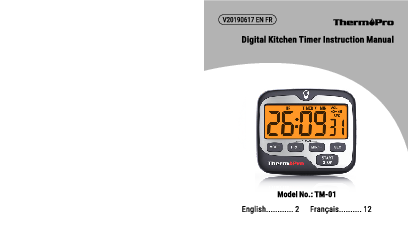
Digital Kitchen Timer Instruction Manual
Brand: ThermoPro
Model: TM-01
Introduction
Congratulations on your purchase of the ThermoPro Digital Kitchen Timer. This device will help you keep track of time accurately.
Features
- Large LCD screen displays TIMER or CLOCK by switching the selector.
- Backlight: Activated by touching the backlight button or pressing any other button.
- Four adjustable volume settings: Off, Low, Medium, and High.
- 12/24-hour time format options.
- Functions as a countdown timer or a count-up timer.
- Countdown time range: 99 hours, 59 minutes, 59 seconds.
- Count up time range: 99 hours, 59 minutes, 59 seconds, with infinite cycling.
- Tabletop and magnet-mountable design for versatile placement.
- Includes 2 AAA batteries.
Key Definitions
The timer features several buttons and indicators:
- LCD: Displays time, timer status, and settings.
- MODE: Switches between TIMER and CLOCK functions.
- HR/+: Sets or increases the hour. Can be held to scroll digits quickly. Also used to select 12/24 hour format.
- MIN/-: Sets or increases the minute. Can be held to scroll digits quickly. Also used to select 12/24 hour format.
- SEC: Sets or increases the second (in CLOCK mode). Can be held to scroll digits quickly.
- START/STOP: Starts or pauses the timer. In CLOCK mode, it selects between hour, minute, and second for setting.
- VOL: Cycles through the four volume settings.
- Backlight Button: Activates the display backlight.
- Stand: Built-in stand for tabletop use.
- Magnet: Allows mounting on magnetic surfaces.
- Battery Compartment: Houses the 2 AAA batteries.
- Buzzer: Emits audible alerts.
Operating Instructions
Starting a Countdown Timer
- Ensure the timer is in TIMER mode. If not, press MODE to switch.
- Set the desired time: Press HR/+ for hours, MIN/- for minutes, and SEC for seconds. Hold buttons to increase digits rapidly.
- Press START/STOP to begin the countdown. Press again to pause.
- To reset the timer to zero: Pause the timer, then press HR/+ and MIN/- simultaneously.
- When the countdown reaches 0:00:00, the timer will beep and flash for one minute, then automatically start counting up. Press START/STOP to silence the alarm.
Starting a Count Up Timer
- Press HR/+ and MIN/- together to clear all digits to zero.
- Press START/STOP to begin the count-up function. Press again to pause.
Setting the Clock
- Turn on the timer and press MODE to select CLOCK mode.
- To choose between 12-hour or 24-hour format, press and hold the START/STOP button. Use HR/+ or MIN/- to toggle between formats, then press START/STOP to confirm.
- Set the hour: Press HR/+ to increase or MIN/- to decrease. Hold buttons to scroll digits quickly.
- Press START/STOP to confirm the hour, then repeat the process for setting the minutes.
- Note: If no buttons are pressed for 20 seconds, the current flashing digits will be automatically saved.
Adjusting Alarm Volume
Press the VOL button to cycle through the four volume levels: ? (Off), ? (Low), ? (Medium), ? (High).
Backlight Feature
Pressing any button or the dedicated backlight button will activate the display's backlight. The backlight will automatically turn off after 10 seconds of inactivity.
Declaration of Conformity
The manufacturer declares that this product complies with the basic requirements and applicable regulations of the EMC Directive 2014/30/EU. The complete declaration of conformity can be found at: https://itronicsmall.com/eu-declaration-of-conformity/
Disposal Information
Meaning of the "Dustbin" Symbol (?️):
- Protect the environment: Do not dispose of electrical equipment with household waste.
- Return used electrical equipment to designated collection points for proper disposal.
- This practice helps avoid potential negative effects on the environment and human health from improper disposal.
- It also contributes to the recycling of electrical and electronic equipment.
- Information on disposal locations can be obtained from your local authority.
CAUTION: Batteries/rechargeable batteries must not be disposed of with household waste!
- Batteries must be removed from the appliance before disposal.
- Take spent batteries to appropriate collection points or retailers.
- Your local authority can provide information on public collection points.
Symbols on batteries/rechargeable batteries indicate harmful substances:
- Pb = contains lead
- Cd = contains cadmium
- Hg = contains mercury
- Li = contains lithium
Limited One-Year Warranty
ThermoPro warrants this product to be free from defects in parts, materials, and workmanship for a period of one year from the date of purchase. For any repairs or servicing required during the warranty period, please contact ThermoPro Customer Service for instructions on packing and shipping the product.
This warranty grants specific legal rights, and consumers may have additional rights that vary by state or region.
Customer Service
Telephone:
- 1-877-515-7797 (USA & Canada only)
- 44-203-769-1321 (UK)
- 33-975-129-576 (France)
Email: service@buythermopro.com
Hours:
- Weekdays: 8:00 AM - 8:00 PM EST (USA & Canada only)
- Weekdays: 1:00 PM - 12:00 AM CET (UK)
