

1Mii ML300 Bluetooth Transmitter and Receiver 2-in-1
Model: ML300
Product Overview
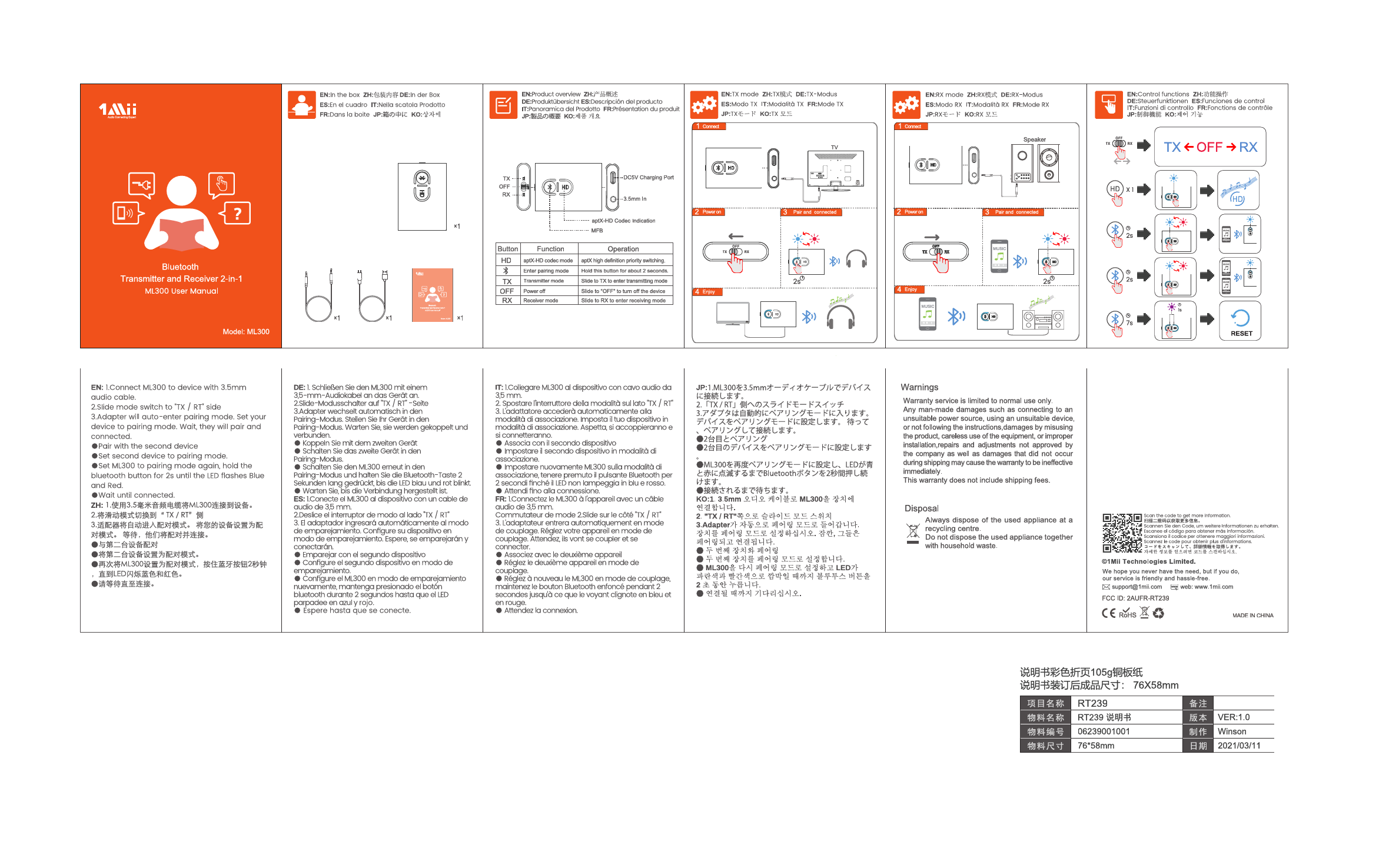
The 1Mii ML300 is a versatile 2-in-1 Bluetooth transmitter and receiver, allowing you to wirelessly stream audio to your headphones or speakers, or receive audio from your phone or tablet.
Package Contents
- 1 x ML300 Bluetooth Transmitter and Receiver
- 1 x 3.5mm Audio Cable
- 1 x USB Charging Cable
- 1 x User Manual
TX Mode (Transmitter)
In TX mode, the ML300 transmits audio from a source device (like a TV) to Bluetooth headphones or speakers.
- Connect: Connect the ML300 to your audio source device using the 3.5mm audio cable.
- Power On: Slide the mode switch to "TX" to power on the device.
- Pair and Connect: The adapter will automatically enter pairing mode. Set your Bluetooth headphones or speakers to pairing mode. The ML300 will automatically pair and connect.
- Enjoy: You can now enjoy wireless audio.
Pairing with a Second Device (TX Mode):
- Set the second Bluetooth device to pairing mode.
- Set the ML300 to pairing mode again by holding the MFB button for 2 seconds until the LED flashes blue and red.
- Wait for the connection to establish.
RX Mode (Receiver)
In RX mode, the ML300 receives audio from a Bluetooth-enabled device (like a smartphone) and outputs it to wired speakers or headphones.
- Connect: Connect the ML300 to your speaker or headphones using the 3.5mm audio cable.
- Power On: Slide the mode switch to "RX" to power on the device.
- Pair and Connect: Set your smartphone or tablet to Bluetooth pairing mode. Find "ML300" in the list and select it to pair and connect.
- Enjoy: You can now stream music wirelessly to your connected audio device.
Control Functions
The MFB (Multi-Function Button) is used for power and pairing.
- Enter Pairing Mode: Hold the MFB button for approximately 2 seconds. The LED will flash blue and red.
- Power Off: Slide the mode switch to "OFF".
Codec Indication
The LED indicator shows the active audio codec:
- aptX-HD Codec: Indicates aptX-HD high definition audio is being transmitted or received.
- Bluetooth: Standard Bluetooth connection.
Warnings and Disposal
Warnings:
- Warranty service is limited to normal use. Damage caused by improper use, installation, or unauthorized repairs will void the warranty.
- This warranty does not cover shipping fees.
Disposal:
- Dispose of used electronic appliances at designated recycling centers. Do not dispose of with household waste.
