

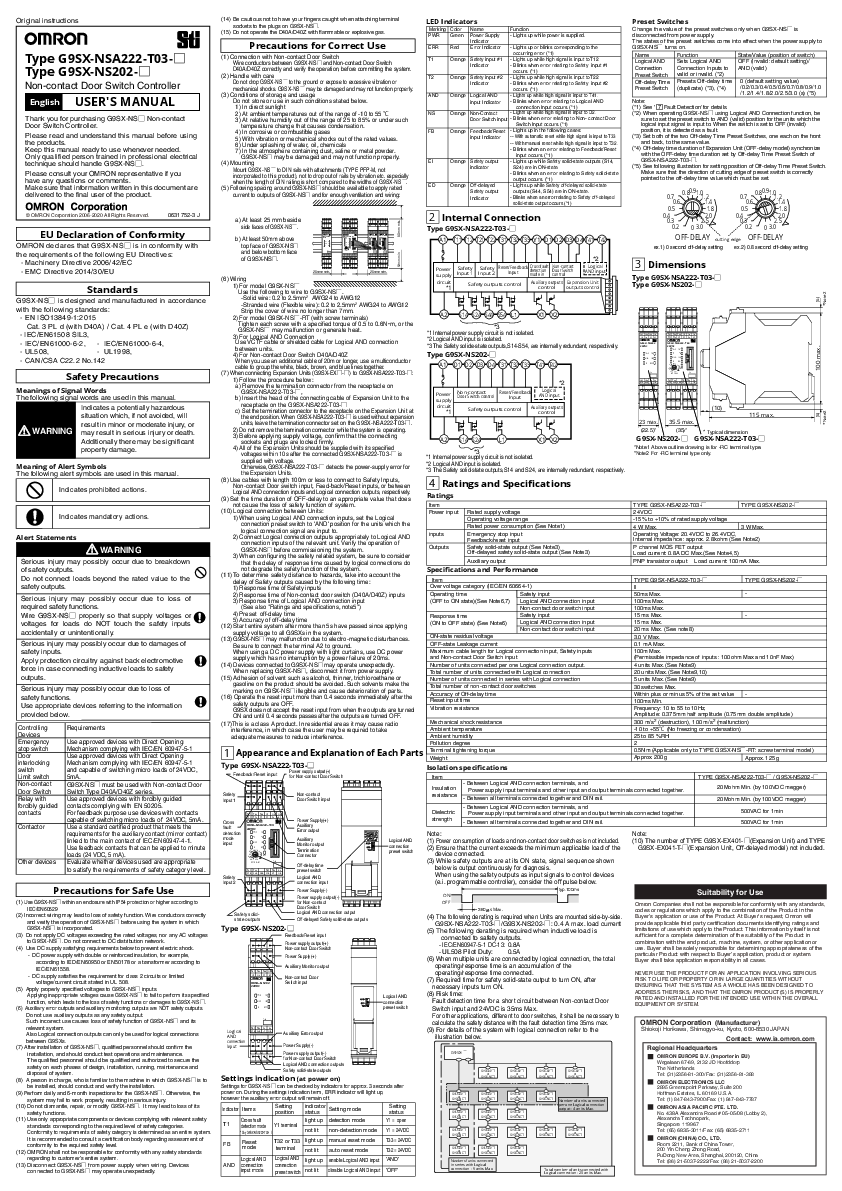
OMRON G9SX-NSA222 Non-contact Door Switch Controller User Manual
File info: application/pdf · 2 pages · 2.41MB
G9SX-NSA222-T03-□/NS202-□
0631752-3
Type G9SX-NSA222-T03-D Type G9SX-NS202-D - Omron ...
Thank you for purchasing G9SX-NSD Non-contact. Door Switch Controller. Please read and understand this manual before using the products.
[PDF] Type G9SX-NSA222-T03-D Type G9SX-NS202-D - Omron Europewww.omron-ap.co.in › mnu
Extracted Text
Original instructions

Type G9SX-NSA222-T03- Type G9SX-NS202-
Non-contact Door Switch Controller
English USER'S MANUAL
Thank you for purchasing G9SX-NS Non-contact Door Switch Controller.
Please read and understand this manual before using the products. Keep this manual ready to use whenever needed. Only qualified person trained in professional electrical technique should handle G9SX-NS. Please consult your OMRON representative if you have any questions or comments. Make sure that information written in this document are delivered to the final user of the product.

� OMRON Corporation 2006-2020 All Rights Reserved.

0631752-3 J

EU Declaration of Conformity
OMRON declares that G9SX-NS is in conformity with the requirements of the following EU Directives:
- Machinery Directive 2006/42/EC - EMC Directive 2014/30/EU

Standards

G9SX-NS is designed and manufactured in accordance

with the following standards:

- EN ISO13849-1:2015

Cat. 3 PL d (with D40A) / Cat. 4 PL e (with D40Z)

- IEC/EN61508 SIL3,

- IEC/EN61000-6-2, - IEC/EN61000-6-4,

- UL508,

- UL1998,

- CAN/CSA C22.2 No.142

Safety Precautions
Meanings of Signal Words The following signal words are used in this manual.
Indicates a potentially hazardous situation which, if not avoided, will result in minor or moderate injury, or
WARNING may result in serious injury or death.
Additionally there may be significant property damage.

Meaning of Alert Symbols The following alert symbols are used in this manual.

Indicates prohibited actions.

Indicates mandatory actions.

Alert Statements
WARNING
Serious injury may possibly occur due to breakdown of safety outputs. Do not connect loads beyond the rated value to the safety outputs.
Serious injury may possibly occur due to loss of required safety functions. Wire G9SX-NS properly so that supply voltages or voltages for loads do NOT touch the safety inputs accidentally or unintentionally.
Serious injury may possibly occur due to damages of safety inputs. Apply protection circuitry against back electromotive force in case connecting inductive loads to safety outputs.
Serious injury may possibly occur due to loss of safety functions. Use appropriate devices referring to the information provided below.

Controlling Devices Emergency stop switch Door interlocking switch Limit switch Non-contact Door Switch Relay with forcibly guided contacts
Contactor
Other devices

Requirements
Use approved devices with Direct Opening Mechanism complying with IEC/EN 60947-5-1 Use approved devices with Direct Opening Mechanism complying with IEC/EN 60947-5-1 and capable of switching micro loads of 24VDC, 5mA. G9SX-NS must be used with Non-contact Door Switch Type D40A/D40Z series. Use approved devices with forcibly guided contacts complying with EN 50205. For feedback purpose use devices with contacts capable of switching micro loads of 24VDC, 5mA. Use a standard certified product that meets the requirements for the auxiliary contact (mirror contact) linked to the main contact of IEC/EN60947-4-1. Use feedback contacts that can be applied to minute loads (24 VDC, 5 mA). Evaluate whether devices used are appropriate to satisfy the requirements of safety category level.

Precautions for Safe Use
(1) Use G9SX-NS within an enclosure with IP54 protection or higher according to IEC/EN60529
(2) Incorrect wiring may lead to loss of safety function. Wire conductors correctly and verify the operation of G9SX-NS before using the system in which G9SX-NS is incorporated.
(3) Do not apply DC voltages exceeding the rated voltages, nor any AC voltages to G9SX-NS. Do not connect to DC distribution network.
(4) Use DC supply satisfying requirements below to prevent electric shock.
- DC power supply with double or reinforced insulation, for example,
according to IED/EN60950 or EN50178 or a transformer according to
IEC/EN61558. - DC supply satisfies the requirement for class 2 circuits or limited
voltage/current circuit stated in UL 508. (5) Apply properly specified voltages to G9SX-NS inputs.
Applying inappropriate voltages cause G9SX-NS to fail to perform its specified function, which leads to the loss of safety functions or damages to G9SX-NS. (6) Auxiliary error outputs and auxiliary monitoring outputs are NOT safety outputs. Do not use auxiliary outputs as any safety output. Such incorrect use causes loss of safety function of G9SX-NS and its relevant system. Also Logical connection outputs can only be used for logical connections between G9SXs. (7) After installation of G9SX-NS, qualified personnel should confirm the installation, and should conduct test operations and maintenance. The qualified personnel should be qualified and authorized to secure the safety on each phases of design, installation, running, maintenance and disposal of system. (8) A person in charge, who is familiar to the machine in which G9SX-NS is to be installed, should conduct and verify the installation. (9) Perform daily and 6-month inspections for the G9SX-NS. Otherwise, the system may fail to work properly, resulting in serious injury. (10) Do not dismantle, repair, or modify G9SX-NS. It may lead to loss of its safety functions. (11) Use only appropriate components or devices complying with relevant safety standards corresponding to the required level of safety categories. Conformity to requirements of safety category is determined as an entire system. It is recommended to consult a certification body regarding assessment of conformity to the required safety level. (12) OMRON shall not be responsible for conformity with any safety standards regarding to customer's entire system. (13) Disconnect G9SX-NS from power supply when wiring. Devices connected to G9SX-NS may operate unexpectedly.

(14) Be cautious not to have your fingers caught when attaching terminal
sockets to the plugs on G9SX-NS. (15) Do not operate the D40A/D40Z with flammable or explosive gas.
Precautions for Correct Use
(1) Connection with Non-contact Door Switch Wire conductors between G9SX-NS and Non-contact Door Switch D40A/D40Z correctly and verify the operation, before committing the system.
(2) Handle with care Do not drop G9SX-NS to the ground or expose to excessive vibration or mechanical shocks. G9SX-NS may be damaged and may not function properly.
(3) Conditions of storage and usage Do not store or use in such conditions stated below. 1) In direct sunlight 2) At ambient temperatures out of the range of -10 to 55 ^ 3) At relative humidity out of the range of 25 to 85% or under such temperature change that causes condensation. 4) In corrosive or combustible gases 5) With vibration or mechanical shocks out of the rated values. 6) Under splashing of water, oil, chemicals 7) In the atmosphere containing dust, saline or metal powder. G9SX-NS may be damaged and may not function properly.
(4) Mounting Mount G9SX-NS to DIN rails with attachments (TYPE PFP-M, not incorporated to this product), not to drop out of rails by vibration etc. especially when the length of DIN railing is short compared to the widths of G9SX-NS.
(5) Following spacing around G9SX-NS should be available to apply rated current to outputs of G9SX-NS and for enough ventilation and wiring:

50mm min.

a) At least 25 mm beside side faces of G9SX-NS.
b) At least 50mm above top face of G9SX-NS and below bottom face of G9SX-NS.

T31 T32 T33 D3 D1 D2 X1 A1
G9SX-NS202 24VDC
PWB FB AND NS EI ERR
No.
T41 T42 X2 A2 S14 S24 L1 D4

T31 T32 T33 D1 D2 D3 T11 T12 Y1 X1 X2 A1

G9SX-NSA222-T03 24VDC
PWR FB

T1 T2

AND NS

EI ED

0.7 0.80.91.01.2

0.6

1.4

0.5 0.4

1.8 2.0

ERR

0.3

2.5

0.2 0 3.0

OFF-DELAY

No.

T21 T22

T41 T42 A2

S14 S24 S44 S54 L1 D4

13 23 33 43 13 23 33 43

G9SX -EX401-T 24VDC
PWR ED
ERR

G9SX -EX401-T 24VDC
PWR ED
ERR

No.

No.

A1 X2 A2 14 24 34 44

A1 X2 A2 14 24 34 44

50mm min.

25mm min.

25mm min.

(6) Wiring 1) For model G9SX-NS Use the following to wire to G9SX-NS. -Solid wire: 0.2 to 2.5mm2 AWG24 to AWG12 -Stranded wire (Flexible wire): 0.2 to 2.5mm2 AWG24 to AWG12 Strip the cover of wire no longer than 7mm. 2) For model G9SX-NS-RT (with screw terminals) Tighten each screw with a specified torque of 0.5 to 0.6Nm, or the G9SX-NS may malfunction or generate heat. 3) For Logical AND Connection Use VCTF cable or shielded cable for Logical AND connection between units. 4) For Non-contact Door Switch D40A/D40Z When you use an additional cable of 20m or longer, use a multiconductor cable to group the white, black, brown, and blue lines together.
(7) When connecting Expansion Units (G9SX-EX-) to G9SX-NSA222-T03-: 1) Follow the procedure below: a) Remove the termination connector from the receptacle on G9SX-NSA222-T03-, b) Insert the head of the connecting cable of Expansion Unit to the receptacle on the G9SX-NSA222-T03- c) Set the termination connector to the receptacle on the Expansion Unit at the end position. When G9SX-NSA222-T03- is used without expansion units, leave the termination connector set on the G9SX-NSA222-T03-. 2) Do not remove the termination connector while the system is operating. 3) Before applying supply voltage, confirm that the connecting sockets and plugs are locked firmly. 4) All of the Expansion Units should be supplied with its specified voltages within 10s after the connected G9SX-NSA222-T03- is supplied with voltage. Otherwise,G9SX-NSA222-T03- detects the power-supply error for the Expansion Units.
(8) Use cables with length 100m or less to connect to Safety Inputs, Non-contact Door switch input, Feed-back/Reset inputs, or between Logical AND connection inputs and Logical connection outputs, respectively.
(9) Set the time duration of OFF-delay to an appropriate value that does not cause the loss of safety function of system.
(10) Logical connection between Units: 1) When using Logical AND connection inputs, set the Logical connection preset switch to 'AND' position for the units which the logical connection signal are input to. 2) Connect Logical connection outputs appropriately to Logical AND connection inputs of the relevant unit.Verify the operation of G9SX-NS before commissioning the system. 3) When configuring the safety related system, be sure to consider that the delay of response time caused by logical connections do not degrade the safety function of the system.
(11) To determine safety distance to hazards, take into account the delay of Safety outputs caused by the following time: 1) Response time of Safety inputs 2) Response time of Non-contact door switch (D40A/D40Z) inputs 3) Response time of Logical AND connection input (See also "Ratings and specifications, note5") 4) Preset off-delay time 5) Accuracy of off-delay time
(12) Start entire system after more than 5s have passed since applying supply voltage to all G9SXs in the system.
(13) G9SX-NS may malfunction due to electro-magnetic disturbances. Be sure to connect the terminal A2 to ground. When using a DC power supply with light curtains, use DC power supply which has no interruption by a power failure of 20ms.
(14) Devices connected to G9SX-NS may operate unexpectedly. When replacing G9SX-NS, disconnect it from power supply.
(15) Adhesion of solvent such as alcohol, thinner, trichloroethane or gasoline on the product should be avoided. Such solvents make the
marking on G9SX-NS illegible and cause deterioration of parts. (16) Operate the reset input more than 0.4 seconds immediately after the
safety outputs are OFF. G9SX does not accept the reset input from when the outputs are turned ON and until 0.4 seconds passes after the outputs are turned OFF.

(17)This is a class A product. In residential areas it may cause radio interference, in which case the user may be required to take adequate measures to reduce interference.

LED Indicators

Marking Color Name

Function

PWR Green Power Supply - Lights up while power is supplied.

Indicator

ERR Red Error Indicator - Lights up or blinks corresponding to the

occurring error (*1)

T1

Orange Safety input #1 - Lights up while high signal is input to T12

Indicator

- Blinks when error relating to Safety input #1

occurs. (*1)

T2

Orange Safety input #2 - Lights up while high signal is input to T22

Indicator

- Blinks when error relating to Safety input #2

occurs. (*1)

AND Orange Logical AND - Lights up while high signal is input to T41.

input Indicator - Blinks when error relating to Logical AND

connection Input occurs. (*1)

NS

Orange Non-Contact

- Lights up while high signal is input to D2.

Door Switch input - Blinks when error relating to Non- contact Door

Switch Input occurs. (*1)

FB

Orange Feedback/Reset - Lights up in the following cases:

input Indicator -- With automatic reset while high signal is input to T33

-- With manual reset while high signal is input to T32.

- Blinks when an error relating to Feedback/Reset

input occurs. (*1)

EI

Orange Safety output - Lights up while Safety solid-state outputs (S14,

indicator

S24) are in ON-state.

- Blinks when an error relating to Safety solid-state

output occurs. (*1)

ED

Orange Off-delayed

- Lights up while Safety off-delayed solid-state

Safety output

outputs (S44, S54) are in ON-state.

Indicator

- Blinks when an error relating to Safety off-delayed

solid-state output occurs.(*1)

2 Internal Connection
Type G9SX-NSA222-T03-
A1 T11 T12 T21 T22 T31 T32 T33 Y1 D1 D2 D3 D4 T41 T42

Power
supply
circuit
*1

*2

Safety Input 1

Safety Input 2

Reset/Feedback Input

Cross fault detection mode in

Non-contact Door Switch control

Logical AND input

Safety outputs control

Auxiliary outputs Expansion Unit control outputs control

Preset Switches
Change the value of the preset switches only when G9SX-NS is disconnected from power supply. The states of the preset switches come into effect when the power supply to G9SX-NS turns on.

Name

Function

State/Value (position of switch)

Logical AND Connection Preset Switch Off-delay Time Preset Switch

Sets Logical AND Connection Inputs to valid or invalid. (*2) Presets Off-delay time (duplicate) (*3), (*4)

OFF (Invalid: default setting)/ AND (valid)
0 (default setting value) /0.2/0.3/0.4/0.5/0.6/0.7/0.8/0.9/1.0 /1.2/1.4/1.8/2.0/2.5/3.0 (s) (*5)

Note: (*1) See ` 7 Fault Detection' for details. (*2) When operating G9SX-NS using Logical AND Connection function, be
sure to set the preset switch to AND (valid) position for the units which the logical input signal is input to. When the switch is set to OFF (invalid) position, it is detected as a fault. (*3) Set both of the two Off-delay Time Preset Switches, one each on the front and back, to the same value. (*4) Off-delay time duration of Expansion Unit (OFF-delay model) synchronize with the OFF-delay time duration set by Off-delay Time Preset Switch of G9SX-NSA222-T03-. (*5) See following illustration for setting position of Off-delay Time Preset Switch. Make sure that the direction of cutting edge of preset switch is correctly pointed to the off-delay time value which must be set.

0.7 0.80.91.01.2

0.6

1.4

0.5

1.8

0.4 0.3 0.2

2.0 2.5 0 3.0

0.7 0.80.91.01.2

0.6

1.4

0.5

1.8

0.4 0.3 0.2

2.0 2.5 0 3.0

OFF-DELAY cutting edge OFF-DELAY
ex.1) 0 second off-delay setting ex.2) 0.8 second off-delay setting

3 Dimensions
Type G9SX-NSA222-T03- Type G9SX-NS202-

(6) *Note2

100 max.

(6) *Note2

A2 S14 S24 S44 S54 L1

X1 X2

*3 *1 Internal power supply circuit is not isolated. *2 Logical AND input is isolated. *3 The Safety solide-state outputs,S14-S54, are internally redundant, respectively.
Type G9SX-NS202-
A1 D1 D2 D3 D4 T31 T32 T33 T41 T42

Power
supply
circuit
*1

Non-contact

Reset/Feedback

Door Switch control

Input

*2
Logical AND input

Safety outputs control

Auxiliary outputs control

A2 S14 S24

L1

X1 X2

*3 *1 Internal power supply circuit is not isolated. *2 Logical AND input is isolated. *3 The Safety solid-state outputs,S14 and S24, are internally redundant, respectively.

4 Ratings and Specifications

Ratings

Item Power input
inputs Outputs

Rated supply voltage Operating voltage range Rated power consumption (See Note1) Emergency stop input Feedback/reset input
Safety solid-state output (See Note3) Off-delayed safety solid-state output (See Note3)

Auxiliary output

Specifications and Performance

Item

Over voltage category (IEC/EN 60664-1)

Operating time

Safety input

(OFF to ON state)(See Note6,7) Logical AND connection input

Non-contact door switch input

Response time

Safety input

(ON to OFF state) (See Note6) Logical AND connection input

Non-contact door switch input

ON-state residual voltage

OFF-state Leakage current

Maximum cable length for Logical connection input, Safety inputs and Non-contact Door Switch input

Number of units connected per one Logical connection output. Total number of units connected with Logical connection Number of units connected in series with Logical connection Total number of non-contact door switches Accuracy of Off-delay time Reset input time Vibration resistance

Mechanical shock resistance Ambient temperature Ambient humidity

T31 T32 T33 D3 D1 D2 X1 A1
G9SX-NS202 24VDC
PWR FB AND NS EI ERR
No.
T41 T42 X2 A2 S14 S24 L1 D4

T31 T32 T33 D1 D2 D3 T11 T12 Y1 X1 X2 A1

G9SX-NSA222-T03 24VDC
PWR FB

T1 T2

AND NS

EI ED

0.7 1 1.5 2 3

0.6

4

0.5 0.4

5 7

ERR

0.3

10

0.2 0 15

OFF-DELAY

No.

T21 T22

T41 T42 A2

S14 S24 S44 S54 L1 D4

(10)

115 max.

23 NBY 35.5 NBY

(22.5)*

(35)*

* Typical dimension

G9SX-NS202- G9SX-NSA222-T03-

*Note1 Above outline drawing is for -RC terminal type.

*Note2 For -RC terminal type only.

TYPE G9SX-NSA222-T03-

TYPE G9SX-NS202-

24VDC

-15% to +10% of rated supply voltage

4 W Max.

3 W Max.

Operating Voltage: 20.4VDC to 26.4VDC, Internal impedance : approx. 2.8kohm (See Note2)

P channel MOS FET output Load current: 0.8A DC Max.(See Note4,5)

PNP transistor output Load current: 100mA Max.

TYPE G9SX-NSA222-T03- II 50ms Max. 100ms Max.

TYPE G9SX-NS202- -

100ms Max.

15 ms Max.

-

15 ms Max.

20 ms Max. (See note8)

3.0 V Max.

0.1 mA Max.

100m Max. (Permissible impedance of inputs : 100ohm Max and 10nF Max)

4 units Max. (See Note9) 20 units Max. (See Note9,10) 5 units Max. (See Note9) 30 switches Max. Within plus or minus 5% of the set value 100ms Min. Frequency: 10 to 55 to 10Hz, Amplitude: 0.375mm half amplitude (0.75mm double amplitude)

300 m/s2 (destruction), 100 m/s2 (malfunction) -10 to +55^ (No freezing or condensation) 25 to 85 %RH

Pollution degree

2

1

Appearance and Explanation of Each Parts

Terminal tightening torque Weight

0.5Nm(Applicable only to TYPE G9SX-NS-RT: screw terminal model)

Approx. 200g

Approx. 125 g

Type G9SX-NSA222-T03-

Feedback/Reset input

Power supply output(+) for Non-contact Door Switch

Isolation specifications
Item

TYPE G9SX-NSA222-T03-/G9SX-NS202-

Safety Input1

Non-contact Door Switch input

- Between Logical AND connection terminals, and Insulation Power supply input terminals and other input and output terminals connected together. resistance - Between all terminals connected together and DIN rail.

20Mohm Min. (by 100VDC megger) 20Mohm Min. (by 100VDC megger)

Cross fault detection mode input

T31 T32 T33 D1 D2 D3 T11 T12 Y1 X1 X2 A1

G9SX-NSA222-T03 24VDC
PWR FB

T1 T2

AND NS

EI ED

0.7 0.80.91.01.2

0.6

1.4

0.5 0.4

1.8 2.0

ERR

0.3

2.5

0.2 0 3.0

OFF-DELAY

No.

Safety Input2

T21 T22

T41 T42 A2

S14 S24 S44 S54 L1 D4

Power Supply(+) Auxiliary Error output
Auxiliary Monitor output Termination Connector
Off-delay time preset switch
Logical AND connection input

0.7

1.2

0.6

1.4

0.5

1.8

0.4

2.0

0.3

2.5

0.2 0 3.0

OFF-DELAY

AND

OFF T41/T42

Logical AND connection preset switch

Dielectric strength

- Between Logical AND connection terminals, and Power supply input terminals and other input and output terminals connected together.
- Between all terminals connected together and DIN rail.

500VAC for 1min 500VAC for 1min

Note: (1) Power consumption of loads and non-contact door switches is not included. (2) Ensure that the current exceeds the minimum applicable load of the
device connected. (3) While safety outputs are at its ON state, signal sequence shown
below is output continuously for diagnosis. When using the safety outputs as input signals to control devices (e.i. programmable controller), consider the off pulse below.

Note: (10) The number of TYPE G9SX-EX401-(Expansion Unit) and TYPE
G9SX-EX041-T-(Expansion Unit, Off-delayed model) not included.

Safety solidstate outputs

Power Supply(-)
Power supply output(-) for Non-contact Door Switch Logical AND connection output
Off-delayed Safety solid-state outputs

Type G9SX-NS202-
Feedback/Reset input

Power supply output(+) Non-contact Door Switch

Power Supply(+)

Auxiliary Monitor output

typ.100ms ON
OFF
360 sMax.
(4) The following derating is required when Units are mounted side-by-side. G9SX-NSA222-T03-/G9SX-NS202-: 0.4 A max. load current
(5) The following derating is required when inductive load is connected to safety outputs. - IEC/EN60947-5-1 DC-13: 0.8A - UL508 Pilot Duty: 0.5A
(6) When multiple units are connected by logical connection, the total operating/response time is an accumulation of the

Suitability for Use
Omron Companies shall not be responsible for conformity with any standards, codes or regulations which apply to the combination of the Product in the Buyer's application or use of the Product. At Buyer's request, Omron will provide applicable third party certification documents identifying ratings and limitations of use which apply to the Product. This information by itself is not sufficient for a complete determination of the suitability of the Product in combination with the end product, machine, system, or other application or use. Buyer shall be solely responsible for determining appropriateness of the particular Product with respect to Buyer's application, product or system. Buyer shall take application responsibility in all cases.

T31 T32 T33 D3 D1 D2 X1 A1
G9SX-NS202 24VDC
PWB FB AND NS EI ERR

Non-contact Door Switch input

AND
OFF T41/T42

Logical AND connection preset switch

operating/response time connected. (7) Required time for safety solid-state output to turn ON, after
necessary inputs turn ON. (8) Risk time:
Fault detection time for a short circuit between Non-contact Door Switch input and 24VDC is 35ms Max.

NEVER USE THE PRODUCT FOR AN APPLICATION INVOLVING SERIOUS RISK TO LIFE OR PROPERTY OR IN LARGE QUANTITIES WITHOUT ENSURING THAT THE SYSTEM AS A WHOLE HAS BEEN DESIGNED TO ADDRESS THE RISKS, AND THAT THE OMRON PRODUCT(S) IS PROPERLY RATED AND INSTALLED FOR THE INTENDED USE WITHIN THE OVERALL EQUIPMENT OR SYSTEM.

For other applications, different to door switches, it shall be necessary to

No.

calculate the safety distance with the fault detection time 35ms max.

OMRON Corporation (Manufacturer)

Logical AND connection input

T41 T42 X2 A2 S14 S24 L1 D4

Auxiliary Error output Power Supply(-)

Power supply output(-) for Non-contact Door Switch
Logical AND connection outputs
Safety solid-state outputs

Settings indication (at power on)
Settings for G9SX-NS can be checked by indicators for approx. 3 seconds after power on. During the settings indication term, ERR indicator will light up,
however the auxiliary error output will remain off.

Indicator Items

Setting position

indicator status

Setting mode

Setting status

Cross fault

light up detection mode

Y1 = open

T1 detection mode Y1 terminal

Only G9SX-NSA222-T03-

not lit non-detection mode Y1 = 24VDC

FB

Reset mode

T32 or T33 light up manual reset mode terminal not lit auto reset mode

T33 = 24VDC T32 = 24VDC

Logical AND AND connection
input mode

Logical AND light up enable Logical AND input 'AND' connection preset switch not lit disable Logical AND input 'OFF'

(9) For details of the system with logical connection refer to the illustration below.
G9SX-

GG99SSXXP--SANDS

G9SX-AD PS
G9SX-NS

G9SX-AD PS
G9SX-NS

G9SX-AD PS
G9SX-NS

GG99SSXXP--SANDS

GG99SSXXP--SANDS

GG99SSXXP--SANDS

GG99SSXXP--SANDS

GG99SSXXP--SANDS

GG99SSXXP--SANDS

GG99SSXXP--SANDS

GG99SSXXP--SANDS

Number of units connected in series with Logical connection : 5 units Max.

GG99SSXXP--SANDS GG99SSXXP--SANDS GG99SSXXP--SANDS GG99SSXXP--SANDS

GG99SSXXP--SANDS

Number of units connected per one Logical connection output : 4 units Max.

GG99SSXXP--SANDS

GG99SSXXP--SANDS

Total number of units connected with Logical connection : 20 units Max.

Shiokoji Horikawa, Shimogyo-ku, Kyoto, 600-8530 JAPAN
Contact: www.ia.omron.com
Regional Headquarters
OMRON EUROPE B.V. (Importer in EU) Wegalaan 67-69, 2132 JD Hoofddorp The Netherlands Tel: (31)2356-81-300/Fax: (31)2356-81-388
OMRON ELECTRONICS LLC 2895 Greenspoint Parkway, Suite 200 Hoffman Estates, IL 60169 U.S.A. Tel: (1) 847-843-7900/Fax: (1) 847-843-7787
OMRON ASIA PACIFIC PTE. LTD. No. 438A Alexandra Road # 05-05/08 (Lobby 2), Alexandra Technopark, Singapore 119967 Tel: (65) 6835-3011/Fax: (65) 6835-2711
OMRON (CHINA) CO., LTD. Room 2211, Bank of China Tower, 200 Yin Cheng Zhong Road, PuDong New Area, Shanghai, 200120, China Tel: (86) 21-5037-2222/Fax: (86) 21-5037-2200

5 Examples of application
Application and timing chart

G9SX-NSA222-T03 (24VDC) (2-channel emergency stop switch input + non-contact door switch input / Manual reset)

S2 Feedback Loop

Note1: This example is corresponding to category 4 (ISO13849-1)
Note2: For details of wiring around the non-contact door switch, refer to the D40Z's manual.

Actuator Non-Contact Door switch (D40Z)

11

21

KM1

12

22

KM2 S1

S3 +24V

white black brown blue

NC

NC NCAND

A1 T11 T12 T21 T22 T31 T32 T33 Y1 D1 D2 D3 D4 T41 T42 OFF

G9SX-NSA222-T03

+24V
Control circuit

A2 S14 S24

S44 S54 L1 X1 X2

KM1 KM2

PLC etc.

Motor controller (Operation command)

S14
Motor controller

KM1

KM2

M1
Timing chart
Emergency stop switch S1 Non-contact door switch S2
Reset switch S3 KM1,KM2 NC contact KM1,KM2 NO contact
Operation command Rotation of motor

Devices

S1

:Emergency stop switch

S2

:Non-contact Door switch(D40Z)

S3

:Reset switch

KM1KM2 :Contactor

M1

:3-phase motor

Pushed the E-stop switch

Off-delay time

Off-delay time

G9SX-NSA222-T03 (24VDC) (2-channel safety limit switch input + non-contact door switch input / Auto reset)

23
S2 24

Feedback Loop

Note1: This example is corresponding to category 3 (ISO13849-1)
Note2: For details of wiring around the non-contact door switch, refer to the D40A's manual.
S3

Actuator Non-Contact Door switch (D40A)

11 S1
12

KM1 KM2

S14
Motor controller KM1

white black brown blue

open

+24V

NC

NC NCAND

A1 T11 T12 T21 T22 T31 T32 T33 Y1 D1 D2 D3 D4 T41 T42 OFF

G9SX-NSA222-T03

+24V
Control circuit

A2 S14 S24

S44 S54 L1 X1 X2

KM1 KM2

PLC etc.

KM2
M1
Timing chart Safety limit switch S1
Limit switch S2 Non-contact door switch S3 KM1,KM2 NC contact

Devices

S1

:Safety Limit switch

S2

:Limit switch

S3

:Non-contact Door switch(D40A)

KM1KM2 :Contactor

M1

:3-phase motor

Motor controller (Operation command)

KM,KM2 NO contact
Operation command Rotation of motor

Off-delay time

Off-delay time

G9SX-BC202(DC24V) (2-channel emergency stop switch input / Manual reset) + G9SX-NS202(DC24V) (Non-contact door switch input / Auto reset)

Feedback Loop

11

21

KM1

Note1: This example is corresponding to category 3 (ISO13849-1)
Note2: For details of wiring around the non-contact door switch, refer to the D40A's manual.

12

22

KM2

S1

S2 +24V NC
A1 T11 T12 T21 T22 T31 T32 T33 Y1
G9SX-BC202

KM1 KM2
M1

+24V
Control circuit

A2 S14 S24 KM1 KM2

L1 L2

X1 X2
PLC etc.

Timing chart (upper unit)
Emergency stop switch S1 Reset switch S2
KM1,KM2 NC contact

Devices (upper unit)

S1

:Emergency stop switch

S2

:Reset switch

KM1,KM2 :Contactor

M1

:3-phase motor

Pushed the E-stop switch

KM1,KM2 NO contact Logical AND output L1 Rotation of motor M1

Actuator Non-Contact Door switch (D40A)

S3 Feedback Loop
KM3 KM4

Timing chart (lower unit) Logical AND input T41 Non-contact door switch S3
KM3,KM4 NC contact
KM3,KM4 NO contact Rotation of motor M2

white black brown blue

+24V

+24V

A1 D1 D2 D3 D4 T31 T32 T33
G9SX-NS202

Control circuit

A2 S14 S24 KM3 KM4

L1 X1 X2
PLC etc.

AND
T41 T42
OFF

KM3 KM4
M2

Devices (lower unit)

S3

:Non-contact door switch(D40A)

KM3,KM4 :Contactor

M2

:3-phase motor

Wiring of inputs and outputs

Signal Name
Power supply input Safety input 1

Terminal Name

Description of operation

A1,

Connect the power source to the A1 and

A2

A2 terminals.

T11,

To set Safety solid-state outputs in ON state,

T12

HIGH state signals must be input to both of

Safety input 1 and Safety input 2

Otherwise Safety solid-state outputs cannot

be in ON state.

Wiring

Connect the power supply plus to the A1 terminal. Connect the power supply minus to the A2 terminal.

Using safety input 1 system

+24V

+24V

T11 T12 T21 T22 Y1

Safety input 2

T21,

T22

Using safety input 2 system (without short-circuit monitoring between systems)

+24V

+24V

+24V
T11 T12 T21 T22 Y1

Using safety input 2 system (with short-circuit monitoring between systems)

NC
T11 T12 T21 T22 Y1

Feedback/ Reset input

T31,

To set Safety solid-state outputs in ON state,

T32,

ON state signal must be input to T33.

T33

Otherwise Safety solid-state outputs cannot

be in ON state.

Auto reset

+24V

Feedback loop KM

T31 T32 T33

To set Safety solid-state outputs in ON state, the signal input to T32 must change from OFF state to ON state, and then to OFF state. Otherwise Safety solid-state outputs cannot be in ON state.

Manual reset

Reset Switch

Feedback loop KM +24V
T31 T32 T33

Logical AND connection input

T41, T42

Logical AND connection means that lower unit

Unit A

input a

(Unit B) calculates the logical multiplication (AND) of the safety output information from upper unit

G9SX-NS

(Unit A) and safety input signal "b", which is input to lower unit.

output(a) L1 A2 Logical AND connection sig. (1st layer)

In the example of a right picture, the safety output of Unit C is "a" AND "b" .

Unit B T41 T42

input b

Connect L1 or L2 of upper unit to T41 of lower unit,

G9SX-NS

and connect GND of upper unit to T42 of lower unit.

output(a&b) L1 A2 Logical AND connection sig. (2nd layer)

Next unit (4 unit Max.)
T41 T42
G9SX-NS Next unit (4 unit Max.)

Cross fault

Y1

detection input

Safety solid-state

S14,

output

S24

Off-delayed

S44,

Safety solid-state

S54

output

Logical connection L1 output

Non-contact Door

D1,

Switch input

D2,

D3,

D4

To set Safety solid-state outputs of the subsequent Unit in ON state, its Logical AND Connection Preset Switch must be set to AND (enable) and High state signal must be input to T41 of the subsequent unit.
Selects a mode of failure detecting (Cross fault detecting) function for safety inputs of G9SX-NSA222-T03- corresponding to the connection of Cross fault detection input.
Turns ON/OFF according to the state of safety inputs, Feedback/Reset inputs, and Logical AND connection inputs. During off-delay state, safety solid-state outputs are not able to turn ON.
Off-delayed safety solid-state outputs. Off-delay time is set by off-delay preset switch. When the delay time is set to zero, these outputs can be used as non-delay outputs.
Outputs a signal of the same logic as Safety solid-state outputs.
To set Safety solid-state outputs in ON state, all non-contact door switch must be ON state. Otherwise Safety solid-state outputs cannot be in ON state.

T41 T42
G9SX-NS
L1 A2
Next unit (5layers Max.)
Keep Y1 open when using T11, T21. (Cross fault detecting mode) Connect Y1 to 24VDC when NOT using T11, T21. (Wiring corresponding category 2 or 3)
Keep these outputs Open when NOT used.

Keep these outputs Open when NOT used.

Keep these outputs Open when NOT used.

white black brown blue

D1 D2 D3 D4

Non-contact Door Switch (type D40A, type D40Z)

Auxiliary Monitor

X1

output

Auxiliary Error output X2

Outputs a signal of the same logic as Safety solid-state outputs
Outputs during error indicator is lighting up or blinking.

Keep these outputs Open when NOT used. Keep these outputs Open when NOT used.

Multiple Connecting of Non-contact Door Switches and G9SX-NS For connecting multiple non-contact door switch to G9SX-NS, refer to the wiring examples on D40A/D40Z's manual.

Terminal arrangement and LED indicators
TYPE G9SX-NSA222-T03- TYPE G9SX-NS202-

T31 T32 T33 D1 D2 D3

T31 T32 T33 D3

6 Performance Level and Safety Category of ISO 13849-1 T11 T12 Y1 X1 X2 A1

D1 D2 X1 A1

The G9SX-NS together with D40A can be used up to PL=d and Category 3, and PWR

FB

the G9SX-NS together with D40Z can be used for PL=e and Category 4, required T1

T2

PWR

FB

by EN ISO 13849-1 European standard. Refer to the following link for the Safety-related characteristic data:

AND

NS

AND

NS

http://www.fa.omron.co.jp/safety_6en/ This does NOT mean that G9SX-NS can always be used for required category under all the similar conditions and situations. Conformity to the categories must be assessed as a whole system.

EI T21 T22

ED ERR T41 T42 A2

EI

ERR

T41 T42 X2 A2

When using G9SX-NS for safety categories, make sure the conformity of the whole system.

S14 S24 S44 S54 L1 D4

S14 S24 L1 D4

1)Connect D40A/D40Z inputs and outputs with terminals D1, D2, D3 and D4.

2)Input the signals to both of the Safety inputs (T11-T12 and T21-T22)

3) Input a signal to the Safety inputs (T11-T12 and T21-T22) through switches with Direct Opening mechanism.

When using limit switches, at least one of them must have Direct Opening Mechanism.

4) Input the signal through a NC contact of the contactor to Feedback/Reset input (T31-T32 for manual reset or

T31-T32 for auto reset).(Refer to ' 5 Examples of Application')

5) Be sure to Connect A2 to ground.

7 Fault Detection
When G9SX-NS detects a fault, ERR indicator and/or other indicators light up or blink to show the information of the fault. Check and take needed measures referring to the following table, and then apply supply voltage to G9SX-NS.

ERR indicator
Blink

Other indicators
T1 Blink T2 Blink
FB Blink

Faults

Expected causes of the faults

Faults by electro-magnetic disturbance or of internal circuits. Faults involved with Safety input 1
Faults involved with Safety input 2
Faults involved with Feedback/Reset input
Faults of Expansion units

1) By excessive electro-magnetic disturbance 2) Failures of the parts of internal circuits
1) Failures involving the wiring of Safety input 1 2) Incorrect setting of Cross fault detection mode. 3) Failures of the parts of the circuits of Safety input 1.
1) Failures involving the wiring of Safety input 2 2) Incorrect setting of Cross fault detection mode. 3) Failures of the parts of the circuits of Safety input 2.
1) Failures involving the wiring of Feedback/Reset input. 2) Failures of the parts of the circuits of Feedback/Reset
input
1) Improper feedback signals from Expansion units 2) Abnormal supply voltage to Expansion units 3) Failures of the parts of the circuits of Safety relay contact
outputs

Light up

EI Blink

Faults involved with Safety solid-state outputs or Logical connection outputs

ED Blink

Faults involved with Off-delayed Safety solid-state outputs

AND Blink

Faults involved with Logic AND connection input

NS Blink

Faults involved with Non-contact Door Switch input

The All (without PWR) indicators Blink

Supply voltage outside the rated value

1) Failures involving the wiring of Safety solid-state outputs 2) Failures of the parts of the circuits of Safety solid-state
outputs 3) Failures involving the wiring of Logical connection output 4) Failures of the parts of the circuits of Logical connection
output 5) Impermissible high ambient temperature
1) Failures involving the wiring of Off-delayed Safety relay contact outputs
2) Incorrect set values of Off-delay time 3) Failures of the parts of the circuits of Off-delayed
Safety relay contact outputs 4) Impermissible high ambient temperature
1) Failures involving the wiring of Logic AND connection input
2) Incorrect setting for Logic AND connection input 3) Failures of the parts of the circuits of Logical AND
connection input
1) Failures involving the wiring of Non-contact Door Switch input
2) Failures involving the wiring of multipul Non-contact Door SwitchFT
3) Failures of the parts of the circuits of G9SX-NS 4) Failures of the parts of the circuits of D40A/D40Z
1) Supply voltage outside the rated value

Checking points and measures to take
1) Check the disturbance level around G9SX-NS and its related system. 2) Replace with a new product.
1) Check the wiring to T11 and T12. (See Note1 ,2) 2) Check the wiring to Y1. (See Note1) 3) Replace with a new product.
1) Check the wiring to T21 and T22. (See Note1 ,2) 2) Check the wiring to Y1. (See Note1) 3) Replace with a new product.
1) Check the wiring to T31, T32, and T33 (See Note1 ,2)
2) Replace with a new product.
1) Check the connecting cable of Expansion units and the connection of the termination socket.
2) Check the supply voltage to Expansion units. * Make sure that all Expansion units' PWR indicators are lighting.
3) Replace the Expansion unit with a new one.
1) Check the wiring to S14 and S24 (See Note1) 2) Replace with a new product. 3) Check the wiring to L1. (See Note1 ,2) 4) Replace with a new product. 5) Check the ambient temperature and spacing around
G9SX-NS.
1) Check the wiring to S44 and S54 (See Note1) 2) Confirm the set values of the two of
Off-delay time preset switches. (See Note3) 3) Replace with a new product. 4) Check the ambient temperature and spacing around
G9SX-NSA222-T03-. 1) Check the wiring to T41 and T42 (See Note1, 2, 4) 2) Confirm the set value of the Logical AND
connection preset switch. 3) Replace with a new product.
1) Check the wiring to D1, D2, D3 and D4 (See Note1 ,2)
2) Check the wirings between D40As 3) Replace with a new G9SX-NS 4) Replace with a new D40A/D40Z
1) Check the supply voltage to Expansion units.

Note: (1) Check miswiring, short, or open, etc. (See 'Wiring of inputs and outputs') (2) Make sure that the wiring length is 100 meters or less.(See 'Precautions for Correct Use(8)') (3) See 'Preset Switches'. (4) See ' 4 Ratings and Specifications' Note 9

When indicators other than ERR indicator while ERR indicator keeps lit off, check and take needed actions referring to the following table.

ERR

The other

indicator indicators

Conditions

Expected causes of the faults

Expected causes of the faults

Light off

T1 Blink or / and T2 Blink

Mismatch between input 1 1) Input status between input 1 and input 2 is

and input 2.

different, cause of contact failure or short circuit

of safety input device(s) or any wiring fault.

1) Check the wiring from safety input devices to G9SX-NS. Or check the inputs sequence of safety input devices. After removing the fault, turn both safety inputs to OFF state.