

Positive Grid Spark MINI Quick Start Guide
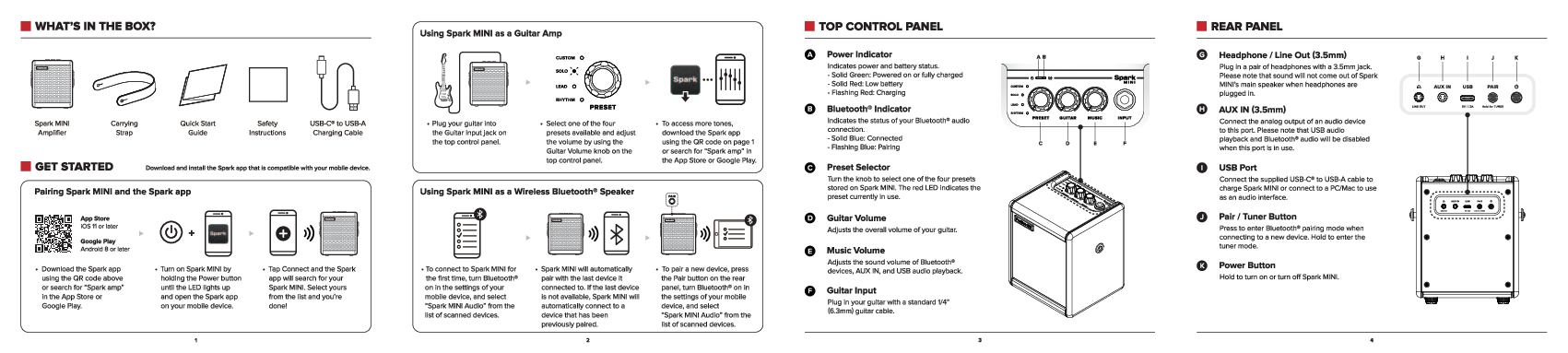
What's in the Box?
Your Spark MINI package includes:
- Spark MINI Amplifier
- Carrying Strap
- Quick Start Guide
- Safety Instructions
- USB-C to USB-A Charging Cable
Getting Started
To begin using your Spark MINI, follow these steps:
- Download the Spark App: Download and install the Spark app compatible with your mobile device from the App Store (iOS 11 or later) or Google Play (Android 8 or later). You can use the QR code provided or search for "Spark amp".
- Power On: Turn on Spark MINI by holding the Power button until the LED lights up.
- Pair with the App: Open the Spark app on your mobile device. Tap 'Connect' and the app will search for your Spark MINI. Select it from the list to complete the pairing.
Using Spark MINI as a Guitar Amp:
- Plug your guitar into the Guitar Input jack on the top control panel.
- Select one of the four available presets using the Preset Selector knob. Adjust the volume with the Guitar Volume knob.
- To access more tones, download the Spark app.
Using Spark MINI as a Wireless Bluetooth® Speaker:
- To connect for the first time, turn on Bluetooth® in your mobile device's settings and select "Spark MINI Audio" from the list of scanned devices.
- To pair a new device, press the Pair button on the rear panel.
- Spark MINI will automatically pair with the last connected device. If unavailable, it will connect to a previously paired device.
Top Control Panel
- A. Power Indicator: Indicates power and battery status. Solid Green: Powered on or fully charged. Solid Red: Low battery. Flashing Red: Charging.
- B. Bluetooth® Indicator: Indicates Bluetooth® audio connection status. Solid Blue: Connected. Flashing Blue: Pairing.
- C. Preset Selector: Turn the knob to select one of the four stored presets. The red LED indicates the current preset.
- D. Guitar Volume: Adjusts the overall volume of your guitar.
- E. Music Volume: Adjusts the sound volume for Bluetooth®, AUX IN, and USB audio playback.
- F. Guitar Input: Plug in your guitar using a standard 1/4" (6.3mm) guitar cable.
Rear Panel
- G. Headphone / Line Out (3.5mm): Plug in headphones. Sound will not come out of the main speaker when headphones are plugged in.
- H. AUX IN (3.5mm): Connect the analog output of an audio device. USB audio playback and Bluetooth® audio will be disabled when this port is in use.
- I. USB Port: Connect the supplied USB-C® to USB-A cable to charge Spark MINI or connect to a PC/Mac to use as an audio interface.
- J. Pair / Tuner Button: Press to enter Bluetooth® pairing mode. Hold to enter tuner mode.
- K. Power Button: Hold to turn Spark MINI on or off.
Tuner Mode
Hold the Pair button to enter tuner mode. The 4 Preset LEDs will indicate the note being played. Your guitar signal will be muted in tuner mode. Press the Pair button again to exit.
- Standby: No signal detected.
- Note Too High: The note detected is sharp.
- Note Too Low: The note detected is flat.
- Note In Tune: The note detected is in tune.
Headphone / Line Out Port
The 3.5mm port can be assigned as a stereo or mono output in the Spark app settings.
- Stereo Mode: For headphones or speakers with a stereo input (default).
- Mono Mode: For guitar amps, powered guitar cabinets, mixers, or audio interfaces with a mono input. A 3.5mm to 1/4" or RCA adapter may be required.
Declarations of Conformity
ROHS
This table indicates the presence of restricted substances in the Spark MINI components.
| Part name | Lead (Pb) | Mercury (Hg) | Cadmium (Cd) | Hexavalent Chromium (Cr+6) | Polybrominated Biphenyls (PBB) | Polybrominated Diphenyl Ethers (PBDE) |
|---|---|---|---|---|---|---|
| Speaker | ○ | ○ | ○ | ○ | ○ | ○ |
| PCBA | ○ | ○ | ○ | X | ○ | ○ |
| Structural parts | ○ | ○ | ○ | ○ | X | ○ |
| Cable | ○ | ○ | ○ | ○ | ○ | ○ |
| Accessory | ○ | ○ | ○ | ○ | ○ | ○ |
| Battery | ○ | ○ | ○ | ○ | ○ | ○ |
Notes: 'O' indicates the substance content is within the regulated limit, 'X' indicates it exceeds the limit, and '-' indicates it is an exemption.
BATTERIES
Batteries shall not be exposed to excessive heat such as sunshine or fire.
WEEE
The WEEE symbol indicates that this product should not be disposed of with household waste. The number in the circle represents the product's normal environmental protection use period.
FCC/IC Compliance
This equipment complies with FCC Rules Part 15 and applicable Canadian regulations. Operation is subject to two conditions: it must not cause harmful interference, and it must accept any interference received.
Caution: Changes or modifications not expressly approved by the responsible party could void the user's authority to operate the equipment.
FCC/IC Radiation Exposure Statement: This equipment complies with FCC and IC RSS-102 radiation exposure limits. Maintain a minimum distance of 20cm between the radiator and any part of your body. The transmitter must not be co-located or operating with any other antenna or transmitter.
CCC Compliance (China Compulsory Certification)
Important Notes:
- Do not place heavy objects on the top or power cord.
- Read the operating instructions carefully to avoid incorrect operation.
- Do not expose the device to water splashes or liquids. Do not place liquid-filled objects on the device.
- This product is not directly connected to the mains power.
- Batteries (battery pack or battery assembly) shall not be exposed to excessive heat such as sunshine, fire, or similar.
- If using a power adapter, purchase one that is CCC certified and meets the required standards.
Caution: Replacing the battery with an incorrect type may result in an explosion hazard. Replace only with the same or an equivalent type.
NCC Compliance (Taiwan)
Warning: Low-power radio frequency devices, without approval, may not alter frequency, increase power, or change original characteristics and functions. The use of low-power radio frequency devices shall not affect flight safety and interfere with legitimate communications. If interference is found, stop using it immediately and improve it until there is no interference. Legitimate communication refers to radio communication operated in accordance with telecommunications management regulations. Low-power radio frequency devices must tolerate interference from legitimate communication or industrial, scientific, and medical radio frequency equipment.
