

PowUnity Quick-Guide EN
File info: application/pdf · 2 pages · 93.09KB
PowUnity Quick-Guide EN
Trips News BikeTrax in your own country? RIDE
QUICK START POWUNITY.COM With the BikeTrax route diary (trips) you have full control over your tour data and can delete ... PowUnity Quick-Guide EN Created Date: 5/5/2021 12:14:30 PM ...
QUICK START POWUNITY.COM ... PowUnity Quick-Guide EN Created Date: 5/5/2021 12:14:30 PM ...
Full PDF Document

If the inline viewer fails, it will open the original document in compatibility mode automatically. You can also open the file directly.
Extracted Text
2
Trips
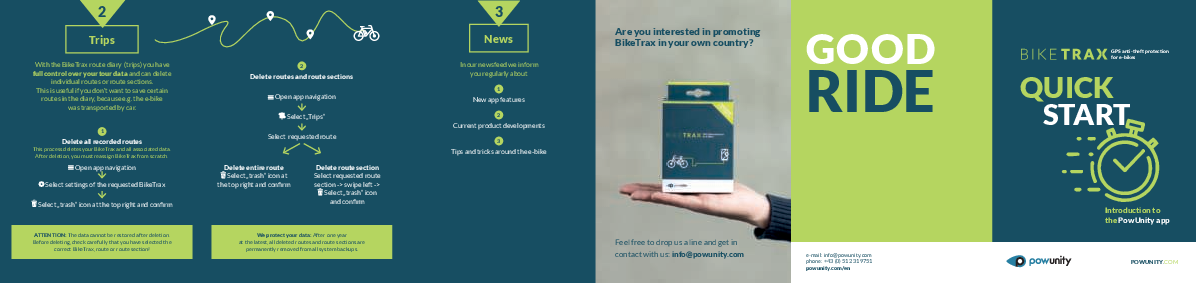
With the BikeTrax route diary (trips) you have full control over your tour data and can delete
individual routes or route sections. This is useful if you don't want to save certain
routes in the diary, because e.g. the e-bike was transported by car.
1
Delete all recorded routes
This process deletes your BikeTrax and all associated data. After deletion, you must reassign BikeTrax from scratch.
Open app navigation
Select settings of the requested BikeTrax
Select ,,trash" icon at the top right and confirm
ATTENTION: The data cannot be restored after deletion. Before deleting, check carefully that you have selected the
correct BikeTrax, route or route section!

2
Delete routes and route sections Open app navigation Select ,,Trips"
Select requested route

Delete entire route
Select ,,trash" icon at the top right and confirm

Delete route section Select requested route section -> swipe left ->
Select ,,trash" icon and confirm

We protect your data: After one year at the latest, all deleted routes and route sections are
permanently removed from all system backups.

3
News
In our newsfeed we inform you regularly about
1
New app features
2
Current product developments
3
Tips and tricks around the e-bike

Are you interested in promoting BikeTrax in your own country?

GOOD
RIDE

Feel free to drop us a line and get in contact with us: info@powunity.com

e-mail: info@powunity.com phone: +43 (0) 512 319751 powunity.com/en

GPS anti-theft protection for e-bikes
QUICK START
Introduction to the PowUnity app
POWUNITY.COM

GETTING STARTED
WITH THE POWUNITY APP

1
BDDOWNLOAD POWUNITY APP

powunity.com/en/app-en

,,PowUnity Bike"
/

2
CREATE APP PROFILE To register you only need to enter your e-mail address.*

3
ADD BIKETRAX BY ID Choose name (e.g. ,,my bike no. 1")
Scan or enter BikeTrax-ID

* ATTENTION: Be sure to remember how you registered the first time.
You always have to log in with the same user data (e-mail password combination). BikeTrax can only be assigned ONCE to a specific app profile.

All your vehicles which are equipped with BixeTrax are listed in the app. You can add any number of additional vehicles by BikeTrax-ID.

Do not forget: Activate/deactivate alarm!
Whenever you are not riding your e-bike, you should activate the alarm so that you are informed of any unauthorized movement of your e-bike on your smartphone:
Open app
The lock icon on the main screen is showing the status of your alarm:

Map
Return to main view
Trips
(see 2 )
News
(see 3 )
Help
FAQs concerning BikeTrax

The alarm is deactivated. You`re not getting any messages.

The alarm is

Your e-bike is/

activated!

was moved.

You will be notified A push message and

when your bike is an acoustic alarm

being moved. on your smartphone

will also inform

you about this.

In case of
a theft:
Bike Passport
(see 1 )

IMPORTANT: The initial operation of your BikeTrax GPS tracker should be performed outdoors. This will ensure a fast
connection with good network coverage.

The PowUnity app can be used on multiple devices
simultaneously.
It's as simple as that:

Install PowUnity app on another smartphone
Log in with the already created app profile.
Important: DO NOT create a new user.

For display on other devices like PC, laptop or
tablet go to app.powunity.com
Log in with the already created app profile.
Important: DO NOT create a new user.

1
Bike Passport
After a theft, quick reaction is important! BikeTrax offers two features that allow you to easily and quickly transmit the necessary data to the nearest
police station if your bike has been stolen.
1
BIKE PASSPORT You should completely fill out the profile for your e-bike (bike passport) as soon as you start using BikeTrax!
Open app navigation
Select settings of the requested BikeTrax
Select ,,Bike passport"
Add relevant data (photo, manufacturer, model, color, price, frame number, proof of purchase, ... ) TIPPS:
It is especially important to report the frame number! The profile can be edited at any time.

2
THEFT REPORT The theft report should be made as soon
as possible after the theft.
Open app navigation
Select settings of the requested BikeTrax
Activate ,,stolen" switch
Select ,,Theft report"
Add relevant data (date/time of the theft, ...). The location of the theft is displayed automatically after activation of the ,,stolen" switch but can be edited. The last position and the current position of the
stolen e-bike are determined automatically.
By clicking on ,,Generate theft report" you can send your bike's profile and the theft report to the nearest police station, e.g. as an e-mail attachment.