

File info: application/pdf · 3 pages · 104.34KB
A.4 Installing the USB Driver for an AS Series CPU module ...
AS Series Operation Manual A-14 A 3. In the Settings window, click Recovery, and then click Restart now. C (Recovery) D (Restart now) 4. After the computer restarts, under Choose an Option, click Troubleshoot, and then…
A.4 Installing the USB Driver for an AS Series CPU module in ...
AS Series Operation Manual. A-14. A. 3. In the Settings window, click Recovery, and then click Restart now. C (Recovery). D (Restart now). 4. After the ...
Full PDF Document

If the inline viewer fails, it will open the original document in compatibility mode automatically. You can also open the file directly.
Extracted Text
Appendix A Installing a USB Driver

A.4 Installing the USB Driver for an AS Series CPU module in Windows 10
Windows 10 driver signature enforcement provides a way to improve the security of the operating system by validating the integrity of a driver or system file each time it is loaded into memory. Because the Delta PLC USB driver does not include the driver signature, this section shows you how to disable driver signature enforcement in Windows 10 to successfully install the Delta PLC USB. Once you disable the driver signature enforcement setting, it returns to its original state after restarting Windows.

This section describes the steps to disable driver signature enforcement in Windows 10.

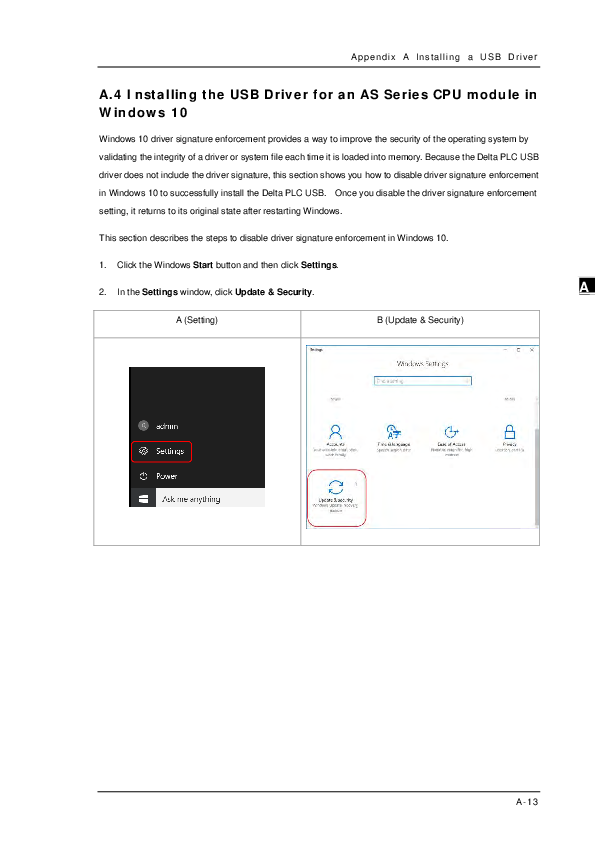
1. Click the Windows Start button and then click Settings.

2. In the Settings window, click Update & Security.

A (Setting)

B (Update & Security)

A_

A-13

AS Series Operation Manual

3. In the Settings window, click Recovery, and then click Restart now.

C (Recovery)

D (Restart now)

_ A
4. After the computer restarts, under Choose an Option, click Troubleshoot, and then click Advanced options.

5. On the Advanced options page, click Startup Settings. On the Startup Settings page click Restart to restart the computer.

A-14

Appendix A Installing a USB Driver
6. On your keyboard, press 7 or F7 to choose Disable driver signature enforcement, and the system directs you to the Windows 10 operating system page. Install the Delta PLC USB driver.
A_
7. Install the USB driver for the AS Series CPU module by connecting the AS Series CPU module to your computer's USB port. Refer to Section A2 for the steps to install the USB driver.
A-15