

File info: application/pdf · 18 pages · 25.71MB
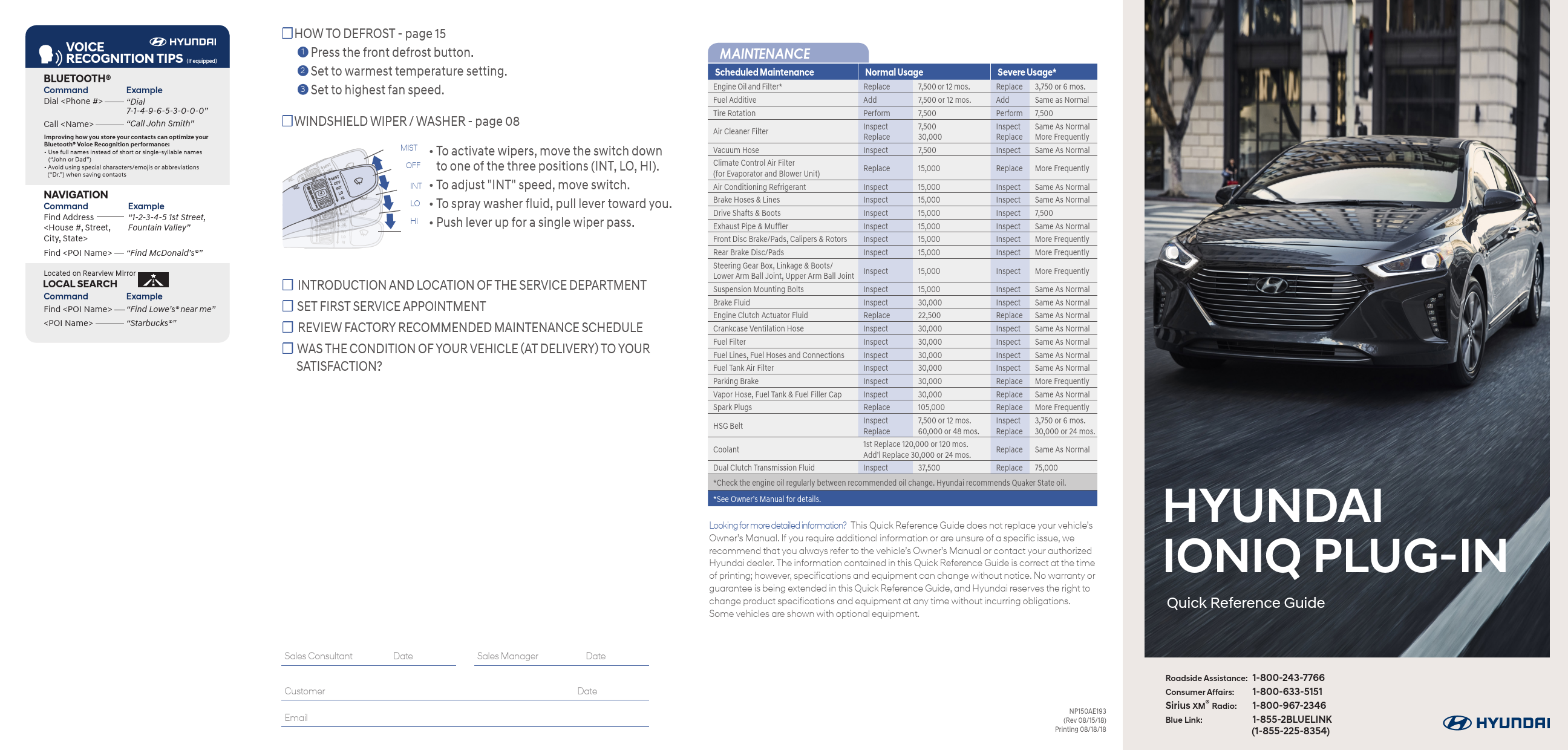
HYUNDAI IONIQ PLUG-IN
This Quick Reference Guide does not replace your vehicle's. Owner's Manual. If you require additional information or are unsure of a specific issue, we.
2019-Hyundai-Ioniq-H..>
Index of /wp-content/uploads/2021/07
Extracted Text
VOICE RECOGNITION TIPS (If equipped)

BLUETOOTH�
Command Dial <Phone #>

Example
"Dial 7-1-4-9-6-5-3-0-0-0"

Call <Name>

"Call John Smith"

Improving how you store your contacts can optimize your Bluetooth� Voice Recognition performance: � Use full names instead of short or single-syllable names
("John or Dad") � Avoid using special characters/emojis or abbreviations
("Dr.") when saving contacts

NAVIGATION
Command Find Address <House #, Street, City, State>
Find <POI Name>

Example "1-2-3-4-5 1st Street, Fountain Valley"
"Find McDonald's�"

Located on Rearview Mirror
LOCAL SEARCH

Command

Example

Find <POI Name> "Find Lowe's� near me"

<POI Name>

"Starbucks�"

HOW TO DEFROST - page 15
1 Press the front defrost button. 2 Set to warmest temperature setting. 3 Set to highest fan speed.
WINDSHIELD WIPER / WASHER - page 08
MIST � To activate wipers, move the switch down OFF to one of the three positions (INT, LO, HI). INT � To adjust "INT" speed, move switch. LO � To spray washer fluid, pull lever toward you. HI � Push lever up for a single wiper pass.
 INTRODUCTION AND LOCATION OF THE SERVICE DEPARTMENT  SET FIRST SERVICE APPOINTMENT  REVIEW FACTORY RECOMMENDED MAINTENANCE SCHEDULE  WAS THE CONDITION OF YOUR VEHICLE (AT DELIVERY) TO YOUR
SATISFACTION?

MAINTENANCE

Scheduled Maintenance Engine Oil and Filter* Fuel Additive Tire Rotation
Air Cleaner Filter
Vacuum Hose Climate Control Air Filter (for Evaporator and Blower Unit) Air Conditioning Refrigerant Brake Hoses & Lines Drive Shafts & Boots Exhaust Pipe & Muffler Front Disc Brake/Pads, Calipers & Rotors Rear Brake Disc/Pads Steering Gear Box, Linkage & Boots/ Lower Arm Ball Joint, Upper Arm Ball Joint Suspension Mounting Bolts Brake Fluid Engine Clutch Actuator Fluid Crankcase Ventilation Hose Fuel Filter Fuel Lines, Fuel Hoses and Connections Fuel Tank Air Filter Parking Brake Vapor Hose, Fuel Tank & Fuel Filler Cap Spark Plugs
HSG Belt
Coolant
Dual Clutch Transmission Fluid

Normal Usage

Replace

7,500 or 12 mos.

Add

7,500 or 12 mos.

Perform

7,500

Inspect Replace

7,500 30,000

Inspect

7,500

Replace

15,000

Inspect Inspect Inspect Inspect Inspect Inspect

15,000 15,000 15,000 15,000 15,000 15,000

Inspect

15,000

Inspect

15,000

Inspect

30,000

Replace

22,500

Inspect

30,000

Inspect

30,000

Inspect

30,000

Inspect

30,000

Inspect

30,000

Inspect

30,000

Replace

105,000

Inspect Replace

7,500 or 12 mos. 60,000 or 48 mos.

1st Replace 120,000 or 120 mos. Add'l Replace 30,000 or 24 mos.

Inspect

37,500

Severe Usage*

Replace 3,750 or 6 mos.

Add

Same as Normal

Perform 7,500

Inspect Same As Normal Replace More Frequently

Inspect Same As Normal

Replace More Frequently

Inspect Inspect Inspect Inspect Inspect Inspect

Same As Normal Same As Normal 7,500 Same As Normal More Frequently More Frequently

Inspect More Frequently

Inspect Inspect Replace Inspect Inspect Inspect Inspect Replace Replace Replace Inspect Replace

Same As Normal Same As Normal Same As Normal Same As Normal Same As Normal Same As Normal Same As Normal More Frequently Same As Normal More Frequently 3,750 or 6 mos. 30,000 or 24 mos.

Replace Same As Normal

Replace 75,000

*Check the engine oil regularly between recommended oil change. Hyundai recommends Quaker State oil.

*See Owner's Manual for details.

Looking for more detailed information? This Quick Reference Guide does not replace your vehicle's Owner's Manual. If you require additional information or are unsure of a specific issue, we recommend that you always refer to the vehicle's Owner's Manual or contact your authorized Hyundai dealer. The information contained in this Quick Reference Guide is correct at the time of printing; however, specifications and equipment can change without notice. No warranty or guarantee is being extended in this Quick Reference Guide, and Hyundai reserves the right to change product specifications and equipment at any time without incurring obligations. Some vehicles are shown with optional equipment.

Sales Consultant

Date

Customer Email

Sales Manager

Date Date

NP150AE193 (Rev 08/15/18) Printing 08/18/18

HYUNDAI IONIQ PLUG-IN
Quick Reference Guide

Roadside Assistance: 1-800-243-7766

Consumer Affairs: 1-800-633-5151

Sirius XM� Radio: 1-800-967-2346

Blue Link:

1-855-2BLUELINK (1-855-225-8354)

HYUNDAI VEHICLE OWNER PRIVACY POLICY
Your Hyundai vehicle may be equipped with technologies and services that use information collected, generated, recorded or stored by the vehicle. Hyundai has created a Vehicle Owner Privacy Policy to explain how these technologies and services collect, use, and share this information.
You may read our Vehicle Owner Privacy Policy on the Hyundaiusa.com website at https://www.hyundaiusa.com/owner-privacy-policy.aspx If you would like to receive a hard copy of our Vehicle Owner Privacy Policy, please contact our Customer Connect Center at:
Hyundai Motor America Hyundai Customer Connect Center P.O. Box 20850 Fountain Valley, CA 92728-0850 800-633-5151 consumeraffairs@hmausa.com
Hyundai's Customer Connect Center representatives are available Monday through Friday, between the hours of 5:00 AM and 7:00 PM PST and Saturday and Sunday between 6:30 AM and 3:00 PM PST (English). For Customer Connect Center assistance in Spanish or Korean, representatives are available Monday through Friday between 6:30 AM and 3:00 PM PST.

Instrument panel lillumination
Page 13

Instrument cluster
Page 09

Wiper and washer
Page 08

Navigation Page 21

Cruise control/ Smart cruise control
Page 28

FEATURES AND CONTROLS

Aux. Battery saver+

13

Charging the vehicle

03

Climate control

17

Driver's main controls

02

Dynamic bending light (DBL)

08

Fuel filler door

06

Headlights

07

Hybrid battery SOC(State Of Charge) gauge 12

Instrument cluster

09

Instrument panel illumination

13

LCD display control

15

LCD display modes

16

Liftgate opening

06

Plug-in Hybrid electric vehicle system modes 14

Plug-in hybrid mode

12

Seat-Front seat adjustment (manual) 01

Seat-Front seat adjustment (power)

01

Vehicle power gauge

12

Warning and indicators

11

Wiper and washer

08

MULTIMEDIA

AUX, USB and iPod� port

22

Clock adjustment

23

Navigation

21

Radio mode

19

DRIVING

Cruise control/smart cruise control

28

Dual clutch transmission

25

Paddle shifter

27

* Some vehicles may not be equipped with all the listed features.

Driver's main controls
Page 02

Headlights Page 07

WARNING!
To reduce the risk of serious injury to yourself and others, read and understand the important SAFETY INFORMATION in your Owner's Manual.

Dual clutch transmission Page 25
Use this Quick Reference Guide to learn about the features that will enhance your enjoyment of your Hyundai. More detailed information about these features are available in your Owner's Manual.

FEATURES AND CONTROLS
FRONT SEAT ADJUSTMENT (Manual) Forward and backward 1

3 2 1

Seat height 2
� Push down on the lever several times to lower the seat.
� Pull up the lever several times to raise it. Seatback angle 3

FRONT SEAT ADJUSTMENT (Power) Forward and backward 1
Seat height 1

DRIVER'S MAIN CONTROLS
Side view mirror � Press the L or R button. � Adjust the mirror by using
the directional switch. Power window lock button Disables the power window switches on the rear passenger doors. Door lock Locks/unlocks all doors. Window switches � Front doors power window
switches. � Rear doors power window
switches.

3 12
01 I Quick Reference Guide

Seatback angle 2 Lumbar support 3

HYUNDAI

IONIQ plug-in

Quick Reference Guide I 02

FEATURES AND CONTROLS
CHARGING THE VEHICLE
1. Move the shift lever to P (Park), turn off all switches, and turn OFF the vehicle.
2. Press center edge of the charging door to open the charging door. The charging door opens only when the vehicle door is unlocked.
3. Insert the charging connector into the charging inlet until you hear a clicking sound.
4. Connect the charging plug to the electric outlet at a normal charging station to start charging.
5. Check if the charging cable indicator light of the high voltage battery on the instrument cluster is turned ON.

Unlock Charging Connector in Emergency
If the charging connector does not disconnect due to battery discharge and failure of the electric wires, open the hood and slightly pull the emergency cable. The charging connector will then disconnect.

03 I Quick Reference Guide

HYUNDAI

IONIQ plug-in

Quick Reference Guide I 04

FEATURES AND CONTROLS

Level 1 Charger

Level 1 charging can be used if a Level 2 charger is not available.

FUEL FILLER DOOR

1. Push the fuel filler door opener button.

1. Move the shift lever to P (Park), turn off all switches, and turn OFF the vehicle.
2. Press center edge of the charging door to open the charging door. The charging door opens only when the vehicle door is unlocked.
3. Connect the plug to a household electric outlet.
4. Check if the power lamp (green) illuminates on the control box.
5. Insert the charging connector into the charging inlet until you hear a clicking sound.
6. Charging starts automatically (charging lamp on the control box blinks).
7. Check if the charging indicator light of the high voltage battery on the instrument cluster is turned ON.

2. Wait until the fuel tank is depressurized. It may take up to 20 seconds to open the fuel filler door.
3. Remove the fuel tank cap.
NOTE: Tighten the fuel filler cap until one click is heard.

LIFTGATE OPENING

Press to open. Smart key needs to be within the range.
Press and hold button to unlock tailgate.

05 I Quick Reference Guide

HYUNDAI

IONIQ plug-in

Quick Reference Guide I 06

FEATURES AND CONTROLS

HEADLIGHTS
Headlights
Parking lights Auto headlights All Lights Off Headlight Delay Headlights may stay on for 15 seconds after exiting and locking vehicle. Press the lock button on the smart key twice to turn the headlights off.

Turn signals and lane change signals

Flashing headlights
PULL

High beam / Smart high beam
PUSH

NOTE: To turn off the high beam, pull the lever towards you.
Smart High Beam Function 1. Select auto position. 2. Push lever forward to engage Auto High Beam. 3. Push lever forward again to disengage.
07 I Quick Reference Guide

HYUNDAI

DYNAMIC BENDING LIGHT (DBL)
DBL uses the steering angle and vehicle speed to help keep your field of vision wide by swiveling and leveling the headlamp. � To turn DBL on, turn the knob to the AUTO position when the vehicle is in the ready ( )mode. � To turn DBL off, turn the knob back to the former position.
WIPERS AND WASHER

MIST OFF INT LO HI

MIST - Single wipe OFF - Off INT - Intermittent wipe LO - Low wiper speed HI - High wiper speed

Intermittent wipe time adjustment Move the speed control switch
Fastest wiper speed
Slowest wiper speed

PULL

Windshield Washer Pull the lever gently towards you to spray washer fluid on the windshield and to run the wipers1-3 cycles.

IONIQ plug-in

Quick Reference Guide I 08

FEATURES AND CONTROLS
INSTRUMENT CLUSTER Type A
2 5
5 1
5 4
Type B
2 5 5 1
5 4

6 3

6 3

1 Power gauge 2 Speedometer 3 Battery SOC (State of Charge) gauge 4 Fuel gauge 5 Warning and indicator lights 6 LCD display (including Trip computer)

09 I Quick Reference Guide

HYUNDAI

IONIQ plug-in

Quick Reference Guide I 10

FEATURES AND CONTROLS

WARNINGS AND INDICATORS

Ready indicator

Service warning light

Charging cable connection indicator*

Parking brake & brake Fluid warning light

EV mode indicator
Regenrative brake warning light

Air bag warning light
Anti-lock Brake System (ABS) warning light Malfunction Indicator Lamp (MIL) Low fuel level warning light
Master warning light
Immobilizer indicator

Seat belt warning light
Electronic Brake force Distribution (EBD) System warning light
Charging system warning light
Engine coolant temperature warning light Electronic Stability Control (ESC) Indicator Light
Turn signal indicator light

Electric Power Steering (EPS) warning light
Engine oil pressure warning light
Low tire pressure warning light / TPMS malfunction Electronic Stability Control (ESC) OFF indicator light
High beam indicator light
Cruise indicator

Light ON indicator light

LED Headlight warning light

Exterior light warning light

Cruise SET indicator
Autonomous Emergency Braking (AEB) warning light * : Plug-in hybrid

SPORT mode indicator
Lane Keeping Assist System (LKAS) indicator

ECO mode indicator

Main indicators in cluster for Hybrid Vehicle
Ready indicator When the vehicle is ready to be driven, this indicator is illuminated. When the ready indicator goes off or blinks, we recommend the vehicle be checked by an authorized HYUNDAI dealer.

EV mode indicator This indicator illuminates when the vehicle is driven by the electric motor.
Service warning light If a problem with the hybrid vehicle control system occurs, the service warning light will illuminate. We recommend the vehicle be checked by an authorized HYUNDAI dealer.

Charging cable connection indicator (Plug-in Hybrid)
This indicator illuminates in red when the charging cable is connected.

11 I Quick Reference Guide

HYUNDAI

VEHICLE POWER GAUGE
The vehicle power gauge indicates whether the current driving condition is fuel efficient or not.
CHARGE Shows that the energy made by the vehicle is being converted to electrical energy. (Regenerated energy)
ECO Shows that the vehicle is being driven in an Eco-friendly manner.
POWER Shows that the vehicle is exceeding the Eco-friendly range.
HYBRID BATTERY SOC (STATE OF CHARGE) GAUGE
This gauge indicates the remaining hybrid battery power. If the SOC is near the "L (Low)" level, the vehicle automatically operates the engine to charge the battery.

PLUG-IN HYBRID MODE
EV/HEV Button
Press the [EV/HEV] button to change the plug-in hybrid system modes, between Electric (CD) mode and Hybrid (CS) mode.

CD (Charge Depleting, Electric) mode The high-voltage (hybrid) battery is used to drive the vehicle.
CS (Charge Sustaining, Hybrid) mode The high-voltage (hybrid) battery and gasoline engine is used to drive the vehicle.

IONIQ plug-in

Quick Reference Guide I 12

FEATURES AND CONTROLS
INSTRUMENT PANEL ILLUMINATION
Press the illumination control button to adjust the instrument cluster illumination brightness.

PLUG-IN HYBRID ELECTRIC VEHICLE SYSTEM MODES

Type A

Type B

AUX. BATTERY SAVER+
The Aux. Battery Saver+ function monitors the charging status of the 12 V auxiliary battery. If the auxiliary battery level is low, the main high voltage battery charges the auxiliary battery.The default setting for Aux. Battery Saver+ is ON.The driver may cancel the function. Go to `User Settings ->Other Features ->Aux. Battery Saver+`.
The message is displayed if the Aux. Battery Saver+ function was activated.

13 I Quick Reference Guide

When the function is activating the third Charging Indicator Lamp will blink. NOTE: Do not touch the high voltage electric wire (orange), connector, and all electric components and devices when the function is activating.
HYUNDAI

Select the PHEV menu on the home screen, or select the PHEV menu from the main menu.

Type A

Type B

7

7

1

2

1

2

4

5

6

3

4

5

6

1 ECO driving : Displays a real-time image for fuel economy or ECO level based on the user's selection.
2 Energy information : Displays a real-time image showing information about the battery and the flow of energy based on the user's selection.
3 EV range : Displays the possible driving distance on a map(for type B).
4 Charging settings : Goes to the menu to set times for charging.
5 Charging stations : Displays a list of EV charging stations nearby.
6 Gas stations : Displays a list of gas stations nearby.
7 Settings : Goes to the settings menu to select the real-time information that will be displayed on the home screen.

IONIQ plug-in

Quick Reference Guide I 14

FEATURES AND CONTROLS
LCD DISPLAY CONTROL
1 2 3

: M ODE button for changing modes
: M OVE switch for changing items
: S ELECT / RESET button for setting or resetting the selected item

Type A

Type B

1 1

2

2

3

3

Type C
1 2

LCD DISPLAY MODES

Type A

Modes

Symbol

Trip Computer

Turn By Turn (TBT)

SCC / LKAS

A / V

Information

or or

User Settings

Description
This mode displays driving information like the tripmeter, fuel economy, etc.
This mode displays the state of the navigation.
This mode displays the state of the Smart Cruise Control (SCC) and Lane Keeping Assist System (LKAS).
This mode displays the state of the A / V (Audio / Video) system.
This mode displays the service interval (mileage or days) and warning messages related to the Blind Spot Detection system, etc.
In this mode, you can change settings of the doors, lamps, etc.

Type B Modes
Trip Computer

Symbol

Turn By Turn (TBT)

Assist

User Settings Warning

Explanation
This mode displays driving information such as the tripmeter, fuel economy, etc.
This mode displays the state of the navigation.
� This mode displays the state of the Smart Cruise Control (SCC) and Lane Keeping Assist System (LKAS).
� This mode displays information related to Tire Pressure.
In this mode, you can change settings of the doors, lamps, etc.
This mode displays warning messages related to the Blind Spot Detection system, etc.

15 I Quick Reference Guide

HYUNDAI

IONIQ plug-in

Quick Reference Guide I 16

FEATURES AND CONTROLS
CLIMATE CONTROL

11 1

13

9

10

12 2

3

4

5

6

7

8

1 Driver's temperature control knob 8 Air intake control button

2 Passenger's temperature control konb 9 Fan speed control button

3 AUTO (automatic control) button 10 Mode selection button

4 OFF button

11 Driver only button

5 Front windshield defrost button 12 SYNC button

6 Rear window defrost button

13 Climate control information screen

7 Air conditioning button

DEFOGGING / DEFROSTING

1. Press the front windshield defrost control button.

2. Set the temperature control to the warmest setting.

3. S et the fan speed to the highest setting.
NOTE: To reduce the tendency of the glass fogging and also to improve visibility, keep the interior surface of the windshield clean by wiping it with a clean cloth and glass cleaner. In addition, select air intake control to the outside (fresh) air position whenever possible while operating the vehicle.

17 I Quick Reference Guide

HYUNDAI

AUTOMATIC HEATING / AIR CONDITIONING

1. Press the AUTO button.

2. S et the temperature control to the desired setting.

Controls the modes, fan speeds, air intake and air-conditioning automatically.

SYSTEM OFF
Pressing the OFF button will place the system in the OFF mode.
� Blower will turn off. � Outside (fresh) air position will be selected. � Vented air will be at last set temperature.

MODE SELECTION Changes the direction of the air flow as follow.

AIR INTAKE CONTROL
Recirculated air position

Outside (fresh) air position

SYNC BUTTON Press the SYNC button to adjust the driver and passenger side temperature and air flow direction equally.
DRIVER ONLY Only the driver's vent will operate if enabled (LED on).

REAR WINDOW DEFROSTER
Press to activate/deactivate the rear window defroster.

IONIQ plug-in

Quick Reference Guide I 18

MULTIMEDIA
RADIO MODE Display Audio

Navigation

PWR PUSH
VOL

RADIO MEDIA

ENTER

TUNE

SEEK TRACK

MAP

NAV SETUP

FILE

Press POWER button to turn radio on.
� TUNING/LISTENING TO CHANNELS 1. Press BAND button on screen to select FM/AM/SiriusXM�. 2. ROTATE TUNE knob to desired channel.
NOTE A clear view of the southern sky helps ensure SiriusXM� radio
reception.
� SETTING PRESET MEMORY BUTTONS Press and hold any preset button on the screen until an audible beep is heard to store current channel.
� ADJUSTING THE SOUND CONTROL
1. Press the SETUP button and press the SOUND button on screen to display the Sound Settings screen.
2. Touch on-screen arrows to adjust desired setting.

PWR PUSH
VOL

RADIO MEDIA

ENTER

TUNE

SEEK TRACK

MAP

NAV SETUP

FILE

Press POWER button to turn radio on.
� TUNING/LISTENING TO CHANNELS 1. Press BAND button on screen to select FM/AM/SiriusXM�. 2. ROTATE TUNE knob to desired channel.
NOTE A clear view of the southern sky helps ensure SiriusXM� radio reception.
� SETTING PRESET MEMORY BUTTONS Press and hold any preset button on the screen until an audible beep is heard to store current channel.
� ADJUSTING THE SOUND CONTROL
1. Press the SETUP button and press the SOUND button on screen to display the Sound Settings screen.
2. Touch on-screen arrows to adjust desired setting.

19 I Quick Reference Guide

HYUNDAI

IONIQ plug-in

Quick Reference Guide I 20

MULTIMEDIA

NAVIGATION

Basic features on map screen

2

1

15

3

4

5

10

6

7

8

9

11

12

13

14

1 Place button : Move to the Place menu. 2 Home button : Go to the Home screen. 3 Map button : Change the map view mode. 4 NAV volume button : Adjusts the volume. 5 Zoom in button : Zoom in the map. 6 Map scale display : Set the zoom level automatically according
to the guidance. 7 Zoom out button : Zoom out the map. 8 Quick menu button : Quick Menu for destination selection and options. 9 Map scroll mark : Touch to scroll the map. 10 Guidance button : Start the preferred navigation route to
selected location. 11 Route button : Choose the preferred navigation route to
selected location. 12 Waypoint button : Set a waypoint to the current route. 13 Save button : Save frequently used address to address book. 14 POI button : Find a POI(Point Of Interest) around the current position. 15 Vehicle position mark : View the vehicle's current position on
the map screen.

Destination search screen

1

2

3

4

9

5

6

7

8

Press [NAV] on the map screen and, finds a destination by using the
[Destination] menu.
1 Address : Set destination by address search. 2 P revious destinations : Select from previously inputted addresses
and POIs. 3 L ocal search : Uses Google Local Search via the vehicle's
connected services system. 4 POI categories : Select the desired item in the sub-categories. 5 C harging stations : Select the desired destinations among the
searched charging stations. 6 R estaurants : Lists available restaurants within a predefined
radius of the current vehicle position. 7 E mergency : Select the desired destination among the searched
emergency facilities. 8 Address Book : Search the destination with the address book. 9 Coordinates : You can find a destination by entering the
coordinates of latitude and longitude.

AUX, USB AND iPod� PORT
Use the input jack to connect an external audio device and listen to it through the audio system in your vehicle.
iPod� is a trademark of Apple, Inc.

21 I Quick Reference Guide

HYUNDAI

IONIQ plug-in

Quick Reference Guide I 22

MULTIMEDIA

CLOCK ADJUSTMENT With Audio Type A

1. Press the SETUP button on the audio head unit.
2. Select Date/Time.
Set Time Set the time displayed on the audio screen.
Time Format Choose between 12-hour and 24hour time formats.
Set Date Set the date displayed on the audio screen.

With Navigation

Type B

1. Press the SETUP button on the audio head unit.
2. Select Date/Time.
3. Select the desired items.
Date/Time If you tap any value, you can directly enter the number in the screen.
24 Hours The time display is set in 24-hour format.
Daylight Saving Time The daylight saving time(DST) is applied.

1. Press the SETUP button on the navigation head unit.
2. Select Date/Time.
3. Select the desired items.
Date/Time Using the arrow buttons, you can change the values. If you tap any value, you can directly enter the number in the screen.
GPS time Displays time according to the received GNSS(Global Navigation Satellite System) time.
Daylight Saving Time The daylight saving time(DST) is applied.
24 Hours The time display is set in 24-hour format.

23 I Quick Reference Guide

HYUNDAI

IONIQ plug-in

Quick Reference Guide I 24

DRIVING
DUAL CLUTCH TRANSMISSION

( ) : Depress the brake pedal and press the shift button while moving the shift lever. ( ) :Press the shift button while moving the shift lever. ( ) : The shift lever can freely operate.

Manual shift mode

Shift the lever from D into the manual gate to activate manual shift mode. Manual shift mode is a recalibrated automatic mode that will hold gears longer and downshift at higher RPM for a more dynamic driving style. Gasoline engine will be engaged more frequently.

NOTE: Dual Clutch Transmission characteristics The new technology of the Dual Clutch Transmission is different from a traditional automatic or manual transmission:
� The Dual Clutch Transmission is an automatically shifting manual transmission.
� Dual Clutch Transmission utilizes two clutches connected to a computer-controlled manual gearbox. It provides the convenience of a transmission that shifts automatically, with the efficiency of a manual transmission.
� When you turn the engine on and off, you may hear clicking sounds as the system goes through a self test. This is a normal sound for the Dual Clutch Transmission.

25 I Quick Reference Guide

HYUNDAI

� When you stop on a hill, if you remove your foot from the brake pedal, the vehicle will remain stationary for approximately two seconds to prevent the vehicle from rolling backwards. If you depress the accelerator pedal during the two second interval, the vehicle will accelerate. If you wait more than two seconds, the vehicle will enter creep mode and may roll backwards if the hill is steep.
Caution � You should always use the foot brake to hold the car on a hill until you are ready to drive. Using creep mode to hold the car on a hill may damage the clutch. � If the clutch becomes overheated by excessive use of the clutch to hold on a hill, you may notice a shudder feeling and a blinking display on the instrument cluster. When this occurs, the clutch is disabled until the clutch cools to normal temperatures. If this occurs, pull over to a safe location, shift into P (Park) and apply the foot brake for a few minutes.
ECO/SPORT mode
ECO mode If you drive the vehicle with the shift lever in D (Drive), the vehicle will automatically change to ECO mode. The ECO indicator will illuminate on the instrument cluster. When driving in ECO mode, the vehicle improves fuel efficiency for eco-friendly driving.
SPORT mode If you drive the vehicle with the shift lever in S (Sport), the vehicle will automatically change to SPORT mode. The SPORT indicator will illuminate on the instrument cluster. When driving in SPORT mode, the vehicle provides more responsive powertrain performance, sporty but firm handling, and the fuel efficiency may decrease.

IONIQ plug-in

Quick Reference Guide I 26

DRIVING
PADDLE SHIFTER

-
-

Press (-) to downshift

Press (+) to upshift

The paddle shifter is available when the shift lever is in the D (Drive) or S (Sport) position, or the manual shift mode. It will operate when the vehicle speed is more than 3mph. Pull the [+] or [-] paddle shifter once to shift up or down one gear.

COASTING GUIDE

CoastinCgoasting
Type A

Vehicle CoastinCgoasting with factory installed navigation system:

Type B

After an address is inputted and navigation is in progress, the coasting guide informs the driver when to take the foot off from the accelerator by anticipating a decelerating event based on the analysis of driving routes and road conditions of the navigation. This helps increase fuel efficiency by allowing coasting down the road with EV motor only.

To activate the system, select "User Settings Driving Assist Coasting Guide". The driving speed should be between 25 mph and 100 mph.

27 I Quick Reference Guide

HYUNDAI

CRUISE CONTROL / SMART CRUISE CONTROL

The Cruise Control system allows you to program the vehicle to maintain a constant speed without depressing the accelerator pedal.

1 To turn On/Off cruise control.

1

2 Toggle switch UP to Resume or

2

Increase the cruise control speed.

3

3 Toggle switch DOWN to Set or

4

Decrease the cruise control speed.

4 To Cancel the Cruise Control.

Setting Vehicle Distance (Smart Cruise Control only)

Press the button to set and

maintain the vehicle-to-vehicle

distance without pressing the

accelerator or brake pedal.

The vehicle-to-vehicle distance 1

will automatically activate when

you set the cruise speed 2 .

Each time the button is pressed,

2

the vehicle-to-vehicle distance

changes as follows:

1

Distance 4 (Longest)

Distance 3

Distance 2

Distance 1

(Shortest)

Setting Cruise Control
1. Press the "CRUISE" button 1 to turn on Cruise Control. The icon will illuminate in the instrument cluster.
2. Toggle "-SET" switch (3) DOWN to set cruising speed.

Adjusting the vehicle speed 1. Toggle "+RES" switch 2 UP to increase cruising speed. 2. Toggle "-SET" switch 3 DOWN to decrease cruising speed.

Note Quick toggle up/down will change speed by 1 mph. Holding switch up/down will change speed by 10 mph.

To Cancel Cruise Control Press the "CANCEL" button 4 or depress the brake pedal.

IONIQ plug-in

Quick Reference Guide I 28

MEMO
29 I Quick Reference Guide

HYUNDAI

IONIQ plug-in

IONIQ CUSTOMER DELIVERY CHECKLIST
BEFORE DELIVERY  SET TIRE PRESSURE LF RF RR LR  VERIFY VEHICLE IS CLEAN, IN GOOD CONDITION,
FREE OF CHIPS AND SCRATCHES � CLEAN WINDSHIELD AND BACK WINDOW
 ENSURE FLOOR MATS ARE SNAPPED INTO PLACE
WALK THE CUSTOMER THROUGH EACH OF THE FOLLOWING KEY DELIVERY FEATURES  REVIEW QUICK REFERENCE GUIDE  PAIR CUSTOMER'S PHONE TO THE BLUETOOTH SYSTEM  OPERATION OF THE NAVIAGATION SYSTEM  REVIEW AND TEAR OFF VOICE COMMAND / QUICK TIP CARD  OPERATION OF THE AUDIO SYSTEM

BLUETOOTH� HANDS-FREE

CONNECTING YOUR PHONE On the radio: 1. Push the SETUP button. 2. Select Bluetooth. 3. Select Bluetooth Connection. 4. Select Add New.
In your phone's Bluetooth settings: 5. Select the <Vehicle Name> on your phone. 6. Enter the passkey from the radio or accept the authorization pop-up on your phone.
SWITCHING BETWEEN PAIRED PHONES
Using Voice Command: "Change Bluetooth device" On the radio: 1. Push the SETUP button. 2. Select Bluetooth. 3. Select Bluetooth Connection . 4. Select Connect next to the
desired phone.
For more information, visit HyundaiBluetooth.com

Quick Reference Guide I 30