

Ametrix LC32 Linear Cove System Instructions
Ametrix LC32 Linear Cove System Instructions
Cooper Lighting Solutions, Ametrix, architectural, linear, Architectural, Collegiate, Grocery, K-12 schools, Office, Recreational-municipal, Educational, Healthcare, Hospitality, Office Space, Private Office, Residential-Multi-Use, Sports Venues, Transportation, Cove, Linear
Installation Instructions Ametrix 18001 East Colfax Ave. Aurora, CO 80011 Ph. (303) 393-1522 Fax (303) 393-1477 ADY121846 1. Unpack fixtures from box. NOTE: If your installation calls for the jumper cable accessory to ad…
Ametrix LC32 Linear Cove System Instructions - Cooper Lighting
Installation Instructions. Ametrix 18001 East Colfax Ave. Aurora, CO 80011 Ph. ( 303) 393-1522 Fax (303) 393-1477. ADY121846. 1. Unpack fixtures from box.
Full PDF Document

If the inline viewer fails, it will open the original document in compatibility mode automatically. You can also open the file directly.
Extracted Text
Installation Instructions

LC32 Linear Cove System

Page 1 of 1

! Carefully read fixture labels and instructions and follow all warnings prior to installation
WARNINGS
1). WARNING! � Risk of Fire/Electric Shock. Disconnect power at fuse or circuit breaker before installing or servicing. 2). WARNING! � Risk of Fire/Electric Shock. If not qualified, consult an electrician. 3). WARNING! � For use in dry/damp locations only. 4). WARNING! � Avoid contact with LED modules.
NOTES
1). NOTE! � This product must be installed in accordance with local/ national electrical codes. 2). NOTE! � Only those open holes indicated in the drawings may be made or altered as a result of installation.
Do not leave any other open holes in an enclosure of wiring or electrical components. 3). NOTE! � To prevent wiring damage or abrasion, do not expose wiring to edges of sheet metal or any sharp
objects. 4). NOTE! � See Installation Specifications table for maximum continuous run length based on product type. 5). NOTE! � For ELV dimming option, use electronic low-voltage (ELV) reverse phase control dimmers only.

Input Voltage (VAC)
120 VAC
277 VAC

LC32 Installation Run Length Specifications

Light Level

Unit Length

Input Current
(A)

Max. Number of Units (Linear Feet) to be
Interconnected

12" (305mm) 0.16 Light Level 1
24" (610mm) 0.16 12" (305mm) 0.16 Light Level 2 24" (610mm) 0.32

60 (60') 60 (120') 60 (60') 30 (60')

12" (305mm) 0.08 Light Level 1
24" (610mm) 0.08 12" (305mm) 0.08 Light Level 2 24" (610mm) 0.16

120 (120') 120 (240') 120 (120') 60 (120')

Max. Distance Between
Interconnected Units using Jumper Cable
12' (3.7m)
12' (3.7m)

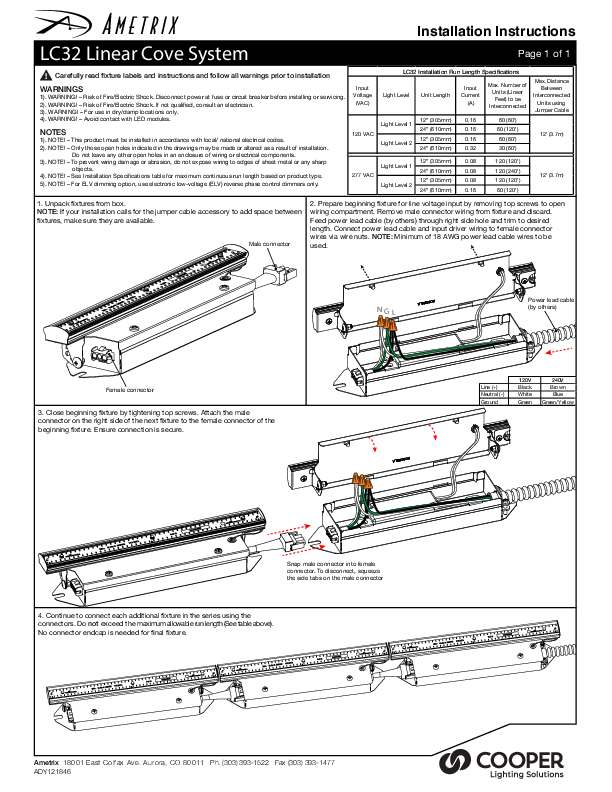
1. Unpack fixtures from box. NOTE: If your installation calls for the jumper cable accessory to add space between fixtures, make sure they are available.
Male connector

2. Prepare beginning fixture for line voltage input by removing top screws to open wiring compartment. Remove male connector wiring from fixture and discard. Feed power lead cable (by others) through right side hole and trim to desired length. Connect power lead cable and input driver wiring to female connector wires via wire nuts. NOTE: Minimum of 18 AWG power lead cable wires to be used.

NGL

Power lead cable (by others)

Female connector
3. Close beginning fixture by tightening top screws. Attach the male connector on the right side of the next fixture to the female connector of the beginning fixture. Ensure connection is secure.

Line (+) Neutral (-) Ground

120V Black White Green

240V Brown Blue Green/Yellow

Snap male connector into female connector. To disconnect, squeeze the side tabs on the male connector
4. Continue to connect each additional fixture in the series using the connectors. Do not exceed the maximum allowable run length (See table above). No connector endcap is needed for final fixture.
Ametrix 18001 East Colfax Ave. Aurora, CO 80011 Ph. (303) 393-1522 Fax (303) 393-1477 ADY121846