

Maxxter ACT-BCAM-01 HD Body Camera User Manual
Product Overview
The Maxxter ACT-BCAM-01 is a compact HD body camera designed for various recording needs. It features multiple recording resolutions, a motion sensor, and night vision capabilities.
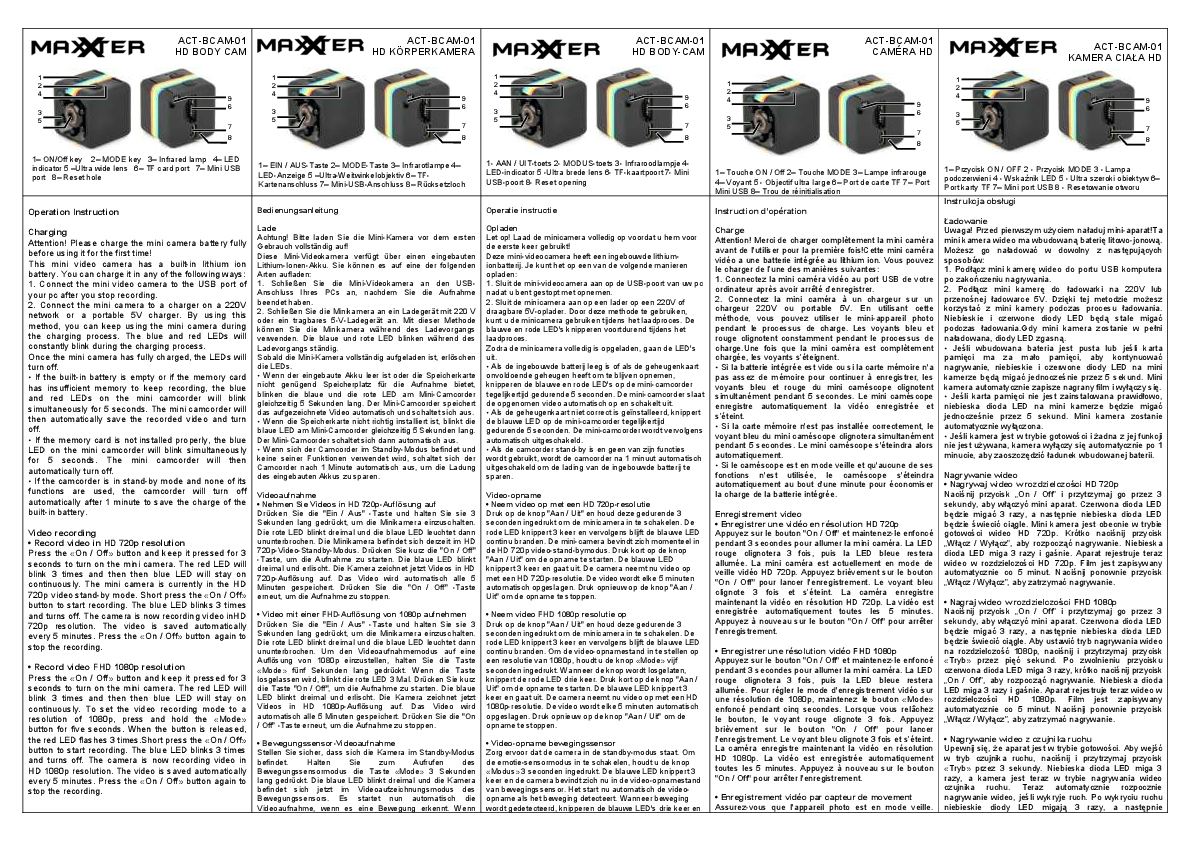
Key Components
- ON/Off Button: Powers the device on and off.
- MODE Button: Switches between recording modes and settings.
- Infrared Lamp: For low-light conditions.
- LED Indicator: Provides status information (charging, recording, etc.).
- Ultra Wide Lens: Captures a wide field of view.
- TF Card Port: For memory card storage.
- Mini USB Port: For charging and data transfer.
- Reset Hole: For resetting the device.
Operation Instructions
Charging
Attention! Please charge the mini camera battery fully before using it for the first time.
The camera has a built-in lithium-ion battery. It can be charged by:
- Connecting to a PC's USB port after stopping recording.
- Connecting to a 220V network charger or a portable 5V charger. The camera can be used while charging. Blue and red LEDs will blink during charging.
LEDs turn off when fully charged. If the battery is low or the memory card is full, the blue and red LEDs will blink simultaneously for 5 seconds, and the camera will save the video and turn off. If the memory card is not installed correctly, the blue LED will blink for 5 seconds, and the camera will turn off.
The camera will automatically turn off after 1 minute of inactivity in standby mode to save battery.
Video Recording
- HD 720p Recording:
- Press and hold the ON/Off button for 3 seconds to turn on the camera. The red LED blinks 3 times, then the blue LED stays on.
- Short press the ON/Off button to start recording. The blue LED blinks 3 times and turns off. Video is saved every 5 minutes.
- Press the ON/Off button again to stop recording.
- FHD 1080p Recording:
- Turn on the camera as described above.
- To set 1080p resolution, press and hold the MODE button for 5 seconds. The red LED flashes 3 times upon release.
- Short press the ON/Off button to start recording. The blue LED blinks 3 times and turns off. Video is saved every 5 minutes.
- Press the ON/Off button again to stop recording.
- Motion Sensor Video Recording:
- Ensure the camera is in standby mode.
- Press and hold the MODE button for 3 seconds to enter motion sensor mode. The blue LED blinks 3 times.
- The camera will automatically start recording when motion is detected. The blue LEDs blink 3 times and turn off during recording. Recording continues for 20 seconds after motion stops.
- Press and hold the MODE button for 3 seconds to exit motion sensor mode. The blue LED flashes 3 times.
Photo Mode
- Turn on the camera.
- Short press the MODE button once. The red LED lights up, indicating photo mode.
- Short press the ON/Off button to take a photo. The red LED blinks once. Photos are saved automatically at 1280x720 resolution.
Night Vision
- Hold the ON/Off button for 2 seconds to turn night vision on.
- Hold the ON/Off button for 2 seconds again to turn night vision off.
Turn Off
- Hold the ON/Off button for 6 seconds to turn off the camera.
View Files
- Turn off the camera and connect it to a computer using the included USB cable.
- The camera will be recognized as a removable drive. The blue indicator shows data transfer, and the red indicator shows battery charging.
Set Date and Time
- Connect the mini camera to a computer.
- Create a text file named
TIMERSET.txtin the main folder of the memory card. - Enter the date and time in the format
YYYYMMDDHHMMSS Y(orNto disable the timestamp). Example:20170625140003 Y. - Save the file, disconnect the camera, and turn it on. The camera will use the date from the SD card.
Specifications
- Interface: USB 2.0
- Image Sensor: Color 1.3 MP HD Sensor
- Video Format: AVI
- Video Resolution: 1080p @ 30fps (interpolated), 720p @ 30fps (native)
- Photo Resolution: 1280x720 (JPG)
- Battery: Internal rechargeable battery, 200 mAh
- Power Input: DC 5V / 800mA
- Dimensions: 22 x 22 x 22 mm (L x W x H)
- USB Cable Length: 80 cm
- Data Rate: 2.5 MB/s
- Memory: TF/Micro SDHC (Speed class 10, max. 32 GB)
- Net Weight: 10 g
Declaration of Conformity
This product is tested and complies with the essential requirements of the laws of member states concerning EMC (2014/30/EU) and RoHS (2011/65/EU). The CE declaration can be found at www.maxxter.biz.
