

ApeosPort-V 5070/4070
File info: application/pdf · 8 pages · 2.01MB
ApeosPort-V 5070/4070
ApeosPort-V 5070/4070 - Fujifilm
Before using the product, read the Instruction Manual carefully for proper use. Use the product with the power source and voltage specified. Be sure to establish ...
ApeosPort-V 5070 / 4070 - Fujifilm
2 ApeosPort-V 5070 / 4070 Print and copy at a blazing 55 sheets/minute*1.Scan in colour or monochrome with a newly developed DADF at 80 pages/minute (single-sided)*2 and 140 pages/minute (double-sided). Introducing a ne…
PDF ApeosPort-V 5070 / 4070 - Fujifilm
Extracted Text
ApeosPort-V 5070 / 4070
ApeosPort-V 5070 / 4070
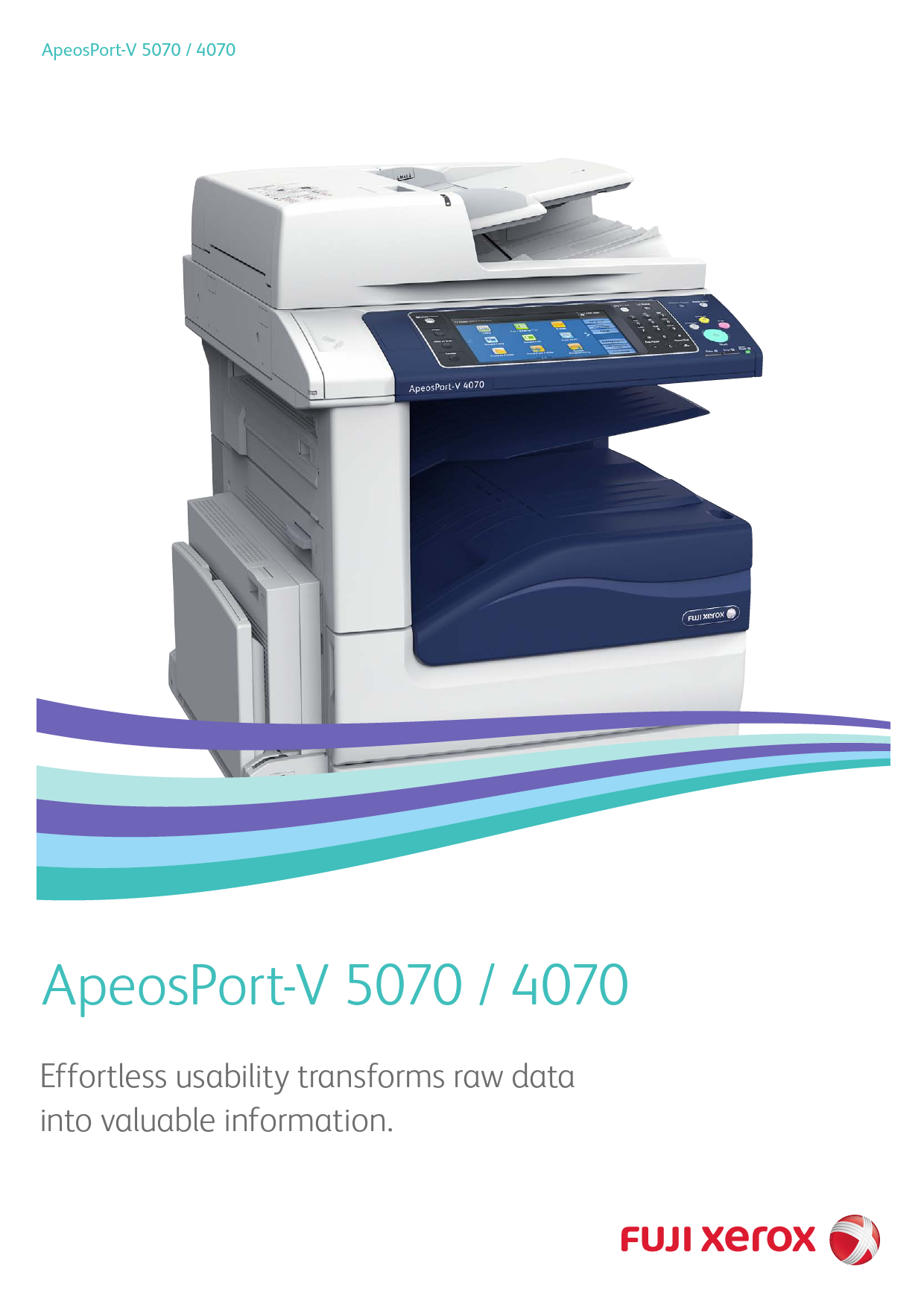
Effortless usability transforms raw data into valuable information.

Fast, highly durable and with versatile finishing options An advanced "central machine"
Print and copy at a blazing 55 sheets/minute*1. Scan in colour or monochrome with a newly developed DADF at 80 pages/minute (single-sided)*2 and 140 pages/minute (double-sided). Introducing a new multifunction device designed to make workflows more efficient, and digitising documents a breeze. After printing, produce beautiful Z-fold and Tri-fold booklets with the optional Finisher. Discover a new level of office efficiency and easy operation.
*1: A4 landscape. With ApeosPort-V 5070. 45 ppm with ApeosPort-V 4070. *2: For Fuji Xerox standard document (A4 landscape) saved in a Folder at 200 dpi.

Copy Print

B / W : 55 ppm*

Fax

Max size: A3 Super G3

Scan

Colour, B / W: 80 ppm One-pass duplex scanning: 140 ppm

* A4 landscape. With ApeosPort-V 5070. 45 ppm with ApeosPort-V 4070. *The picture shows the multifunction device with options: C3 Finisher with Booklet
Maker and Folder Unit CD1.

ApeosPort-V 5070 / 4070
2

Work wherever you are, however you like.
On the road, at home, dashing off to a client in the morning, or returning home in the evening. There's no doubt about it: Workstyles are changing. To support people in all facets of their jobs, Fuji Xerox offers comprehensive mobile computing functions and keeps everyone connected via the Cloud. We always look for ways to help bring out your best, wherever and however you work.
Working Folder

Home

Office
Expansion of the workspace

On the go

Serviced Office
Smooth, impressive client presentations
Eliminate the hassle and worry of lugging around bulky, confidential documents. Working Folder, our Cloud-based document sharing service, keeps your documents secure and your briefcase light. Use a PC or Fuji Xerox multifunction device to store documents in Working Folder, then access and view with a smart device while at your client's office. You can also print from a tablet or smartphone to multifunction devices when out of the office via wireless LAN.
ApeosPort for simplified, secure document management
Featuring excellent scalability and customisability, ApeosPort boasts a galaxy of functions that also streamline management tasks and secure confidential information. Users can now focus on work, assured of fast, easy access to shared information across the entire company.
l Link with an external authentication server l Register frequently performed tasks for smoother workflows l Encourage cost-cutting l Restrict user permissions and limit printing/copying l Log usage to monitor operations l Monitor usage with UUID and image logs
* Requires optional ApeosWare Management Suite.

3

More features, simplified operation.

Easy Fingertip Control.

The new ApeosPort-V series take advantage of technology seen in smartphones and tablets by enabling users to operate the devices intuitively, for faster and more efficient production. Four different gestures � tap, double-tap, drag and flick � can be used to scroll and switch functions smoothly and quickly.

Making multifunction devices easier to use

Simpler Operations
Operation screens can be simplified and made easier than ever to navigate by installing a free optional software application � EasyUI Solution 3. This offers individual users a simple and easy-to-use operation screen, reducing working time. * Available as a free download from our official website.

Printable from Any Machine on Demand
If your preferred device is in use, print to another one using "Server-less On-Demand Print" solution. Up to 5 devices can be linked. When both A4 and A3 multifunction devices are used in the office, A3 print jobs will be automatically reduced to A4. * Optional.

Preview finished results -- for example, N-up or two-sided -- before copying.

Utilizing "Custom Menu" allows individual user to place only buttons for functions he/she uses frequently, on the menu screen.

Register frequently used functions for one-touch copying or scanning.

Scanning is now much simpler with the automatic recognition of both the orientation and number of printed sides of the original document.

Offices Using Five or More Devices

By utilising ApeosWare Management Suite 2*, administrators can distribute print drivers, restrict use of the device to certain accounts, gather print counts, improve running efficiency, automate distribution processes and manage job logs. These applications make it a simple task to plan and manage usage of the device, while maintaining full security. * Software sold separately.
4

On a machine having fewer load on the network, login through authentication, select a stored job, and print it.

The specified machine is in use. Store data.

Transferring of data

Print in different environments

Output

The ApeosPort-V series can be shared and printing can be performed in two independent network environments. With two network ports, you can maximise the use of the multifunction device while maintaining tight security of having separate network.
* Optional. * Print function only. Supported protocol: TCP/IP (lpd, Port9100) only.

Linkage with Remote Authentication Servers

ApeosPort can access user information on an authentication server, facilitating user management without having to individually configure devices.
You can also read IC cards by installing the optional IC card reader*. * Optional.

Built-in IC Card Reader

Scan more efficiently.

Fax more effectively.

Various File Formats and Processing Supported
Users can convert scanned documents and data to numerous file formats including TIFF, JPEG, DocuWorks document, PDF and XPS*1 before you send them by email. OCR processing can assist in searching for and compressing documents to reduce their size for e-mail communications*2, and password settings can also be set. *1: Stands for XML Paper Specification *2: Optional.
Conversion to Editable Word and Excel Files
Scanned data can also be converted to files in Word or Excel format, and hardcopy documents can be converted into editable digital documents. The ApeosPort-V series devices can also convert tables and illustrations to objects suitable for reproduction with Word and Excel. * Optional. An auxiliary function that allows you to reuse materials such as text, tables, shapes, and photos on paper documents. However, accuracy will depend on the original document quality.
Save/Print Using a USB Memory
You can save scanned data directly into the USB memory, and print documents and captured records directly from the USB memory. * Optional.

Leverage of Timely Information with Paperless Fax
[Receiving] Received fax documents can be sorted into different device folders by dial number or G3ID. After viewing the thumbnails, users can choose to print only designated documents. As soon as fax documents are received in a folder, they can also be sent as a fax, printed, sent as an e-mail, transferred via FTP, and transferred via SMB automatically. [Sending] Direct Fax (sending fax directly from PC) can also be used. Sent fax documents can also be saved as PDF and sent as e-mail attachments. [Reject] Allows administrators to block incoming faxes from certain numbers and anonymous numbers.
Reduced communication costs compared to regular phone lines
Internet fax*1: Send scanned documents attached to e-mails. Direct fax: Send faxes without being routed through an SMTP server. Real time communication: Directly connect IP Fax (SIP) devices.*2 *1:Internet fax requires a working e-mail account. Maximum attachment size
varies depending on e-mail account. *2:Requires optional IP Fax (SIP) kit. This kit supports multifunction devices
that are JT-T 3.2 compatible and equipped with an IP Fax function offered by Fuji Xerox or Ricoh Company, Ltd.
Dependability to ensure error-free faxing
Re-entry of recipients Recipient confirmation display Confirm multiple recipients, delete unwanted recipients Prohibit sending to recipients not in the phonebook Manually cancel direct fax Manual redial

Mobile and Cloud applications
Google Cloud PrintTM
ApeosPort-V Series Work with Google Cloud PrintTM, so you can print on the go from your smartphone or computer using Google Cloud Print enabled apps. *iOS and AndroidTM devices as well as PCs can be used to output via Google
Cloud PrintTM. * Google Cloud PrintTM is a web-based print service provided by Google Inc.
Print Utility for iOS / Android
Scan documents and save to iOS or Android devices via wireless LAN, and output web pages and pictures from the devices. *Print Utility for iOS and Print Utility for Android can be downloaded for free
from App Store and Google PlayTM, respectively. *DocuWorks documents and PDF documents can also be output by linking
with DocuWorks Viewer Light for iPhone/iPad.

AirPrint
Print directly from an iOS device via wireless LAN. This eliminates the need to open data on a PC, download special software, or install a dedicated driver. * AirPrint is a standard print function included in iOS on iPhones and iPads.
Working Folder
Store scanned documents directly to Working Folder, automatically upload received faxes and send upload notifications by e-mail. Stored documents can be viewed and edited on PCs or smart devices using a web browser or DocuWorks. The enhanced security and management functions allow all information to be securely shared.
Working Folder

Scan Print

Wi-Fi router

With a smart device
V iew, register and download documents Upload pictures and videos

With a web browser or DocuWorks Desk Search, drag and drop

With a multifunction device
Auto-register received faxes Resister scanned documents Download and print

*This function requires the Woking Folder Service contract.

5

Options
Offering further finishing outputs including "Z Fold Half sheet" and "Tri-fold" with the new C3 Finisher

Stapling
Stapling multiple pages documents, such as meeting materials into sets, is available.

Punch
A hole punch process can be used for filing documents in binders.

Saddle Staple
This Single Fold and stapling process is ideal for creating catalogues and booklets.

Z Fold Half sheet*
Z Fold Half sheet is a useful method to combine A3 documents into A4 size.

* Folder Unit CD1 is required.
Finisher B1 + Booklet Maker Unit for Finisher-B1

C3 Finisher

C3 Finisher with Booklet Maker

Tri-fold*
The C-fold is useful when creating materials enclosed in envelopes.
C3 Finisher with Booklet Maker + Folder Unit CD1

Stapling thickness Punch

Saddle Staple

Single Fold

Tri-fold

Z Fold Half sheet

Tray

Output tray

capacity*8 Finisher tray

50 sheets 2/4 hole punch*1 or 2/3 hole punch*2
*3 *3
-- -- -- 2000 sheets

50 or 65 sheets*4 2/4 hole punch*5 or 2/3 hole punch*6 -- -- -- -- 500 sheets 3000 sheets

50 or 65 sheets*4 2/4 hole punch*5 or 2/3 hole punch*6
-- -- 500 sheets 1500 sheets

50 or 65 sheets*4 2/4 hole punch*5 or 2/3 hole punch*6
*7 *7 500 sheets 1500 sheets

*1: 2/4 Hole Punch Kit for Finisher-B1 is required. *2: US 2/3 Hole Punch Kit for Finisher-B1 is required. *3: Booklet Maker Unit for Finisher-B1 is required. For the features of Saddle Staple
or Single Fold, Finisher B1 does not perform folding but perform scoring. *4: C3 Finisher Staple Unit 65 sheets is required.

*5: Punch Unit 2H/4H is required. *6: Punch Unit US 2H/3H is required. *7: Folder Unit CD1 is required. *8: 64 gsm paper. Note: C3 Finisher or C3 Finisher with Booklet Maker requires Transport Unit H2.

Environmentally responsible

Smart energy saving
The new ApeosPort-V series uses Smart Energy Management to power only the functions requested by users. This reduces power consumption and CO2 emissions. To minimise noise, the scanning and output devices do not generate noise when not operating.

When scanning or sending fax
Power applied
No power applied

Fast Wake-up of Control Panel
This activates the control panel in about 3 seconds after pressing Power Save button -- another smart way to ensure eco-friendly operation.

Visualise eco-friendly operation
Check the degree of eco-friendliness when printing via a five-step scale. The more leaves shown, the more eco-friendly the operation. * R equires Document Monitor to be installed on PC. (Software included on
bundled DVD.)

6

Specifications of ApeosPort-V 5070 / 4070

Basic Specifications/Copy Function

Item

ApeosPort-V 5070

ApeosPort-V 4070

Type

Console

Memory capacity Hard disk capacity*1

4 GB (Max. 4 GB) 160 GB or larger (Used space : 128 GB)

Scan Resolution

600 � 600 dpi

Printing Resolution

2400 dpi or equivalent x 600 dpi

Warm-up Time

30 seconds or less. 30 seconds or less if the main power is on (At room temperature 23�C)

Original Size

Maximum of 297 x 432 mm (A3, 11 x 17") for both Sheet and Book

Paper Size Max.

A3, 11 x 17"

Min.

A5 [Postcard (100 x 148mm), Quadrate NO. 3 when using Bypass Tray]

Image loss Lead Edge 4.0 mm, Trail Edge 4.0 mm, Right & Left Edges 4.0 mm width

Paper Weight*2

Tray 1

60 to 105 gsm

Tray 2, 3, 4 60 to 216 gsm

Bypass Tray 60 to 216 gsm

First Copy Output Time 3.1 sec. (A4 LEF)

Continuous A4 LEF/B5 LEF 55 ppm

Copy Speed*3 A4/B5

33 ppm

45 ppm 32 ppm

B4

33 ppm

29 ppm

A3

28 ppm

24 ppm

Paper Tray Standard Capacity*4 Optional

500 sheets x 2-tray + Bypass Tray 95 sheets
Two Tray Module : 500 sheets x 2-tray Tandem Tray Module : 870 + 1130 sheets HCF B1 : 2000 sheets

Max. Output Tray Capacity*5*6

5090 sheets [Tandem Tray Module + HCF B1] 500 sheets (A4 LEF)

Power Supply

AC220-240 V +/- 10 %, 10 A, 50 / 60 Hz common

Maximum Power Consumption

2.2 kW or less (AC220 V +/- 10 %) 2.4 kW or less (AC240 V +/- 10 %) Sleep Mode : 2.0 W or less Low Power Mode*7 : 58 W or less

Dimensions Weight*8

W 640 x D 699 x H 1136 mm (With Two Tray Module)
81 kg 105 kg (With Two Tray Module) 107 kg (With FAX, Two Tray Module)

*1: The Storage Hard disk capacity is not totally available for customers. *2: It is encouraged to use paper recommended by Fuji Xerox. Printing may not be performed correctly depending on the use conditions. *3: The speed may be reduced due to the image quality adjustment.The performance may be reduced depending on the paper type. *4: 80 gsm paper. *5: 64 gsm paper. *6: When the optional Exit 2 Tray is used: 250 sheets(Center tray, A4 LEF), 250 sheets(Exit 2 Tray, A4 LEF) *7: Low Power Mode is not set at the time of shipment from the factory. *8: Excluding Toner Cartridge.

Scan Function

Item Type Scan Resolution Scan Speed*1
Interface Standard Optional

Description Colour Scanner 600 x 600 dpi, 400 x 400 dpi, 300 x 300 dpi, 200 x 200 dpi B / W : 80 ppm, Colour : 80 ppm (1 pass, 2 sided scanning B / W : 140 ppm, Colour : 140 ppm) [Fuji Xerox Standard Paper (A4 LEF), 200dpi, to Folder.] Ethernet 100BASE-TX / 10BASE-T Ethernet 1000BASE-T

*1: The scanning speed varies depending on the documents.

Fax Function (Optional)

Item Original Size Recording Paper Size
Transmission Time Transmission Mode Applicable Lines

Description
Max. : A3, 11 x 17", Long document (Longest 600 mm)
Max. : A3, 11 x 17" Min. : A5 2 seconds and more but fewer than 3 seconds*1
ITU-T G3 Telephone subscriber line, PBX, Fax communication (PSTN) , Max. 3 port*2 (G3-3port)

*1: When A4 size document with approximately 700 characters is transmitted in standard image-quality (8 x 3.85 lines / mm) and in high-speed mode (28.8 kbps or faster, JBIG). Only indicates the time for transmitting the image information and does not include the communication control time. The total communication time will vary depending on the contents of the document, the type of machine receiving the fax, and line condition. *2: No.of FAX lines is up to 3 ports. Port refers to number of channels for FAX.

Duplex Automatic Document Feeder

Item Original Size
Paper Weight Capacity*2 Feeding Speed

ApeosPort-V 5070

ApeosPort-V 4070

Max. : A3, 11 x 17" Min. : A5*1

38 to 128 gsm (In Duplex : 50 to 128 gsm)

130 sheets

55 ppm (A4 LEF Simplex)

46 ppm (A4 LEF Simplex)

*1: The minimum custom size is 125 x 85 mm. *2: 64 gsm paper.

Side Tray (Optional)

Item Paper Capacity*1 Dimensions

Description 100 sheets W 274 x D 469 x H 128 mm

*1: 64 gsm paper.

Print Function

Item

Type Continuous Print Speed*1

Printing Resolution

Page

Standard

Description Optional Language

Description Built-in type Same as the Basic Specifications / Copy Function 600 x 600 dpi, 1200 x 1200 dpi PCL5, PCL6 Adobe� PostScript� 3TM

Supported Operating System*2
Interface

PLC6-Driver Windows Server 2003 (32bit), Windows Vista (32bit), (Standard) Windows Server 2008 (32bit), Windows 7 (32bit), Windows 8 (32bit),
Windows 8.1 (32bit), Windows 10 (32bit), Windows Server 2003 (64bit), Windows Vista (64bit), Windows Server 2008 (64bit), Windows 7 (64bit), Windows Server 2008 R2 (64bit), Windows 8 (64bit), Windows Server 2012 (64bit), Windows 8.1 (64bit), Windows Server 2012 R2 (64bit), Windows 10 (64bit), Windows Server 2016 (64bit), Windows Server 2019 (64bit)

Mac OS OS X 10.14/10.13/10.12/10.11/10.10/10.9/10.8

X-Driver Mac OS X 10.7/10.6/10.5

(Standard)

Adobe�

Windows Server 2003 (32bit), Windows Vista (32bit),

PostScript� 3TM Windows Server 2008 (32bit), Windows 7 (32bit), Windows 8 (32bit),

Driver

Windows 8.1 (32bit), Windows 10 (32bit), Windows Server 2003 (64bit),

(Optional) Windows Vista (64bit), Windows Server 2008 (64bit), Windows 7 (64bit),

Windows Server 2008 R2 (64bit), Windows 8 (64bit),

Windows Server 2012 (64bit), Windows 8.1 (64bit),

Windows Server 2012 R2 (64bit), Windows 10 (64bit),

Windows Server 2016 (64bit), Windows Server 2019 (64bit)

OS X 10.14/10.13/10.12/10.11/10.10/10.9/10.8, Mac OS X 10.7/10.6

Standard Ethernet 100BASE-TX / 10BASE-T, USB2.0

Optional Ethernet 1000BASE-T, Bidirectional Parallel (IEEE1284-B)

*1: The speed may be reduced due to the image quality adjustment. *2: Please refer our official website for the latest supported OS.

HCF B1 (Optional)
Item Paper Size Paper Weight Dimensions Weight

Description A4 LEF, Letter LEF, B5 LEF 56 to 216 gsm W 389 x D 610 x H 380 mm 29 kg

Folder Unit CD1 (Optional)

Item Folding
Paper Capacity*1

Z Fold Half Sheet Tri-fold
Tri-fold

Description
Paper Size : A3, 11 x 17", B4 Paper Weight : 60 to 90 gsm
Paper Size : A4, Letter Paper Weight : 60 to 90 gsm 40 sheets*2

Power Supply*3 Maximum Power Consumption Dimensions Weight

AC220-240 V +/- 10 %, 0.6 A, 50 / 60 Hz common 120 W or less
W 232 x D 726 x H 991 mm 53 kg

Note: Optional for C3 Finisher and C3 Finisher with Booklet Maker. *1: 64 gsm paper. *2: Paper capacity may be less than 40 sheets depending on the paper type. *3: Power supply separate from the main unit is required.

7

Specifications of ApeosPort-V 5070 / 4070

Finisher-B1 (Optional)

Item

Description

Type

Sort (Offset available) / Stack (Offset available)

Paper Size*1 Output Tray Max. : A3, 11 x 17" Min. : B5 LEF

Paper Weight

Output Tray 60 to 216 gsm*2

Paper Capacity*3

Output Tray [Without Stapling] A4 : 2000 sheets, B4 or larger : 1000 sheets, Mixed Size Stacking*4 : 300 sheets [With Stapling] A4 : 100 sets or 1000 sheets*5 , B4 or larger : 75 sets or 750 sheets [With Booklet Finisher]*6 50 sets or 600 sheets [With Fold]*6 500 sheets

Staple

Capacity 50 sheets (90 gsm or less)

Paper Size Max. : A3, 11 x 17" Min. : B5 LEF

Punch*7

Position
Number of Holes
Paper Size
Paper Weight

Single stapling, Dual stapling 2-hole / 4-hole punch or 2-hole / 3-hole punch (US Specifications)
A3, 11 x 17", B4, A4*8 , A4 LEF, Letter*8 , Letter LEF, B5 LEF 60 to 200 gsm*9

Saddle Staple / Single Crease*6

Capacity Paper Size
Paper Weight

Dimensions*10

Saddle Staple : 15 sheets, Scoring : 5 sheets Max. : A3, 11 x 17" Min. : A4, Letter Saddle Staple : 60 to 80 gsm, Scoring : 60 to 105 gsm
W 643 x D 552 x H 942 mm W 643 x D 597 x H 1057 mm (With Booklet Finisher)

Weight

28 kg 37 kg (With Booklet Finisher)

*1: Paper less than B5 size is delivered from the Center Tray. *2: 56 to 216 gsm when the optional High Capacity Feeder is used. *3: 64 gsm paper. *4: When larger size sheets are stacked on top of smaller size sheets. *5: 75 sets or 750 sheets with dual stapling. *6: The Booklet Finishing function requires the Booklet Maker Unit for Finisher-B1. After a job with the Booklet Finishing function specified has been output, the next job may not be delivered until the sheets are removed from the output tray. Also, if larger size sheets are stacked on top of smaller size sheets after a job with the Booklet Finishing function specified has been run, the next job may not be delivered until the sheets are removed from the output tray. *7: Optional 2 / 4 Hole Punch kit or optional Finisher B1 2 / 3 Hole Punch kit (US Specifications) is required. *8: 3-hole punch is not applicable. *9: 56 to 200 gsm when the optional HCF B1 is used. *10: Inner connector within the body is excluded.

C3 Finisher / C3 Finisher with Booklet Maker (Optional)

Item

C3 Finisher

C3 Finisher with Booklet Maker

Type

Output Tray Sort / Stack

Finisher Tray

Sort (Offset available) / Stack (Offset available)

Booklet Tray -

Sort / Stack

Paper Size Output Tray Max. : A3, 11 x 17" Min. : Postcard (100 x 148mm)

Finisher Tray

Max. : A3, 11 x 17" Min. : B5

Paper Weight

Booklet Tray -
Output Tray 60 to 216 gsm*1 Finisher 60 to 216 gsm*1 Tray Booklet Tray -

Max. : A3, 11 x 17" Min. : B5
60 to 105 gsm*2

Paper Capacity*3

Output Tray 500 sheets (A4)

Finisher Tray

[Without Stapling] A4 : 3000 sheets B4 or larger : 1500 sheets Mixed Size Stacking*3 : 300 sheets [With Stapling] A4 : 200 sets, or 3000 sheets B4 or larger : 100 sets, or 1500 sheets Mixed Size Stacking*3 : 70 sets or 200 sheets

Booklet Tray -

[Without Stapling] A4 : 1500 sheets B4 or larger : 1500 sheets Mixed Size Stacking*4 : 300 sheets [With Stapling] A4 : 200 sets, or 1500 sheets B4 or larger : 100 sets, or 1500 sheets Mixed Size Stacking*4 : 70 sets or 200 sheets
20 sets*5

Staple

Capacity 50 sheets (90 gsm or less*6)

Paper Size Max. : A3, 11 x 17" Min. : B5 LEF

Punch*7
Booklet Finishing

Position Number of Holes Paper Size
Paper Weight Capacity

Single stapling, Dual stapling 2-hole / 4-hole punch or 2-hole / 3-hole punch (US Specifications)

A3, 11 x 17", B4, A4*8 , A4 LEF, Letter*8 , Letter LEF, B5 LEF, 7.25 x 10.5" (184 x 267 mm) , 8 x 10" (203 x 254 mm) , 16K (194 x 267 mm) , CoversA4 (223 x 297 mm) , 9 x 11" (229 x 279 mm) , 215 x 315 mm, 8.5 x 13" (216 x 330 mm) , Legal, 11 x 15" (279 x 381 mm) , 8K (267 x 388 mm)
60 to 200 gsm*9

-

Saddle Staple : 16 sheets*10

Middle-Fold : 5 sheets

Single Fold : 1 sheet

Paper Size -

Max. : A3, 11 x 17" Min. : B5

Paper Weight
Dimensions*11

-
W 730 x D 589 x H 1056 mm W 965 x D 726 x H 1056 mm (When Folder Unit CD1 is installed)

Saddle Staple : 60 to 105 gsm Middle-Fold : 60 to 105 gsm Single Fold : 60 to 105 gsm
W 790 x D 589 x H 1056 mm W 1025 x D 726 x H 1056 mm (When Folder Unit CD1 is installed)

Weight

44 kg

61 kg

98 kg (When Folder Unit CD1 is installed) 115 kg (When Folder Unit CD1 is installed)

*1: 56 to 216 gsm when the optional HCF B1 is used. *2: Cover sheets can be up to 216 gsm. *3: 64 gsm paper. *4: When larger size sheets are stacked on top of smaller size sheets. *5: When the output paper size is the same. *6: Up to 65 sheets can be stapled when the C3 Finisher Staple Unit 65 Sheets is installed. However, depending on the paper type, incorrect stapling such as uneven edge alignment of sets may occur. *7: Optional. *8: 3-hole punch is not applicable. *9: 56 to 200 gsm when the optional HCF B1 is used. *10: Saddle Staple capacity varies depending on how heavy the cover is. Booklet may not be tightly closed depending on the size or type of the paper. *11: Inner connector within the body is excluded.

Notes 1) If the storage media (such as hard disk drives) of the base unit fail, loss of received data, accumulated data,
registered setting data, etc. may occur. In no event shall Fuji Xerox be liable for any damages whatsoever arising from loss of data. 2) Functional spare parts will be available for at least 7 years after the product is no longer manufactured. 3) The available model varies depending on the country/region. Please ask the sales representatves for details.
All product names and company names mentioned in this brochure are trademarks or registered trademarks of their respective companies. The product specifications, appearance and other details in this brochure are subject to change without notice for improvements.
Reproduction Prohibitions Please note that reproduction of the following is prohibited by law : Domestic and foreign currencies, government-issued securities, and national bonds and local bond certificates. Unused postage stamps, post cards, etc. Certificate stamps stipulated by law. Reproducing works forming the subject matter of copyright (literary works, musical works, paintings, engravings, maps, cinematographic works, drawings, photographic works, etc.) is not permitted unless the reproduction is for the purpose of personal use, family use or other similar uses within a limited circle.
For more information or detailed product specification, please call or visit us at

For Your Safety Before using the product, read the Instruction Manual carefully for proper use. Use the product with the power source and voltage specified. Be sure to establish ground connection. Otherwise, electronic shock may result in the case of a failure or short circuit.

79 Carlton Gore Road, Newmarket, Auckland 1023, New Zealand Tel. 0800 4 XEROX (0800 493769)
https://www.fujixerox.co.nz/

Xerox, Xerox and Design, as well as Fuji Xerox and Design are registered trademarks or trademarks of Xerox Corporation in Japan and / or other countries.

The information is as of April, 2019. PIC-0064 NZ (1411-R2)