

HVSJ A869 RGB Marquee Game Mouse
An overview of the HVSJ A869, a macro-definition programmable RGB gaming mouse designed for enhanced gaming performance.
Product Overview
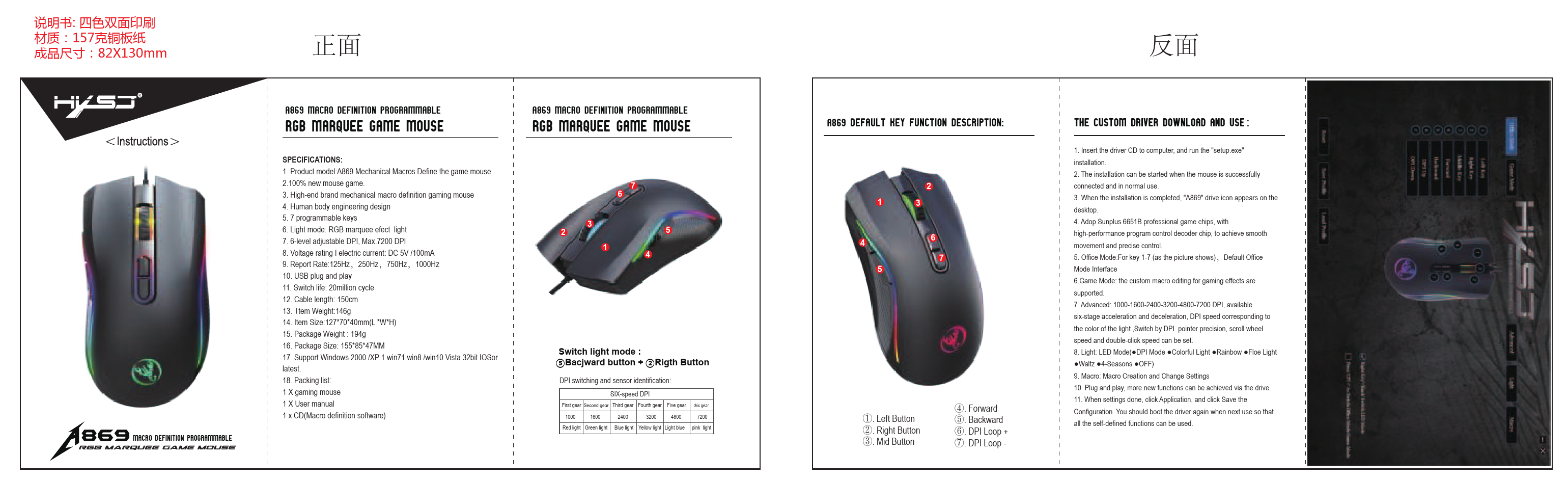
The HVSJ A869 is a high-end gaming mouse featuring mechanical macro definition and customizable RGB lighting effects. Designed with an ergonomic shape for comfort during extended gaming sessions, it offers advanced control and responsiveness.
Specifications
| Specification | Details |
|---|---|
| Product Model | A869 |
| Brand | HVSJ |
| Type | Mechanical Macros Define the game mouse |
| Programmable Keys | 7 |
| Light Mode | RGB marquee effect light |
| Adjustable DPI | 6-level adjustable, Max. 7200 DPI |
| Voltage/Current | DC 5V / 100mA |
| Report Rate | 125Hz, 250Hz, 750Hz, 1000Hz |
| Switch Life | 20 million cycles |
| Cable Length | 150 cm |
| Item Weight | 146g |
| Item Size (L*W*H) | 127*70*40mm |
| Package Weight | 194g |
| Package Size | 155*85*47mm |
| Operating System Support | Windows 2000/XP/Win7/Win8/Win10 Vista 32bit, macOS (latest) |
| Connectivity | USB Plug and Play |
Key Features
- High-end brand mechanical macro definition gaming mouse.
- Human body engineering design for comfort.
- 7 programmable keys for customized commands.
- RGB marquee effect lighting for a dynamic visual experience.
- 6-level adjustable DPI, up to a maximum of 7200 DPI for precise control.
- USB plug and play for easy setup.
- Long switch lifespan of 20 million cycles.
Custom Driver and Software
To unlock the full potential of the A869 mouse, a custom driver is available:
- Insert the provided driver CD into the computer and run "setup.exe" to begin installation.
- Ensure the mouse is successfully connected and functioning normally before starting the installation.
- Upon successful installation, an "A869" drive icon will appear on the desktop.
- The mouse utilizes the Sunplus 6651B professional gaming chip with a high-performance program control decoder chip for smooth movement and precise control.
- Office Mode: Provides a default interface for keys 1-7.
- Game Mode: Supports custom macro editing for enhanced gaming effects.
- Advanced Settings: Allows adjustment of DPI across six stages (1000-1600-2400-3200-4800-7200 DPI). Users can configure acceleration/deceleration, DPI speed corresponding to light colors, pointer precision, scroll wheel speed, and double-click speed.
- Light Settings: Offers various LED modes including DPI Mode, Colorful Light, Rainbow, Flow Light, 4-Seasons, and OFF.
- Macro Settings: Enables macro creation and modification.
- The mouse supports plug and play, with additional functions accessible through the driver.
- After configuring settings, click "Application" and then "Save Configuration". The driver needs to be restarted on subsequent uses to apply all custom functions.
Package Contents
- 1 x Gaming Mouse (A869)
- 1 x User Manual
- 1 x CD (Macro definition software)
