

JVC HA-A17T True Wireless Earbuds
Model: HA-A17T
Website: us.jvc.com
Overview
WARNING
Hearing Comfort and Well-Being
- Do not play your personal audio at a high volume. Hearing experts advise against continuous extended play.
- If you experience a ringing in your ears, reduce volume or discontinue use.
Traffic Safety
- Do not use while operating a motorized vehicle. It may create a traffic hazard and is illegal in many areas.
- Use extreme caution or temporarily discontinue use in potentially hazardous situations.
- Do not turn up the volume so high that you cannot hear sound around you.
CAUTION
To reduce the risk of electrical shocks, fire, etc.:
- Do not disassemble or modify the unit.
- Do not allow flammable, water, or metallic objects to enter the unit.
For your safety...
- Stop using the headphones if they are causing great discomfort or irritation on the skin and ears. They may damage your skin and cause rash or inflammation.
- If an ear piece or other parts of the headphone become lodged in your ear, be careful not to push it deep into the ear canal and seek skilled medical assistance to remove.
- Store the ear pieces in a safe place where children cannot reach them to avoid risk of a possible accident or hazard such as swallowing them.
- In drier air conditions such as winter, you may feel some static shock when using the headphones.
- Attach the ear pieces firmly when replacing them; failure to do so may result in the ear pieces getting lodged in your ear canal when removed, thus becoming a possible health hazard.
Precaution for use
- For replacement of ear pieces, please consult your local dealer.
NOTE
If the system does not work correctly, charge the system to reset it.
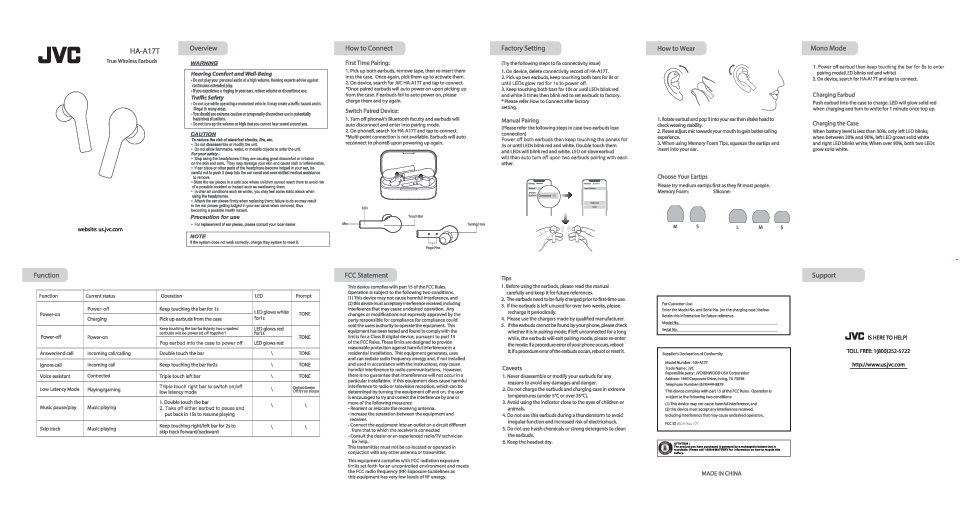
Diagram Description: A line drawing shows two JVC HA-A17T true wireless earbuds and their charging case. Each earbud has an LED indicator, a microphone, and a touch bar. The charging case is depicted open with the earbuds inside, showing pogo pins for charging.
How to Connect
First Time Pairing
- Pick up both earbuds, remove tape, then re-insert them into the case. Once again, pick them up to activate them.
- On your device, search for JVC HA-A17T and tap to connect.
*Once paired, earbuds will auto power on upon picking up from the case. If earbuds fail to auto power on, please charge them and try again.
Switch Paired Device
- Turn off your phone's Bluetooth and the earbuds will auto disconnect and enter pairing mode.
- On phone B, search for HA-A17T and tap to connect.
*Multi-point connection is not available. Earbuds will auto reconnect to phone B upon powering up again.
Diagram Description: A sequence of smartphone screen captures illustrates the Bluetooth pairing process. It shows searching for devices, selecting "JVC HA-A17T", and a "Connected" status, along with an option to "Forget Device". Below this, two earbuds are shown with connecting lines, indicating pairing.
Factory Setting
(Try the following steps to fix connectivity issues)
- On your device, delete the connectivity record of HA-A17T.
- Pick up two earbuds, keep touching both bars for 8s or until LEDs glow red for 1s to power off.
- Keep touching both bars for 10s or until LEDs blink red and white 3 times, then blink red to set earbuds to factory setting.
* Please refer to "How to Connect" after factory setting.
Manual Pairing
(Please refer the following steps in case two earbuds lose connection)
- Power off both earbuds, then keep touching the panels for 5s or until LEDs blink red and white.
- Double touch them, and the LEDs will blink red and white. The LED on the slave earbud will then auto turn off upon two earbuds pairing with each other.
How to Wear
- Rotate the earbud and pop it into your ear, then shake your head to check wearing stability.
- Please adjust the mic towards your mouth to gain better calling experience.
- When using Memory Foam Tips, squeeze the eartips and insert into your ear.
Diagram Description: Illustrations show how to correctly insert an earbud into the ear and adjust its position for optimal microphone placement during calls.
Choose Your Eartips
Please try medium eartips first as they fit most people.
Memory Foam: [Eartip sizes L, M, S shown]
Silicone: [Eartip sizes L, M, S shown]
Diagram Description: Images display three different sizes (Large, Medium, Small) of silicone eartips, labeled L, M, and S.
Mono Mode
- Power off the earbud, then keep touching the bar for 5s to enter pairing mode (LED blinks red and white).
- On your device, search for HA-A17T and tap to connect.
Charging Earbud
Push the earbud into the case to charge. The LED will glow solid red when charging and turn to white for 1 minute once fully charged.
Charging the Case
When battery level is less than 30%, only the left LED blinks. When between 30% and 90%, the left LED grows solid white and the right LED blinks white. When over 90%, both LEDs grow solid white.
Function
| Function | Current status | Operation | LED | Prompt |
|---|---|---|---|---|
| Power-on | Power-off | Keep touching the bar for 1s | LED glows white for 1s | TONE |
| Charging | Pick up earbuds from the case | LED glows red for 1s | TONE | |
| Power-off | Power-on | Keep touching the bar for 8s (only two unpaired earbuds will be powered off together) | LED glows red for 1s | TONE |
| Pop earbud into the case to power off | LED glows red | |||
| Answer/end call | Incoming call/calling | Double touch the bar | TONE | |
| Ignore call | Incoming call | Keep touching the bar for 2s | TONE | |
| Voice assistant | Connected | Triple touch left bar | TONE | |
| Low Latency Mode | Playing/gaming | Triple touch right bar to switch on/off low latency mode | On: 2 beeps Off: 3 beeps | |
| Music pause/play | Music playing | 1. Double touch the bar 2. Take off either earbud to pause and put back in 15s to resume playing | ||
| Skip track | Music playing | Keep touching right/left bar for 2s to skip track forward/backward |
FCC Statement
This device complies with part 15 of the FCC Rules. Operation is subject to the following two conditions:
- This device may not cause harmful interference, and
- This device must accept any interference received, including interference that may cause undesired operation.
Any changes or modifications not expressly approved by the party responsible for compliance could void the user's authority to operate the equipment.
This equipment has been tested and found to comply with the limits for a Class B digital device, pursuant to part 15 of the FCC Rules. These limits are designed to provide reasonable protection against harmful interference in a residential installation.
This equipment generates, uses, and can radiate radio frequency energy and, if not installed and used in accordance with the instructions, may cause harmful interference to radio communications. However, there is no guarantee that interference will not occur in a particular installation. If this equipment does cause harmful interference to radio or television reception, which can be determined by turning the equipment off and on, the user is encouraged to try and correct the interference by one or more of the following measures:
- Reorient or relocate the receiving antenna.
- Increase the separation between the equipment and receiver.
- Connect the equipment into an outlet on a circuit different from that to which the receiver is connected.
- Consult the dealer or an experienced radio/TV technician for help.
This transmitter must not be co-located or operated in conjunction with any other antenna or transmitter.
This equipment complies with FCC radiation exposure limits set forth for an uncontrolled environment and meets the FCC radio frequency (RF) Exposure Guidelines as this equipment has very low levels of RF energy.
FCC ID: RDR-HAA17T
Tips
- Before using the earbuds, please read the manual carefully and keep it for future references.
- The earbuds need to be fully charged prior to first-time use.
- If the earbuds are left unused for over two weeks, please recharge them periodically.
- Please use chargers made by a qualified manufacturer.
- If the earbuds cannot be found by your phone, please check whether they are in pairing mode. If left unconnected for a long while, the earbuds will exit pairing mode; please re-enter the mode. If a procedure error of your phone occurs, reboot it; if a procedure error of the earbuds occurs, reboot or reset them.
Caveats
- Never disassemble or modify your earbuds for any reasons to avoid any damages and danger.
- Do not charge the earbuds and charging case in extreme temperatures (under 5°C or over 35°C).
- Avoid using the indicator close to the eyes of children or animals.
- Do not use these earbuds during a thunderstorm to avoid irregular function and increased risk of electric shock.
- Do not use harsh chemicals or strong detergents to clean the earbuds.
- Keep the headset dry.
Supplier's Declaration of Conformity
Model Number: HA-A17T
Trade Name: JVC
Responsible party: JVCKENWOOD USA Corporation
Address: 1440 Corporate Drive, Irving, TX 75038
Telephone Number: (678)449-8879
This device complies with part 15 of the FCC Rules. Operation is subject to the following two conditions:
- This device may not cause harmful interference, and
- This device must accept any interference received, including interference that may cause undesired operation.
FCC ID: RDR-HAA17T
ATTENTION: The product you have purchased is powered by a rechargeable battery that is recyclable. Please call 1-800-8-BATTERY for information on how to recycle this battery.
MADE IN CHINA
Support
For Customer Use:
Enter the Model No. and Serial No. (on the charging case) below. Retain this information for future reference.
Model No.: [Placeholder for Model No.]
Serial No.: [Placeholder for Serial No.]
JVC IS HERE TO HELP!
TOLL FREE: 1(800)252-5722
Website: http://www.us.jvc.com
