

Power Pod™ Portable Charger
User Guide and Specifications
Introduction
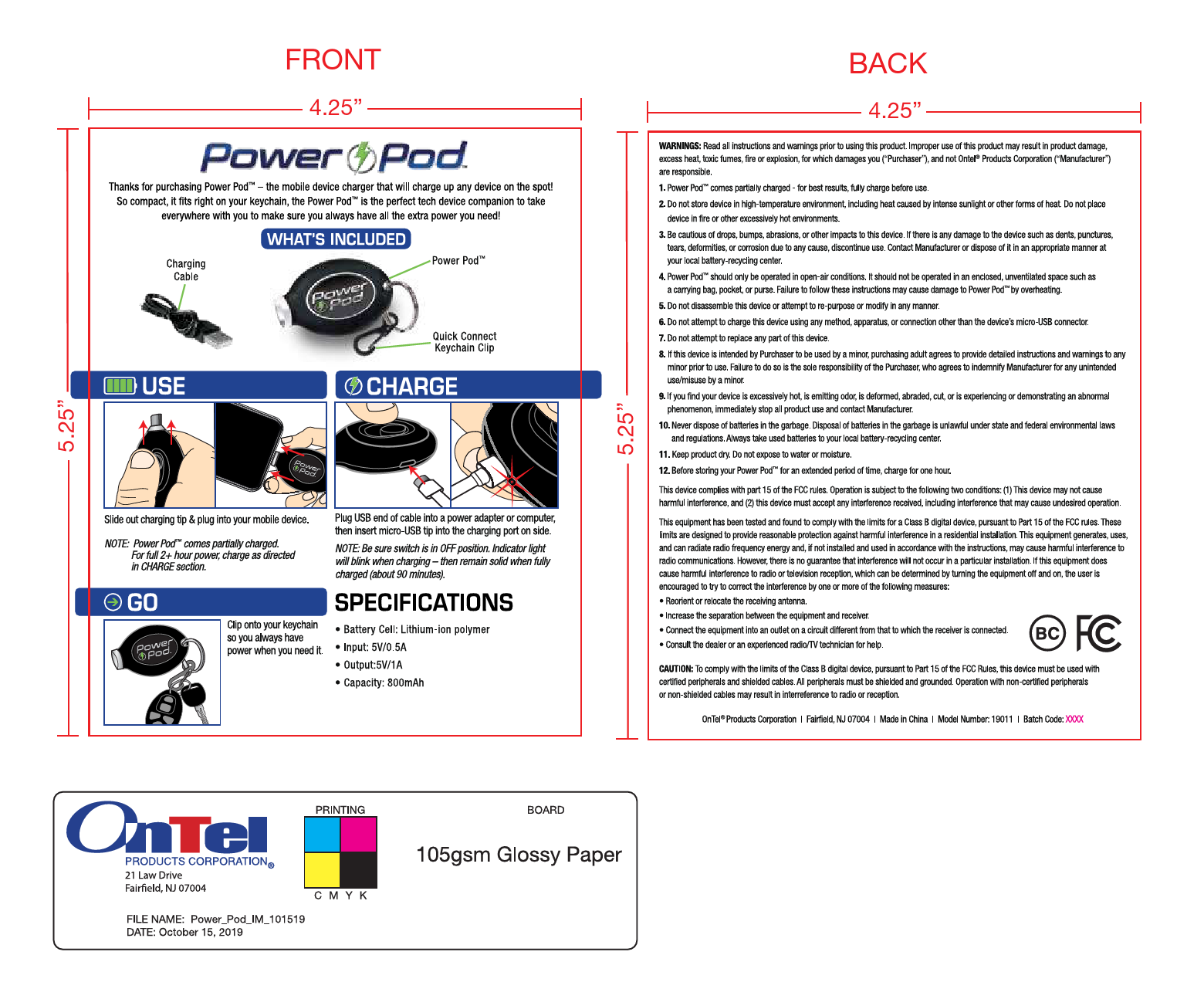
Thanks for purchasing the Power Pod™ – the mobile device charger that will charge up any device on the spot! So compact, it fits right on your keychain, the Power Pod™ is the perfect tech device companion to take everywhere with you to make sure you always have all the extra power you need!
What's Included
The Power Pod™ package includes:
- Charging Cable
- Power Pod™ device
- Quick Connect Keychain Clip
How to Use
[Step 1: Connect] Slide out the charging tip and plug it into your mobile device.
Note: The Power Pod™ comes partially charged. For a full 2+ hour charge, follow the instructions in the "How to Charge" section.
How to Charge
[Step 1: Connect Cable] Plug the USB end of the charging cable into a power adapter or computer.
[Step 2: Insert Tip] Insert the micro-USB tip into the charging port on the side of the Power Pod™.
Note: Ensure the switch is in the OFF position. The indicator light will blink when charging and remain solid when fully charged (approximately 90 minutes).
Go
Clip the Power Pod™ onto your keychain so you always have power when you need it.
Specifications
- Battery Cell: Lithium-ion polymer
- Input: 5V/0.5A
- Output: 5V/1A
- Capacity: 800mAh
Warnings
Read all instructions and warnings prior to using this product. Improper use of this product may result in product damage, excess heat, toxic fumes, fire or explosion, for which damages you ("Purchaser"), and not Ontel® Products Corporation ("Manufacturer") are responsible.
- Power Pod™ comes partially charged - for best results, fully charge before use.
- Do not store device in high-temperature environments, including heat caused by intense sunlight or other forms of heat. Do not place device in fire or other excessively hot environments.
- Be cautious of drops, bumps, abrasions, or other impacts to this device. If there is any damage to the device such as dents, punctures, tears, deformities, or corrosion due to any cause, discontinue use. Contact Manufacturer or dispose of it in an appropriate manner at your local battery-recycling center.
- Power Pod™ should only be operated in open-air conditions. It should not be operated in an enclosed, unventilated space such as a carrying bag, pocket, or purse. Failure to follow these instructions may cause damage to Power Pod™ by overheating.
- Do not disassemble this device or attempt to re-purpose or modify it in any manner.
- Do not attempt to charge this device using any method, apparatus, or connection other than the device's micro-USB connector.
- Do not attempt to replace any part of this device.
- If this device is intended by Purchaser to be used by a minor, the purchasing adult agrees to provide detailed instructions and warnings to any minor prior to use. Failure to do so is the sole responsibility of the Purchaser, who agrees to indemnify Manufacturer for any unintended use/misuse by a minor.
- If you find your device is excessively hot, is emitting odor, is deformed, abraded, cut, or is experiencing or demonstrating an abnormal phenomenon, immediately stop all product use and contact Manufacturer.
- Never dispose of batteries in the garbage. Disposal of batteries in the garbage is unlawful under state and federal environmental laws and regulations. Always take used batteries to your local battery-recycling center.
- Keep product dry. Do not expose to water or moisture.
- Before storing your Power Pod™ for an extended period of time, charge for one hour.
Regulatory Compliance
This device complies with Part 15 of the FCC Rules. Operation is subject to the following two conditions: (1) This device may not cause harmful interference, and (2) this device must accept any interference received, including interference that may cause undesired operation.
This equipment has been tested and found to comply with the limits for a Class B digital device, pursuant to Part 15 of the FCC Rules. These limits are designed to provide reasonable protection against harmful interference in a residential installation. This equipment generates, uses, and can radiate radio frequency energy and, if not installed and used in accordance with the instructions, may cause harmful interference to radio communications. However, there is no guarantee that interference will not occur in a particular installation. If this equipment does cause harmful interference to radio or television reception, which can be determined by turning the equipment off and on, the user is encouraged to try to correct the interference by one or more of the following measures:
- Reorient or relocate the receiving antenna.
- Increase the separation between the equipment and receiver.
- Connect the equipment into an outlet on a circuit different from that to which the receiver is connected.
- Consult the dealer or an experienced radio/TV technician for help.
CAUTION: To comply with the limits of the Class B digital device, pursuant to Part 15 of the FCC Rules, this device must be used with certified peripherals and shielded cables. All peripherals must be shielded and grounded. Operation with non-certified peripherals or non-shielded cables may result in interference to radio or reception.
Compliance Marks: The device displays the BC and FC compliance marks.
