

Manual-Go-tcha-Evolve
File info: application/pdf · 4 pages · 2.06MB
Manual-Go-tcha-Evolve
User Guide - Go-tcha Evolve
smartwatch settings to enhance the Go-tcha experience. Simply scan the QR code to take you to Go-tcha Evolve on the Apple or Android App Store page or search ‘Go-tcha Evolve’ in the App store. Remove and reconnect at 45…
Accept the Bluetooth pairing message on your smartphone to comple
Accept the Bluetooth pairing message on your smartphone to complete the connection Using Go-tcha Evolve - Manually Catch Pokémon and Collect at Pokéstops Go-tcha Evolve will vibrate and animate the screen to show a new/…
Extracted Text
User Guide
Thank you for purchasing the Go-tcha Evolve for Pok�mon Go!
Enjoy Pok�mon GO on the move without looking at your smartphone!
What's In The Box?
In your Go-tcha Evolve for Pok�mon Go box you should receive:
x1 Go-tcha Evolve Smartwatch x1 Charging Instruction Card

Charging Your Go-tcha

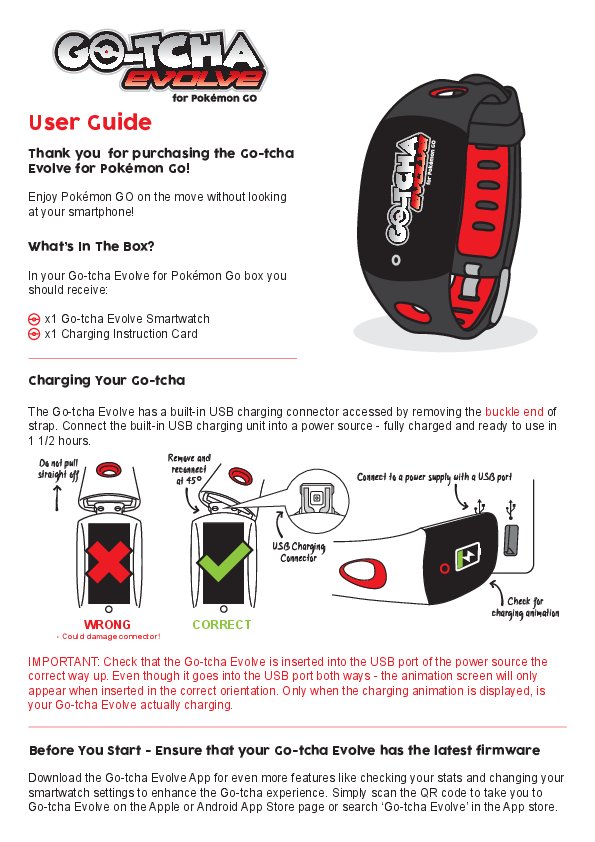
The Go-tcha Evolve has a built-in USB charging connector accessed by removing the buckle end of strap. Connect the built-in USB charging unit into a power source - fully charged and ready to use in 1 1/2 hours.

Do not pull straight off

Remove and reconnect at 45�

Connect to a power supply with a USB port

USB Charging Connector

WRONG
- Could damage connector!

CORRECT

Check for charging animation

IMPORTANT: Check that the Go-tcha Evolve is inserted into the USB port of the power source the correct way up. Even though it goes into the USB port both ways - the animation screen will only appear when inserted in the correct orientation. Only when the charging animation is displayed, is your Go-tcha Evolve actually charging.

Before You Start - Ensure that your Go-tcha Evolve has the latest firmware
Download the Go-tcha Evolve App for even more features like checking your stats and changing your smartwatch settings to enhance the Go-tcha experience. Simply scan the QR code to take you to Go-tcha Evolve on the Apple or Android App Store page or search `Go-tcha Evolve' in the App store.

To connect your Go-tcha Evolve to the Go-tcha Evolve App, you must close the Pok�mon Go App. Press the button on the Go-tcha Evolve to wake the screen and it will connect automatically to the open Go-tcha Evolve App. Updates will download automatically. Note: The Go-tcha Evolve cannot connect to more than one App at a time so the Pok�mon Go App cannot be running in the background. If you tried to connect with the Pok�mon Go App running, close both Apps and then open the Go-tcha Evolve App again.
*Time Setting: The Go-tcha Evolve App will automatically update the time on your Go-tcha Evolve when you connect your watch to the app. The App will also enable the Logo/Time setting screen to allow you to choose which you would like as your default screen setting.
Connecting Your Go-tcha Evolve
To connect your Go-tcha Evolve to the Pok�mon App: Open the Pok�mon GO App Touch the Main Menu Touch Settings Touch `Pok�mon GO Plus' Press the red button on the Go-tcha Evolve to make it discoverable to the Pok�mon Go App Touch your `Pok�mon GO Plus' under Available Devices list to connect Accept the Bluetooth pairing message on your smartphone to complete the connection
Using Go-tcha Evolve - Manually Catch Pok�mon and Collect at Pok�stops
Go-tcha Evolve will vibrate and animate the screen to show a new/duplicate Pok�mon is near. Press the red Go-tcha Evolve button to catch the Pok�mon. Go-tcha Evolve will vibrate and animate the screen to show a successful/unsuccessful catch. Go-tcha Evolve will vibrate and animate the screen to show when a Pok�stop is in range. Press the red Go-tcha Evolve button to retrieve items from a Pok�stop. Go-tcha Evolve will vibrate and animate the screen to show it has successfully/unsuccessfully collected the items and how many items it has collected. See `Go-tcha Evolve Animation Screens' on pages 2-3 of this User Guide for a complete guide to the colour screen animation alerts.
Using Your Go-tcha - Auto-catch Pok�mon and Collect at Pok�stops
To turn the `Auto-catch' function on, press the Go-tcha Evolve button until the auto-catch symbol changes as below.

Auto-catch off

Auto-catch on

If you have Auto Catch on: Go-tcha Evolve will vibrate and animate the screen to show a successful/unsuccessful catch. Go-tcha Evolve will vibrate and animate the screen to show it has successfully/unsuccessfully collected the items and how many items it has collected at a Pok�stop.
To turn `Auto-catch' off, press and hold the Go-tcha button until the appears in the box.

Go-tcha Evolve Animation Screens
The Go-tcha Evolve has many colour animations to alert you. On the next page of the manual you will find a full list of animation screens and their functions.

Auto-catch On

Auto-catch Off

Unknown Pok�mon

Pok�mon Caught

Pok�mon Ran Away

Out of Pok�balls

Auto-catch Unknown
On

Auto-catch Unknown
Off

Mystery Item

Catch Pok�mon Unknown

Catch Pok�mon Duplicate

Bag Full

Auto-Pok�stop Auto-Pok�stop

On

Off

Pok�stop In Range

Pok�stop Out Of Range

Pedometer

Charging

Watch Paired? Yes

Watch Paired? Vibrate Watch? Vibrate Watch?

No

Yes

No

Silence Watch Alerts? Yes

Silence Watch Alerts? No

Update Ready

Updating

Update Complete

Switch logo to clockosnc*reen

Switch logo to clockofsfc*reen

Flip Screen
(Your Go-tcha Evolve may or may not have this function depending
on its region)

Available in...

THIS PRODUCT IS NOT SPONSORED, ENDORSED, OR APPROVED BY THE POK�MON COMPANY OR NIANTIC.
Compatible with iPhone 5s, iPhone 6, iPhone 6 Plus, iPhone 6S, iPhone 6S Plus, iPhone SE, iPhone 7, iPhone 7 Plus, iPhone 8, iPhone 8 Plus, iPhone X, iPhone XS, iPhone XS Max, iPhone XR, iPhone 11, iPhone 11 Pro and iPhone 11 Pro Max devices with iOS 10.0 or later installed. Compatible with Android devices with 2 GB RAM or more, Bluetooth Smart (Bluetooth Ver. 4.0 or higher) capability, and Android Ver. 5.0 or higher installed.

Technical Support Before contacting Datel's customer service department, please ensure that you have read through and understood the information in this manual/guide. If you contact support, please ensure that you have information on when and where you purchased this product to hand.
Web: http://support.codejunkies.com/

Datel Customer Services Europe Customers Services, Datel Ltd, Stafford Road, Stone, Staffordshire, ST15 0DG. UNITED KINGDOM

� 2019 Datel Ltd. Go-tcha Evolve is a trademark of Datel Ltd. Pok�mon is a trademark or registered Trademark of the POK�MON COMPANY. All other trademarks are the property of their respective owners. Go-tcha Evolve for Pok�mon Go is a 100% unofficial product and is NOT sponsored, endorsed or approved by NINTENDO, nor any games developer or publisher.