

hp 2700 All-in-One Series DeskJet Printer Datasheet
File info: application/pdf · 2 pages · 563.90KB
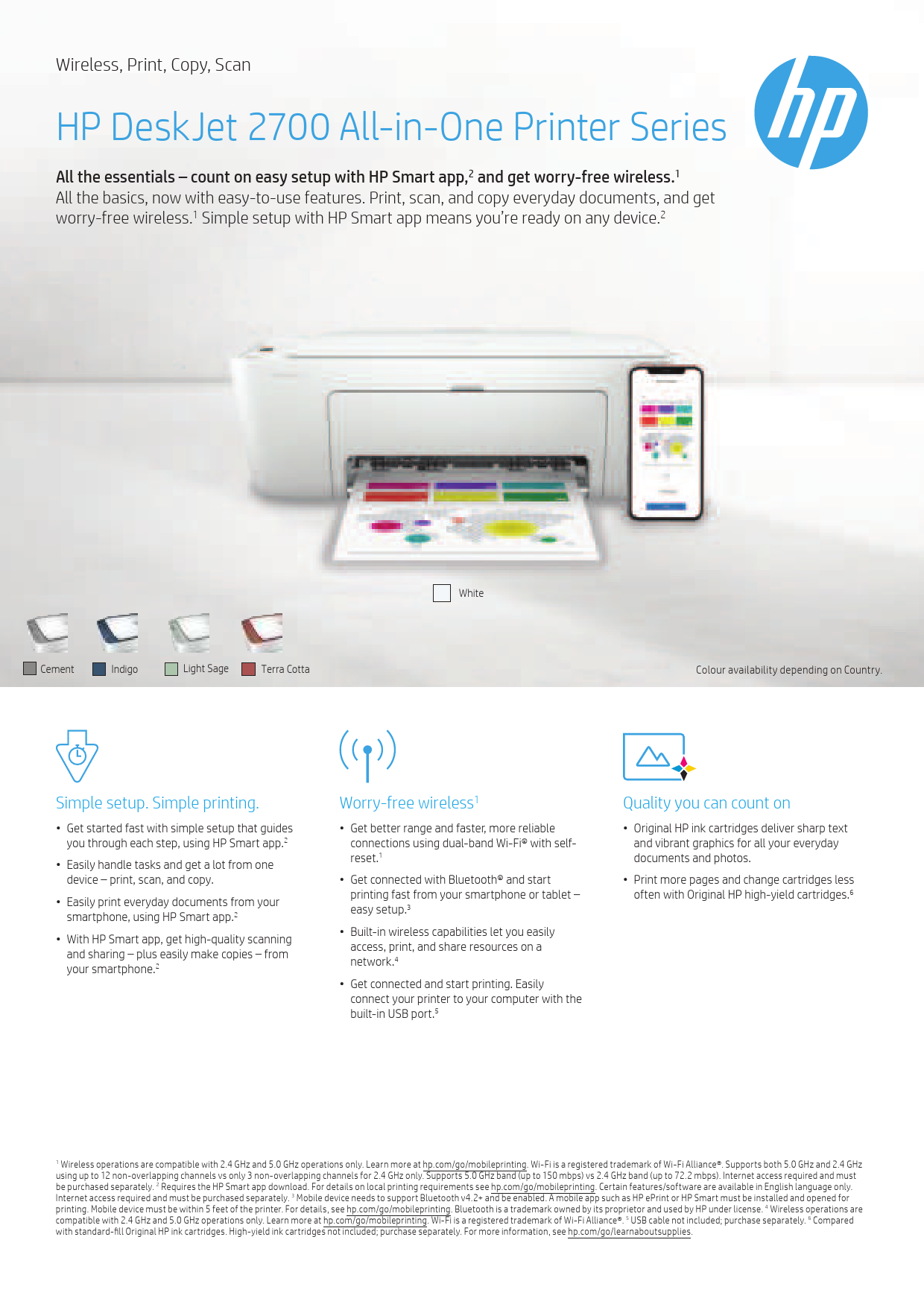
HP DeskJet 2700 All-in-One Printer Series
Manual (driver support provided). Mobile printing ... 2021 HP Development Company, L.P. The information contained herein is subject to change without notice.
Wireless, Print, Copy, Scan HP DeskJet 2700 All-in-One ...
Duplex print options Manual (driver support provided) Mobile printing capability Apple AirPrint™; Chrome OS; HP Smart app; Mopria-certified Language HP PCL 3 GUI; HP PCLm (HP Apps/UPD); URF (AirPrint)
HP DeskJet 2700 All-in-One Printer Series • Get started fast with simple setup that guides 2you through each step, using HP Smart app. • Easily handle tasks and get a lot from one device – print, scan, and • Easily prin…
Extracted Text
Wireless, Print, Copy, Scan
HP DeskJet 2700 All-in-One Printer Series
All the essentials � count on easy setup with HP Smart app,2 and get worry-free wireless.1 All the basics, now with easy-to-use features. Print, scan, and copy everyday documents, and get worry-free wireless.1 Simple setup with HP Smart app means you're ready on any device.2

Cement

Indigo

Light Sage

Terra Cotta

White

Colour availability depending on Country.

Simple setup. Simple printing.
� Get started fast with simple setup that guides you through each step, using HP Smart app.2
� Easily handle tasks and get a lot from one device � print, scan, and copy.
� Easily print everyday documents from your smartphone, using HP Smart app.2
� With HP Smart app, get high-quality scanning and sharing � plus easily make copies � from your smartphone.2

Worry-free wireless1
� Get better range and faster, more reliable connections using dual-band Wi-Fi� with selfreset.1
� Get connected with Bluetooth� and start printing fast from your smartphone or tablet � easy setup.3
� Built-in wireless capabilities let you easily access, print, and share resources on a network.4
� Get connected and start printing. Easily connect your printer to your computer with the built-in USB port.5

Quality you can count on
� Original HP ink cartridges deliver sharp text and vibrant graphics for all your everyday documents and photos.
� Print more pages and change cartridges less often with Original HP high-yield cartridges.6

1 Wireless operations are compatible with 2.4 GHz and 5.0 GHz operations only. Learn more at hp.com/go/mobileprinting. Wi-Fi is a registered trademark of Wi-Fi Alliance�. Supports both 5.0 GHz and 2.4 GHz using up to 12 non-overlapping channels vs only 3 non-overlapping channels for 2.4 GHz only. Supports 5.0 GHz band (up to 150 mbps) vs 2.4 GHz band (up to 72.2 mbps). Internet access required and must be purchased separately. 2 Requires the HP Smart app download. For details on local printing requirements see hp.com/go/mobileprinting. Certain features/software are available in English language only. Internet access required and must be purchased separately. 3 Mobile device needs to support Bluetooth v4.2+ and be enabled. A mobile app such as HP ePrint or HP Smart must be installed and opened for printing. Mobile device must be within 5 feet of the printer. For details, see hp.com/go/mobileprinting. Bluetooth is a trademark owned by its proprietor and used by HP under license. 4 Wireless operations are compatible with 2.4 GHz and 5.0 GHz operations only. Learn more at hp.com/go/mobileprinting. Wi-Fi is a registered trademark of Wi-Fi Alliance�. 5 USB cable not included; purchase separately. 6 Compared with standard-fill Original HP ink cartridges. High-yield ink cartridges not included; purchase separately. For more information, see hp.com/go/learnaboutsupplies.

Specifications for HP DeskJet 2700 AiO Printer Series
Technical specifications

Number of Users AIO functions Print
Speed1
First page out (A4, ready)2 Resolution
Duplex print options Mobile printing capability Language Ink types Scan Type Technology Resolution Max scanning size Input modes Grayscale levels Bit depth File format Copy Resolution Max Number of Copies Copier Settings Display Control Panel
Processor speed Media
Duty cycle (monthly, A4)3 Recommended monthly page volume Supported sizes Recommended weights Supported weights
Types Paper handling Memory Operating system compatibility Minimum system requirements
Connectivity Connectivity (Std) Network capabilities Wireless capability Supported network protocols
Dimensions (W x D x H)4 Weight5 Environmental
Operating environment
Acoustics
Power specifications
What's in the box7
Warranty

1-3 Users Wireless, Print, Copy, Scan
Black: Up to 20 ppm (draft, A4); Up to 7.5 ppm (ISO); Colour: Up to 16 ppm (draft, A4); Up to 5.5 ppm (ISO); Colour Photo (draft, Photo Paper, 10x15 cm): As fast as 65 seconds Black: As fast as 15 seconds; Colour: As fast as 19 seconds Black (best): 1200 x 1200 rendered dpi; Colour (best): Up to 4800 x 1200 optimized dpi colour (when printing from a computer on selected HP photo papers and 1200 input dpi) Manual (driver support provided) Apple AirPrintTM; Chrome OS; HP Smart app; Mopria-certified HP PCL 3 GUI; HP PCLm (HP Apps/UPD); URF (AirPrint) Dye-based (colour); Pigment-based (black)
Flatbed Contact Image Sensor (CIS) Hardware: Up to 1200 x 1200 dpi; Optical: Up to 1200 dpi Flatbed: 216 x 297 mm Front-panel scan 256 24-bit JPEG, TIFF, PDF, BMP, PNG
Black (text and Graphics): Up to 300 x 300 dpi; Colour (text and graphics): Up to 300 x 300 dpi Up to 9 copies Auto-enlarge Icon LCD display Icon LCD display, 7 buttons (Power, Cancel, Resume, Wi-Fi, Info, Colour Copy & Black Copy), 5 LED indicator light (Power, Ink, Resume, Wi-Fi & Info) 180 GHz
Up to 1,000 pages Up to 100 to 400 pages
A4; B5; A6; DL envelope 75 g/m� A4: 60 to 90 g/m�; HP envelopes: 75 to 90 g/m�; HP cards: Up to 200 g/m�; HP 10 x 15 cm photo paper: Up to 300 g/m� Plain paper, Photo paper, Brochure paper Input: 60-sheet input tray; Output: 25-sheet output tray Standard: 86 MB; Maximum: 512 M bit DDR1; 160 M bit flash Windows 10, 7; MacOS Sierra v10.12 (previously OS X), macOS High Sierra v10.13, macOS Mojave v10.14, macOS Catalina v10.15, Chrome OS PC: Windows 10, 7: 1 GHz 32-bit (x86) or 64-bit (x64) processor, 2 GB available hard disk space, Internet connection, USB port, Internet Explorer; Mac: MacOS Sierra v10.12 (previously OS X), macOS High Sierra v10.13, macOS Mojave v10.14, macOS Catalina v10.15, 2 GB Available Space, Internet Access.
1 Hi-Speed USB 2.0 Wi-Fi 802.11a/b/g/n Yes, built-in Wi-Fi 802.11a/b/g/n Wireless Network Supported
425.2 x 546.6 x 250 mm 3.42 kg
Operating temperature range: 5 to 40� C; Recommended operating temperature range: 15 to 30� C; Operating humidity range: 15 to 80% RH (non-condensing); Recommended operating humidity range: 20 to 80% RH (non-condensing); Storage temperature range: -40 to 60� C; Operating Altitude (metric): Up to 3,000 m; Non-operating humidity range: 5 to 90% RH (non-condensing); Non-operating Altitude: 4500 m Acoustic power emissions (active, printing): 6.2 B(A); Acoustic pressure emission: 48 dB(A); Acoustic power emissions (active, copy): 6.1B(A) Power supply type: Internal; Power supply required: Input voltage: 100 to 240 VAC (+/- 10%), 50/60 Hz (+/- 3 Hz); Power consumption:6 1.7 watts (ready), 0.9 watts (sleep), 0.1 watts (auto-off), 0.1 watts (off); Typical electricity consumption (TEC): 0.18 kWh/Week Printer; Setup Black Cartridge; Setup Tri-colour Cartridge; Setup guide; Reference guide; USB cable; Power cord [For ink volume and page yield information, visit hp.com/go/learnaboutsupplies] One-year limited hardware warranty; 24-hour, 7 days a week support

Ordering information

Number 3XV19A 7FR58A 7FR60A 7FR62A 7FR54A 7FR52A

Description HP DeskJet 2720 AiO Printer (White)
(AU/NZ) HP DeskJet 2721 AiO Printer (Cement)
(AU/NZ) HP DeskJet 2722 AiO Printer (Light Sage)
(AU/NZ/SG) HP DeskJet 2723 AiO Printer (Indigo)
(AU/NZ/SG) HP DeskJet 2722 AiO Printer (Light Sage)
(MY/TH) HP DeskJet 2720 AiO Printer (White)
(TH/VN/PK/SEMC)

Replacement cartridges8

Number 3YM56AA 3YM57AA 3YM59AA
3YM55AA 3YM58AA

Description HP 67 Black Original Ink Cartridge HP 67XL Black High Yield Original Ink Cartridge HP 67XXL Black Extra High-Yield Original Ink
Cartridge HP 67 Tri-Colour Original Ink Cartridge HP 67XL Tri-Colour High-Yield Original Ink Cartridge

For information on reference page output, please log on the hp.com/go/pageyield.

HP Care Packs

Number UG092E
UG062E
UG295E UG235E UG367E
UG337E
UG487E
UG457E
U6N05E

Description HP 2-year Next Business Exchange Multifunction
Printer - E Svc HP 3-year Next Business Exchange Multifunction
Printer - E Svc
HP 2-year return Multifunction Printer - E Svc
HP 3-year return Multifunction Printer - E Svc
HP 2-year Pickup Return Multifunction
Printer -E Svc
HP 3-year Pickup Return Multifunction
Printer -E Svc HP 2-year Onsite Exchange Multifunction
Printer - E Svc HP 3-year Onsite Exchange Multifunction
Printer - E Svc
HP Installation w/nw Consumer Printer Svc

Protect your investment with HP Care Pack. Let HP certified engineers resolve your technical issues. For more details on HP Care Pack, go to hp.com/go/cpc.

Recommended Papers9

Number 9RR53A
9RR54A
9RR55A 9RR56A

Description HP Photo Paper, Glossy, 10 x 15 cm, 20 sheets,
180 gsm HP Photo Paper, Glossy, 10 x 15 cm, 100 sheets,
180 gsm
HP Photo Paper, Glossy, A4, 20 sheets, 180 gsm
HP Photo Paper, Glossy, A4, 100 sheets, 180 gsm

Please visit hp.com/apac/paper for more details.

Hewlett-Packard offices

Australia Malaysia New Zealand Singapore Thailand Vietnam

(613) 8833 5000 (603) 2332 3333 (09) 918 9555 (65) 6275 3888 (662) 353 9500 (848) 3823 4151

hp.com.au hp.com.my hp.co.nz hp.com.sg hp.com/th hp.com/vn

For the following countries, please fax your queries to: (65) 6275 6707
Pakistan For more information, please visit us at hp.com/apac/homeandoffice.

1 Speed specifications have been updated to reflect current industry testing methods. 2 Either after first page or af ter first set of ISO test pages. For details see hp.com/go/printerclaims. 3 HP recommends that the number of printed pages per month be within the stated range for optimum device performance, based on factors including supplies replacement. 4 Dimensions vary as per configuration. 5 Weight varies as per configuration. 6 Power requirements are based on the country/region where the printer is sold. Do not convert operating voltages. This will damage the printer and void the product warranty. 7 For more information about page yields for replacement cartridges see hp.com/go/learnaboutsupplies for setup cartridges click on Setup supplies link on the same page. 8 Actual yield varies considerably based on content of printed pages and other factors. For details see hp.com/go/learnaboutsupplies. 9 Available in selected countries only.
� 2021 HP Development Company, L.P. The information contained herein is subject to change without notice. The only warranties for HP products and services are set forth in the express warranty statements accompanying such products and services. Nothing herein should be construed as constituting an additional warranty. To the extent allowed by law, HP shall not be liable for technical or editorial errors or omissions contained herein.
4AA7-7335EEAP, Feb 2021
References
-
 Laptop Computers, Desktops, Printers and more | HP® New Zealand
-
 Laptop Computers, Desktops, Printers, Ink & Toner | HP® Australia
-
 Laptop Computers, Desktops, Printers, Ink & Toner | HP® Malaysia
-
 Laptop Computers, Desktops, Printers and more | HP® Singapore
-
 Bright and clear printing, HP Ink and Toner - Shop HP.com Singapore
-
HP | Care Pack Central
-
HP
-
123.hp.com - HP Smart
-
HP
-
Printing speed test reports | HP® Official Site
-
แล็ปท็อป คอมพิวเตอร์ เดสก์ท็อป เครื่องพิมพ์ และอื่นๆ อีกมากมาย | HP® Thailand
-
Laptop Computers, Desktops, Printers and more | HP® Việt Nam