

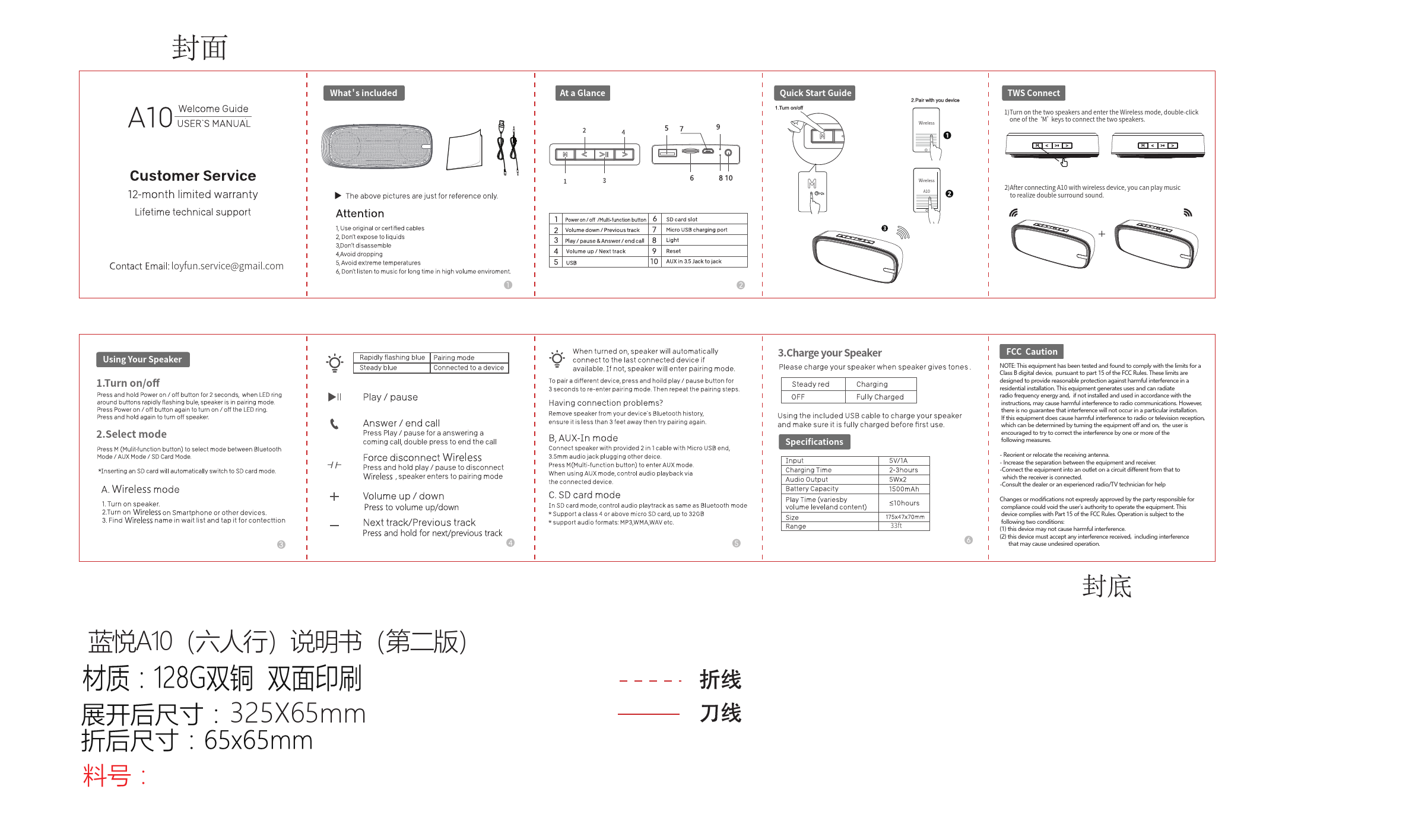
Lan Yue A10 Wireless Speaker
User Manual & Quick Start Guide
What's Included
- Lan Yue A10 Wireless Speaker
- User Manual
- USB Charging Cable
Customer Service
12-month limited warranty
Lifetime technical support
Contact Email: loyfun.service@gmail.com
The above pictures are just for reference only.
At a Glance
Diagram showing the Lan Yue A10 speaker from different angles, highlighting its ports and buttons.
Key Components:
- 1. Power on/off / Multi-function button [multifunction button]
- 2. Volume down / Previous track [previous track button]
- 3. Play/pause & Answer/end call [play/pause button]
- 4. Volume up / Next track [next track button]
- 5. USB [USB port]
- 6. SD card slot [SD card slot]
- 7. Micro USB charging port [Micro USB port]
- 8. Light [LED indicator]
- 9. Reset [reset button]
- 10. AUX in 3.5 Jack [AUX jack]
Quick Start Guide
Diagrams illustrating the initial setup and pairing process.
1. Turn on/off
Press and hold the Power on/off button [multifunction button] for 2 seconds. The LED ring around the buttons will rapidly flash blue, indicating the speaker is in pairing mode. Press the Power on/off button again to turn the LED ring on/off. Press and hold the button again to turn the speaker off.
When turned on, the speaker will automatically connect to the last connected device if available. If not, it enters pairing mode.
To pair a different device, press and hold the play/pause button [play/pause button] for 3 seconds to re-enter pairing mode. Then repeat the pairing steps.
Having connection problems? Remove the speaker from your device's Bluetooth history, ensure it is less than 3 feet away, then try pairing again.
2. Select mode
Press the M (Multi-function button) [multifunction button] to select the mode: Bluetooth Mode / AUX Mode / SD Card Mode.
Note: Inserting an SD card will automatically switch to SD card mode.
3. Pair with your device
A. Wireless mode
- Turn on the speaker.
- Turn on Wireless on your smartphone or other devices.
- Find the Wireless name in the wait list and tap it for connection.
B. AUX-In mode
Connect the speaker with the provided 2-in-1 cable (Micro USB end to speaker, 3.5mm audio jack to another device).
Press the M (Multi-function button) [multifunction button] to enter AUX mode.
When using AUX mode, control audio playback via the connected device.
C. SD card mode
In SD card mode, control audio playback as in Bluetooth mode.
- Support a Class 4 or above micro SD card, up to 32GB.
- Support audio formats: MP3, WMA, WAV etc.
Speaker Controls & Functions
- Play/pause & Answer/end call [play/pause button]: Press to play/pause music or answer/end a call. Double press to end the call.
- Volume up / Next track [next track button]: Press to increase volume. Press and hold for the next track.
- Volume down / Previous track [previous track button]: Press to decrease volume. Press and hold for the previous track.
- Force disconnect Wireless: Press and hold the play/pause button [play/pause button] to disconnect the current Wireless connection and re-enter pairing mode.
TWS Connect
Diagram illustrating how to connect two A10 speakers for stereo sound.
- Turn on both speakers and ensure they are in Wireless mode.
- Double-click the 'M' button [multifunction button] on one of the speakers to initiate TWS pairing.
- After the speakers are connected, you can pair your device with one of the speakers to play music with double surround sound.
Charge Your Speaker
Please charge your speaker when it emits tones indicating low battery.
- Charging: The LED indicator [LED indicator] will show a steady red light.
- Fully Charged: The LED indicator [LED indicator] will show a [charging status off] or [fully charged indicator] (diagram shows 'OFF' for fully charged).
Use the included USB cable to charge your speaker. Ensure it is fully charged before first use.
Specifications
| Parameter | Value |
|---|---|
| Input | 5V/1A |
| Charging Time | 2-3 hours |
| Audio Output | 5W x 2 |
| Battery Capacity | 1500mAh |
| Play Time (varies by volume level and content) | ≤10 hours |
| Size | 175 x 47 x 70mm |
| Range | 33ft |
FCC Caution
NOTE: This equipment has been tested and found to comply with the limits for a Class B digital device, pursuant to part 15 of the FCC Rules. These limits are designed to provide reasonable protection against harmful interference in a residential installation. This equipment generates, uses, and can radiate radio frequency energy and, if not installed and used in accordance with the instructions, may cause harmful interference to radio communications. However, there is no guarantee that interference will not occur in a particular installation.
If this equipment does cause harmful interference to radio or television reception, which can be determined by turning the equipment off and on, the user is encouraged to try to correct the interference by one or more of the following measures:
- Reorient or relocate the receiving antenna.
- Increase the separation between the equipment and receiver.
- Connect the equipment into an outlet on a circuit different from that to which the receiver is connected.
- Consult the dealer or an experienced radio/TV technician for help.
Changes or modifications not expressly approved by the party responsible for compliance could void the user's authority to operate the equipment. This device complies with Part 15 of the FCC Rules. Operation is subject to the following two conditions: (1) this device may not cause harmful interference, and (2) this device must accept any interference received, including interference that may cause undesired operation.
Document Information
Product Name: Lan Yue A10 (六人行) 说明书 (第二版)
Material: 128G double copper, double-sided printing
Unfolded Size: 325x65mm
Folded Size: 65x65mm
Part No.: [Part Number Not Specified]
Folding Line: [folding line]
Cutting Line: [cutting line]