

MAKE NOISE DV247 Strega User Manual
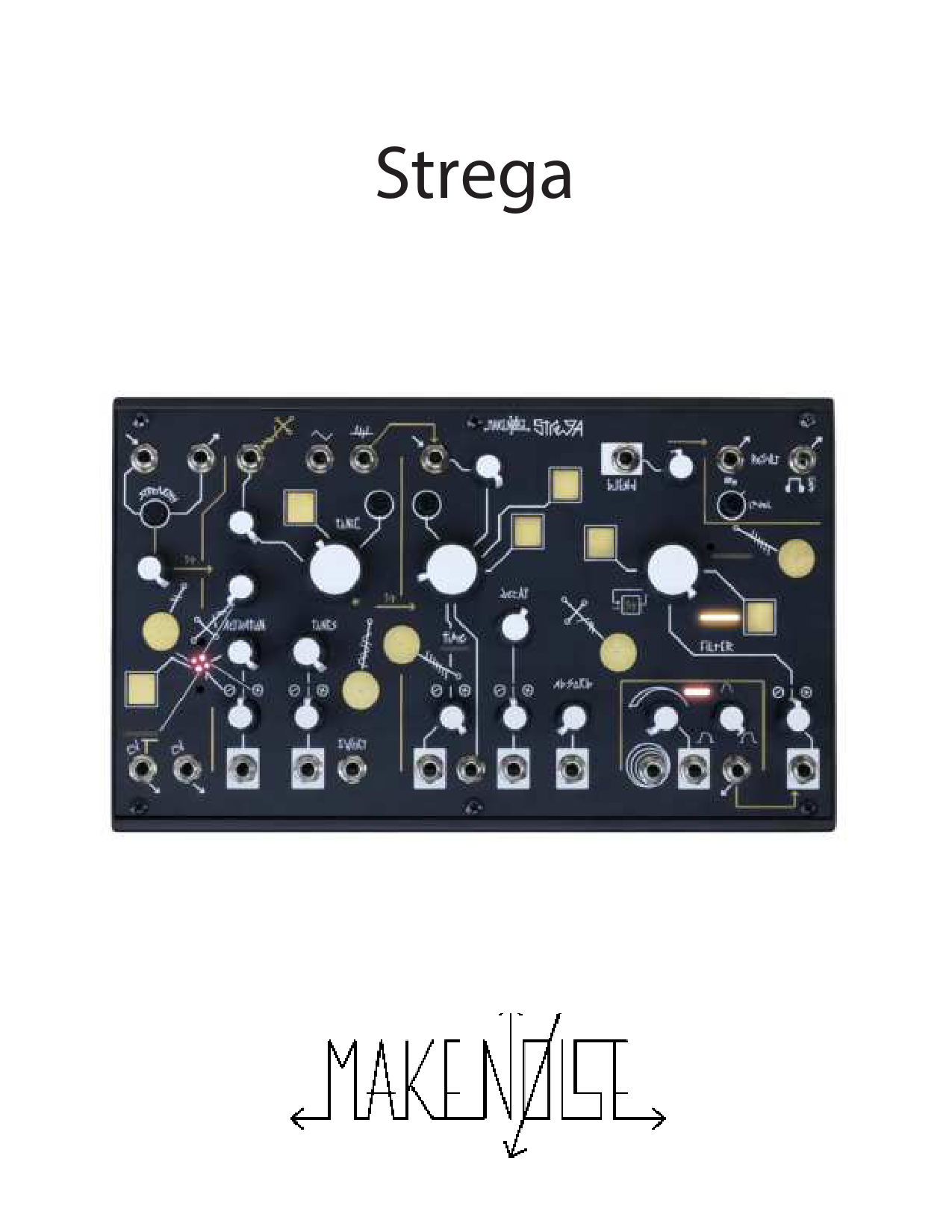
File info: application/pdf · 39 pages · 23.79MB
Strega Manual
Strega Manual - Make Noise
This equipment generates, uses, and can radiate radio frequency energy and, if not installed and used in accordance with the instruction manual, may cause ...
About This Manual: Written by Tony Rolando and Walker Farrell Illustrated by Lewis Dahm and Walker Farrell Strega Design: Tony Rolando and Alessandro Cortini Thanks to the...
Full PDF Document

If the inline viewer fails, it will open the original document in compatibility mode automatically. You can also open the file directly.
Extracted Text
Strega

Table of Contents

2

3

FCC Rules

4

Warranty

5

A Note from the Designers

6

Connecting Power

7

Beginning the Strega Experiment

10 Continuing the Strega Experiment

11 Panel Controls, Inputs and Outputs

18 Tips and Tricks

19 Patch Corner

3
This device complies with Part 15 of the FCC Rules. Operation is subject to the following two conditions: (1) this device may not cause harmful interference, and (2) this device must accept
any interference received, including interference that may cause undesired operation. to operate the equipment.
This equipment has been tested and found to comply with the limits for a Class A digital device, pursuant to part 15 of the FCC Rules. These limits are designed to provide reasonable
protection against harmful interference when the equipment is operated in a commercial environment. This equipment generates, uses, and can radiate radio frequency energy and, if
not installed and used in accordance with the instruction manual, may cause harmful interference to radio communications. makenoisemusic.com
Make Noise Co., 414 Haywood Road, Asheville, NC 28806

Limited WARRANTY:

4

Make Noise warrants this product to be free of defects in materials or construction for a period of one year from the date of purchase (proof of purchase/invoice required).
Malfunction resulting from wrong power supply voltages, backwards or reversed eurorack bus board cable connection, abuse of the product, removing knobs, changing face plates, or any other causes determined by Make Noise to be the fault of the user are not covered by this warranty, and normal service rates will apply.
During the warranty period, any defective products will be repaired or replaced, at the option of Make Noise, on a return-to-Make Noise basis with the customer paying the transit cost to Make Noise.
Make Noise implies and accepts no responsibility for harm to person or apparatus caused through operation of this product.
Please contact technical@makenoisemusic.com with any questions, Return To Manufacturer Authorization, or any needs & comments.
http://www.makenoisemusic.com

About This Manual: Written by Tony Rolando and Walker Farrell Illustrated by Lewis Dahm and Walker Farrell Strega Design: Tony Rolando and Alessandro Cortini Thanks to the Beta Testers!

A Note from the Designers

5

Tony Rolando: Strega is an audio alchemical experiment. Activate! Spill the tonic into time and let time decay through the filter to hear the results.
The Strega is an instrument designed in collaboration with Alessandro Cortini. It is informed well by Cortini's recorded output and some of the instruments he has used over the years. It takes some inspiration from the way alchemy is at once comfortable with both science and magic, the seen and unseen. It takes the same form factor as the 0-COAST and 0-CTRL and was designed to be controlled by the 0-CTRL or 0-COAST MIDI CV B. It is also a fantastic idea to patch the 0-COAST into the Strega to unlock new 0-COAST sounds.

Alessandro Cortini: I can't remember if Strega was born from a personal need or from the creative relationship I have with Tony and the Make Noise team. The two are so intertwined. The important thing is that it is no longer a collection of ideas any more but the instrument you now hold in your hands... an instrument representing a sonic aesthetic that is really dear to me. Strega speaks a very unique language, one that you will quickly learn to communicate with and listen to... What do you hear? To me it represents the auditory equivalent of an object left in the sea for decades: currents have smoothed its edges, colors have mutated, textures are softer. Strega feels like the perfect balance between inspiration, action and result. It does exactly what I need it to: shortens the pathway between playtime and constructive, meaningful and emotive sonic expression. I hope Strega sparks the same creative pleasure in you.... Don't be afraid to let it guide you someplace new.

Connecting Power

6

It is recommended that the Strega AC Adapter is plugged into a fuse-protected power strip with an On/Off switch; however, if that is not available, it is OK to plug it into a wall outlet. Use only the Make Noise Strega AC Adapter to power the Strega. To turn on your Strega, once you have plugged the AC Adapter into your AC outlet, attach the other end of the AC Adapter to the jack on the side of the Strega. The included Y cable may be used to allow a single Strega power supply to power a Strega as well as a 0CTRL or 0-Coast.

Beginning the Strega Experiment

7

It is not important to fully understand the Strega itself. Only a working knowledge of the typical Make Noise control structure will be helpful. If you are not already familiar with the typical control structure, the inputs and outputs utilized on Make Noise instruments, check out page 7 of the 0-Coast manual at http://makenoisemusic.com/content/manuals/0-coast_manual.pdf. It is important to approach the Strega with a desire to experiment and an openness to results that might be outside of your control. With time it will be possible to guide the Strega enough to achieve less mysterious results should you desire to do so. Throughout your Strega experiments it is important to use the Level control to set a comfortable volume. When in doubt, flatten it out and start your experiment with Level turned full CCW, slowly turning CW to bring up the resulting sound level.

The most well documented path to learning the Strega begins with Activation. Point all controls to 12:00 (except Level) and then slowly turn up the Level to a comfortable volume. You should hear the Strega. Use the Activation Constant and Activation Interference controls to change the Strega sound. Turn both of these controls full CCW and work with one at a time so you might understand them better.
Activation Interference ->
<- Activation Constant

Beginning the Strega Experiment (cont.)

8

Adjust the Tonic so the Strega Tones are lower in pitch and set the Tonic Modulation Interference control full CCW so there is no interference. Adjust the Tones control through its entire range so you could formulate some idea of the different tones available for experimentation. Set the Tonic control so the Strega tones are higher in pitch and slowly sweep the Tones control from Full CCW to Full CW so you may hear all the Tones again.

Tonic Modulation Interference ->

Set the Time Modulation full CCW and Blend control Full CW, and sweep the Time control through the entire range so you land at around 9:00. You should hear an avalanche of noise and Strega Tones. Turn the Tonic control a very small amount CCW to create a change in the pitch of the Strega Tones.
Time Modulation ->

Beginning the Strega Experiment (cont.)

9

Adjust the Absorb control through the entire range ending at full CW. Now sweep the Filter control through the entire range ending at full CCW.

Set the Filter CV Attenuator Full CW and focus your attention on the Agitation Function Generator. Adjust the Speed and Angle parameters through their ranges so you may understand how they could be used to agitate the Strega.

Speed -> Angle ->

<- Filter CV Attenuator

You've completed the initial experiment. Put all controls back to 12:00.

Continuinuing the Strega Experiment

10

The many symbols, lines, and arrows on Strega indicate potential connections between circuits. Bridge these connections with patch cables or, in the case of the Touch Bridges and Gateways, by pressing on two or more with your fingers. Where there are input attenuators, use them to control the depth of the connections. Symbols indicate types of signals, lines map the alchemic paths of the signals, and gold arrows indicate pre-wired signal connections that can be broken by patch cable. Make connections, observe symbols, and listen to the results in order to get a feel for the nature of the different signals that are available.

Patch external audio signals to the External Substance In for processing by Strega. Add gain if necessary with the Strength control, patch the Strength output wherever you like, or add the signal to the Time/Filter experiment by turning up the External Constant control. A DC Voltage representation of the External In appears at the CV 1 output.

External Substance In ->

<- Strength Output

External Constant Control ->

Panel controls, Inputs and Outputs

11

External Signal Addition: Should your experiment require audio substances not contained within the Strega, you may add them using these circuits.
1. External Substance In: AC coupled Mono TS mini jack input. Signals ranging from Modular Level to Line Level.
2. Strength Out: the external signal as processed by the Strength circuit. Maximum signal level is quite large and dependent upon amplitude of signal patched to External In. Max levels 20Vpp. Typical Signal level is Modular, 10Vpp.
3. Strength Control: Sets amount of gain applied to Signal patched to External In. From Unity Gain at Full CCW to Maximal Gain at Full CW, for Line Level signals.
4. External Constant Control: Sets how much of the Signal from the Strength Out is added to the Time/ Filter experiment. Use this to blend External Substances with Strega Tones. Control Sources and Modulation Sources: these sources may be patched to any destination in the Strega to influence, control or agitate the experiment.
5. CV 1: DC Voltage representation of the of External In as processed by the Strength circuit. 0 to 10VDC.
6. CV 2: DC Voltage Feedback signal from the Time/ Filter circuit. Range +/-5VDC

Panel controls, Inputs and Outputs

12

Agitation Generator: 1. Speed: the rate at which agitation will occur. The resulting signal will rise from 0VDC to 8VDC and then fall back to 0VDC at a rate of about 1 minute to audio rate (around 1khz). With nothing patched to the Begin and End Input, infinite agitation will occur. 2. Angle: sets the angle of the agitation function for faster rise or fall. Leaning the agitation to one side or the other produces different results in your experiment. 3. Begin and End In: control input to Begin and also to End Agitation. Expects Gate signal of 0VDC to 10VDC magnitude. When Gate signal is High, Agitation begins and level is sustained as long as Gate is High. When Gate is Low, Agitation stops until Gate goes High again. Normalled to Gate High. 4. Speed CV In: attenuated control input for the Agitation Function Speed. Range +/-5VDC. 5. Agitation Function Out: DC Voltage for agitation purposes. Range 0VDC to 6VDC.

Panel controls, Inputs and Outputs

13

Activation: the Strega Tones are activated and added to the Time/ Filter experiment using these circuits. Keep in mind that External audio substances must be activated at their sources.
1. Activation Interference Control: sets amount of influence from Time/ Filter allowing that experiment to influence activation and therefore itself.
2. Activation Constant Control: sets continuous addition of Strega Tones into Time/ Filter. 3. Activation CV Attenuvertor: bi-polar attenuator for the Activation CV In. 4. Activation CV In: Patch control signals here for activation of Strega Tones from external sources or the CV
sources contained within Strega such as CV1, CV2 and Cycle. Direct coupled, range +/-5VDC.

Panel controls, Inputs and Outputs

14

Strega Tones: these circuits select the substances to activate and add to the Time/ Filter experiment. 1. Tonic Coarse Control: wide range adjustment for frequency of Strega Tones, 20hz to 10khz. 2. Tonic Fine Control: short range precision adjustment of frequency of Strega Tones. Tonic Modulation Interference Input: AC coupled modulation input for Tonic 3. Tonic Modulation Interference Combo Control: with nothing patched to Tonic Modulation Interference Input, sets the amount of Interference from Time/ Filter experiment. With signal patched to Tonic Modulation Interference Input, sets the depth of modulation. 4. Strega Tones Core Output: triangle shaped audio substance output here, 10V pp range. 5. Strega Tones Sub Harmonics Output: sub harmonics not used in the Time/ Filter experiment are output here, range 10Vpp. 6. Tones Control: selects Strega tones to be added to Time/ Filter experiment. 7. Tones CV Attenuvertor: bi-polar attenuator for the Tones CV In. 8. Tones CV In: Direct Coupled, bi-polar CV Input for Tones, range +/- 10VDC. 9. Tonic 1V/ Octave: classic bi-polar pitch control for Tonic, direct coupled, optimal range +/-5VDC.

Panel controls, Inputs and Outputs

15

Time/ Filter Experiment: in these circuits the external substances are combined with the Strega Tones and 1. Time Coarse: wide range adjustment for the rate at which the external Substances and Strega Tones are dripped into the Filter. 2. Time Fine: short range precision adjustment for the rate at which the external Substances and Strega Tones are dripped into the Filter. 3. Time Modulation Input: attenuated AC coupled modulation input for Time. Normalled to Strega Tones Sub Harmonics Output. Typical input 10Vpp. 4. Time Modulation Combo Control: with nothing patched to Time Modulation Input, sets the amount of modulation from Strega Tones Sub Harmonics. With signal patched to Time Modulation Input, sets the depth of modulation. 5. Time CV Attenuvertor: bi-polar attenuator for the Time CV In. 6. Time CV In: attenuated Direct Coupled, bi-polar CV Input for Time, range +/- 10VDC. 7. Time Unity CV In: full scale control input for Time, range +/- 10VDC. Be careful. 8. Decay CV In: Direct Coupled, bi-polar CV Input for Time, range +/- 10VDC. 9. Decay CV Attenuvertor: bi-polar attenuator for the Time CV In. 10. Decay: sets the iterations of Time/ Filter experiment. Ranges from a handful to infinity.

Panel controls, Inputs and Outputs

16

Time/ Filter Experiment (cont.): in these circuits the external substances are combined with the Strega Tones and
1. Blend CV In: Direct Coupled, uni-polar CV Input for Blend, range 0VDC to 5VDC. 2. Blend Combo Control: allows for recombining the original external substances and Strega Tones with the results
of the Time/ Filter experiment. With nothing patched to Blend CV In, operates as panel control for Blend. With signal patched to Bland CV In, operates as unipolar attenuator for that signal setting amount of control that signal has over the Blend. 3. Filter: removes unwanted substances from the results of Time/ Filter experiment. At Full CW all substances are passed through to be Decayed. At Full CCW almost no substances will be passed through to be Decayed. 4. Filter CV Attenuvertor: bi-polar attenuator for the Filter CV In. 5. Filter CV In: Direct Coupled, bi-polar CV Input for Filter, range +/- 10VDC. 6. Absorb CV In: Direct Coupled, uni-polar CV Input for Filter, range 0VDC to 10VDC. 7. Absorb Combo Control: determines how much of the Filtered substances will be absorbed and therefore diminished into the earth and how much will be presented for blending. With nothing patched to Absorb CV In, operates as panel control for Absorb. With signal patched to Absorb CV In, operates as unipolar attenuator for that signal, setting amount of control that signal has over the Absorb process.

Panel controls, Inputs and Outputs

17

The Result: here the resulting audio signals found. 1. Level Control: sets output level for both Modular Level and Line/ Headphone outputs. 2. Modular Level Output: TS Mono Audio Signal, 10Vpp 3. Line/ Headphone Output: TRS Stereo Audio Signal, 3Vpp Touch Bridges and Gateways: manually stir the Strega experiment. 4. Touch Gateways: these square shaped gold plates are where you may manually agitate the Strega experiment. By touching one or more of these square gold plates and one or more of the circular gold plates, you may manually agitate the Strega. 5. Touch Bridges: these circular gold plates are sources of agitation. By touching one or more of these circular gold plates and one or more of the square gold plates, you may manually agitate the Strega.

Tips and Tricks

18

- Patch Strength out to Activation CV In to "ring modulate" any audio source - Patch CV1 Output to Activation CV In to control the loudness of the Strega Tones using an external instrument patched to External Substance In. With External Constant Control turned down you can also use this to dial in the correct Strength setting for your instrument (watch the brightness of the CV1 LED and listen to the depth of Activation modulation). - Patch a dummy cable to Agitation Start/Stop in order to Stop the Agitation circuit from cycling. - Use the Activation Touch Gateway with various Touch Bridges to "play" Strega by hand even without an external controller. - Patch a dummy cable to External Input with Strength at 9:00 or greater, and generate human sound by touch by touching the other end of the cable. While touching the cable, any Touch Bridge you touch will also be injected into the Strega experiment. (Thanks Jon King for this observation)

Patch Corner

19

WELCOME (Alessandro) Evolving pitched textural mass. The main movement comes from the slow AD looping (SINEish) and modulating the filter and the delay decay. Tweak absorb/activation and the touch plates by hand for more active modulation. For a bit more juice + annihilation, open the feedback loop (output to input)

Patch Corner

20

MOVEMENT (Alessandro) Wave enveloped droning mass. The main movement comes from the looping AD (zero Attack) modulating the filter cutoff, starting with absorb at 0 (full filter mode). Decay, Absorb and mix are played in real time to evolve the texture as needed. With mix at 0 you can hear the effect of the envelope modulating the tones in the VCO

Patch Corner

21

RHYTHM (Alessandro) Drumlike Feedback evolving pattern. The VCO is modded by the sub VCO, creating a kick-like pattern. The Activation knob adds a hi-hat / percussion- like part to the rhythm. Blend in the Strega Delay to hear the modulated feedback come in and out.

Patch Corner

22

BREATHING (Alessandro) Looping living breathing creature. The looping envelope is modulating the delay time lightly, along with the delay mix (using stackable cable or mult). Manually play with absorb, decay and tones to vary the creature's emotional states.

Patch Corner

23

SINGING SAW (Tony) Play with 0-CTRL, set Pitch steps to taste.

(patch to 0-CTRL Pressure CV)

(patch to 0-CTRL Pitch CV)

Patch Corner

24

DUCKING SYNTH (Tony) Patch External Sound Signal (something dynamic will produce greater results) to Strega Ext In. Set Strength so the CV 1 LED follows the amplitude of the external signal. Set External Drive, Activation, and Blend parameters according to diagram. Set other Strega parameters for desired sound.

Patch Corner

25

Echo-Verb (Pete) Set Time and Decay to taste for a nice dark reverb that dwells after the Strega VCO has quieted down. Darken it further by setting Filter CCW from 12:00.

(patch to 0-CTRL Pressure CV)

(patch to 0-CTRL Pitch CV)

Patch Corner

26

Wow and Flutter (Pete) Start with Blend at 12:00 and adjust to taste. Turn either Absorb or Filter CW while keeping the other around 2:00 to influence the age and quality of the "tape."

(patch to 0-CTRL Dynamic Env)

(patch to 0-CTRL Pitch CV)

Patch Corner

27

Noise patch (Walker) Turn up Activation or manipulate Touch Agitators to "play" this patch.

Patch Corner

28

Ring Mod (Walker) Patch a sound of your choice to the External Input. Set Strength so the CV 1 LED follows the amplitude of the external signal. Adjust Tonic and Tones to taste for differing harmonic values to be ring modulated. Turn up Blend for echoes if desired.

Patch Corner

29

Touch Activation (Walker) Set all parameters to taste, then turn Activation and Activation Interference CCW. Press Activation Touch Gateway with left hand and try out different Activation Bridges (circles) with other fingers for manual playing. Many of the Bridges will be affected by Tonic and other parameters.

Patch Corner

30

Bat Cave (Jake) Adjust bat proximity and cave size with Decay control.

Patch Corner

31

Slime Stew (Jake) (dedicated to SOPHIE)

Patch Corner

32

Melted Rhythm Machine (Sarah Belle Reid) Start with all knobs as shown in the diagram. Explore the Touch Bridges and Gateways to accentuate the fundamental rhythms. Adjusting Tones and the Agitation Generator's Speed can be used as dynamic timbral control for the fundamental rhythm. Adjusting Tonic will change the tempo, and adjusting Delay introduces variable trace rhythms. Tune to taste and explore from here!

Patch Corner

33

Night Flight (Tim Held) Play patch with Touch Gates and Agitors, and by adjusting attenuators on modulated parameters.

Patch Corner

34

Keybath (Lightbath)

Patch Corner

35

Keybath Patch notes:
�-CTRL CLOCK - OFF �-CTRL INTERRUPT - ON
Use the �-CTRL TOUCH PLATES like a keyboard allowing the PRESSURE OUT to open Strega's ACTIVATION and FILTER. Drip in some EXTERNAL SUBSTANCE and play along gesturally. Use the indicated TOUCH AGITATOR/GATEWAY to crumble the sound and vary the amount of TIME MODULATION to taste. Remember that TONES has many flavors.

Tips
Try using �-CTRL's STRENGTH CV OUT to alter Strega's AGITATION FUNCTION speed.
Enable �-CTRL clock and disable Interrupt to use the TOUCH PADS to open Strega while the sequence plays.

Patch Corner

36

Twelve Kay (Lightbath)

Patch Corner

37

Twelve Kay Patch Notes:
�-CTRL CLOCK - ON �-CTRL INTERRUPT - OFF
Drip in some EXTERNAL SUBSTANCE to complement Strega's internal TONES. Use the indicated TOUCH AGITATOR/GATEWAY to crumble the sound and vary the amount of TIME MODULATION to taste. Set up a nice sequence with �-CTRL's PITCH, STRENGTH, and TIME rows and allow the feedback from CV2 to create dynamic instability.
Tips
Play with different loop points using �-CTRL's touch pads.
Try using �-CTRL's CLOCK output to trigger Strega's AGITATION FUNCTION GENERATOR and re-adjust its controls to taste.

Patch Corner

38

The Fire (Lightbath)

Patch Corner

39

The Fire Patch Notes:
�-CTRL CLOCK - ON �-CTRL INTERRUPT - OFF
Drip in some EXTERNAL SUBSTANCE to complement Strega's internal TONES. Set up a nice sequence with �-CTRL's PITCH, STRENGTH, and TIME rows. Use the TOUCH PADS to quiet the VCO. Adjust �-CTRL STRENGTH to increase/decrease percussive hits via ABSORB and balance the rhythmic interplay between the triggered envelope modulating the FILTER by adjusting the AGITATION FUNCTION controls.
Tips
Play with different loop points using �-CTRL's touch pads.
Really lean into Time Modulation to create engaging rhythmic shapes.
 One moment, please...
  One moment, please...