

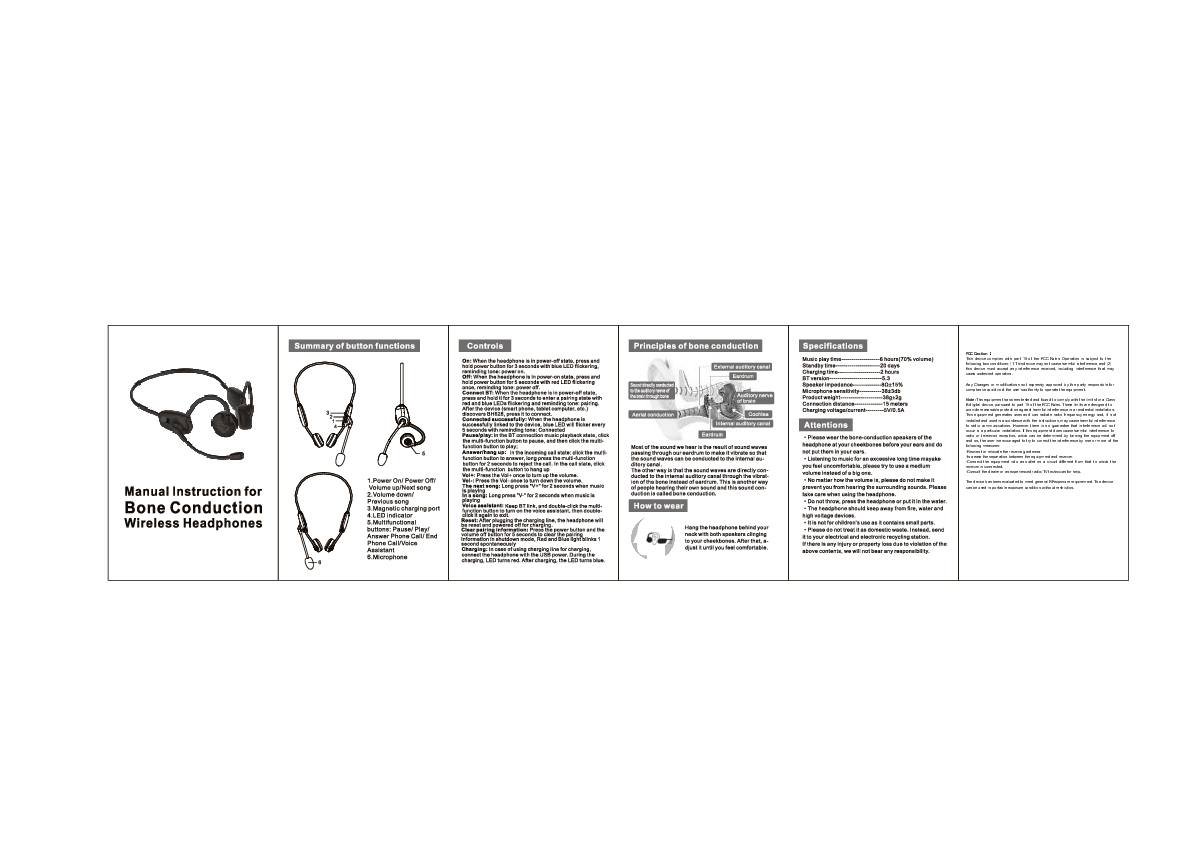
Manual Instruction for Bone Conduction Wireless Headphones
Model: BH628
Brand: Shenzhen Elenose Technology Co. LTD
Product Overview
Image of the bone conduction wireless headphones, showing the over-ear design with a microphone boom.
These wireless headphones utilize bone conduction technology to deliver audio directly to the auditory nerve through the cheekbones, bypassing the eardrum.
Summary of Button Functions
Diagram showing the headphone with numbered buttons and ports:
- 1. Power On/Off, Volume Up/Next Song
- 2. Volume Down/Previous Song
- 3. Magnetic Charging Port
- 4. LED Indicator
- 5. Multifunctional Button: Pause/Play, Answer/End Call, Voice Assistant
- 6. Microphone
Controls
- Power On: Press and hold the power button for 3 seconds. The blue LED will flicker, and a tone will indicate power on.
- Power Off: Press and hold the power button for 5 seconds. The red LED will flicker once, and a tone will indicate power off.
- Bluetooth Pairing: When powered off, press and hold the power button for 3 seconds to enter pairing mode (red and blue LEDs flicker, pairing tone). Search for "BH628" on your device and connect.
- Connection Status: Once successfully linked, the blue LED will flicker every 5 seconds, accompanied by a "Connected" tone.
- Music Playback:
- Pause/Play: Click the multifunctional button.
- Next Song: Long press the "Volume Up" button (1) for 2 seconds.
- Previous Song: Long press the "Volume Down" button (2) for 2 seconds.
- Call Management:
- Answer/Hang Up: Click the multifunctional button.
- Reject Call: Long press the multifunctional button for 2 seconds.
- Volume Adjustment:
- Volume Up: Press the "Volume Up" button (1) once.
- Volume Down: Press the "Volume Down" button (2) once.
- Voice Assistant: With Bluetooth connected, double-click the multifunctional button to activate the voice assistant. Double-click again to deactivate.
- Reset: Plugging in the charging cable will reset the headphone and power it off for charging.
- Clear Pairing Information: In shutdown mode, press and hold both the power button and the volume down button (2) for 5 seconds. The red and blue lights will blink for 1 second.
- Charging: Connect the headphone to a USB power source using the charging cable. The LED indicator will be red during charging and turn blue when fully charged.
Principles of Bone Conduction
Diagram illustrating bone conduction. Shows sound waves bypassing the eardrum and traveling directly to the auditory nerve via bone. Labels: External auditory canal, Eardrum, Auditory nerve of brain, Cochlea, Internal auditory canal, Aerial conduction, Eardrum.
Most of the sound we hear is a result of sound waves passing through our eardrum to make it vibrate, conducting sound to the internal auditory canal. Bone conduction offers an alternative pathway, conducting sound waves directly to the internal auditory canal through bone vibration, bypassing the eardrum. This is how the headphones transmit sound.
How to Wear
Illustration showing how to wear the headphones. Depicts placing the speakers on the cheekbones in front of the ears.
Hang the headphone behind your neck so that both speakers rest on your cheekbones, positioned in front of your ears. Adjust the fit until you feel comfortable.
Specifications
| Music Play Time | 6 hours (at 70% volume) |
| Standby Time | 20 days |
| Charging Time | 2 hours |
| BT Version | 5.3 |
| Speaker Impedance | 8Ω ± 15% |
| Microphone Sensitivity | -38 ± 3db |
| Product Weight | 38g ± 2g |
| Connection Distance | 15 meters |
| Charging Voltage/Current | 5V/0.5A |
Attentions
- Please wear the bone-conduction speakers on your cheekbones, in front of your ears, not inside your ears.
- Listening to music at excessive volumes for extended periods may cause discomfort. Consider using a medium volume.
- Ensure that the volume does not prevent you from hearing surrounding sounds. Exercise caution while using the headphones.
- Do not throw, press, or immerse the headphone in water.
- Keep the headphone away from fire, water, and high-voltage devices.
- This product is not intended for children's use due to small parts.
- Please dispose of this product responsibly as electronic waste, not as domestic waste.
- The manufacturer will not bear responsibility for any injury or property loss resulting from violation of these instructions.
FCC Caution
This device complies with part 15 of the FCC Rules. Operation is subject to the following two conditions: (1) This device may not cause harmful interference, and (2) this device must accept any interference received, including interference that may cause undesired operation.
Any changes or modifications not expressly approved by the party responsible for compliance could void the user's authority to operate the equipment.
Note: This equipment has been tested and found to comply with the limits for a Class B digital device, pursuant to part 15 of the FCC Rules. These limits are designed to provide reasonable protection against harmful interference in a residential installation. This equipment generates, uses, and can radiate radio frequency energy and, if not installed and used in accordance with the instructions, may cause harmful interference to radio communications. However, there is no guarantee that interference will not occur in a particular installation. If this equipment does cause harmful interference to radio or television reception, which can be determined by turning the equipment off and on, the user is encouraged to try to correct the interference by one or more of the following measures:
- Reorient or relocate the receiving antenna.
- Increase the separation between the equipment and receiver.
- Connect the equipment into an outlet on a circuit different from that to which the receiver is connected.
- Consult the dealer or an experienced radio/TV technician for help.
The device has been evaluated to meet general RF exposure requirements and can be used in portable exposure conditions without restriction.
