

DAC32 Quick Start Guide
This guide provides instructions for setting up and using the DAC32 Music Streamer.
Step 1: Wiring
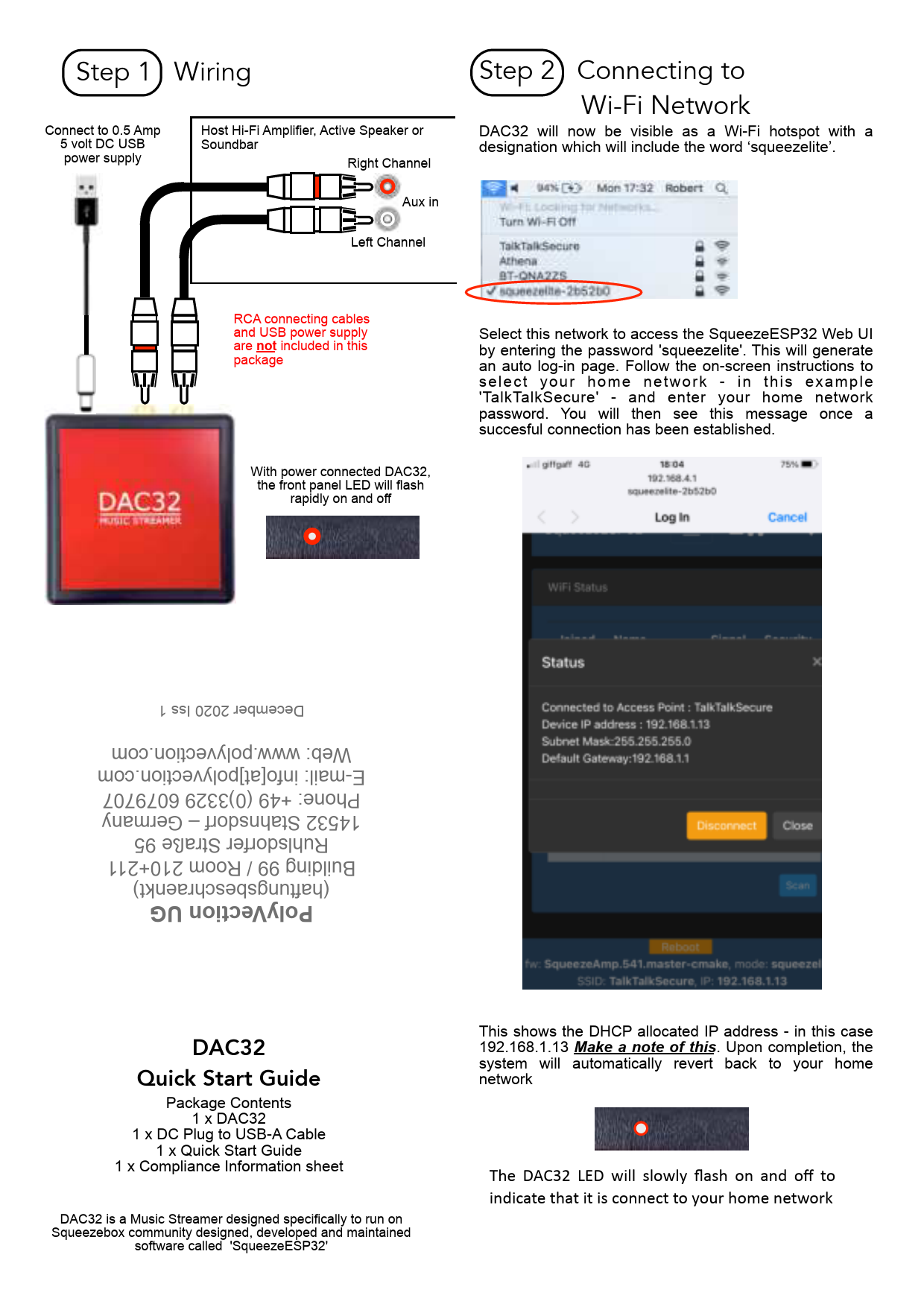
Connect the DAC32 to a 0.5 Amp 5 volt DC USB power supply. Connect the DAC32 to your host Hi-Fi Amplifier, Active Speaker, or Soundbar using RCA connecting cables. The RCA cables and USB power supply are not included in the package.
When power is connected, the front panel LED on the DAC32 will flash rapidly on and off.
Step 2: Connecting to Wi-Fi Network
The DAC32 will appear as a Wi-Fi hotspot with a designation including the word 'squeezelite'. Select this network to access the SqueezeESP32 Web UI by entering the password 'squeezelite'. This will generate an auto log-in page.
Follow the on-screen instructions to select your home network (e.g., 'TalkTalkSecure') and enter your home network password. A successful connection will be indicated by a message.
The DAC32 LED will slowly flash on and off to indicate that it is connected to your home network.
The DHCP allocated IP address is shown in the interface (e.g., 192.168.1.13). Note this address. Upon completion, the system will automatically revert back to your home network.
Step 3: Web UI / Settings
To access the SqueezeESP32 Web UI, type the IP address obtained in Step 2 (e.g., 192.168.1.13) into a browser's address bar.
Within the Web UI, you can configure various settings, including Wi-Fi signal strength, player settings, and more.
Step 4: Playing Music
The DAC32 can be used as an available Bluetooth Receiver and Airplay Player.
Bluetooth: Turn Bluetooth On and select 'ESP32-BT-2b52b0' from your device's Bluetooth settings. Adjust volume and select the output device.
Airplay: Select 'ESP32-AirPlay-2b52b0' as the Airplay Player. The RED LED will remain illuminated when playing audio.
Step 5: Playing Music - Squeezebox
The DAC32 will also be visible as an available Squeezebox Player when used in conjunction with a Logitech Media Server (LMS).
You can select your preferred player from the LMS interface, such as 'squeezelite-2b52b0'.
Step 6: Player Name
Use the SqueezeESP32 Web UI to enter a new Player Name. This can be changed under System > Device name. This setting also applies to the Airplay & Bluetooth Player Name.
Package Contents
- 1 x DAC32
- 1 x DC Plug to USB-A Cable
- 1 x Quick Start Guide
- 1 x Compliance Information sheet
DAC32 is a Music Streamer designed specifically to run on Squeezebox community designed, developed and maintained software called 'SqueezeESP32'.
All brand names referred to are the property of their respective brand owners.