

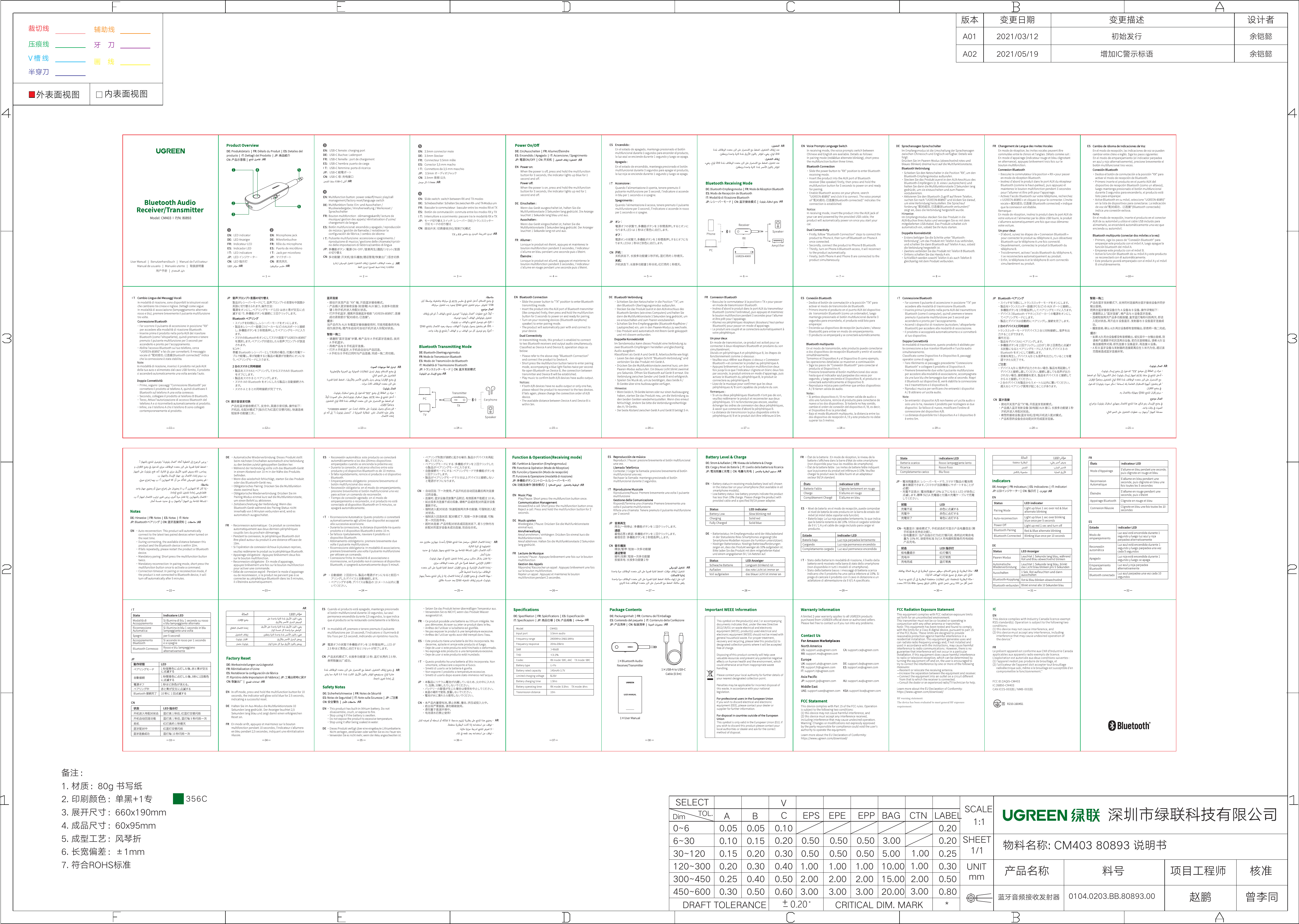
UGREEN Bluetooth Audio Receiver/Transmitter
Model: CM403 | P/N: 80893
Product Overview
The UGREEN CM403 80893 is a compact audio device designed for both receiving and transmitting Bluetooth audio signals. It features a clip for portability and essential ports for connectivity.
- LED indicator: Displays device status.
- Multifunction button: Controls power, playback, and calls.
- 3.5mm jack: Audio input/output port.
- Microphone port: For voice input during calls.
Visual description: A small, black, oval-shaped device with a clip on one side. It has a 3.5mm audio jack on one end and a USB-C charging port on the side. A single button and an LED indicator are visible on the top surface.
Power On/Off
- Power On: Press and hold the multifunction button for 3 seconds. The blue LED will flash once, and the device will power on.
- Power Off: Press and hold the multifunction button for 3 seconds. The red LED will flash once, and the device will power off.
Bluetooth Connection
Bluetooth Transmitting Mode (TX)
This mode allows you to transmit audio from a non-Bluetooth source to a Bluetooth receiving device.
- Slide the switch to the "TX" position to enter Bluetooth transmitting mode.
- Insert the product into the AUX port of your audio source (e.g., TV, PC, car audio system).
- The product will automatically enter pairing mode, indicated by the blue LED flashing quickly.
- Activate Bluetooth on your receiving device (e.g., Bluetooth headset, Bluetooth speaker) and select "UGREEN-80893" to pair.
- Once connected, the blue LED will flash slowly.
Connection flow: Audio Source (PC/TV/Car AUX) → Transmitter → Bluetooth Headset/Speaker.
Bluetooth Receiving Mode (RX)
This mode allows you to receive audio from a Bluetooth-enabled device and play it through a non-Bluetooth speaker or car stereo.
- Slide the switch to the "RX" position to enter Bluetooth receiving mode.
- Insert the product into the AUX port of your receiving device (e.g., speaker, car audio system).
- The product will automatically enter pairing mode, indicated by the blue LED flashing quickly.
- Activate Bluetooth on your transmitting device (e.g., phone, tablet) and select "UGREEN-80893" to pair.
- Once connected, the blue LED will flash slowly.
Connection flow: Bluetooth Device (Phone/Tablet) → Receiver → Audio Output (Speaker/Car AUX).
Dual Connectivity (Receiving Mode)
This product supports connecting to two Bluetooth devices simultaneously in receiving mode.
- First, connect the product to Phone A.
- While connected, press the multifunction button twice to re-enter pairing mode. The blue LED will flash quickly.
- Activate Bluetooth on Phone B and connect to the product.
- Both Phone A and Phone B are now connected to the product.
Note: If only one device has audio output, please change the order of connection between Device A and Device B.
Function & Operation (Receiving Mode)
Phone Call Management
- Answer/End Call: Short press the multifunction button.
- Reject Call: Long press the multifunction button for 2 seconds.
- Redial: Double press the multifunction button.
Music Playback
- Play/Pause: Short press the multifunction button.
- Next Track: Long press the "+" button.
- Previous Track: Long press the "-" button.
- Volume Up: Short press the "+" button.
- Volume Down: Short press the "-" button.
Battery Level & Charge
- Low Battery: The red LED flashes once every 5 seconds.
- Charging: The red LED stays on.
- Fully Charged: The red LED turns off.
LED Indicators
| Status | LED Indicator |
|---|---|
| Pairing Mode | Blue LED flashes quickly (twice per second) |
| Connected | Blue LED flashes slowly (once every 5 seconds) |
| Low Battery | Red LED flashes once every 5 seconds |
| Charging | Red LED stays on |
| Fully Charged | Red LED turns off |
| Power Off | Red LED flashes twice, then off |
| Bluetooth Connection Failed | Turns off automatically after 5 minutes |
Notes
- This product will automatically connect to the last paired device within 5 minutes of powering on.
- If the connection fails, please restart the product or the Bluetooth device.
- If pairing fails, press the multifunction button twice to re-enter pairing mode.
- During pairing, the distance between the product and the Bluetooth device should be within 5 meters.
- If no device connects within 5 minutes, the product will turn off automatically.
Factory Reset
To reset the device to factory settings:
- Press and hold the multifunction button for 10 seconds. The red LED will flash twice, then turn off, indicating a successful reset.
Safety Notes
- The product contains a lithium battery. Do not disassemble or replace the battery.
- Stop using the product if the battery swells.
- Stop using the product after it has been soaked in water.
- Do not disassemble or modify the product.
Specifications
| Parameter | Value |
|---|---|
| Model | CM403 |
| Bluetooth Version | 5.1 |
| Frequency Range | 2400MHz-2483.5MHz |
| Output Power | 4dBm |
| Transmission Distance | 10m |
| Battery Capacity | 120mAh |
| Battery Charging Time | 1.5 hours |
| Battery Life (Receiving) | 8 hours |
| Battery Life (Transmitting) | 5.5 hours |
| Dimensions | 60x95mm (folded) |
Package Contents
- 1x UGREEN Bluetooth Audio Receiver/Transmitter
- 1x USB-A to USB-C Cable (0.5m)
- 1x 3.5mm Audio Cable (0.5m)
- 1x User Manual
Visual description: The package includes the main device, a USB-A to USB-C charging cable, and a 3.5mm audio cable.
Important WEEE Information
The symbol on the product or its packaging indicates that this product must not be disposed of with your other household waste. Instead, it is your responsibility to dispose of your waste equipment by handing it over to a designated collection point for the recycling of waste electrical and electronic equipment. The separate collection and recycling of your waste equipment at the time of disposal will help conserve natural resources and ensure that it is recycled in a manner that protects human health and the environment. For more information about where you can drop off your waste equipment for recycling, please contact your local city office, your household waste disposal service, or the shop where you purchased the product.
Warranty Information
A limited 2-year warranty applies to all UGREEN products purchased from authorized channels. For support or warranty claims, please contact UGREEN customer service.
Contact UGREEN
For Amazon Marketplaces, UGREEN can be contacted via the following email addresses:
- North America: us.support@ugreen.com
- Europe: eu.support@ugreen.com
- Asia Pacific: au.support@ugreen.com
- Middle East: ae.support@ugreen.com
FCC Radiation Exposure Statement
This equipment complies with FCC radiation exposure limits set forth for an uncontrolled environment. This equipment should be installed and operated with minimum distance 20cm between the radiator and your body. This transmitter must not be co-located or operating in conjunction with any other antenna or transmitter.
This device complies with Part 15 of the FCC Rules. Operation is subject to the following two conditions: (1) this device may not cause harmful interference, and (2) this device must accept any interference received, including interference that may cause undesired operation.
Changes or modifications not expressly approved by the party responsible for compliance could void the user's authority to operate the equipment.
IC Statement
This device complies with Industry Canada license-exempt RSS standard(s). Operation is subject to the following two conditions: (1) this device may not cause interference, and (2) this device must accept any interference, including interference that may cause undesired operation of the device.
Models: CM403, 2AQI5-CM403, 2AQI5CM403, 80893, CM403 Bluetooth Audio Receiver, CM403 Bluetooth Audio Transmitter