

Intel Quartus Prime Timing Analyzer Cookbook
File info: application/pdf · 27 pages · 198.74KB
Intel Quartus Prime Timing Analyzer Cookbook
[dita]
This manual contains a collection of design scenarios, constraint ... With this method, you can manually constrain the input clock of the PLL and ...
This manual contains a collection of design scenarios, constraint guidelines, and recommendations. You must be familiar with the Timing Analyzer and the basics of...
Full PDF Document

If the inline viewer fails, it will open the original document in compatibility mode automatically. You can also open the file directly.
Extracted Text
2018.11.12 MNL-01035

Intel� Quartus� Prime Timing Analyzer Cookbook

Subscribe

Send Feedback

This manual contains a collection of design scenarios, constraint guidelines, and recommendations. You must be familiar with the Timing Analyzer and the basics of Synopsys* Design Constraints (SDC) to properly apply these guidelines.

Clocks and Generated Clocks
Basic Non-50/50 Duty Cycle Clock
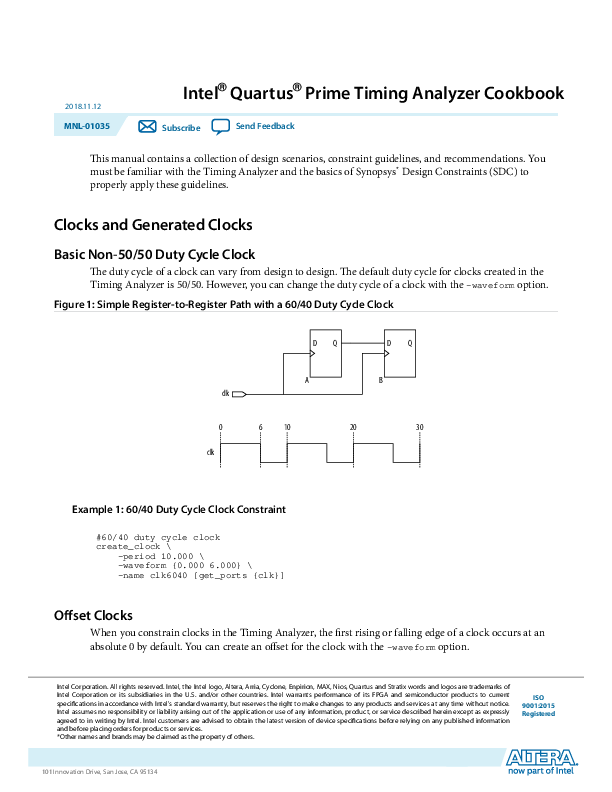
The duty cycle of a clock can vary from design to design. The default duty cycle for clocks created in the Timing Analyzer is 50/50. However, you can change the duty cycle of a clock with the -waveform option. Figure 1: Simple Register-to-Register Path with a 60/40 Duty Cycle Clock

DQ

DQ

clk 0 clk

A 6 10

B

20

30

Example 1: 60/40 Duty Cycle Clock Constraint
#60/40 duty cycle clock create_clock \
-period 10.000 \ -waveform {0.000 6.000} \ -name clk6040 [get_ports {clk}]
Offset Clocks
When you constrain clocks in the Timing Analyzer, the first rising or falling edge of a clock occurs at an absolute 0 by default. You can create an offset for the clock with the -waveform option.

Intel Corporation. All rights reserved. Intel, the Intel logo, Altera, Arria, Cyclone, Enpirion, MAX, Nios, Quartus and Stratix words and logos are trademarks of Intel Corporation or its subsidiaries in the U.S. and/or other countries. Intel warrants performance of its FPGA and semiconductor products to current specifications in accordance with Intel's standard warranty, but reserves the right to make changes to any products and services at any time without notice. Intel assumes no responsibility or liability arising out of the application or use of any information, product, or service described herein except as expressly agreed to in writing by Intel. Intel customers are advised to obtain the latest version of device specifications before relying on any published information and before placing orders for products or services. *Other names and brands may be claimed as the property of others.

ISO 9001:2015 Registered

www.altera.com
101 Innovation Drive, San Jose, CA 95134

2

Basic Clock Divider Using -divide_by

Figure 2: Simple Register-to-Register Path Clocked by clkB

clkA
clkB 0 2.5 5 clkA clkB

DQ A 10

DQ B

20

30

MNL-01035 2018.11.12

Example 2: Offset Clock Constraints
# -waveform defaults to 50/50 duty cycle create_clock -period 10.000 \
-name clkA \ [get_ports {clkA}] #create a clock with a 2.5 ns offset create_clock -period 10.000 \ -waveform {2.500 7.500} \ -name clkB [get_ports {clkB}]
Basic Clock Divider Using -divide_by
You can derive clocks in a design from a clock source when the derived clock is slower than the source clock. When constraining a slower clock derived from a clock source, use the -divide_by option.

Altera Corporation

Intel Quartus Prime Timing Analyzer Cookbook Send Feedback

MNL-01035 2018.11.12
Figure 3: Divide-by-Two Derived Clock

clk
0 clk clkdiv

DQ

CLRN DIV

5

10

Basic Clock Divider Using -divide_by

3

DQ

DQ

A

B

20

30

Example 3: Divide-by with -waveform Clock Constraints
create_clock -period 10.000 -name clk [get_ports {clk}] # Using -divide_by option create_generated_clock \
-divide_by 2 \ -source [get_ports {clk}] \ -name clkdiv \ [get_pins {DIV|q}] # Alternatively use pins to constrain the divider without # knowing about the original source create_generated_clock \ -divide_by 2 \ -source [get_pins {DIV|clk}] \ -name clkdiv \ [get_pins {DIV|q}] # the second option works since the # clock pin of the register DIV is # connected to the same net fed by the # clock port clk
You can also create a divide-by clock with the -edges option which allows you to specify the rising, falling, and next rising edge for a clock.

Intel Quartus Prime Timing Analyzer Cookbook Send Feedback

Altera Corporation

4

Toggle Register Generated Clock

Figure 4: Divide-by- Two Clock with the -edges Option

clk

1

2

clk

clkdiv

DQ

DQ

A CLRN

CLRN DIV

3

4

5

DQ B CLRN

6

7

MNL-01035 2018.11.12

Example 4: Divide-by with -waveform Clock Constraints
# Edge numbers are based on the master clock create_generated_clock \
-edges {1 3 5} \ -source [get_pins {DIV|clk}] \ -name clkdiv \ [get_pins {DIV|q}]
Toggle Register Generated Clock
Use a toggle register to create a divide-by-two clock. If the data feeding the toggle register is at a logical "1" value and fed by a 10 ns period clock, the output of the register is a clock with a period of 20 ns. The constraints for the toggle register clock is very similar to the previous example. Figure 5: Toggle Register Generating a Divide-by-Two Clock

Altera Corporation

Intel Quartus Prime Timing Analyzer Cookbook Send Feedback

MNL-01035 2018.11.12
Example 5: Toggle Register Constraints
# Create a base clock create_clock \
-period 10.000 \ -name clk \ [get_ports {clk}] # Create the generated clock on the output # of the toggle register. create_generated_clock \ -name tff_clk \ -source [get_ports {clk}] \ -divide_by 2 \ [get_pins {tff|q}]

PLL Clocks

5

PLL Clocks
This section describes examples of the derive_pll_clocks, create_clock, and create_generated_clock constraints. Phase-locked loops (PLLs) are used to perform clock synthesis in Intel� FPGAs. Constrain all output clocks for the proper analysis. The ALTPLL IP core incorporates PLL circuits in Intel FPGAs into your design. You can constrain a PLL with the following methods: � Create base clocks and PLL output clocks automatically � Create base clocks manually and PLL output clocks automatically � Create base clocks manually and PLL output clocks manually This section shows the advantages for each method. Figure 6: ALTPLL IP core
altpll

clk

inclk0 inclk0 frequency: 100.000 MHz

c0 c1

Operation Mode: Normal

locked

Clk Ratio Ph (dg) DC (10%) c0 1/1 0.00 50.00 c1 2/1 0.00 50.00

PLL

Stratix III

Method 1 � Create Base Clocks and PLL Output Clocks Automatically This method allows you to automatically constrain the input and output clocks of the PLL. All PLL parameters specified in the ALTPLL IP core constrain the input and output clocks of the PLL. You do not need to track changes to the PLL parameters or specify the correct value when creating the PLL's input and output clocks. The ALTPLL IP core automatically updates any modification.

Intel Quartus Prime Timing Analyzer Cookbook Send Feedback

Altera Corporation

6

Multi-Frequency Analysis

MNL-01035 2018.11.12

To automatically constrain all inputs and outputs, use the derive_pll_clocks command with the create_base_clocks option. The Timing Analyzer determines the correct settings based on the IP Catalog instantiation of the PLL.

Example 6: Constraining PLL Base Clocks Automatically

derive_pll_clocks -create_base_clocks

Method 2 � Create Base Clocks Manually and PLL Output Clocks Automatically With this method, you can manually constrain the input clock of the PLL and allow the Timing Analyzer to automatically constrain the output clocks of the PLL. In addition, you can specify a different input clock frequency instead of the input clock frequency specified in the ALTPLL IP core. The ALTPLL IP core automatically creates PLL output clocks with the specified parameters. You can try different input clock frequencies, while keeping the same PLL output clock parameters. Note: Ensure that any input clock frequency specified is compatible with the currently configured PLL. You can use this method with the derive_pll_clocks command and manually create the input clock for the PLL.
Example 7: Constraining PLL Base Clocks Manually
create_clock -period 10.000 -name clk [get_ports {clk}] derive_pll_clocks

Method 3 � Create Base Clocks and PLL Output Clocks Manually With this method, you can manually constrain the input clock and output clocks of the PLL. All PLL parameters are specified and parameter values can differ from those specified in the ALTPLL IP core. In addition, you can experiment with various PLL input and output frequencies and parameters. You can use this method with a combination of the create_clock and create_generate_clock commands.
Example 8: Constraining PLL Output and Base Clocks Manually
create_clock -period 10.000 -name clk [get_ports {clk}] create_generated_clock \
-name PLL_C0 \ -source [get_pins {PLL|altpll_component|pll|inclk[0]}] \ [get_pins {PLL|altpll_component|pll|clk[0]}] create_generated_clock \ -name PLL_C1 \ -multiply_by 2 \ -source [get_pins {PLL|altpll_component|pll|inclk[0]}] \ [get_pins {PLL|altpll_component|pll|clk[1]}]
Multi-Frequency Analysis
Some designs require multiple clocks driving into the FPGA, where one clock might be faster or slower than the other.

Altera Corporation

Intel Quartus Prime Timing Analyzer Cookbook Send Feedback

MNL-01035 2018.11.12

Clock Multiplexing

7

Clock Multiplexing With clock multiplexing, you can select from two or more clocks with the create_clock and set_clock_groups constraints.
Figure 7: Constraints for a Typical 2:1 Clock Multiplexer

DQ

DQ

clkA

mux21

data0

result

A

B

clkB

data1 CLKMUX sel

clksel

Example 9: Clock Multiplexer Constraints

#Create the first input clock clkA to the mux

create_clock -period 10.000 -name clkA [get_ports {clkA}]

#Create the second input clock clkB to the mux

create_clock -period 20.000 -name clkB [get_ports {clkB}]

#Cut paths between clkA and clkB

set_clock_groups

-exclusive

-group {clkA}

-group {clkB}

Externally Switched Clock Through an external multiplexer or jumper setting, digital systems are capable of providing different clock frequencies to the same clock port. The Timing Analyzer can model this behavior with the create_clock constraint and the -add option. The following figure shows a simple register-to-register path where you can drive the clock port clock with a 100-MHz clock or a 50-MHz clock.
Figure 8: Simple Register-to-Register Design

DQ

DQ

A

B

clk

Example 10: Externally Switched Clock Constraints
# The clk port can be driven at 100MHz (10ns) or # 50MHz (20ns) # clkA is 10ns create_clock \
-period 10.000 \
Intel Quartus Prime Timing Analyzer Cookbook
Send Feedback

Altera Corporation

8

PLL Clock Switchover

-name clkA \ [get_ports {clk}] # clkB is 20ns assigned to the same port # Requires -add option create_clock \ -period 20.000 \ -name clkB \ [get_ports {clk}] \ -add set_clock_groups \ -exclusive \ -group {clkA} \ -group {clkB}

MNL-01035 2018.11.12

PLL Clock Switchover The PLL can select between two possible input clocks with the PLL clock switchover feature in Intel FPGAs.
Figure 9: PLL Clock Switchover
altpll

clk0 clk1 rst clk_switch

inclk0 inclk1 areset clkswitch
PLL

inclk0 frequency: 100.000 MHz inclk1 frequency: 50.000 MHz Operation Mode: Normal
Clk Ratio Ph (dg) DC (10%) c0 1/1 0.00 50.00

c0 locked

Stratix III

Example 11: PLL Clock Switchover Constraints
#create a 10ns clock for clock port clk0 create_clock \
-period 10.000 \ -name clk0 \ [get_ports {clk0}] #create a 20ns clock for clock port clk1 create_clock \ -period 20.000 \ -name clk1 \ [get_ports {clk1}] #automatically create clocks for the PLL output clocks #derive_pll_clocks automatically makes the proper #clock assignments for clock-switchover derive_pll_clocks set_clock_groups \ -exclusive \ -group {clk0} \ -group {clk1}

Altera Corporation

Intel Quartus Prime Timing Analyzer Cookbook Send Feedback

MNL-01035 2018.11.12

I/O Constraints

9

I/O Constraints
Input and Output Delays with Virtual Clocks
All input and output delays should reference a virtual clock. With that virtual clock, the Timing Analyzer can derive and apply the correct clock uncertainty values when you use the derive_clock_uncertainty command. If the input and output delays reference base clocks or PLL clocks rather than virtual clocks, the intra- and inter-clock transfer clock uncertainties, determined by derive_clock_uncertainty, are incorrectly applied to the I/O ports. Also, with virtual clocks, additional external clock uncertainties can be applied independent of the clock uncertainties determined by derive_clock_uncertainty. The properties of the virtual clock must be identical to the original clock used to clock either the input (input delay) or output (output delay) ports. Figure 10: Chip-to-Chip Design with Virtual Clocks as Input/Output Ports

External Device tCOa CLKAs

data_in BDa
clkA CLKAd

FPGA

External Device

data_out BDb tSUb

clkB

CLKBs

CLKBd

Example 12: Input and Output Delays Referencing a Virtual Clock
#create the input clock create_clock -name clkA -period 10 [get_ports clkA] #create the associated virtual input clock create_clock -name clkA_virt -period 10 #create the output clock create_clock -name clkB -period 5 [get_ports clkB] #create the associated virtual input clock create_clock -name clkB_virt -period 5 #determine internal clock uncertainties derive_clock_uncertainty #create the input delay referencing the virtual clock #specify the maximum external clock delay from the external #device set CLKAs_max 0.200 #specify the minimum external clock delay from the external #device set CLKAs_min 0.100 #specify the maximum external clock delay to the FPGA set CLKAd_max 0.200 #specify the minimum external clock delay to the FPGA set CLKAd_min 0.100 #specify the maximum clock-to-out of the external device set tCOa_max 0.525 #specify the minimum clock-to-out of the external device set tCOa_min 0.415 #specify the maximum board delay
Intel Quartus Prime Timing Analyzer Cookbook
Send Feedback

Altera Corporation

10

Tri-State Outputs

set BDa_max 0.180 #specify the minimum board delay set BDa_min 0.120 #create the input maximum delay for the data input to the #FPGA that accounts for all delays specified set_input_delay -clock clkA_virt \ -max [expr $CLKAs_max + $tCOa_max + $BDa_max - $CLKAd_min] \ [get_ports {data_in[*]}] #create the input minimum delay for the data input to the #FPGA that accounts for all delays specified set_input_delay -clock clkA_virt \ -min [expr $CLKAs_min + $tCOa_min + $BDa_min - $CLKAd_max] \ [get_ports {data_in[*]}] #creating the output delay referencing the virtual clock #specify the maximum external clock delay to the FPGA set CLKBs_max 0.100 #specify the minimum external clock delay to the FPGA set CLKBs_min 0.050 #specify the maximum external clock delay to the external device set CLKBd_max 0.100 #specify the minimum external clock delay to the external device set CLKBd_min 0.050 #specify the maximum setup time of the external device set tSUb 0.500 #specify the hold time of the external device set tHb 0.400 #specify the maximum board delay set BDb_max 0.100 #specify the minimum board delay set BDb_min 0.080 #create the output maximum delay for the data output from the #FPGA that accounts for all delays specified set_output_delay -clock clkB_virt \ -max [expr $CLKBs_max + $tSUb + $BDb_max - $CLKBd_min] \ [get_ports {data_out}] #create the output minimum delay for the data output from the #FPGA that accounts for all delays specified set_output_delay -clock clkB_virt \ -min [expr $CLKBs_min - $tHb + $BDb_min - $CLKBd_max] \ [get_ports {data_out}]

MNL-01035 2018.11.12

Tri-State Outputs
Tri-state outputs allow either a valid data signal or a high impedance signal to be driven out of an output or I/O port. The timing of either signal is important in the overall system timing of the design.
The timing constraints for tri-state outputs are identical to regular output ports.

Altera Corporation

Intel Quartus Prime Timing Analyzer Cookbook Send Feedback

MNL-01035 2018.11.12
Figure 11: Typical Output Fed by a Tri-State Buffer
oe_ctrl

System Synchronous Input

11

data

tri_out

clk

Example 13: Tri-State Output Port Constraints
# Base clock create_clock [get_ports {clk}] \
-name {clk} \ -period 10.0 \ -waveform {0.0 5.0} # Virtual clock for the output port create_clock \ -name {clk_virt} \ -period 10.0 \ -waveform {0.0 5.0} # Output constraints set_output_delay 2.0 \ -max \ -clock [get_clocks {clk_virt}] \ [get_ports {tri_out}] set_output_delay 1.0 \ -min \ -clock [get_clocks {clk_virt}] \ [get_ports {tri_out}]
System Synchronous Input
The following figure shows a typical chip-to-chip input interface and the various parameters necessary to specify an input delay for the interface.

Intel Quartus Prime Timing Analyzer Cookbook Send Feedback

Altera Corporation

12

System Synchronous Output

Figure 12: Simple Chip-to-Chip Input Interface

BD

FPGA

tCO

sys_clk

CLKs

CLKd

MNL-01035 2018.11.12

min
max
Example 14: System Synchronous Input Constraints
#specify the maximum external clock delay from the external device set CLKs_max 0.200 #specify the minimum external clock delay from the external device set CLKs_min 0.100 #specify the maximum external clock delay to the FPGA set CLKd_max 0.200 #specify the minimum external clock delay to the FPGA set CLKd_min 0.100 #specify the maximum clock-to-out of the external device set tCO_max 0.525 #specify the minimum clock-to-out of the external device set tCO_min 0.415 #specify the maximum board delay set BD_max 0.180 #specify the minimum board delay set BD_min 0.120 #create a clock 10ns create_clock -period 10 -name sys_clk [get_ports sys_clk] #create the associated virtual input clock create_clock -period 10 -name virt_sys_clk #create the input maximum delay for the data input to the FPGA that #accounts for all delays specified set_input_delay -clock virt_sys_clk \
-max [expr $CLKs_max + $tCO_max + $BD_max - $CLKd_min] \ [get_ports {data_in[*]}] #create the input minimum delay for the data input to the FPGA that #accounts for all delays specified set_input_delay -clock virt_sys_clk \ -min [expr $CLKs_min + $tCO_min + $BD_min - $CLKd_max] \ [get_ports {data_in[*]}]
System Synchronous Output
The following figure shows a typical chip-to-chip output interface and the various parameters necessary to specify an output delay for the interface.

Altera Corporation

Intel Quartus Prime Timing Analyzer Cookbook Send Feedback

MNL-01035 2018.11.12
Figure 13: Simple Chip-to-Chip Interface
FPGA

I/O Timing Requirements (tSU, tH, and tCO)

13

BD tSU/th

CLKd

CLKs

sys_clk

Example 15: System Synchronous Output Constraints
#specify the maximum external clock delay to the FPGA set CLKs_max 0.200 #specify the minimum external clock delay to the FPGA set CLKs_min 0.100 #specify the maximum external clock delay to the external device set CLKd_max 0.200 #specify the minimum external clock delay to the external device set CLKd_min 0.100 #specify the maximum setup time of the external device set tSU 0.125 #specify the minimum setup time of the external device set tH 0.100 #specify the maximum board delay set BD_max 0.180 #specify the minimum board delay set BD_min 0.120 #create a clock 10ns create_clock -period 10 -name sys_clk [get_ports sys_clk] #create the associated virtual input clock create_clock -period 10 -name virt_sys_clk #create the output maximum delay for the data output from the FPGA that #accounts for all delays specified set_output_delay -clock virt_sys_clk \
-max [expr $CLKs_max + $BD_max + $tSU - $CLKd_min] \ [get_ports {data_out[*]}] #create the output minimum delay for the data output from the FPGA that #accounts for all delays specified set_output_delay -clock virt_sys_clk \ -min [expr $CLKs_min + $BD_min - $tH - $CLKd_max] \ [get_ports {data_out[*]}]
I/O Timing Requirements (tSU, tH, and tCO)
The following example shows how to specify tSU and tH using set_input_delay, and how to specify tCO using set_output_delay.

Intel Quartus Prime Timing Analyzer Cookbook Send Feedback

Altera Corporation

14

I/O Timing Requirements (tSU, tH, and tCO)

Figure 14: I/O Timing Specifications

MNL-01035 2018.11.12

LaEdugnech

LEadtgceh

Clk

data_in[*]

min arrival tSU

tH

max arrival

data_out[*] tCO

Example 16: tSU, tH, and tCO Constraints
#Specify the clock period set period 10.000 #Specify the required tSU set tSU 1.250 #Specify the required tH set tH 0.750 #Specify the required tCO set tCO 0.4 #create a clock 10ns create_clock -period $period -name clk [get_ports sys_clk] #create the associated virtual input clock create_clock -period $period -name virt_clk set_input_delay -clock virt_clk \
-max [expr $period - $tSU] \ [get_ports {data_in[*]}] set_input_delay -clock virt_clk \ -min $tH \ [get_ports {data_in[*]}] set_output_delay -clock virt_clk \ -max [expr $period - $tCO] \ [get_ports {data_out[*]}] set_output_delay -clock virt_clk \ -min [expr -1*$tco_min] \ [get_ports {data_out [*]}]

Altera Corporation

Intel Quartus Prime Timing Analyzer Cookbook Send Feedback

MNL-01035 2018.11.12

Exceptions

15

Exceptions
Multicycle Exceptions
By default, the Timing Analyzer uses a single-cycle analysis to determine both the setup and hold relationship of any register-to-register path. This results in the most restrictive setup and hold requirements. However, multicycle exceptions can be used to relax the setup or hold relationship of any register-to-register path. Figure 15: Register-to-Register Path

reg1

reg2

reg3

data

clkA

clkB

clkA setup
clkB 5

hold

10

15

20

25

You can apply multicycles to clock-to-clock transfers or to individual registers. Applying multicycles to clock-to-clock transfers affects all the specified setup or hold relationships of the target clocks of registerto-register paths fed by the source and destination clocks.
Example 17: Multicycle Clock-to-Clock
create_clock -period 10 [get_ports clkA] create_clock -period 5 [get_ports clkB] set_multicycle_path -from [get_clocks {clkA}] -to [get_clocks {clkB}] -setup -end 2
In the Multicycle Clock-to-Clock example, the setup relationship is relaxed by an additional destination clock period for any register-to-register path where the source clock is clkA and the destination clock is clkB. This results in registers reg1 and reg2 having a setup relationship of 12.5 ns instead of the default 5 ns. The setup relationship between registers reg2 and reg3 is not affected by the multicycle. Applying multicycles to individual registers affects only the specified registers setup or hold relationship. In the Multicycle Register-to-Register example in the figure above, the setup relationship is relaxed by an additional destination clock period for the register-to-register path from register reg1 to register reg2.

Intel Quartus Prime Timing Analyzer Cookbook Send Feedback

Altera Corporation

16

False Paths

MNL-01035 2018.11.12

This results in registers reg1 and reg2 having a setup relationship of 10 ns instead of the default 5 ns. The setup relationship between registers reg2 and reg3 is not affected by the multicycle.

Example 18: Multicycle Register-to-Register

create_clock -period 10 [get_ports clkA] create_clock -period 5 [get_ports clkB] set_multicycle_path -from [get_pins {reg1|q}] -to [get_pins {reg2|d}] -setup -end 2

Related Information The Intel Quartus� Prime Timing Analyzer For more information about the types of multicycle exceptions available in the Timing Analyzer.
False Paths
You do not need to analyze timing on all paths. Synchronization of non-critical paths can be removed or cut from timing analysis. When you declare non-critical paths, the Intel Quartus� Prime Fitter can focus on the optimization of critical paths and can reduce overall compilation time. Figure 16: Register-to-Register Cut Path

reg1

reg2

reg3

data

clkA

clkB

False paths can be applied either to clock-to-clock transfers or to individual registers. Applying false paths to clock-to-clock transfers cuts all paths between the target clocks. In the False Path Clock-to-Clock example, the path is cut and not analyzed by the Timing Analyzer for any register-to-register path where the source clock is clkA and the destination clock is clkB. This does not affect register-to-register paths where the source register is clocked by clkB and the destination register is clocked by clkA. Note: The set_false_path command cuts paths from clock clkA to clkB. The command does not cut
paths from clkB to clkA. To cut paths from clkB to clkA, you must apply an additional set_false_path command (for example, set_false_path -from clkB -to clkA). Alternatively, you can use set_clock_groups to cut paths from clkA to clkB and from clkB to clkA with one command. Applying false paths to individual registers cuts only the path specified.

Altera Corporation

Intel Quartus Prime Timing Analyzer Cookbook Send Feedback

MNL-01035 2018.11.12
Example 19: False Path Clock-to-Clock

Miscellaneous

17

create_clock -period 12 [get_ports clkA] create_clock -period 5 [get_ports clkB] set_false_path -from [get_clocks {clkA}] -to [get_clocks {clkB}]

In the False Path Register-to-Register example, the register-to-register path from register reg1 to register reg2 is cut. All other paths remain unaffected. Example 20: False Path Register-to-Register

create_clock -period 10 [get_ports clkA] create_clock -period 5 [get_ports clkB] set_false_path -from [get_pins {reg1|q}] -to [get_pins {reg2|d}]

Related Information Set Clock Groups Dialog Box (set_clock_groups) For more information about the set_clock_groups command in Intel Quartus Prime Help.

Miscellaneous

JTAG Signals
Many in-system debugging tools use the JTAG interface in Intel FPGAs.
When you debug your design with the JTAG interface, the JTAG signals TCK, TMS, TDI, and TDO are implemented as part of the design. Because of this, the Timing Analyzer flags these signals as unconstrained when an unconstrained path report is generated.

Table 1: JTAG Signals That Might Appear as Unconstrained

Signal Name altera_reserved_tck(1) (2) altera_reserved_tms(2) altera_reserved_tdi(2) altera_reserved_tdo(2)

Description
JTAG test clock input port JTAG test mode select input port JTAG test data input line input port JTAG test data output line output port

(1) Constrained under Intel Quartus Prime Standard Edition by default. (2) Unconstrained under Intel Quartus Prime Pro Edition unless you use a variation of the SDC example
contained in the JTAG Signal Constraints template.

Intel Quartus Prime Timing Analyzer Cookbook

Altera Corporation

Send Feedback

18

JTAG Signals

You can constrain the JTAG signals by applying the following SDC commands:

Example 21: JTAG Signal Constraints

MNL-01035 2018.11.12

# Search "---customize here---" for the few decisions you need to make # # By default, the most challenging timing spec is applied to work in # many JTAG chain setup situations
set_time_format -unit ns -decimal_places 3
# This is the main entry point called at the end of this SDC file. proc set_jtag_timing_constraints { } {
# If the timing characteristic outside of FPGA is well understood, and # there is a need to provide more slack to allow flexible placement of # JTAG logic in the FPGA core, use the timing constraints for both # timing analysis and fitter; otherwise, use the default fitter timing # constraints.
# ---customize here--set use_fitter_specific_constraint 1
if { $use_fitter_specific_constraint && [string equal quartus_fit $::TimeQuestInfo(nameofexecutable)] } {
# Define a different set of timing spec to influence place-and-route # result in the jtag clock domain. The slacks outside of FPGA are # maximized.
set_default_quartus_fit_timing_directive } else {
# Define a set of timing constraints that describe the JTAG paths # for the Timing Analyzer to analyze. The Timing Analyzer timing reports show whether # the JTAG logic in the FPGA core will operates in this setup.
set_jtag_timing_spec_for_timing_analysis } }
proc set_default_quartus_fit_timing_directive { } { # A10 supports max 33.3Mhz clock set jtag_33Mhz_t_period 30
create_clock -name {altera_reserved_tck} -period $jtag_33Mhz_t_period [get_ports {altera_reserved_tck}]
set_clock_groups -asynchronous -group {altera_reserved_tck} # Force fitter to place register driving TDO pin to be as close to # the JTAG controller as possible to maximize the slack outside of FPGA. set_max_delay -to [get_ports { altera_reserved_tdo } ] 0 }
proc set_jtag_timing_spec_for_timing_analysis { } { derive_clock_uncertainty
# There are few possible JTAG chain configurations: # a. This device is the only device in the JTAG chain # b. This device is the first one in the JTAG chain # c. This device is in the middle of the JTAG chain # d. This device is the last one in the JTAG chain
# No matter where the device is in the chain. The tck and tms are driven # directly from JTAG hardware. set_tck_timing_spec set_tms_timing_spec

Altera Corporation

Intel Quartus Prime Timing Analyzer Cookbook Send Feedback

MNL-01035 2018.11.12

JTAG Signals

19

# Depending on where the device is located along the chain, tdi can be # either driven by blaster hw (a. b.) or driven by another device in the # chain(c. d.) # ---customize here--set tdi_is_driven_by_blaster 1

if { $tdi_is_driven_by_blaster } { set_tdi_timing_spec_when_driven_by_blaster } else { set_tdi_timing_spec_when_driven_by_device }

# Depending on where the device is located along the chain, tdo can # drive either blaster hw (a. d.) or another device in the chain (b. c.) # ---customize here--set tdo_drive_blaster 1

if { $tdo_drive_blaster } { set_tdo_timing_spec_when_drive_blaster
} else { set_tdo_timing_spec_when_drive_device
}

set_optional_ntrst_timing_spec

# Cut a few timing paths that are not related to JTAG logic in # the FPGA core, such as security mode. set_false_path -from [get_ports {altera_reserved_tdi}] -to [get_ports {altera_reserved_tdo}] if { [get_collection_size [get_registers -nowarn *~jtag_reg]] > 0 } {
set_false_path -from [get_registers *~jtag_reg] -to [get_ports {altera_reserved_tdo}]
}

}

proc set_tck_timing_spec { } { # USB Blaster 1 uses 6 MHz clock = 166.666 ns period set ub1_t_period 166.666 # USB Blaster 2 uses 24 MHz clock = 41.666 ns period set ub2_default_t_period 41.666 # USB Blaster 2 running at 16 MHz clock safe mode = 62.5 ns period set ub2_safe_t_period 62.5

# ---customize here--set tck_t_period $ub2_default_t_period

create_clock -name {altera_reserved_tck} -period $tck_t_period [get_ports {altera_reserved_tck}]
set_clock_groups -asynchronous -group {altera_reserved_tck} }

proc get_tck_delay_max { } { set tck_blaster_tco_max 14.603 set tck_cable_max 11.627

# tck delay on the PCB depends on the trace length from JTAG 10-pin # header to FPGA on board. In general on the PCB, the signal travels # at the speed of ~160 ps/inch (1000 mils = 1 inch). # ---customize here--set tck_header_trace_max 0.5

return [expr $tck_blaster_tco_max + $tck_cable_max + $tck_header_trace_max] }

proc get_tck_delay_min { } {

Intel Quartus Prime Timing Analyzer Cookbook Send Feedback

Altera Corporation

20

JTAG Signals

set tck_blaster_tco_min 14.603 set tck_cable_min 10.00

# tck delay on the PCB depends on the trace length from JTAG 10-pin # header to FPGA on board. In general on the PCB, the signal travels # at the speed of ~160 ps/inch (1000 mils = 1 inch). # ---customize here--set tck_header_trace_min 0.1

return [expr $tck_blaster_tco_min + $tck_cable_min + $tck_header_trace_min] }

proc set_tms_timing_spec { } { set tms_blaster_tco_max 9.468 set tms_blaster_tco_min 9.468

set tms_cable_max 11.627 set tms_cable_min 10.0

# tms delay on the PCB depends on the trace length from JTAG 10-pin # header to FPGA on board. In general on the PCB, the signal travels # at the speed of ~160 ps/inch (1000 mils = 1 inch). # ---customize here--set tms_header_trace_max 0.5 set tms_header_trace_min 0.1

set tms_in_max [expr $tms_cable_max + $tms_header_trace_max + $tms_blaster_tco_max - [get_tck_delay_min]]
set tms_in_min [expr $tms_cable_min + $tms_header_trace_min + $tms_blaster_tco_min - [get_tck_delay_max]]

set_input_delay -add_delay -clock_fall -clock altera_reserved_tck -max $tms_in_max [get_ports {altera_reserved_tms}]
set_input_delay -add_delay -clock_fall -clock altera_reserved_tck -min $tms_in_min [get_ports {altera_reserved_tms}] }

proc set_tdi_timing_spec_when_driven_by_blaster { } { set tdi_blaster_tco_max 8.551 set tdi_blaster_tco_min 8.551

set tdi_cable_max 11.627 set tdi_cable_min 10.0

# tms delay on the PCB depends on the trace length from JTAG 10-pin # header to FPGA on board. In general on the PCB, the signal travels # at the speed of ~160 ps/inch (1000 mils = 1 inch). # ---customize here--set tdi_header_trace_max 0.5 set tdi_header_trace_min 0.1

set tdi_in_max [expr $tdi_cable_max + $tdi_header_trace_max + $tdi_blaster_tco_max - [get_tck_delay_min]]
set tdi_in_min [expr $tdi_cable_min + $tdi_header_trace_min + $tdi_blaster_tco_min - [get_tck_delay_max]]

#TDI launches at the falling edge of TCK per standard set_input_delay -add_delay -clock_fall -clock altera_reserved_tck -max $tdi_in_max [get_ports {altera_reserved_tdi}] set_input_delay -add_delay -clock_fall -clock altera_reserved_tck -min $tdi_in_min [get_ports {altera_reserved_tdi}] }

proc set_tdi_timing_spec_when_driven_by_device { } { # TCO timing spec of tdo on the device driving this tdi input # ---customize here---

MNL-01035 2018.11.12

Altera Corporation

Intel Quartus Prime Timing Analyzer Cookbook Send Feedback

MNL-01035 2018.11.12

set previous_device_tdo_tco_max 10.0 set previous_device_tdo_tco_min 10.0

JTAG Signals

21

# tdi delay on the PCB depends on the trace length from JTAG 10-pin # header to FPGA on board. In general on the PCB, the signal travels # at the speed of ~160 ps/inch (1000 mils = 1 inch). # ---customize here--set tdi_trace_max 0.5 set tdi_trace_min 0.1

set tdi_in_max [expr $previous_device_tdo_tco_max + $tdi_trace_max [get_tck_delay_min]]
set tdi_in_min [expr $previous_device_tdo_tco_min + $tdi_trace_min [get_tck_delay_max]]

#TDI launches at the falling edge of TCK per standard set_input_delay -add_delay -clock_fall -clock altera_reserved_tck -max $tdi_in_max [get_ports {altera_reserved_tdi}] set_input_delay -add_delay -clock_fall -clock altera_reserved_tck -min $tdi_in_min [get_ports {altera_reserved_tdi}] }

proc set_tdo_timing_spec_when_drive_blaster { } { set tdo_blaster_tsu 5.831 set tdo_blaster_th -1.651

set tdo_cable_max 11.627 set tdo_cable_min 10.0

# tdi delay on the PCB depends on the trace length from JTAG 10-pin # header to FPGA on board. In general on the PCB, the signal travels # at the speed of ~160 ps/inch (1000 mils = 1 inch). # ---customize here--set tdo_header_trace_max 0.5 set tdo_header_trace_min 0.1

set tdo_out_max [expr $tdo_cable_max + $tdo_header_trace_max + $tdo_blaster_tsu + [get_tck_delay_max]]
set tdo_out_min [expr $tdo_cable_min + $tdo_header_trace_min $tdo_blaster_th + [get_tck_delay_min]]

#TDO does not latch inside the USB Blaster II at the rising edge of TCK, # it actually is latched one half cycle later in packed mode # (equivalent to 1 JTAG fall-to-fall cycles) set_output_delay -add_delay -clock_fall -clock altera_reserved_tck -max $tdo_out_max [get_ports {altera_reserved_tdo}] set_output_delay -add_delay -clock_fall -clock altera_reserved_tck -min $tdo_out_min [get_ports {altera_reserved_tdo}] }

proc set_tdo_timing_spec_when_drive_device { } { # TCO timing spec of tdi on the device driven by this tdo output # ---customize here--set next_device_tdi_tco_max 10.0 set next_device_tdi_tco_min 10.0

# tdi delay on the PCB depends on the trace length from JTAG 10-pin # header to FPGA on board. In general on the PCB, the signal travels # at the speed of ~160 ps/inch (1000 mils = 1 inch). # ---customize here--set tdo_trace_max 0.5 set tdo_trace_min 0.1

set tdo_out_max [expr $next_device_tdi_tco_max + $tdo_trace_max + [get_tck_delay_max]]
set tdo_out_min [expr $next_device_tdi_tco_min + $tdo_trace_min + [get_tck_delay_min]]

Intel Quartus Prime Timing Analyzer Cookbook Send Feedback

Altera Corporation

22

Input and Output Delays with Multiple Clocks

MNL-01035 2018.11.12

#TDO latches at the rising edge of TCK per standard set_output_delay -add_delay -clock altera_reserved_tck -max $tdo_out_max [get_ports {altera_reserved_tdo}] set_output_delay -add_delay -clock altera_reserved_tck -min $tdo_out_min [get_ports {altera_reserved_tdo}] }
proc set_optional_ntrst_timing_spec { } { # ntrst is an optional JTAG pin to asynchronously reset the device JTAG
controller. # There is no path from this pin to any FPGA core fabric. if { [get_collection_size [get_ports -nowarn {altera_reserved_ntrst}]] >
0 } { set_false_path -from [get_ports {altera_reserved_ntrst}]
} }
set_jtag_timing_constraints

Input and Output Delays with Multiple Clocks
These constraints provide both a primary and secondary clock. The primary clock acts as the main clock and the secondary clock acts as a redundant clock at a slower speed.
Figure 17: Simple Register-to-Register Design with Primary and Secondary Clocks

ttCCOOmmianx==12.7.05nnss 1.1 ns, 1.3 ns

ttSHU==02.1.8nnss FPGA
1.2 ns, 1.4 ns

A 0. 22 ns, 0.24 ns B 0.23 ns, 0.25 ns

0.32 ns, 0.34 ns

0.5 ns, 0.6 ns

0.35 ns, 0.37 ns 2.30 ns, 2.4 ns

Example 22: Input Delay with Multiple Clocks
######################### # Create all the clocks # ######################### # Create variables for the clock periods. set PERIOD_CLK_A 10.000 set PERIOD_CLK_B 7.000 # Create the clk_a clock which will represent the clock # that routes to the FPGA. create_clock \
-name {clk_a} \ -period \ $PERIOD_CLK_A \

Altera Corporation

Intel Quartus Prime Timing Analyzer Cookbook Send Feedback

MNL-01035 2018.11.12

Input and Output Delays with Multiple Clocks

23

[get_ports {clk}] # Create the clk_b clock which will represent the clock # that routes to the FPGA. # Note the -add is needed because this is the second clock # that has the same 'clk' port as a target. create_clock \
-name {clk_b} \ -period $PERIOD_CLK_B \ [get_ports {clk}] \ -add # Create a virtual clock which will represent the clock # that routes to the external source device when clk_a is # selected a the external mux. create_clock \ -name virtual_source_clk_a \ -period $PERIOD_CLK_A # Create a virtual clock which will represent the clock # that routes to the external source device when clk_b is # selected a the external mux. create_clock \ -name virtual_source_clk_b \ -period $PERIOD_CLK_B # Create a virtual clock which will represent the clock # that routes to the external destination device when clk_a # is selected a the external mux. create_clock \ -name virtual_dest_clk_a \ -period $PERIOD_CLK_A # Create a virtual clock which will represent the clock # that routes to the external destination device when clk_b # is selected a the external mux. create_clock \ -name virtual_dest_clk_b \ -period $PERIOD_CLK_B ########################################## # Cut clock transfers that are not valid # ########################################## # Cut this because virtual_source_clk_b can not be clocking # the external source device at the same time that clk_a is # clocking the FPGA. set_clock_groups -exclusive \ -group {clk_a} \ -group {virtual_source_clk_b} # Cut this because virtual_source_clk_a can not be clocking # the external source device at the same time that clk_b is # clocking the FPGA. set_clock_groups -exclusive \ -group {clk_b} \ -group {virtual_source_clk_a} # Cut this because virtual_dest_clk_b can not be clocking # the external destination device at the same time that # clk_a is clocking the FPGA. set_clock_groups -exclusive \ -group {clk_a} \ -group {virtual_dest_clk_b} # Cut this because virtual_dest_clk_a can not be clocking # the external destination device at the same time that # clk_b is clocking the FPGA set_clock_groups -exclusive \ -group {clk_b} \ -group {virtual_dest_clk_a} ######################################## # Define the latency of all the clocks # ######################################## # Since the Timing Analyzer does not know what part of the clock # latency is common we must simply remove the common part # from the latency calculation. For example when

Intel Quartus Prime Timing Analyzer Cookbook Send Feedback

Altera Corporation

24

Input and Output Delays with Multiple Clocks

# calculating the latency for virtual_source_clk_a we must # ignore the 220ps,240ps route and the 500ps/600ps mux # delay if we want to remove the common clock path # pessimism. # # Define fastest and slowest virtual_source_clk_a path to # the external source device. set_clock_latency -source \
-early .320 \ [get_clocks virtual_source_clk_a] set_clock_latency -source \
-late .340 \ [get_clocks virtual_source_clk_a] # Define fastest and slowest virtual_source_clk_b path to # the external source device. set_clock_latency -source \ -early .320 \ [get_clocks virtual_source_clk_b] set_clock_latency -source \ -late .340 \ [get_clocks virtual_source_clk_b] # Define fastest and slowest clk_a path to the FPGA. set_clock_latency -source \ -early .350 \ [get_clocks clk_a] set_clock_latency -source \ -late .370 \ [get_clocks clk_a] # Define fastest and slowest clk_b path to the FPGA. set_clock_latency -source \ -early .350 \ [get_clocks clk_b] set_clock_latency -source \ -late .370 \ [get_clocks clk_b] # Define fastest and slowest virtual_dest_clk_a path to # the external destination device. set_clock_latency -source \ -early 2.3 \ [get_clocks virtual_dest_clk_a] set_clock_latency -source \ -late 2.4 \ [get_clocks virtual_dest_clk_a] # Define fastest and slowest virtual_dest_clk_b path to # the external destination device. set_clock_latency -source \ -early 2.3 \ [get_clocks virtual_dest_clk_b] set_clock_latency -source \ -late 2.4 \ [get_clocks virtual_dest_clk_b] ##################################### # Constrain the input port 'datain' # ##################################### # This Tco is the min/max value of the Tco for the # external module. set Tco_max 2.0 set Tco_min 1.75 # Td is the min/max trace delay of datain from the # external device set Td_min 1.1 set Td_max 1.3 # Calculate the input delay numbers set input_max [expr $Td_max + $Tco_max] set input_min [expr $Td_min + $Tco_min] # Create the input delay constraints when clk_a is selected set_input_delay \

MNL-01035 2018.11.12

Altera Corporation

Intel Quartus Prime Timing Analyzer Cookbook Send Feedback

MNL-01035 2018.11.12

Clock Enable Multicycle

25

-clock virtual_source_clk_a \ -max $input_max \ [get_ports datain] set_input_delay \ -clock virtual_source_clk_a \ -min $input_min \ [get_ports datain] # Create the input delay constraints when clk_b is selected set_input_delay \ -clock virtual_source_clk_b \ -max $input_max \ [get_ports datain] \ -add_delay set_input_delay \ -clock virtual_source_clk_b \ -min $input_min \ [get_ports datain] \ -add_delay ####################################### # Constrain the output port 'dataout' # ####################################### # This Tsu/Th is the value of the Tsu/Th for the external # device. set Tsu 2.8 set Th 0.1 # This is the min/max trace delay of dataout to the # external device. set Td_min 1.2 set Td_max 1.4 # Calculate the output delay numbers set output_max [expr $Td_max + $Tsu] set output_min [expr $Td_min - $Th] # Create the output delay constraints when clk_a is # selected. set_output_delay \ -clock virtual_dest_clk_a \ -max $output_max \ [get_ports dataout] set_output_delay \ -clock virtual_dest_clk_a \ -min $output_min \ [get_ports dataout] # Create the output delay constraints when clk_b is # selected. set_output_delay \ -clock virtual_dest_clk_b \ -max $output_max \ [get_ports dataout] \ -add_delay set_output_delay \ -clock virtual_dest_clk_b \ -min $output_min \ [get_ports dataout] \ -add_delay

Clock Enable Multicycle
You can specify multicycles based on the enabled ports of registers with clock enabled multicycles. For example, the following figure shows a simple circuit where register enable_reg is used to create a registered enabled signal for registers din_a_reg[7..0], din_b_reg[7..0], din_x_reg[7..0], din_y_reg[7..0], a_times_b, and x_times_y.
The enable_reg register generates an enable pulse that is two times the clock period of the register. Therefore, a multicycle exception must be applied for the correct analysis. You must apply a multicycle

Intel Quartus Prime Timing Analyzer Cookbook

Altera Corporation

Send Feedback

26

Clock Enable Multicycle

MNL-01035 2018.11.12

setup of 2 and a multicycle hold of 1 to the enable-driven register fed by the register enable_reg. The multicycle exception is applied only to register-to-register paths where the destination register is controlled by enable_reg. To accomplish this, you can apply the set_multicycle_path exception to all enable-driven registers. This can be tedious, because all enable-driven registers must be specified. You can also use the combination of set_multicycle_path and get_fanouts.

Figure 18: Clock Enable Multicycle Design

fast_clk

din_a[7..0]

sel_xy_nab din_a_reg
DQ fast_clk sel_xy_nab ENA

din_x[7..0]

din_x_reg
DQ fast_clk sel_xy_nab ENA

din_b[7..0]

din_b_reg
DQ fast_clk sel_xy_nab ENA

din_Y[7..0]

din_y_reg
DQ fast_clk sel_xy_nab ENA

DQ
ENA enable_reg

sel_xy_nab

DQ fast_clk
ENA
sel_xy_nab

ab_out[15..0]

DQ fast_clk sel_xy_nab ENA

xy_out[15..0]

Example 23: Clock Enable Multicycle Constraints
#Setup multicycle of 2 to enabled driven destination registers set_multicycle_path 2 -to [get_fanouts [get_pins enable_reg|q] \ -through [get_pins -hierarchical *|ena]] -end -setup

Altera Corporation

Intel Quartus Prime Timing Analyzer Cookbook Send Feedback

MNL-01035 2018.11.12

Intel Quartus Prime Timing Analyzer Cookbook Document Revision History

27

The target of the set_multicycle_path exception is limited to all fan-outs of the enable_reg register that feed the enable port of a register. Use the following option:

[get_fanouts [get_pins enable_reg|q] -through [get_pins -hierarchical *|ena]]
The setup and hold relationships start at the enable_reg register and end at any enable-driven register at 2 and 1, respectively.
Related Information The Intel Quartus Prime Timing Analyzer For more information about multicycle exceptions refer to the Timing Analyzer Chapter in volume 3 of the Intel Quartus Prime Handbook.

Intel Quartus Prime Timing Analyzer Cookbook Document Revision History

Document Version 2018.11.12 2017.11.21 2017.11.02 2016.10.15 2016.02.15
2011.01.15
2010.03.15 2008.08.15

Intel Quartus Prime Version

Changes

17.1.0

Corrected error in "Simple Register-to-Register Design with Primary and Secondary Clocks" diagram.

17.1.0

Updated JTAG Signal Constratints sample code to include option to reset device JTAG controller asynchronously.

17.1.0 Applied Intel rebranding.

16.1.0 Updated the Multicycle Exceptions topic.

16.0.0

� Updated the JTAG Signals SDC example � Added a section on Unateness of the OE in a packed FF � Made corrections to the Clock Enable Multicycle topic. � Corrected errors in example scripts and artwork.

11.0.0

� Added new sections Toggle Register Generated Clock and Tri-State Outputs.
� Minor text edits.

10.0.0 8.1.0

Corrected errors in example script. Initial release of document.

Intel Quartus Prime Timing Analyzer Cookbook Send Feedback

Altera Corporation