

R&S OSP License Key Installation Instructions
File info: application/pdf · 2 pages · 670.97KB
R&S OSP License Key Installation Instructions
R&S OSP License Key Installation Instructions - Rohde ...
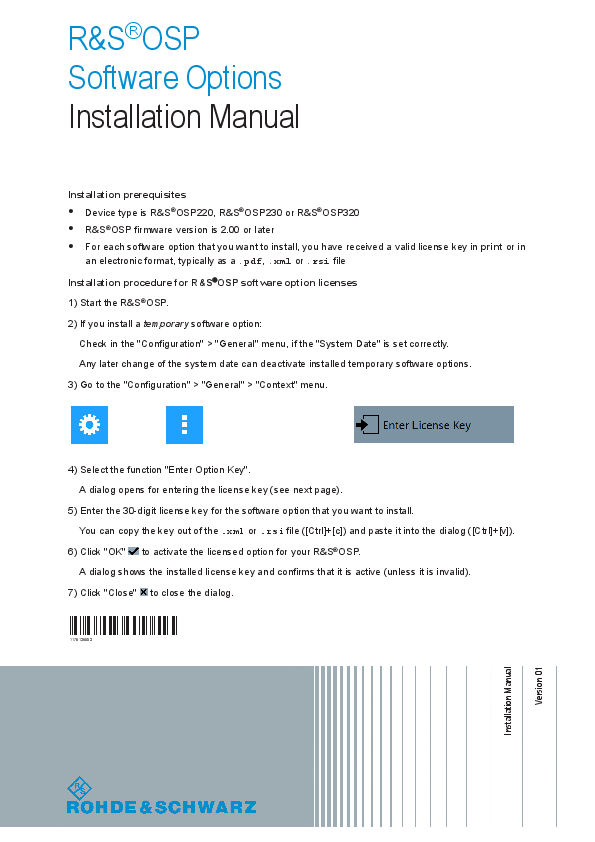
Installation Manual. Installation prerequisites. ○ Device type is R&S OSP220, R&S OSP230 or R&S OSP320. ○ R&S OSP firmware version is 2.00 or later.
Extracted Text
R&S�OSP Software Options Installation Manual
Installation prerequisites  Device type is R&S�OSP220, R&S�OSP230 or R&S�OSP320  R&S�OSP firmware version is 2.00 or later  For each software option that you want to install, you have received a valid license key in print or in
an electronic format, typically as a .pdf, .xml or .rsi file Installation procedure for R&S�OSP software option licenses 1) Start the R&S�OSP. 2) If you install a temporary software option:
Check in the "Configuration" > "General" menu, if the "System Date" is set correctly. Any later change of the system date can deactivate installed temporary software options. 3) Go to the "Configuration" > "General" > "Context" menu.
4) Select the function "Enter Option Key". A dialog opens for entering the license key (see next page).
5) Enter the 30-digit license key for the software option that you want to install. You can copy the key out of the .xml or .rsi file ([Ctrl]+[c]) and paste it into the dialog ([Ctrl]+[v]).
6) Click "OK" to activate the licensed option for your R&S�OSP. A dialog shows the installed license key and confirms that it is active (unless it is invalid).
7) Click "Close" to close the dialog.
(;�<�2)
1179125802

Installation Manual Version 01

 Note: Triple usage of invalid license keys disables key entry for a brief period of time.
Figure 1: Dialog for entering the license key (with invalid example key)
Product start page: www.rohde-schwarz.com/product/osp-n The user manual with more detailed instructions is available on the internet at: www.rohde-schwarz.com/manual/osp-n Keep documents for service issues Keep the software installation instructions and the "License Keys List" with your user documentation, both are important service documents. If there are any problems, contact your Rohde & Schwarz service center. Contacting customer support For quick, expert help with any Rohde & Schwarz product, contact our customer support center. A team of highly qualified engineers provides support and works with you to find a solution to your query on any aspect of the operation, programming or applications of Rohde & Schwarz products.  Contact our customer support center at www.rohde-schwarz.com/support, or follow this QR code:
� 2020 Rohde & Schwarz GmbH & Co. KG M�hldorfstr. 15, 81671 M�nchen, Germany Phone: +49 89 41 29 - 0 Email: info@rohde-schwarz.com Internet: www.rohde-schwarz.com Subject to change � Data without tolerance limits is not binding. R&S� is a registered trademark of Rohde & Schwarz GmbH & Co. KG. Trade names are trademarks of the owners.