TruCore Distributors TRUMEDIC Remote Controller User Manual R1

truCore Distributors, Inc Remote Controller R1

User Manual R1

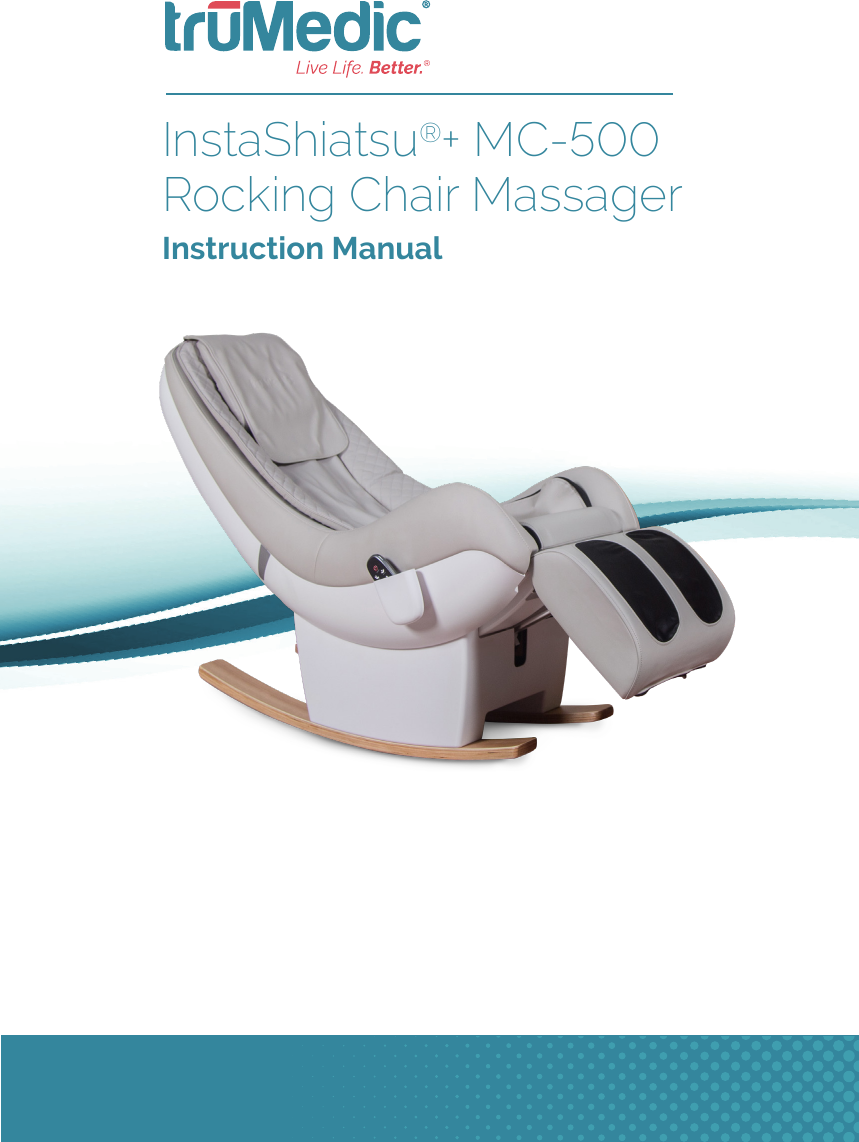
InstaShiatsu®+ MC-500 Rocking Chair Massager  Instruction Manual
Important Safety Instructions  1Save These Instructions  2Important Safeguards  3Introduction  9Understanding Your Massage Chair   10Installation Guide  11Operating Your Massage Chair  15Using the Remote Controller  18Cleaning and Maintenance  26Troubleshooting  28Warranty and Technical Specications  30TABLE OF CONTENTS
1IMPORTANT SAFETY INSTRUCTIONSWhen using an electrical appliance, basic precautions should always be followed, including the following: Read all instructions before using (this appliance). DANGER: To reduce the risk of electric shock: Always unplug this appliance from the electrical outlet immediately after using and before cleaning.WARNING: To reduce the risk of burns, re, electric shock, or injury to persons:1.  An appliance should never be left unattended when plugged in. Unplug from outlet when not in use, and before putting on or taking off parts.2.  Do not operate under blanket or pillow. Excessive heating can occur and cause re, electric shock, or injury to persons.3.   WARNING: Keep children away from extended foot support (or other similar parts). Close supervision is necessary when this appliance is used by, on, or near children, invalids, or disabled persons.4.  Use this appliance only for its intended use as described in this manual. Do not use attachments not recommended by the manufacturer.5.  Never operate this appliance if it has a damaged cord or plug, if it is not working properly, if it has been dropped or damaged, or dropped into water. Return the appliance to a service center for examination and repair.6.  Do not carry this appliance by supply cord or use cord as a handle.7.  Keep the cord away from heated surfaces.8.  Never drop or insert any object into any opening.9.  Do not use outdoors. Household, commercial and indoor use only.10. Do not operate where aerosol (spray) products are being used or where oxygen is being administered.11. To disconnect, turn all controls to the off position, then remove plug from outlet.12.  WARNING: Connect this appliance to a properly grounded outlet only. See Grounding Instructions.13.  WARNING: Do not use massager in close proximity to loose clothing or jewelry. Keep long hair away from massager while in use.14.  WARNING: REMOVE CONTROL BOX WHEN NOT IN USE, AND STORE OUT OF REACH OF CHILDREN.15.  WARNING: Chemical Burn Hazard. Keep batteries away from children. This product contains a lithium button/coin cell battery. If a new or used lithium button/coin cell battery is swallowed or enters the body, it can cause severe internal burns and can lead to death in as little as 2 hours. Always completely secure the battery compartment. If the battery compartment does not close securely, stop using the product, remove the batteries, and keep it away from children. If you think batteries might have been swallowed or placed inside any part of the body, seek immediate medical attention. The cells shall be disposed of properly, including keeping them away from children; and even used cells may cause injury.
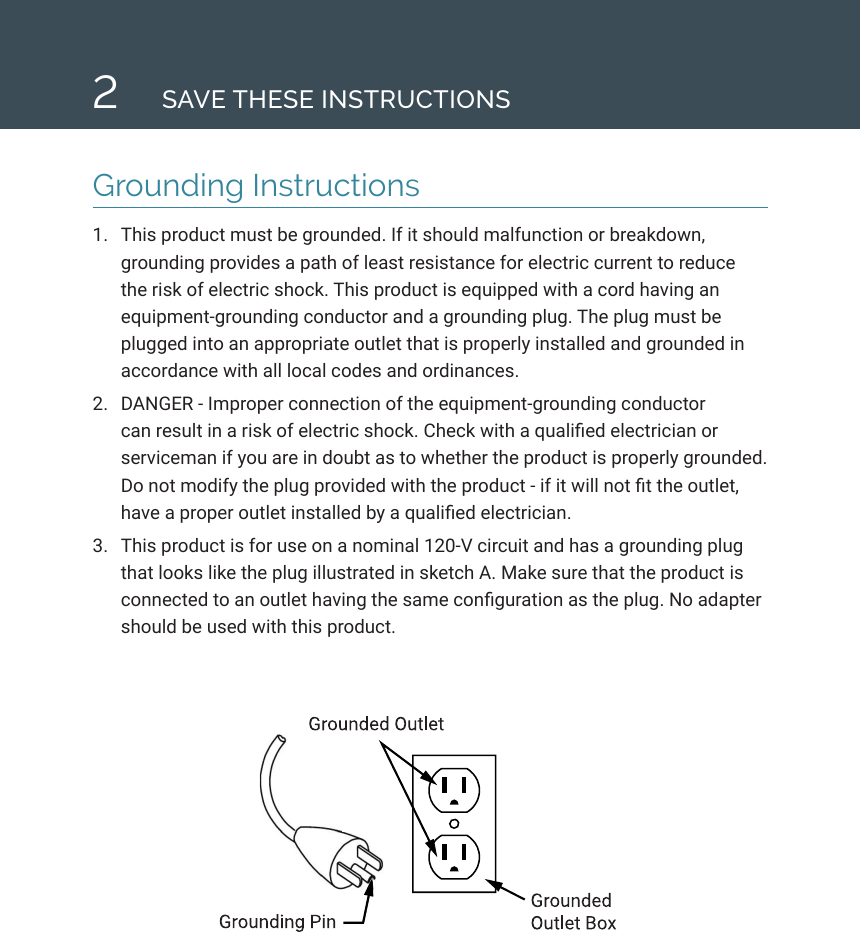
2SAVE THESE INSTRUCTIONSGrounding Instructions1.  This product must be grounded. If it should malfunction or breakdown, grounding provides a path of least resistance for electric current to reduce the risk of electric shock. This product is equipped with a cord having an equipment-grounding conductor and a grounding plug. The plug must be plugged into an appropriate outlet that is properly installed and grounded in accordance with all local codes and ordinances.2.  DANGER - Improper connection of the equipment-grounding conductor can result in a risk of electric shock. Check with a qualied electrician or serviceman if you are in doubt as to whether the product is properly grounded. Do not modify the plug provided with the product - if it will not t the outlet, have a proper outlet installed by a qualied electrician. 3.  This product is for use on a nominal 120-V circuit and has a grounding plug that looks like the plug illustrated in sketch A. Make sure that the product is connected to an outlet having the same conguration as the plug. No adapter should be used with this product.
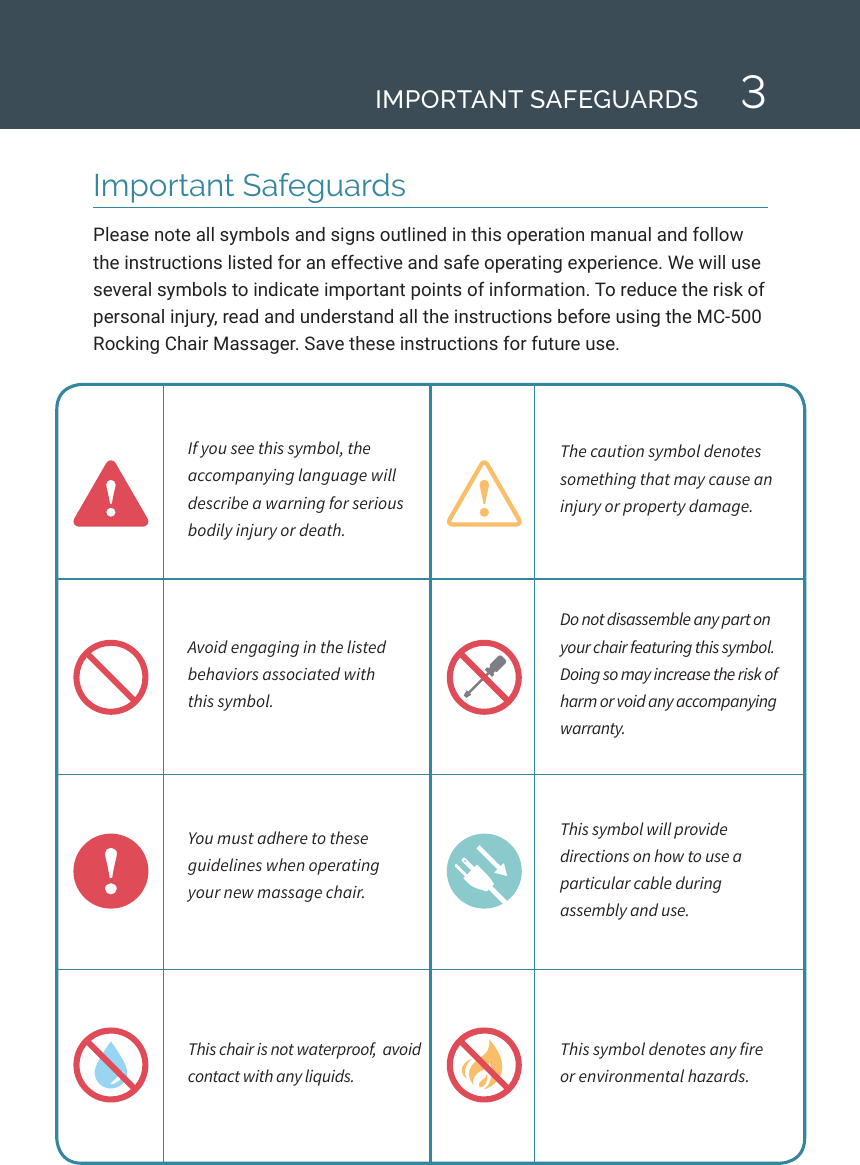
3Important SafeguardsPlease note all symbols and signs outlined in this operation manual and follow the instructions listed for an effective and safe operating experience. We will use several symbols to indicate important points of information. To reduce the risk of personal injury, read and understand all the instructions before using the MC-500 Rocking Chair Massager. Save these instructions for future use.If you see this symbol, the accompanying language will describe a warning for serious bodily injury or death. The caution symbol denotes something that may cause an injury or property damage. Avoid engaging in the listed behaviors associated with  this symbol. Do not disassemble any part on your chair featuring this symbol. Doing so may increase the risk of harm or void any accompanying warranty. You must adhere to these guidelines when operating  your new massage chair. This symbol will provide directions on how to use a particular cable during  assembly and use.This chair is not waterproof,  avoid contact with any liquids.This symbol denotes any fire  or environmental hazards.IMPORTANT SAFEGUARDS
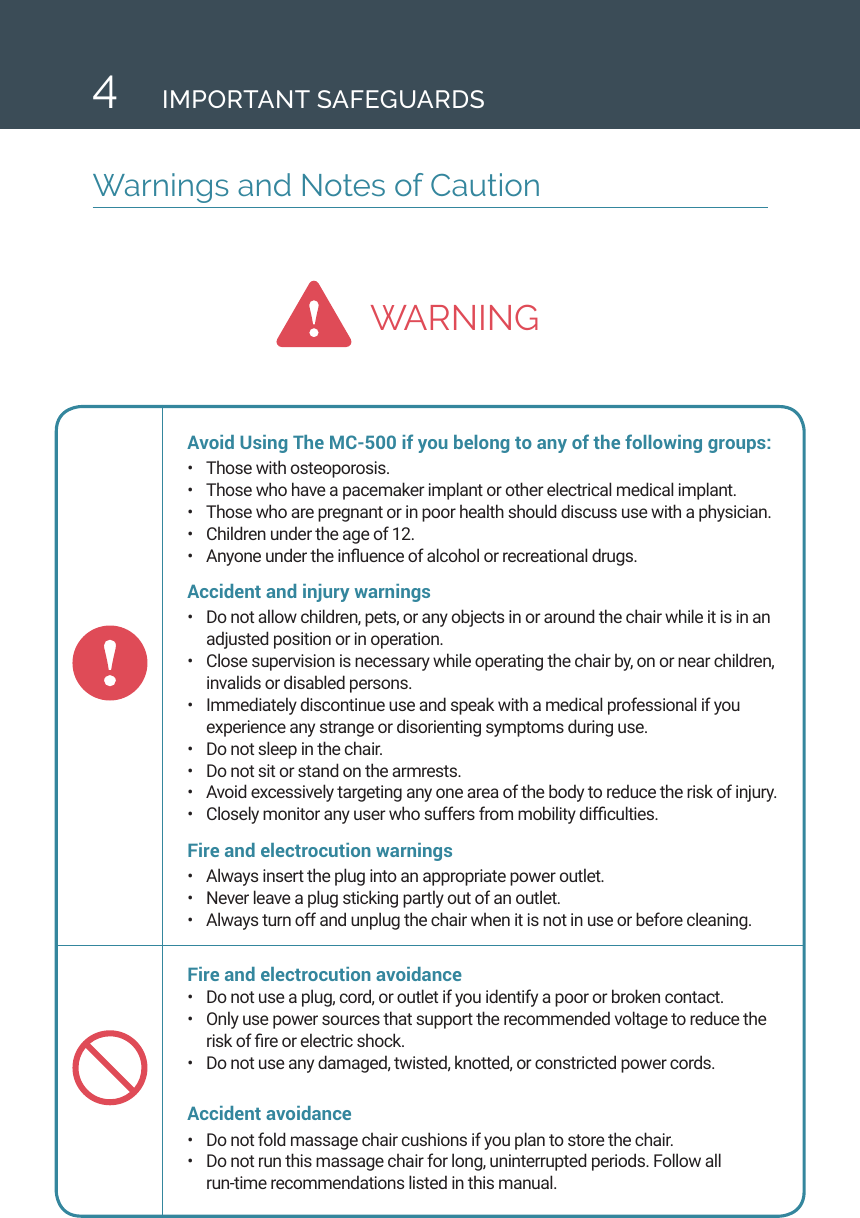
WARNING4Warnings and Notes of CautionIMPORTANT SAFEGUARDSAvoid Using The MC-500 if you belong to any of the following groups:•  Those with osteoporosis.•  Those who have a pacemaker implant or other electrical medical implant.•  Those who are pregnant or in poor health should discuss use with a physician.•  Children under the age of 12.•  Anyone under the inuence of alcohol or recreational drugs.Accident and injury warnings •  Do not allow children, pets, or any objects in or around the chair while it is in an adjusted position or in operation. •  Close supervision is necessary while operating the chair by, on or near children, invalids or disabled persons.•  Immediately discontinue use and speak with a medical professional if you experience any strange or disorienting symptoms during use.•  Do not sleep in the chair. •  Do not sit or stand on the armrests.•  Avoid excessively targeting any one area of the body to reduce the risk of injury.•  Closely monitor any user who suffers from mobility difculties. Fire and electrocution warnings •  Always insert the plug into an appropriate power outlet. •  Never leave a plug sticking partly out of an outlet. •  Always turn off and unplug the chair when it is not in use or before cleaning.Fire and electrocution avoidance •  Do not use a plug, cord, or outlet if you identify a poor or broken contact.•  Only use power sources that support the recommended voltage to reduce the risk of re or electric shock. •  Do not use any damaged, twisted, knotted, or constricted power cords. Accident avoidance •  Do not fold massage chair cushions if you plan to store the chair.•  Do not run this massage chair for long, uninterrupted periods. Follow all  run-time recommendations listed in this manual.
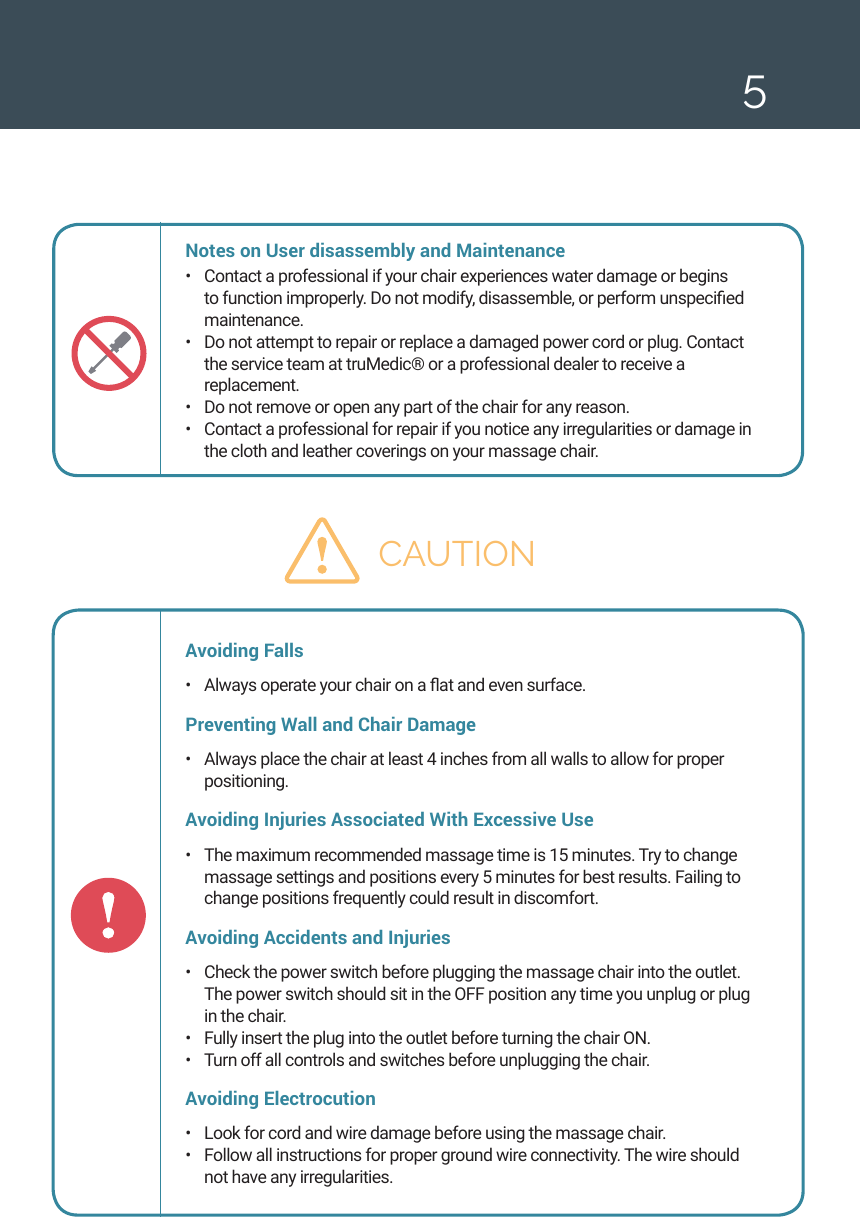
5Notes on User disassembly and Maintenance •  Contact a professional if your chair experiences water damage or begins to function improperly. Do not modify, disassemble, or perform unspecied maintenance. •  Do not attempt to repair or replace a damaged power cord or plug. Contact the service team at truMedic® or a professional dealer to receive a replacement. •  Do not remove or open any part of the chair for any reason. •  Contact a professional for repair if you notice any irregularities or damage in the cloth and leather coverings on your massage chair. CAUTIONAvoiding Falls•  Always operate your chair on a at and even surface. Preventing Wall and Chair Damage •  Always place the chair at least 4 inches from all walls to allow for proper positioning. Avoiding Injuries Associated With Excessive Use •  The maximum recommended massage time is 15 minutes. Try to change massage settings and positions every 5 minutes for best results. Failing to change positions frequently could result in discomfort. Avoiding Accidents and Injuries•  Check the power switch before plugging the massage chair into the outlet. The power switch should sit in the OFF position any time you unplug or plug in the chair. •  Fully insert the plug into the outlet before turning the chair ON.•  Turn off all controls and switches before unplugging the chair. Avoiding Electrocution •  Look for cord and wire damage before using the massage chair. •  Follow all instructions for proper ground wire connectivity. The wire should not have any irregularities.
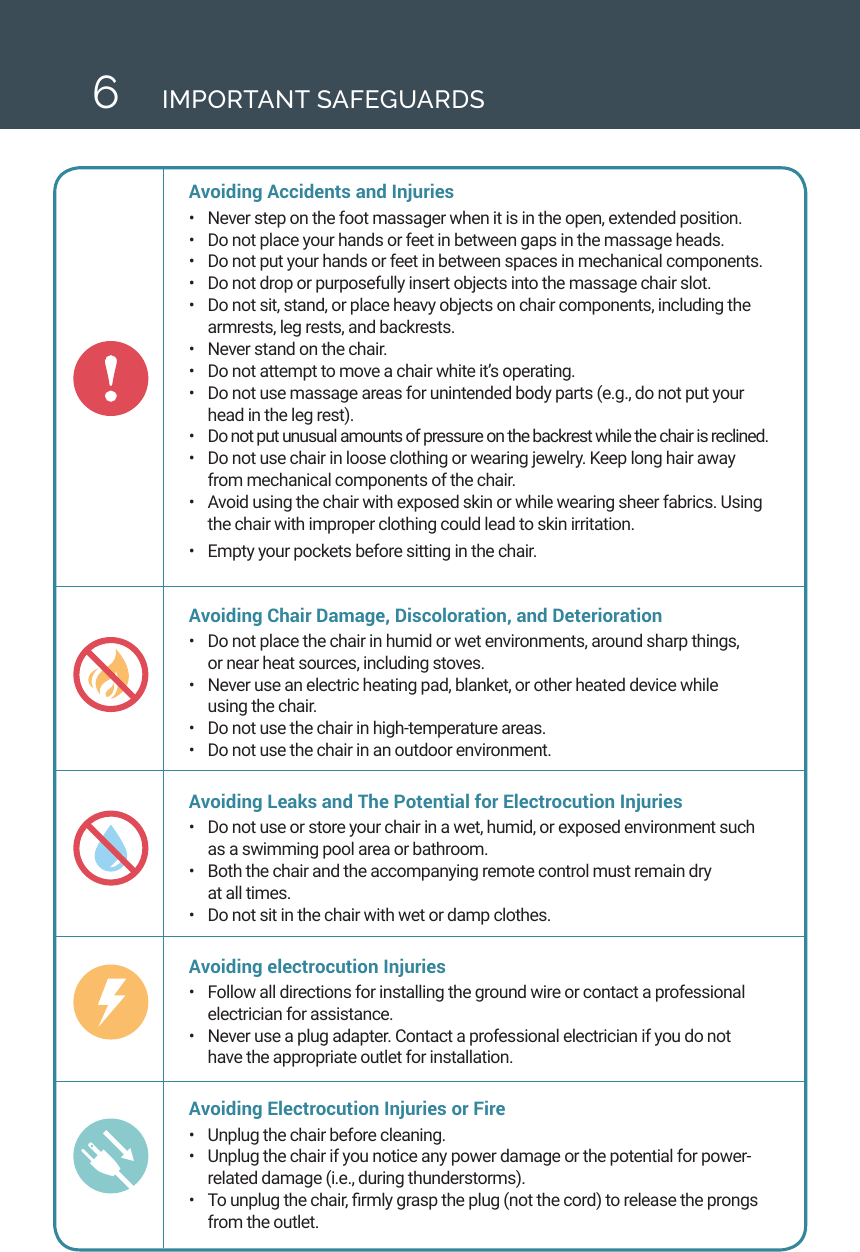
6IMPORTANT SAFEGUARDSAvoiding Accidents and Injuries •  Never step on the foot massager when it is in the open, extended position.•  Do not place your hands or feet in between gaps in the massage heads. •  Do not put your hands or feet in between spaces in mechanical components. •  Do not drop or purposefully insert objects into the massage chair slot. •  Do not sit, stand, or place heavy objects on chair components, including the armrests, leg rests, and backrests. •  Never stand on the chair. •  Do not attempt to move a chair white it’s operating. •  Do not use massage areas for unintended body parts (e.g., do not put your head in the leg rest). •  Do not put unusual amounts of pressure on the backrest while the chair is reclined. •  Do not use chair in loose clothing or wearing jewelry. Keep long hair away from mechanical components of the chair.•  Avoid using the chair with exposed skin or while wearing sheer fabrics. Using the chair with improper clothing could lead to skin irritation. •  Empty your pockets before sitting in the chair. Avoiding Chair Damage, Discoloration, and Deterioration •  Do not place the chair in humid or wet environments, around sharp things,  or near heat sources, including stoves. •  Never use an electric heating pad, blanket, or other heated device while  using the chair. •  Do not use the chair in high-temperature areas. •  Do not use the chair in an outdoor environment. Avoiding Leaks and The Potential for Electrocution Injuries •  Do not use or store your chair in a wet, humid, or exposed environment such as a swimming pool area or bathroom. •  Both the chair and the accompanying remote control must remain dry  at all times. •  Do not sit in the chair with wet or damp clothes. Avoiding electrocution Injuries •  Follow all directions for installing the ground wire or contact a professional electrician for assistance. •  Never use a plug adapter. Contact a professional electrician if you do not have the appropriate outlet for installation. Avoiding Electrocution Injuries or Fire•  Unplug the chair before cleaning. •  Unplug the chair if you notice any power damage or the potential for power-related damage (i.e., during thunderstorms). •  To unplug the chair, rmly grasp the plug (not the cord) to release the prongs from the outlet.
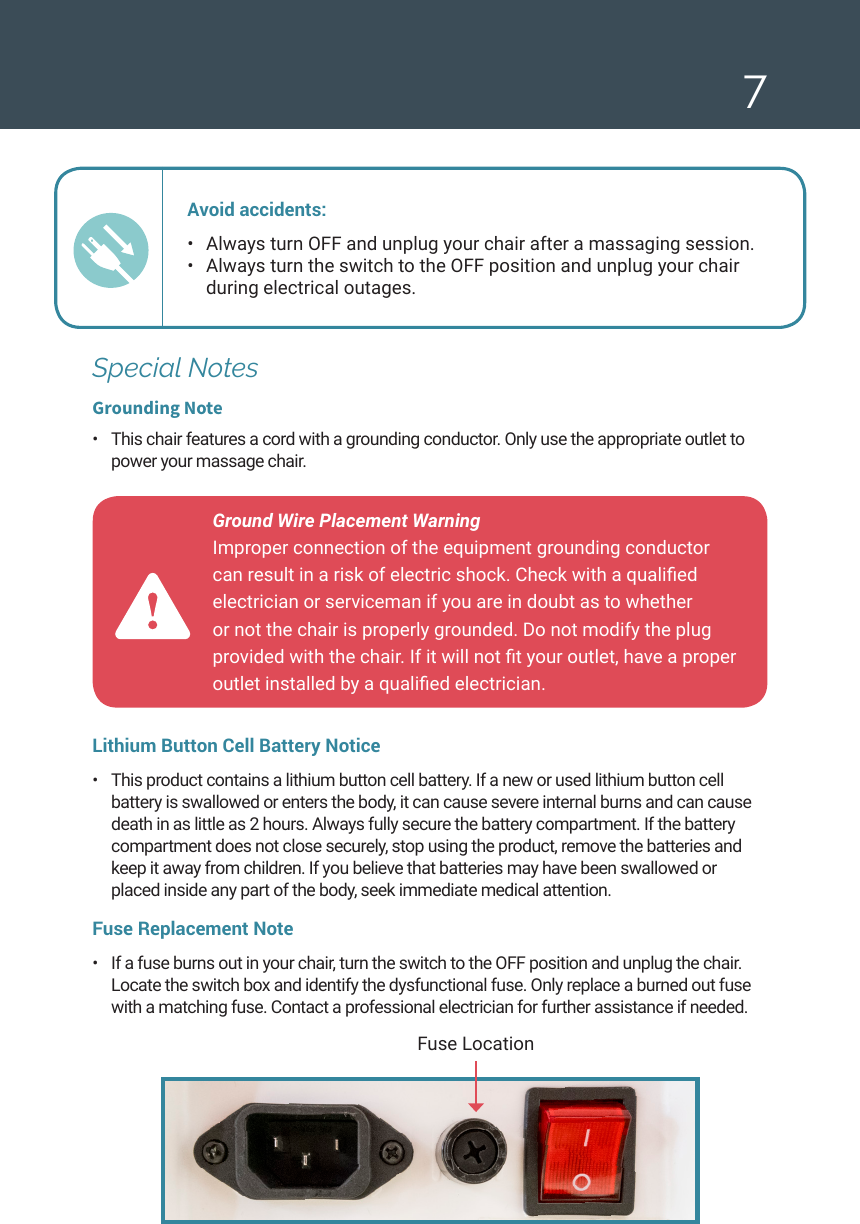
7Ground Wire Placement Warning  Improper connection of the equipment grounding conductor can result in a risk of electric shock. Check with a qualied electrician or serviceman if you are in doubt as to whether or not the chair is properly grounded. Do not modify the plug provided with the chair. If it will not t your outlet, have a proper outlet installed by a qualied electrician. Fuse LocationSpecial NotesGrounding Note•  This chair features a cord with a grounding conductor. Only use the appropriate outlet to power your massage chair. Avoid accidents: •  Always turn OFF and unplug your chair after a massaging session. •  Always turn the switch to the OFF position and unplug your chair  during electrical outages. Lithium Button Cell Battery Notice•  This product contains a lithium button cell battery. If a new or used lithium button cell battery is swallowed or enters the body, it can cause severe internal burns and can cause death in as little as 2 hours. Always fully secure the battery compartment. If the battery compartment does not close securely, stop using the product, remove the batteries and keep it away from children. If you believe that batteries may have been swallowed or placed inside any part of the body, seek immediate medical attention.Fuse Replacement Note •  If a fuse burns out in your chair, turn the switch to the OFF position and unplug the chair. Locate the switch box and identify the dysfunctional fuse. Only replace a burned out fuse with a matching fuse. Contact a professional electrician for further assistance if needed.
8IMPORTANT SAFEGUARDSFCC StatementNOTE: This equipment has been tested and found to comply with the limits for a Class B digital device, pursuant to Part 15 of the FCC Rules. These limits are designed to provide reasonable protection against harmful interference in a residential installation. This equipment generates, uses and can radiate radio frequency energy and, if not installed and used in accordance with the instructions, may cause harmful interference to radio communications. However, there is no guarantee that interference will not occur in a particular installation. If this equipment does cause harmful interference to radio or television reception, which can be determined by turning the equipment off and on, the user is encouraged to try to correct the interference by one or more of the following measures:•  Reorient or relocate the receiving antenna.•  Increase the separation between the equipment and receiver.•  Connect the equipment into an outlet on a circuit different from that to which the receiver is connected.•  Consult the dealer or an experienced radio/TV technician for help.Warning  Changes or modications to this unit  not expressly approved by the party responsible for compliance could void the user’s authority to operate the equipment.
9IntroductionThank you for your purchase of the truMedic MC-500 Rocking Chair Massager! With simple care and maintenance this ne product will bring you stress relief and relaxation for many years to come. The MC-500 combines the holistic benets of a dynamic shiatsu massage with the relaxing benets of gentle rocking motion, all in one stylish, convenient package. Use your MC-500 at home, in the ofce, or anywhere you need to relax (Indoor use only).•  Choose The Perfect Massage: 4 auto-massage functions; Relax,  Rejuvenate, Soothe, and Sleep.•  4 Available Massage Program Techniques: Kneading, Tapping, Shiatsu  and Calf Massage Modes.•  Remote Control: Included wireless remote control to customize your massage experience.•  Massage Your Feet: Convertible Foot Massager works both calves  and feet, depending on position.•  Airbag Pressure-Massage: airbags located at hip level to  provide compression relief.A Quick Note from truMedic®As you install and begin to use your new massage chair, please keep the following recommendations in mind: •  Use the images provided here as a guide and not as an exact illustration of your chair. Always refer to your massage chair as you read through the instructions.•  Store your operation manual in a convenient place for quick reference.•  Carefully read all warnings and cautionary notes provided in your manual. truMedic® reserves the right to change the design specications of the MC-500 without notice. Use the images provided here as a guide and not as an exact replica of your chair. Always refer to your massage chair as you read through  the instructions.INTRODUCTION
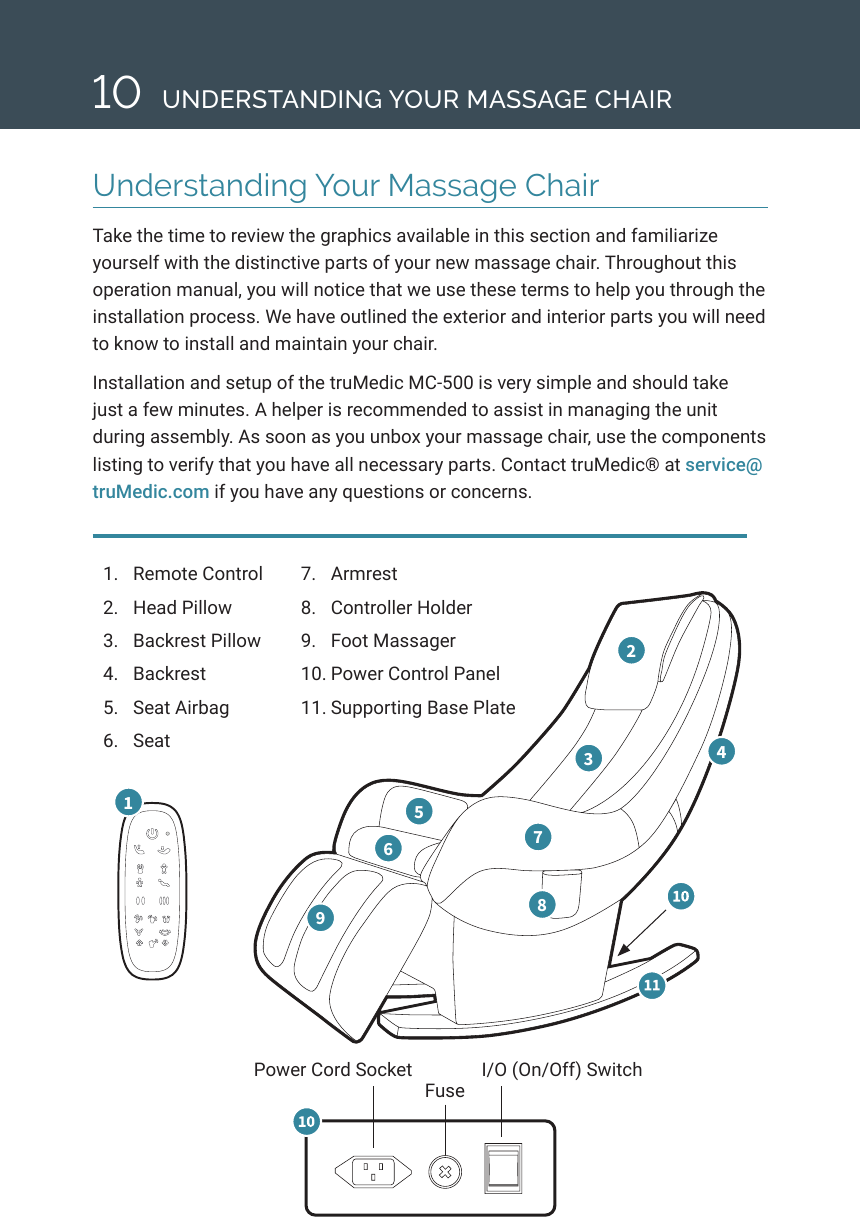
Understanding Your Massage ChairTake the time to review the graphics available in this section and familiarize yourself with the distinctive parts of your new massage chair. Throughout this operation manual, you will notice that we use these terms to help you through the installation process. We have outlined the exterior and interior parts you will need to know to install and maintain your chair. Installation and setup of the truMedic MC-500 is very simple and should take just a few minutes. A helper is recommended to assist in managing the unit during assembly. As soon as you unbox your massage chair, use the components listing to verify that you have all necessary parts. Contact truMedic® at service@truMedic.com if you have any questions or concerns. 101.  Remote Control2.  Head Pillow3.  Backrest Pillow 4.  Backrest5.  Seat Airbag 6.  Seat 1 2 3  4 5 6  7 8 9   7.  Armrest8.  Controller Holder9.  Foot Massager10. Power Control Panel11. Supporting Base PlatePower Cord Socket I/O (On/Off) SwitchFuseUNDERSTANDING YOUR MASSAGE CHAIR
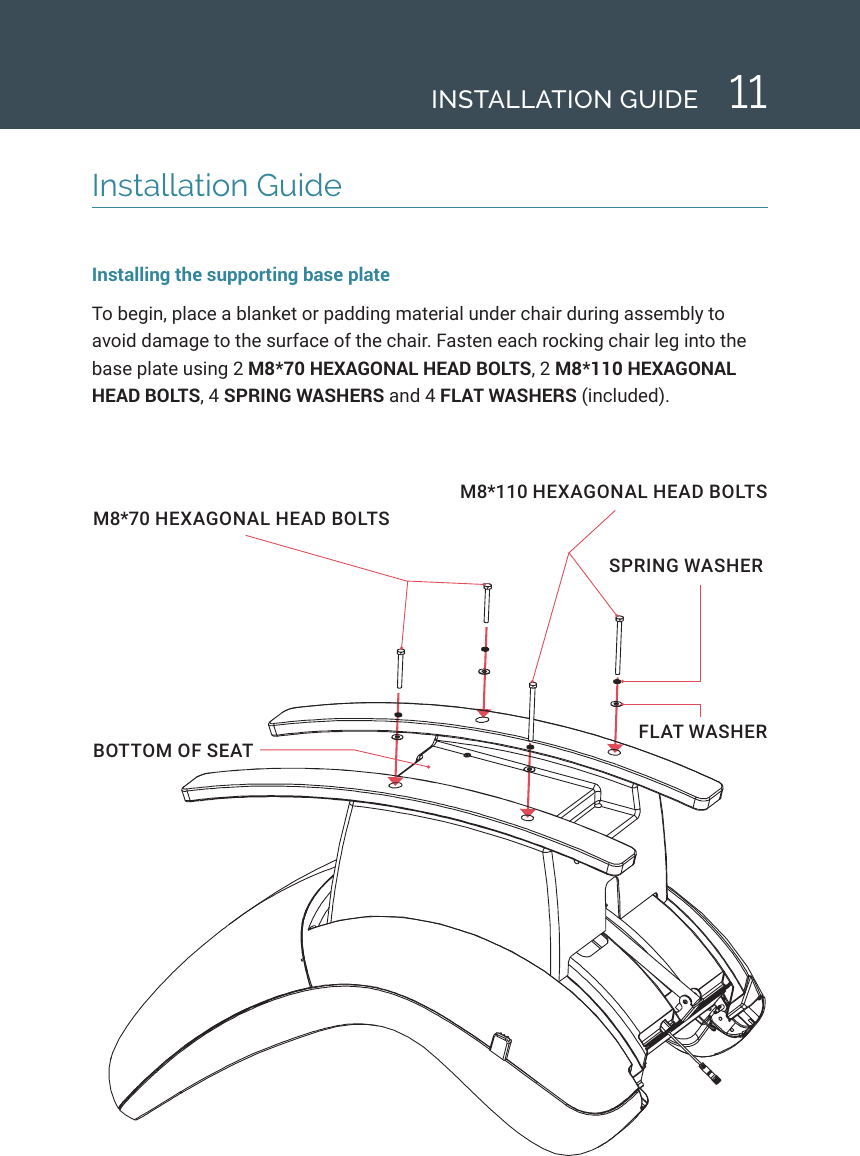
11INSTALLATION GUIDEInstallation GuideInstalling the supporting base plate To begin, place a blanket or padding material under chair during assembly to avoid damage to the surface of the chair. Fasten each rocking chair leg into the base plate using 2 M8*70 HEXAGONAL HEAD BOLTS, 2 M8*110 HEXAGONAL HEAD BOLTS, 4 SPRING WASHERS and 4 FLAT WASHERS (included).M8*70 HEXAGONAL HEAD BOLTSM8*110 HEXAGONAL HEAD BOLTSSPRING WASHERFLAT WASHERBOTTOM OF SEAT
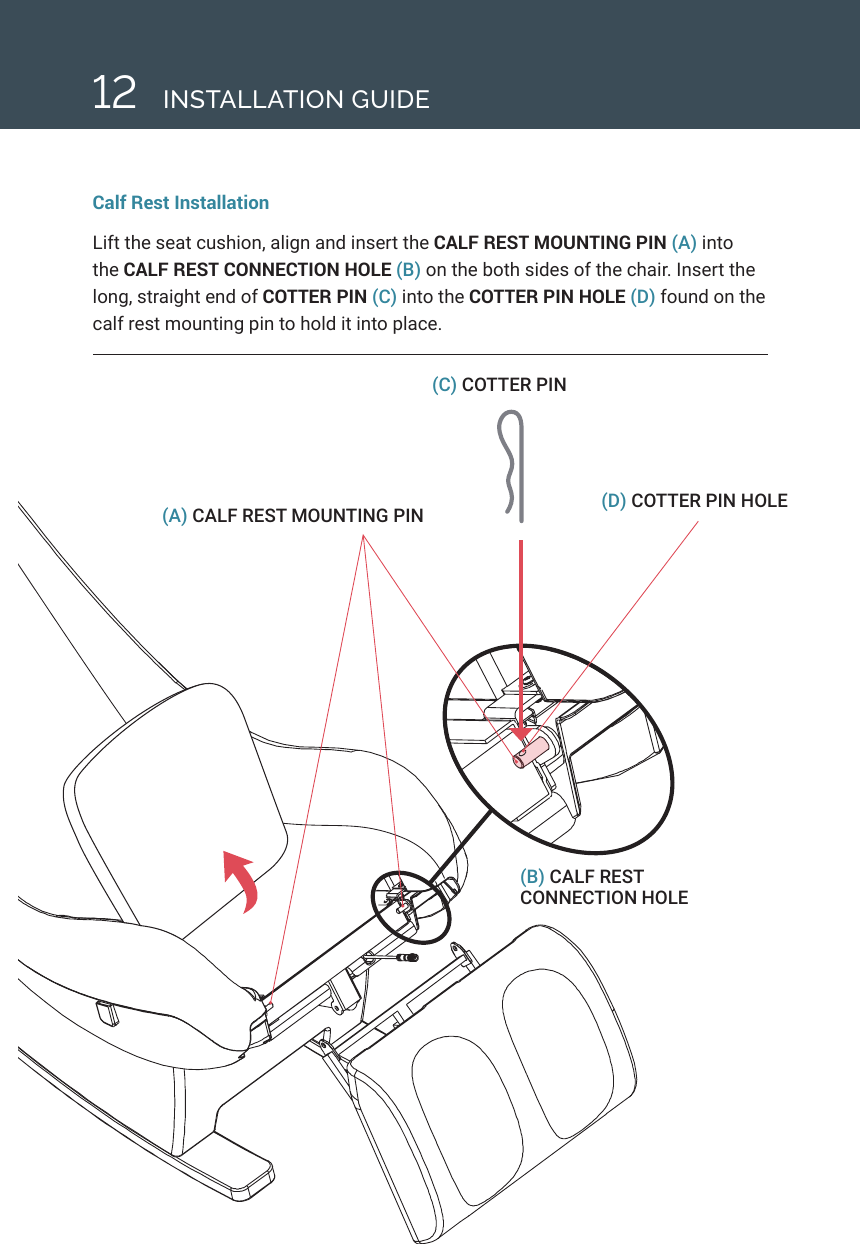
12(C) COTTER PIN (D) COTTER PIN HOLE(A) CALF REST MOUNTING PIN(B) CALF REST CONNECTION HOLECalf Rest InstallationLift the seat cushion, align and insert the CALF REST MOUNTING PIN (A) into the CALF REST CONNECTION HOLE (B) on the both sides of the chair. Insert the long, straight end of COTTER PIN (C) into the COTTER PIN HOLE (D) found on the calf rest mounting pin to hold it into place.INSTALLATION GUIDE
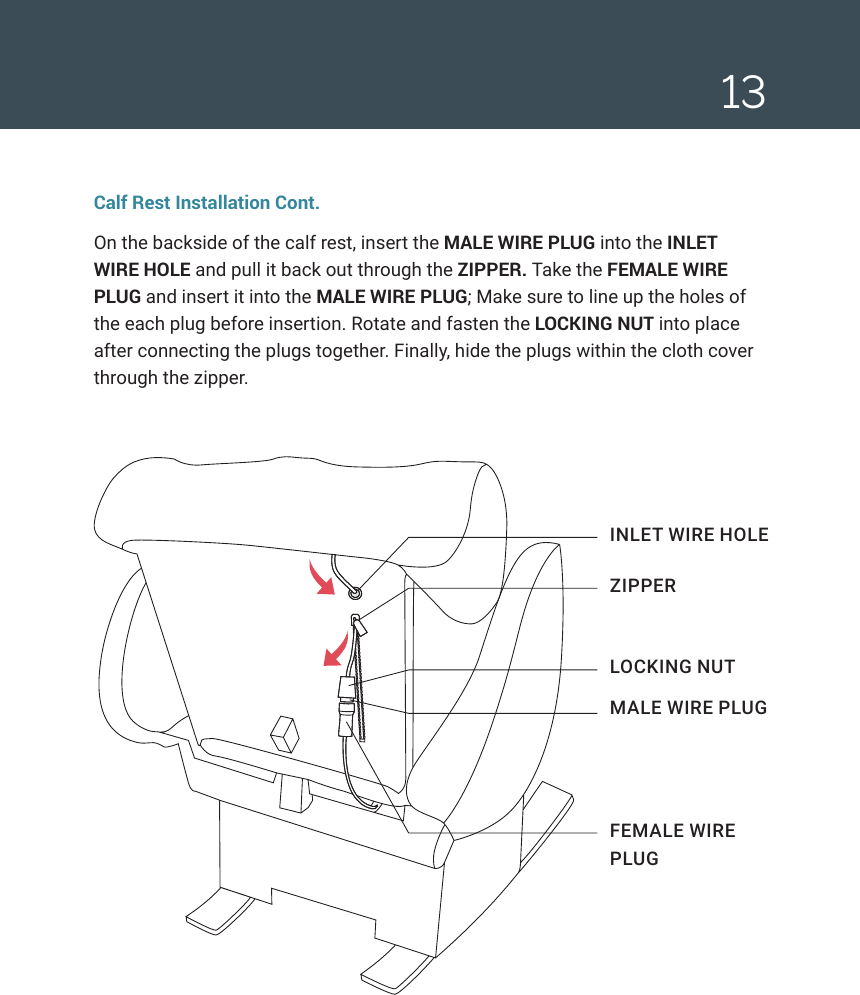
13 (D) COTTER PIN HOLEINLET WIRE HOLEZIPPERLOCKING NUTMALE WIRE PLUGFEMALE WIRE PLUGCalf Rest Installation Cont.On the backside of the calf rest, insert the MALE WIRE PLUG into the INLET WIRE HOLE and pull it back out through the ZIPPER. Take the FEMALE WIRE PLUG and insert it into the MALE WIRE PLUG; Make sure to line up the holes of the each plug before insertion. Rotate and fasten the LOCKING NUT into place after connecting the plugs together. Finally, hide the plugs within the cloth cover through the zipper.
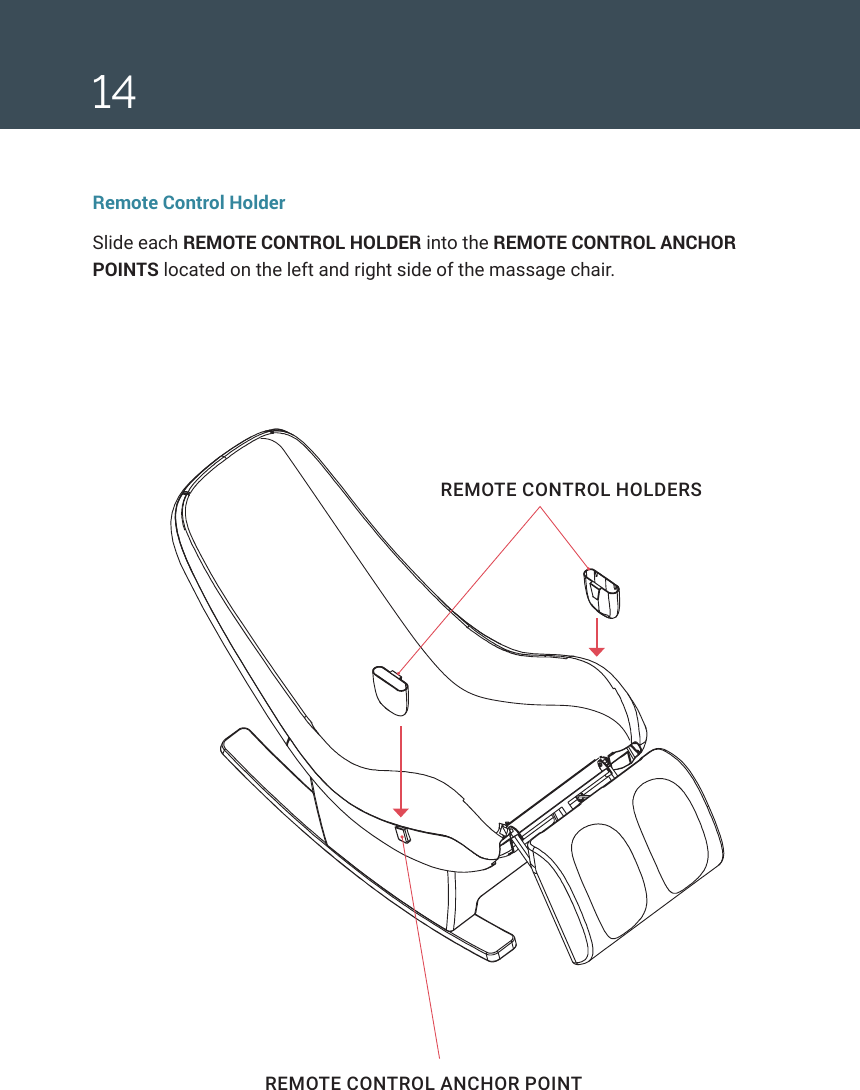
14REMOTE CONTROL ANCHOR POINTREMOTE CONTROL HOLDERSRemote Control HolderSlide each REMOTE CONTROL HOLDER into the REMOTE CONTROL ANCHOR POINTS located on the left and right side of the massage chair.
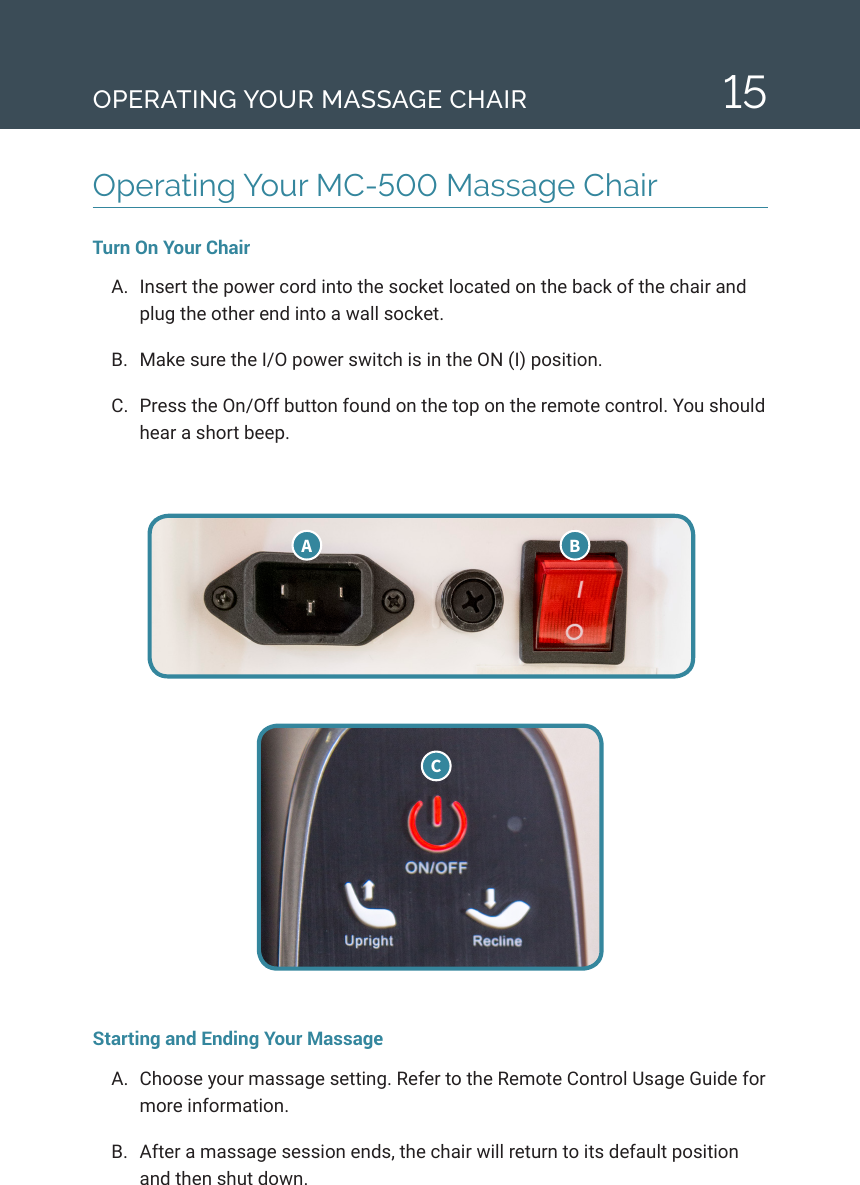
15Operating Your MC-500 Massage Chair Turn On Your ChairA.  Insert the power cord into the socket located on the back of the chair and plug the other end into a wall socket.B.  Make sure the I/O power switch is in the ON (I) position. C.  Press the On/Off button found on the top on the remote control. You should hear a short beep.Starting and Ending Your MassageA.  Choose your massage setting. Refer to the Remote Control Usage Guide for more information. B.  After a massage session ends, the chair will return to its default position and then shut down. A  B COPERATING YOUR MASSAGE CHAIR
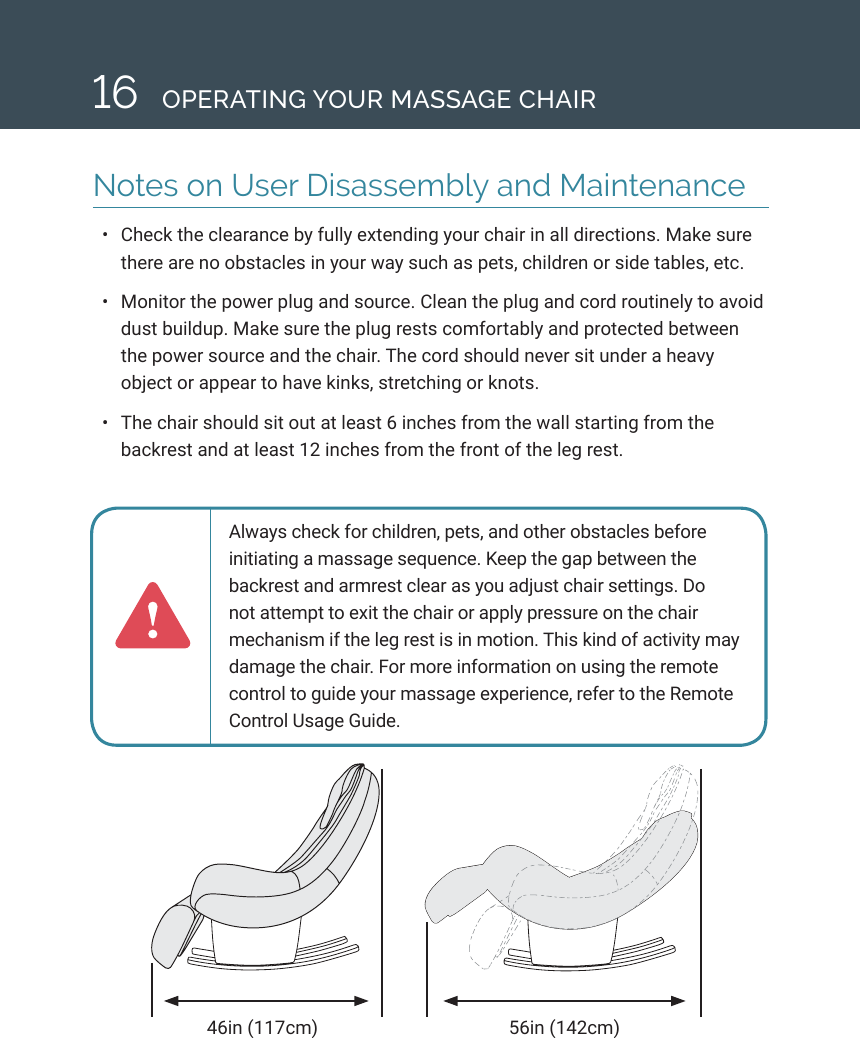
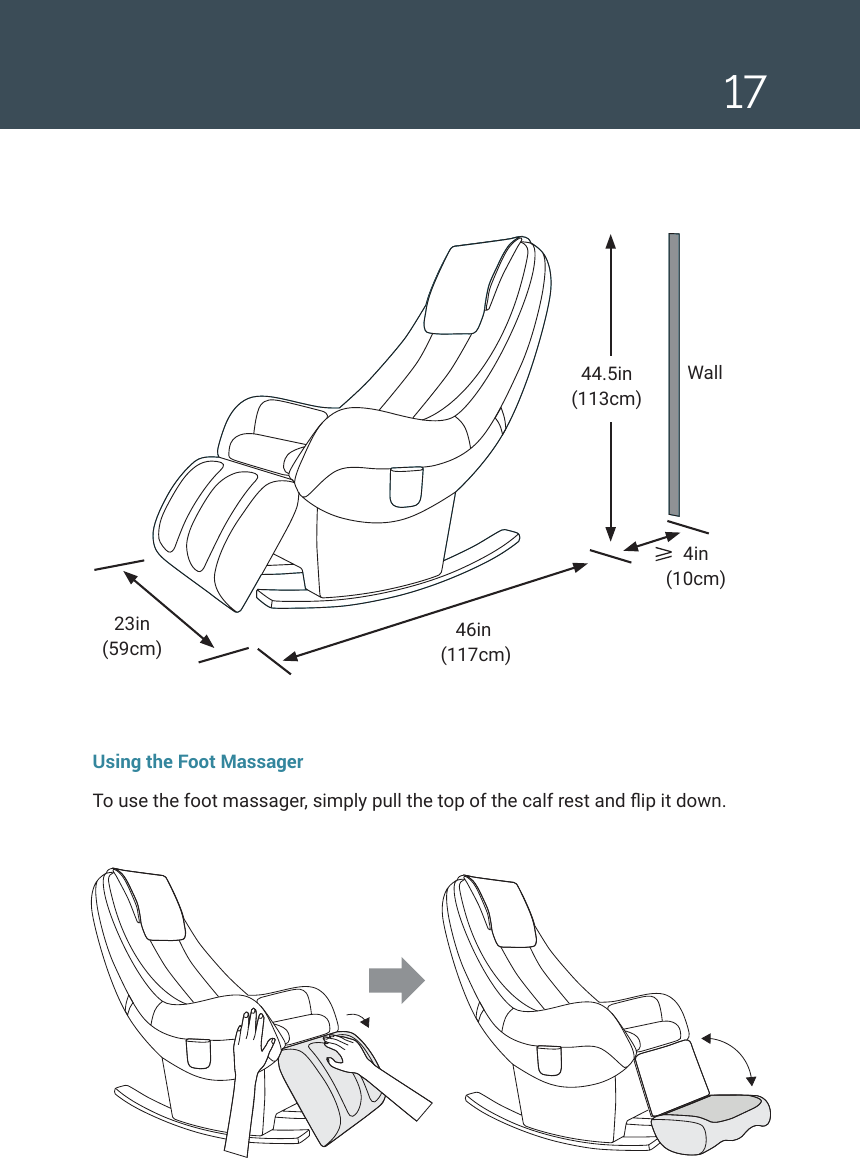
16 OPERATING YOUR MASSAGE CHAIRNotes on User Disassembly and Maintenance•  Check the clearance by fully extending your chair in all directions. Make sure there are no obstacles in your way such as pets, children or side tables, etc.•  Monitor the power plug and source. Clean the plug and cord routinely to avoid dust buildup. Make sure the plug rests comfortably and protected between the power source and the chair. The cord should never sit under a heavy object or appear to have kinks, stretching or knots. •  The chair should sit out at least 6 inches from the wall starting from the backrest and at least 12 inches from the front of the leg rest.46in (117cm) 56in (142cm)Always check for children, pets, and other obstacles before initiating a massage sequence. Keep the gap between the backrest and armrest clear as you adjust chair settings. Do not attempt to exit the chair or apply pressure on the chair mechanism if the leg rest is in motion. This kind of activity may damage the chair. For more information on using the remote control to guide your massage experience, refer to the Remote Control Usage Guide.
1723in  (59cm)46in  (117cm)4in  (10cm)Wall44.5in  (113cm)Using the Foot MassagerTo use the foot massager, simply pull the top of the calf rest and ip it down.
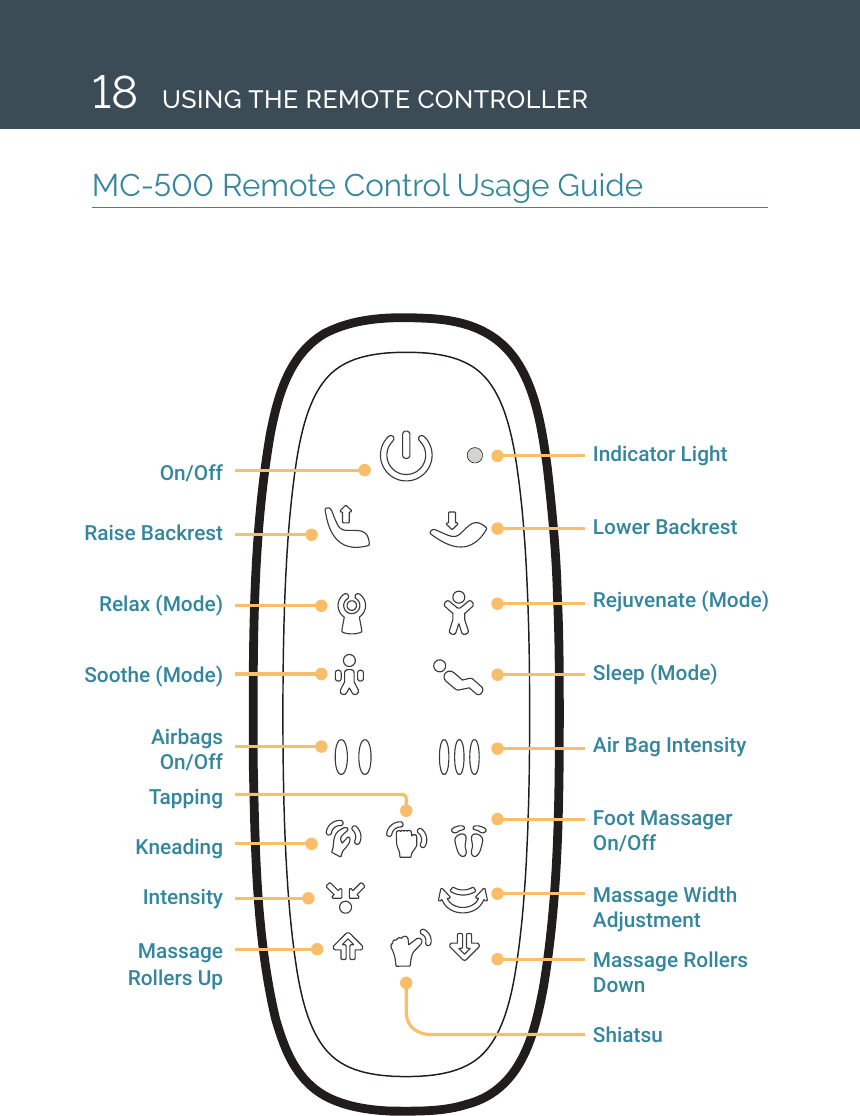
18On/OffRaise BackrestRelax (Mode)Soothe (Mode)Airbags  On/OffTappingKneadingIntensityMassage Rollers UpIndicator LightLower Backrest Rejuvenate (Mode) Sleep (Mode)Air Bag IntensityFoot Massager On/OffMassage Width AdjustmentMassage Rollers  Down ShiatsuMC-500 Remote Control Usage GuideUSING THE REMOTE CONTROLLER
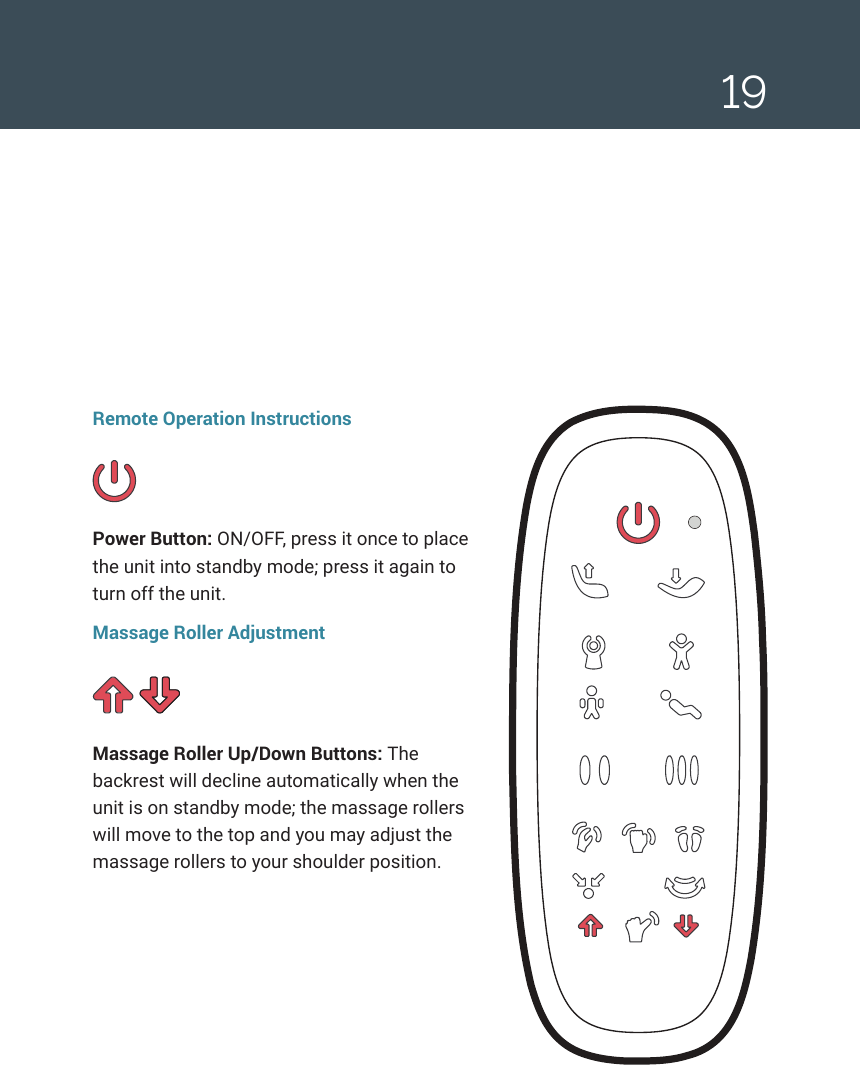
19Remote Operation InstructionsPower Button: ON/OFF, press it once to place the unit into standby mode; press it again to turn off the unit.Massage Roller AdjustmentMassage Roller Up/Down Buttons: The backrest will decline automatically when the unit is on standby mode; the massage rollers will move to the top and you may adjust the massage rollers to your shoulder position.
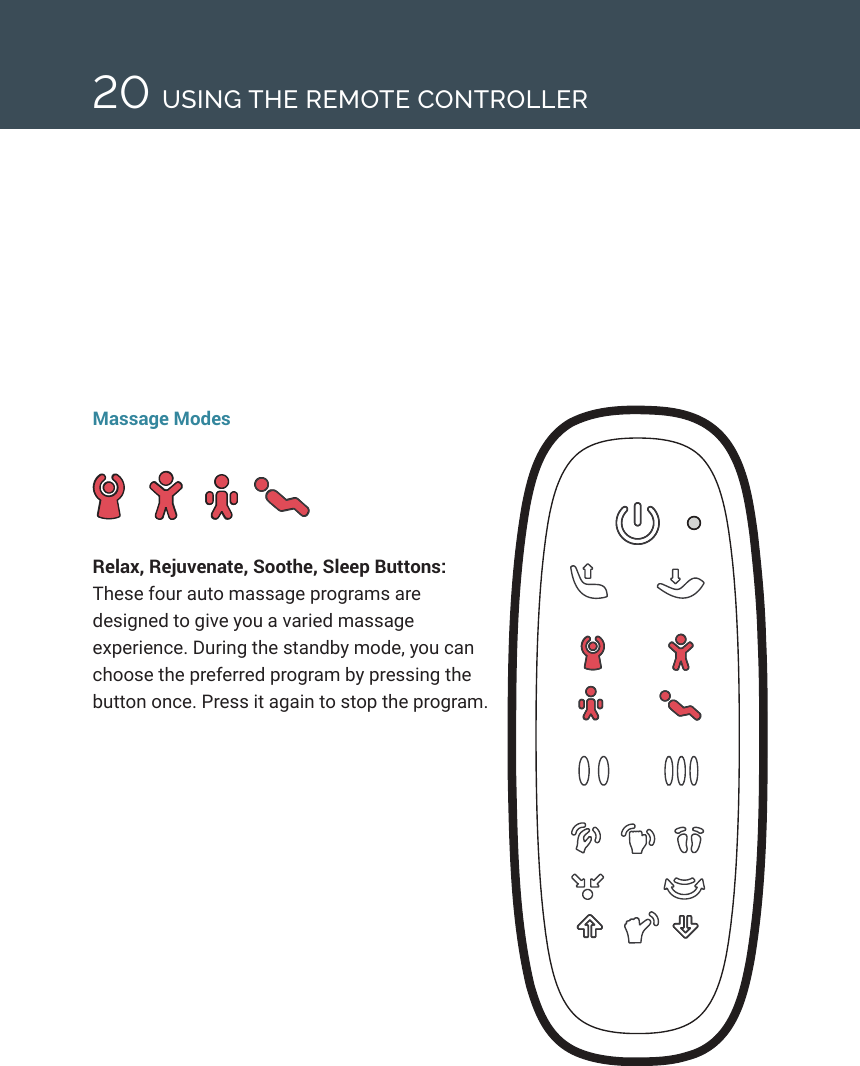
20Massage ModesRelax, Rejuvenate, Soothe, Sleep Buttons: These four auto massage programs are designed to give you a varied massage experience. During the standby mode, you can choose the preferred program by pressing the button once. Press it again to stop the program.USING THE REMOTE CONTROLLER
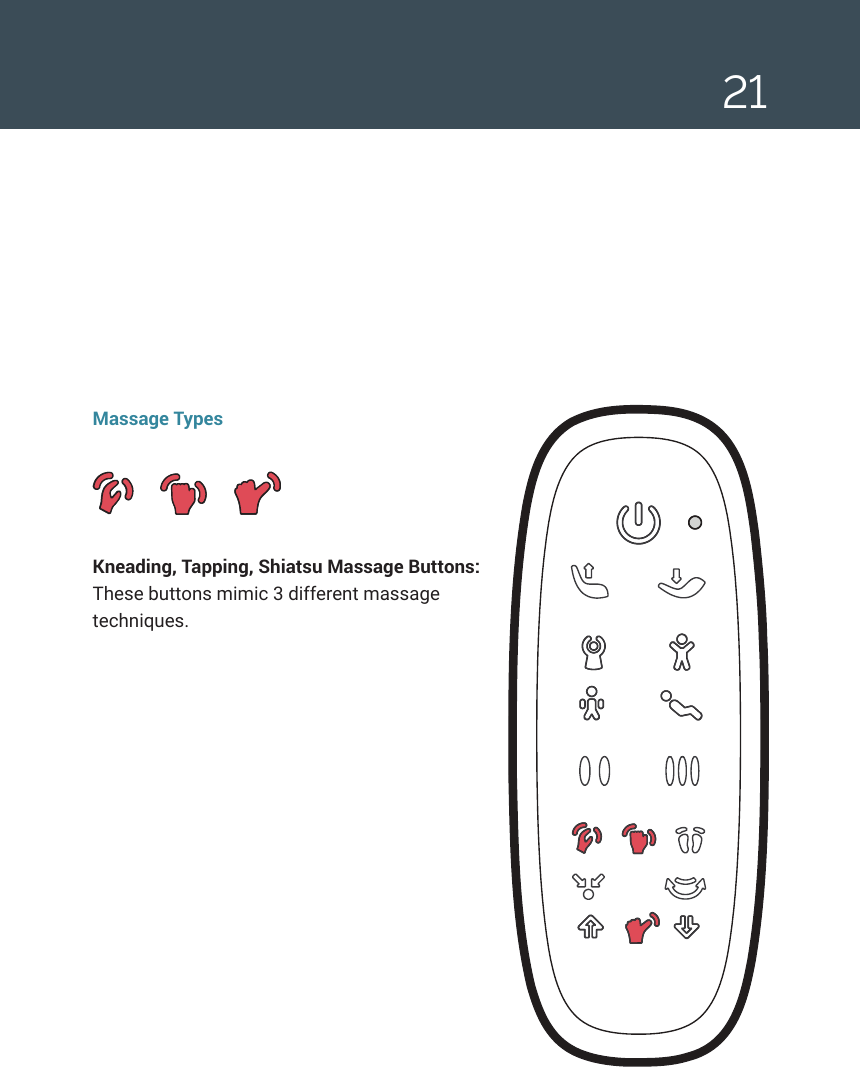
21Massage TypesKneading, Tapping, Shiatsu Massage Buttons: These buttons mimic 3 different massage techniques.
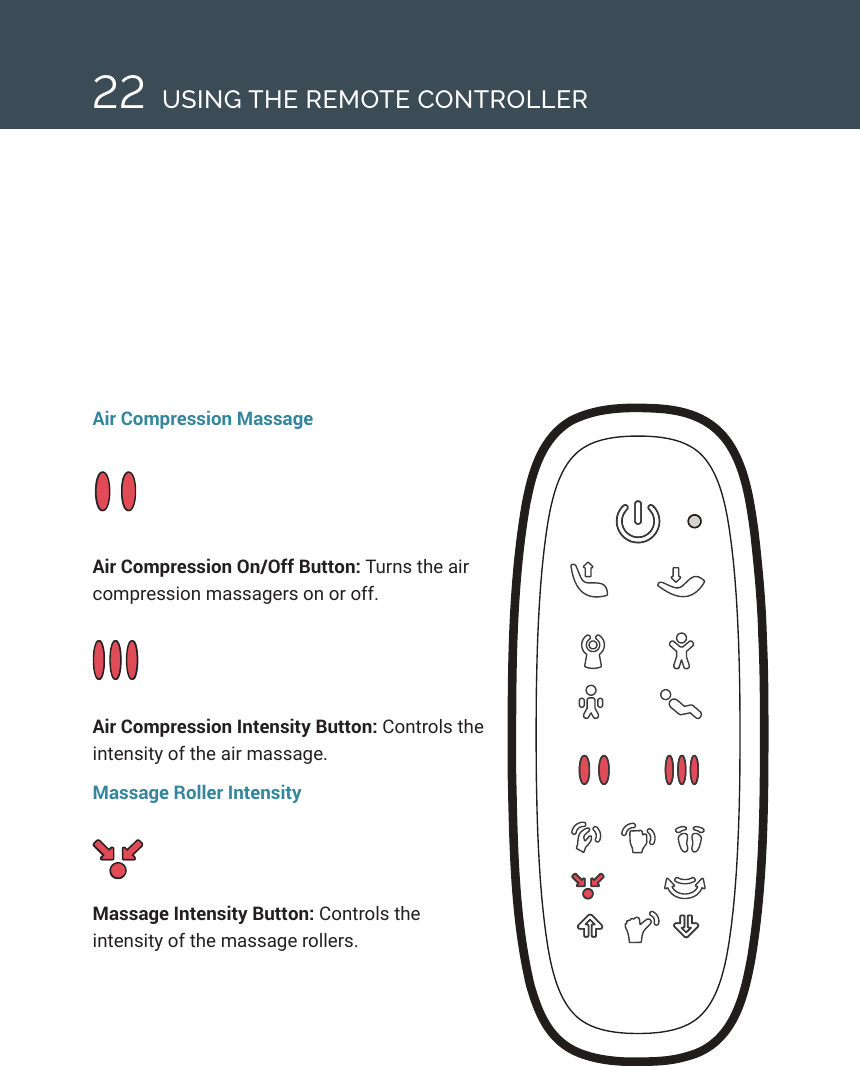
22Air Compression MassageAir Compression On/Off Button: Turns the air compression massagers on or off.Air Compression Intensity Button: Controls the intensity of the air massage.Massage Roller IntensityMassage Intensity Button: Controls the intensity of the massage rollers.USING THE REMOTE CONTROLLER
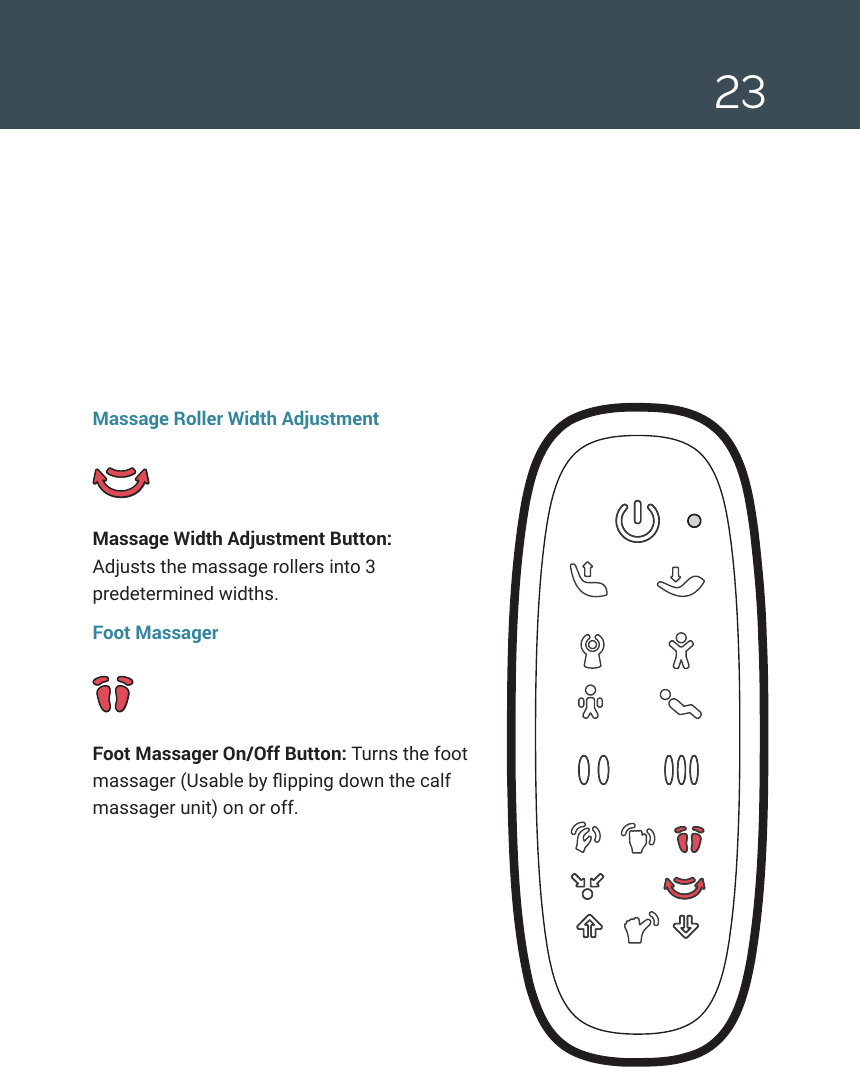
23Massage Roller Width AdjustmentMassage Width Adjustment Button:  Adjusts the massage rollers into 3 predetermined widths.Foot MassagerFoot Massager On/Off Button: Turns the foot massager (Usable by ipping down the calf massager unit) on or off.
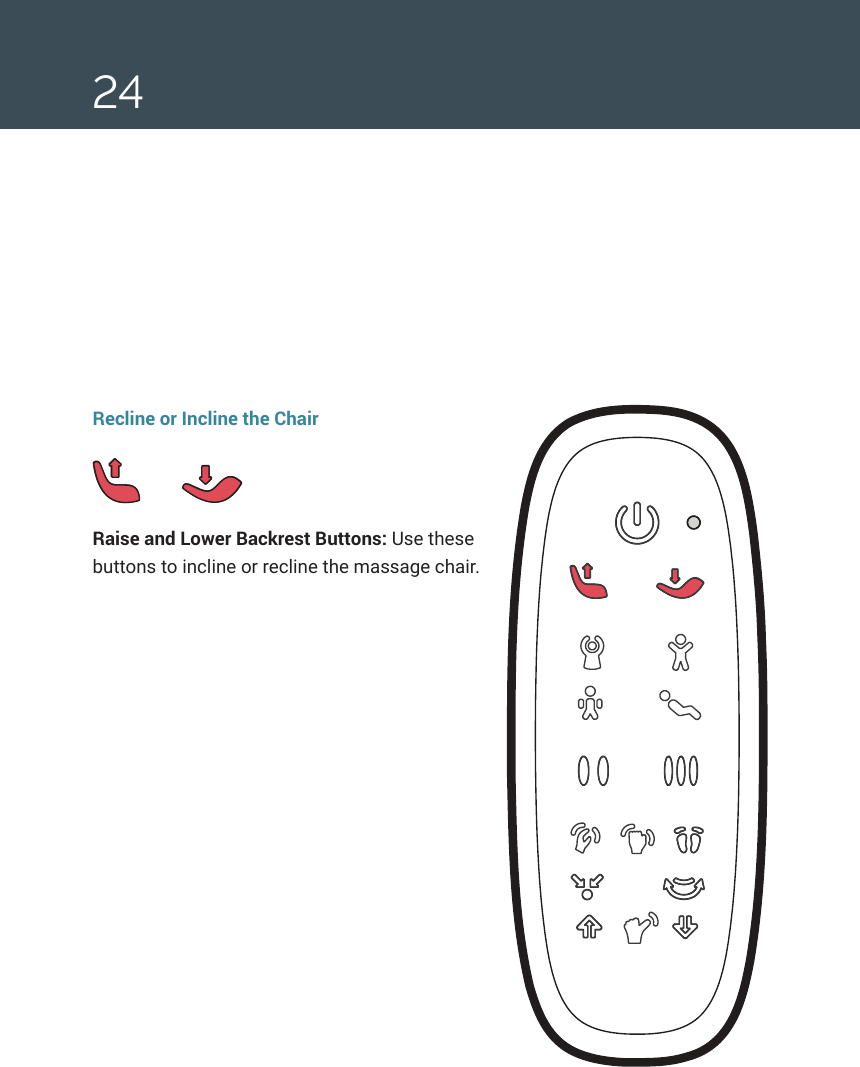
24Recline or Incline the ChairRaise and Lower Backrest Buttons: Use these buttons to incline or recline the massage chair.
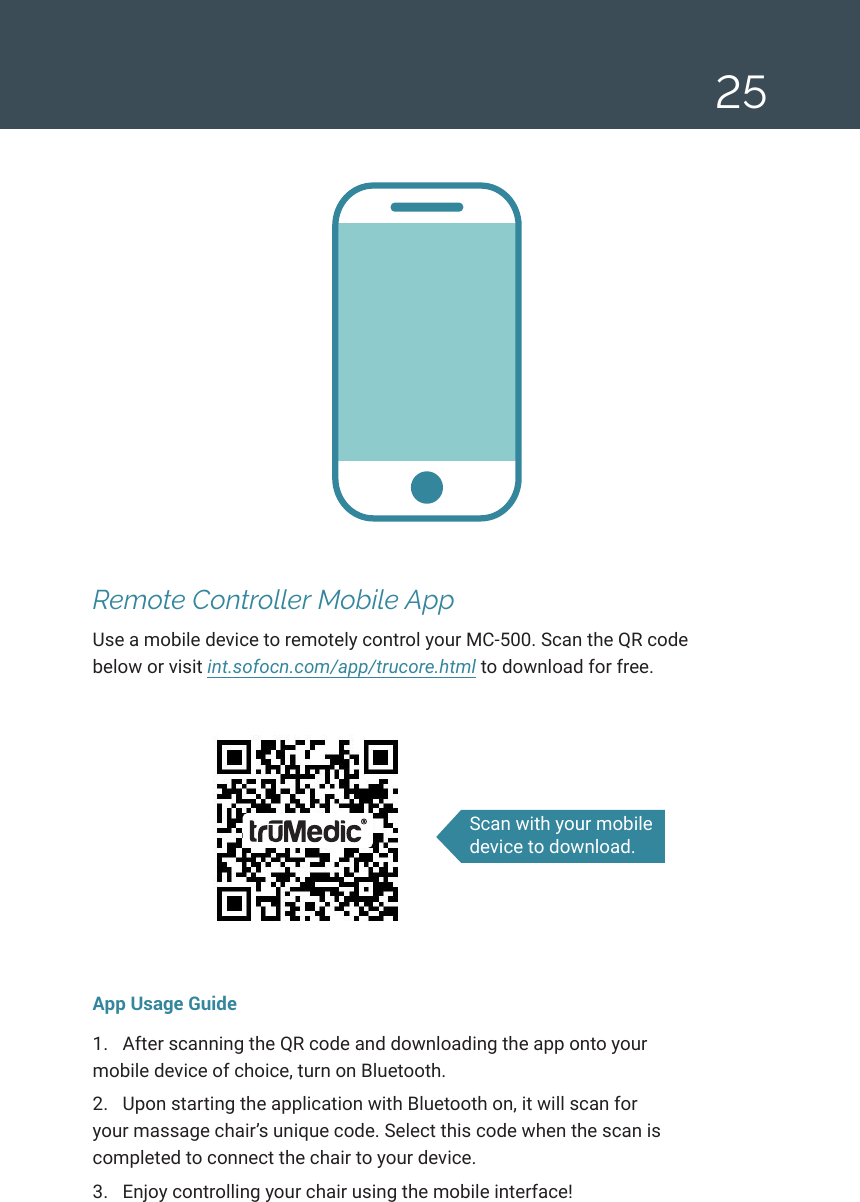
25Remote Controller Mobile AppUse a mobile device to remotely control your MC-500. Scan the QR code below or visit int.sofocn.com/app/trucore.html to download for free.App Usage Guide1.  After scanning the QR code and downloading the app onto your mobile device of choice, turn on Bluetooth. 2.  Upon starting the application with Bluetooth on, it will scan for your massage chair’s unique code. Select this code when the scan is completed to connect the chair to your device.3.  Enjoy controlling your chair using the mobile interface! Scan with your mobile device to download.
26Cleaning and Maintaining the MC-500 Follow these instructions as needed to keep your chair clean and well maintained Cleaning the Synthetic Leather SurfacesGeneral Cleaning •  Wipe down your chair regularly with a dry, soft, clean cloth. •  Do not use chemical or medical-grade cleaners on synthetic surfaces.For Deep Cleaning •  Use a water-based solution containing 3–5% natural detergent and a soft cleaning cloth. Squeeze excess liquid from the cloth before cleaning your chair.•  Wipe down synthetic leather surfaces with this solution. •  Remove excess moisture with a dry cloth. •  Allow your chair to dry fully before using. Do not use a hair dryer or other blower implement to dry your chair. Cleaning the Cloth Surfaces: •  Use the same weak, natural solution you used to wipe down synthetic leather surfaces. Wring out your cloth or brush before applying it to the surface of the chair. Note: do not use harsh chemicals or substances such as gas, diluent, or alcohol. •  Gently use brushing movements to clean the surface. Note: using excessive pressure may weaken or damage the cloth. •  Wipe down the surface with a clean damp cloth and then a clean dry cloth. •  Allow the surface to fully dry before using.CLEANING AND MAINTENANCE
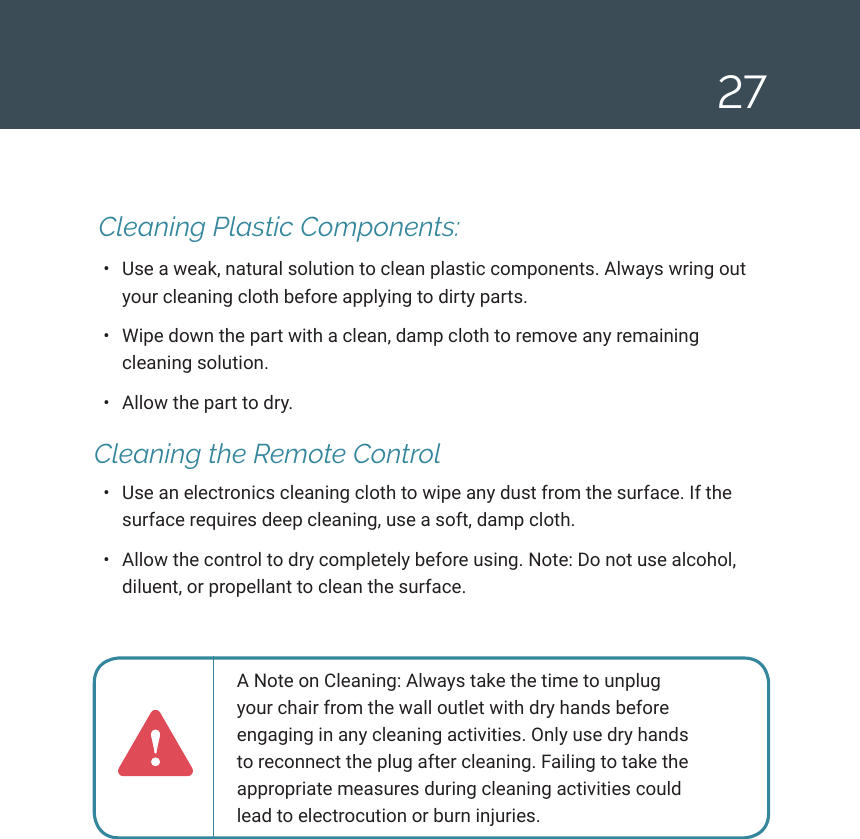
27 Cleaning Plastic Components: •  Use a weak, natural solution to clean plastic components. Always wring out your cleaning cloth before applying to dirty parts. •  Wipe down the part with a clean, damp cloth to remove any remaining cleaning solution.•  Allow the part to dry. Cleaning the Remote Control•  Use an electronics cleaning cloth to wipe any dust from the surface. If the surface requires deep cleaning, use a soft, damp cloth. •  Allow the control to dry completely before using. Note: Do not use alcohol, diluent, or propellant to clean the surface.A Note on Cleaning: Always take the time to unplug your chair from the wall outlet with dry hands before engaging in any cleaning activities. Only use dry hands to reconnect the plug after cleaning. Failing to take the appropriate measures during cleaning activities could lead to electrocution or burn injuries.
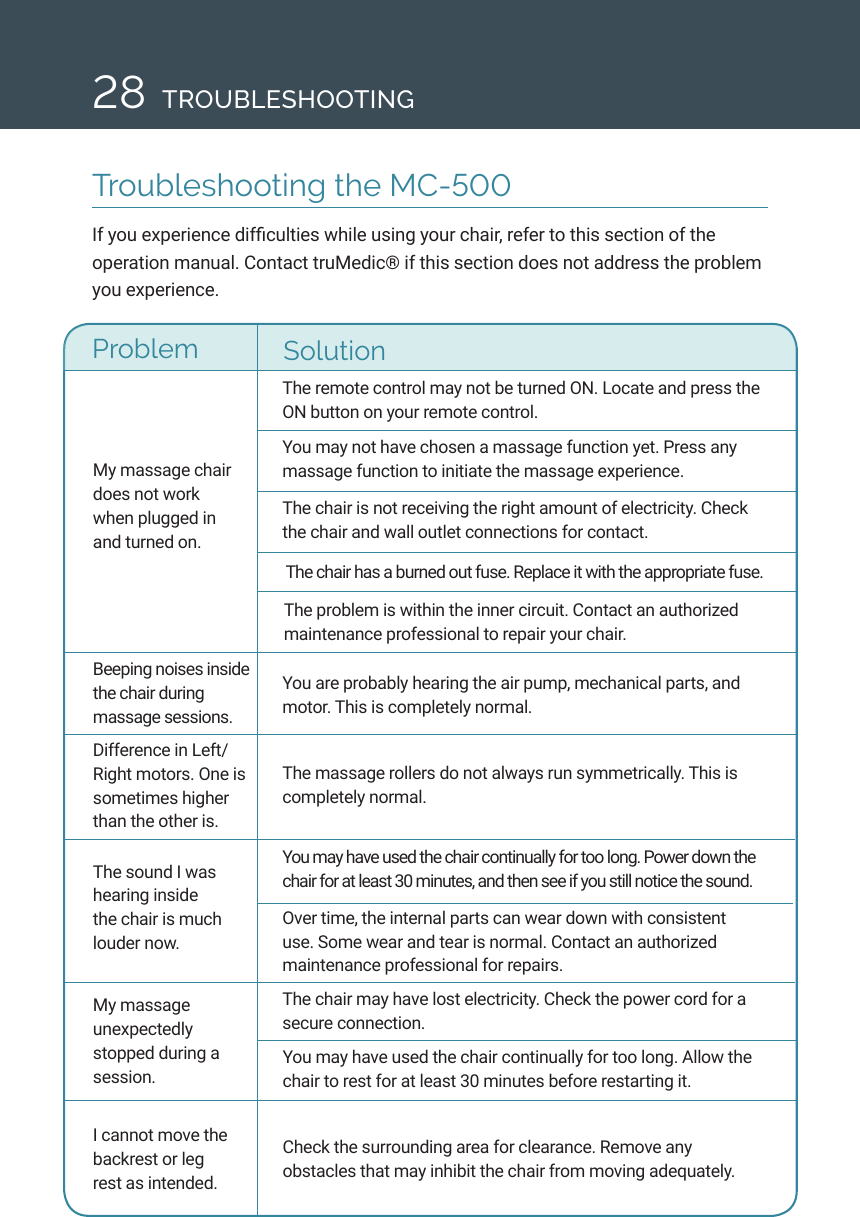
28 TROUBLESHOOTINGTroubleshooting the MC-500If you experience difculties while using your chair, refer to this section of the operation manual. Contact truMedic® if this section does not address the problem you experience. My massage chair does not work when plugged in and turned on. The remote control may not be turned ON. Locate and press the ON button on your remote control. You may not have chosen a massage function yet. Press any massage function to initiate the massage experience. The chair is not receiving the right amount of electricity. Check the chair and wall outlet connections for contact.  The chair has a burned out fuse. Replace it with the appropriate fuse. Problem SolutionThe problem is within the inner circuit. Contact an authorized maintenance professional to repair your chair. Beeping noises inside the chair during massage sessions.Difference in Left/Right motors. One is sometimes higher than the other is. The sound I was hearing inside the chair is much louder now. My massage unexpectedly stopped during a session. I cannot move the backrest or leg rest as intended.You are probably hearing the air pump, mechanical parts, and motor. This is completely normal. The massage rollers do not always run symmetrically. This is completely normal. You may have used the chair continually for too long. Power down the chair for at least 30 minutes, and then see if you still notice the sound. Over time, the internal parts can wear down with consistent use. Some wear and tear is normal. Contact an authorized maintenance professional for repairs.  The chair may have lost electricity. Check the power cord for a secure connection. You may have used the chair continually for too long. Allow the chair to rest for at least 30 minutes before restarting it. Check the surrounding area for clearance. Remove any obstacles that may inhibit the chair from moving adequately.
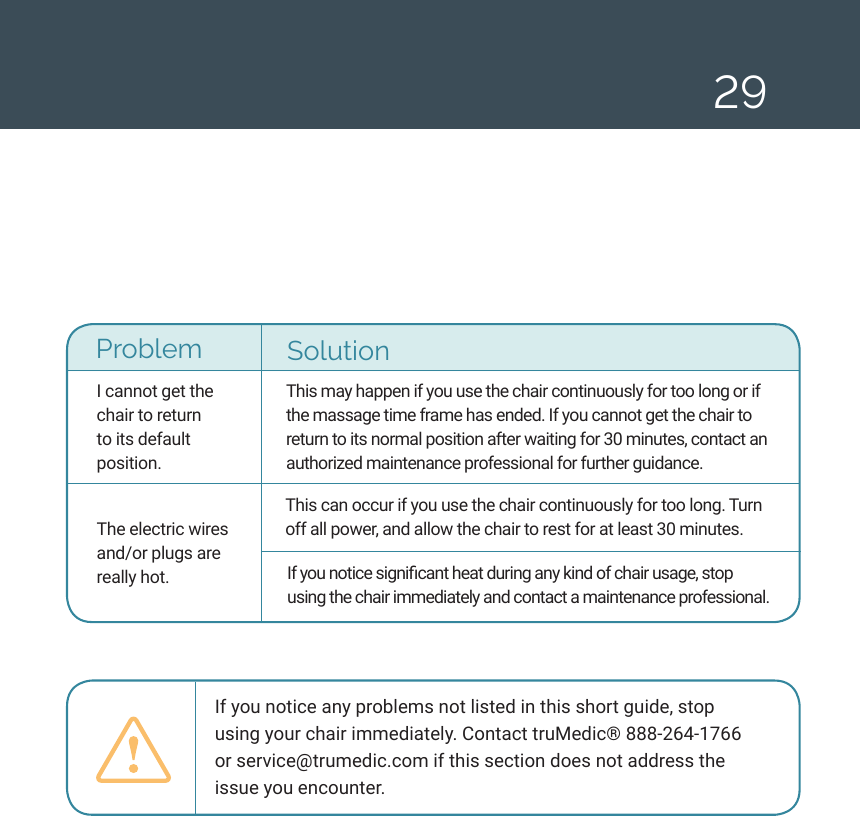
29I cannot get the chair to return to its default position. The electric wires and/or plugs are really hot.  This may happen if you use the chair continuously for too long or if the massage time frame has ended. If you cannot get the chair to return to its normal position after waiting for 30 minutes, contact an authorized maintenance professional for further guidance. Problem SolutionThis can occur if you use the chair continuously for too long. Turn off all power, and allow the chair to rest for at least 30 minutes. If you notice signicant heat during any kind of chair usage, stop using the chair immediately and contact a maintenance professional. If you notice any problems not listed in this short guide, stop using your chair immediately. Contact truMedic® 888-264-1766 or service@trumedic.com if this section does not address the issue you encounter.
30 WARRANTY AND TECHNICAL SPECIFICATIONSWarranty InformationTWO (2) YEAR LIMITED WARRANTYtruMedic® warrants this truMedic® Massage Chair against defects in materials and/or workmanship under normal use for a period of TWO (2) YEAR from the date of purchase by the original purchaser (“Warranty Period”). Normal use is dened as use by an end-user in a residential location. If a defect arises and a valid claim is received within the Warranty Period, at its option, truMedic® will either 1) repair the defect at no charge, using new or refurbished replacement parts, or 2) replace the truMedic® Massage Chair with a new or refurbished truMedic® Massage Chair OR 3) provide a credit in the amount of the purchase price of the original product. A replacement product or part, including a user-installable part installed in accordance with instructions provided by truMedic®, will be covered for the remaining warranty period of the original product. When a product or part is exchanged, any replacement item becomes your property and the replaced item becomes truMedic® property. When a credit is given, the original product must be returned to truMedic® and becomes truMedic® property. Obtaining Service: To obtain warranty service, call the truMedic®  Warranty Service at 888-264-1766 or contact the company via email at  service@truMedic.com. Please be prepared to describe the truMedic® Massage Chair model that needs service and the nature of the problem. Proof of purchase is required. All repairs and replacements must be authorized in advance. Service options, parts availability and response times will vary. Limits and Exclusions: Coverage under this Warranty is limited to the United States of America, excluding the U.S. Territories of Guam, Puerto Rico, and the U.S. Virgin Islands and including Canada. This Warranty applies only to products manufactured by truMedic® that can be identied by the “truMedic®” trademark, trade name, or logo afxed to them or their packaging. The Warranty does not apply to any non-truMedic® products. truMedic®, in so far as permitted by law, provides these products “as is.” This warranty does not apply to: a) damage caused by failure to follow instructions relating to product’s use or the installation of components; b) damage caused by accident, abuse, misuse, re, oods, earthquake or other external causes; c) damage caused by service performed by anyone who is not a representative of truMedic®; d) accessories used in conjunction with a covered product; e) a product or part that has been modied to alter functionality or capability; f) items intended to be periodically replaced by
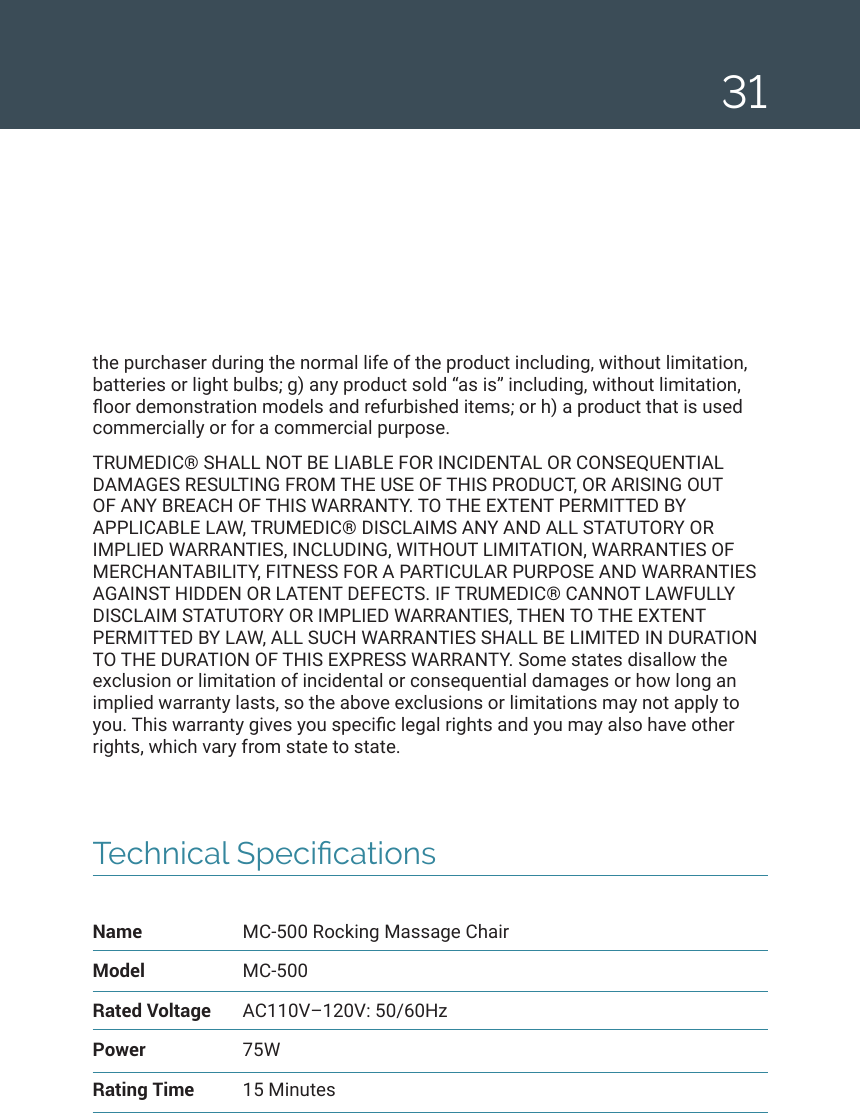
31Technical SpecicationsName  MC-500 Rocking Massage ChairModel MC-500Rated Voltage  AC110V–120V: 50/60HzPower 75WRating Time  15 Minutesthe purchaser during the normal life of the product including, without limitation, batteries or light bulbs; g) any product sold “as is” including, without limitation, oor demonstration models and refurbished items; or h) a product that is used commercially or for a commercial purpose. TRUMEDIC® SHALL NOT BE LIABLE FOR INCIDENTAL OR CONSEQUENTIAL DAMAGES RESULTING FROM THE USE OF THIS PRODUCT, OR ARISING OUT OF ANY BREACH OF THIS WARRANTY. TO THE EXTENT PERMITTED BY APPLICABLE LAW, TRUMEDIC® DISCLAIMS ANY AND ALL STATUTORY OR IMPLIED WARRANTIES, INCLUDING, WITHOUT LIMITATION, WARRANTIES OF MERCHANTABILITY, FITNESS FOR A PARTICULAR PURPOSE AND WARRANTIES AGAINST HIDDEN OR LATENT DEFECTS. IF TRUMEDIC® CANNOT LAWFULLY DISCLAIM STATUTORY OR IMPLIED WARRANTIES, THEN TO THE EXTENT PERMITTED BY LAW, ALL SUCH WARRANTIES SHALL BE LIMITED IN DURATION TO THE DURATION OF THIS EXPRESS WARRANTY. Some states disallow the exclusion or limitation of incidental or consequential damages or how long an implied warranty lasts, so the above exclusions or limitations may not apply to you. This warranty gives you specic legal rights and you may also have other rights, which vary from state to state.
TRUCORE DISTRIBUTORS, INC. LOCATION 252 Indian Head Rd. Kings Park, NY 11754 TEL 888-264-1766E-MAIL service@truMedic.com WEBSITE www.truMedic.com0808-18USv7@truMedicMassage

Navigation menu