2VE ENERGY PLC CMR119A Wireless Electricity Monitor (433.92MHz Tx) User Manual CM119 UM FCC US R0 indd

2 SAVE ENERGY PLC Wireless Electricity Monitor (433.92MHz Tx) CM119 UM FCC US R0 indd

User Manual

1USINTRODUCTION  Thank you for selecting the   Wireless Energy Monitor. Keeping an eye on your electrical usage has never been easier with the new    Wireless Energy Monitor.  This revelatory device, which aims to help in the fi ght against climate change, is  set  to  show  millions  of  people  just  how  much  electricity  we  waste  in  our  homes,  whilst highlighting the money we can all save as a result. monitors the home’s electricity supply and for the fi rst time provides real-time monetary information  about  the  household’s  energy  usage.  When  lights  and  appliances  are  turned on,   easy-to-read LCD monitor reveals exactly how much electricity is being used, how the cost of electricity per hour changes, and how much harmful CO2 emissions the home is producing.  By  simply  turning  off  appliances  when  not  in  use,  or  rather  being  used  needlessly,  UK consumers can actually save up to 25% of their electricity usage - a saving that translates directly to reducing their monthly bills and households’ harmful carbon emissionsCEO2 Save Energy plcTABLE OF CONTENTSINTRODUCTION ....................................................................................................................................................... 1TABLE OF CONTENTS ............................................................................................................................................ 1GENERAL SAFETY & CARE GUIDELINES ............................................................................................................ 2HOW THE   WORKS ........................................................................................................................................ 3Overview .......................................................................................................................................................... 3Household Power Cables And Phase .............................................................................................................. 3Greenhouse Gas .............................................................................................................................................. 3Definitions ........................................................................................................................................................ 3 FEATURES & FUNCTIONS ........................................................................................................................... 4Remote Monitor Features  ............................................................................................................................... 4Remote Monitor Key Press Functions ............................................................................................................. 4Sender Box Features  ...................................................................................................................................... 4 ADVANCED SETTINGS ................................................................................................................................. 5WHAT TO DO IF?  .................................................................................................................................................... 7 SPECIFICATIONS .......................................................................................................................................... 8 Factory Default Setting .......................................................................................................................... 8COMPLIANCE .......................................................................................................................................................... 9Declaration of Conformity ................................................................................................................................ 9WARRANTY  ............................................................................................................................................................ 9Limited One Year Warranty .............................................................................................................................. 9Warranty Conditions ........................................................................................................................................ 9DISTRIBUTOR DETAILS ......................................................................................................................................... 9RETURNS ............................................................................................................................................................... 10Process .......................................................................................................................................................... 10Customer Services ......................................................................................................................................... 10 NOTE  Please keep this Manual and Quick Start Guide handy as you use your   Wireless Energy Monitor. They contain practical systematic instructions, technical specifi cations, and safety precaution warnings you should know about.
2USGENERAL SAFETY & CARE GUIDELINESTo ensure that you use your product safely and correctly please read the Warnings & Safety Precautions, Caring for Your Product and the User Manual sections before using this OWL Wireless Energy MonitorPlease observe the following warning & safety precaution guidelines when setting up and using this product•   SENSORS MUST BE INSTALLED BY A QUALIFIED/LICENSED ELECTRICIAN, UNLESS OTHERWISE PERMITTED BY COUNTRY/LOCAL REGULATIONS.•   Do not immerse the unit in water or other liquids. If you spill liquid over it, dry it immediately with a soft,      lint-free cloth.•   Do not use this product where the use of radio frequency products can cause malfunction in the control      devices of other equipment ie:- hospitals, aircraft, etc•   Do not use or store the product in locations that could adversely affect the product such as rain, snow,      desert, and magnetic fields.•   Do not subject the unit to excessive force, shock, dust, temperature or humidity.•   The LCD panel behind the display lens is made of glass, and may break if the unit is dropped, impacted or    subjected to shock.•   Take special care when handling a damaged Display, as the liquid crystals can be harmful to your health.•  Keep the product away from heat sources ie radiators, stoves, heaters, etc•   Do not use the product in or near water or in high moisture areas ie Bathroom•   Do not cover the ventilation holes with any items such s newspapers, curtains etc.•   Do not tamper with the units internal components. This invalidates the warranty.•   Do not attempt to repair the product yourself. Contact the retailer or our customer service department if it    requires servicing.•   Take care when handling all battery types.  Batteries can cause injuries, burns or damage to property if      they come into contact with conducting materials, heat, corrosive materials or explosives. Remove the      batteries before storing the product for extended periods of time.•   Only use fresh batteries. Do not mix new and old batteries.•   Do not dispose of old batteries as unsorted municipal waste, do so in accordance with your local waste      disposal regulations.•   When disposing of this product do so in accordance with your local waste disposal regulationsCaring for your productTo ensure you receive the maximum benefit from using this product, please observe the following guidelines•   Cleaning - Disconnect the sensor and remove batteries from the sender box and Display before      cleaning. Use a damp cloth. Do not use liquid or aerosol cleaning agents, benzene, thinners,      abrasive or corrosive materials. •   Do not scratch hard objects against the Display as this may cause damage•   Do not leave discharged batteries in either the display or sender units for any length of time as      they may leak and cause corrosion  NOTE  The technical specifications for this product and the contents of the user manual are subject to change without notice.•   The contents of this manual may not be reproduced without the permission of the manufacturer.•   Images shown in this manual may differ from the actual display.
3USHOW THE   WORKSOverviewThis product uses current transformer sensing technology to detect and monitor a tiny magnetic field around your household  electricity  power  cable.  It  measures  the  current  (Amps)  being  used  and,  by reference  to  the system voltage, calculates the amount of power being used, the cost, and the amount of greenhouse gas emissions. It then transmits this information from the Sender Box to a Wireless Remote Monitor on a wireless frequency of 433MHz, from up to 30 metres (100 feet) away (unbroken transmission). NOTE  The intention of this   product is primarily as an educational device to aid understanding of the cost of operating electrical appliances in the home. Hence, there is no intention for the   Wireless Energy Monitor to replace your accurate electricity revenue meter.Household Power Cables And PhaseMost UK household electricity supplies use single-phase, but some use three phase. In single-phase supplies, the current flows to and from your household appliances using a neutral and power line. The neutral line has a voltage close to zero while the power line carries a fluctuating voltage or phase. The difference between these two lines makes the current flow through your appliances.In three phase supplies, current flows to and from a device through a group of three lines - each one carrying a fluctuating voltage or phase. One sensor should be connected to each of the three phase lines before using the .Green House GasFossil fuel power stations emit gases such as carbon dioxide when producing electricity. This causes an atmospheric imbalance, which in turn has been linked to global warming (global temperature rise). Every power station has a slightly different ratio of emissions to electricity production, depending on the type of fuel used to generate electricity. Sustainable energy sources such as hydro, solar and wind power do not create any emissions.The default greenhouse gas emission rate on the Remote Monitor is set to 1.27lb (0.58kg) of greenhouse gas for every 1KWh of electricity produced. This can be changed depending upon the fuel or energy source used by your power generating authority.Definitions•  Voltage:- is the measure of electrical potential in Volts(V).•  Current:- signifies the amount of electricity flowing through a conductive material, such as a wire.       Electrical current is measured in amperes or amps (A). •  Power:- is the rate at which electrical energy is converted to another form. Both voltage and current are     necessary to provide electrical power for your household appliances. Power is the product of Volts      times Amps, and the unit of measure is Watts. A Watt is the standard unit of measurement for the amount of     energy (electric or otherwise) being transferred to or from somewhere each second.    o   The voltage is usually constant - so the amount of power used is directly proportional to the        current used.   o   A Kilowatt (kW) is a larger unit of measurement (1000 W = 1 kW).  o   Kilowatt hour (kWh) represents the use of 1000 watts of electricity for one whole hour.  o   1 kWh is the equivalent of ten (10) x 100-watt bulbs operating at the same time for one hour.
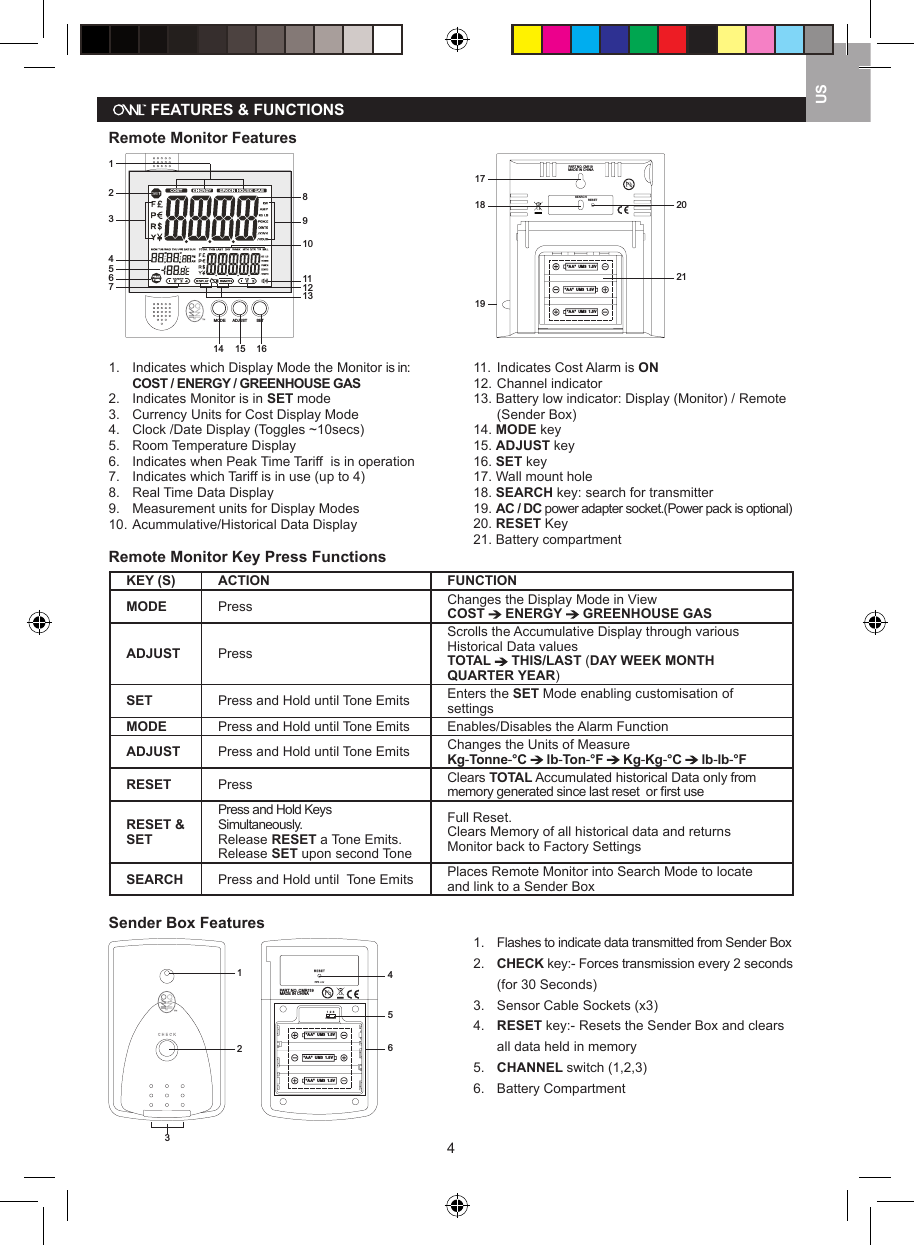
4US   FEATURES & FUNCTIONSRemote Monitor Features CENT-A-METERTM1234567891011121314 15 16 SETMODEADJUST                                           "AA"  UM3  1.5V"AA"  UM3  1.5V"AA"  UM3  1.5VPART NO. CM119MADE IN CHINASEARCHRESET1718 202119                                                                                               1.  Indicates which Display Mode the Monitor is in:   COST / ENERGY / GREENHOUSE GAS2.  Indicates Monitor is in SET mode3.  Currency Units for Cost Display Mode4.  Clock /Date Display (Toggles ~10secs) 5.  Room Temperature Display6.   Indicates when Peak Time Tariff  is in operation7.   Indicates which Tariff is in use (up to 4)8.   Real Time Data Display9.   Measurement units for Display Modes10.  Acummulative/Historical Data Display 11.  Indicates Cost Alarm is ON12. Channel indicator13. Battery low indicator: Display (Monitor) / Remote    (Sender Box)14. MODE key15. ADJUST key16. SET key17. Wall mount hole18. SEARCH key: search for transmitter19. AC / DC power adapter socket.(Power pack is optional)20. RESET Key21. Battery compartmentRemote Monitor Key Press FunctionsKEY (S) ACTION FUNCTIONMODE Press Changes the Display Mode in ViewCOST   ENERGY   GREENHOUSE GASADJUST PressScrolls the Accumulative Display through various Historical Data valuesTOTAL   THIS/LAST (DAY WEEK MONTH QUARTER YEAR)  SET Press and Hold until Tone Emits Enters the SET Mode enabling customisation of settingsMODE Press and Hold until Tone Emits Enables/Disables the Alarm FunctionADJUST Press and Hold until Tone Emits Changes the Units of MeasureKg-Tonne-°C   lb-Ton-°F   Kg-Kg-°C   lb-lb-°FRESET Press Clears TOTAL Accumulated historical Data only from memory generated since last reset  or first useRESET & SETPress and Hold Keys Simultaneously. Release RESET a Tone Emits. Release SET upon second ToneFull Reset.Clears Memory of all historical data and returns Monitor back to Factory SettingsSEARCH Press and Hold until  Tone Emits Places Remote Monitor into Search Mode to locate and link to a Sender BoxSender Box Features123c he c k     456PART NO. CMR119  MADE IN CHINA"AA"  UM3  1.5V"AA"  UM3  1.5V"AA"  UM3  1.5V1  2  3CHANNEL1.  Flashes to indicate data transmitted from Sender Box2.   CHECK key:- Forces transmission every 2 seconds    (for 30 Seconds)3.   Sensor Cable Sockets (x3) 4.   RESET key:- Resets the Sender Box and clears    all data held in memory5.   CHANNEL switch (1,2,3)6.   Battery Compartment
5US  Reset Total Accumulated Data•   Selecting YES sets accumulated data back to ‘0’ since last reset or device first started•  This function can also be implemented using the RESET button at the back of the unit  Customising the Setup 1•  From the OTHER menu select Country [CNTY] menu to select generic country settings   •   Settings > Voltage / Currency / Units / GHG Factor / Generic Tariff Values  Customising the Setup 2•  From the OTHER menu select Currency [CURR] menu to select currency symbol  Customising the Setup 3•  From the OTHER menu select Voltage [VOLT] menu to select voltage setting  Customising the Setup 4•  From the OTHER menu select Units [UNIT] menu to select Metric / Imperial units for GHG Setting ADVANCED SETTINGS
6US  Customising the Setup 5•  From the OTHER menu select Temperature Units [TEMP] menu to select units  Customising the Setup 6•  From the OTHER menu select Channel [CHAN] menu if you wish to change wireless channel of operation•  The Sender Box will need to be changed to the same channel using the CHANNEL switch shown in     Sender Box features  Customising the Setup 7•  From the OTHER menu select GHG Factor [GHG] menu to set Utility-Related Factor for calculating the     kWH of Energy into LB of GHG emissions  Exiting Menus•  To Exit OTHER menu select [END]•  To Exit SET mode select [END]
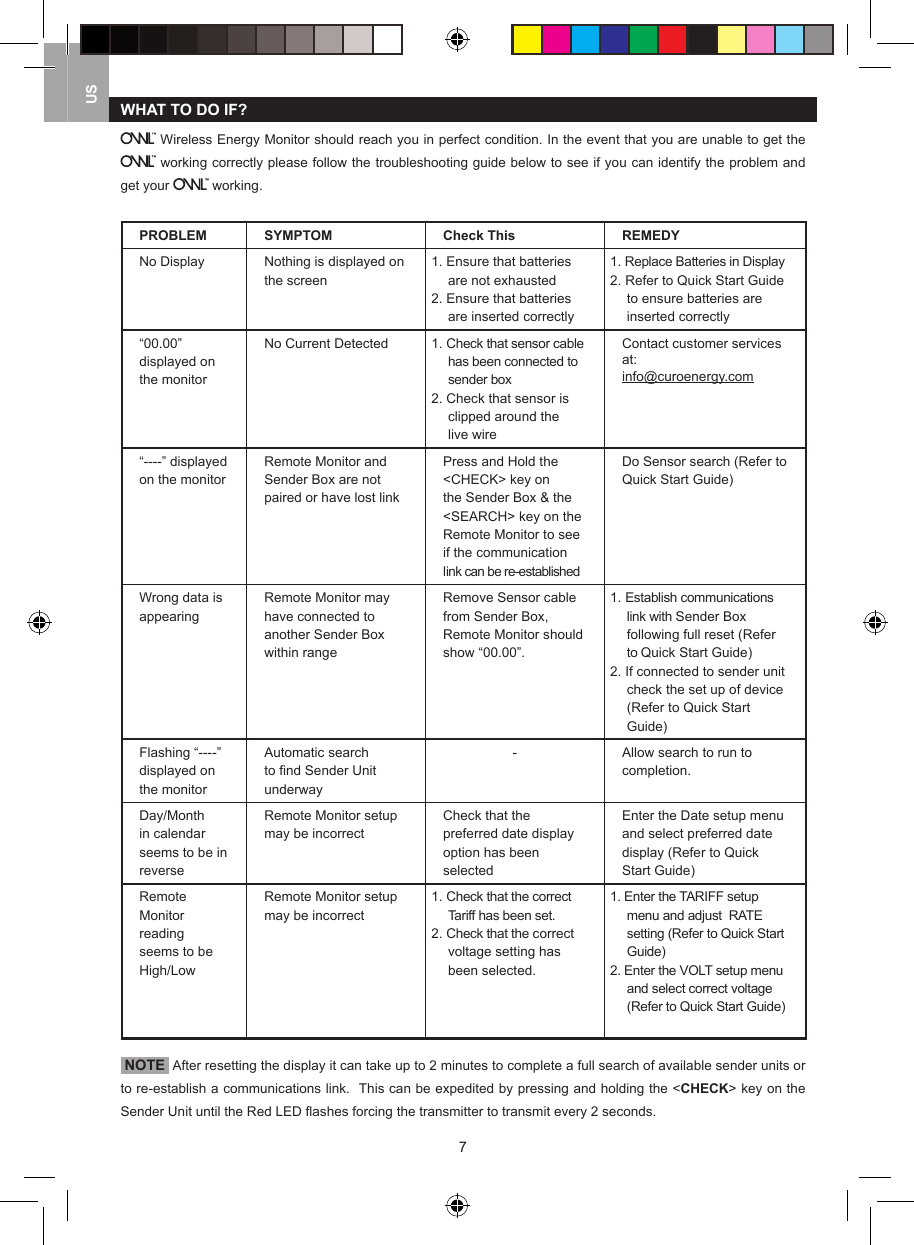
7USWHAT TO DO IF? Wireless Energy Monitor should reach you in perfect condition. In the event that you are unable to get the  working correctly please follow the troubleshooting guide below to see if you can identify the problem and get your   working.PROBLEM SYMPTOM Check This REMEDYNo Display Nothing is displayed on the screen1. Ensure that batteries         are not exhausted2. Ensure that batteries are inserted correctly1. Replace Batteries in Display2. Refer to Quick Start Guide to ensure batteries are inserted correctly“00.00” displayed on the monitorNo Current Detected 1. Check that sensor cable has been connected to sender box2. Check that sensor is clipped around the live wireContact customer services at:info@curoenergy.com“----” displayed on the monitorRemote Monitor and Sender Box are not paired or have lost linkPress and Hold the <CHECK> key on the Sender Box & the <SEARCH> key on the Remote Monitor to see if the communication link can be re-establishedDo Sensor search (Refer to Quick Start Guide)Wrong data is appearingRemote Monitor may have connected to another Sender Box within rangeRemove Sensor cable from Sender Box, Remote Monitor should show “00.00”.   1. Establish communications link with Sender Box following full reset (Refer to Quick Start Guide)2. If connected to sender unit check the set up of device (Refer to Quick Start Guide)Flashing “----” displayed on the monitorAutomatic search to find Sender Unit underway- Allow search to run to completion.Day/Month in calendar seems to be in reverseRemote Monitor setup may be incorrectCheck that the preferred date display option has been selectedEnter the Date setup menu and select preferred date display (Refer to Quick Start Guide)Remote Monitor reading seems to be High/LowRemote Monitor setup may be incorrect1. Check that the correct Tariff has been set.2. Check that the correct voltage setting has been selected.1. Enter the TARIFF setup menu and adjust  RATE setting (Refer to Quick Start Guide)2. Enter the VOLT setup menu and select correct voltage (Refer to Quick Start Guide) NOTE  After resetting the display it can take up to 2 minutes to complete a full search of available sender units or to re-establish a communications link.  This can be expedited by pressing and holding the <CHECK> key on the Sender Unit until the Red LED flashes forcing the transmitter to transmit every 2 seconds.
8US SPECIFICATIONSDimensions Width Height Depth Weight (No Battery)Display 107mm (4.2 in) 117mm ( 4.6in) 30mm ( 1.2in) 164gm ( 5.8oz)Sender Unit 78mm ( 3.1in) 113mm ( 4.5in) 40mm ( 1.6in) 110gm ( 3.9oz)Sensor 50mm (2.0 in) 50mm ( 2.0in) 30mm (1.2 in) 66gm ( 2.3oz)Accuracy <1A 1A to 3A 3A to 71ACurrent RMS Not Specified Better than 10% Better Than 5%Wireless Link 433MHz Radio FrequencyWireless Range30 metres in open area[walls, partitions and electrical appliances may affect reception range]Display Power Supply 3 x AA / LR6 / UM-3 1.5V batteries or 6V AC/DC adaptorSender Box Power Supply 3 x AA / LR6 / UM-3 1.5V batteriesOperating Temperature 5°C ~ 45°C (41°F ~ 113°F) at 85% relative humidityStorage Temperature -5°C ~ 60°C (23°F ~ 140°F) at 85% relative humidity Factory Default SettingCountry Setting USVoltage 120Units Imperial (LB/°F)Currency $:centsPower Units KWEnergy Units KWHGHG Units LB/hrAccumulative GHG Units TonTemperature Units FGHG Conversion 1.27LB CO2 = 1KW/hrClock 12 hrDate mmddTariff 1 - Rate 12.00 centsTariff 1 - Time 07:00amTariff 1 - Peak [Yes/No] NoTariff 1 - Alarm On/Off OffTariff 1 - Alarm Level $2.00Tariff 2, 3 & 4 [On/Off] OffTariff 2 - Rate 14.00 centsTariff 2 - Time 11:00amTariff 3 - Rate 12.00 centsTariff 3 - Time 05:00pmTariff 4 - Rate 8.00 centsTariff 4 - Time 08:00pmTariff  2,  3  &  4      -  Peak [Yes/No] NoTariff  2,  3  &  4    -  Alarm [On/Off] OffTariff  2,  3  &  4    -  Alarm Level $2.00
9USCOMPLIANCEManufactured  to  ISO-9001  Quality  Assurance  Standards  &  tested  for  compliance  relative  to  configuration  for intended market.  Product tested by Intertek Testing Services HK Ltd:- European CE, FCC, UL (USA), IC (Canada), C-tick Aus & NZ.Declaration of ConformityHereby, 2 Save Energy plc, declares that the OWL Wireless Monitor (CM119) is in conformity with Part 15 of the FCC Rules.FCC StatementThis device complies with Part 15 of the FCC Rules.  Operation is subject to the following two conditions: (1) This device may not cause harmful interference, and (2) This device must accept any interference received, including interference that may cause undesired operation.WARNING: Changes or modifications to this unit not expressly approved by the party responsible for compliance could void the user’s authority to operate the equipment.NOTE: This equipment has been tested and found to comply with the limits for a Class B digital device, pursuant to Part 15 of the FCC Rules.  These limits are designed to provide reasonable protection against harmful interference in  a  residential  installation. This  equipment  generates,  uses  and  can  radiate  radio  frequency energy  and,  if  not installed and used in accordance with the instructions, may cause harmful interference to radio communications.However, there is no guarantee that interference will not occur in a particular installation. If this equipment does cause harmful interference to radio or television reception, which can be determined by turning the equipment off and on, the user is encouraged to try to correct the interference by one or more of the following measures:   •  Reorient or relocate the receiving antenna.  •  Increase the separation between the equipment and receiver.  •  Connect the equipment into an outlet on a circuit different from that to which the receiver is connected.  •  Consult the dealer or an experienced radio/TV technician for help.WARRANTYLimited One Year Warranty2 Save Energy plc warrant this product for a period of 1 year from date of purchase for all defects in workmanship or materials. All defective parts will be repaired free of charge or replaced.The following exclusions do not exclude the purchaser from those statutory rights consumers have under the Trade Practices Act or similar State and Territory Laws.Warranty Conditions1.   The product must be installed and operated in strict accordance with instructions provided. 2 Save Energy plc will not accept liability for any damage or injury caused by mis-use or non-compliance to the instructions.2.   Warranty will only be given where proof of purchase date is provided. Eg Original Invoice/Receipt3.   This instrument must not be modified in any way4.   Batteries are specifically excluded from this Warranty5.   2 Save Energy plc will not be liable for indirect, consequential or incidental damages.6.   2 Save Energy plc reserves the right to change specifications or designs described in this manual without notice or obligation.DISTRIBUTOR DETAILSUSCuro Energy, 10322 Pine Forest Road, Houston, TX 77042Tel: +1 713-429-1968E-mail: info@curoenergy.com    Web www.curoenergy.com
10USRETURNSProcessContact info@curoenergy.com  to report the  issue  and reason  for  wanting to  return  product. Upon  agreement  to return the product Customer Services will allocate a reference number that should be added onto the form on the next page with Purchaser Name & Address, Supplier Name & Address, and Date of Purchase, which should be sent with the proof of purchase and product to the following address:Customer Services, Curo Energy, 10322 Pine Forest Road, Houston, TX 77042 NOTE •   A record of the Return Reference Number should be kept and used in all correspondence relating to the return•   No returns will be accepted without a Returns Reference Number being allocated•   All returns must be by recorded deliveryProduct Name:   ......................................................................................Product Model Number:  ......................................................................................Purchaser Name:  ......................................................................................Purchaser Address:  ......................................................................................  ......................................................................................  ......................................................................................  ......................................................................................Purchaser Telephone Number:  ......................................................................................Supplier Name:  ......................................................................................Supplier Address:  ......................................................................................  ......................................................................................  ......................................................................................  ......................................................................................Date Of Purchase:  ......................................................................................Return Reference Number:  ......................................................................................

Navigation menu