2VE ENERGY PLC CMR130A OWL Micro Wireless Electricity Monitor (433.92MHz Tx) User Manual CM130A UM R2 indd

2 SAVE ENERGY PLC OWL Micro Wireless Electricity Monitor (433.92MHz Tx) CM130A UM R2 indd

Users Manual

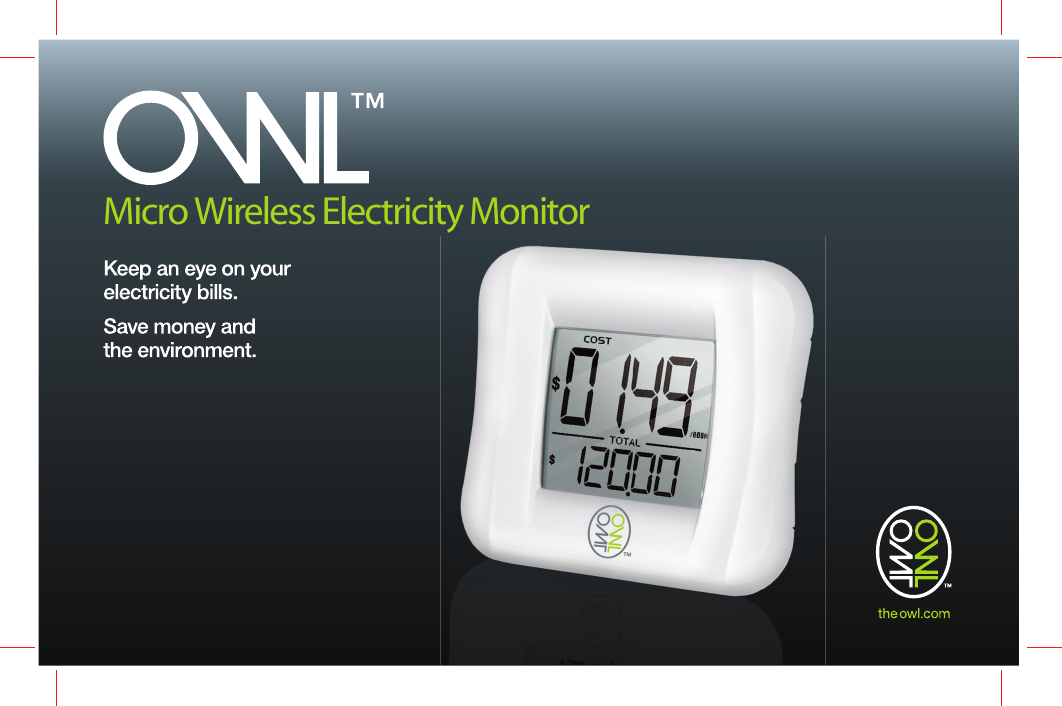
Micro Wireless Electricity Monitor
1TABLE OF CONTENTSTABLE OF CONTENTS .........................................................................................................................................................................................1GENERAL SAFETY & CARE GUIDELINES .......................................................................................................................................................2HOW THE   MICRO WORKS ......................................................................................................................................................................4Overview .......................................................................................................................................................................................................4Household Power Cables And Phase .........................................................................................................................................................4Accuracy........................................................................................................................................................................................... 4DISPLAY FEATURES ...........................................................................................................................................................................................5Display Key Functions ..................................................................................................................................................................................5TRANSMITTER FEATURES .................................................................................................................................................................................6Transmitter  Key  Functions  ..........................................................................................................................................................................6GETTING STARTED ..............................................................................................................................................................................................7What’s in the box ..........................................................................................................................................................................................7Synchronising  the  Display  and Transmitter ................................................................................................................................................7Connecting the Sensor .................................................................................................................................................................................8SWITCHING BETWEEN DISPLAY MODES .........................................................................................................................................................9SETTING THE  COST  ...........................................................................................................................................................................................9PLACE DISPLAY INTO POWER SAVE  MODE  ................................................................................................................................................10RESET ACCUMULATED VALUES ......................................................................................................................................................................10LOW BATTERY WARNING ..................................................................................................................................................................................11HINTS, TIPS & TROUBLESHOOTING ......................................................................................................... .......................................................12 SPECIFICATIONS.............................................................................................................................. .......................................................12COMPLIANCE .....................................................................................................................................................................................................13WARRANTY .........................................................................................................................................................................................................14Limited One Year Warranty ..........................................................................................................................................................................14Warranty Conditions ...................................................................................................................................................................................14RETURNS  PROCESS  ........................................................................................................................................................................................14USUK
GENERAL SAFETY & CARE GUIDELINESTo ensure that you use your product safely and correctly please read the Warnings & Safety Precautions, Caring for Your Product and the User Manual sections before using this   Micro Wireless Electricity Monitor. WARNINGS-Please observe the following warning & safety precaution guidelines when setting up and using this product.•   This product uses Type C current sensor, do not apply around or remove from HAZARDOUS LIVE conductors.•   When fitting the sensor if in any doubt always contact a qualified electrician.•   Do not immerse the unit in water or other liquids. If you spill liquid over it, dry it immediately with a soft, lint-free cloth.•   Do not use this product where the use of radio frequency products can cause malfunction in the control devices of other equipment    ie:- hospitals, aircraft, etc.•   Do not use or store the product in locations that could adversely affect the product such as rain, snow, desert, and magnetic fields.•   Do not subject the unit to excessive force, shock, dust, temperature or humidity.•   The LCD panel behind the display lens is made of glass, and may break if the unit is dropped, impacted or subjected to shock.•   Take special care when handling a damaged Display, as the liquid crystals can be harmful to your health.•   Keep the product away from heat sources ie radiators, stoves, heaters, etc.•   Do not use the product in or near water or in high moisture areas ie Bathroom•   Do not cover the ventilation holes with any items such as newspapers, curtains etc.•   Do not tamper with the units internal components. This invalidates the warranty.•   Do not attempt to repair the product yourself. Contact the retailer or our customer service department if it requires servicing.23USUKUSUSUK
•   If the equipment used in a manner not specified in this manual, the protection provided by the equipment may be impaired.•   Take care when handling all battery types. Batteries can cause injuries, burns or damage to property if they come into contact with    conducting materials, heat, corrosive materials or explosives. Remove the batteries before storing the product for extended periods of    time.•   Only use fresh batteries. Do not mix new and old batteries.•   Do not dispose of old batteries as unsorted municipal waste, do so in accordance with your local waste disposal regulations.•   When disposing of this product do so in accordance with your local waste disposal regulations.Caring for your productTo ensure you receive the maximum benefit from using this product, please observe the following guidelines.•   Cleaning - Disconnect the sensor and remove batteries from the sender box and Display before cleaning. Use a damp cloth. Do not    use liquid or aerosol cleaning agents, benzene, thinners, abrasive or corrosive materials.•   Do not scratch hard objects against the Display as this may cause damage.•   Do not leave discharged batteries in either the display or sender units for any length of time as they may leak and cause corrosion. NOTE  The technical specifications for this product and the contents of the user manual are subject to change without notice.•   The contents of this manual may not be reproduced without the permission of the manufacturer.•   Images shown in this manual may differ from the actual display. 23USUKUSUSUK
HOW THE OWL MICRO WORKSOverviewThis measurement category II product uses current  transformer sensing  technology to detect and monitor a tiny magnetic field around your household electricity power cable. It measures the current (Amps) being used and, by reference to the system voltage, calculates the amount of power being used and the cost. It then transmits this information from the Transmitter wirelessly to the Display on a radio frequency of 433MHz, from up to 30 metres (100 feet) away (unbroken transmission).  NOTE    The  intention  of  this    product  is  primarily  as  an  educational  device  to  aid  understanding  of  the  cost  of  operating  electrical appliances in the home. Hence, there is no intention for the    Micro Wireless Electricity Monitor to replace your accurate electricity revenue meter.Household Power Cables And PhaseTypical US household electricity supplies standardized at 120V/60Hz are single phase 3 –wire systems, with 2 hot lines and a neutral.  The line to neutral voltage is 120V used for general circuits within the household, and a line to line voltage of 240V used for heavy duty applications such as air conditioners, clothes dryers, stoves, ovens, and water heaters. AccuracyThe    Micro Wireless Electricity Monitor has a fixed voltage - 120V and used with the monitoring of current by the sensor clip enables a calculation of KWH. Generally the device is accurate within 10%. The    Micro Wireless Electricity Monitor is not designed to replace homes electricity meter - they are aimed to provide a very visual and accessible way for users to see the impact of different devices and usage patterns around the home. This we hope will assist in educating users to adopt more beneficial consumption habits, reduce their costs and reduce their carbon emissions.45USUKUSUSUK
DISPLAY FEATURES            1.  Indicates which Display Mode   the Monitor is in: COST / ENERGY         2.  Currency Units for Cost Display Mode         124356     7 8 910113.   Battery low indicator: Display (Monitor) / Remote4.   Display current COST / ENERGY5.   Measurement units for Display Modes6.   Acummulative/Historical Data Display7.   [   ] key8.  [   ] key9.   SET key10. RESET Key11. Battery compartmentDisplay Key FunctionsKEY MODE ACTION OPERATION[SET] Non SET mode ≥ 2s Place Display into SET mode   Adjust COSTSET mode Pressed Selects adjusted COST value[   ] Non SET mode Pressed Change to next display modes: COST   ENERGY   COST≥ 2s Enable sensor searching. Typical search time is ~30secsSET mode Pressed Adjusts the COST   Increment[   ] Non SET mode Pressed Change to next display modes: COST   ENERGY   COST≥ 2s Enable/Disable Power Save SET mode Pressed Adjusts the COST   Decrement[   ] + [   ] Non SET mode ≥ 2s Clear TOTAL COST and TOTAL ENERGY to 045USUKUSUSUK
TRANSMITTER FEATURES12 3456    1.    Flashes to indicate data transmitted from Sender Box            2.    Sockets for sensors             3.    Wall mount hole            4.    RESET key: Resets the Sender Box and clears all data held in memory            5.    CHECK key: Forces transmission every 2 seconds (for 30 Seconds)            6.    Battery CompartmentTransmitter Key FunctionsKEY KEY PRESS OPERATION[CHECK] Press and Hold until Red Light flashesPlaces transmitter into increased transmit rate to help speed up synchronisation with Display[RESET] Press <2s Resets the transmitter and allocates new synchronising address67USUKUSUSUK
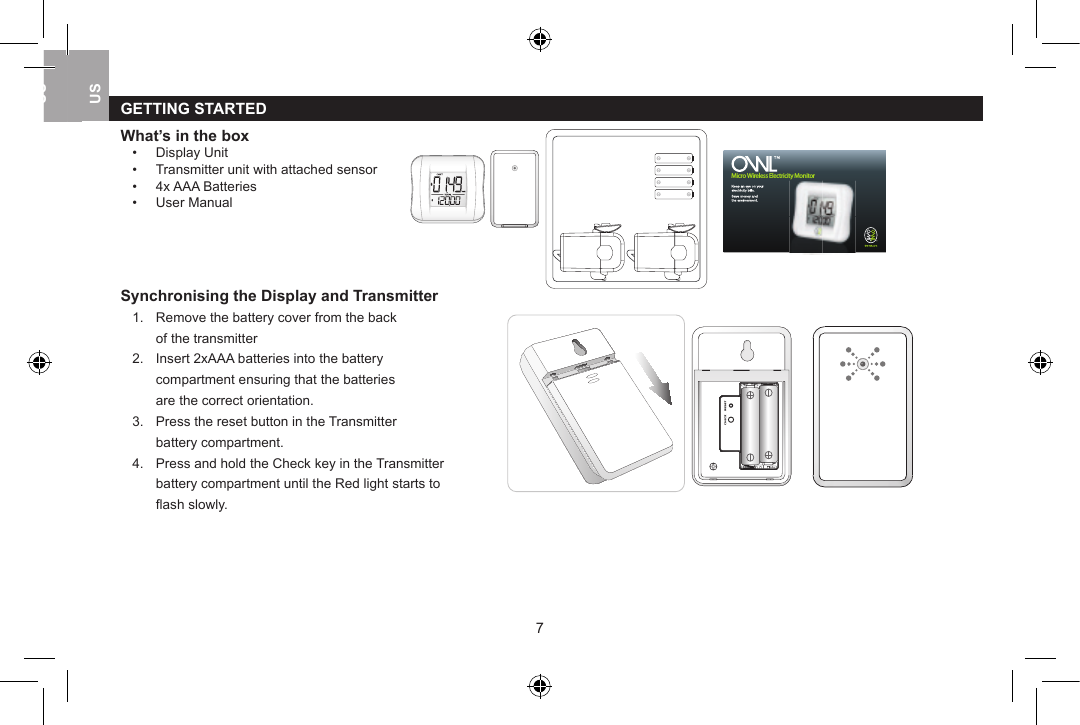
GETTING STARTEDWhat’s in the box•  Display Unit      •  Transmitter unit with attached sensor•  4x AAA Batteries•  User Manual Synchronising the Display and Transmitter1.  Remove the battery cover from the back      of the transmitter2.  Insert 2xAAA batteries into the battery   compartment ensuring that the batteries   are the correct orientation.3.  Press the reset button in the Transmitter   battery compartment.4.  Press and hold the Check key in the Transmitter   battery compartment until the Red light starts to   fl ash slowly.Micro Wireless Electricity Monitor67USUKUSUSUK
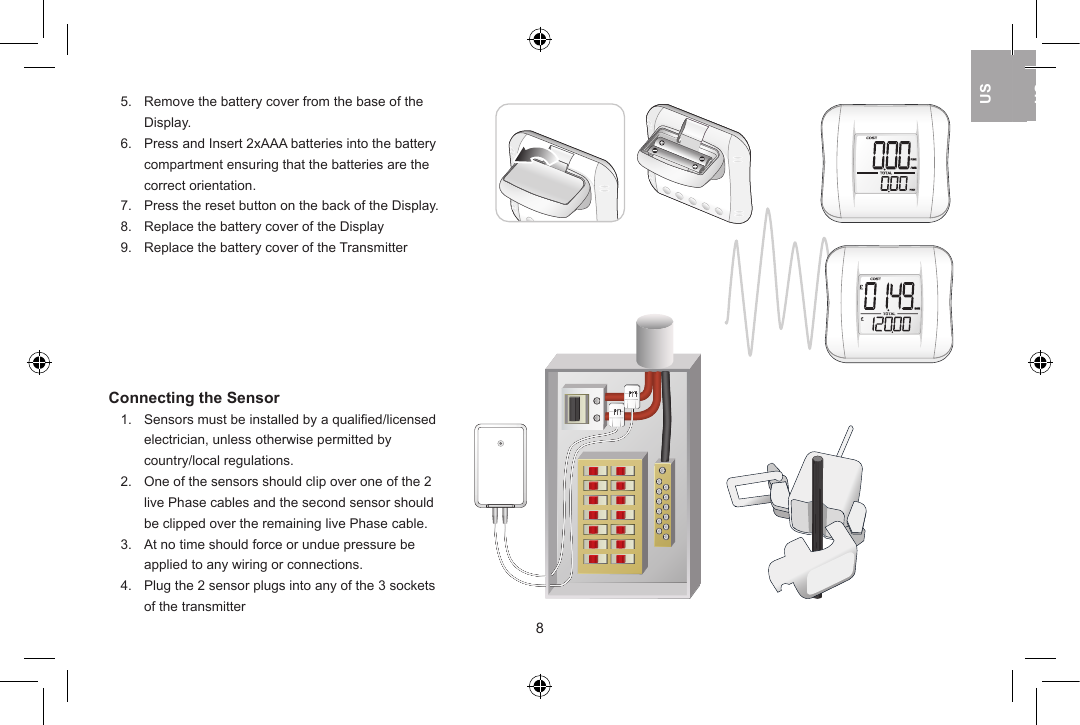
5.  Remove the battery cover from the base of the   Display.       6.  Press and Insert 2xAAA batteries into the battery   compartment ensuring that the batteries are the   correct orientation.7.  Press the reset button on the back of the Display.8.  Replace the battery cover of the Display9.  Replace the battery cover of the TransmitterConnecting the Sensor1.  Sensors must be installed by a qualified/licensed   electrician, unless otherwise permitted by   country/local regulations.2.  One of the sensors should clip over one of the 2   live Phase cables and the second sensor should   be clipped over the remaining live Phase cable.3.  At no time should force or undue pressure be   applied to any wiring or connections.4.  Plug the 2 sensor plugs into any of the 3 sockets   of the transmitter89USUKUSUSUK
SWITCHING BETWEEN DISPLAY MODESElectricity use can be viewed in a Cost or Energy Display. Press [   ] or [   ] to switch between the Display Modes. In the Energy display view current kW in upper screen and accumulated  Energy  (kWh)  since  last  reset  in  the  lower screen. In the Cost display view current cost of electricity per hour in the upper screen and accumulated cost since last reset in the lower screen.SETTING THE COST The cost of electricity per hour can be set from 00.00 to 99.99 cents. Press and hold the  [SET] key to enable the SET Mode to adjust the cost of electricity per hour (Default 10.00).        The “Main Units” will flash slowly (“10”). Press [   ] and/or [   ] to adjust the cost of electricity per hour “Main Units”.  Press [SET] to confirm Main Units value.  The “Sub Units” will flash slowly (“00”). Press [   ] and/or [   ] to adjust the cost of electricity per hour “Sub Units”.  Press [SET] to confirm Sub Units value. The cost of electricity per hour has been set and returns back to display mode.89USUKUSUSUK
PLACE DISPLAY INTO POWER SAVE MODEThe display unit has a power save mode to extend the life of the batteries, by changing the receive rate from every 12 seconds to every 60 seconds.Note that the Transmitter has an auto power save as it transmits every 6 seconds only if there is a change in the electricity usage otherwise transmits every 60 seconds. Press and hold [   ] key to place Display into or to take Display out from Power Save Mode.      RESET ACCUMULATED VALUESPress and hold [   ] + [   ] keys simultaneously for greater than 2 seconds to reset the accumulated cost & energy values to 0.   1011USUKUSUSUK
LOW BATTERY WARNINGA low battery warning icon will appear in top right hand corner of the display when in either the COST or ENERGY display modes.  This indicates that the batteries in the Display or Transmitter are coming close to the end of their usable life and should be replaced soon. Replace batteries in the Display unit           •  Remove the battery cover from the base of the Display•  Replace the 2x AAA batteries in the battery compartment with new/    fresh batteries ensuring that the batteries are inserted in the correct    orientation.•  Replace the battery cover of the Display•  Press and hold [   ] key  for greater than 2 seconds to place the      display into Search mode to resynchronise with the transmitter unit.Replace batteries in the Transmitter unit           •  Remove the battery cover from the back of the Transmitter•  Replace the 2x AAA batteries in the battery compartment with new/    fresh batteries ensuring that the batteries are inserted in the correct    orientation.•  Press and hold the Check key in the Transmitter battery compartment    until the Red light starts to flash slowly.•  Replace the battery cover of the Transmitter•  Press and hold [   ] key  for greater than 2 seconds to place the     display into Search mode to resynchronise with the transmitter unit.1011USUKUSUSUK
HINTS, TIPS & TROUBLESHOOTINGCost of Electricity:- Price per kWh of electricity as shown on your electricity bill.Cable Size- The sensor is suitable to connect over a cable up to 17mm in diameter including the insulation.  It is ok for the sensor to be loose over the cable. Display is blank:- Ensure that the batteries are inserted the correct way around and that the batteries are not exhausted.  If the batteries are exhausted replace with new batteries.  If the display does not return then contact dg@pdsmn.com.Four dashes (----) flashing on the upper part of the Display:- The Display is in a search mode looking for a Transmitter to synchronise with.  Four dashes (----) fixed on the upper part of the Display:- The Display and Transmitter have not synchronised.  Repeat the “Synchronising the Display and Transmitter” process in the manual.0.00 Reading on the Display:- The sensor is not able to measure the electricity flow through the Twin/Three Core cables so will return a reading of 0.00 if the sensor is connected over the cable  of an appliance. 0.00 Reading on the Display: Possible that the Sensor has a damaged Ferrite Core. To check to see if the sensor is damaged, you will need to unclip the sensor from the cable and inspect the Ferrite Core (U-Shaped Black Material) in the sensor lid is still in one piece and that the corresponding faces in the sensor body are in position.  If this is damaged then contact dg@pdsmn.com.Lower reading than expected:- If the cable is a very tight fit for the sensor then it is likely the sensor is unable to be closed properly as in the 2 halves of ferrite core within the sensor do not make a flush contact then the reading will be lower than measured. SPECIFICATIONSDimensions Width Height Depth Weight (No Battery)Display 85mm (3.3in) 78.5mm (3.1in) 19mm (0.7in) 70gm ( 2.5oz)Sender Unit 56mm (2.2in) 90mm (3.5in) 24mm (0.9in) 50gm (1.8oz)Sensor 45mm (1.8in) 51mm (2.0in) 30mm (1.2in) 40gm (1.4oz)1213USUKUSUSUK
Accuracy <1A 1A to 3A 3A to 71A >71ACurrent RMS Not Specified Better than 10% Better Than 5% Not SpecifiedWireless Link 433MHz Radio FrequencyWireless Range 30 metres in open area[walls, partitions and electrical appliances may affect reception range]Display Power Supply 2 x AAA / LR03 / UM-4 1.5V batteriesSender Box Power Supply 2 x AAA / LR03 / UM-4 1.5V batteriesOperating Temperature 5°C ~ 45°C (41°F ~ 113°F) at 85% relative humidityStorage Temperature -5°C ~ 60°C (23°F ~ 140°F) at 85% relative humidityCOMPLIANCEManufactured to ISO-9001 Quality Assurance Standards & tested for compliance relative to configuration for intended market.  Product tested by Intertek Testing Services HK Ltd:- European CE, FCC, UL (USA), IC (Canada), C-tick Aus & NZ.Declaration of ConformityHereby, 2 Save Energy Ltd, declares that the OWL Micro Wireless Monitor (CM130A) is in conformity with Part 15 of the FCC Rules.FCC StatementThis device complies with Part 15 of the FCC Rules.  Operation is subject to the following two conditions: (1) This device may not cause harmful interference, and (2) This device must accept any interference received, including interference that may cause undesired operation.WARNING: Changes or modifications to this unit not expressly approved by the party responsible for compliance could void the user’s authority to operate the equipment.NOTE: This equipment has been tested and found to comply with the limits for a Class B digital device, pursuant to Part 15 of the FCC Rules.  These limits are designed to provide reasonable protection against harmful interference in a residential installation. This equipment generates, uses and can radiate radio frequency energy and, if not installed and used in accordance with the instructions, may cause harmful interference to radio communications.1213USUKUSUSUK
However, there is no guarantee that interference will not occur in a particular installation. If this equipment does cause harmful interference to radio or television  reception,  which  can  be  determined  by  turning  the  equipment  off and on, the user is encouraged to try to correct  the interference by one or more of the following measures:   •  Reorient or relocate the receiving antenna.  •  Increase the separation between the equipment and receiver.  •  Connect the equipment into an outlet on a circuit different from that to which the receiver is connected.  •  Consult the dealer or an experienced radio/TV technician for help.WARRANTYLimited One Year Warranty2 Save Energy Ltd warrant this product for a period of 1 year from date of purchase for all defects in workmanship or materials. All defective parts will be repaired free of charge or replaced.The following exclusions do not exclude the purchaser from those statutory rights consumers have under the Trade Practices Act or similar State and Territory Laws.Warranty Conditions1.   The product must be installed and operated in strict accordance with instructions provided. 2 Save Energy Ltd will not accept liability for any damage or injury caused by mis-use or non-compliance to the instructions.2.   Warranty will only be given where proof of purchase date is provided. Eg Original Invoice/Receipt3.   This instrument must not be modified in any way4.   Batteries are specifically excluded from this Warranty5.   2 Save Energy Ltd will not be liable for indirect, consequential or incidental damages.6.   2 Save Energy Ltd reserves the right to change specifications or designs described in this manual without notice or obligation.RETURNS PROCESSContact dg@pdsmn.com to report the issue and reason for wanting to return product. Upon agreement to return the product, Customer Services will allocate a returns reference number that should be used in all correspondence relating to the return.  Customer Services will provide a return address to return the product along with Purchaser Name & Address, Supplier Name & Address, and Date of Purchase, which should be sent with the proof of purchase.14USUKUS
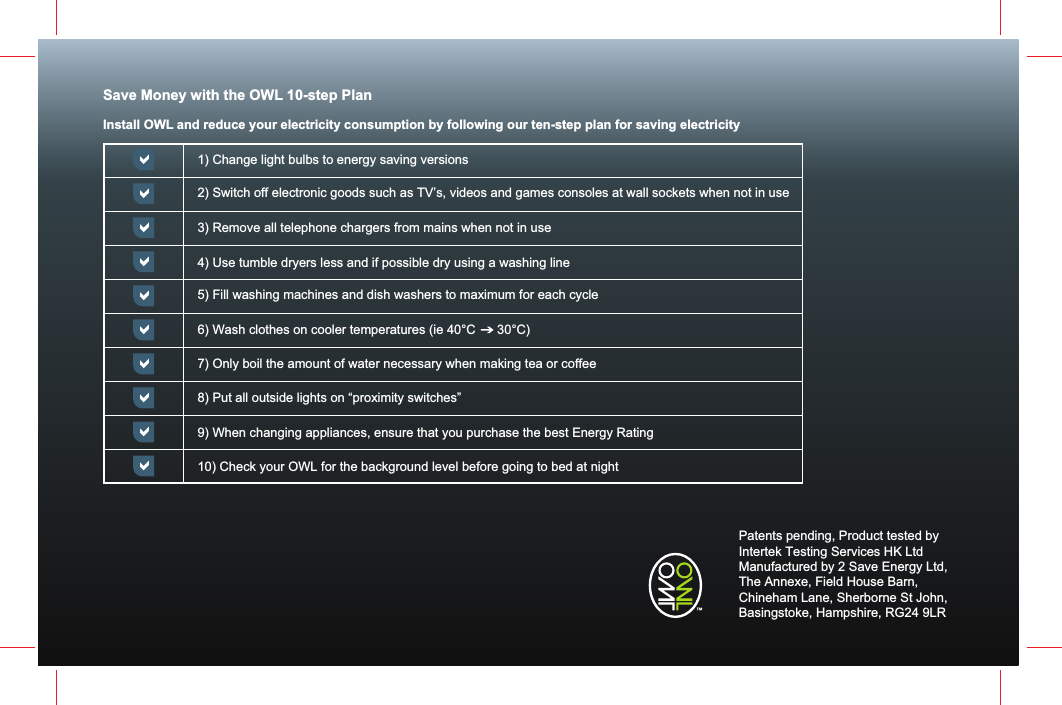
Save Money with the OWL 10-step PlanInstall OWL and reduce your electricity consumption by following our ten-step plan for saving electricity1) Change light bulbs to energy saving versions2) Switch off electronic goods such as TV’s, videos and games consoles at wall sockets when not in use 3) Remove all telephone chargers from mains when not in use4) Use tumble dryers less and if possible dry using a washing line5) Fill washing machines and dish washers to maximum for each cycle6) Wash clothes on cooler temperatures (ie 40°C      30°C) 7) Only boil the amount of water necessary when making tea or coffee8) Put all outside lights on “proximity switches”9) When changing appliances, ensure that you purchase the best Energy Rating10) Check your OWL for the background level before going to bed at nightPatents pending, Product tested by Intertek Testing Services HK LtdManufactured by 2 Save Energy Ltd,The Annexe, Field House Barn, Chineham Lane, Sherborne St John, Basingstoke, Hampshire, RG24 9LR

Navigation menu