3M CONSTRUCTION and HOME IMPROVEMENT MARKETS DIVISION TAC500B Peltor Sport Tactical 500 Electronic Hearing Protector User Manual

3M CONSTRUCTION & HOME IMPROVEMENT MARKETS DIVISION Peltor Sport Tactical 500 Electronic Hearing Protector Users Manual

Users Manual

User ManualModel: Tactical 500Trade Name: 3M3M Construction & Home Improvement Markets Division ADD: 3M Center, Building 251-01-E-19,St.Paul,MN 55144-1000 U.S.A
1SPORT   TACTICAL 500Electronic Hearing Protectors
2
3TACTICAL 500 ELECTRONIC HEARING PROTECTORSDesigned especially for shooters and hunters, these products go beyond  protection, with excellent durability, ease-of-use and functionality.  So you can stay focused and on target.CONTENTSBASIC OPERATIONS   4 QUICKSTART GUIDE • TACTICAL 500   9BLUETOOTH   OPERATION   10NAVIGATION • TACTICAL 500   12SAFETY INFORMATION   14NOISE REDUCTION RATING (NRR)  17ACCESSING THE SETUP MENU  20SPORT®7
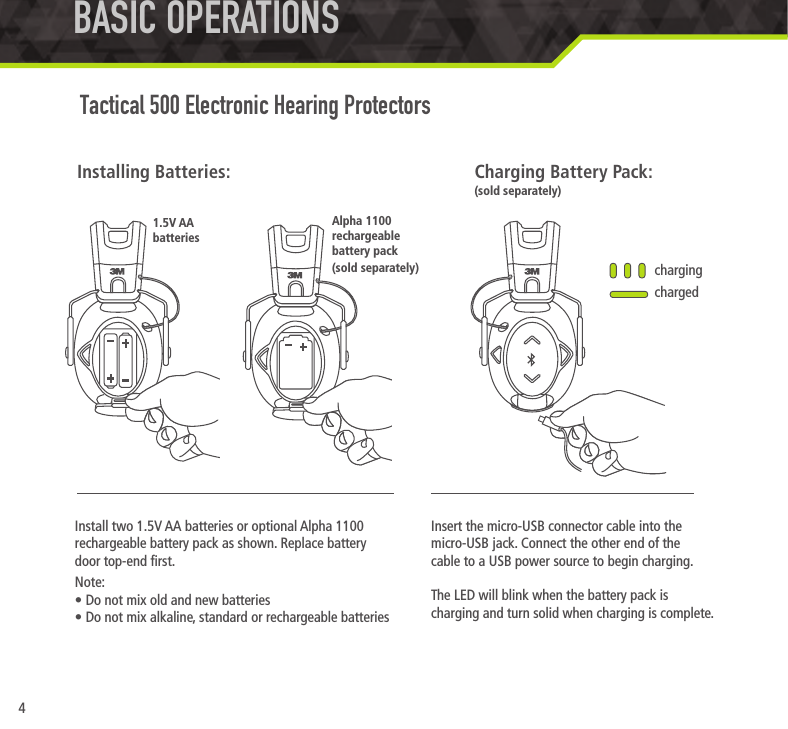
4Install two 1.5V AA batteries or optional Alpha 1100 rechargeable battery pack as shown. Replace battery  door top-end rst.Note:• Do not mix old and new batteries• Do not mix alkaline, standard or rechargeable batteriesInstalling Batteries:BASIC OPERATIONS Tactical 500 Electronic Hearing ProtectorsInsert the micro-USB connector cable into the micro-USB jack. Connect the other end of the  cable to a USB power source to begin charging.The LED will blink when the battery pack is charging and turn solid when charging is complete.chargingchargedCharging Battery Pack:(sold separately)1.5V AA  batteriesAlpha 1100 rechargeable battery pack (sold separately)
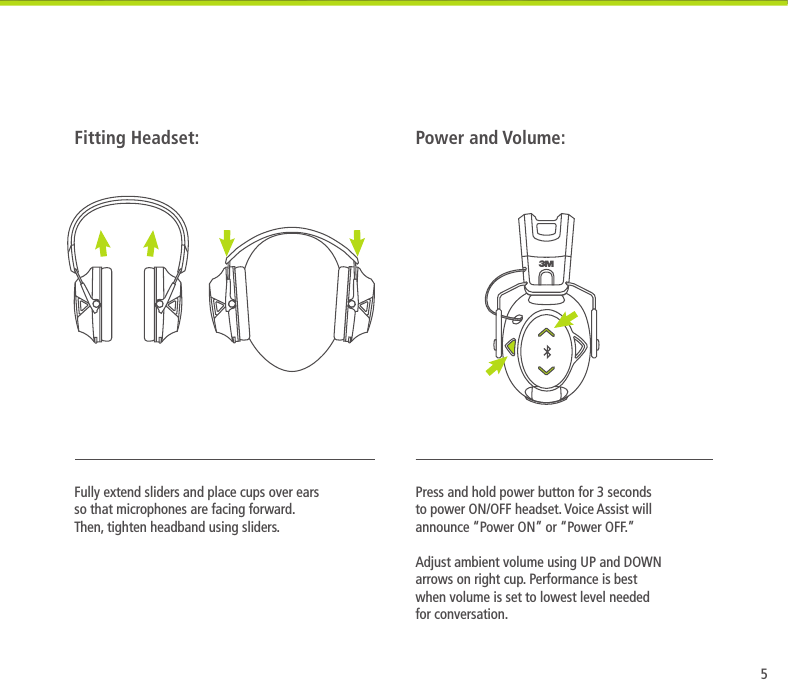
5Press and hold power button for 3 seconds to power ON/OFF headset. Voice Assist will announce “Power ON” or “Power OFF.”  Adjust ambient volume using UP and DOWN arrows on right cup. Performance is best when volume is set to lowest level needed for conversation.Power and Volume:Fully extend sliders and place cups over ears so that microphones are facing forward. Then, tighten headband using sliders.Fitting Headset:
6Headset will give a “Battery Low” warning every 10 minutes when battery voltage is low. Additional warnings will occur as hearing protector powers down. Replace batteries at this time.After a period of inactivity (either 2 or 4 hours according to your timer setting in the setup menu), a 10-second countdown will begin before hearing protector automatically powers down. To reset auto shut-off, simply adjust volume. After auto shut-off, press and hold the power button for 3 seconds to turn the unit on. The 2 or 4 hour auto shut-off time can be selected in the setup menu. The default setting is 2 hours.Low Battery Warning: Auto Shut-Off:BASIC OPERATIONSBASIC OPERATIONS (CONT.) Tactical 500 Electronic Hearing ProtectorsBATTERYLOW
7Dynamic Suppression Time (DST) optimizes your experience by measuring the gunshot energy to adjust for the appropriate suppression time — shorter suppression time for small-caliber rearms, longer suppression time for large-caliber rearms. Dynamic Suppression Time will also adjust recovery time to reduce echoes in your environment — ideal for shooters who move between indoor and outdoor ranges. The user can select a xed (shorter) suppression time by turning off the Adaptive Suppression Time feature in the setup menu. The default setting is Adaptive Suppression Time ON.Clear Voice Tracking seeks voices in background/environmental noise and reduces the noise to improve speech intelligibility. The user can select standard microphone ltering by turning off the Surround Sound Filtering in the setup menu. The default setting is Surround Sound Filtering ON.Dynamic Suppression Time: Clear Voice Tracking:Voice Noise
12
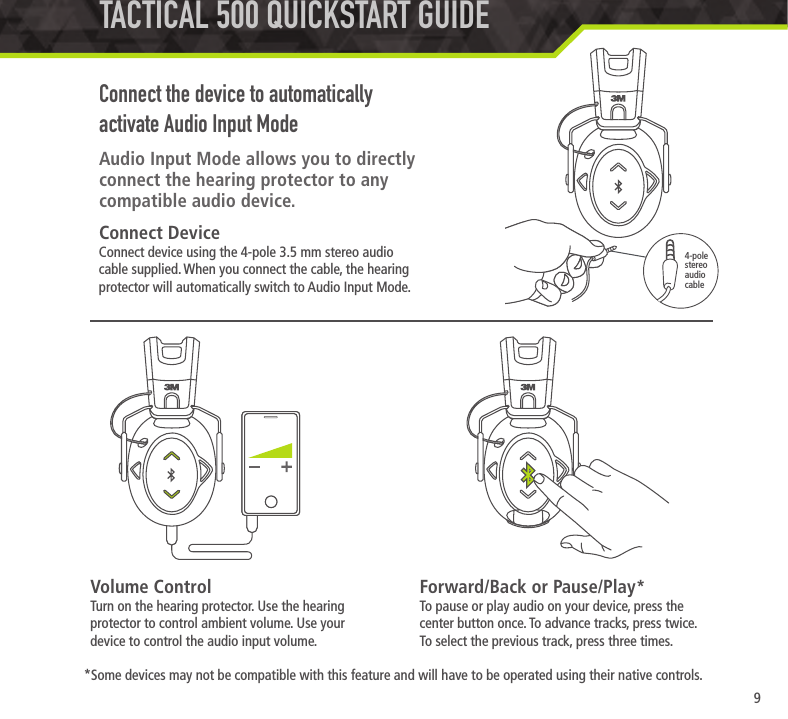
9Connect the device to automatically activate Audio Input ModeAudio Input Mode allows you to directly  connect the hearing protector to any compatible audio device.Volume ControlTurn on the hearing protector. Use the hearing protector to control ambient volume. Use your device to control the audio input volume.Forward/Back or Pause/Play*To pause or play audio on your device, press the center button once. To advance tracks, press twice. To select the previous track, press three times.*Some devices may not be compatible with this feature and will have to be operated using their native controls.TACTICAL 500 QUICKSTART GUIDE4-pole stereo audio cableConnect DeviceConnect device using the 4-pole 3.5 mm stereo audio cable supplied. When you connect the cable, the hearing protector will automatically switch to Audio Input Mode.
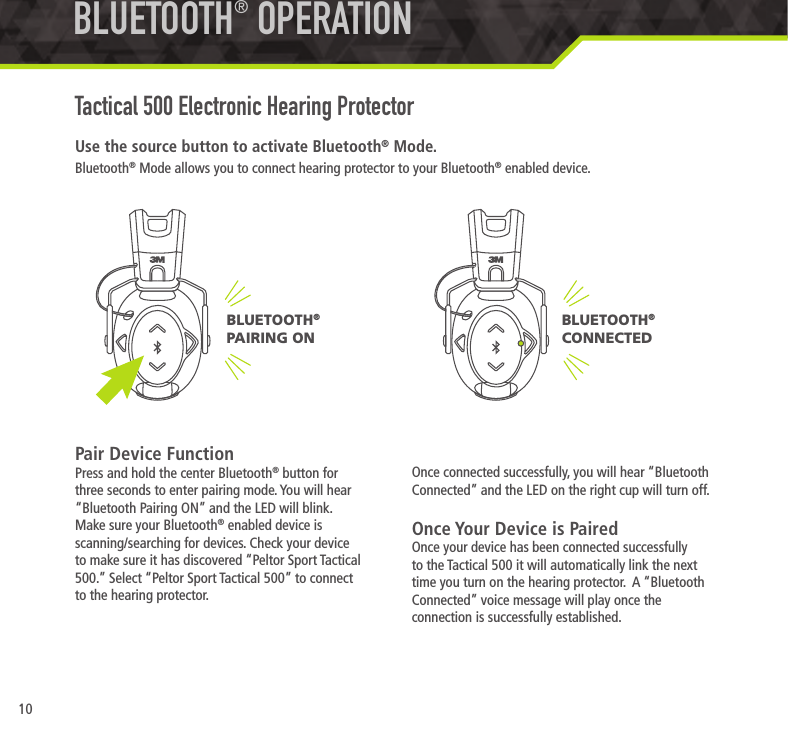
10Use the source button to activate Bluetooth® Mode.Bluetooth® Mode allows you to connect hearing protector to your Bluetooth® enabled device. Pair Device FunctionPress and hold the center Bluetooth® button for three seconds to enter pairing mode. You will hear “Bluetooth Pairing ON” and the LED will blink. Make sure your Bluetooth® enabled device is scanning/searching for devices. Check your device to make sure it has discovered “Peltor Sport Tactical 500.” Select “Peltor Sport Tactical 500” to connect to the hearing protector.  BLUETOOTH® OPERATIONTactical 500 Electronic Hearing ProtectorOnce connected successfully, you will hear “Bluetooth Connected” and the LED on the right cup will turn off.Once Your Device is PairedOnce your device has been connected successfully to the Tactical 500 it will automatically link the next time you turn on the hearing protector.  A “Bluetooth Connected” voice message will play once the connection is successfully established.BLUETOOTH®  CONNECTEDBLUETOOTH®  PAIRING ON
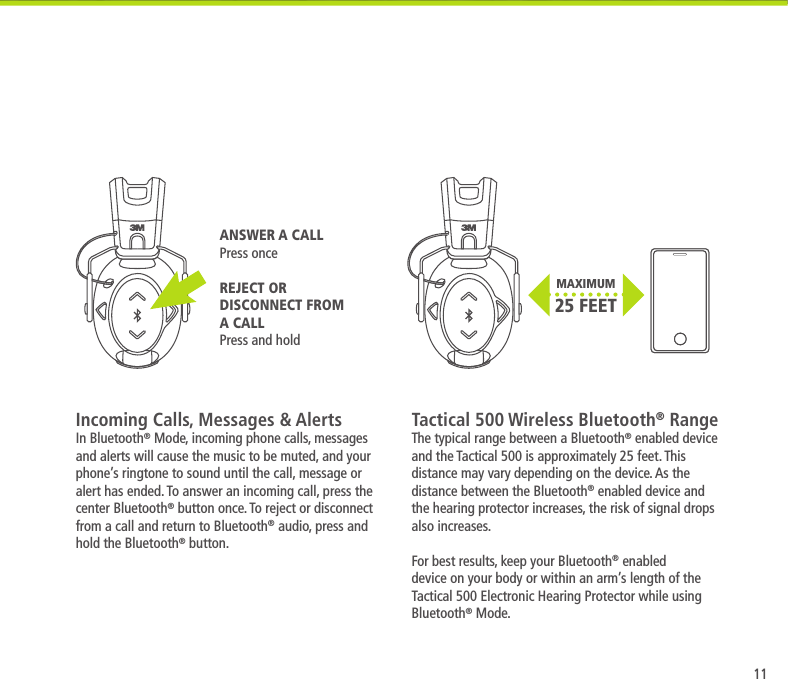
11MAXIMUM 25 FEETIncoming Calls, Messages & AlertsIn Bluetooth® Mode, incoming phone calls, messages and alerts will cause the music to be muted, and your phone’s ringtone to sound until the call, message or alert has ended. To answer an incoming call, press the center Bluetooth® button once. To reject or disconnect from a call and return to Bluetooth® audio, press and hold the Bluetooth® button.Tactical 500 Wireless Bluetooth® RangeThe typical range between a Bluetooth® enabled device and the Tactical 500 is approximately 25 feet. This distance may vary depending on the device. As the distance between the Bluetooth® enabled device and the hearing protector increases, the risk of signal drops also increases. For best results, keep your Bluetooth® enabled device on your body or within an arm’s length of the Tactical 500 Electronic Hearing Protector while using Bluetooth® Mode.ANSWER A CALLPress onceREJECT OR DISCONNECT FROM A CALLPress and hold
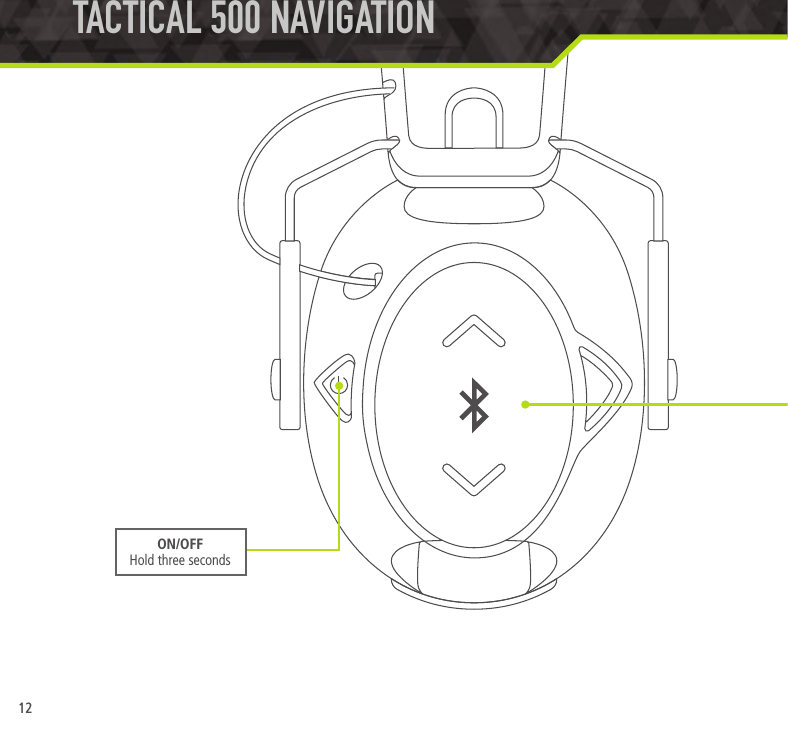
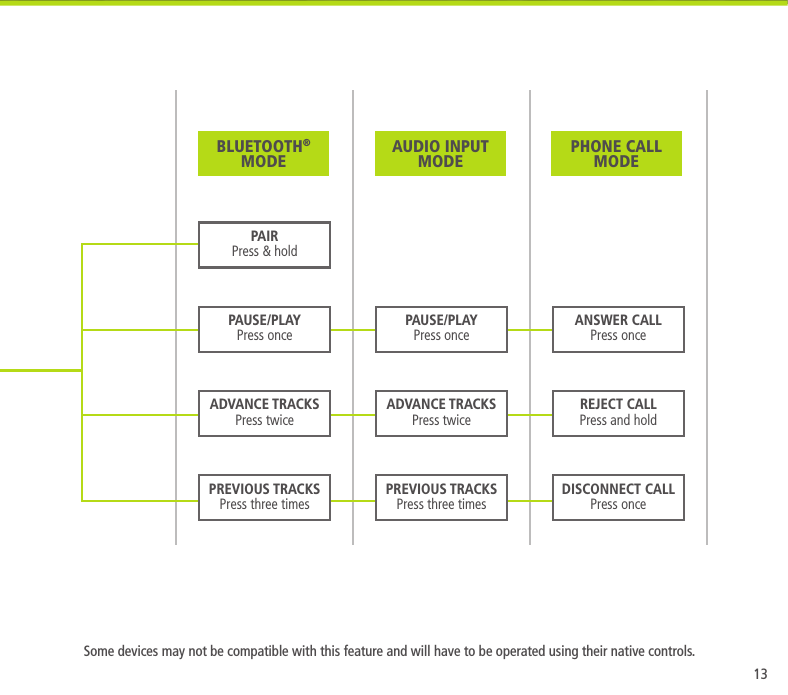
12TACTICAL 500 NAVIGATION  ON/OFFHold three seconds
13PAUSE/PLAYPress onceADVANCE TRACKSPress twicePREVIOUS TRACKSPress three timesPAIRPress & holdPAUSE/PLAYPress onceADVANCE TRACKSPress twicePREVIOUS TRACKSPress three timesANSWER CALLPress onceREJECT CALLPress and holdDISCONNECT CALLPress onceSome devices may not be compatible with this feature and will have to be operated using their native controls.AUDIO INPUT MODEBLUETOOTH® MODEPHONE CALL MODE
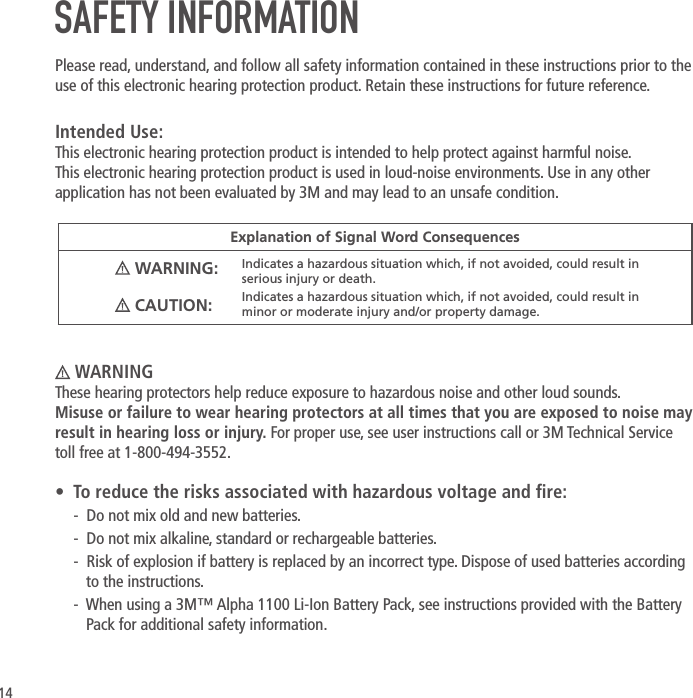
14 WARNINGThese hearing protectors help reduce exposure to hazardous noise and other loud sounds.  Misuse or failure to wear hearing protectors at all times that you are exposed to noise may result in hearing loss or injury. For proper use, see user instructions call or 3M Technical Service toll free at 1-800-494-3552. •  To reduce the risks associated with hazardous voltage and re:-  Do not mix old and new batteries.-  Do not mix alkaline, standard or rechargeable batteries.-  Risk of explosion if battery is replaced by an incorrect type. Dispose of used batteries according to the instructions.-  When using a 3M™ Alpha 1100 Li-Ion Battery Pack, see instructions provided with the Battery Pack for additional safety information.Explanation of Signal Word Consequences WARNING: Indicates a hazardous situation which, if not avoided, could result in serious injury or death. CAUTION: Indicates a hazardous situation which, if not avoided, could result in minor or moderate injury and/or property damage.SAFETY INFORMATIONPlease read, understand, and follow all safety information contained in these instructions prior to the use of this electronic hearing protection product. Retain these instructions for future reference.Intended Use:This electronic hearing protection product is intended to help protect against harmful noise. This electronic hearing protection product is used in loud-noise environments. Use in any other application has not been evaluated by 3M and may lead to an unsafe condition.
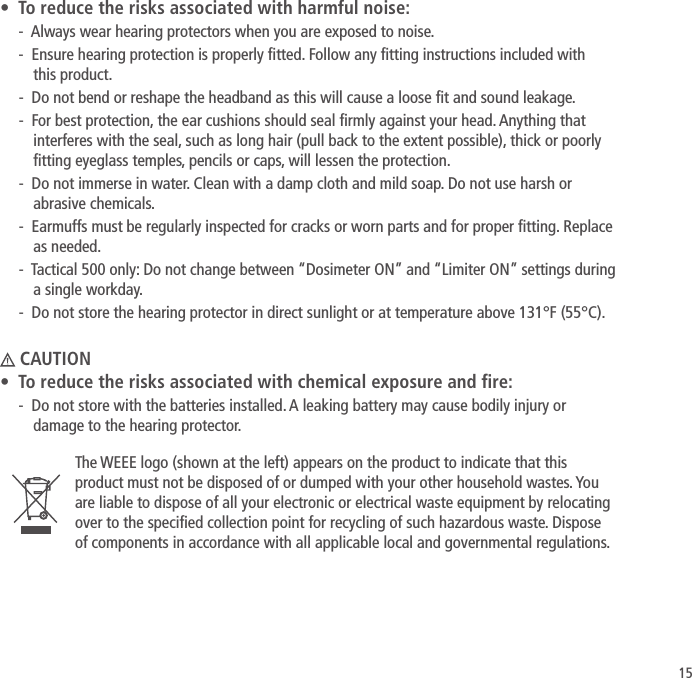
15•  To reduce the risks associated with harmful noise:-  Always wear hearing protectors when you are exposed to noise.-  Ensure hearing protection is properly tted. Follow any tting instructions included with  this product.-  Do not bend or reshape the headband as this will cause a loose t and sound leakage.-  For best protection, the ear cushions should seal rmly against your head. Anything that interferes with the seal, such as long hair (pull back to the extent possible), thick or poorly tting eyeglass temples, pencils or caps, will lessen the protection.-  Do not immerse in water. Clean with a damp cloth and mild soap. Do not use harsh or abrasive chemicals.-  Earmuffs must be regularly inspected for cracks or worn parts and for proper tting. Replace as needed.-  Tactical 500 only: Do not change between “Dosimeter ON” and “Limiter ON” settings during a single workday.-  Do not store the hearing protector in direct sunlight or at temperature above 131°F (55°C). CAUTION•  To reduce the risks associated with chemical exposure and re:-  Do not store with the batteries installed. A leaking battery may cause bodily injury or damage to the hearing protector.The WEEE logo (shown at the left) appears on the product to indicate that this product must not be disposed of or dumped with your other household wastes. You are liable to dispose of all your electronic or electrical waste equipment by relocating over to the specied collection point for recycling of such hazardous waste. Dispose of components in accordance with all applicable local and governmental regulations.
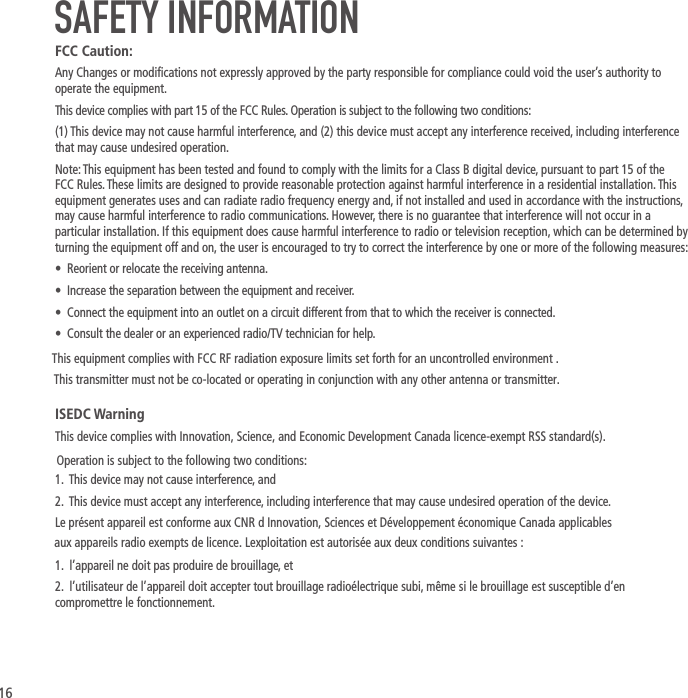
16SAFETY INFORMATIONFCC Caution:Any Changes or modications not expressly approved by the party responsible for compliance could void the user’s authority to operate the equipment.This device complies with part 15 of the FCC Rules. Operation is subject to the following two conditions:(1) This device may not cause harmful interference, and (2) this device must accept any interference received, including interference that may cause undesired operation.Note: This equipment has been tested and found to comply with the limits for a Class B digital device, pursuant to part 15 of the FCC Rules. These limits are designed to provide reasonable protection against harmful interference in a residential installation. This equipment generates uses and can radiate radio frequency energy and, if not installed and used in accordance with the instructions, may cause harmful interference to radio communications. However, there is no guarantee that interference will not occur in a particular installation. If this equipment does cause harmful interference to radio or television reception, which can be determined by turning the equipment off and on, the user is encouraged to try to correct the interference by one or more of the following measures:•  Reorient or relocate the receiving antenna.•  Increase the separation between the equipment and receiver.•  Connect the equipment into an outlet on a circuit different from that to which the receiver is connected.•  Consult the dealer or an experienced radio/TV technician for help.ISEDC WarningThis device complies with Innovation, Science, and Economic Development Canada licence-exempt RSS standard(s). 1.  This device may not cause interference, and2.  This device must accept any interference, including interference that may cause undesired operation of the device.Le présent appareil est conforme aux CNR d Innovation, Sciences et Développement économique Canada applicables1.  l’appareil ne doit pas produire de brouillage, et2.  l’utilisateur de l’appareil doit accepter tout brouillage radioélectrique subi, même si le brouillage est susceptible d’en compromettre le fonctionnement. Operation is subject to the following two conditions: aux appareils radio exempts de licence. Lexploitation est autorisée aux deux conditions suivantes :This equipment complies with FCC RF radiation exposure limits set forth for an uncontrolled environment .This transmitter must not be co-located or operating in conjunction with any other antenna or transmitter.
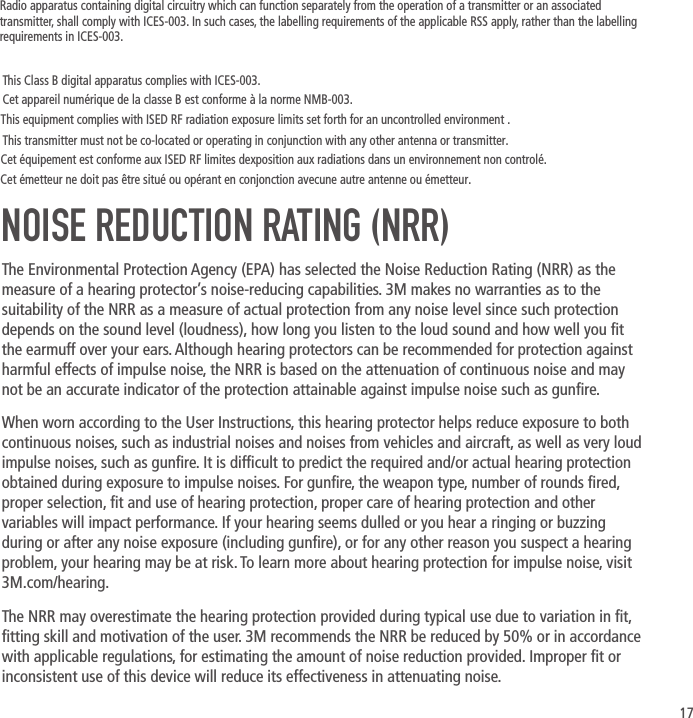
17NOISE REDUCTION RATING (NRR)The Environmental Protection Agency (EPA) has selected the Noise Reduction Rating (NRR) as the measure of a hearing protector’s noise-reducing capabilities. 3M makes no warranties as to the suitability of the NRR as a measure of actual protection from any noise level since such protection depends on the sound level (loudness), how long you listen to the loud sound and how well you t the earmuff over your ears. Although hearing protectors can be recommended for protection against harmful effects of impulse noise, the NRR is based on the attenuation of continuous noise and may not be an accurate indicator of the protection attainable against impulse noise such as gunre.When worn according to the User Instructions, this hearing protector helps reduce exposure to both continuous noises, such as industrial noises and noises from vehicles and aircraft, as well as very loud impulse noises, such as gunre. It is difcult to predict the required and/or actual hearing protection obtained during exposure to impulse noises. For gunre, the weapon type, number of rounds red, proper selection, t and use of hearing protection, proper care of hearing protection and other variables will impact performance. If your hearing seems dulled or you hear a ringing or buzzing during or after any noise exposure (including gunre), or for any other reason you suspect a hearing problem, your hearing may be at risk. To learn more about hearing protection for impulse noise, visit 3M.com/hearing.The NRR may overestimate the hearing protection provided during typical use due to variation in t, tting skill and motivation of the user. 3M recommends the NRR be reduced by 50% or in accordance with applicable regulations, for estimating the amount of noise reduction provided. Improper t or inconsistent use of this device will reduce its effectiveness in attenuating noise.This equipment complies with ISED RF radiation exposure limits set forth for an uncontrolled environment .Cet équipement est conforme aux ISED RF limites dexposition aux radiations dans un environnement non controlé.This Class B digital apparatus complies with ICES-003.Cet appareil numérique de la classe B est conforme à la norme NMB-003.This transmitter must not be co-located or operating in conjunction with any other antenna or transmitter.Cet émetteur ne doit pas être situé ou opérant en conjonction avecune autre antenne ou émetteur.Radio apparatus containing digital circuitry which can function separately from the operation of a transmitter or an associated transmitter, shall comply with ICES-003. In such cases, the labelling requirements of the applicable RSS apply, rather than the labelling requirements in ICES-003.
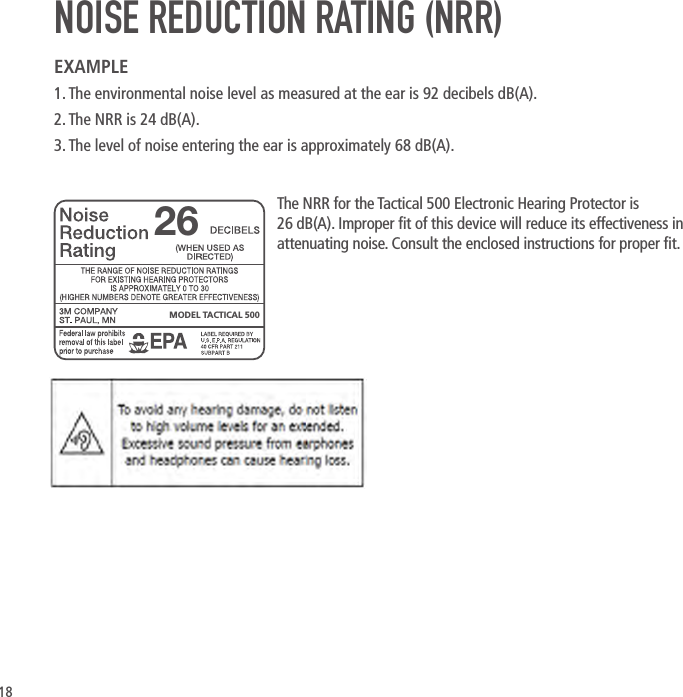
18NOISE REDUCTION RATING (NRR)EXAMPLE1. The environmental noise level as measured at the ear is 92 decibels dB(A).2. The NRR is 24 dB(A).3. The level of noise entering the ear is approximately 68 dB(A). The NRR for the Tactical 500 Electronic Hearing Protector is 26dB(A). Improper t of this device will reduce its effectiveness in attenuating noise. Consult the enclosed instructions for proper t.MODEL TACTICAL 50026
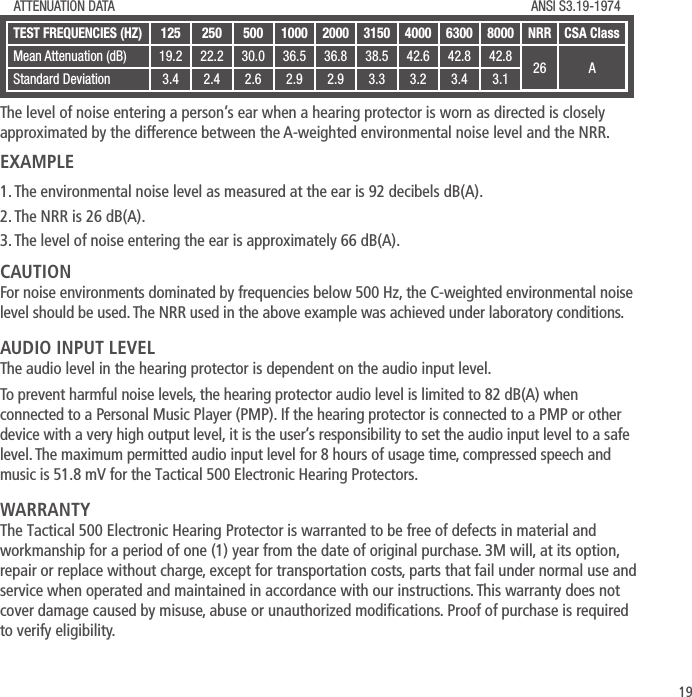
19TEST FREQUENCIES(HZ) 125 250 500 1000 2000 3150 4000 6300 8000 NRR CSA ClassMean Attenuation (dB) 19.2 22.2 30.0 36.5 36.8 38.5 42.6 42.8 42.8 26 AStandard Deviation 3.4 2.4 2.6 2.9 2.9 3.3 3.2 3.4 3.1ATTENUATION DATA ANSI S3.19-1974The level of noise entering a person’s ear when a hearing protector is worn as directed is closely approximated by the difference between the A-weighted environmental noise level and the NRR.EXAMPLE1. The environmental noise level as measured at the ear is 92 decibels dB(A).2. The NRR is 26 dB(A).3. The level of noise entering the ear is approximately 66 dB(A).CAUTIONFor noise environments dominated by frequencies below 500 Hz, the C-weighted environmental noise level should be used. The NRR used in the above example was achieved under laboratory conditions.AUDIO INPUT LEVELThe audio level in the hearing protector is dependent on the audio input level.To prevent harmful noise levels, the hearing protector audio level is limited to 82 dB(A) when connected to a Personal Music Player (PMP). If the hearing protector is connected to a PMP or other device with a very high output level, it is the user’s responsibility to set the audio input level to a safe level. The maximum permitted audio input level for 8 hours of usage time, compressed speech and music is 51.8 mV for the Tactical 500 Electronic Hearing Protectors.WARRANTYThe Tactical 500 Electronic Hearing Protector is warranted to be free of defects in material and workmanship for a period of one (1) year from the date of original purchase. 3M will, at its option, repair or replace without charge, except for transportation costs, parts that fail under normal use and service when operated and maintained in accordance with our instructions. This warranty does not cover damage caused by misuse, abuse or unauthorized modications. Proof of purchase is required to verify eligibility.
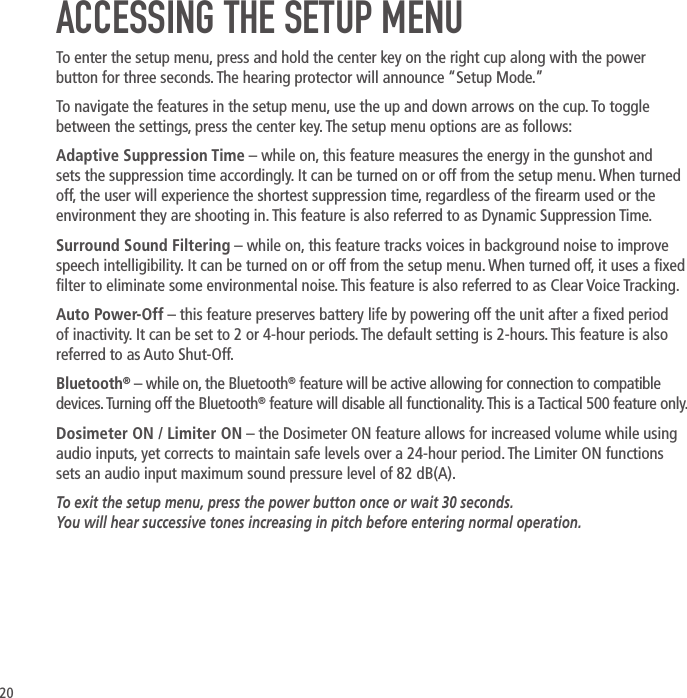
20ACCESSING THE SETUP MENUTo enter the setup menu, press and hold the center key on the right cup along with the power button for three seconds. The hearing protector will announce “Setup Mode.”To navigate the features in the setup menu, use the up and down arrows on the cup. To toggle between the settings, press the center key. The setup menu options are as follows:Adaptive Suppression Time – while on, this feature measures the energy in the gunshot and sets the suppression time accordingly. It can be turned on or off from the setup menu. When turned off, the user will experience the shortest suppression time, regardless of the rearm used or the environment they are shooting in. This feature is also referred to as Dynamic Suppression Time.Surround Sound Filtering – while on, this feature tracks voices in background noise to improve speech intelligibility. It can be turned on or off from the setup menu. When turned off, it uses a xed lter to eliminate some environmental noise. This feature is also referred to as Clear Voice Tracking.Auto Power-Off – this feature preserves battery life by powering off the unit after a xed period of inactivity. It can be set to 2 or 4-hour periods. The default setting is 2-hours. This feature is also referred to as Auto Shut-Off.Bluetooth® – while on, the Bluetooth® feature will be active allowing for connection to compatible devices. Turning off the Bluetooth® feature will disable all functionality. This is a Tactical 500 feature only.Dosimeter ON / Limiter ON – the Dosimeter ON feature allows for increased volume while using audio inputs, yet corrects to maintain safe levels over a 24-hour period. The Limiter ON functions sets an audio input maximum sound pressure level of 82 dB(A).To exit the setup menu, press the power button once or wait 30 seconds. You will hear successive tones increasing in pitch before entering normal operation.
© 2017, 3M. All rights reserved. 3M and Peltor are trademarks of 3M. The Bluetooth® word mark and logo areregistered trademarks owned by Bluetooth SIG, Inc. and any use of such marks by 3M is under license.Issue Date: 2016-12     34-8720-0823-93MSafety.com/PeltorSportSPORT

Navigation menu