3M CONSTRUCTION and HOME IMPROVEMENT MARKETS DIVISION WTW90542 WorkTunes Wireless Hearing Protector User Manual

3M CONSTRUCTION & HOME IMPROVEMENT MARKETS DIVISION WorkTunes Wireless Hearing Protector Users Manual

Users Manual

WORKTUNESTM INALÁMBRICOcon tecnología inalámbrica Bluetooth®1WORKTUNESTM WIRELESSfeaturing Bluetooth®wireless technologyPDF Scaled at 100.0%
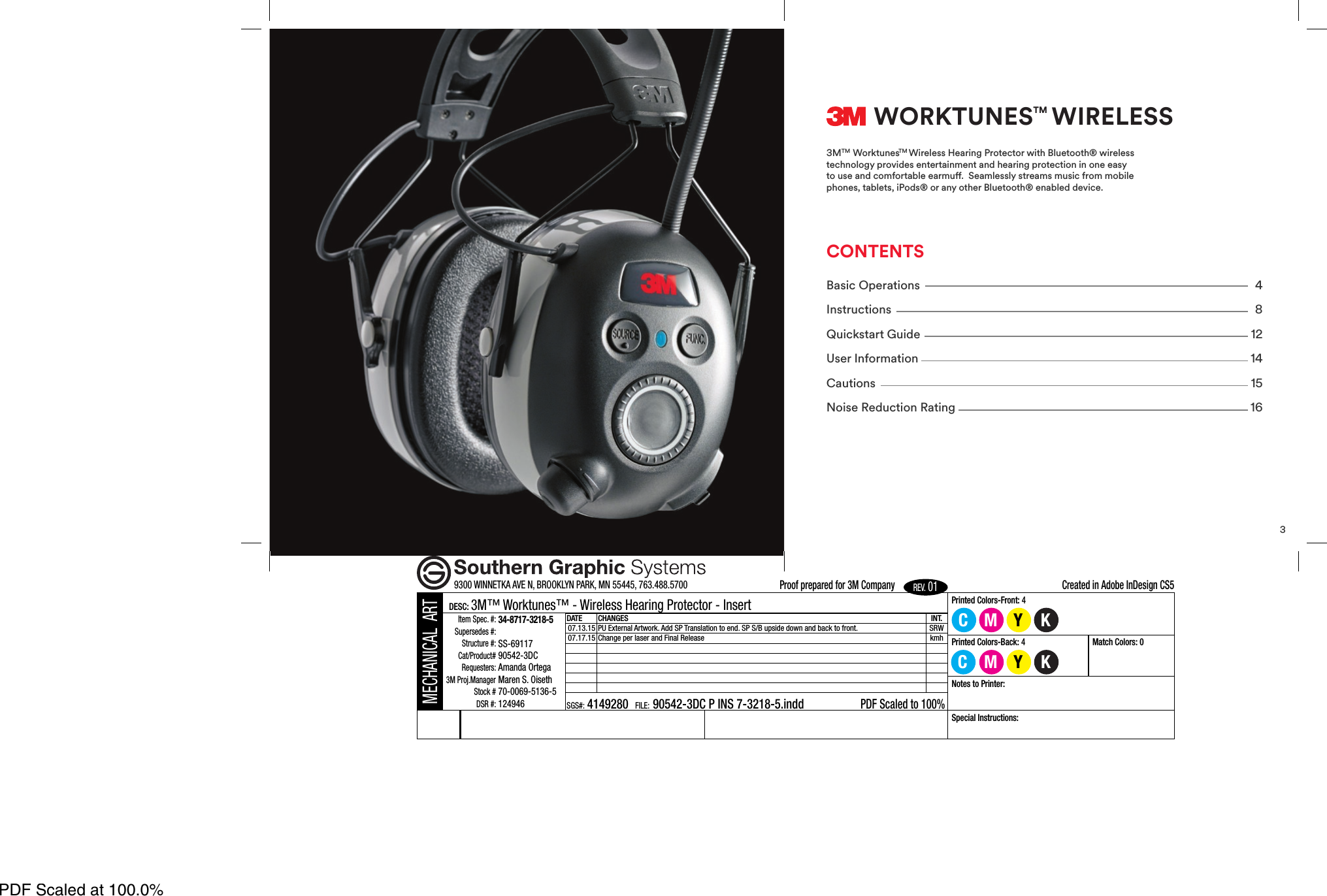
2MECHANICAL ARTDESC: 3M™ Worktunes™ - Wireless Hearing Protector - InsertItem Spec. #:34-8717-3218-5Supersedes #:Structure #:SS-69117Cat/Product#90542-3DCRequesters:Amanda Ortega3M Proj.ManagerMaren S. OisethStock #70-0069-5136-5DSR #:124946DATE CHANGES07.13.15PU External Artwork. Add SP Translation to end. SP S/B upside do07.17.15 Change per laser and Final ReleaseSGS#: 4149280 FILE:90542-3DC P INS 7-3218-5.inddBar CodeMagnification:XXX%This bar code symbol was produced using a bar width adjustment of minus 0.004. If this does notmeet the needs of the printing process or equipment to be used, the printer is responsible to recreatethe file using the appropriate bar width adjustment while meeting 3M quality requirements.Because of the differences in scanningof UPC Bar codes. The Uniform Cat 100% with no truncation. All UPr9300 WINNETKA AVE N, BROOKLYN PARK, MN 55445, 763.488.57003WORKTUNESTM WIRELESS3MTM WorktunesTM Wireless Hearing Protector with Bluetooth® wirelesstechnology provides entertainment and hearing protection in one easyto use and comfortable earmu.  Seamlessly streams music from mobilephones, tablets, iPods® or any other Bluetooth® enabled device.CONTENTSBasic Operations 4Instructions 8Quickstart Guide 12User Information 14Cautions 15Noise Reduction Rating 16Printed Colors-Front: 4CINT. SP S/B upside down and back to front.SRWkmh90542-3DC P INS 7-3218-5.inddPDF Scaled to 100%Printed Colors-Back: 4Match Colors: 0Notes to Printer:scanning equipment, SGS Minnesota cannot guarantee the scannabilityCodeCouncilrecommendsaUPCsymbolbeprintedblackonwhitell UPC codes are test scanned and verified before leaving our facility.Special Instructions:Created in Adobe InDesign CS5Proof prepared for 3M CompanyREV.01MMYYKC KPDF Scaled at 100.0%
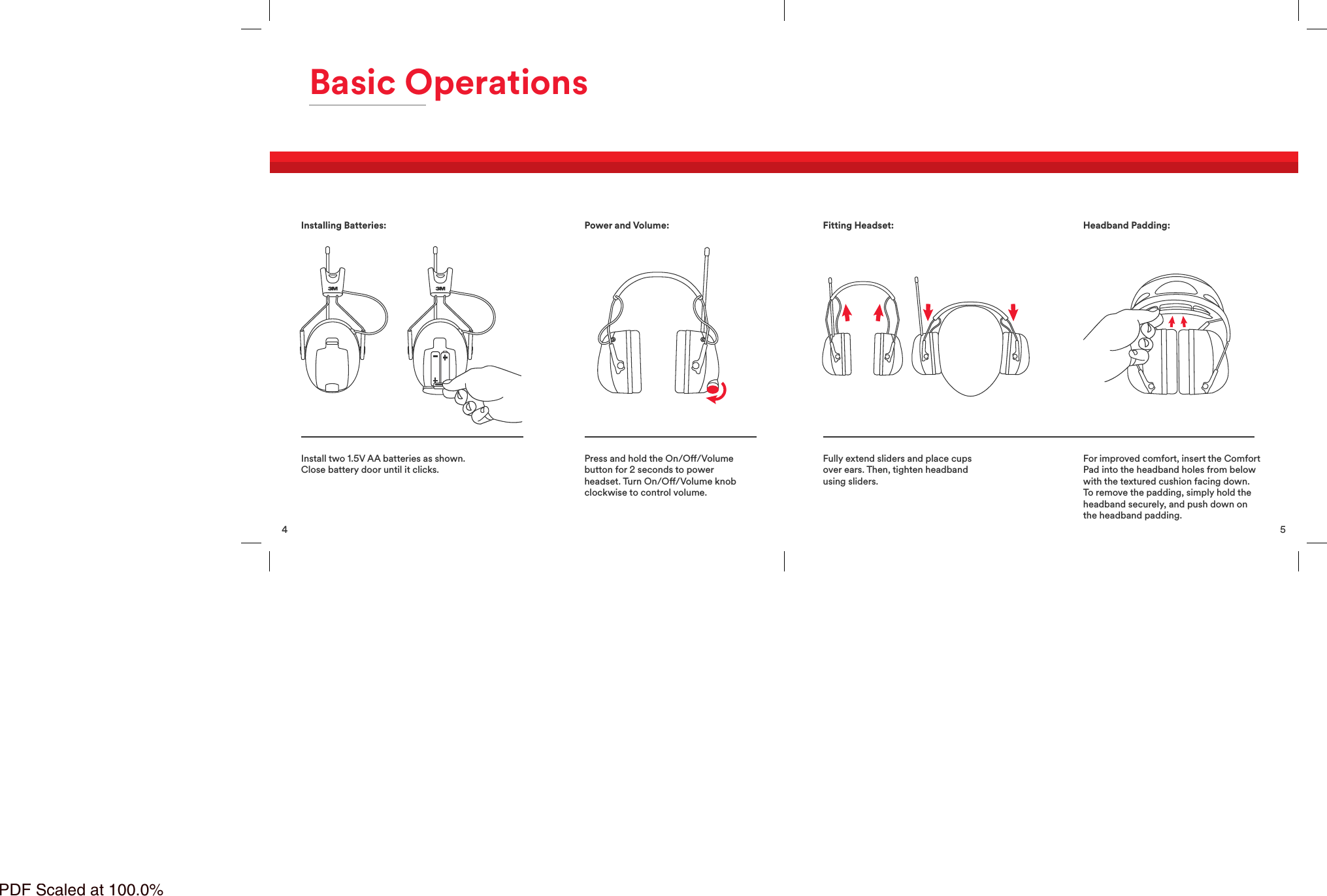
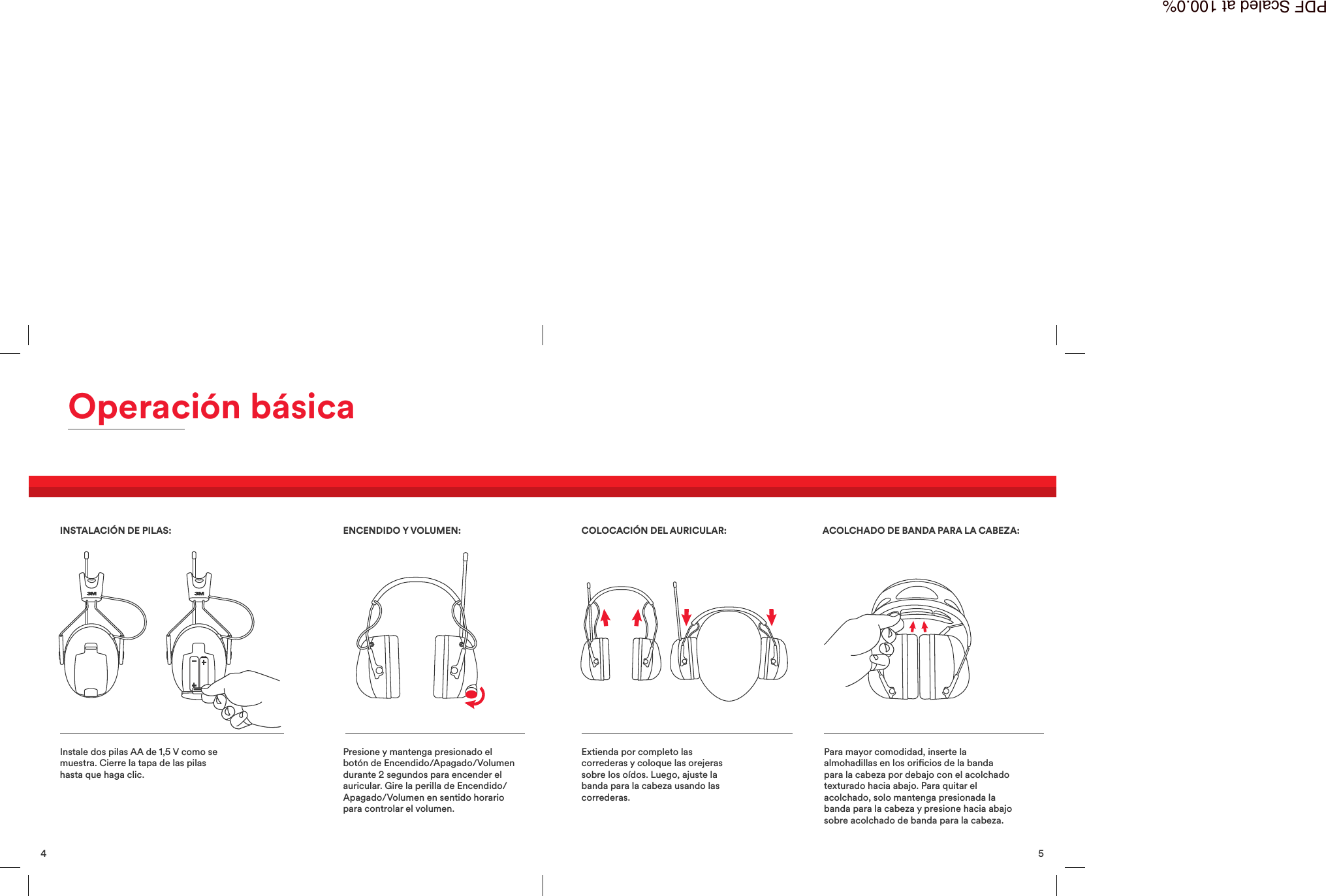
4Basic OperationsInstall two 1.5V AA batteries as shown.Close battery door until it clicks.Press and hold the On/O/Volumebutton for 2 seconds to powerheadset. Turn On/O/Volume knobclockwise to control volume.Installing Batteries: Power and Volume:5Fully extend sliders and place cupsover ears. Then, tighten headbandusing sliders.For improved comfort, insert the ComfortPad into the headband holes from belowwith the textured cushion facing down.To remove the padding, simply hold theheadband securely, and push down onthe headband padding.Fitting Headset: Headband Padding:PDF Scaled at 100.0%
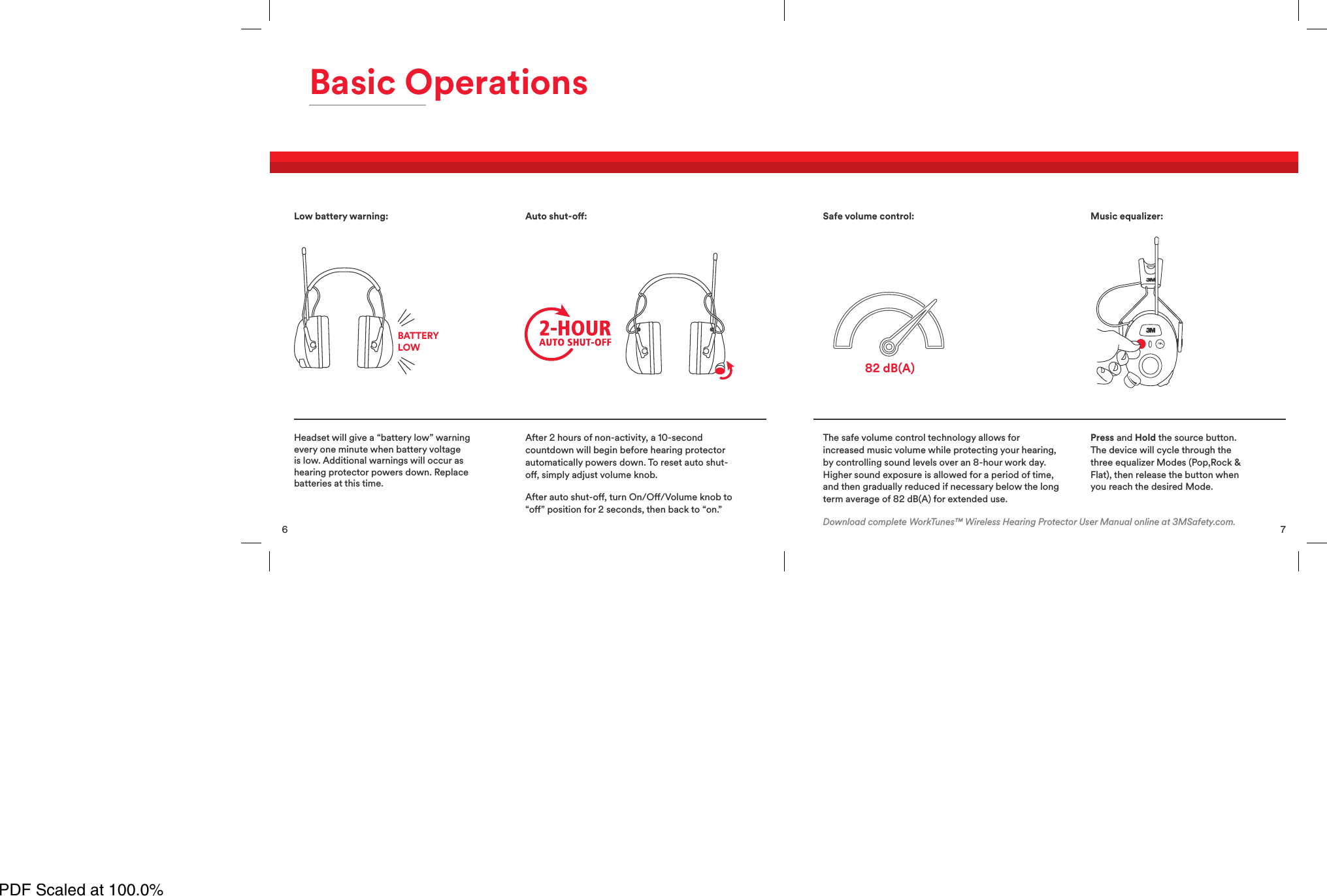
6Basic OperationsHeadset will give a “battery low” warningevery one minute when battery voltageis low. Additional warnings will occur ashearing protector powers down. Replacebatteries at this time.After 2 hours of non-activity, a 10-secondcountdown will begin before hearing protectorautomatically powers down. To reset auto shut-o, simply adjust volume knob.After auto shut-o, turn On/O/Volume knob to“o” position for 2 seconds, then back to “on.”Low battery warning:BATTERYLOWAuto shut-o:7The safe volume control technology allows forincreased music volume while protecting your hearing,by controlling sound levels over an 8-hour work day.Higher sound exposure is allowed for a period of time,and then gradually reduced if necessary below the longterm average of 82 dB(A) for extended use.Press and Hold the source button.The device will cycle through thethree equalizer Modes (Pop,Rock &Flat), then release the button whenyou reach the desired Mode.82 dB(A)Safe volume control: Music equalizer:Download complete WorkTunes™ Wireless Hearing Protector User Manual online at 3MSafety.com.PDF Scaled at 100.0%
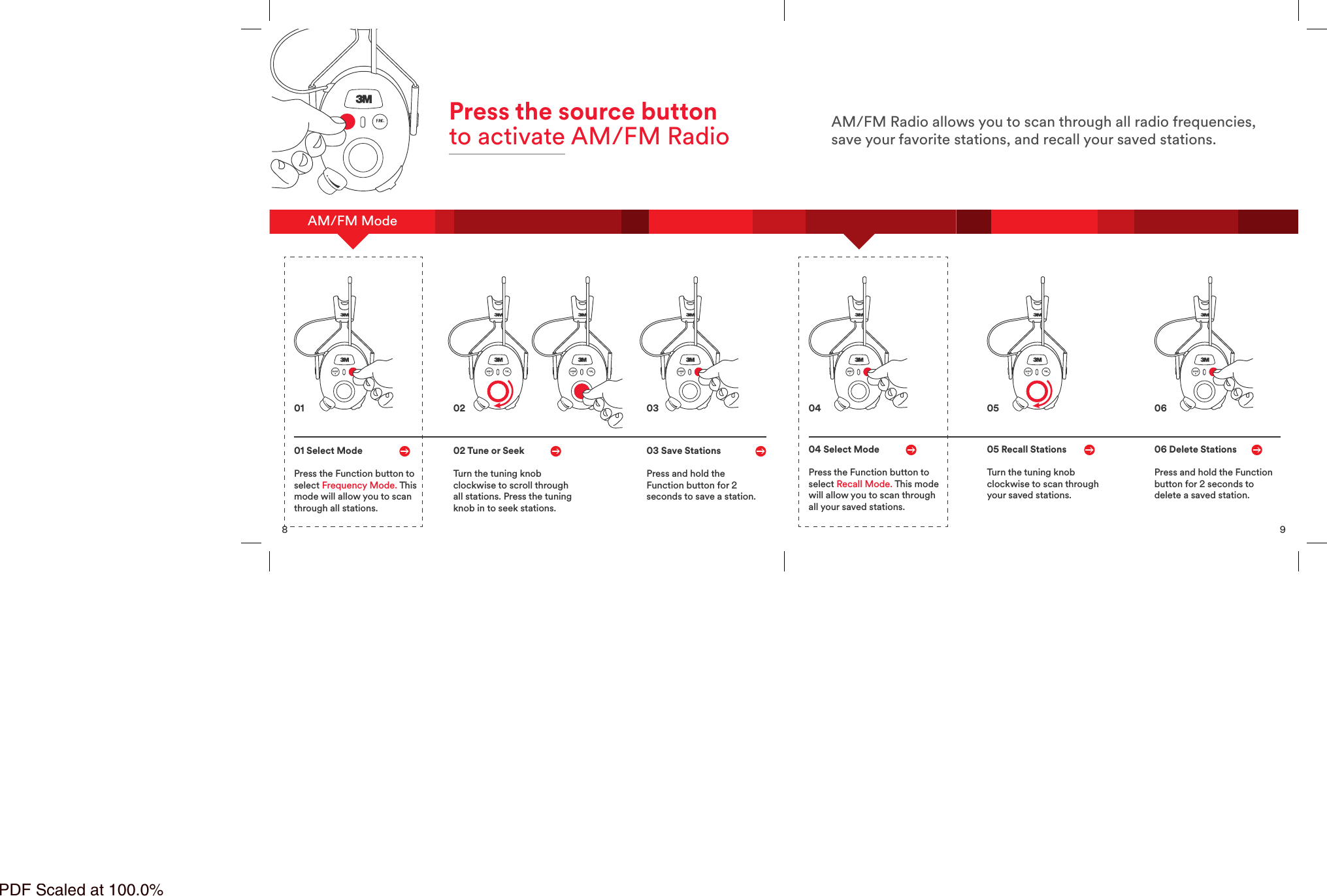
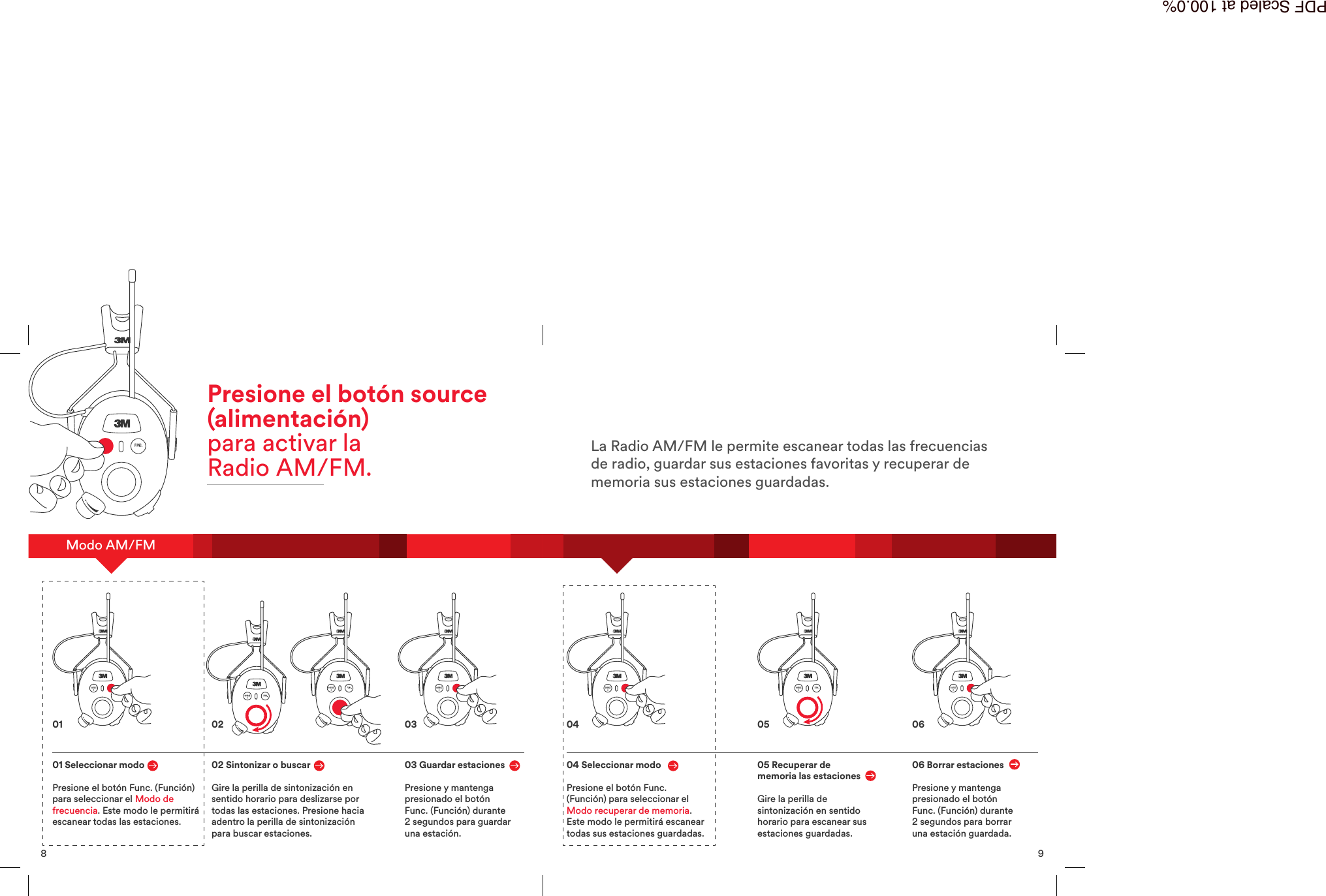
8AM/FM ModePress the source buttonto activate AM/FM Radio01 Select ModePress the Function button toselect Frequency Mode. Thismode will allow you to scanthrough all stations.02 Tune or SeekTurn the tuning knobclockwise to scroll throughall stations. Press the tuningknob in to seek stations.03 Save StationsPress and hold theFunction button for 2seconds to save a station.01 02 039AM/FM Radio allows you to scan through all radio frequencies,save your favorite stations, and recall your saved stations.04 Select ModePress the Function button toselect Recall Mode. This modewill allow you to scan throughall your saved stations.05 Recall StationsTurn the tuning knobclockwise to scan throughyour saved stations.06 Delete StationsPress and hold the Functionbutton for 2 seconds todelete a saved station.04 05 06PDF Scaled at 100.0%
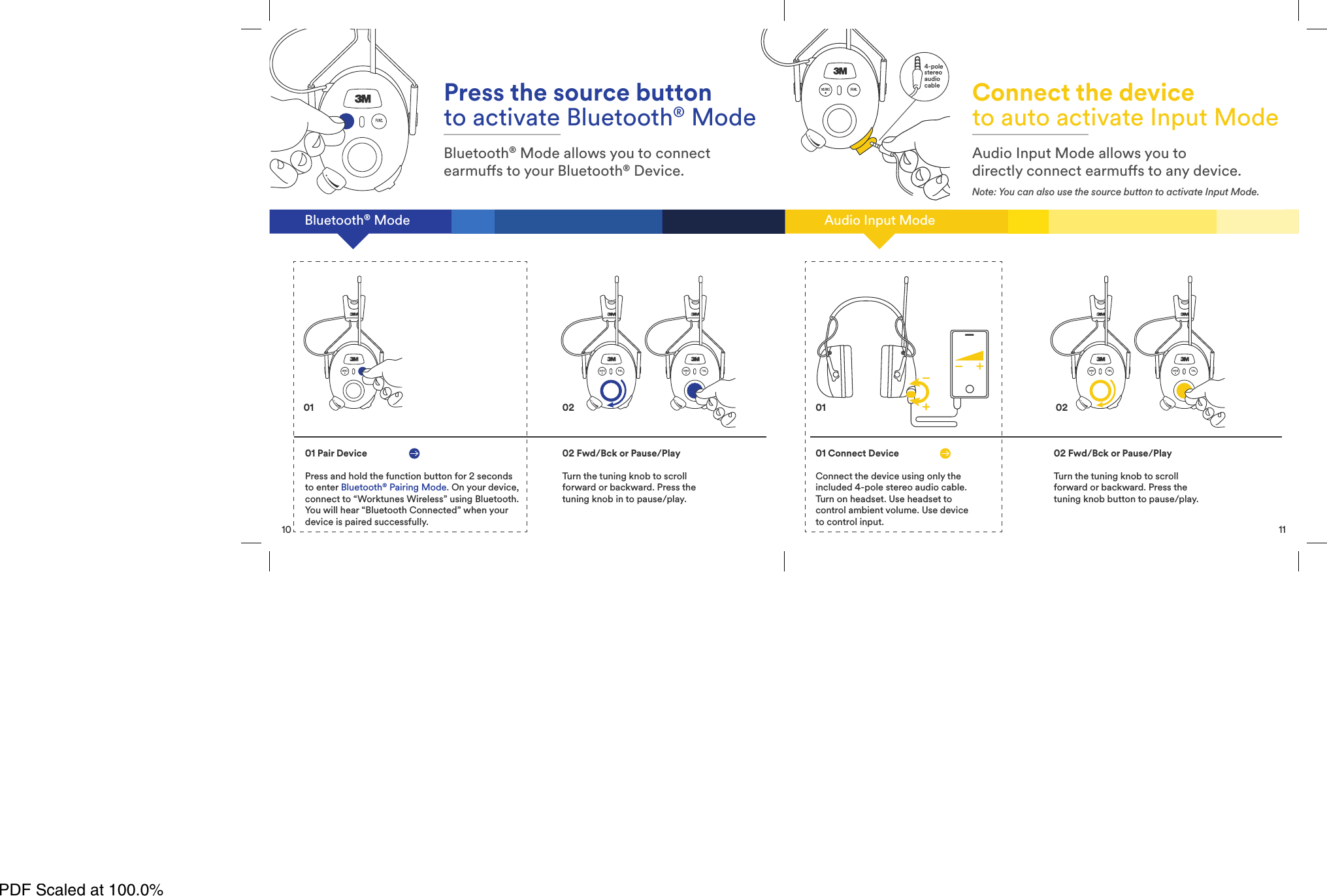
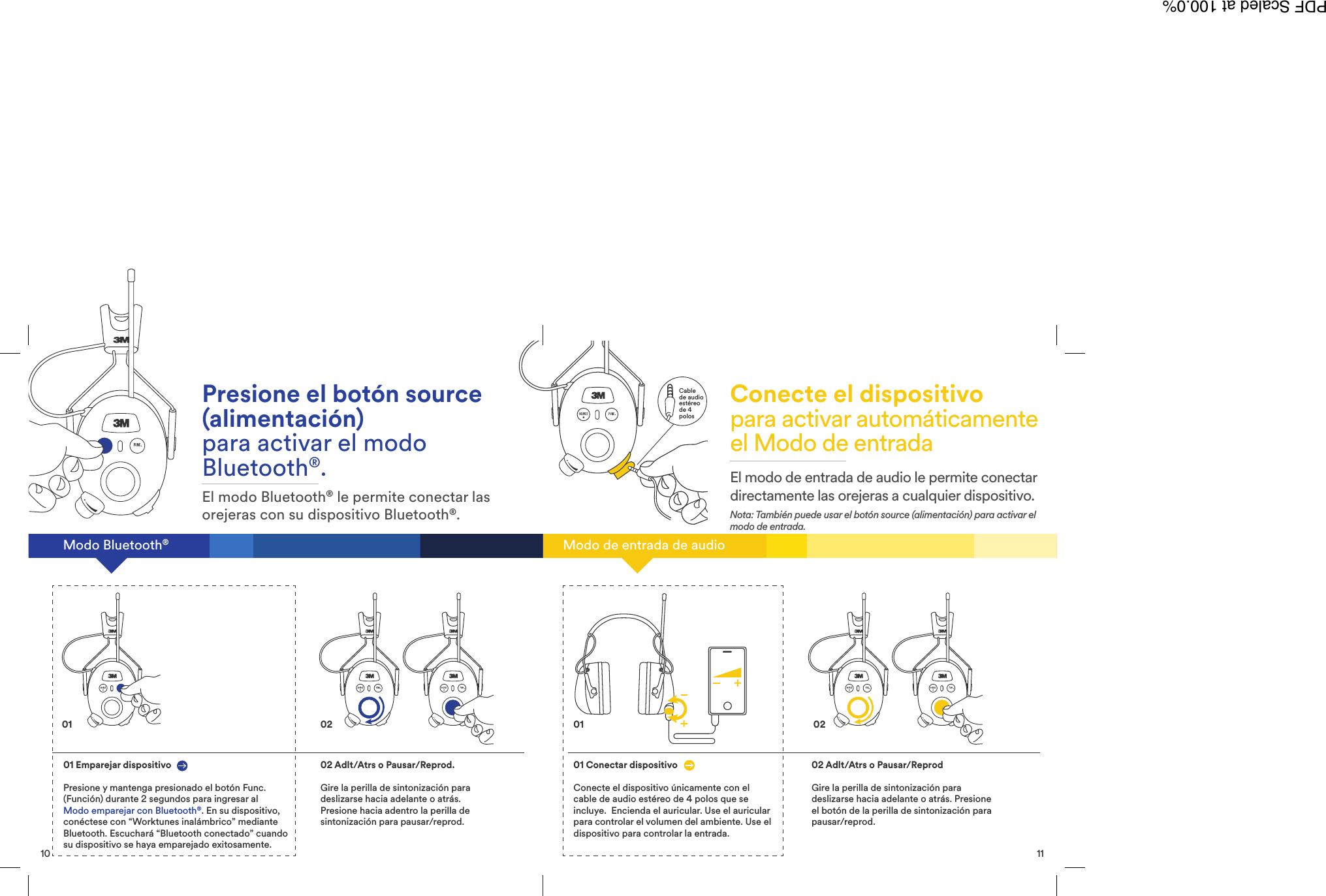
10Bluetooth® ModePress the source buttonto activate Bluetooth® ModeBluetooth® Mode allows you to connectearmus to your Bluetooth® Device.01 Pair DevicePress and hold the function button for 2 secondsto enter Bluetooth®Pairing Mode. On your device,connect to “Worktunes Wireless” using Bluetooth.You will hear “Bluetooth Connected” when yourdevice is paired successfully.02 Fwd/Bck or Pause/PlayTurn the tuning knob to scrollforward or backward. Press thetuning knob in to pause/play.01 0211Audio Input ModeConnect the deviceto auto activate Input ModeAudio Input Mode allows you todirectly connect earmus to any device.Note: You can also use the source button to activate Input Mode.01 Connect DeviceConnect the device using only theincluded 4-pole stereo audio cable.Turn on headset. Use headset tocontrol ambient volume. Use deviceto control input.02 Fwd/Bck or Pause/PlayTurn the tuning knob to scrollforward or backward. Press thetuning knob button to pause/play.02014-polestereoaudiocablePDF Scaled at 100.0%
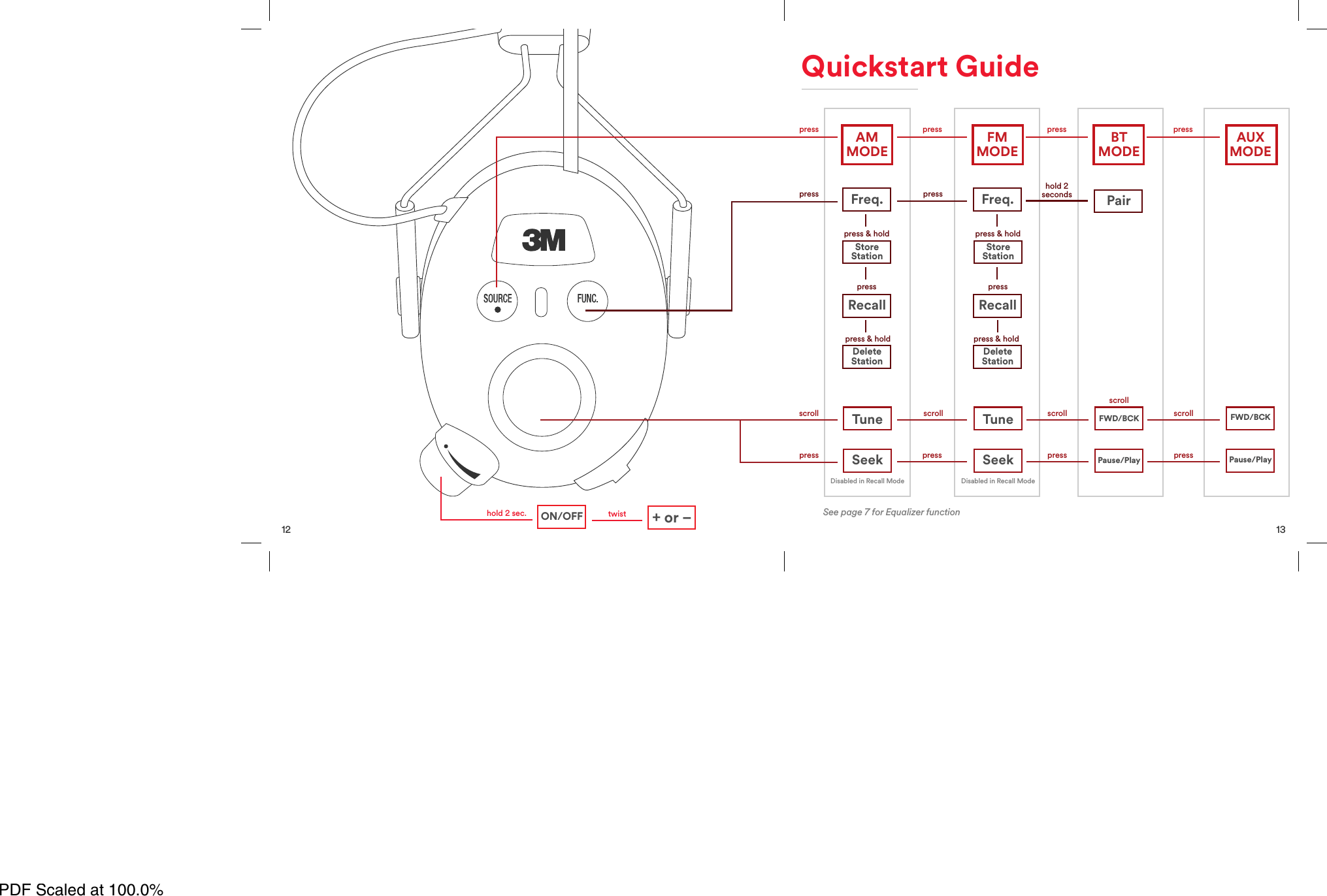
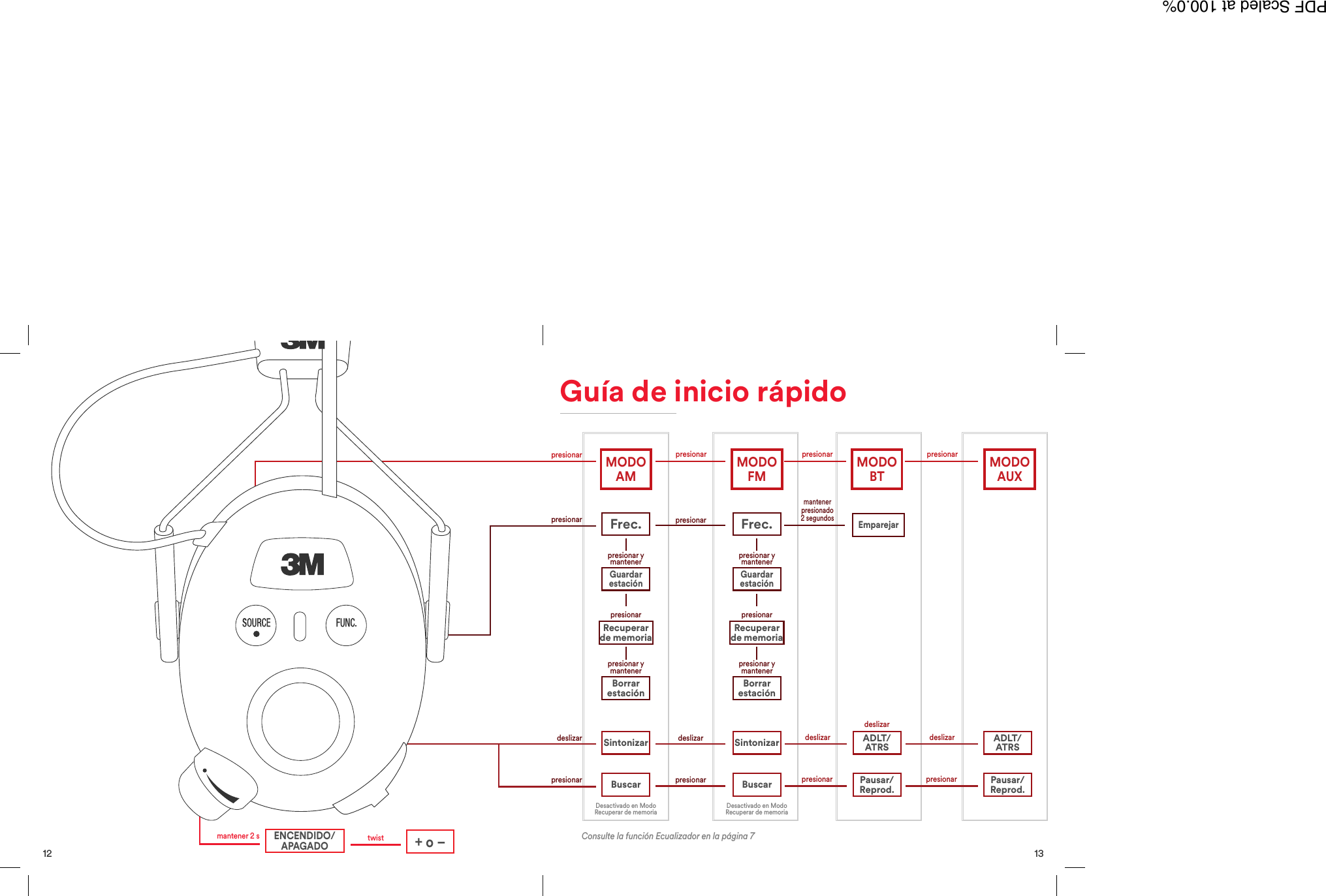
12twisthold 2 sec. +or–ON/OFF13Freq. Freq.press press press presspress presspress & hold press & holdpress & holdpresspress & holdpressscrollscroll scroll scrollscrollhold 2secondspresspress press pressDisabled in Recall Mode Disabled in Recall ModeTune Tune FWD/BCKRecall RecallDeleteStation DeleteStationStoreStation StoreStationSeek Seek Pause/PlayPairFWD/BCKPause/PlayQuickstart GuideAMMODE FMMODE BTMODE AUXMODESee page 7 for Equalizer functionPDF Scaled at 100.0%
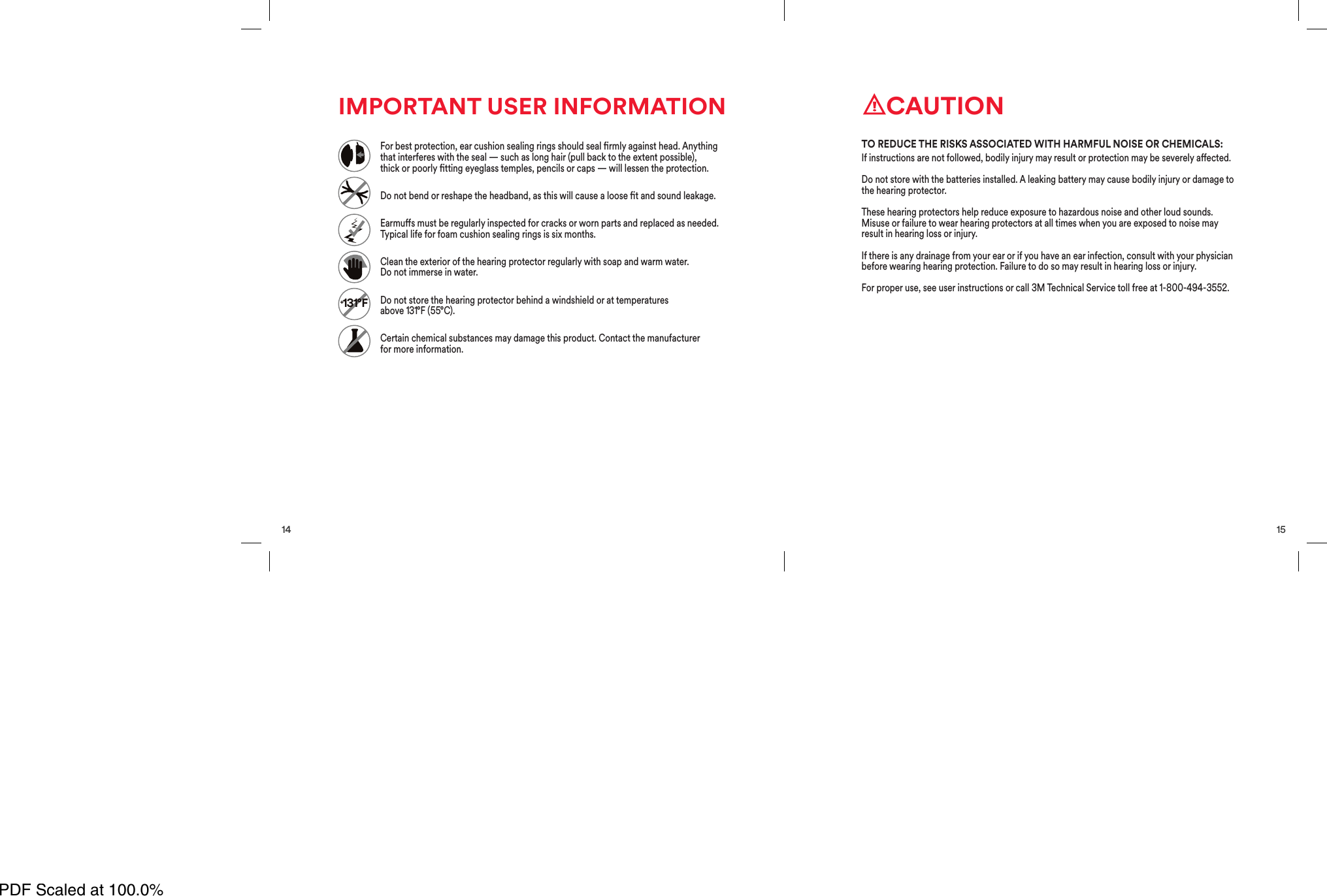
14IMPORTANT USER INFORMATION+131°FFor best protection, ear cushion sealing rings should seal rmly against head. Anythingthat interferes with the seal — such as long hair (pull back to the extent possible),thickorpoorlyttingeyeglass temples, pencils or caps — will lessen the protection.Do not bend or reshape the headband, as this will cause a loose t and sound leakage.Earmus must be regularly inspected for cracks or worn parts and replaced as needed.Typical life for foam cushion sealing rings is six months.Clean the exterior of the hearing protector regularly with soap and warm water.Do notimmerse in water.Do not store the hearing protector behind a windshield or at temperaturesabove131°F (55°C).Certain chemical substances may damage this product. Contact the manufacturerformore information.15CAUTIONIf instructions are not followed, bodily injury may result or protection may be severely aected.Do not store with the batteries installed. A leaking battery may cause bodily injury or damage tothe hearing protector.These hearing protectors help reduce exposure to hazardous noise and other loud sounds.Misuse or failure to wear hearing protectors at all times when you are exposed to noise mayresult in hearing loss or injury.If there is any drainage from your ear or if you have an ear infection, consult with your physicianbefore wearing hearing protection. Failure to do so may result in hearing loss or injury.For proper use, see user instructions or call 3M Technical Service toll free at 1-800-494-3552.TO REDUCE THE RISKS ASSOCIATED WITH HARMFUL NOISE OR CHEMICALS:PDF Scaled at 100.0%
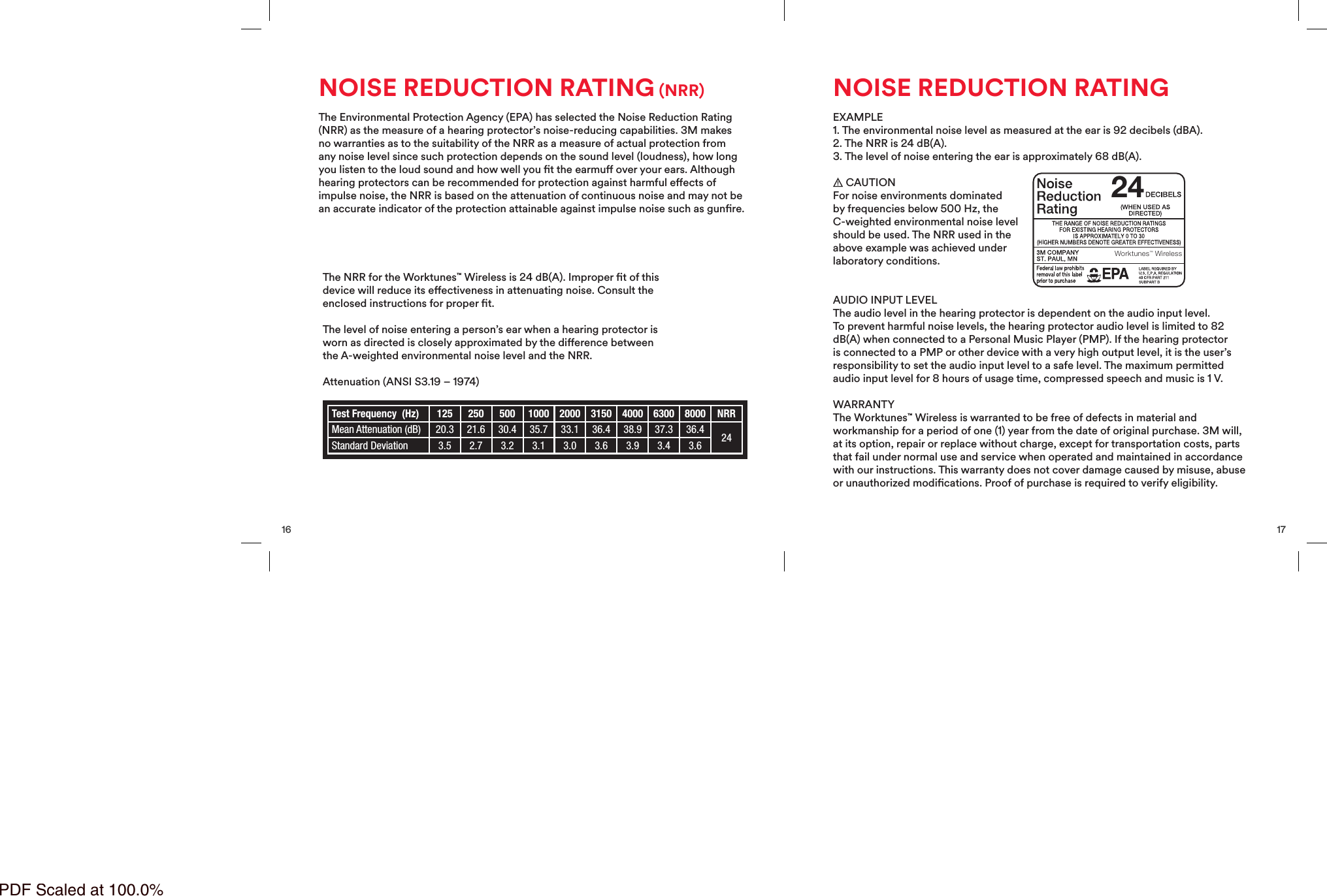
16NOISE REDUCTION RATING (NRR)The Environmental Protection Agency (EPA) has selected the Noise Reduction Rating(NRR) as the measure of a hearing protector’s noise-reducing capabilities. 3M makesno warranties as to the suitability of the NRR as a measure of actual protection fromany noise level since such protection depends on the sound level (loudness), how longyou listen to the loud sound and how well you t the earmu over your ears. Althoughhearing protectors can be recommended for protection against harmful eects ofimpulse noise, the NRR is based on the attenuation of continuous noise and may not bean accurate indicator of the protection attainable against impulse noise such as gunre.The NRR for the Worktunes™Wireless is 24 dB(A). Improper tof thisdevice will reduce its eectiveness in attenuating noise. Consult theenclosed instructions for proper t.The level of noise entering a person’s ear when a hearing protector isworn as directed is closely approximated by the dierence betweenthe A-weighted environmental noise level and the NRR.Attenuation (ANSI S3.19 – 1974)Test Frequency  (Hz) 125 250 500 1000 2000 3150 4000 6300 8000 NRRMean Attenuation (dB) 20.3 21.6 30.4 35.7 33.1 36.4 38.9 37.3 36.4 24Standard Deviation 3.5 2.7 3.2 3.1 3.0 3.6 3.9 3.4 3.617NOISE REDUCTION RATINGEXAMPLE1. The environmental noise level as measured at the ear is 92 decibels (dBA).2. The NRR is 24 dB(A).3. The level of noise entering the ear is approximately 68 dB(A).CAUTIONFor noise environments dominatedby frequencies below 500 Hz, theC-weighted environmental noise levelshould be used. TheNRR used in theabove example was achieved underlaboratory conditions.AUDIO INPUT LEVELThe audio level in the hearing protector is dependent on the audio input level.To prevent harmful noise levels, the hearing protector audio level is limited to 82dB(A) when connected to a Personal Music Player (PMP). If the hearing protectoris connected to a PMP or other device with a very high output level, it is the user’sresponsibility to set the audio input level to a safe level. The maximum permittedaudio input level for 8 hours of usage time, compressed speech and music is 1 V.WARRANTYThe Worktunes™Wireless is warranted to be free of defects in material andworkmanship for a period of one (1) year from the date of original purchase. 3M will,at its option, repair or replace without charge, except for transportation costs, partsthat fail under normal use and service when operated and maintained in accordancewith our instructions. This warranty does not cover damage caused by misuse, abuseor unauthorized modications. Proof of purchase is required to verify eligibility.24Worktunes™ WirelessPDF Scaled at 100.0%
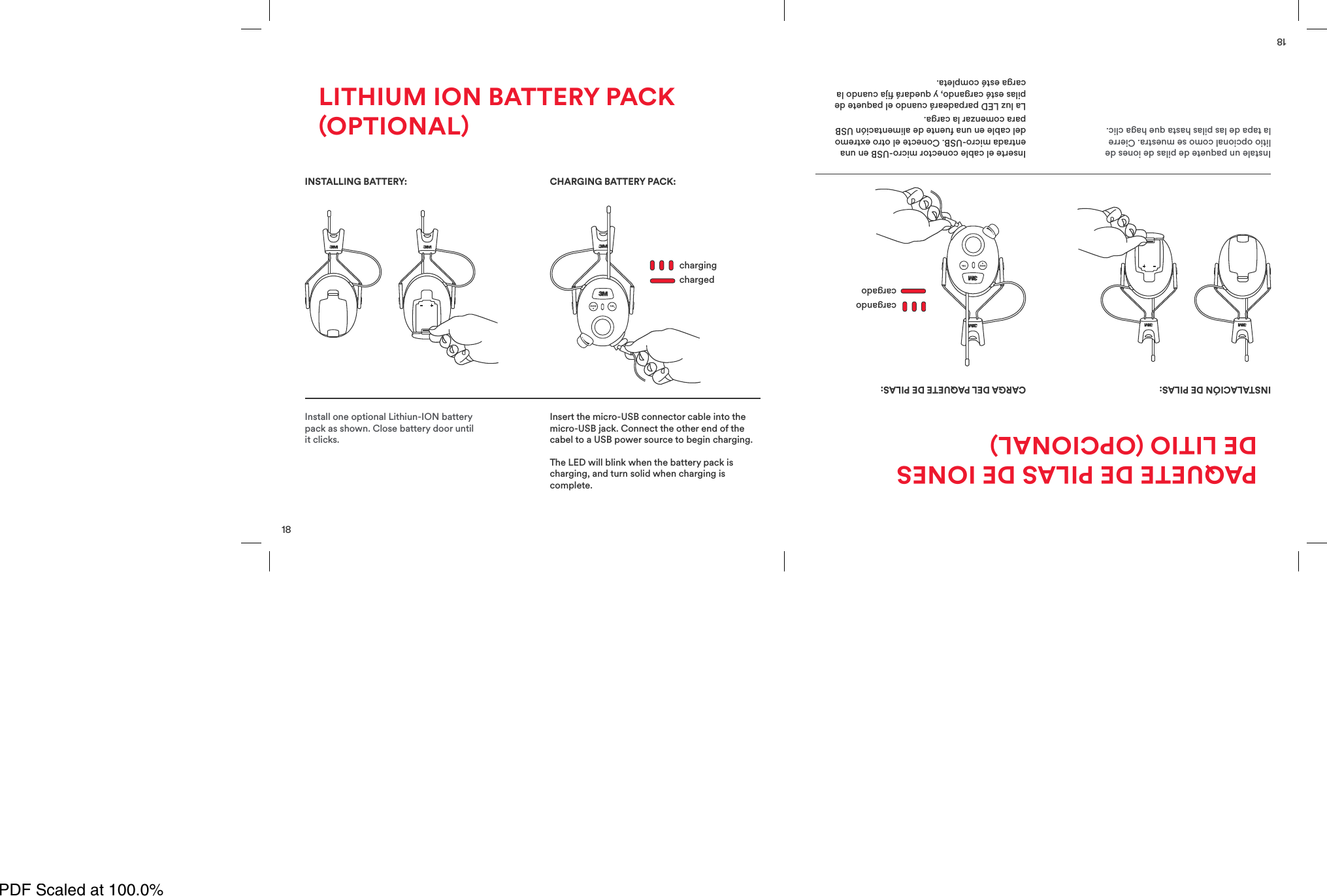
18Install one optional Lithiun-ION batterypack as shown. Close battery door untilit clicks.Insert the micro-USB connector cable into themicro-USB jack. Connect the other end of thecabel to a USB power source to begin charging.The LED will blink when the battery pack ischarging, and turn solid when charging iscomplete.chargingchargedINSTALLING BATTERY:BATTERYLOWCHARGING BATTERY PACK:LITHIUM ION BATTERY PACKOPTIONAL18Instale un paquete de pilas de iones delitio opcional como se muestra. Cierrela tapa de las pilas hasta que haga clic.Inserte el cable conector micro-USB en unaentrada micro-USB. Conecte el otro extremodel cable en una fuente de alimentación USBpara comenzar la carga.La luz LED parpadeará cuando el paquete depilas esté cargando, y quedará ja cuando lacarga esté completa.cargandocargadoINSTALACIÓN DE PILAS:BATTERYLOWCARGA DEL PAQUETE DE PILAS:PAQUETE DE PILAS DE IONESDE LITIO OPCIONALPDF Scaled at 100.0%
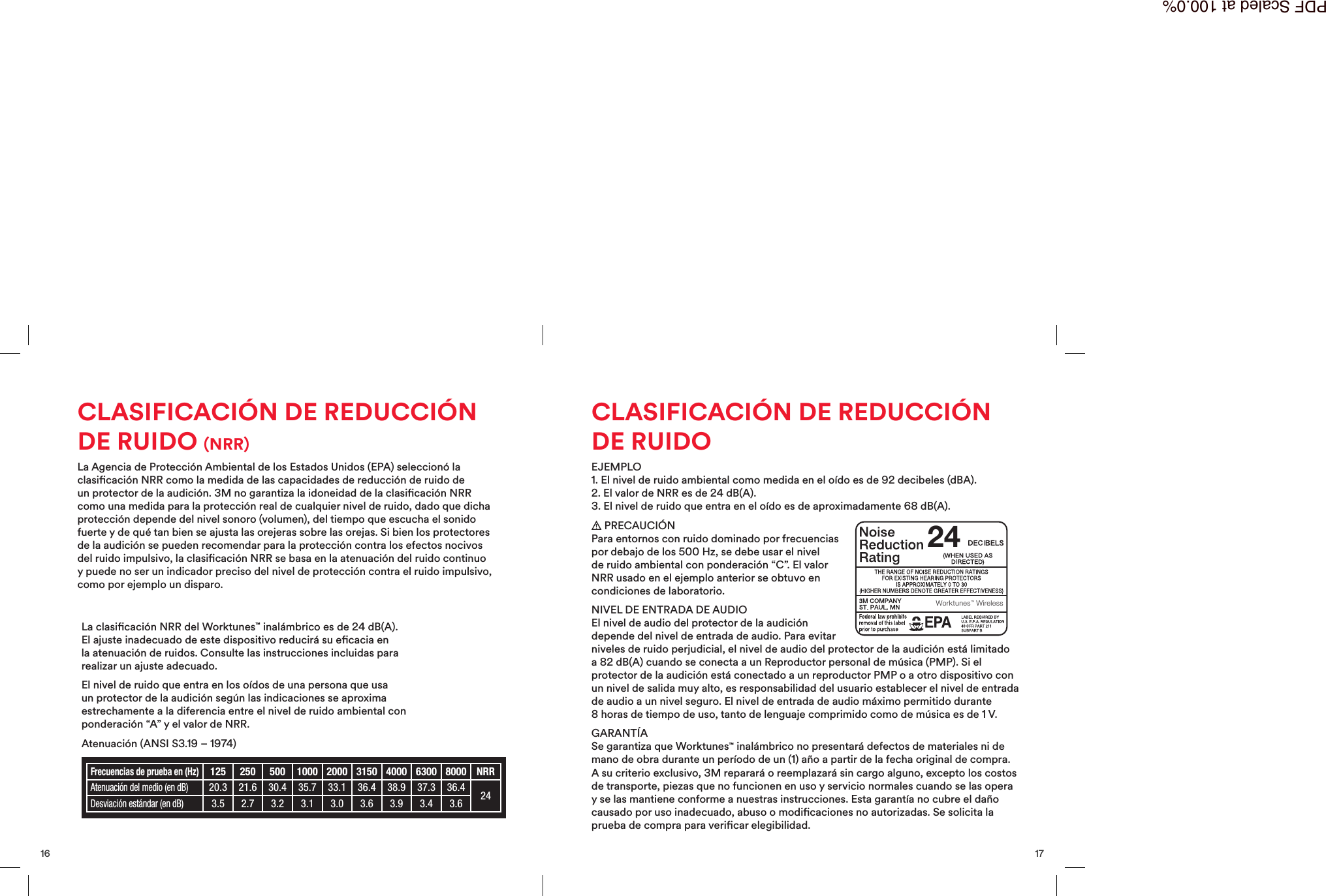
17CLASIFICACIÓN DE REDUCCIÓNDE RUIDOEJEMPLO1. El nivel de ruido ambiental como medida en el oído es de 92 decibeles (dBA).2. El valor de NRR es de 24 dB(A).3. El nivel de ruido que entra en el oído es de aproximadamente 68 dB(A).PRECAUCIÓNPara entornos con ruido dominado por frecuenciaspor debajo de los 500 Hz, se debe usar el nivelde ruido ambiental con ponderación “C”. El valorNRR usado en el ejemplo anterior se obtuvo encondiciones delaboratorio.NIVEL DE ENTRADA DE AUDIOEl nivel de audio del protector de la audicióndepende del nivel de entrada de audio. Para evitarniveles de ruido perjudicial, el nivel de audio del protector de la audición está limitadoa 82 dB(A) cuando se conecta a un Reproductor personal de música (PMP). Si elprotector de la audición está conectado a un reproductor PMP o a otro dispositivo conun nivel de salida muy alto, es responsabilidad del usuario establecer el nivel de entradade audio a un nivel seguro. El nivel de entrada de audio máximo permitido durante8horas de tiempo de uso, tanto de lenguaje comprimido como de música es de 1 V.GARANTÍASe garantiza que Worktunes™inalámbrico no presentará defectos de materiales ni demano de obra durante un período de un (1) año a partir de la fecha original de compra.A su criterio exclusivo, 3M reparará o reemplazará sin cargo alguno, excepto los costosde transporte, piezas que no funcionen en uso y servicio normales cuando se las operay se las mantiene conforme a nuestras instrucciones. Esta garantía no cubre el dañocausado por uso inadecuado, abuso o modicaciones no autorizadas. Se solicita laprueba de compra para vericar elegibilidad.24Worktunes™ Wireless16CLASIFICACIÓN DE REDUCCIÓNDE RUIDO (NRR)La Agencia de Protección Ambiental de los Estados Unidos (EPA) seleccionó laclasicación NRR como la medida de las capacidades de reducción de ruido deun protector de la audición. 3M no garantiza la idoneidad de la clasicación NRRcomo una medida para la protección real de cualquier nivel de ruido, dado que dichaprotección depende del nivel sonoro (volumen), del tiempo que escucha el sonidofuerte y de qué tan bien se ajusta las orejeras sobre las orejas. Si bien los protectoresde la audición se pueden recomendar para la protección contra los efectos nocivosdel ruido impulsivo, la clasicación NRR se basa en la atenuación del ruido continuoy puede no ser un indicador preciso del nivel de protección contra el ruido impulsivo,como por ejemplo un disparo.La clasicación NRR del Worktunes™ inalámbrico es de 24 dB(A).El ajuste inadecuado de este dispositivo reducirá su ecacia enla atenuación de ruidos. Consulte las instrucciones incluidas pararealizar un ajuste adecuado.El nivel de ruido que entra en los oídos de una persona que usaun protector de la audición según las indicaciones se aproximaestrechamente a la diferencia entre el nivel de ruido ambiental conponderación “A” y el valor de NRR.Atenuación (ANSI S3.19 – 1974)Frecuencias de prueba en (Hz)125 250 500 1000 2000 3150 4000 6300 8000 NRRAtenuación del medio (en dB)20.3 21.6 30.4 35.7 33.1 36.4 38.9 37.3 36.4 24Desviación estándar (en dB)3.5 2.7 3.2 3.1 3.0 3.6 3.9 3.4 3.6PDF Scaled at 100.0%
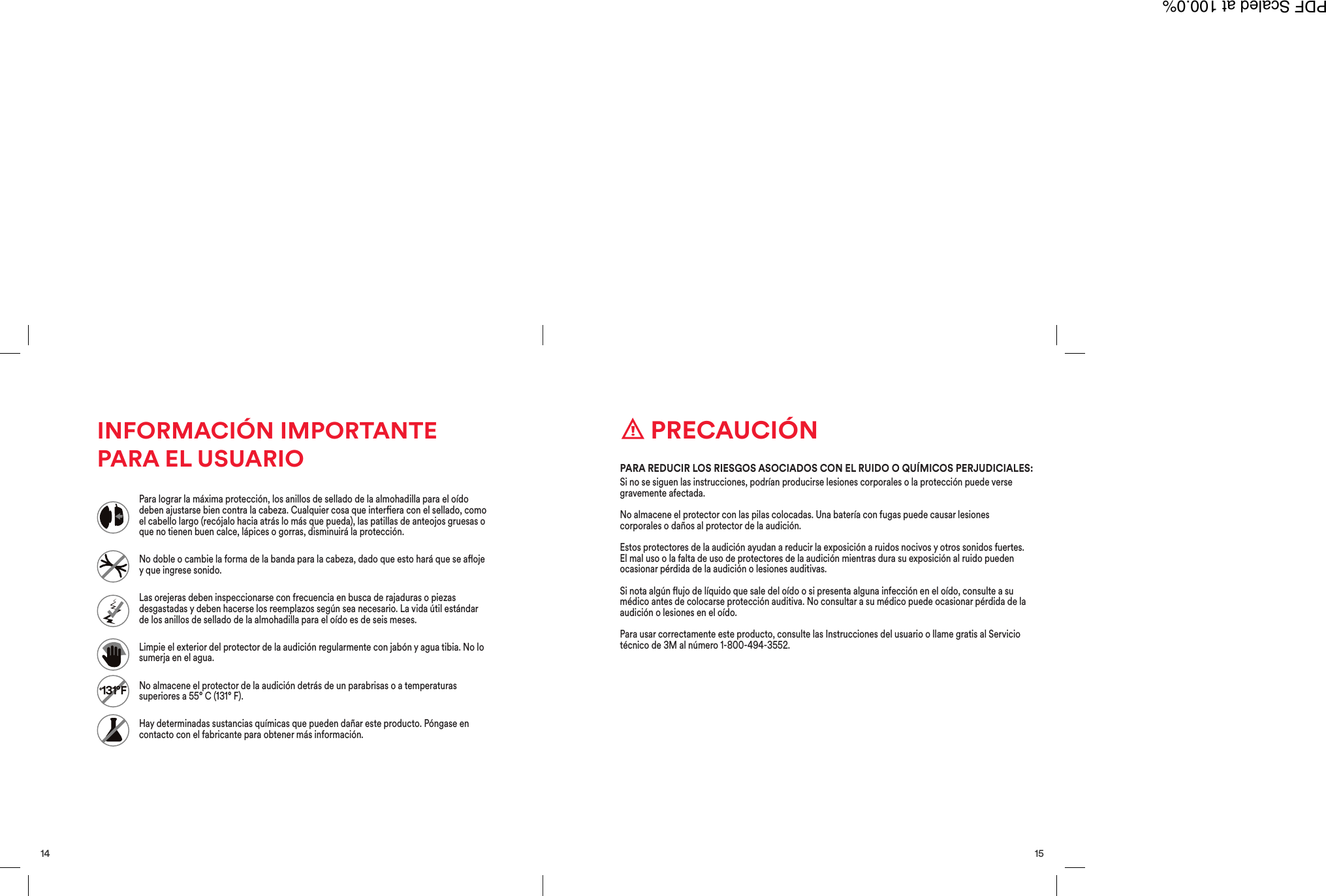
15 PRECAUCIÓNSi no se siguen las instrucciones, podrían producirse lesiones corporales o la protección puede versegravemente afectada.No almacene el protector con las pilas colocadas. Una batería con fugas puede causar lesionescorporales o daños al protector de la audición.Estos protectores de la audición ayudan a reducir la exposición a ruidos nocivos y otros sonidos fuertes.El mal uso o la falta de uso de protectores de la audición mientras dura su exposición al ruido puedenocasionar pérdida de la audición o lesiones auditivas.Si nota algún ujo de líquido que sale del oído o si presenta alguna infección en el oído, consulte a sumédico antes de colocarse protección auditiva. No consultar a su médico puede ocasionar pérdida de laaudición o lesiones en el oído.Para usar correctamente este producto, consulte las Instrucciones del usuario o llame gratis al Serviciotécnico de 3M al número 1-800-494-3552.PARA REDUCIR LOS RIESGOS ASOCIADOS CON EL RUIDO O QUÍMICOS PERJUDICIALES:14INFORMACIÓN IMPORTANTEPARA EL USUARIO+131°FPara lograr la máxima protección, los anillos de sellado de la almohadilla para el oídodeben ajustarse bien contra la cabeza. Cualquier cosa que interera con el sellado, comoel cabello largo (recójalo hacia atrás lo más que pueda), las patillas de anteojos gruesas oque no tienen buen calce, lápices o gorras, disminuirá la protección.No doble o cambie la forma de la banda para la cabeza, dado que esto hará que se aojey que ingrese sonido.Las orejeras deben inspeccionarse con frecuencia en busca de rajaduras o piezasdesgastadas y deben hacerse los reemplazos según sea necesario. La vida útil estándarde los anillos de sellado de la almohadilla para el oído es de seis meses.Limpie el exterior del protector de la audición regularmente con jabón y agua tibia. No losumerja en el agua.No almacene el protector de la audición detrás de un parabrisas o a temperaturassuperiores a 55° C (131° F).Hay determinadas sustancias químicas que pueden dañar este producto. Póngase encontacto con el fabricante para obtener más información.PDF Scaled at 100.0%
13Consulte la función Ecualizador en la página 7Frec. Frec.presionarpresionarpresionar ymantenerpresionar ymantenerpresionar ymantenerpresionar ymantenerpresionarpresionarpresionarpresionarpresionardeslizarpresionardeslizarpresionar presionardeslizar deslizardeslizarmantenerpresionado2 segundospresionar presionarDesactivado en ModoRecuperar de memoria Desactivado en ModoRecuperar de memoriaMODOAM MODOFM MODOBT MODOAUXSintonizar Sintonizar ADLT/ATRS ADLT/ATRSRecuperarde memoriaRecuperarde memoriaBorrarestaciónBorrarestaciónGuardarestaciónGuardarestaciónBuscar Buscar Pausar/Reprod. Pausar/Reprod.EmparejarGuía de inicio rápido 12twistmantener 2 s + o –ENCENDIDO/APAGADOPDF Scaled at 100.0%
11Cablede audioestéreode 4polosModo de entrada de audioConecte el dispositivopara activar automáticamenteel Modo de entradaEl modo de entrada de audio le permite conectardirectamente las orejeras a cualquier dispositivo.Nota: También puede usar el botón source (alimentación) para activar elmodo de entrada.01 Conectar dispositivoConecte el dispositivo únicamente con elcable de audio estéreo de 4 polos que seincluye. Encienda el auricular. Use el auricularpara controlar el volumen del ambiente. Use eldispositivo para controlar la entrada.02 Adlt/Atrs o Pausar/ReprodGire la perilla de sintonización paradeslizarse hacia adelante o atrás. Presioneel botón de la perilla de sintonización parapausar/reprod.020110Modo Bluetooth®Presione el botón source(alimentación)para activar el modoBluetooth®.El modo Bluetooth®le permite conectar lasorejeras con su dispositivo Bluetooth®.01 Emparejar dispositivoPresione y mantenga presionado el botón Func.(Función) durante 2 segundos para ingresar alModo emparejar con Bluetooth®. En su dispositivo,conéctese con “Worktunes inalámbrico” medianteBluetooth. Escuchará “Bluetooth conectado” cuandosu dispositivo se haya emparejado exitosamente.02 Adlt/Atrs o Pausar/Reprod.Gire la perilla de sintonización paradeslizarse hacia adelante o atrás.Presione hacia adentro la perilla desintonización para pausar/reprod.01 02PDF Scaled at 100.0%
9La Radio AM/FM le permite escanear todas las frecuenciasde radio, guardar sus estaciones favoritas y recuperar dememoria sus estaciones guardadas.04 Seleccionar modoPresione el botón Func.(Función) para seleccionar elModo recuperar de memoria.Este modo le permitirá escaneartodas sus estaciones guardadas.05 Recuperar dememoria las estacionesGire la perilla desintonización en sentidohorario para escanear susestaciones guardadas.06 Borrar estacionesPresione y mantengapresionado el botónFunc. (Función) durante2segundos para borraruna estación guardada.04 05 068Modo AM/FMPresione el botón source(alimentación)para activar laRadioAM/FM.01 Seleccionar modoPresione el botón Func. (Función)para seleccionar el Modo defrecuencia. Este modo le permitiráescanear todas las estaciones.02 Sintonizar o buscarGire la perilla de sintonización ensentido horario para deslizarse portodas las estaciones. Presione haciaadentro la perilla de sintonizaciónpara buscar estaciones.03 Guardar estacionesPresione y mantengapresionado el botónFunc. (Función) durante2 segundos para guardaruna estación.01 02 03PDF Scaled at 100.0%
La tecnología de control de volumen seguro le permiteaumentar el volumen de la música a la vez que protege suaudición, dado que controla los niveles de sonido duranteuna jornada laboral de 8 horas. Se permite la exposición aun sonido más alto durante un tiempo, y luego se lo reducegradualmente, si es necesario, por debajo del promedio delargo plazo de los 82 dB(A) para un uso extendido.Presione el botón source(alimentación) y manténgalopresionado. El dispositivo alternaráentres los tres modos de ecualizador(Pop, Rock y Flat [Fijo]); cuandollegue al modo deseado, deje depresionar el botón.CONTROL DE VOLUMEN SEGURO: ECUALIZADOR DE MÚSICA:Descargue el Manual del usuario del Protector auditivo inalámbrico WorkTunes™ en línea en 3MSafety.com.82 dB(A)7 6Operación básicaEl auricular emitirá una advertencia“battery low” (batería baja) a cada minutocuando el voltaje de la batería sea bajo.Se emitirán otras advertencias a medidaque el protector de la audición se vayaapagando. Cambie las pilas en este punto.Luego de 2 horas de inactividad, comenzará una cuentaregresiva de 10 segundos antes de que el protector dela audición se apague automáticamente. Para reiniciarel apagado automático, simplemente ajuste la perilla delvolumen.Luego del apagado automático, gire la perilla deEncendido/Apagado/Volumen a la posición “o” (apagado)durante 2 segundos y luego regrésela a “on” (encendido).ADVERTENCIA DE BATERÍA BAJA: APAGADO AUTOMÁTICO:BATERÍABAJAAPAGADOAUTOMÁTICO EN2 HORASPDF Scaled at 100.0%
5Extienda por completo lascorrederas y coloque las orejerassobre los oídos. Luego, ajuste labanda para la cabeza usando lascorrederas.Para mayor comodidad, inserte laalmohadillas en los oricios de la bandapara la cabeza por debajo con el acolchadotexturado hacia abajo. Para quitar elacolchado, solo mantenga presionada labanda para la cabeza y presione hacia abajosobre acolchado de banda para la cabeza.COLOCACIÓN DEL AURICULAR: ACOLCHADO DE BANDA PARA LA CABEZA:4Operación básicaInstale dos pilas AA de 1,5 V como semuestra. Cierre la tapa de las pilashasta que haga clic.Presione y mantenga presionado elbotón de Encendido/Apagado/Volumendurante 2 segundos para encender elauricular. Gire la perilla de Encendido/Apagado/Volumen en sentido horariopara controlar el volumen.INSTALACIÓN DE PILAS: ENCENDIDO YVOLUMEN:PDF Scaled at 100.0%
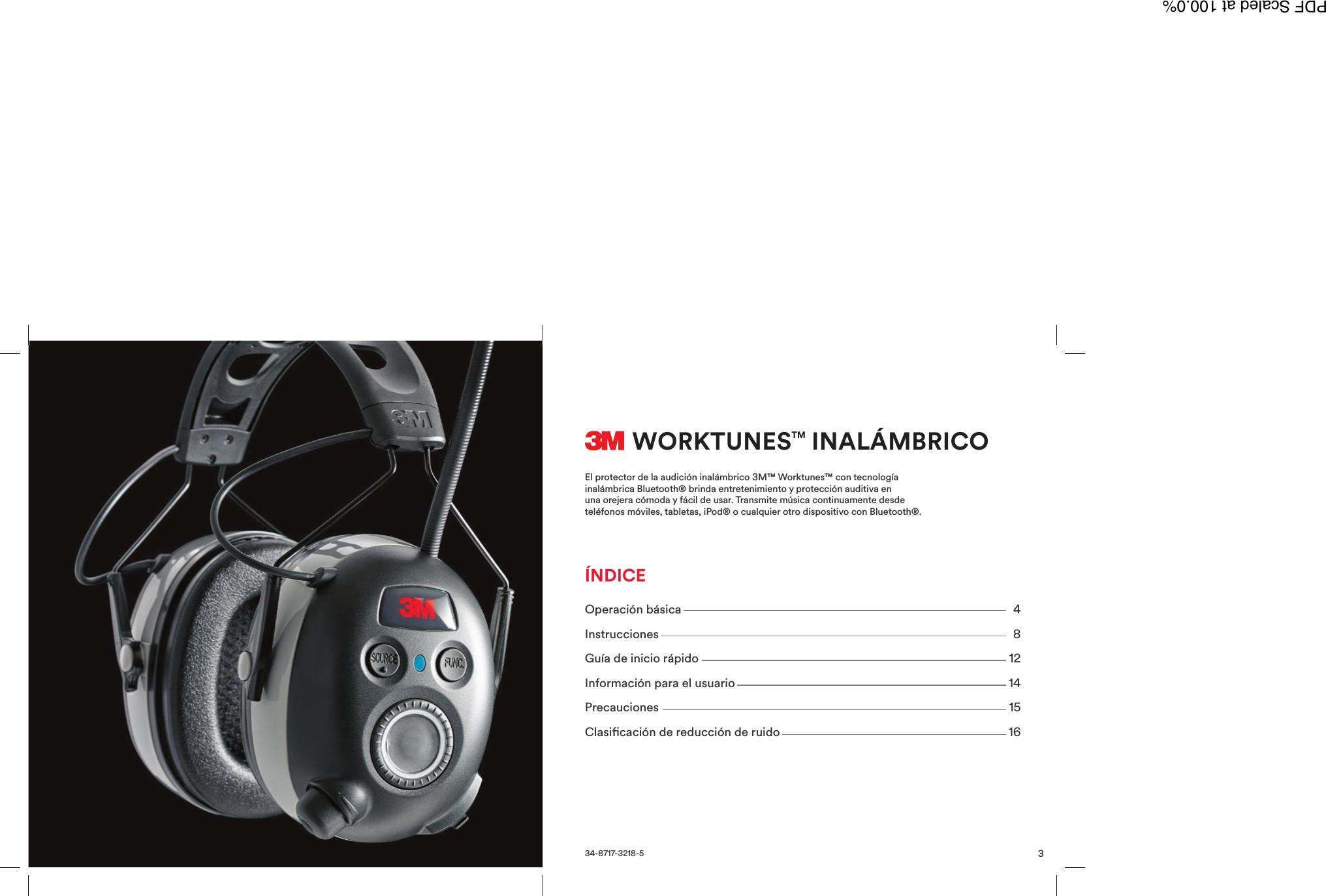
3WORKTUNESTM INALÁMBRICOEl protector de la audición inalámbrico 3M™ Worktunes™ con tecnologíainalámbrica Bluetooth® brinda entretenimiento y protección auditiva enuna orejera cómoda y fácil de usar. Transmite música continuamente desdeteléfonos móviles, tabletas, iPod® o cualquier otro dispositivo con Bluetooth®.34-8717-3218-5Operación básica 4Instrucciones 8Guía de inicio rápido 12Información para el usuario 14Precauciones 15Clasicación de reducción de ruido 16ÍNDICEPDF Scaled at 100.0%
  FCC Caution:  Any Changes or modifications not expressly approved by the party responsible for compliance could void the user's authority to operate the equipment.     This device complies with part 15 of the FCC Rules. Operation is subject to the following two conditions: (1) This device may not cause harmful interference, and (2) this device must accept any interference received, including interference that may cause undesired operation.  This equipment complies with FCC radiation exposure limits set forth for an uncontrolled environment .This transmitter must not be co-located or operating in conjunction with any other antenna or transmitter.  IC Warning This device complies with Industry Canada licence-exempt RSS standard(s). Operation is subject to the following two conditions:   (1) this device may not cause interference, and (2) this device must accept any interference, including interference that may cause undesired operation of the device. Le présent appareil est conforme aux CNR d'Industrie Canada applicables aux appareils radio exempts de licence. L'exploitation est autorisée aux deux conditions suivantes : (1) l'appareil nedoit pas produire de brouillage, et (2) l'utilisateur de l'appareil doit accepter tout brouillage radioélectrique subi, même si le brouillage est susceptible d'en compromettre le fonctionnement.   The device been tested is compliance with RF field strength limits, users can obtain Canadian information on RF exposure and compliance.Le présent appareil est conforme Après examen de ce matériel aux conformité ou aux limites d’intensité de champ RF, les utilisateurs peuvent sur l’exposition aux radiofréquences et la conformité and compliance d’acquérir  les informations correspondantes.
Important Safety Instructions To prevent possible hearing damage, do not listen at high volume levels for long periods. Please use appointed battery in case of explosion risk, please dispose of lifeless battery under guidance. Recycle your phone TheWEEElogo(shownattheleft)appearsontheproducttoindicatethatthisproductmustnotbedisposedoffordumpedwithyourotherhouseholdwastes.Youareliabletodisposeofallyourelectronicorelectricalwasteequipmentbyrelocatingovertothespecifiedcollectionpointforrecycling.ofsuchhazardouswaste.

Navigation menu