A OK Technology Grand Development AC135 Wall type emitter User Manual PowerPoint Presentation

Shenzhen A-OK Technology Grand Development Co., LTD Wall type emitter PowerPoint Presentation

User manual

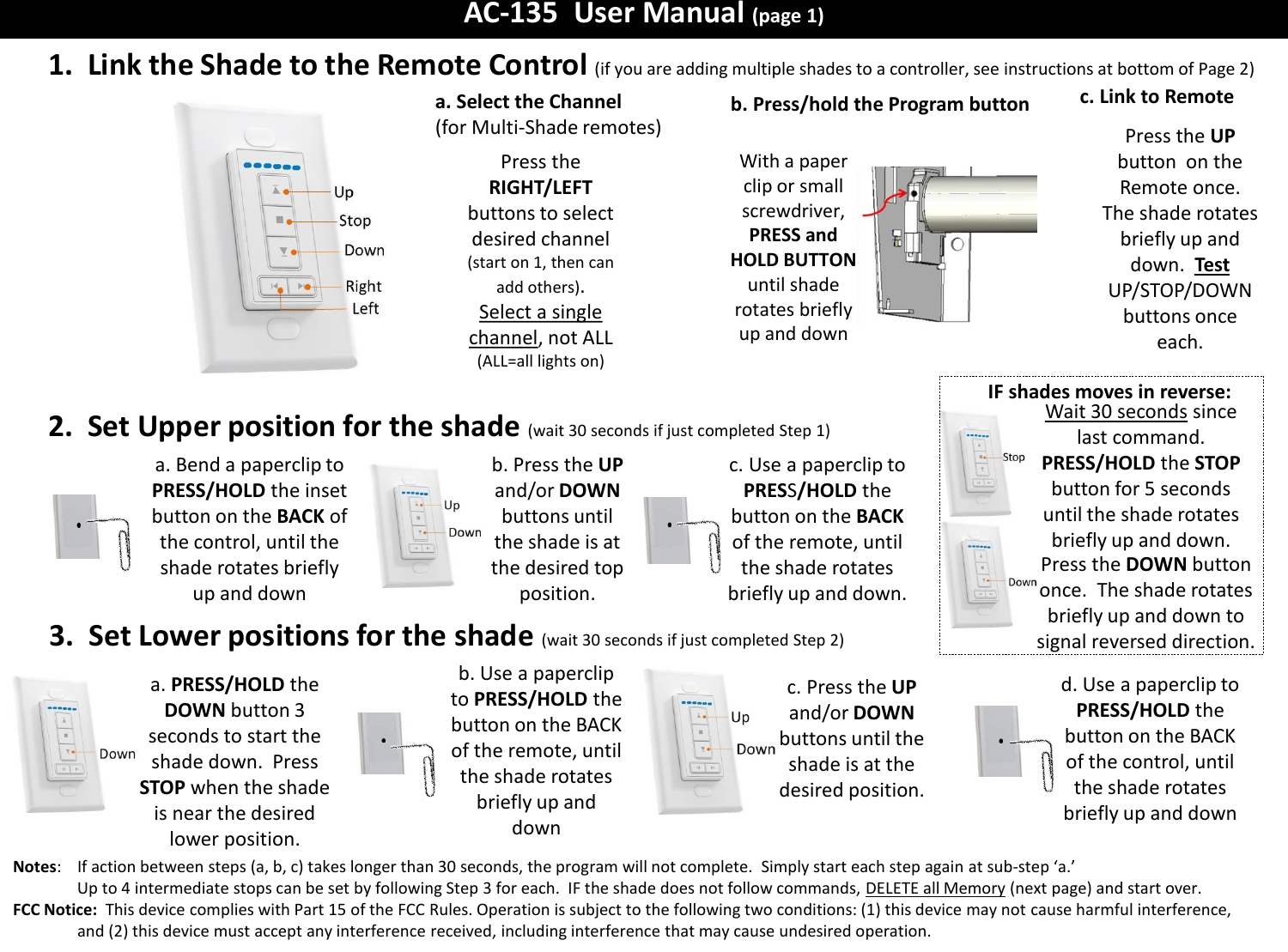
AC-135  User Manual (page 1) c. Link to Remote 1.  Link the Shade to the Remote Control (if you are adding multiple shades to a controller, see instructions at bottom of Page 2)  Press the UP button  on the Remote once.  The shade rotates briefly up and down.  Test  UP/STOP/DOWN buttons once each. 2.  Set Upper position for the shade (wait 30 seconds if just completed Step 1) b. Press/hold the Program button With a paper clip or small screwdriver, PRESS and HOLD BUTTON until shade rotates briefly up and down a. Bend a paperclip to PRESS/HOLD the inset button on the BACK of the control, until the shade rotates briefly up and down 3.  Set Lower positions for the shade  (wait 30 seconds if just completed Step 2) b. Use a paperclip to PRESS/HOLD the button on the BACK of the remote, until the shade rotates briefly up and down c. Press the UP and/or DOWN buttons until the shade is at the desired position. d. Use a paperclip to PRESS/HOLD the button on the BACK of the control, until the shade rotates briefly up and down a. PRESS/HOLD the DOWN button 3 seconds to start the shade down.  Press STOP when the shade is near the desired lower position. Notes:    If action between steps (a, b, c) takes longer than 30 seconds, the program will not complete.  Simply start each step again at sub-step ‘a.’   Up to 4 intermediate stops can be set by following Step 3 for each.  IF the shade does not follow commands, DELETE all Memory (next page) and start over. FCC Notice:  This device complies with Part 15 of the FCC Rules. Operation is subject to the following two conditions: (1) this device may not cause harmful interference, and (2) this device must accept any interference received, including interference that may cause undesired operation.    a. Select the Channel (for Multi-Shade remotes) Press the RIGHT/LEFT buttons to select desired channel (start on 1, then can add others).  Select a single channel, not ALL (ALL=all lights on) IF shades moves in reverse: Wait 30 seconds since last command.  PRESS/HOLD the STOP button for 5 seconds until the shade rotates briefly up and down. Press the DOWN button once.  The shade rotates briefly up and down to signal reversed direction. b. Press the UP and/or DOWN buttons until the shade is at the desired top position. c. Use a paperclip to PRESS/HOLD the button on the BACK of the remote, until the shade rotates briefly up and down.
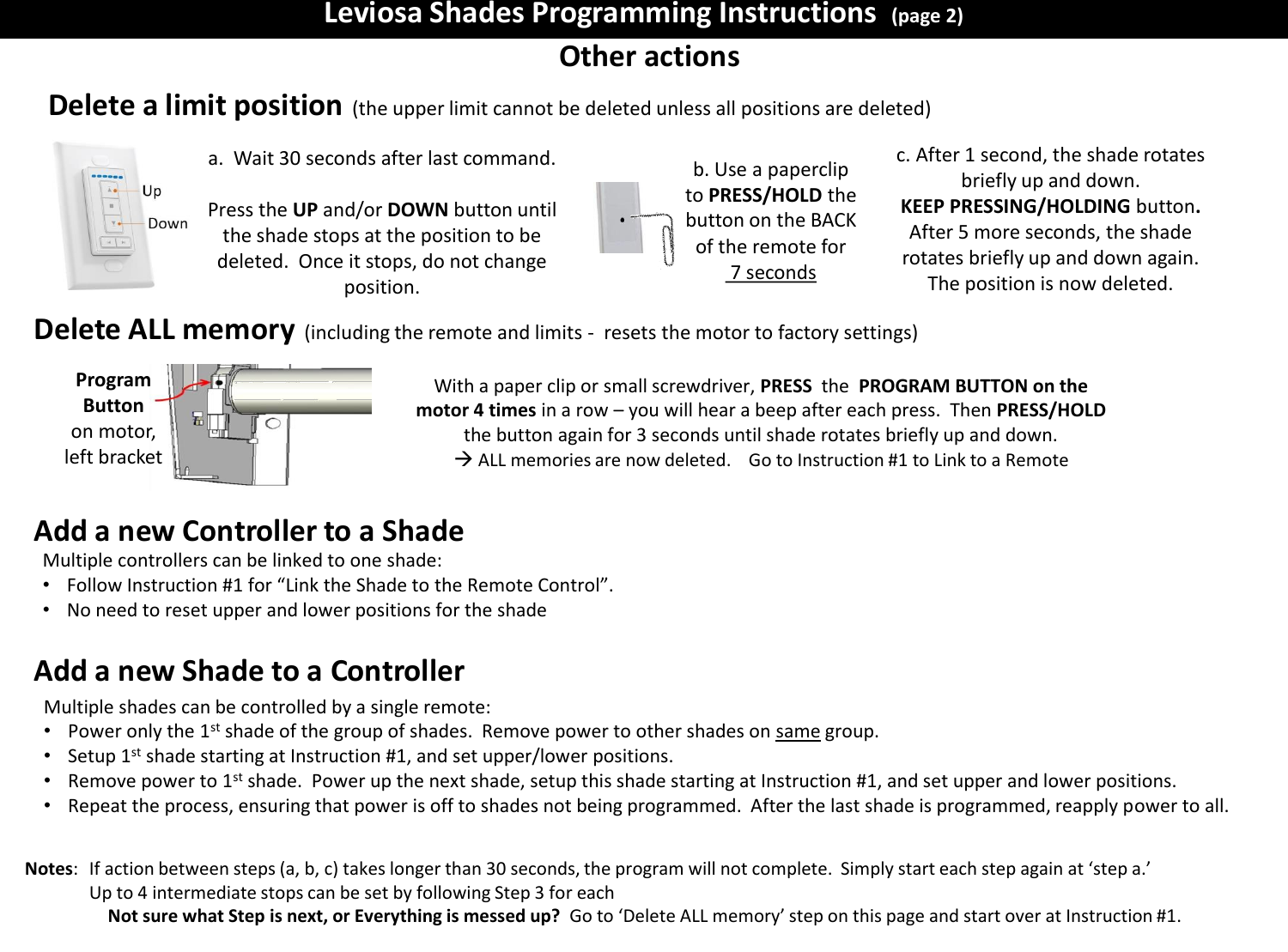
Leviosa Shades Programming Instructions  (page 2) Other actions Delete a limit position (the upper limit cannot be deleted unless all positions are deleted) Notes:   If action between steps (a, b, c) takes longer than 30 seconds, the program will not complete.  Simply start each step again at ‘step a.’   Up to 4 intermediate stops can be set by following Step 3 for each Not sure what Step is next, or Everything is messed up?  Go to ‘Delete ALL memory’ step on this page and start over at Instruction #1. a.  Wait 30 seconds after last command.  Press the UP and/or DOWN button until the shade stops at the position to be deleted.  Once it stops, do not change position. b. Use a paperclip to PRESS/HOLD the button on the BACK of the remote for  7 seconds c. After 1 second, the shade rotates briefly up and down. KEEP PRESSING/HOLDING button. After 5 more seconds, the shade rotates briefly up and down again. The position is now deleted. Delete ALL memory (including the remote and limits -  resets the motor to factory settings) Add a new Controller to a Shade With a paper clip or small screwdriver, PRESS  the  PROGRAM BUTTON on the motor 4 times in a row – you will hear a beep after each press.  Then PRESS/HOLD the button again for 3 seconds until shade rotates briefly up and down.  ALL memories are now deleted.    Go to Instruction #1 to Link to a Remote Program Button  on motor, left bracket Multiple controllers can be linked to one shade: •Follow Instruction #1 for “Link the Shade to the Remote Control”. •No need to reset upper and lower positions for the shade  Multiple shades can be controlled by a single remote: •Power only the 1st shade of the group of shades.  Remove power to other shades on same group. •Setup 1st shade starting at Instruction #1, and set upper/lower positions. •Remove power to 1st shade.  Power up the next shade, setup this shade starting at Instruction #1, and set upper and lower positions. •Repeat the process, ensuring that power is off to shades not being programmed.  After the last shade is programmed, reapply power to all. Add a new Shade to a Controller
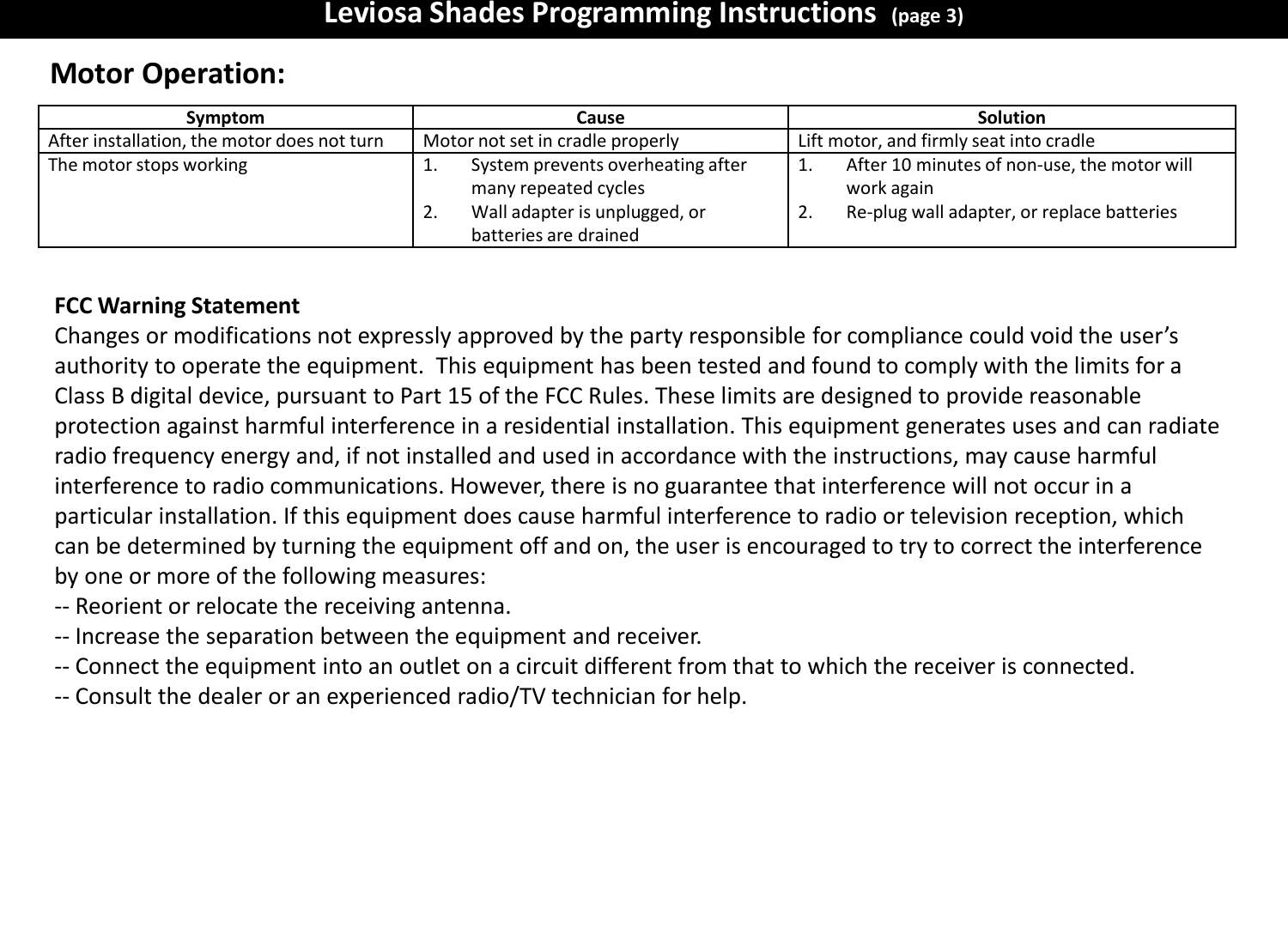
Leviosa Shades Programming Instructions  (page 3) FCC Warning Statement Changes or modifications not expressly approved by the party responsible for compliance could void the user’s authority to operate the equipment.  This equipment has been tested and found to comply with the limits for a Class B digital device, pursuant to Part 15 of the FCC Rules. These limits are designed to provide reasonable protection against harmful interference in a residential installation. This equipment generates uses and can radiate radio frequency energy and, if not installed and used in accordance with the instructions, may cause harmful interference to radio communications. However, there is no guarantee that interference will not occur in a particular installation. If this equipment does cause harmful interference to radio or television reception, which can be determined by turning the equipment off and on, the user is encouraged to try to correct the interference by one or more of the following measures: ‐‐ Reorient or relocate the receiving antenna. ‐‐ Increase the separation between the equipment and receiver. ‐‐ Connect the equipment into an outlet on a circuit different from that to which the receiver is connected. ‐‐ Consult the dealer or an experienced radio/TV technician for help. Symptom  Cause  Solution After installation, the motor does not turn Motor not set in cradle properly Lift motor, and firmly seat into cradle The motor stops working 1.System prevents overheating after many repeated cycles 2.Wall adapter is unplugged, or batteries are drained 1.After 10 minutes of non-use, the motor will work again 2.Re-plug wall adapter, or replace batteries Motor Operation:

Navigation menu