AB CA Ostberg 4020527 Antenna for Heatrecovery units User Manual 1270316 utg1 heru ul qxp

AB CA Ostberg Antenna for Heatrecovery units 1270316 utg1 heru ul qxp

User Manual

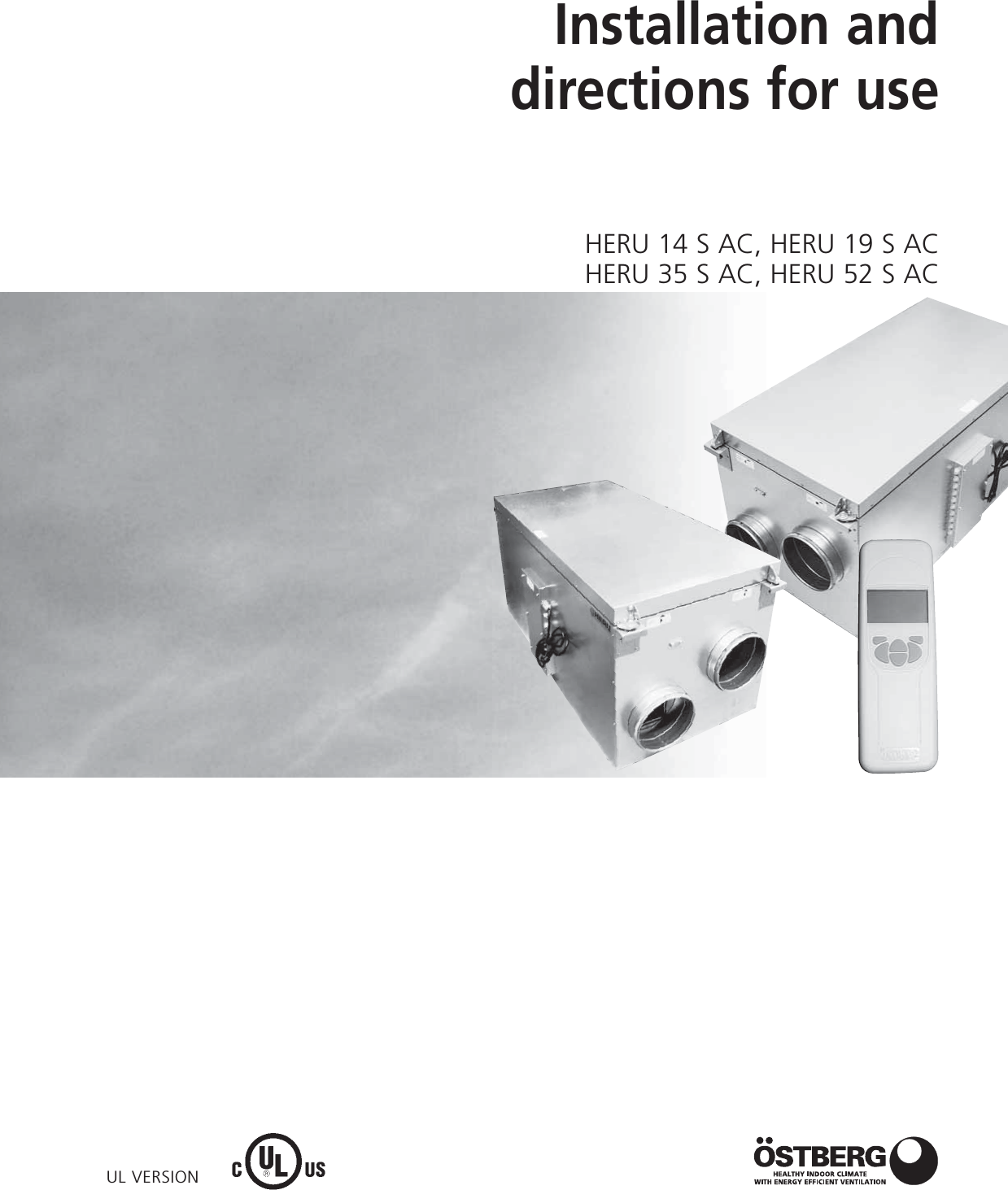
UL VERSIONInstallation anddirections for useHERU 14 S AC, HERU 19 S ACHERU 35 S AC, HERU 52 S AC
UNIT DESCRIPTION . . . . . . . . . . . . . . . . . . . . . . . .3INSTALLATION AND SECURITY  . . . . . . . . . . . . . .4”USE” ”SECURITY” ”MOUNTING””WARRANTY”  . . . . . .4”PLACING” ”FREE SPACE” ”SCHEMATIC DIAGRAM FOR PLACING”  . . . . . . . . . . . . .5STARTING UP THE UNIT  . . . . . . . . . . . . . . . . . . . .6CONTROL DIAGRAMS  . . . . . . . . . . . . . . . . . . . . .7REGULATION FUNCTIONS  . . . . . . . . . . . . . . . . . .8OPERATING THE CONTROL UNIT  . . . . . . . . . . . .9VIEW MODES 1-4  . . . . . . . . . . . . . . . . . . . . . . . .10MAIN MENU  . . . . . . . . . . . . . . . . . . . . . . . . . . . .11”FAN SPEED” MENU . . . . . . . . . . . . . . . . . . . . . .11”TEMPERATURE” MENU . . . . . . . . . . . . . . . . . . .11”BOOST” MENU  . . . . . . . . . . . . . . . . . . . . . . . . .11”OVERPRESSURE” MENU . . . . . . . . . . . . . . . . . .12”WEEK TIMER” MENU  . . . . . . . . . . . . . . . . . . . .12”UNIT ON/OFF” MENU . . . . . . . . . . . . . . . . . . . .13”ALARMS” MENU . . . . . . . . . . . . . . . . . . . . . . . .13”SETTINGS” MENU  . . . . . . . . . . . . . . . . . . . . . . .14THE ”SERVICE MENU” . . . . . . . . . . . . . . . . . .14-21”FILTER MEASUREMENT” ”AC FAN SETUP” . . . . . . . . . .15”DISPLAY CONTRAST” ”BOOST” ”OVERPRESSURE”  . . .16”ALARM””CO2” . . . . . . . . . . . . . . . . . . . . . . . . . . . . . .17”RH” ”HEATER” ”COOLER”  . . . . . . . . . . . . . . . . . . . . .18”SUPPLY LIMITS” ”REGULATION MODE” ”SUMMER COOLING”  . . . . . . . . . . . . . . . . . . . . . . . . . .19”FREEZE PROTECTION”FLOW DIRECTION””LOAD/SAVE SETTINGS” ”VERSION INFO”  . . . . . . . . . . .20”DEVICE PAIRS” . . . . . . . . . . . . . . . . . . . . . . . . . . . . . . . .21OTHER FUNCTIONS  . . . . . . . . . . . . . . . . . . . . . .21SERVICE HERU S  . . . . . . . . . . . . . . . . . . . . . . .22-23ACCESSORIES  . . . . . . . . . . . . . . . . . . . . . . . . . . .24SPARE PARTS  . . . . . . . . . . . . . . . . . . . . . . . . . . .25ERROR DETECTION DIAGRAM  . . . . . . . . . . .26-27ERROR DETECTION . . . . . . . . . . . . . . . . . . . . . . .28INTERNAL SETTINGS  . . . . . . . . . . . . . . . . . . . . .29 CONTENTSDIMENSIONS  . . . . . . . . . . . . . . . . . . . . . . . . . . .30TECHNICAL  . . . . . . . . . . . . . . . . . . . . . . . . . . . . .31SOUND DATA  . . . . . . . . . . . . . . . . . . . . . . . .32-33PRESSURE-FLOW DIAGRAMS . . . . . . . . . . . .34-35WIRING DIAGRAMS  . . . . . . . . . . . . . . . . . . .36-37TECHNICAL INFORMATION
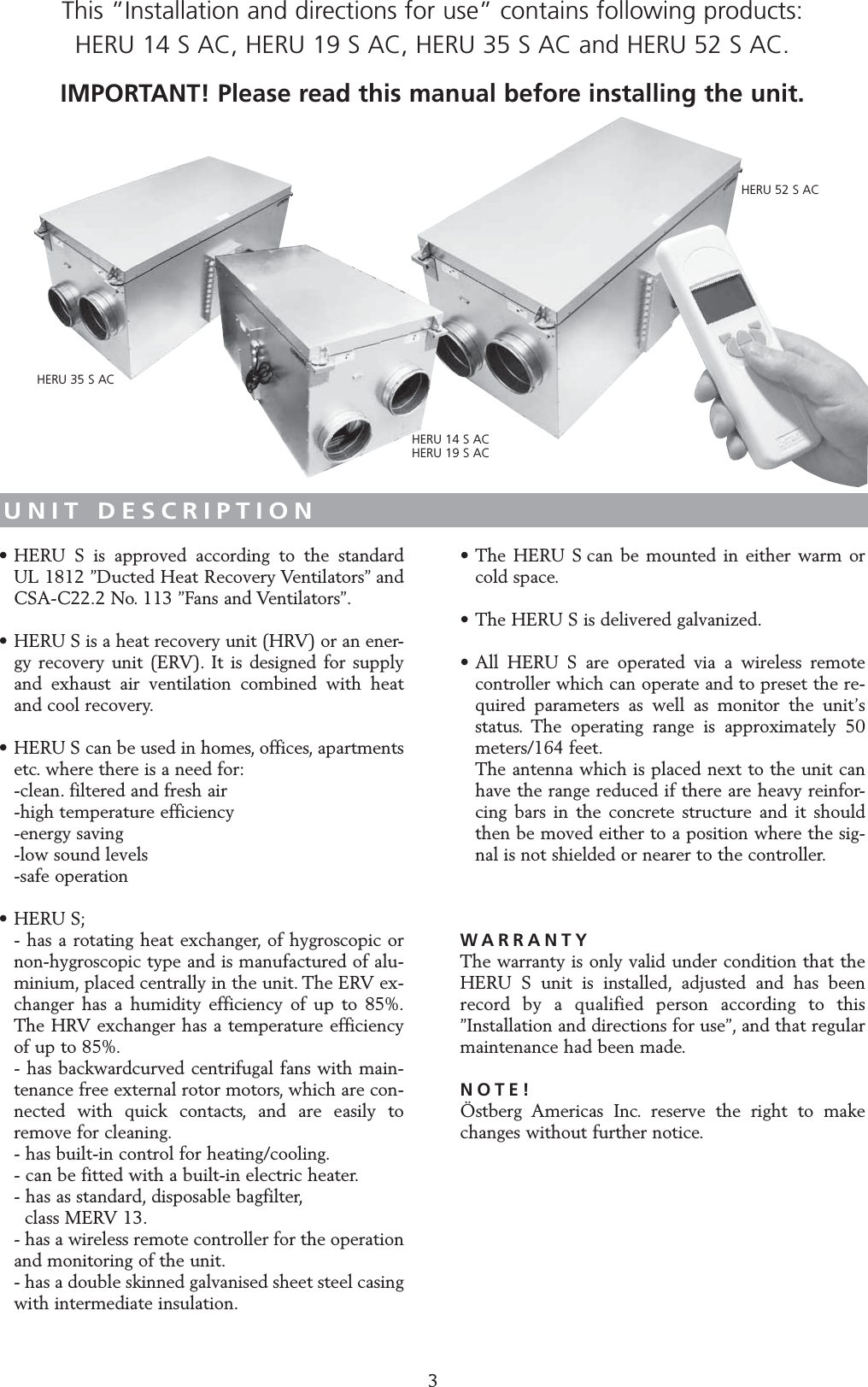
UNIT DESCRIPTION• HERU S is approved according to the standard UL 1812 ”Ducted Heat Recovery Ventilators” and CSA-C22.2 No. 113 ”Fans and Ventilators”.• HERU S is a heat recovery unit (HRV) or an ener-gy recovery unit (ERV). It is designed for supply and exhaust air ventilation combined with heat and cool recovery.• HERU S can be used in homes, offices, apartments etc. where there is a need for:-clean. filtered and fresh air -high temperature efficiency -energy saving-low sound levels-safe operation• HERU S;- has a rotating heat exchanger, of hygroscopic or non-hygroscopic type and is manufactured of alu-minium, placed centrally in the unit. The ERV ex-changer has a humidity efficiency of up to 85%.The HRV exchanger has a temperature efficiency of up to 85%.- has backwardcurved centrifugal fans with main-tenance free external rotor motors, which are con-nected with quick contacts, and are easily to remove for cleaning.- has built-in control for heating/cooling.- can be fitted with a built-in electric heater.- has as standard, disposable bagfilter,class MERV 13.- has a wireless remote controller for the operation and monitoring of the unit.- has a double skinned galvanised sheet steel casing with intermediate insulation.• The HERU S can be mounted in either warm or cold space.• The HERU S is delivered galvanized.• All HERU S are operated via a wireless remote controller which can operate and to preset the re-quired parameters as well as monitor the unit’s status. The operating range is approximately 50 meters/164 feet.The antenna which is placed next to the unit can have the range reduced if there are heavy reinfor-cing bars in the concrete structure and it should then be moved either to a position where the sig-nal is not shielded or nearer to the controller.WARRANTYThe warranty is only valid under condition that theHERU S unit is installed, adjusted and has beenrecord by a qualified person according to this”Installation and directions for use”, and that regular maintenance had been made.NOTE!Östberg Americas Inc. reserve the right to makechanges without further notice.3This ”Installation and directions for use” contains following products: HERU 14 S AC, HERU 19 S AC, HERU 35 S AC and HERU 52 S AC.IMPORTANT! Please read this manual before installing the unit.HERU 14 S ACHERU 19 S ACHERU 35 S ACHERU 52 S AC
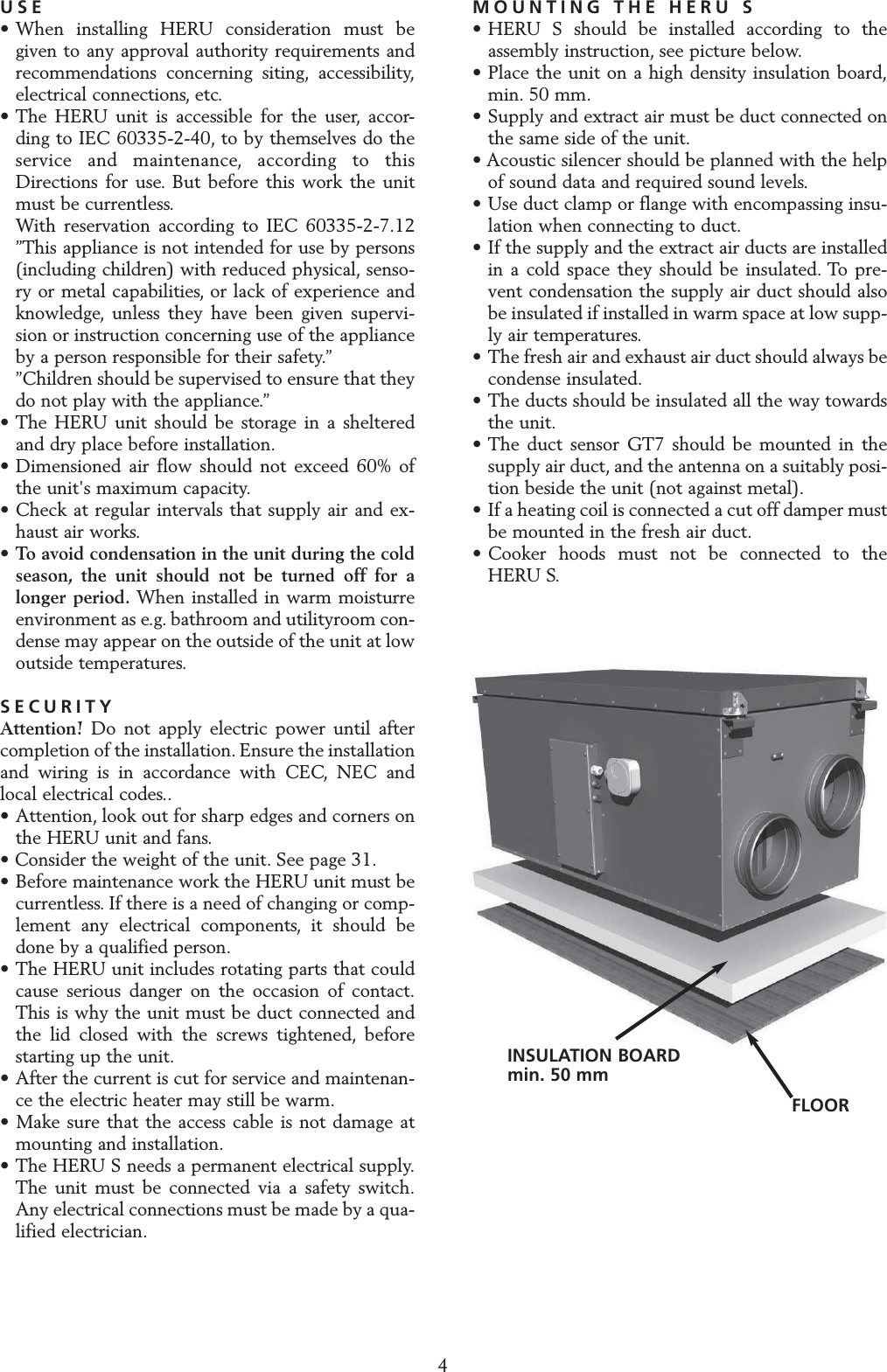
INSTALLATION AND SECURITYUSE• When installing HERU consideration must be given to any approval authority requirements and recommendations concerning siting, accessibility,electrical connections, etc.• The HERU unit is accessible for the user, accor-ding to IEC 60335-2-40, to by themselves do the service and maintenance, according to this Directions for use. But before this work the unit must be currentless.With reservation according to IEC 60335-2-7.12 ”This appliance is not intended for use by persons (including children) with reduced physical, senso-ry or metal capabilities, or lack of experience and knowledge, unless they have been given supervi-sion or instruction concerning use of the appliance by a person responsible for their safety.””Children should be supervised to ensure that they do not play with the appliance.”• The HERU unit should be storage in a sheltered and dry place before installation.• Dimensioned air flow should not exceed 60% of the unit's maximum capacity.• Check at regular intervals that supply air and ex-haust air works.•To avoid condensation in the unit during the cold season, the unit should not be turned off for a longer period. When installed in warm moisturre environment as e.g. bathroom and utilityroom con-dense may appear on the outside of the unit at low outside temperatures.SECURITYAttention! Do not apply electric power until aftercompletion of the installation. Ensure the installationand wiring is in accordance with CEC, NEC andlocal electrical codes..• Attention, look out for sharp edges and corners on the HERU unit and fans.• Consider the weight of the unit. See page 31.• Before maintenance work the HERU unit must be currentless. If there is a need of changing or comp-lement any electrical components, it should be done by a qualified person.• The HERU unit includes rotating parts that could cause serious danger on the occasion of contact.This is why the unit must be duct connected and the lid closed with the screws tightened, before starting up the unit.• After the current is cut for service and maintenan-ce the electric heater may still be warm.• Make sure that the access cable is not damage at mounting and installation.• The HERU S needs a permanent electrical supply.The unit must be connected via a safety switch.Any electrical connections must be made by a qua-lified electrician.MOUNTING THE HERU S• HERU S should be installed according to the assembly instruction, see picture below.• Place the unit on a high density insulation board,min. 50 mm.• Supply and extract air must be duct connected on the same side of the unit.• Acoustic silencer should be planned with the helpof sound data and required sound levels.• Use duct clamp or flange with encompassing insu-lation when connecting to duct.• If the supply and the extract air ducts are installed in a cold space they should be insulated. To pre-vent condensation the supply air duct should also be insulated if installed in warm space at low supp-ly air temperatures.• The fresh air and exhaust air duct should always be condense insulated.• The ducts should be insulated all the way towards the unit.• The duct sensor GT7 should be mounted in the supply air duct, and the antenna on a suitably posi-tion beside the unit (not against metal).• If a heating coil is connected a cut off damper must be mounted in the fresh air duct.• Cooker hoods must not be connected to theHERU S.4INSULATION BOARDmin. 50 mmFLOOR
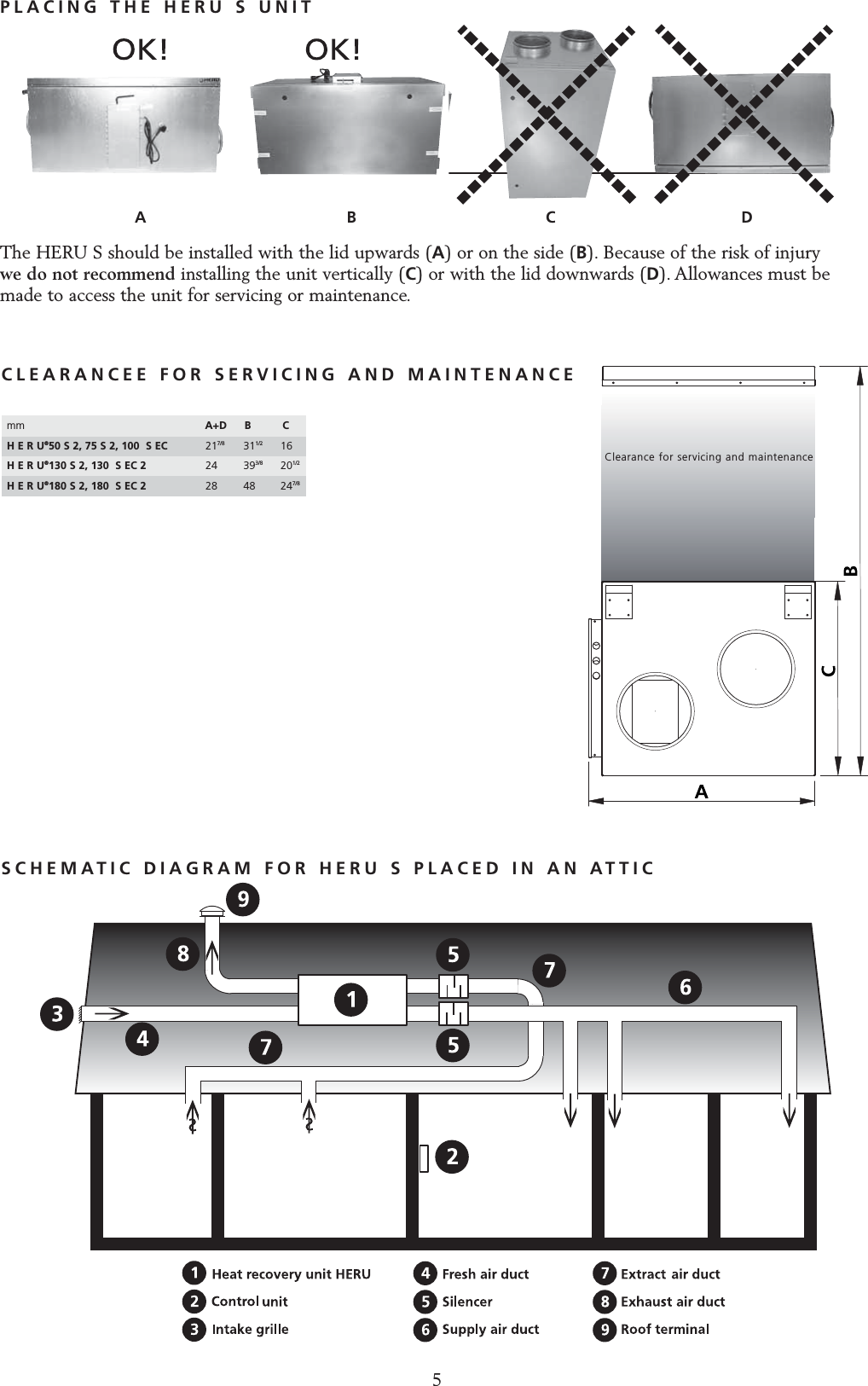
PLACING THE HERU S UNITThe HERU S should be installed with the lid upwards (A) or on the side (B). Because of the risk of injury we do not recommend installing the unit vertically (C) or with the lid downwards (D). Allowances must bemade to access the unit for servicing or maintenance.A                                         B C                                      Dmm  A+D B  CH E R U®50 S 2, 75 S 2, 100  S EC  217/8 311/2 16H E R U®130 S 2, 130  S EC 2  24 393/8 201/2H E R U®180 S 2, 180  S EC 2  28 48 247/8Clearance for servicing and maintenanceCLEARANCEE FOR SERVICING AND MAINTENANCE5SCHEMATIC DIAGRAM FOR HERU S PLACED IN AN ATTIC
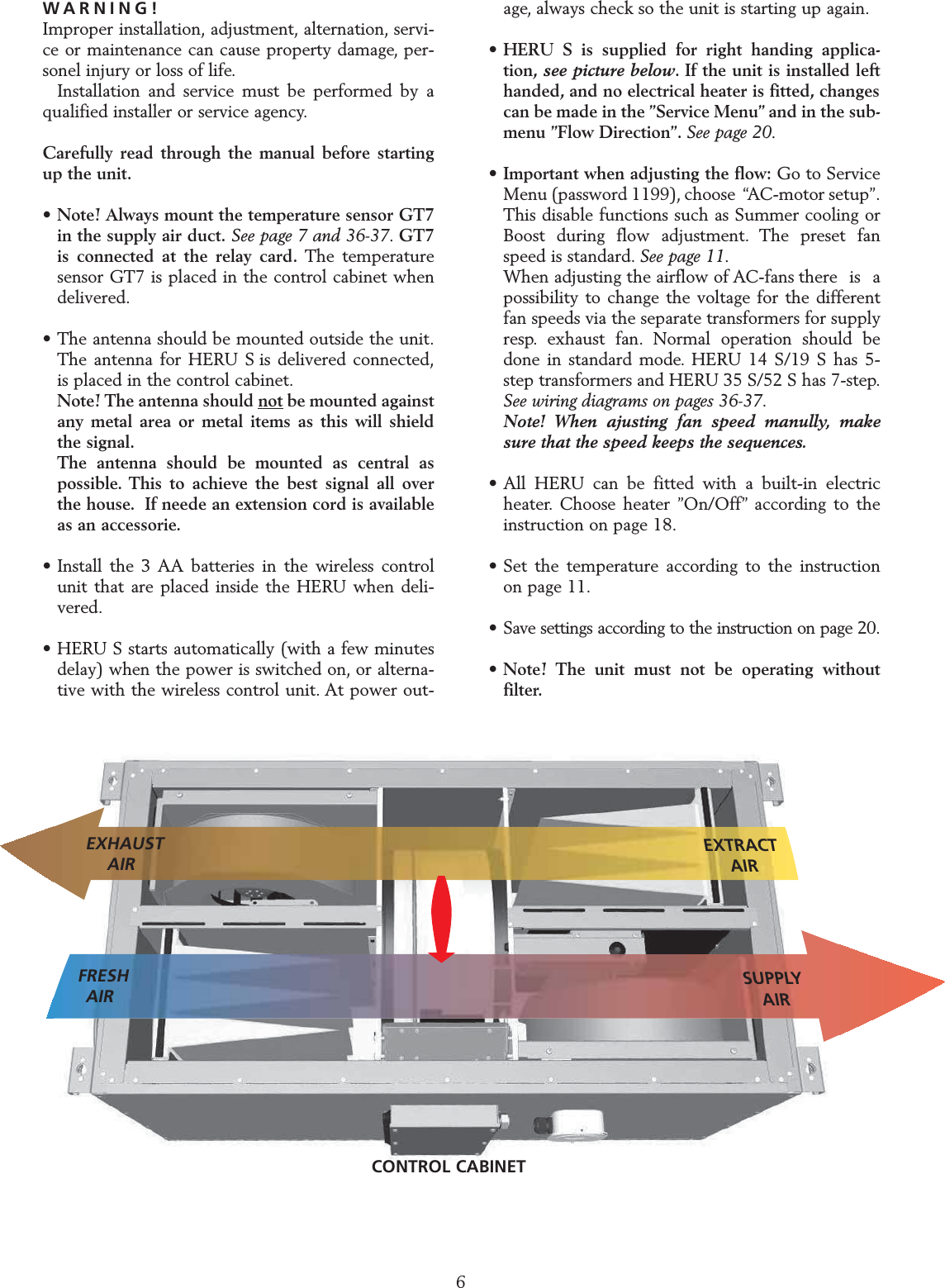
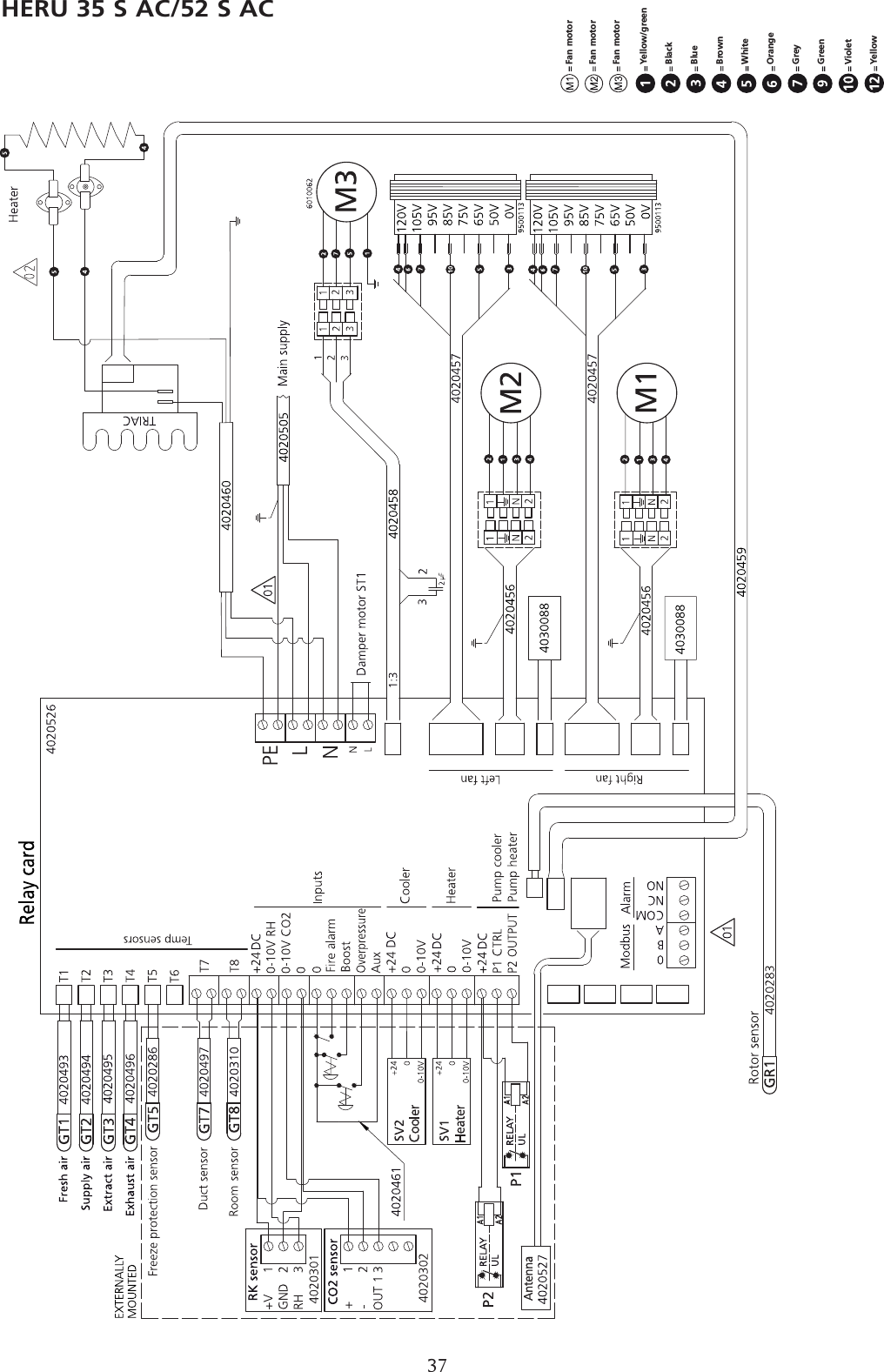
WARNING!Improper installation, adjustment, alternation, servi-ce or maintenance can cause property damage, per-sonel injury or loss of life.Installation and service must be performed by aqualified installer or service agency.Carefully read through the manual before startingup the unit.• Note! Always mount the temperature sensor GT7 in the supply air duct. See page 7 and 36-37. GT7 is connected at the relay card. The temperature sensor GT7 is placed in the control cabinet when delivered.• The antenna should be mounted outside the unit.The antenna for HERU S is delivered connected,is placed in the control cabinet.Note! The antenna should not be mounted against any metal area or metal items as this will shield the signal.The antenna should be mounted as central as possible. This to achieve the best signal all over the house. If neede an extension cord is available as an accessorie.• Install the 3 AA batteries in the wireless control unit that are placed inside the HERU when deli-vered.• HERU S starts automatically (with a few minutes delay) when the power is switched on, or alterna-tive with the wireless control unit. At power out-age, always check so the unit is starting up again.•HERU S is supplied for right handing applica-tion, see picture below. If the unit is installed left handed, and no electrical heater is fitted, changes can be made in the ”Service Menu” and in the sub-menu ”Flow Direction”. See page 20.• Important when adjusting the flow: Go to Service Menu (password 1199), choose  “AC-motor setup”.This disable functions such as Summer cooling or Boost during flow adjustment. The preset fan speed is standard. See page 11.When adjusting the airflow of AC-fans there  is  a possibility to change the voltage for the different fan speeds via the separate transformers for supply resp. exhaust fan. Normal operation should be done in standard mode. HERU 14 S/19 S has 5-step transformers and HERU 35 S/52 S has 7-step.See wiring diagrams on pages 36-37.Note! When ajusting fan speed manully, make sure that the speed keeps the sequences.• All HERU can be fitted with a built-in electric heater. Choose heater ”On/Off” according to the instruction on page 18.• Set the temperature according to the instruction on page 11.• Save settings according to the instruction on page 20.•Note! The unit must not be operating without filter.STARTING UP THE UNITNote! Important information before starting!6SUPPLYAIRFRESHAIREXHAUSTAIREXTRACTAIRCONTROL CABINET
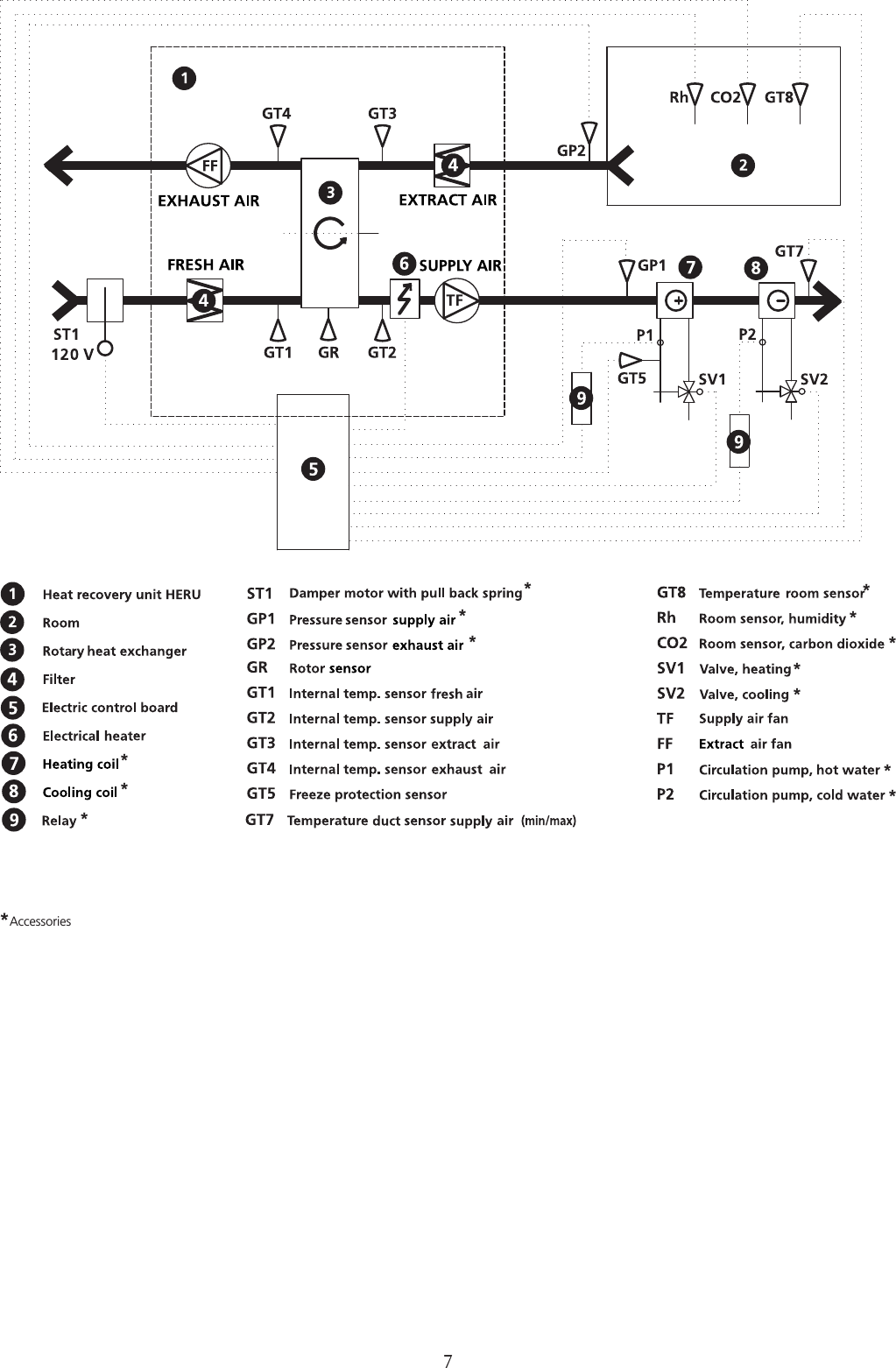
CONTROL DIAGRAM HERU®S shows all sensors, flow direction right7**************Accessories
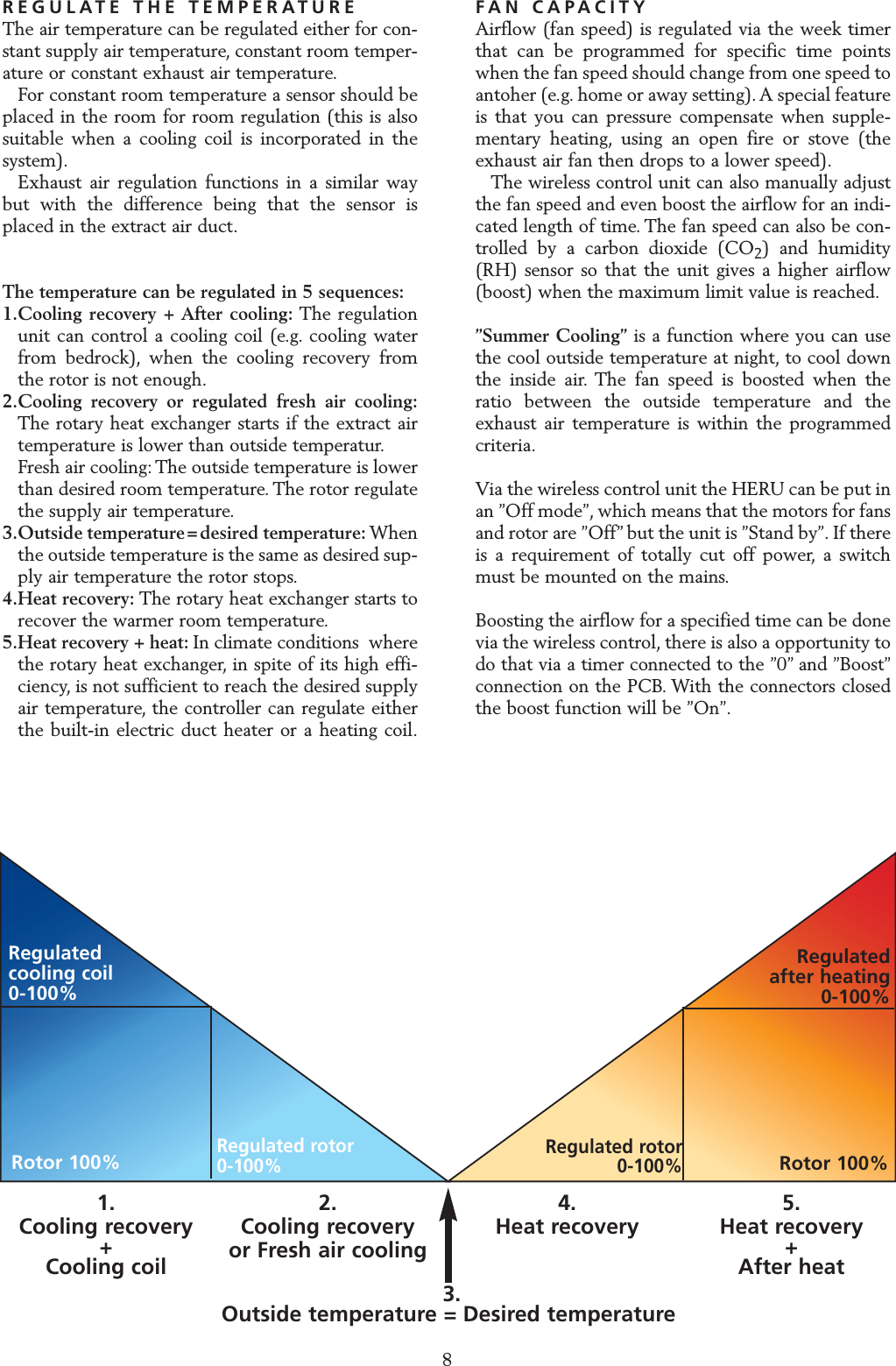
REGULATE THE TEMPERATUREThe air temperature can be regulated either for con-stant supply air temperature, constant room temper-ature or constant exhaust air temperature.For constant room temperature a sensor should beplaced in the room for room regulation (this is alsosuitable when a cooling coil is incorporated in thesystem).Exhaust air regulation functions in a similar waybut with the difference being that the sensor isplaced in the extract air duct.The temperature can be regulated in 5 sequences:1.Cooling recovery + After cooling: The regulation unit can control a cooling coil (e.g. cooling water from bedrock), when the cooling recovery from the rotor is not enough.2.Cooling recovery or regulated fresh air cooling:The rotary heat exchanger starts if the extract air temperature is lower than outside temperatur.Fresh air cooling: The outside temperature is lower than desired room temperature. The rotor regulate the supply air temperature.3.Outside temperature = desired temperature: When the outside temperature is the same as desired sup-ply air temperature the rotor stops.4.Heat recovery: The rotary heat exchanger starts to recover the warmer room temperature.5.Heat recovery + heat: In climate conditions  where the rotary heat exchanger, in spite of its high effi-ciency, is not sufficient to reach the desired supply air temperature, the controller can regulate either the built-in electric duct heater or a heating coil.FAN CAPACITYAirflow (fan speed) is regulated via the week timerthat can be programmed for specific time pointswhen the fan speed should change from one speed toantoher (e.g. home or away setting).A special featureis that you can pressure compensate when supple-mentary heating, using an open fire or stove (theexhaust air fan then drops to a lower speed).The wireless control unit can also manually adjustthe fan speed and even boost the airflow for an indi-cated length of time. The fan speed can also be con-trolled by a carbon dioxide (CO2) and humidity(RH) sensor so that the unit gives a higher airflow(boost) when the maximum limit value is reached.”Summer Cooling” is a function where you can usethe cool outside temperature at night, to cool downthe inside air. The fan speed is boosted when theratio between the outside temperature and theexhaust air temperature is within the programmedcriteria.Via the wireless control unit the HERU can be put inan ”Off mode”, which means that the motors for fansand rotor are ”Off” but the unit is ”Stand by”. If thereis a requirement of totally cut off power, a switchmust be mounted on the mains.Boosting the airflow for a specified time can be donevia the wireless control, there is also a opportunity todo that via a timer connected to the ”0” and ”Boost”connection on the PCB. With the connectors closedthe boost function will be ”On”.REGULATION FUNCTIONS3. Outside temperature = Desired temperature1. Cooling recovery +Cooling coil2. Cooling recoveryor Fresh air cooling 4. Heat recovery  5. Heat recovery +After heatRegulatedcooling coil0-100%Regulatedafter heating 0-100%Rotor 100%Regulated rotor 0-100%Rotor 100%Regulated rotor 0-100%8
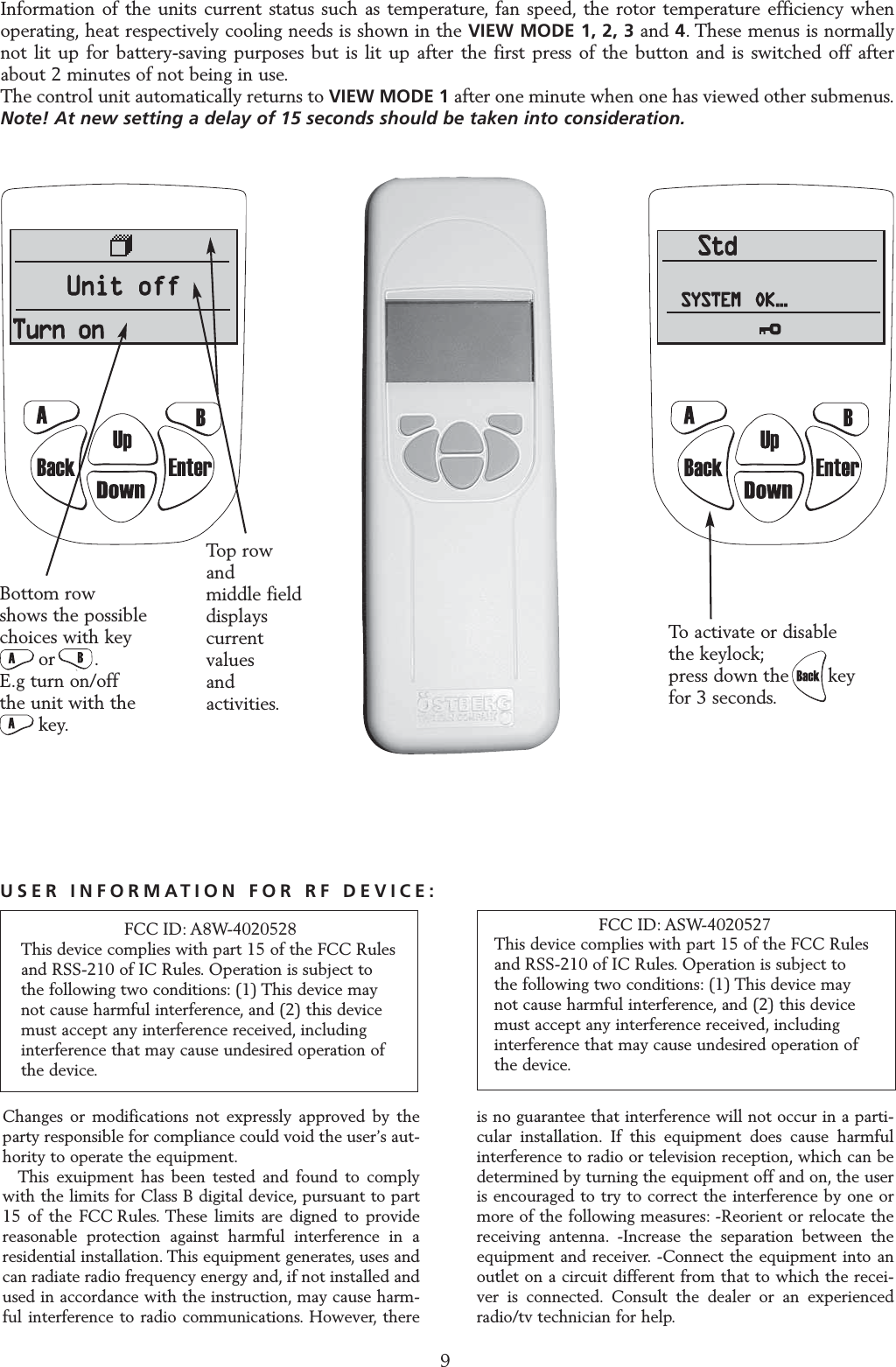
OPERATING THE CONTROL UNIT9StdSYSTEM OK...StdStdSYSTEMSYSTEM OK......To activate or disable   the keylock;press down the       key for 3 seconds.Information of the units current status such as temperature, fan speed, the rotor temperature efficiency whenoperating, heat respectively cooling needs is shown in the VIEW MODE 1, 2, 3 and 4. These menus is normallynot lit up for battery-saving purposes but is lit up after the first press of the button and is switched off afterabout 2 minutes of not being in use.The control unit automatically returns to VIEW MODE 1 after one minute when one has viewed other submenus.Note! At new setting a delay of 15 seconds should be taken into consideration.Bottom row shows the possible choices with key or       .E.g turn on/off the unit with the     key.Top row and middle field displays current values and activities.Changes or modifications not expressly approved by theparty responsible for compliance could void the user’s aut-hority to operate the equipment.This exuipment has been tested and found to complywith the limits for Class B digital device, pursuant to part15 of the FCC Rules. These limits are digned to providereasonable protection against harmful interference in aresidential installation. This equipment generates, uses andcan radiate radio frequency energy and, if not installed andused in accordance with the instruction, may cause harm-ful interference to radio communications. However, thereis no guarantee that interference will not occur in a parti-cular installation. If this equipment does cause harmfulinterference to radio or television reception, which can bedetermined by turning the equipment off and on, the useris encouraged to try to correct the interference by one ormore of the following measures: -Reorient or relocate thereceiving antenna. -Increase the separation between theequipment and receiver. -Connect the equipment into anoutlet on a circuit different from that to which the recei-ver is connected. Consult the dealer or an experiencedradio/tv technician for help.FCC ID: ASW-4020527This device complies with part 15 of the FCC Rules and RSS-210 of IC Rules. Operation is subject to the following two conditions: (1) This device may not cause harmful interference, and (2) this device must accept any interference received, including interference that may cause undesired operation of the device.USER INFORMATION FOR RF DEVICE:FCC ID: A8W-4020528This device complies with part 15 of the FCC Rules and RSS-210 of IC Rules. Operation is subject to the following two conditions: (1) This device may not cause harmful interference, and (2) this device must accept any interference received, including interference that may cause undesired operation of the device.
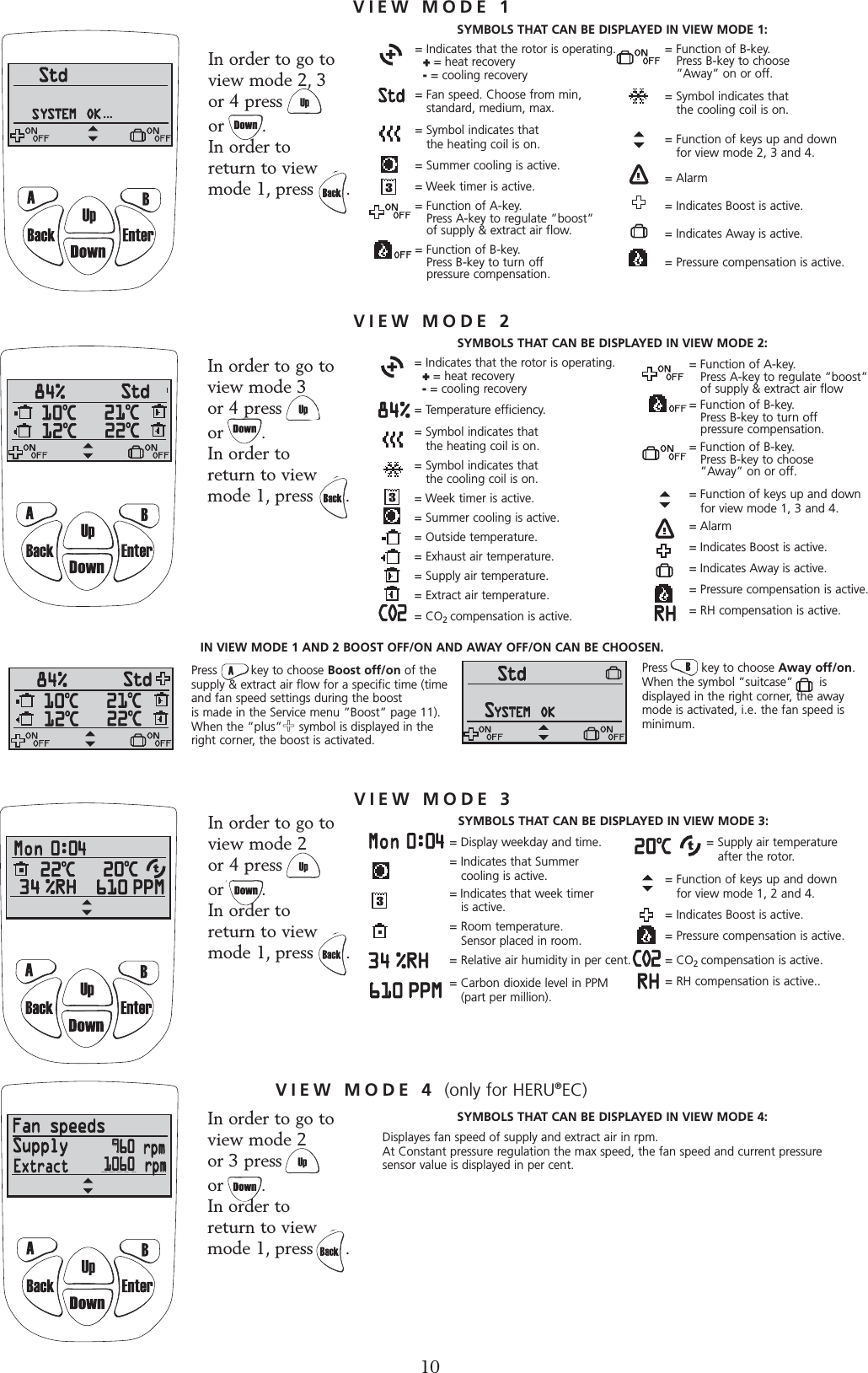
= Supply air temperature after the rotor.= Function of keys up and down for view mode 1, 2 and 4.= Indicates Boost is active.= Pressure compensation is active.= CO2compensation is active.= RH compensation is active..CO2= Indicates that the rotor is operating.   += heat recovery-= cooling recovery= Temperature efficiency.= Symbol indicates that the heating coil is on.= Symbol indicates that the cooling coil is on.= Week timer is active.= Summer cooling is active.= Outside temperature.= Exhaust air temperature.= Supply air temperature.   = Extract air temperature.= CO2compensation is active.= Function of A-key. Press A-key to regulate ”boost” of supply & extract air flow= Function of B-key.Press B-key to turn off pressure compensation.= Function of B-key. Press B-key to choose ”Away” on or off.= Function of keys up and down for view mode 1, 3 and 4.= Alarm= Indicates Boost is active.= Indicates Away is active.= Pressure compensation is active.= RH compensation is active.CO2In order to go toview mode 2  or 3 press         or       .In order to return to viewmode 1, press      .In order to go toview mode 2 or 4 press         or       .In order to return to viewmode 1, press      .In order to go to view mode 3 or 4 press         or       .In order to return to viewmode 1, press      .VIEW MODE 3= Display weekday and time.= Indicates that Summer cooling is active.= Indicates that week timer is active.= Room temperature. Sensor placed in room. = Relative air humidity in per cent. = Carbon dioxide level in PPM (part per million).VIEW MODE 4 (only for HERU®EC)SYMBOLS THAT CAN BE DISPLAYED IN VIEW MODE 3:SYMBOLS THAT CAN BE DISPLAYED IN VIEW MODE 4:Displayes fan speed of supply and extract air in rpm.At Constant pressure regulation the max speed, the fan speed and current pressure sensor value is displayed in per cent.Press         key to choose Boost off/on of thesupply & extract air flow for a specific time (timeand fan speed settings during the boost is made in the Service menu ”Boost” page 11).When the ”plus”++symbol is displayed in theright corner, the boost is activated. ...VIEW MODE 1In order to go to view mode 2, 3 or 4 press         or       .In order to return to viewmode 1, press      .= Indicates that the rotor is operating.   ++= heat recovery-= cooling recovery= Fan speed. Choose from min, standard, medium, max.= Symbol indicates that the heating coil is on.= Summer cooling is active.= Week timer is active.= Function of A-key. Press A-key to regulate ”boost” of supply & extract air flow.= Function of B-key.Press B-key to turn off pressure compensation. VIEW MODE 2SYMBOLS THAT CAN BE DISPLAYED IN VIEW MODE 1:SYMBOLS THAT CAN BE DISPLAYED IN VIEW MODE 2:= Function of B-key. Press B-key to choose ”Away” on or off.= Symbol indicates that the cooling coil is on.= Function of keys up and down for view mode 2, 3 and 4.= Alarm= Indicates Boost is active.= Indicates Away is active.= Pressure compensation is active.IN VIEW MODE 1 AND 2 BOOST OFF/ON AND AWAY OFF/ON CAN BE CHOOSEN.Press         key to choose Away off/on. When the symbol ”suitcase”       is displayed in the right corner, the awaymode is activated, i.e. the fan speed isminimum.9960106010Extract
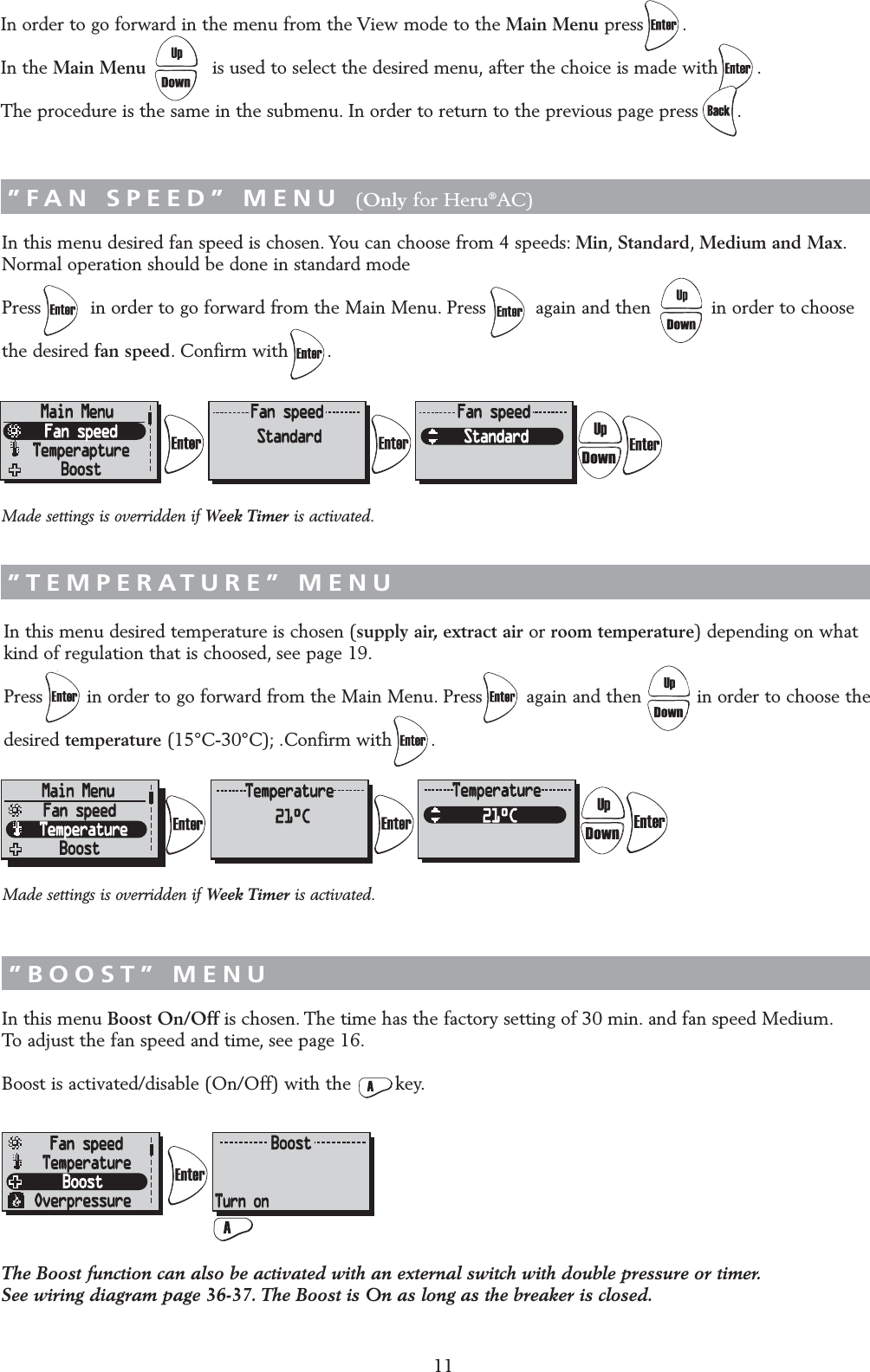
11In this menu desired fan speed is chosen. You can choose from 4 speeds: Min,Standard,Medium and Max.Normal operation should be done in standard modePress         in order to go forward from the Main Menu. Press         again and then           in order to choose the desired fan speed. Confirm with       .In this menu desired temperature is chosen (supply air, extract air or room temperature) depending on what kind of regulation that is choosed, see page 19.Press        in order to go forward from the Main Menu. Press        again and then          in order to choose the desired temperature (15°C-30°C); .Confirm with       .In this menu Boost On/Off is chosen. The time has the factory setting of 30 min. and fan speed Medium.To adjust the fan speed and time, see page 16.Boost is activated/disable (On/Off) with the        key.”FAN SPEED” MENU (Only for Heru®AC)”TEMPERATURE” MENU”BOOST” MENUIn order to go forward in the menu from the View mode to the Main Menu press .In the Main Menu is used to select the desired menu, after the choice is made with .The procedure is the same in the submenu. In order to return to the previous page press .”MAIN MENU”The Boost function can also be activated with an external switch with double pressure or timer.See wiring diagram page 36-37. The Boost is On as long as the breaker is closed.Made settings is overridden if Week Timer is activated.Made settings is overridden if Week Timer is activated.
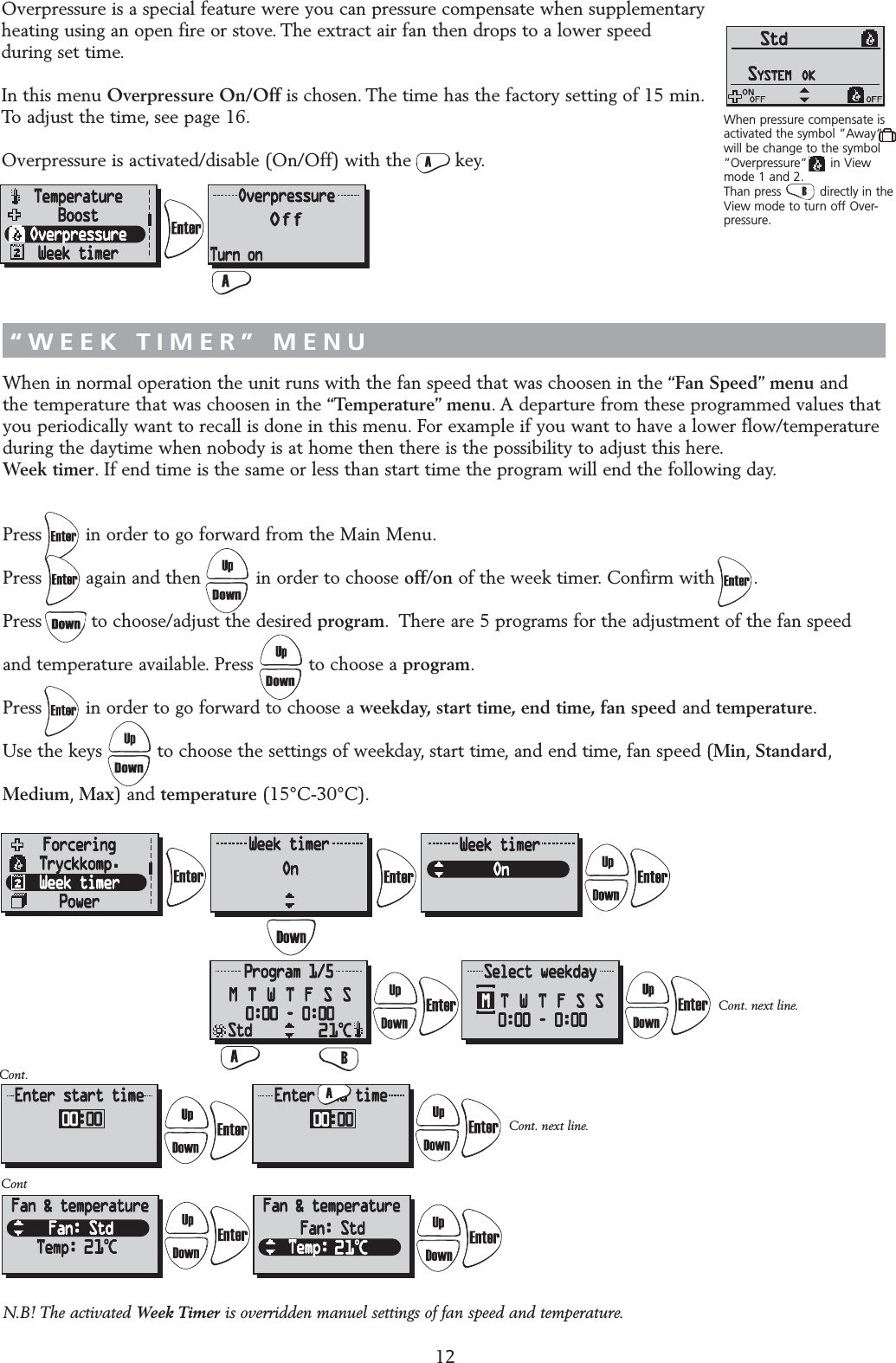
When in normal operation the unit runs with the fan speed that was choosen in the “Fan Speed” menu and the temperature that was choosen in the “Temperature” menu. A departure from these programmed values that you periodically want to recall is done in this menu. For example if you want to have a lower flow/temperature during the daytime when nobody is at home then there is the possibility to adjust this here.Week timer. If end time is the same or less than start time the program will end the following day.Press        in order to go forward from the Main Menu.Press        again and then          in order to choose off/on of the week timer. Confirm with       .Press         to choose/adjust the desired program. There are 5 programs for the adjustment of the fan speed and temperature available. Press          to choose a program.Press        in order to go forward to choose a weekday, start time, end time, fan speed and temperature.Use the keys          to choose the settings of weekday, start time, and end time, fan speed (Min,Standard,Medium,Max) and temperature (15°C-30°C).Overpressure is a special feature were you can pressure compensate when supplementary heating using an open fire or stove. The extract air fan then drops to a lower speed during set time.In this menu Overpressure On/Off is chosen. The time has the factory setting of 15 min.To adjust the time, see page 16.Overpressure is activated/disable (On/Off) with the        key.12“OVERPRESSURE” MENU“WEEK TIMER” MENUCont.Cont. next line.When pressure compensate isactivated the symbol ”Away”will be change to the symbol”Overpressure”      in View mode 1 and 2.Than press          directly in theView mode to turn off Over-pressure.ContCont. next line.OffN.B! The activated Week Timer is overridden manuel settings of fan speed and temperature.
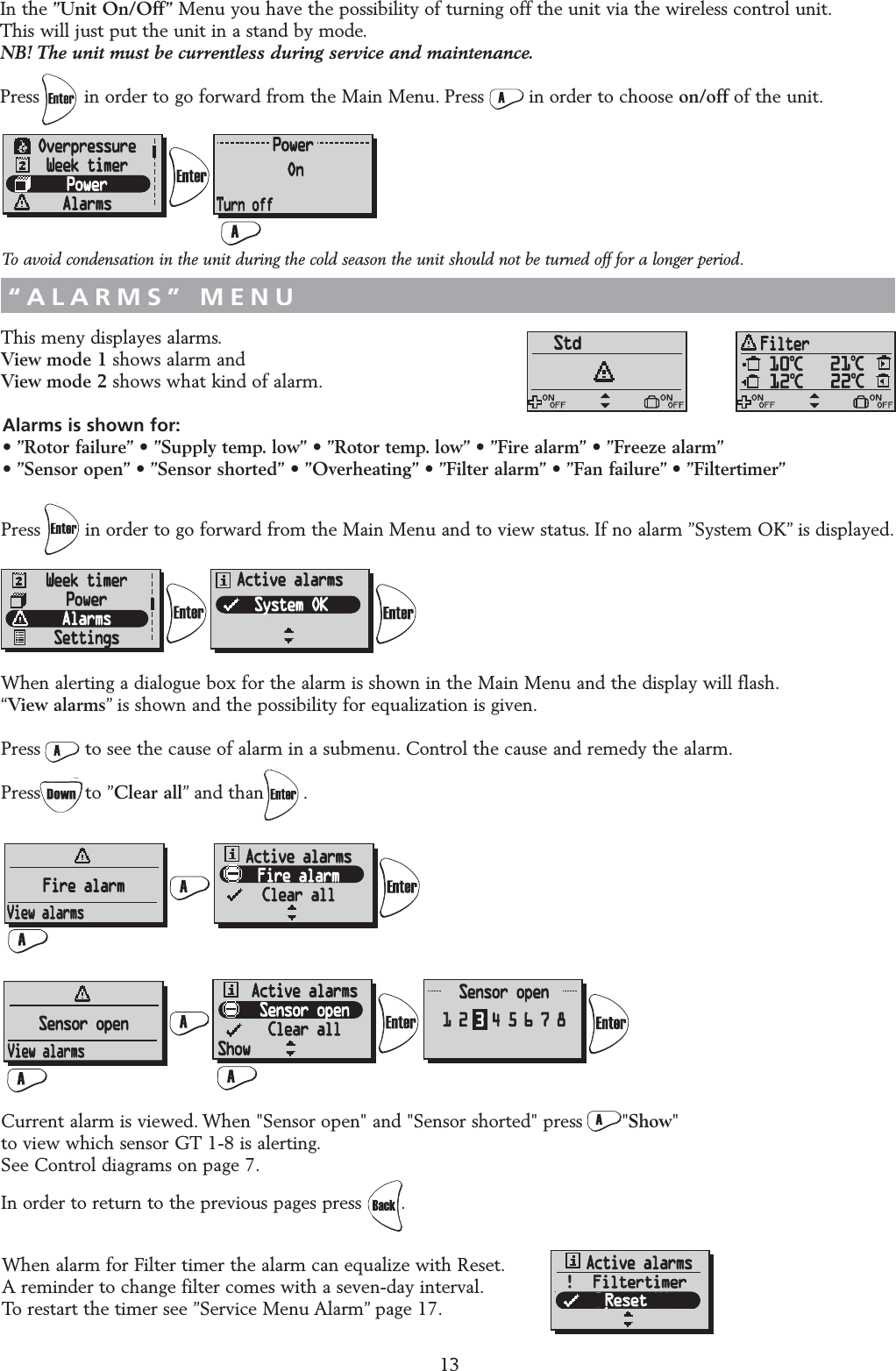
This meny displayes alarms.View mode 1 shows alarm and View mode 2 shows what kind of alarm.Press        in order to go forward from the Main Menu and to view status. If no alarm ”System OK” is displayed.When alerting a dialogue box for the alarm is shown in the Main Menu and the display will flash.“View alarms” is shown and the possibility for equalization is given.Press        to see the cause of alarm in a submenu. Control the cause and remedy the alarm.Press        to ”Clear all” and than       .Current alarm is viewed. When "Sensor open" and "Sensor shorted" press       "Show" to view which sensor GT 1-8 is alerting.See Control diagrams on page 7.In order to return to the previous pages press .13“ALARMS” MENUIn the ”Unit On/Off” Menu you have the possibility of turning off the unit via the wireless control unit.This will just put the unit in a stand by mode.NB! The unit must be currentless during service and maintenance.Press        in order to go forward from the Main Menu. Press        in order to choose on/off of the unit.“UNIT ON/OFF” MENUAlarms is shown for:• ”Rotor failure” • ”Supply temp. low” • ”Rotor temp. low” • ”Fire alarm” • ”Freeze alarm”• ”Sensor open” • ”Sensor shorted” • ”Overheating” • ”Filter alarm” • ”Fan failure” • ”Filtertimer”When alarm for Filter timer the alarm can equalize with Reset.A reminder to change filter comes with a seven-day interval.To restart the timer see ”Service Menu Alarm” page 17.!!  FiltertimerResetTo avoid condensation in the unit during the cold season the unit should not be turned off for a longer period.
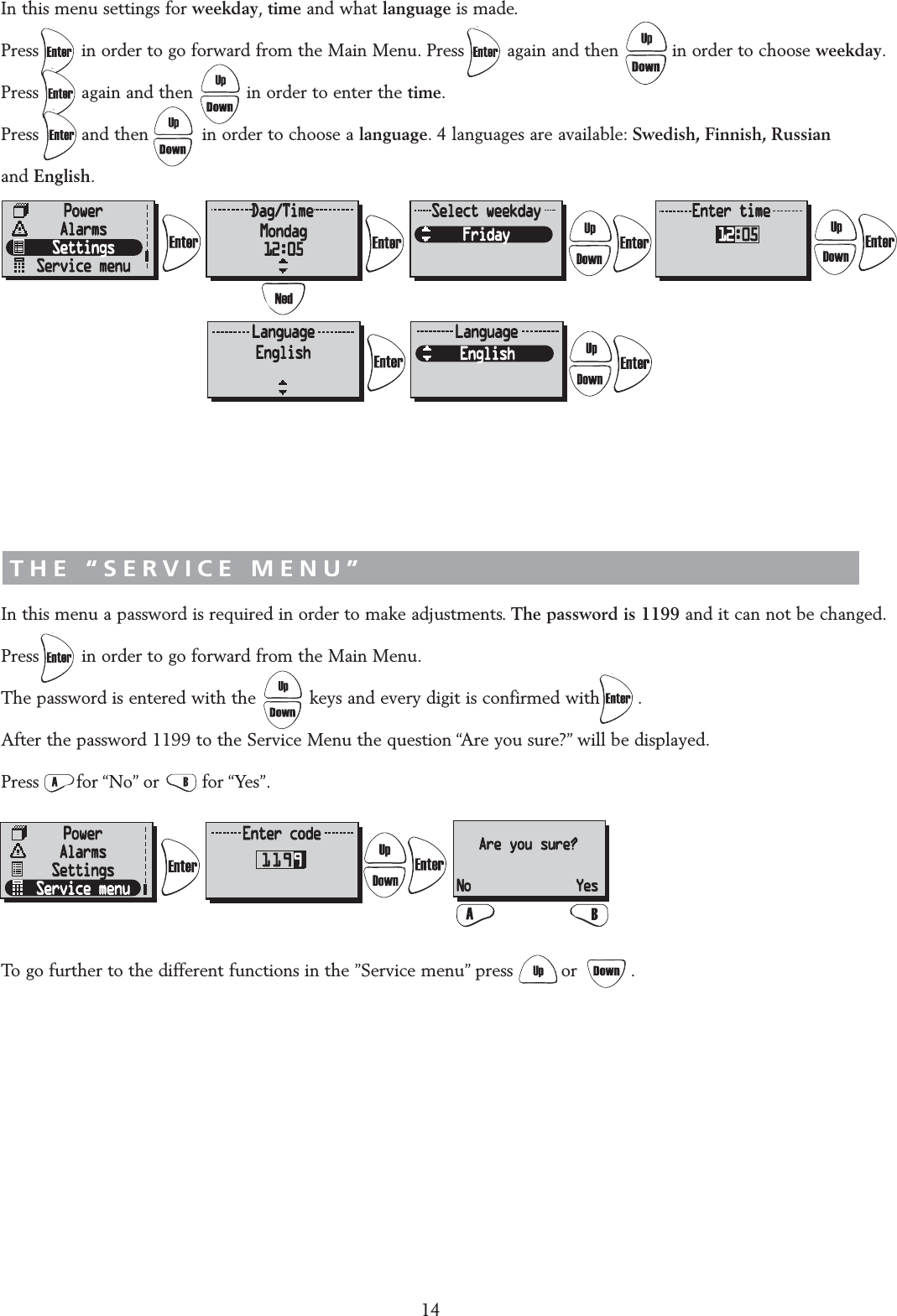
“SETTINGS” MENUIn this menu settings for weekday,time and what language is made.Press        in order to go forward from the Main Menu. Press        again and then          in order to choose weekday.Press        again and then          in order to enter the time.Press        and then          in order to choose a language. 4 languages are available: Swedish, Finnish, Russian and English.THE “SERVICE MENU”In this menu a password is required in order to make adjustments. The password is 1199 and it can not be changed.Press        in order to go forward from the Main Menu.The password is entered with the          keys and every digit is confirmed with       .After the password 1199 to the Service Menu the question “Are you sure?” will be displayed.Press       for “No” or        for “Yes”.To go further to the different functions in the ”Service menu” press         or          .14AAre you sure?No Yes
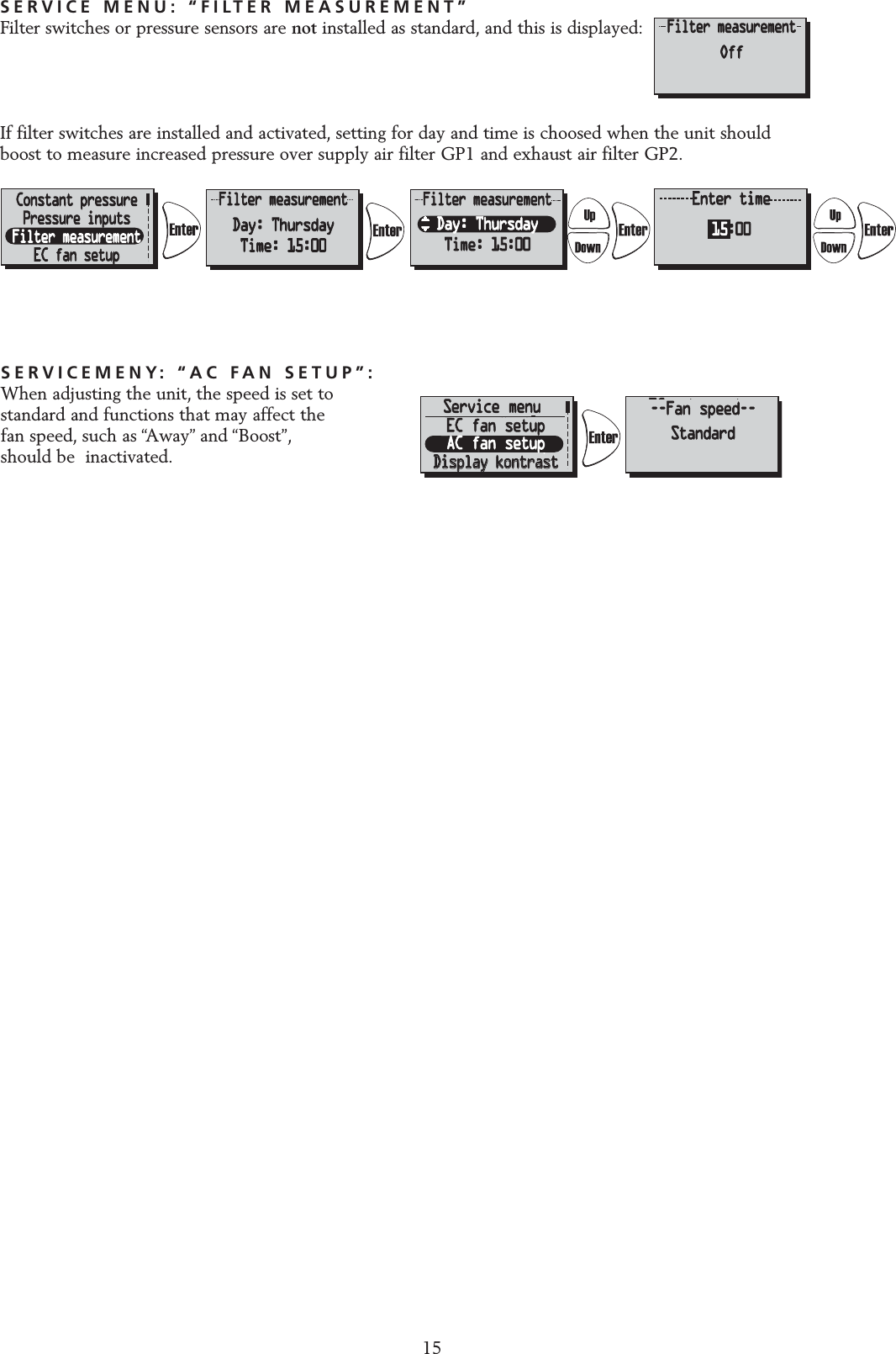
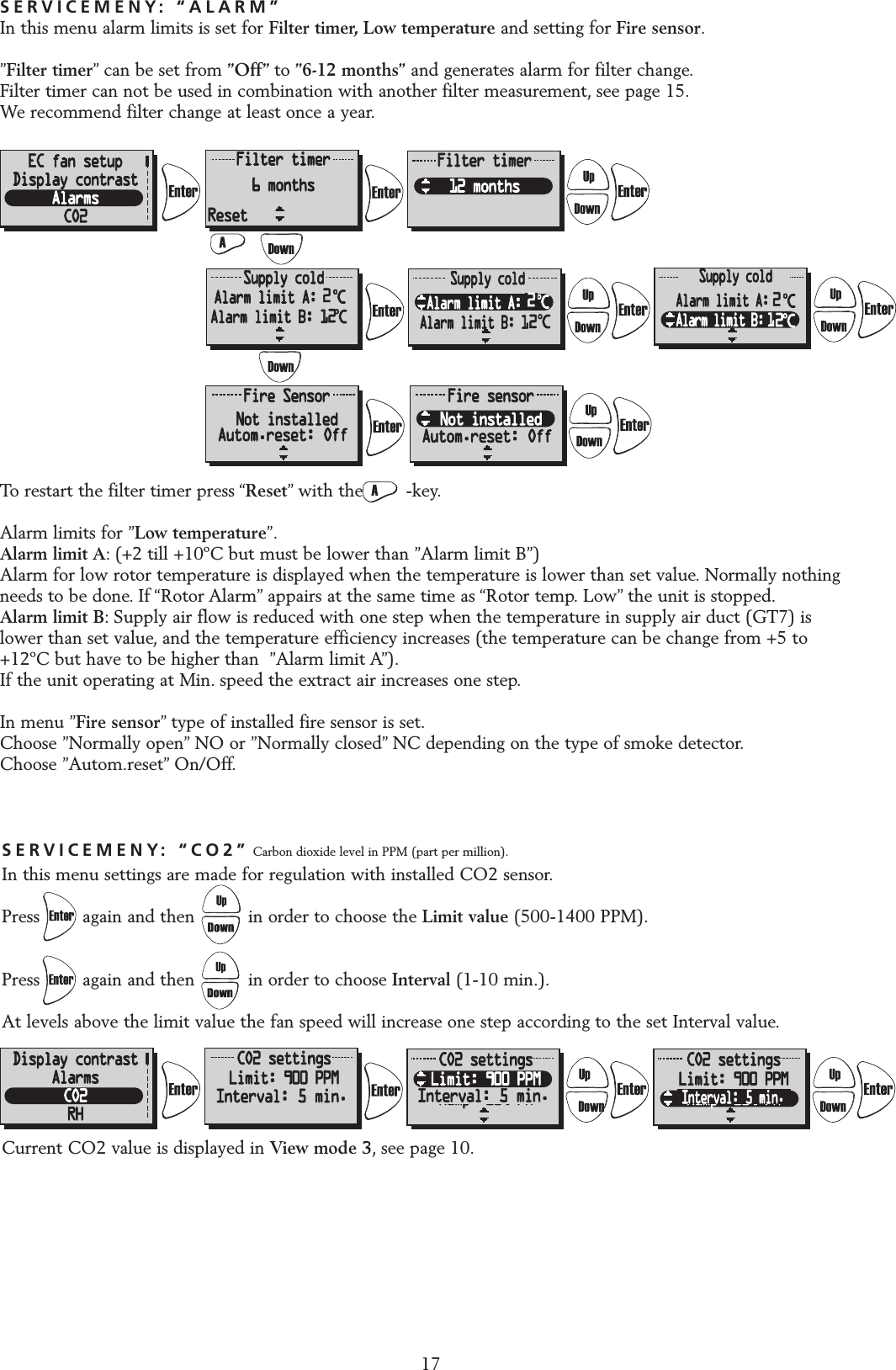
SERVICEMENY: “AC FAN SETUP”:When adjusting the unit, the speed is set tostandard and functions that may affect the fan speed, such as “Away” and “Boost”,should be  inactivated.SERVICE MENU: “FILTER MEASUREMENT”Filter switches or pressure sensors are not installed as standard, and this is displayed:If filter switches are installed and activated, setting for day and time is choosed when the unit should boost to measure increased pressure over supply air filter GP1 and exhaust air filter GP2.ServicemenyServicemenyFiltermätningFiltermätningEC-motor setupEC-motor setupDisplay kontrastDisplay kontrastÄr du säker?Bör endast ändrasav installatör!Standard (%)Tilluft: 60%Frånluft: 70%MinimumMin: 20%EC-motor setupEC-motor setupStandardStandardMinMediumMedium Avbryt           OkStandard(konst.tr.)Till: 90Pa (45%)Från: 110Pa (50%)Till konst.tr.EC-motor setupStandardMinMediumMinimumMin: 20%Standard (%)Tilluft: 60%Frånluft: 70%Standard (%)Tilluft: 60%Frånluft: 70%Pressure inputsFilter measurementEC fan setupDisplay contrastAre you sure?Should not bechanged by user!Standard (%)Sup: 60%Exh: 70%MinimumMin: 20%EC fan setupStandardMinMedium Cancel           OkStandard(CPC)Sup: 90Pa (45%)Exh: 110Pa (50%)Go to CPCEC fan setupStandardMinMediumMinimumMin: 20%Standard (%)Sup: 60%Exh: 70%Standard (%)Sup: 60%Exh: 70%EC fan setupAC fan setup--Fan speed--StandardService menu15
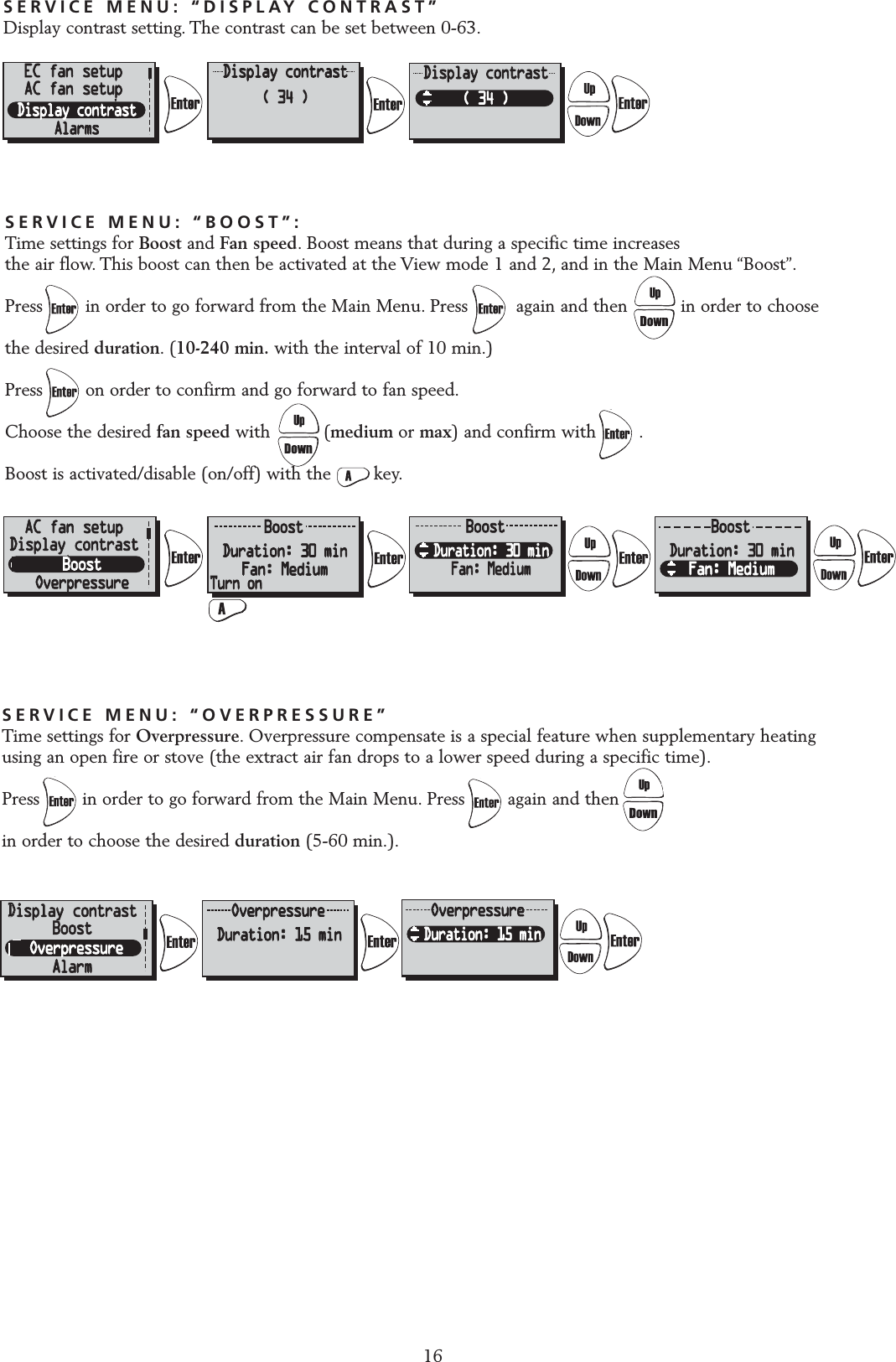
SERVICE MENU: “DISPLAY CONTRAST”Display contrast setting. The contrast can be set between 0-63.16EC fan setupAC fan setupSERVICE MENU: “BOOST”:Time settings for Boost and Fan speed. Boost means that during a specific time increases the air flow. This boost can then be activated at the View mode 1 and 2, and in the Main Menu “Boost”.Press        in order to go forward from the Main Menu. Press         again and then          in order to choose the desired duration.(10-240 min. with the interval of 10 min.)Press        on order to confirm and go forward to fan speed.Choose the desired fan speed with          (medium or max) and confirm with        .Boost is activated/disable (on/off) with the        key.AAC fan setupDisplay contrastSERVICE MENU: “OVERPRESSURE”Time settings for Overpressure. Overpressure compensate is a special feature when supplementary heatingusing an open fire or stove (the extract air fan drops to a lower speed during a specific time).Press        in order to go forward from the Main Menu. Press        again and then          in order to choose the desired duration (5-60 min.).DDisplay contrastBoostAlarm
SERVICEMENY: “CO2” Carbon dioxide level in PPM (part per million).In this menu settings are made for regulation with installed CO2 sensor.Press        again and then          in order to choose the Limit value (500-1400 PPM).Press        again and then          in order to choose Interval (1-10 min.).At levels above the limit value the fan speed will increase one step according to the set Interval value.Current CO2 value is displayed in View mode 3, see page 10.17SERVICEMENY: “ALARM”In this menu alarm limits is set for Filter timer, Low temperature and setting for Fire sensor.”Filter timer” can be set from ”Off” to ”6-12 months” and generates alarm for filter change.Filter timer can not be used in combination with another filter measurement, see page 15.We recommend filter change at least once a year.To restart the filter timer press “Reset” with the        -key.Alarm limits for ”Low temperature”.Alarm limit A: (+2 till +10ºC but must be lower than ”Alarm limit B”)Alarm for low rotor temperature is displayed when the temperature is lower than set value. Normally nothingneeds to be done. If “Rotor Alarm” appairs at the same time as “Rotor temp. Low” the unit is stopped.Alarm limit B: Supply air flow is reduced with one step when the temperature in supply air duct (GT7) islower than set value, and the temperature efficiency increases (the temperature can be change from +5 to+12ºC but have to be higher than  ”Alarm limit A”).If the unit operating at Min. speed the extract air increases one step.In menu ”Fire sensor” type of installed fire sensor is set.Choose ”Normally open” NO or ”Normally closed” NC depending on the type of smoke detector.Choose ”Autom.reset” On/Off.ResetInterval: 5 min. Interval: 5 min.Interval: 5 min.222Autom.reset: Off Autom.reset: Off
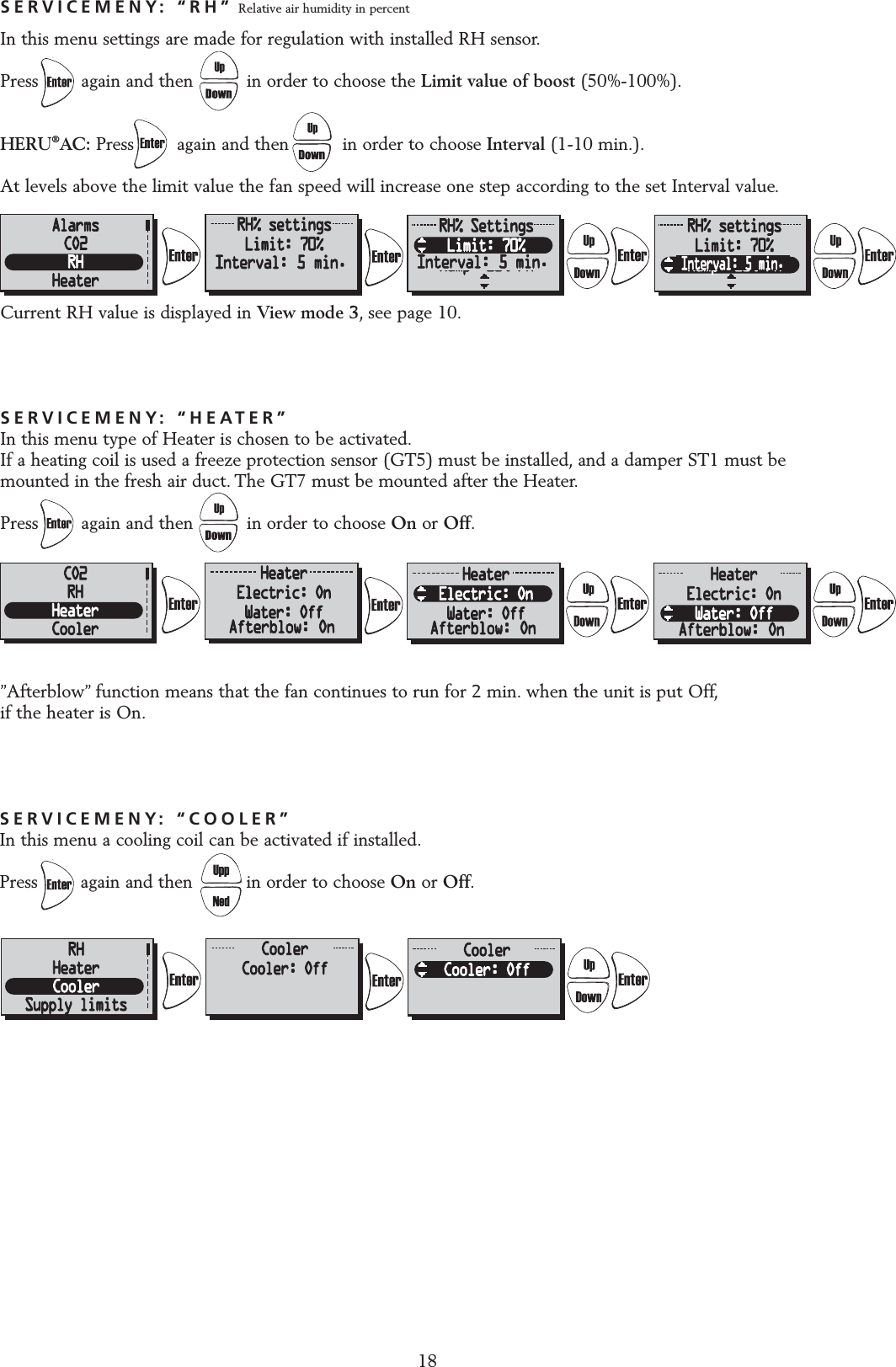
SERVICEMENY: “HEATER”In this menu type of Heater is chosen to be activated.If a heating coil is used a freeze protection sensor (GT5) must be installed, and a damper ST1 must be mounted in the fresh air duct. The GT7 must be mounted after the Heater.Press        again and then          in order to choose On or Off.”Afterblow” function means that the fan continues to run for 2 min. when the unit is put Off,if the heater is On.SERVICEMENY: “RH” Relative air humidity in percentIn this menu settings are made for regulation with installed RH sensor.Press        again and then          in order to choose the Limit value of boost (50%-100%).HERU®AC: Press        again and then          in order to choose Interval (1-10 min.).At levels above the limit value the fan speed will increase one step according to the set Interval value.Current RH value is displayed in View mode 3, see page 10.18SERVICEMENY: “COOLER”In this menu a cooling coil can be activated if installed.Press        again and then          in order to choose On or Off.Interval: 5 min. Interval: 5 min.Interval: 5 min.Afterblow: On Afterblow: On Afterblow: On
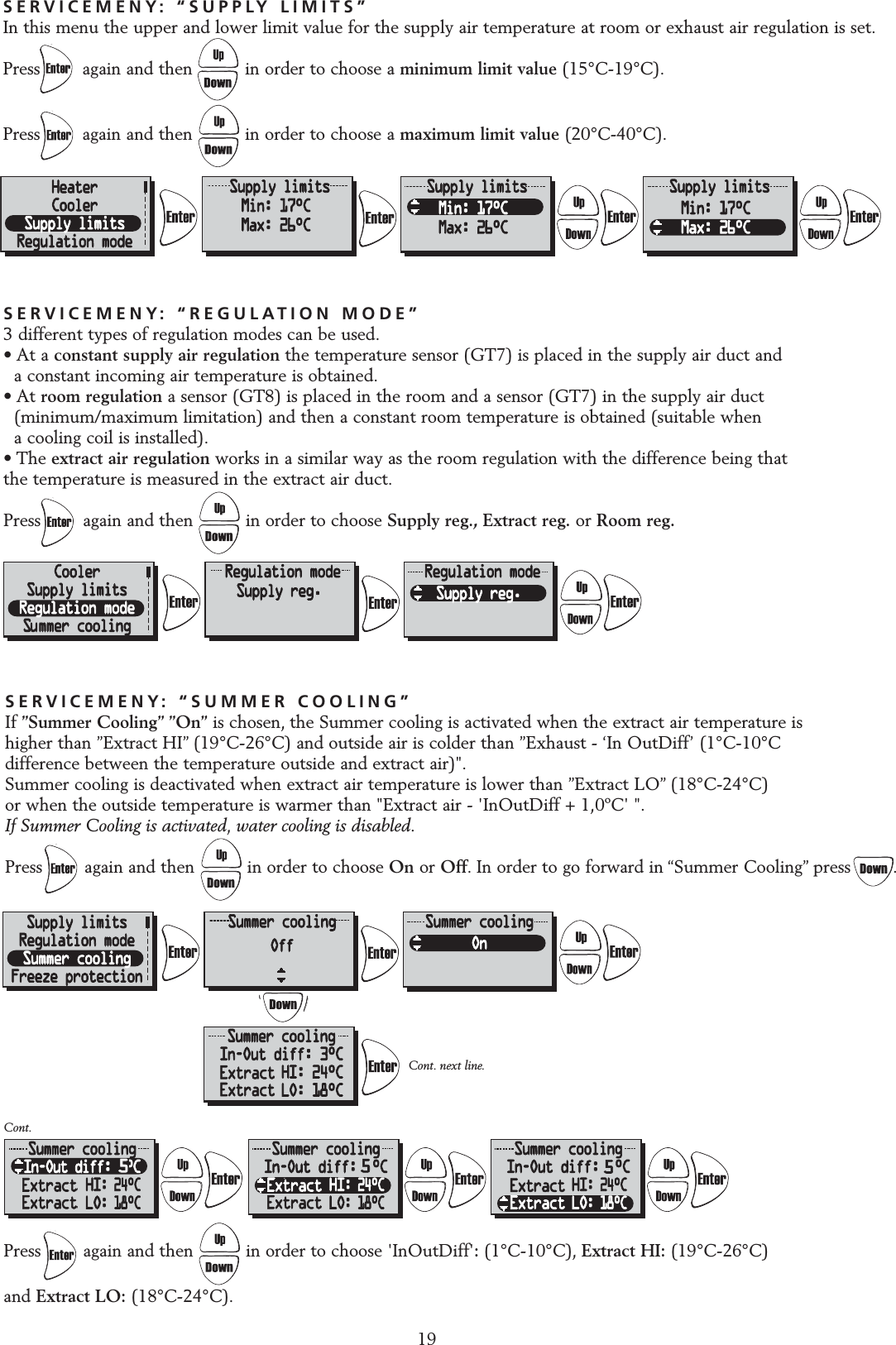
19SERVICEMENY: “REGULATION MODE”3 different types of regulation modes can be used.• At a constant supply air regulation the temperature sensor (GT7) is placed in the supply air duct and a constant incoming air temperature is obtained.• At room regulation a sensor (GT8) is placed in the room and a sensor (GT7) in the supply air duct (minimum/maximum limitation) and then a constant room temperature is obtained (suitable when a cooling coil is installed).• The extract air regulation works in a similar way as the room regulation with the difference being that the temperature is measured in the extract air duct.Press        again and then          in order to choose Supply reg., Extract reg. or Room reg.Press        again and then          in order to choose 'InOutDiff':(1°C-10°C), Extract HI: (19°C-26°C) and Extract LO: (18°C-24°C).SERVICEMENY: “SUMMER COOLING”If ”Summer Cooling” ”On” is chosen, the Summer cooling is activated when the extract air temperature is higher than ”Extract HI” (19°C-26°C) and outside air is colder than ”Exhaust - ‘In OutDiff’ (1°C-10°C difference between the temperature outside and extract air)".Summer cooling is deactivated when extract air temperature is lower than ”Extract LO” (18°C-24°C) or when the outside temperature is warmer than "Extract air - 'InOutDiff + 1,0ºC' ".If Summer Cooling is activated, water cooling is disabled.Press        again and then          in order to choose On or Off. In order to go forward in “Summer Cooling” press        .Cont.Cont. next line.SERVICEMENY: “SUPPLY LIMITS”In this menu the upper and lower limit value for the supply air temperature at room or exhaust air regulation is set.Press        again and then          in order to choose a minimum limit value (15°C-19°C).Press        again and then          in order to choose a maximum limit value (20°C-40°C).5555ExtractExtractExtractExtractExtractExtract ExtractExtract
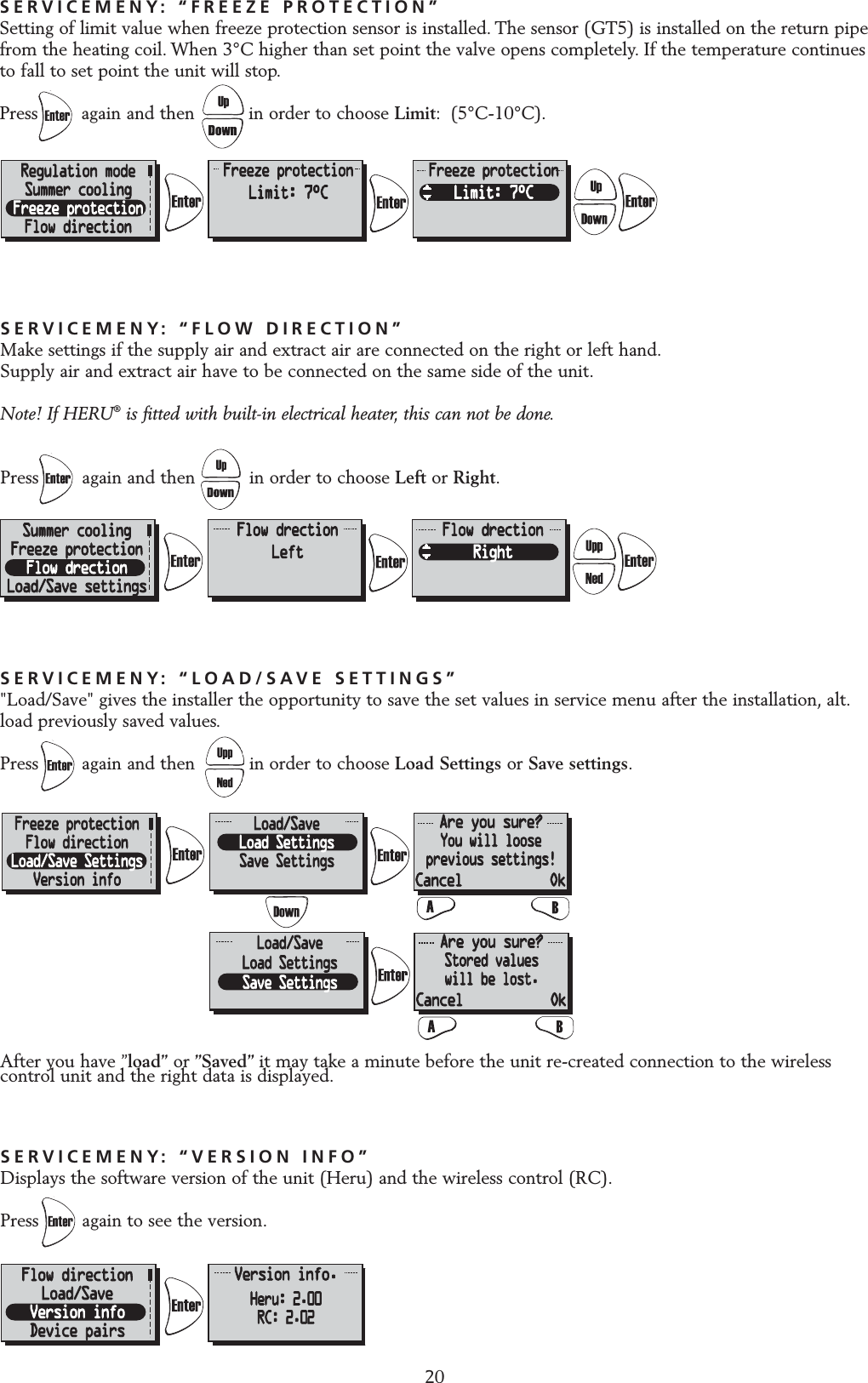
20SERVICEMENY: “FLOW DIRECTION”Make settings if the supply air and extract air are connected on the right or left hand.Supply air and extract air have to be connected on the same side of the unit.Note! If HERU®is fitted with built-in electrical heater, this can not be done.Press        again and then          in order to choose Left or Right.SERVICEMENY: “VERSION INFO”Displays the software version of the unit (Heru) and the wireless control (RC).Press again to see the version.SERVICEMENY: “LOAD/SAVE SETTINGS”"Load/Save" gives the installer the opportunity to save the set values in service menu after the installation, alt.load previously saved values.Press again and then          in order to choose Load Settings or Save settings.After you have ”load” or ”Saved” it may take a minute before the unit re-created connection to the wirelesscontrol unit and the right data is displayed.SERVICEMENY: “FREEZE PROTECTION”Setting of limit value when freeze protection sensor is installed. The sensor (GT5) is installed on the return pipefrom the heating coil. When 3°C higher than set point the valve opens completely. If the temperature continuesto fall to set point the unit will stop.Press        again and then          in order to choose Limit: (5°C-10°C).
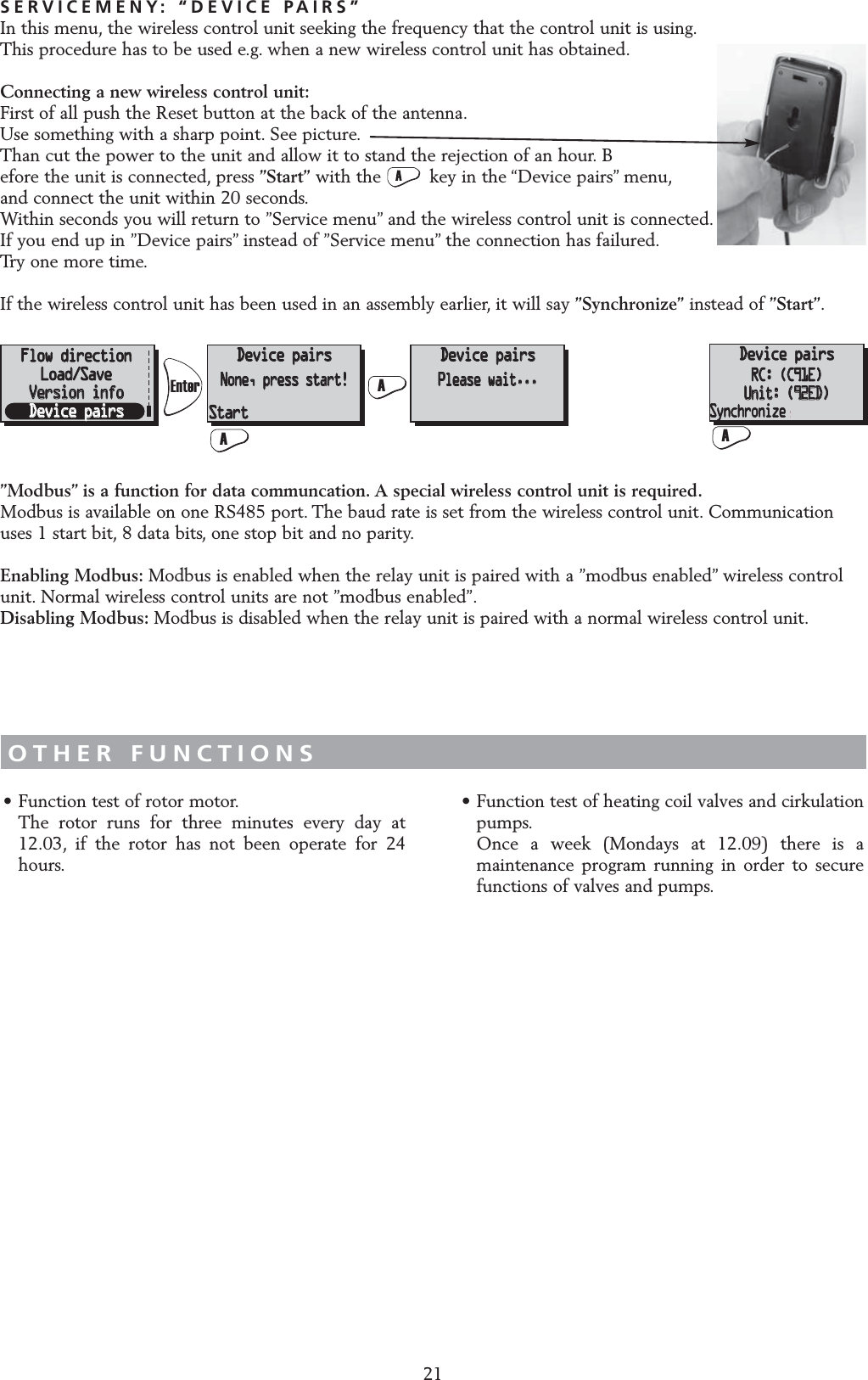
21SERVICEMENY: “DEVICE PAIRS”In this menu, the wireless control unit seeking the frequency that the control unit is using.This procedure has to be used e.g. when a new wireless control unit has obtained.Connecting a new wireless control unit:First of all push the Reset button at the back of the antenna.Use something with a sharp point. See picture.Than cut the power to the unit and allow it to stand the rejection of an hour. Before the unit is connected, press ”Start” with the         key in the “Device pairs” menu,and connect the unit within 20 seconds.Within seconds you will return to ”Service menu” and the wireless control unit is connected.If you end up in ”Device pairs” instead of ”Service menu” the connection has failured.Try one more time.If the wireless control unit has been used in an assembly earlier, it will say ”Synchronize” instead of ”Start”.OTHER FUNCTIONS• Function test of rotor motor.The rotor runs for three minutes every day at 12.03, if the rotor has not been operate for 24 hours.• Function test of heating coil valves and cirkulation pumps.Once a week (Mondays at 12.09) there is a maintenance program running in order to secure functions of valves and pumps.FlödesriktningLadda/SparaVersion infoManöverenhetManöverenhetIngen, starta!ManöverenhetV.g. vänta...ManöverenhetRC: (C91E)Unit: (92ED)Start SynkroniseraFlow directionFlow directionLoad/SaveLoad/SaveVersion infoVersion infoDevice pairsDevice pairsDevice pairsDevice pairsNone, press start!None, press start!Device pairsDevice pairsPlease wait...Please wait...Device pairsRC: (C91E)Unit: (92ED)StartStartAASyncroniseFlödesriktningLadda/SparaVersion infoManöverenhetManöverenhetIngen, starta!ManöverenhetV.g. vänta...ManöverenhetRC: (C91E)Unit: (92ED)Start SynkroniseraFlow directionLoad/SaveVersion infoDevice pairsDevice pairsNone, press start!Device pairsPlease wait...Device pairsDevice pairsRC: (C91E)RC: (C91E)Unit: (92ED)Unit: (92ED)StartASyncroniseSyncroniseSynchronize”Modbus” is a function for data communcation. A special wireless control unit is required.Modbus is available on one RS485 port. The baud rate is set from the wireless control unit. Communicationuses 1 start bit, 8 data bits, one stop bit and no parity.Enabling Modbus: Modbus is enabled when the relay unit is paired with a ”modbus enabled” wireless controlunit. Normal wireless control units are not ”modbus enabled”.Disabling Modbus: Modbus is disabled when the relay unit is paired with a normal wireless control unit.
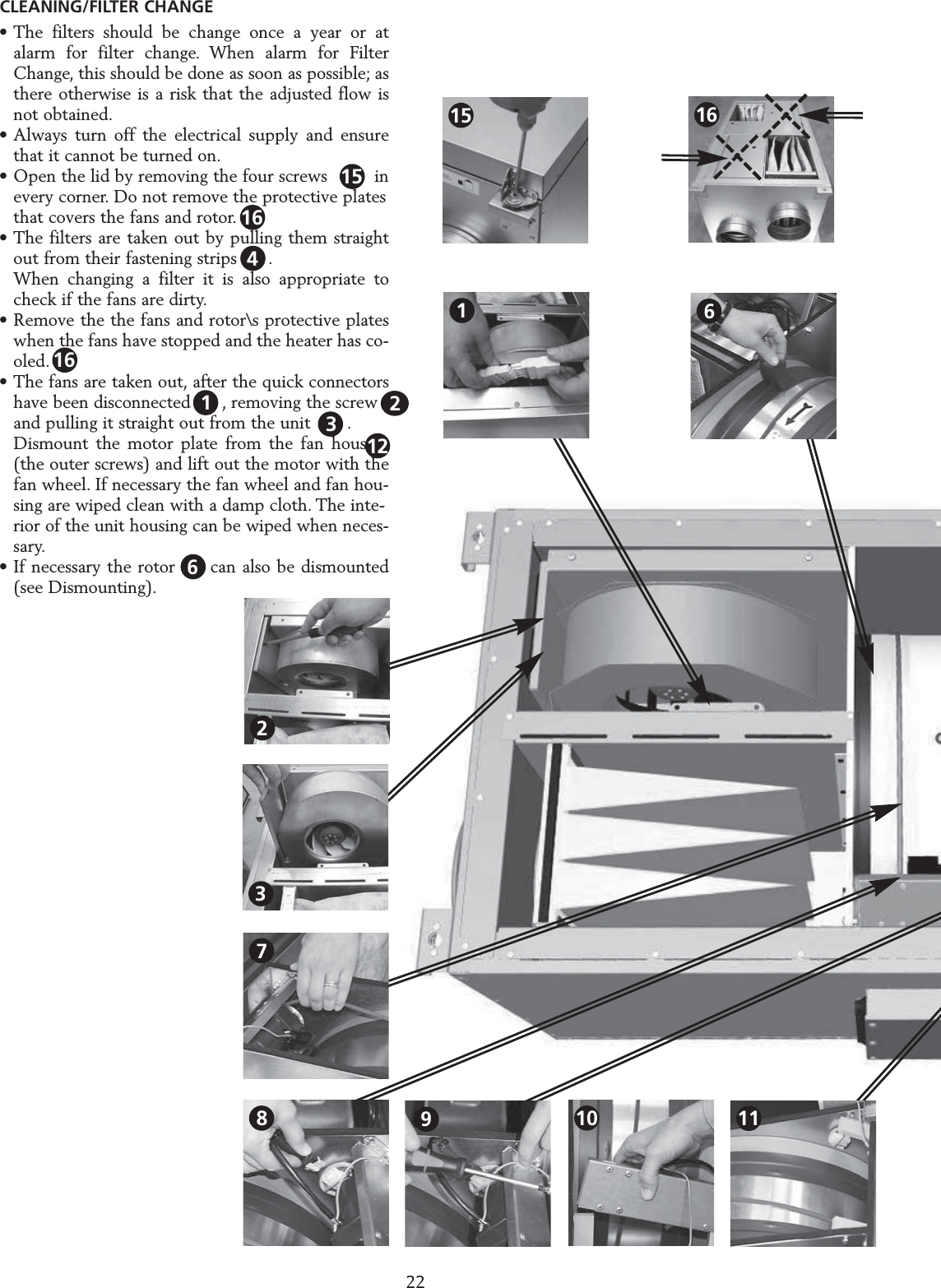
• The filters should be change once a year or at alarm for filter change. When alarm for Filter Change, this should be done as soon as possible; as there otherwise is a risk that the adjusted flow is not obtained.• Always turn off the electrical supply and ensure that it cannot be turned on.• Open the lid by removing the four screws         inevery corner. Do not remove the protective plates that covers the fans and rotor.• The filters are taken out by pulling them straight out from their fastening strips      .When changing a filter it is also appropriate to check if the fans are dirty.• Remove the the fans and rotor\s protective plates when the fans have stopped and the heater has co-oled.• The fans are taken out, after the quick connectors  have been disconnected      , removing the screw    and pulling it straight out from the unit       .Dismount the motor plate from the fan housing (the outer screws) and lift out the motor with the fan wheel. If necessary the fan wheel and fan hou-sing are wiped clean with a damp cloth. The inte-rior of the unit housing can be wiped when neces-sary.• If necessary the rotor  1  can also be dismounted (see Dismounting).SERVICE HERU S 2216123CLEANING/FILTER CHANGE10618911237151542161616
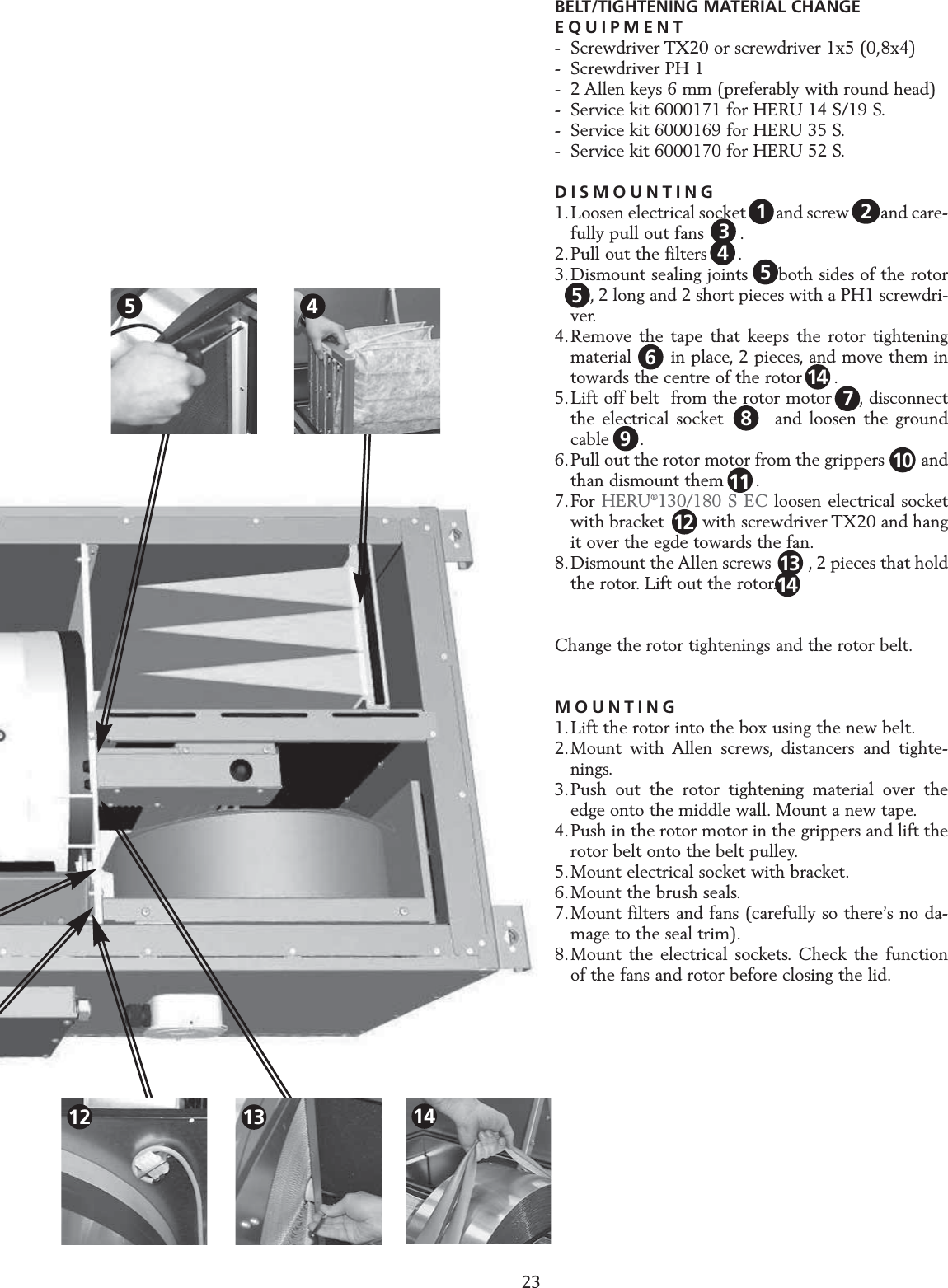
23SERVICE HERU S BELT/TIGHTENING MATERIAL CHANGEEQUIPMENT- Screwdriver TX20 or screwdriver 1x5 (0,8x4)- Screwdriver PH 1- 2 Allen keys 6 mm (preferably with round head)- Service kit 6000171 for HERU 14 S/19 S.- Service kit 6000169 for HERU 35 S.- Service kit 6000170 for HERU 52 S.DISMOUNTING1.Loosen electrical socket  1   and screw 1 2 and care-fully pull out fans   2  .2.Pull out the filters  3  .3.Dismount sealing joints on both sides of the rotor4  , 2 long and 2 short pieces with a PH1 screwdri-ver.4.Remove the tape that keeps the rotor tightening material   5  in place, 2 pieces, and move them in towards the centre of the rotor      .5.Lift off belt  from the rotor motor  8 , disconnect the electrical socket       and loosen the ground cable   9 .6.Pull out the rotor motor from the grippers        and than dismount them      .7.For HERU®130/180 S EC loosen electrical socket with bracket  13  with screwdriver TX20 and hang it over the egde towards the fan.8.Dismount the Allen screws  11  , 2 pieces that hold the rotor. Lift out the rotor.Change the rotor tightenings and the rotor belt.MOUNTING1.Lift the rotor into the box using the new belt.2.Mount with Allen screws, distancers and tighte-nings.3.Push out the rotor tightening material over the edge onto the middle wall. Mount a new tape.4.Push in the rotor motor in the grippers and lift the rotor belt onto the belt pulley.5.Mount electrical socket with bracket.6.Mount the brush seals.7.Mount filters and fans (carefully so there’s no da-mage to the seal trim).8.Mount the electrical sockets. Check the function of the fans and rotor before closing the lid.13456118121479102513144512 1314
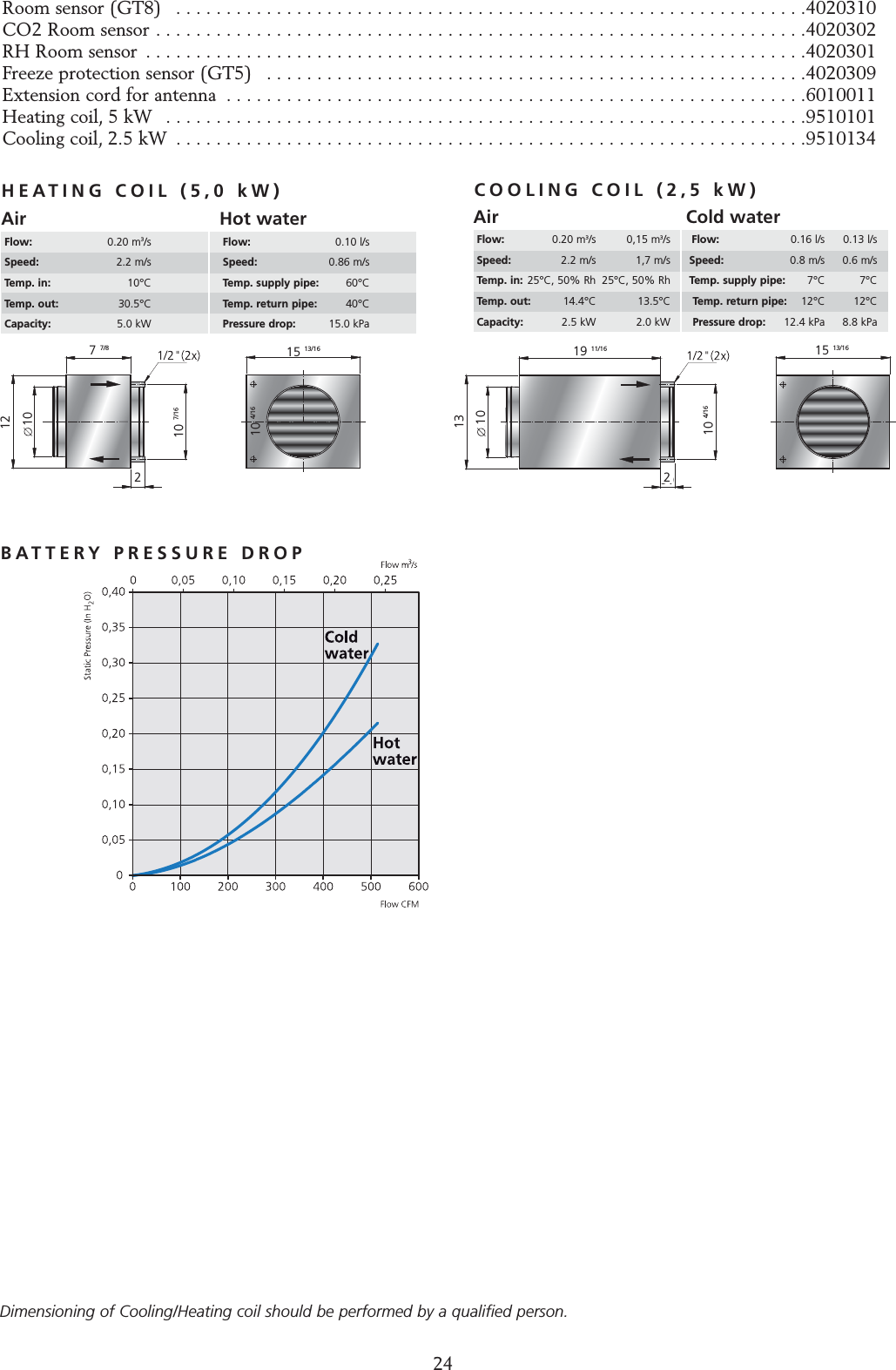
24ACCESSORIES Room sensor (GT8)  . . . . . . . . . . . . . . . . . . . . . . . . . . . . . . . . . . . . . . . . . . . . . . . . . . . . . . . . . . . . . . .4020310CO2 Room sensor . . . . . . . . . . . . . . . . . . . . . . . . . . . . . . . . . . . . . . . . . . . . . . . . . . . . . . . . . . . . . . . . .4020302RH Room sensor  . . . . . . . . . . . . . . . . . . . . . . . . . . . . . . . . . . . . . . . . . . . . . . . . . . . . . . . . . . . . . . . . . .4020301Freeze protection sensor (GT5)  . . . . . . . . . . . . . . . . . . . . . . . . . . . . . . . . . . . . . . . . . . . . . . . . . . . . . .4020309Extension cord for antenna  . . . . . . . . . . . . . . . . . . . . . . . . . . . . . . . . . . . . . . . . . . . . . . . . . . . . . . . . . .6010011Heating coil, 5 kW  . . . . . . . . . . . . . . . . . . . . . . . . . . . . . . . . . . . . . . . . . . . . . . . . . . . . . . . . . . . . . . . .9510101Cooling coil, 2.5 kW  . . . . . . . . . . . . . . . . . . . . . . . . . . . . . . . . . . . . . . . . . . . . . . . . . . . . . . . . . . . . . . .9510134HEATING COIL (5,0 kW) COOLING COIL (2,5 kW)AirFlow: 0.20 m3/s 0,15 m3/sSpeed: 2.2 m/s 1,7 m/sTemp. in: 25°C, 50% Rh 25°C, 50% RhTemp. out: 14.4°C 13.5°CCapacity:  2.5 kW 2.0 kWCold waterFlow: 0.16 l/s 0.13 l/sSpeed: 0.8 m/s 0.6 m/sTemp. supply pipe: 7°C 7°CTemp. return pipe: 12°C 12°CPressure drop:  12.4 kPa 8.8 kPaAirFlow: 0.20 m3/sSpeed: 2.2 m/sTemp. in: 10°CTemp. out: 30.5°CCapacity:  5.0 kWHot waterFlow: 0.10 l/sSpeed: 0.86 m/sTemp. supply pipe: 60°CTemp. return pipe: 40°CPressure drop:  15.0 kPaBATTERY PRESSURE DROPDimensioning of Cooling/Heating coil should be performed by a qualified person.15 13/1619 11/162213 10 10 4/1615 13/167 7/812 10 10 4/1610 7/16
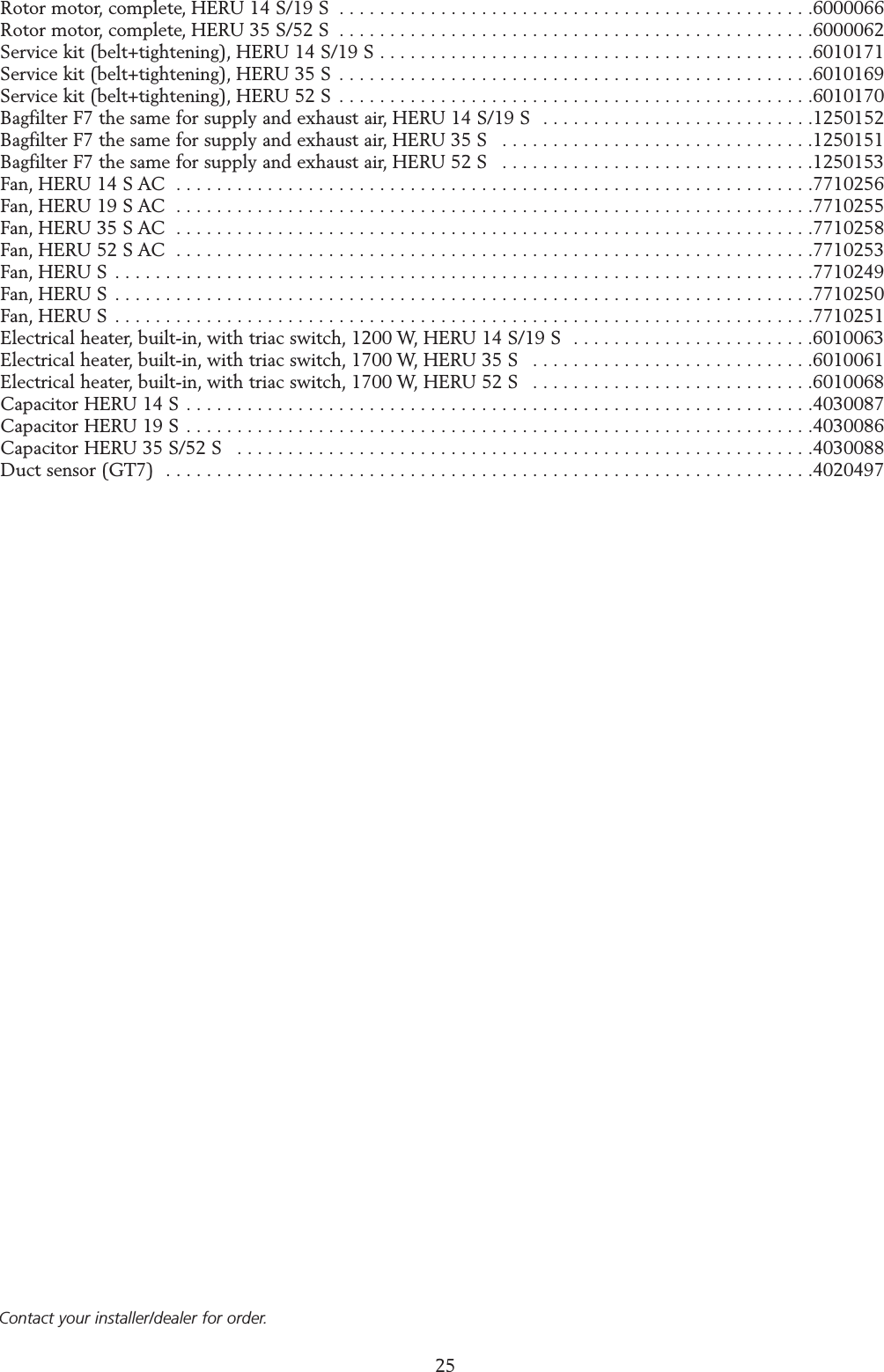
25Rotor motor, complete, HERU 14 S/19 S  . . . . . . . . . . . . . . . . . . . . . . . . . . . . . . . . . . . . . . . . . . . . . . .6000066Rotor motor, complete, HERU 35 S/52 S  . . . . . . . . . . . . . . . . . . . . . . . . . . . . . . . . . . . . . . . . . . . . . . .6000062Service kit (belt+tightening), HERU 14 S/19 S . . . . . . . . . . . . . . . . . . . . . . . . . . . . . . . . . . . . . . . . . . .6010171Service kit (belt+tightening), HERU 35 S  . . . . . . . . . . . . . . . . . . . . . . . . . . . . . . . . . . . . . . . . . . . . . . .6010169Service kit (belt+tightening), HERU 52 S  . . . . . . . . . . . . . . . . . . . . . . . . . . . . . . . . . . . . . . . . . . . . . . .6010170Bagfilter F7 the same for supply and exhaust air, HERU 14 S/19 S  . . . . . . . . . . . . . . . . . . . . . . . . . . .1250152Bagfilter F7 the same for supply and exhaust air, HERU 35 S  . . . . . . . . . . . . . . . . . . . . . . . . . . . . . . .1250151Bagfilter F7 the same for supply and exhaust air, HERU 52 S  . . . . . . . . . . . . . . . . . . . . . . . . . . . . . . .1250153Fan, HERU 14 S AC  . . . . . . . . . . . . . . . . . . . . . . . . . . . . . . . . . . . . . . . . . . . . . . . . . . . . . . . . . . . . . . .7710256Fan, HERU 19 S AC  . . . . . . . . . . . . . . . . . . . . . . . . . . . . . . . . . . . . . . . . . . . . . . . . . . . . . . . . . . . . . . .7710255Fan, HERU 35 S AC  . . . . . . . . . . . . . . . . . . . . . . . . . . . . . . . . . . . . . . . . . . . . . . . . . . . . . . . . . . . . . . .7710258Fan, HERU 52 S AC  . . . . . . . . . . . . . . . . . . . . . . . . . . . . . . . . . . . . . . . . . . . . . . . . . . . . . . . . . . . . . . .7710253Fan, HERU S  . . . . . . . . . . . . . . . . . . . . . . . . . . . . . . . . . . . . . . . . . . . . . . . . . . . . . . . . . . . . . . . . . . . . .7710249Fan, HERU S  . . . . . . . . . . . . . . . . . . . . . . . . . . . . . . . . . . . . . . . . . . . . . . . . . . . . . . . . . . . . . . . . . . . . .7710250Fan, HERU S  . . . . . . . . . . . . . . . . . . . . . . . . . . . . . . . . . . . . . . . . . . . . . . . . . . . . . . . . . . . . . . . . . . . . .7710251Electrical heater, built-in, with triac switch, 1200 W, HERU 14 S/19 S  . . . . . . . . . . . . . . . . . . . . . . . .6010063Electrical heater, built-in, with triac switch, 1700 W, HERU 35 S  . . . . . . . . . . . . . . . . . . . . . . . . . . . .6010061Electrical heater, built-in, with triac switch, 1700 W, HERU 52 S  . . . . . . . . . . . . . . . . . . . . . . . . . . . .6010068Capacitor HERU 14 S  . . . . . . . . . . . . . . . . . . . . . . . . . . . . . . . . . . . . . . . . . . . . . . . . . . . . . . . . . . . . . .4030087Capacitor HERU 19 S . . . . . . . . . . . . . . . . . . . . . . . . . . . . . . . . . . . . . . . . . . . . . . . . . . . . . . . . . . . . . .4030086Capacitor HERU 35 S/52 S  . . . . . . . . . . . . . . . . . . . . . . . . . . . . . . . . . . . . . . . . . . . . . . . . . . . . . . . . .4030088Duct sensor (GT7)  . . . . . . . . . . . . . . . . . . . . . . . . . . . . . . . . . . . . . . . . . . . . . . . . . . . . . . . . . . . . . . . .4020497SPARE PARTSContact your installer/dealer for order.
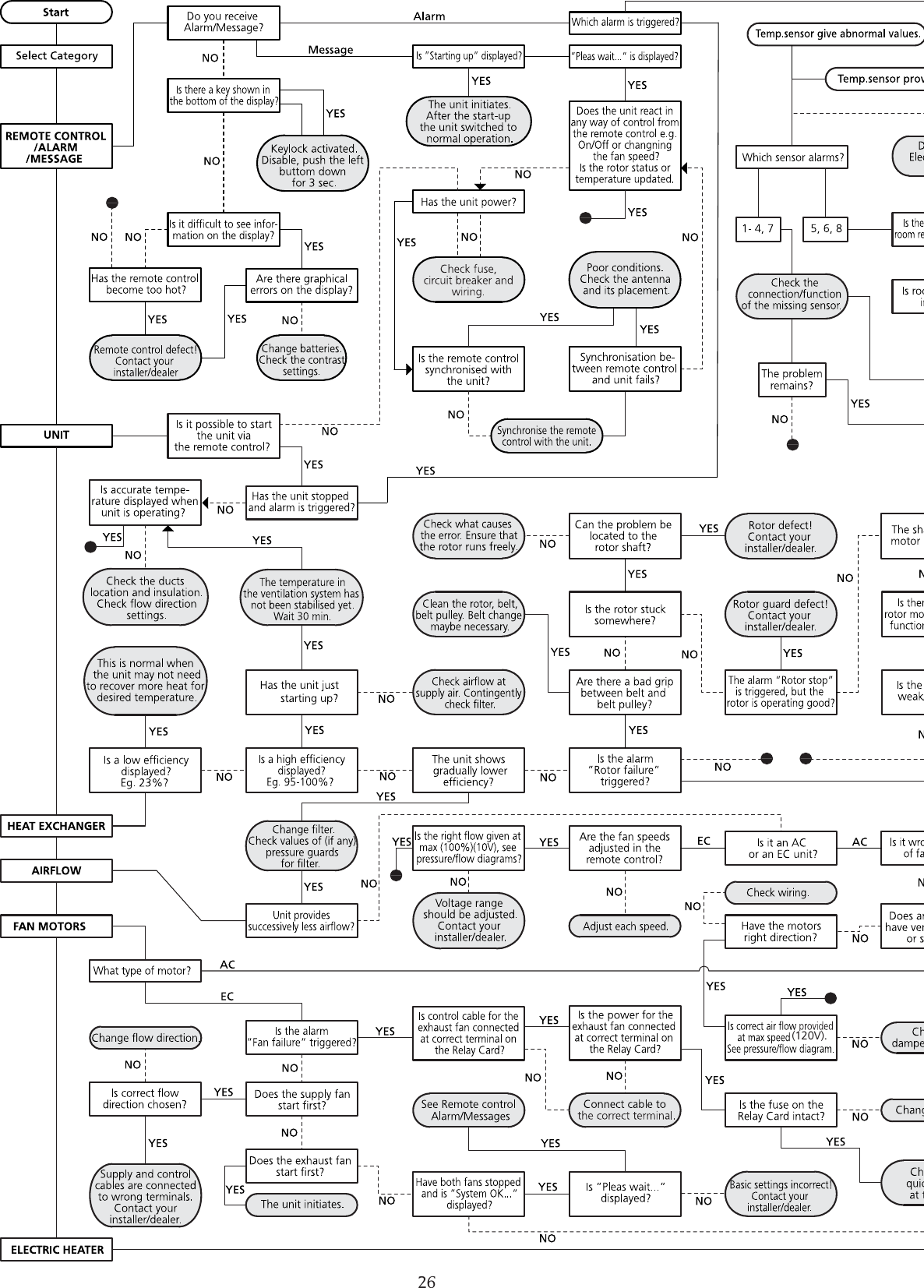
26(120V).
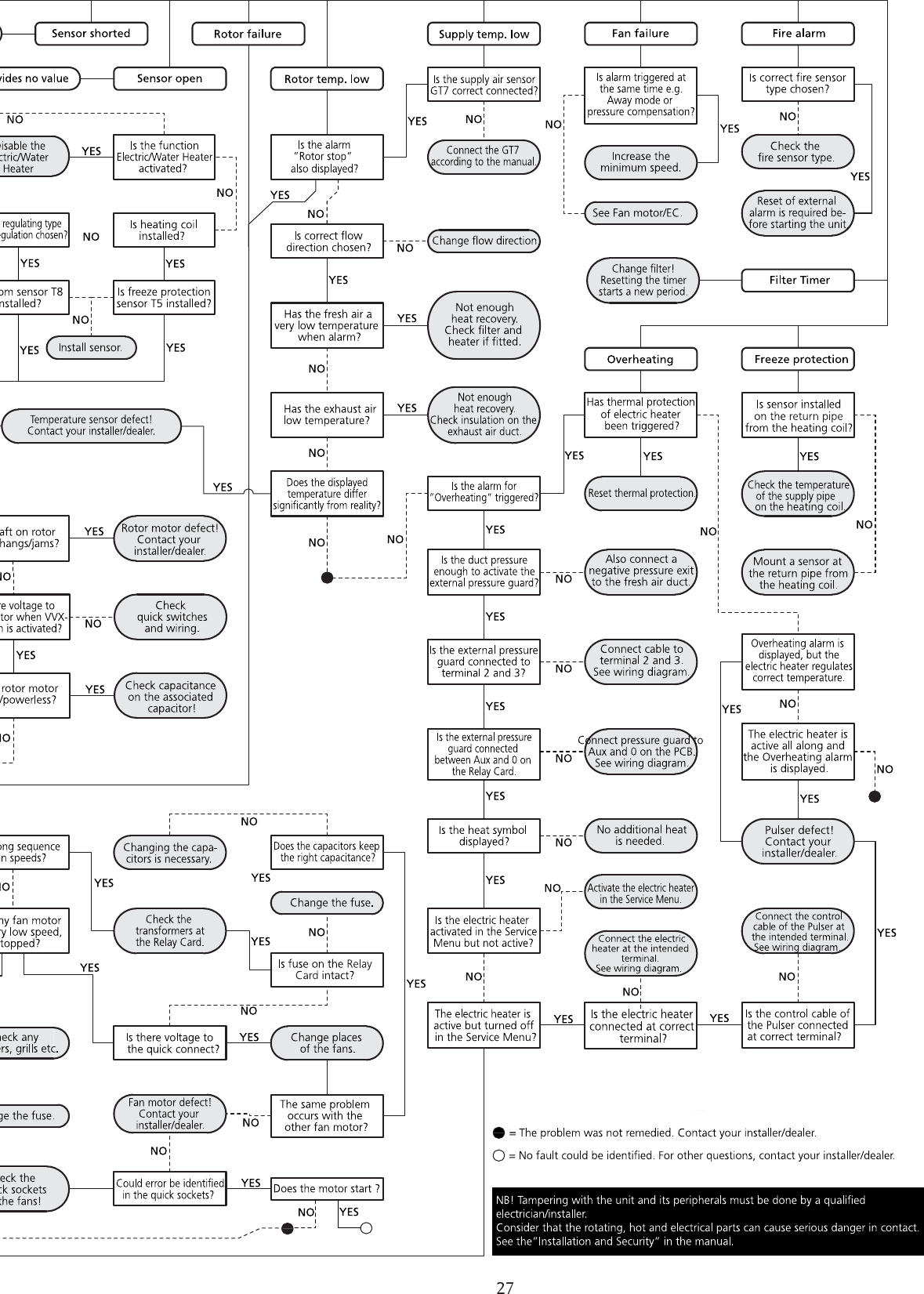
27
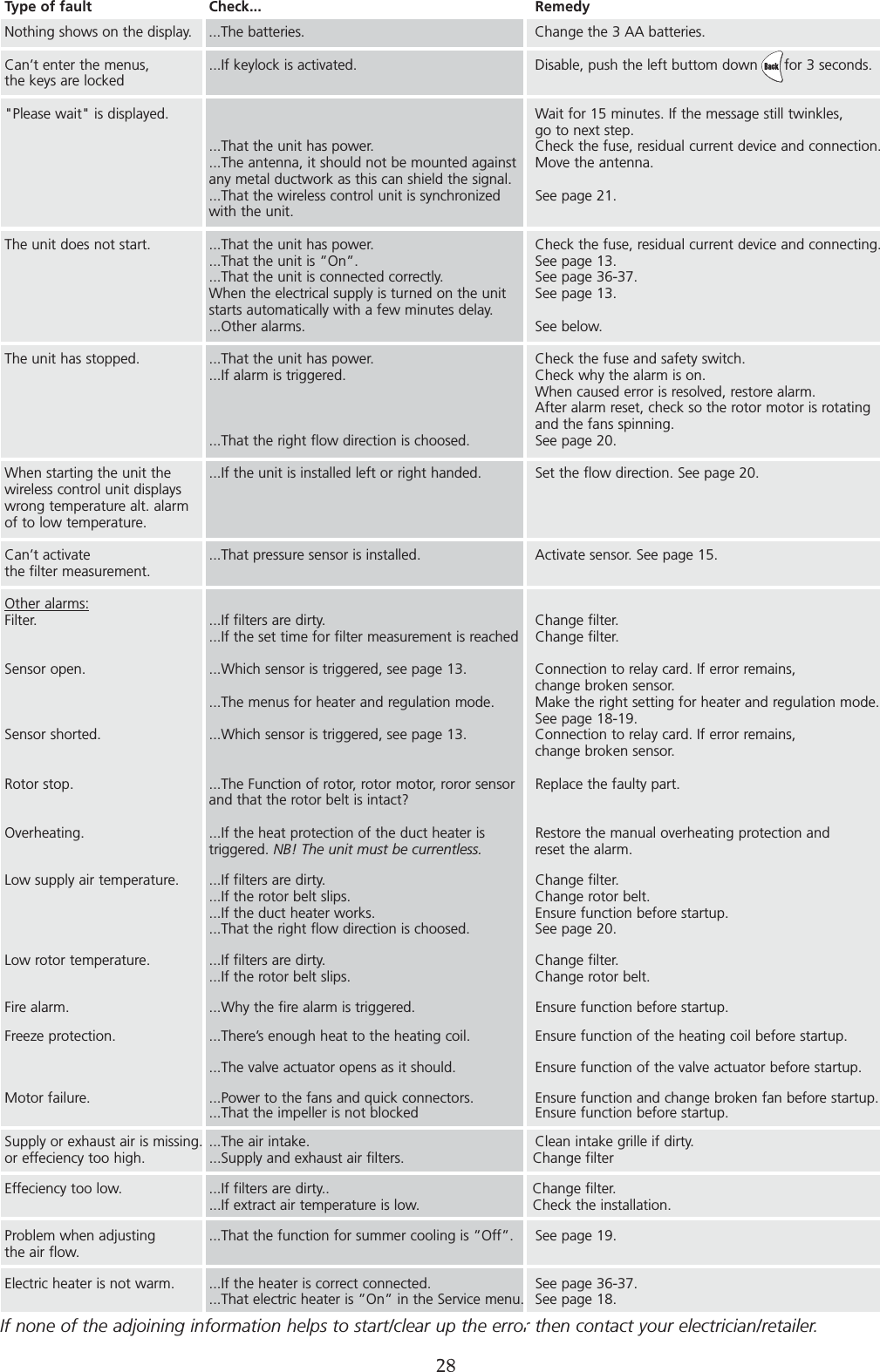
ERROR DETECTIONIf none of the adjoining information helps to start/clear up the error then contact your electrician/retailer.     28Type of fault Check... RemedyNothing shows on the display. ...The batteries. Change the 3 AA batteries.Can’t enter the menus, ...If keylock is activated. Disable, push the left buttom down      for 3 seconds.the keys are locked"Please wait" is displayed. Wait for 15 minutes. If the message still twinkles,go to next step....That the unit has power. Check the fuse, residual current device and connection....The antenna, it should not be mounted against  Move the antenna.any metal ductwork as this can shield the signal....That the wireless control unit is synchronized  See page 21.with the unit.The unit does not start. ...That the unit has power. Check the fuse, residual current device and connecting....That the unit is ”On”. See page 13....That the unit is connected correctly. See page 36-37.When the electrical supply is turned on the unit  See page 13.starts automatically with a few minutes delay....Other alarms. See below.The unit has stopped. ...That the unit has power. Check the fuse and safety switch....If alarm is triggered.  Check why the alarm is on.When caused error is resolved, restore alarm.After alarm reset, check so the rotor motor is rotating and the fans spinning....That the right flow direction is choosed.  See page 20.When starting the unit the ...If the unit is installed left or right handed. Set the flow direction. See page 20.wireless control unit displayswrong temperature alt. alarm of to low temperature.Can’t activate  ...That pressure sensor is installed.  Activate sensor. See page 15.the filter measurement.Other alarms:Filter. ...If filters are dirty. Change filter....If the set time for filter measurement is reached Change filter.Sensor open. ...Which sensor is triggered, see page 13. Connection to relay card. If error remains, change broken sensor....The menus for heater and regulation mode. Make the right setting for heater and regulation mode.See page 18-19.Sensor shorted. ...Which sensor is triggered, see page 13. Connection to relay card. If error remains,change broken sensor.Rotor stop. ...The Function of rotor, rotor motor, roror sensor  Replace the faulty part.and that the rotor belt is intact? Overheating. ...If the heat protection of the duct heater is  Restore the manual overheating protection andtriggered. NB! The unit must be currentless. reset the alarm.Low supply air temperature. ...If filters are dirty. Change filter....If the rotor belt slips. Change rotor belt....If the duct heater works. Ensure function before startup....That the right flow direction is choosed. See page 20.Low rotor temperature. ...If filters are dirty. Change filter....If the rotor belt slips. Change rotor belt.Fire alarm. ...Why the fire alarm is triggered. Ensure function before startup.Freeze protection. ...There’s enough heat to the heating coil. Ensure function of the heating coil before startup....The valve actuator opens as it should. Ensure function of the valve actuator before startup.Motor failure. ...Power to the fans and quick connectors. Ensure function and change broken fan before startup....That the impeller is not blocked Ensure function before startup.Supply or exhaust air is missing. ...The air intake. Clean intake grille if dirty. or effeciency too high. ...Supply and exhaust air filters. Change filter Effeciency too low. ...If filters are dirty.. Change filter....If extract air temperature is low. Check the installation.Problem when adjusting  ...That the function for summer cooling is ”Off”.  See page 19.the air flow.Electric heater is not warm. ...If the heater is correct connected. See page 36-37....That electric heater is ”On” in the Service menu. See page 18.
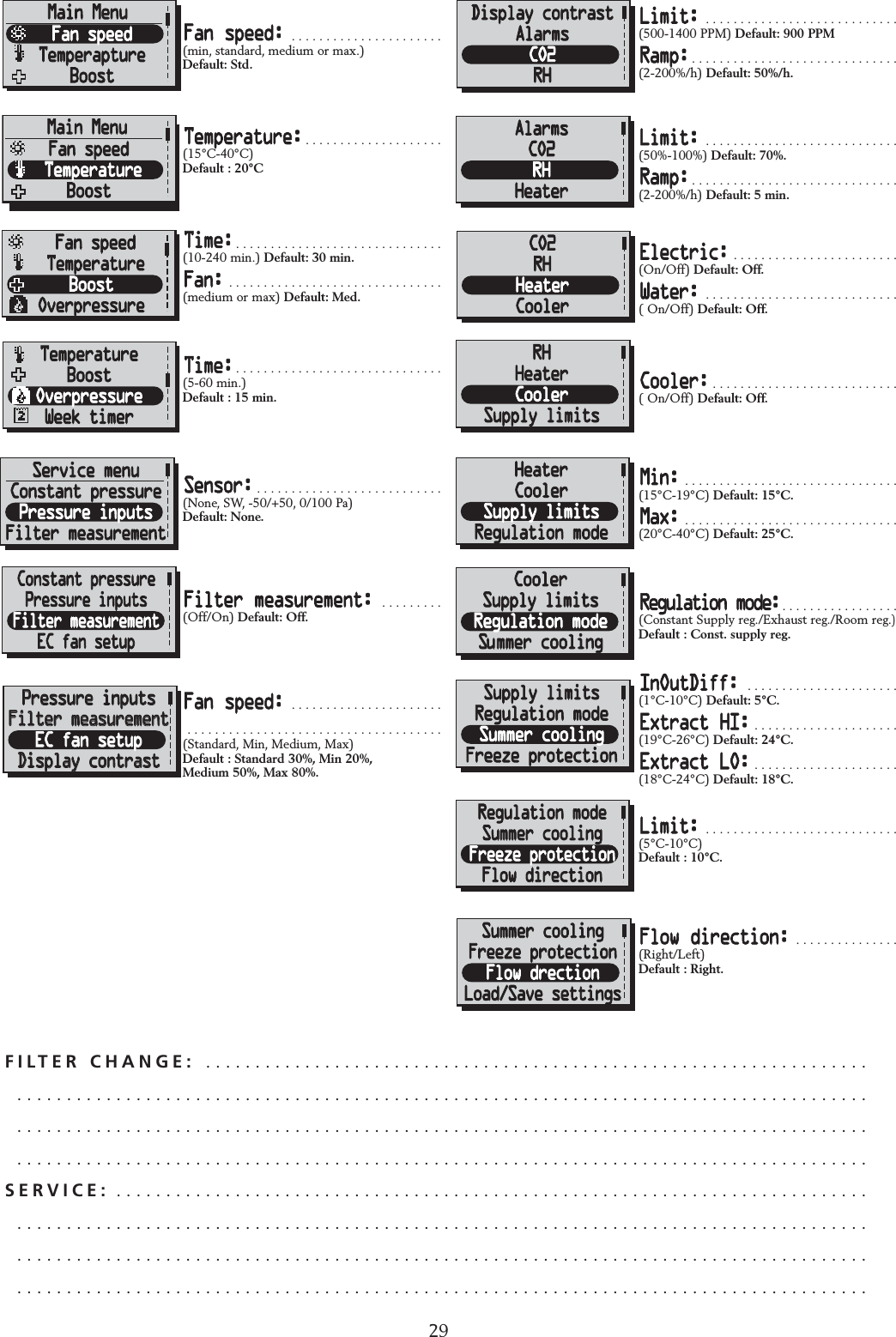
29INTERNAL SETTINGS ACFILTER CHANGE:  . . . . . . . . . . . . . . . . . . . . . . . . . . . . . . . . . . . . . . . . . . . . . . . . . . . . . . . . . . . . . . . . . . . . . . . . . . . . . . . . . . . . . . . . . . . . . . . . . . . . . . . . . . . . . . . . . . . . . . . . . . . . . . . . . . . . . . . . . . . . . . . . . . . . . . . . . . . . . . . . . . . . . . . . . . . . . . . . . . . . . . . . . . . . . . . . . . . . . . . . . . . . . . . . . . . . . . . . . . . . . . . . . . . . . . . . . . . . . . . . . . . . . . . . . . . . . . . . . . . . . . . . . . . . . . . . . . . . . . . . . . . . . . . . . . . . . . . . . . . . . . . . . . . . . . . . . . . . . . . . . . . . .SERVICE: . . . . . . . . . . . . . . . . . . . . . . . . . . . . . . . . . . . . . . . . . . . . . . . . . . . . . . . . . . . . . . . . . . . . . . . . . . . . . . . . . . . . . . . . . . . . . . . . . . . . . . . . . . . . . . . . . . . . . . . . . . . . . . . . . . . . . . . . . . . . . . . . . . . . . . . . . . . . . . . . . . . . . . . . . . . . . . . . . . . . . . . . . . . . . . . . . . . . . . . . . . . . . . . . . . . . . . . . . . . . . . . . . . . . . . . . . . . . . . . . . . . . . . . . . . . . . . . . . . . . . . . . . . . . . . . . . . . . . . . . . . . . . . . . . . . . . . . . . . . . . . . . . . . . . . . . . . . . . . . . . . . . . . . . . . . . . .FFan speed: . . . . . . . . . . . . . . . . . . . . . .(min, standard, medium or max.)Default: Std.Temperature: . . . . . . . . . . . . . . . . . . . .(15°C-40°C)Default : 20°CTime: . . . . . . . . . . . . . . . . . . . . . . . . . . . . . .(10-240 min.) Default: 30 min.Fan: . . . . . . . . . . . . . . . . . . . . . . . . . . . . . . .(medium or max) Default: Med.Time: . . . . . . . . . . . . . . . . . . . . . . . . . . . . . .(5-60 min.) Default : 15 min.Sensor: . . . . . . . . . . . . . . . . . . . . . . . . . . .(None, SW, -50/+50, 0/100 Pa)Default: None.Filter measurement: . . . . . . . . .(Off/On) Default: Off.Fan speed: . . . . . . . . . . . . . . . . . . . . . . . . . . . . . . . . . . . . . . . . . . . . . . . . . . . . . . . . . . .(Standard, Min, Medium, Max) Default : Standard 30%, Min 20%,Medium 50%, Max 80%.Limit: . . . . . . . . . . . . . . . . . . . . . . . . . . . .(500-1400 PPM) Default: 900 PPMRamp: . . . . . . . . . . . . . . . . . . . . . . . . . . . . . .(2-200%/h) Default: 50%/h.Limit: . . . . . . . . . . . . . . . . . . . . . . . . . . . .(50%-100%) Default: 70%.Ramp: . . . . . . . . . . . . . . . . . . . . . . . . . . . . . .(2-200%/h) Default: 5 min.Electric: . . . . . . . . . . . . . . . . . . . . . . . .(On/Off) Default: Off.Water: . . . . . . . . . . . . . . . . . . . . . . . . . . . .( On/Off) Default: Off.Cooler: . . . . . . . . . . . . . . . . . . . . . . . . . . .( On/Off) Default: Off.Min: . . . . . . . . . . . . . . . . . . . . . . . . . . . . . . .(15°C-19°C) Default: 15°C.Max: . . . . . . . . . . . . . . . . . . . . . . . . . . . . . . .(20°C-40°C) Default: 25°C.Regulation mode: . . . . . . . . . . . . . . . . .(Constant Supply reg./Exhaust reg./Room reg.)Default : Const. supply reg.InOutDiff: . . . . . . . . . . . . . . . . . . . . . .(1°C-10°C) Default: 5°C.Extract HI: . . . . . . . . . . . . . . . . . . . . .(19°C-26°C) Default: 24°C.Extract LO: . . . . . . . . . . . . . . . . . . . . .(18°C-24°C) Default: 18°C.Limit: . . . . . . . . . . . . . . . . . . . . . . . . . . . .(5°C-10°C)Default : 10°C.Flow direction: . . . . . . . . . . . . . . .(Right/Left)Default : Right.ServicemenyFiltermätningEC-motor setupDisplay kontrastÄr du säker?Bör endast ändrasav installatör!Standard (%)Tilluft: 60%Frånluft: 70%MinimumMin: 20%EC-motor setupStandardMinMedium Avbryt           OkStandard(konst.tr.)Till: 90Pa (45%)Från: 110Pa (50%)Till konst.tr.EC-motor setupStandardMinMediumMinimumMin: 20%Standard (%)Tilluft: 60%Frånluft: 70%Standard (%)Tilluft: 60%Frånluft: 70%Pressure inputsPressure inputsFilter measurementFilter measurementEC fan setupEC fan setupDisplay contrastDisplay contrastAre you sure?Should not bechanged by user!Standard (%)Sup: 60%Exh: 70%MinimumMin: 20%EC fan setupStandardMinMedium Cancel           OkStandard(CPC)Sup: 90Pa (45%)Exh: 110Pa (50%)Go to CPCEC fan setupStandardMinMediumMinimumMin: 20%Standard (%)Sup: 60%Exh: 70%Standard (%)Sup: 60%Exh: 70%
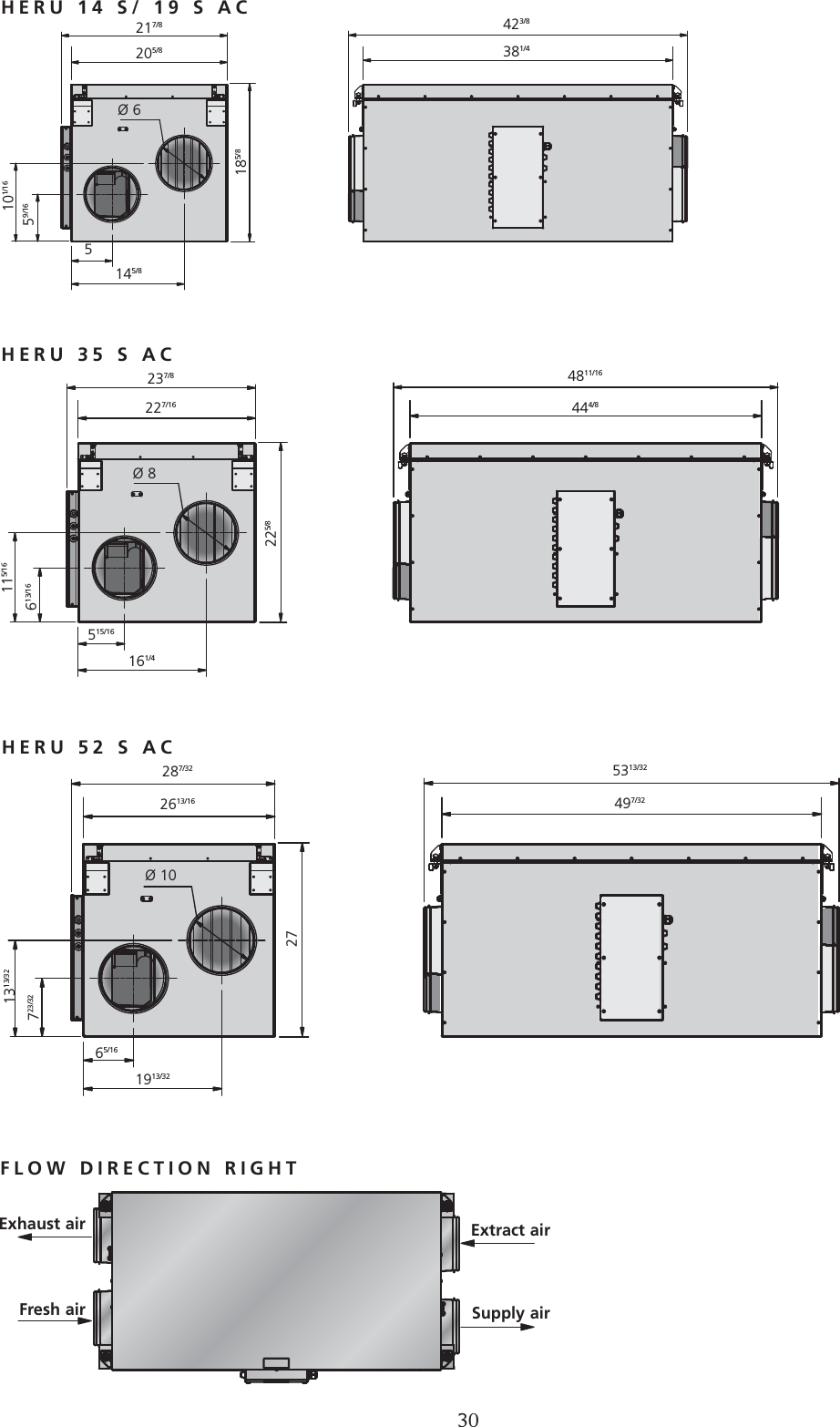
DIMENSIONS (inch)237/8227/164811/16444/8515/16161/4Ø 8287/322613/165313/32497/3265/161913/321313/32723/32Ø 10217/8205/8423/8381/45145/8101/1659/16Ø 6185/8225/827FLOW DIRECTION RIGHTExtract airSupply airExhaust airFresh airHERU 52 S ACHERU 35 S ACHERU 14 S/ 19 S AC115/16613/1630
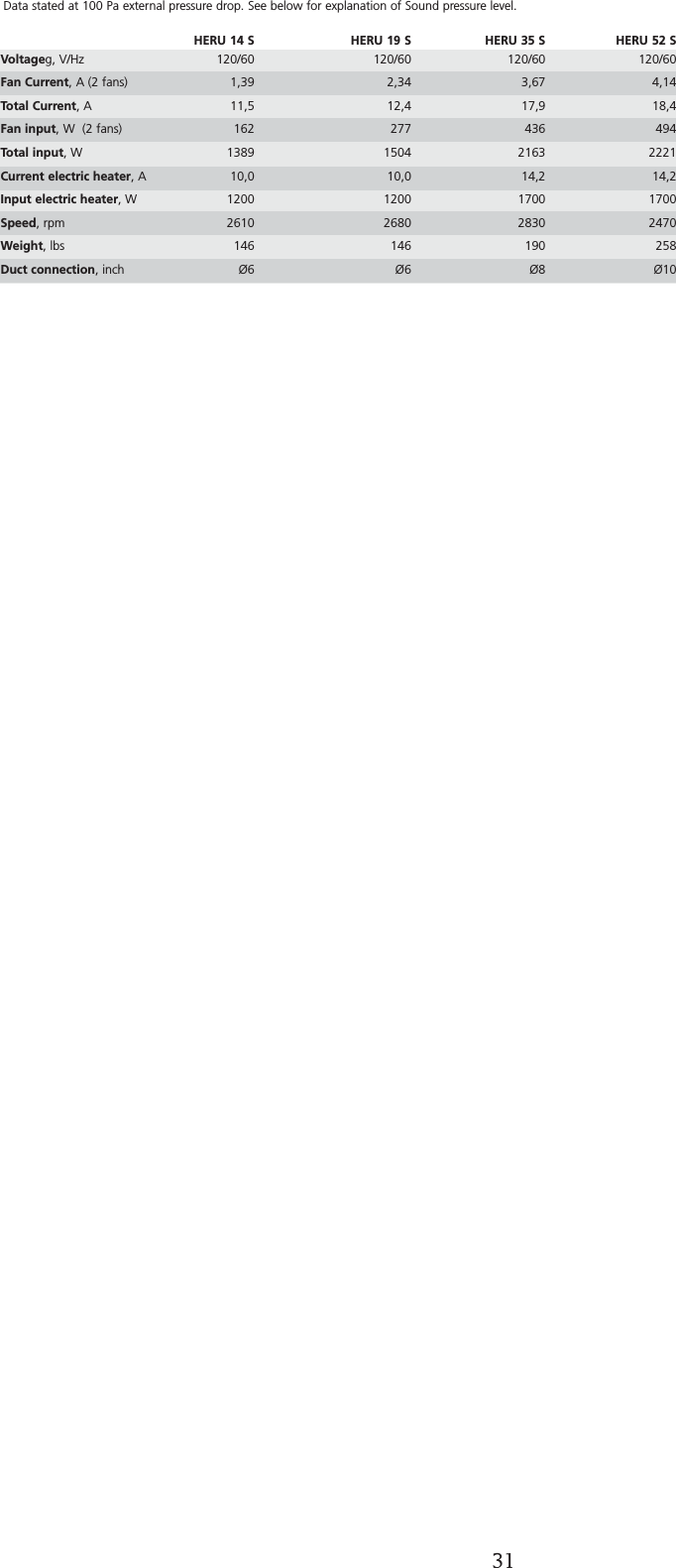
31TECHNICAL DATAData stated at 100 Pa external pressure drop. See below for explanation of Sound pressure level.HERU 14 S HERU 19 S HERU 35 S HERU 52 SVoltageg, V/Hz 120/60 120/60 120/60 120/60Fan Current, A (2 fans) 1,39 2,34 3,67 4,14Total Current, A 11,5 12,4 17,9 18,4Fan input, W  (2 fans) 162 277 436 494Total input, W 1389 1504 2163 2221Current electric heater, A  10,0 10,0 14,2 14,2Input electric heater, W  1200 1200 1700 1700Speed, rpm  2610 2680 2830 2470Weight, lbs 146 146 190 258Duct connection, inch Ø6 Ø6 Ø8 Ø10
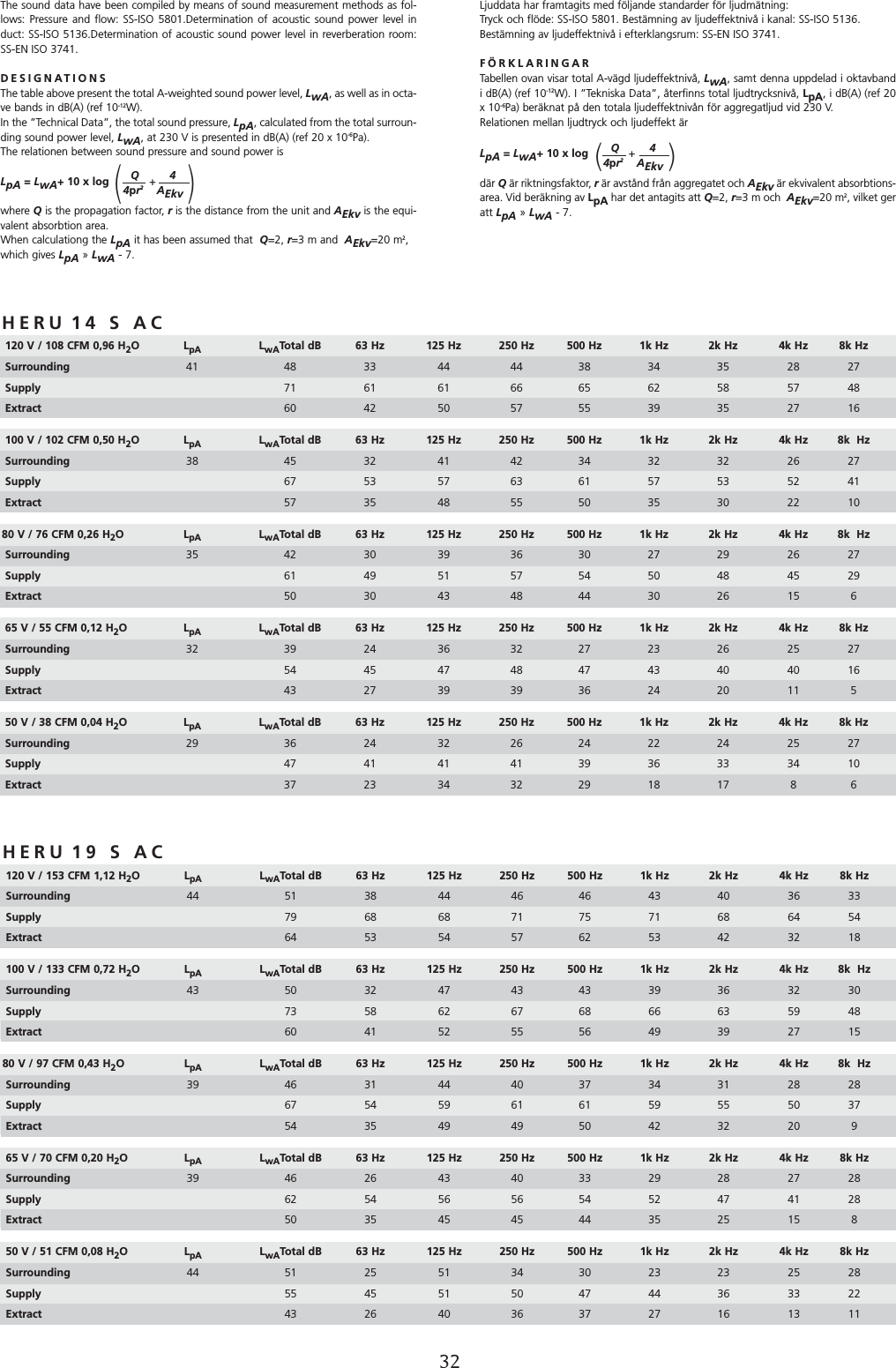
SOUND DATAHERU 14 S AC120 V / 108 CFM 0,96 H2OLpA LwATotal dB 63 Hz 125 Hz 250 Hz 500 Hz 1k Hz 2k Hz 4k Hz 8k HzSurrounding  41 48 33 44 44 38 34 35 28 27Supply  71 61 61 66 65 62 58 57 48Extract 60 42 50 57 55 39 35 27 16100 V / 102 CFM 0,50 H2OLpA LwATotal dB 63 Hz 125 Hz 250 Hz 500 Hz 1k Hz 2k Hz 4k Hz 8k  HzSurrounding  38 45 32 41 42 34 32 32 26 27Supply  67 53 57 63 61 57 53 52 41Extract 57 35 48 55 50 35 30 22 1080 V / 76 CFM 0,26 H2OLpA LwATotal dB 63 Hz 125 Hz 250 Hz 500 Hz 1k Hz 2k Hz 4k Hz 8k  HzSurrounding 35 42 30 39 36 30 27 29 26 27Supply 61 49 51 57 54 50 48 45 29Extract 50 30 43 48 44 30 26 15 665 V / 55 CFM 0,12 H2OLpA LwATotal dB 63 Hz 125 Hz 250 Hz 500 Hz 1k Hz 2k Hz 4k Hz 8k HzSurrounding 32 39 24 36 32 27 23 26 25 27Supply  54 45 47 48 47 43 40 40 16Extract 43 27 39 39 36 24 20 11 550 V / 38 CFM 0,04 H2OLpA LwATotal dB 63 Hz 125 Hz 250 Hz 500 Hz 1k Hz 2k Hz 4k Hz 8k Hz Surrounding 29 36 24 32 26 24 22 24 25 27Supply 47 41 41 41 39 36 33 34 10Extract 37 23 34 32 29 18 17 8 6Ljuddata har framtagits med följande standarder för ljudmätning: Tryck och flöde: SS-ISO 5801. Bestämning av ljudeffektnivå i kanal: SS-ISO 5136.Bestämning av ljudeffektnivå i efterklangsrum: SS-EN ISO 3741.FÖRKLARINGARTabellen ovan visar total A-vägd ljudeffektnivå, LwA, samt denna uppdelad i oktavbandi dB(A) (ref 10-12W). I ”Tekniska Data”, återfinns total ljudtrycksnivå, LpA, i dB(A) (ref 20x 10-6Pa) beräknat på den totala ljudeffektnivån för aggregatljud vid 230 V.Relationen mellan ljudtryck och ljudeffekt ärLpA = LwA+ 10 x log +     där Qär riktningsfaktor, rär avstånd från aggregatet och AEkv är ekvivalent absorbtions-area. Vid beräkning av LpA har det antagits att Q=2, r=3 m och  AEkv=20 m2, vilket geratt LpA » LwA - 7.Q         44pr2AEkv(         )The sound data have been compiled by means of sound measurement methods as fol-lows: Pressure and flow: SS-ISO 5801.Determination of acoustic sound power level induct: SS-ISO 5136.Determination of acoustic sound power level in reverberation room:SS-EN ISO 3741.DESIGNATIONSThe table above present the total A-weighted sound power level, LwA, as well as in octa-ve bands in dB(A) (ref 10-12W). In the ”Technical Data”, the total sound pressure, LpA, calculated from the total surroun-ding sound power level, LwA, at 230 V is presented in dB(A) (ref 20 x 10-6Pa).The relationen between sound pressure and sound power isLpA = LwA+ 10 x log   +     where Qis the propagation factor, ris the distance from the unit and AEkv is the equi-valent absorbtion area.When calculationg the LpA it has been assumed that  Q=2, r=3 m and  AEkv=20 m2, which gives LpA » LwA - 7.Q         44pr2AEkv(         )32HERU 19 S AC120 V / 153 CFM 1,12 H2OLpA LwATotal dB 63 Hz 125 Hz 250 Hz 500 Hz 1k Hz 2k Hz 4k Hz 8k HzSurrounding  44 51 38 44 46 46 43 40 36 33Supply  79 68 68 71 75 71 68 64 54Extract 64 53 54 57 62 53 42 32 18100 V / 133 CFM 0,72 H2OLpA LwATotal dB 63 Hz 125 Hz 250 Hz 500 Hz 1k Hz 2k Hz 4k Hz 8k  HzSurrounding  43 50 32 47 43 43 39 36 32 30Supply  73 58 62 67 68 66 63 59 48Extract 60 41 52 55 56 49 39 27 1580 V / 97 CFM 0,43 H2OLpA LwATotal dB 63 Hz 125 Hz 250 Hz 500 Hz 1k Hz 2k Hz 4k Hz 8k  HzSurrounding 39 46 31 44 40 37 34 31 28 28Supply 67 54 59 61 61 59 55 50 37Extract 54 35 49 49 50 42 32 20 965 V / 70 CFM 0,20 H2OLpA LwATotal dB 63 Hz 125 Hz 250 Hz 500 Hz 1k Hz 2k Hz 4k Hz 8k HzSurrounding 39 46 26 43 40 33 29 28 27 28Supply  62 54 56 56 54 52 47 41 28Extract 50 35 45 45 44 35 25 15 850 V / 51 CFM 0,08 H2OLpA LwATotal dB 63 Hz 125 Hz 250 Hz 500 Hz 1k Hz 2k Hz 4k Hz 8k Hz Surrounding 44 51 25 51 34 30 23 23 25 28Supply 55 45 51 50 47 44 36 33 22Extract 43 26 40 36 37 27 16 13 11
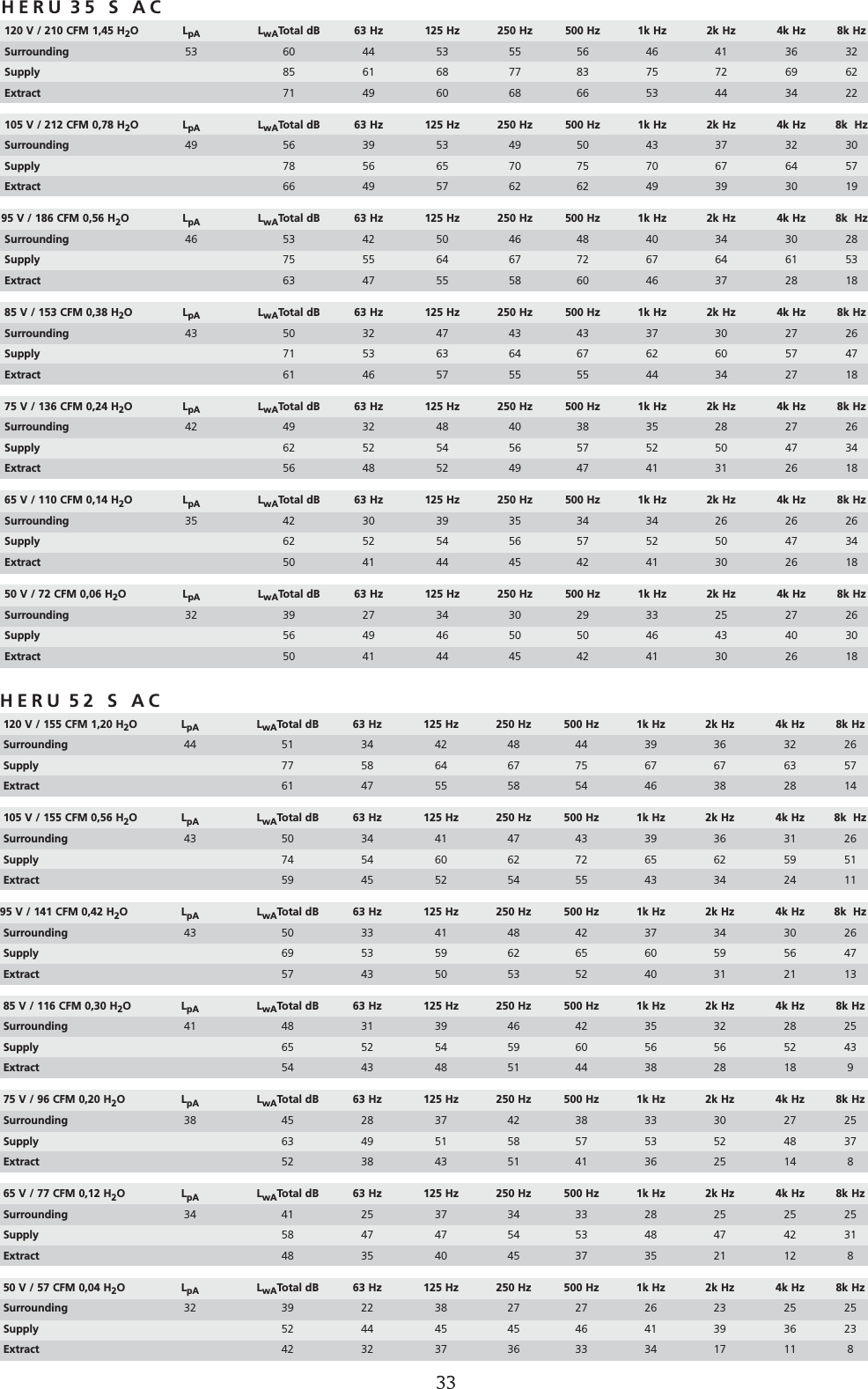
33SOUND DATAHERU 35 S AC120 V / 210 CFM 1,45 H2OLpA LwATotal dB 63 Hz 125 Hz 250 Hz 500 Hz 1k Hz 2k Hz 4k Hz 8k HzSurrounding  53 60 44 53 55 56 46 41 36 32Supply  85 61 68 77 83 75 72 69 62Extract 71 49 60 68 66 53 44 34 22105 V / 212 CFM 0,78 H2OLpA LwATotal dB 63 Hz 125 Hz 250 Hz 500 Hz 1k Hz 2k Hz 4k Hz 8k  HzSurrounding  49 56 39 53 49 50 43 37 32 30Supply  78 56 65 70 75 70 67 64 57Extract 66 49 57 62 62 49 39 30 1995 V / 186 CFM 0,56 H2OLpA LwATotal dB 63 Hz 125 Hz 250 Hz 500 Hz 1k Hz 2k Hz 4k Hz 8k  HzSurrounding 46 53 42 50 46 48 40 34 30 28Supply 75 55 64 67 72 67 64 61 53Extract 63 47 55 58 60 46 37 28 1885 V / 153 CFM 0,38 H2OLpA LwATotal dB 63 Hz 125 Hz 250 Hz 500 Hz 1k Hz 2k Hz 4k Hz 8k HzSurrounding 43 50 32 47 43 43 37 30 27 26Supply  71 53 63 64 67 62 60 57 47Extract 61 46 57 55 55 44 34 27 1875 V / 136 CFM 0,24 H2OLpA LwATotal dB 63 Hz 125 Hz 250 Hz 500 Hz 1k Hz 2k Hz 4k Hz 8k Hz Surrounding 42 49 32 48 40 38 35 28 27 26Supply 62 52 54 56 57 52 50 47 34Extract 56 48 52 49 47 41 31 26 1865 V / 110 CFM 0,14 H2OLpA LwATotal dB 63 Hz 125 Hz 250 Hz 500 Hz 1k Hz 2k Hz 4k Hz 8k Hz Surrounding 35 42 30 39 35 34 34 26 26 26Supply 62 52 54 56 57 52 50 47 34Extract 50 41 44 45 42 41 30 26 1850 V / 72 CFM 0,06 H2OLpA LwATotal dB 63 Hz 125 Hz 250 Hz 500 Hz 1k Hz 2k Hz 4k Hz 8k Hz Surrounding 32 39 27 34 30 29 33 25 27 26Supply 56 49 46 50 50 46 43 40 30Extract 50 41 44 45 42 41 30 26 18HERU 52 S AC120 V / 155 CFM 1,20 H2OLpA LwATotal dB 63 Hz 125 Hz 250 Hz 500 Hz 1k Hz 2k Hz 4k Hz 8k HzSurrounding  44 51 34 42 48 44 39 36 32 26Supply  77 58 64 67 75 67 67 63 57Extract 61 47 55 58 54 46 38 28 14105 V / 155 CFM 0,56 H2OLpA LwATotal dB 63 Hz 125 Hz 250 Hz 500 Hz 1k Hz 2k Hz 4k Hz 8k  HzSurrounding  43 50 34 41 47 43 39 36 31 26Supply  74 54 60 62 72 65 62 59 51Extract 59 45 52 54 55 43 34 24 1195 V / 141 CFM 0,42 H2OLpA LwATotal dB 63 Hz 125 Hz 250 Hz 500 Hz 1k Hz 2k Hz 4k Hz 8k  HzSurrounding 43 50 33 41 48 42 37 34 30 26Supply 69 53 59 62 65 60 59 56 47Extract 57 43 50 53 52 40 31 21 1385 V / 116 CFM 0,30 H2OLpA LwATotal dB 63 Hz 125 Hz 250 Hz 500 Hz 1k Hz 2k Hz 4k Hz 8k HzSurrounding 41 48 31 39 46 42 35 32 28 25Supply  65 52 54 59 60 56 56 52 43Extract 54 43 48 51 44 38 28 18 975 V / 96 CFM 0,20 H2OLpA LwATotal dB 63 Hz 125 Hz 250 Hz 500 Hz 1k Hz 2k Hz 4k Hz 8k Hz Surrounding 38 45 28 37 42 38 33 30 27 25Supply 63 49 51 58 57 53 52 48 37Extract 52 38 43 51 41 36 25 14 865 V / 77 CFM 0,12 H2OLpA LwATotal dB 63 Hz 125 Hz 250 Hz 500 Hz 1k Hz 2k Hz 4k Hz 8k Hz Surrounding 34 41 25 37 34 33 28 25 25 25Supply 58 47 47 54 53 48 47 42 31Extract 48 35 40 45 37 35 21 12 850 V / 57 CFM 0,04 H2OLpA LwATotal dB 63 Hz 125 Hz 250 Hz 500 Hz 1k Hz 2k Hz 4k Hz 8k Hz Surrounding 32 39 22 38 27 27 26 23 25 25Supply 52 44 45 45 46 41 39 36 23Extract 42 32 37 36 33 34 17 11 8
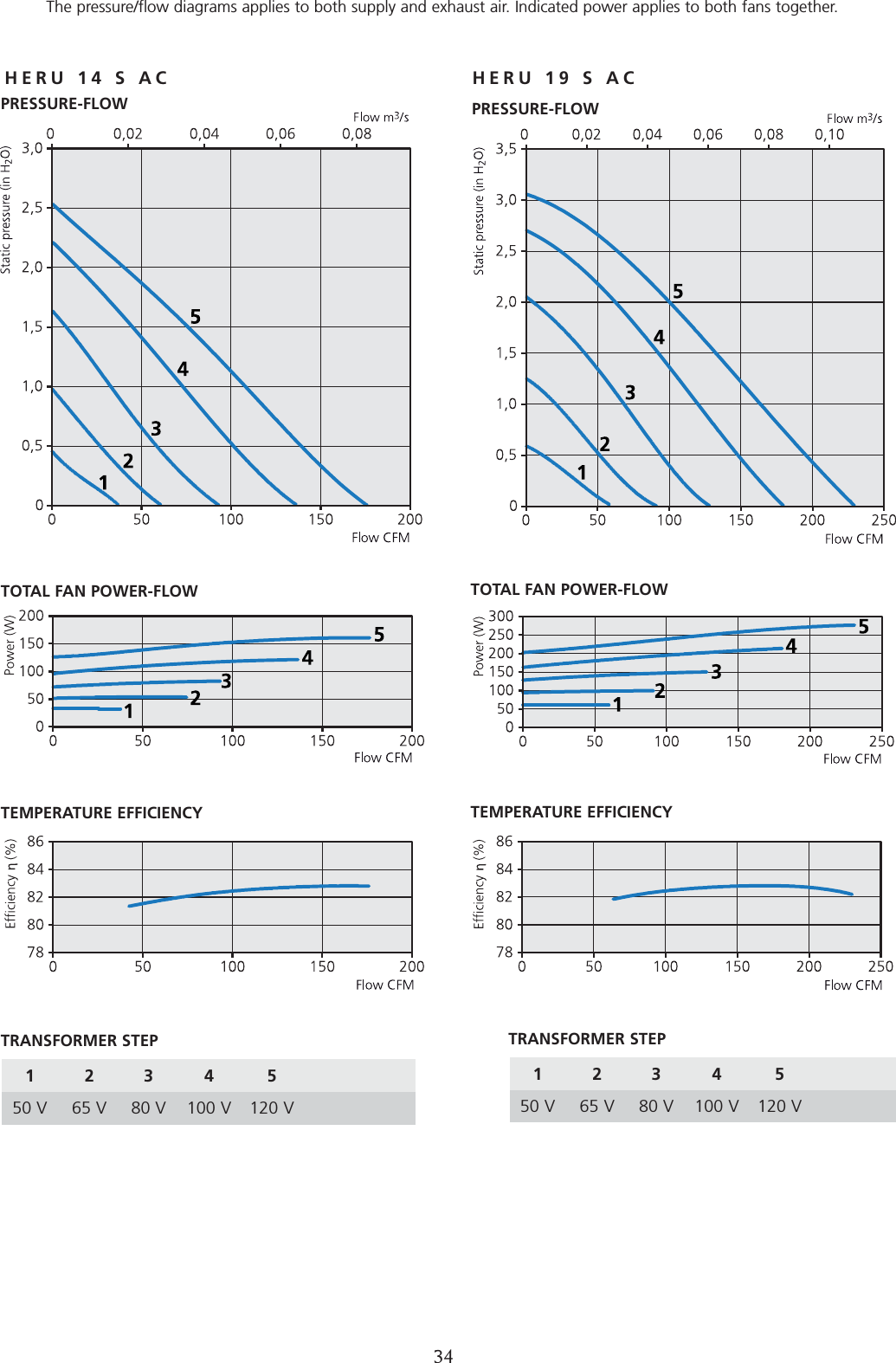
34PRESSURE-FLOW  DIAGRAMSThe pressure/flow diagrams applies to both supply and exhaust air. Indicated power applies to both fans together.HERU 14 S AC HERU 19 S ACPRESSURE-FLOW 1234 550 V 65 V 80 V 100 V 120 VPRESSURE-FLOW TOTAL FAN POWER-FLOWTEMPERATURE EFFICIENCYTRANSFORMER STEPTOTAL FAN POWER-FLOW TEMPERATURE EFFICIENCY1234 550 V 65 V 80 V 100 V 120 VTRANSFORMER STEP
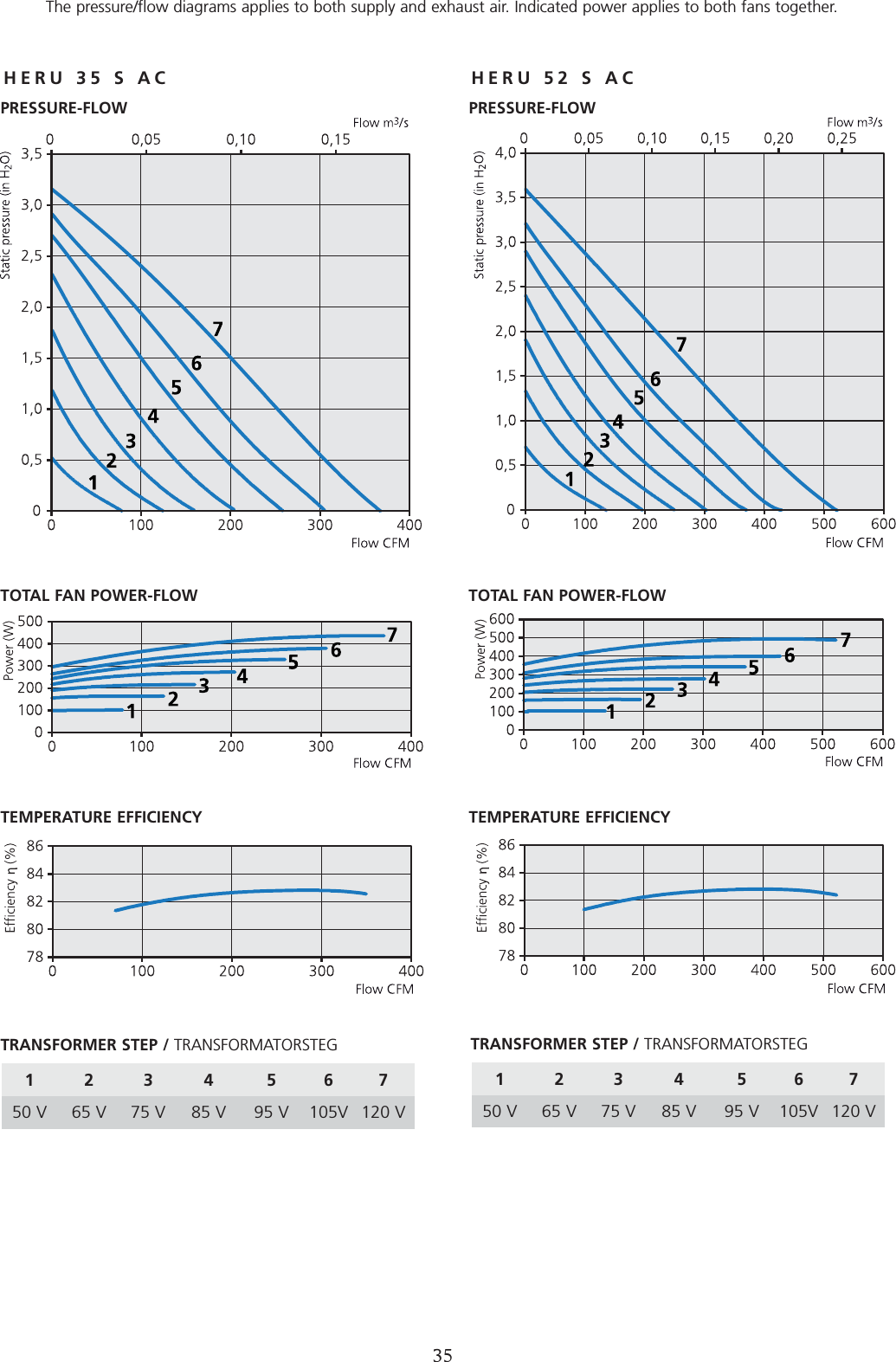
35HERU 35 S AC HERU 52 S ACPRESSURE-FLOW DIAGRAMSThe pressure/flow diagrams applies to both supply and exhaust air. Indicated power applies to both fans together.1234 56750 V 65 V 75 V 85 V 95 V 105V 120 VPRESSURE-FLOWTOTAL FAN POWER-FLOWTEMPERATURE EFFICIENCYTRANSFORMER STEP / TRANSFORMATORSTEGPRESSURE-FLOWTOTAL FAN POWER-FLOW TEMPERATURE EFFICIENCY1234 56750 V 65 V 75 V 85 V 95 V 105V 120 VTRANSFORMER STEP / TRANSFORMATORSTEG
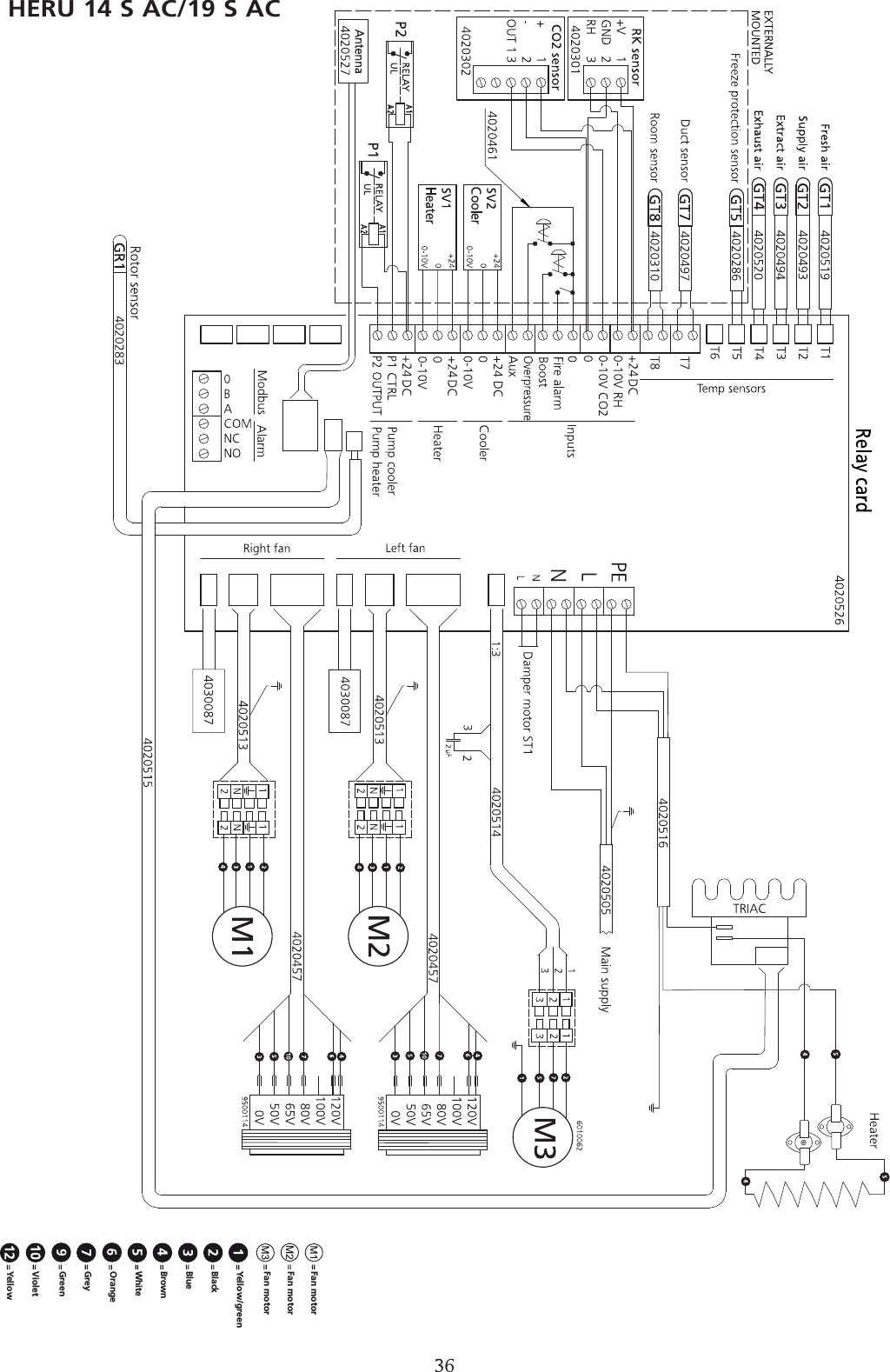
WIRING DIAGRAM 4040155HERU 14 S AC/19 S AC36Fan motor Fan motor Fan motor Yellow/green Black Blue Brown White Orange Grey Green Violet Yellow
WIRING DIAGRAM 4040149HERU 35 S AC/52 S AC 37Fan motor Fan motor Fan motor Yellow/greenBlack Blue BrownWhite OrangeGrey Green Violet Yellow
1270316 UL 11.12 Utg 1OSTBERG AMERICAS INC. 55 Raglin PL # 3 • Cambridge, N1R 7J2 • CanadaPhone 519-623-6363Telefax 519-623-8543 www.ostberg.com

Navigation menu