ACADIA ELECTRONIC ES-53803BT Bluetooth Speaker User Manual
SHENZHEN ACADIA ELECTRONIC CO., LTD Bluetooth Speaker Users Manual
Users Manual
1
BLUETOOTH SPLASH PROOF
AQUA ALL WEATHER
SPEAKER
SBS-6/6096

2
INSTRUCTION MANUAL
PLEASE READ ALL INSTRUCTIONS CAREFULLY
& RETAIN FOR FUTURE USE
Getting Started
Remove the package contents from the box.
Please retain all packaging until you have checked off all parts and contents on
the package contents list.
Package Contents
Wireless Shower Speaker
USB Charging Cable
Instruction Manual
Features
Compatible with Bluetooth® devices
Unique splash proof design allows you to enjoy wireless music in the shower
Built-in answer key and microphone - never miss phone calls while listening to
music
Easily mounts via suction cup on smooth and flat surfaces
Speaker recharges via USB cable (included)
IMPORTANT SAFETY INFORMATION
1. Read all instructions before using this product.
2. Do not leave this product unattended while connected to a power supply.
3. Do not immerse in water or any other liquids.
4. Do not use if unit has been dropped or damaged in any way.
5. Repairs to electrical equipment should only be performed by qualified
personnel. Improper repairs may place user at serious risk.
6. Place the unit on a sound, even surface, free of vibrations and away from
sources of heat.
7. Do not use with wet hands.
8. Do not place objects into openings.
9. Keep free of dust, lint, hair etc.
10. Do not use this unit for any other reason than its intended use.
11. Keep this product out of reach from children.
12. This product is not a toy.
13. Do not play music at excessive levels, especially near children, as it may
damage hearing.
3
CAUTION: SPLASH PROOF
This unit is designed to resist mild steam and light splashes from a
shower and/or bath. Speaker must never be operated under running
water. Under no circumstances should it ever be fully immersed
under water.
This unit has rubber seals to minimize the risk of moisture getting
inside. Do not immerse it in water or else risk permanent damage to
the electrical and mechanical parts.
4
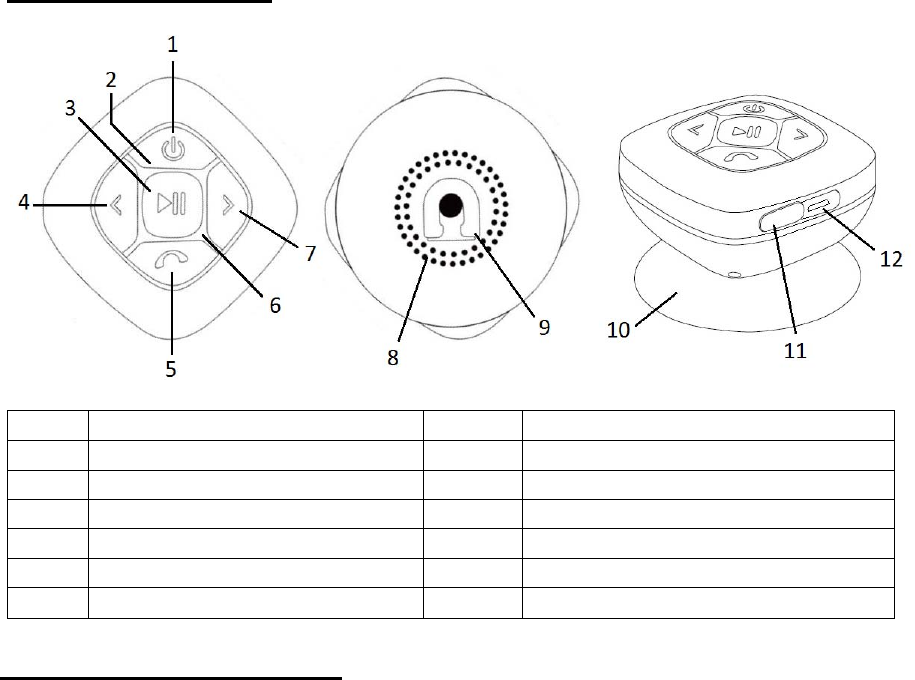
Description of parts
S. No. Description S.No. Description
1 Power Button 7 Skip Forward / Higher Volume
2 Mode / Charging LED Indicator 8 Speaker
3 Play / Pause Button 9 Suction Cup Holder
4 Skip Backward / Lower Volume 10 Suction Cup
5 Answer Call / End Call Button 11 Rubber Flap
6 Built-In Microphone 12 Charging Port
INSTRUCTIONS FOR USE
Charging the speaker
For best results, fully charge the unit before its first use.
1. Connect the USB cord to the charging port of the speaker and insert the other
end into a USB port on your computer or a similar power source.
2. When the Charging LED Light turns RED, it indicates the speaker is charging.
Once fully charged, the red LED light will turn off.
3. It will take 3 to 4 hours to fully charge the speaker.
4. Once the speaker is fully recharged, disconnect the USB Cable and firmly
close the USB Charging Port with the Rubber Flap. If the USB charging port is
not securely covered, water may seep into the circuitry and may damage the
unit. This damage will NOT be covered under product warranty.
Note: When the speaker is running on low battery, you will hear Low battery warning.
Please recharge the device.
5
Turn On/Off the Speaker
Press and hold the “Power” button for 2-3 seconds until you hear the message “It
is pairing, waiting for device connecting” from the speaker. Your speaker is now
ON and is entering “pairing” mode.
Press and hold the “Power” button for 2-3 seconds until you hear a unique tone
to indicate that the speaker has turned OFF.
Turn the speaker to Bluetooth pairing mode
Press and hold the “Power” button for 2-3 seconds until you hear the message “It
is pairing, waiting for device connecting” from the speaker. Your speaker is now
ON and is now in “pairing” mode.
(Note: The speaker will first search for previously paired devices. It will
automatically pair after finding a previously paired device. If unable to pair with a
device, it will automatically turn off after approximately 10 minutes.)
Pairing your device with Bluetooth Speaker
Your Wireless Shower Speaker can wirelessly stream audio from any Bluetooth
enabled device within 27-33 feet. Simply follow the steps below.
1. Turn the speaker ON and the blue LED light will blink.
2. Enable the Bluetooth feature on your smartphone, tablet or computer.
3. It will search for various devices.
4. The pairing name of the Bluetooth Speaker is “SL SHOWER SPKR.” Pair it
with this device.
5. If a password is required, enter ‘0000’ to finalize pairing.
6. Once paired successfully, the blue LED light will flash slowly.
7. If you fail to pair it within the allotted time frame or you want to pair it with a
different Bluetooth device, please follow the steps outlined above.
Select your favorite song on the Bluetooth device to play it through the Wireless
Shower Speaker.
6
Listening to Music Wirelessly
In order to stream music wirelessly, please ensure that your device (smartphone, tablet or
computer) is paired with the Bluetooth speaker. Once paired, play music from your device.
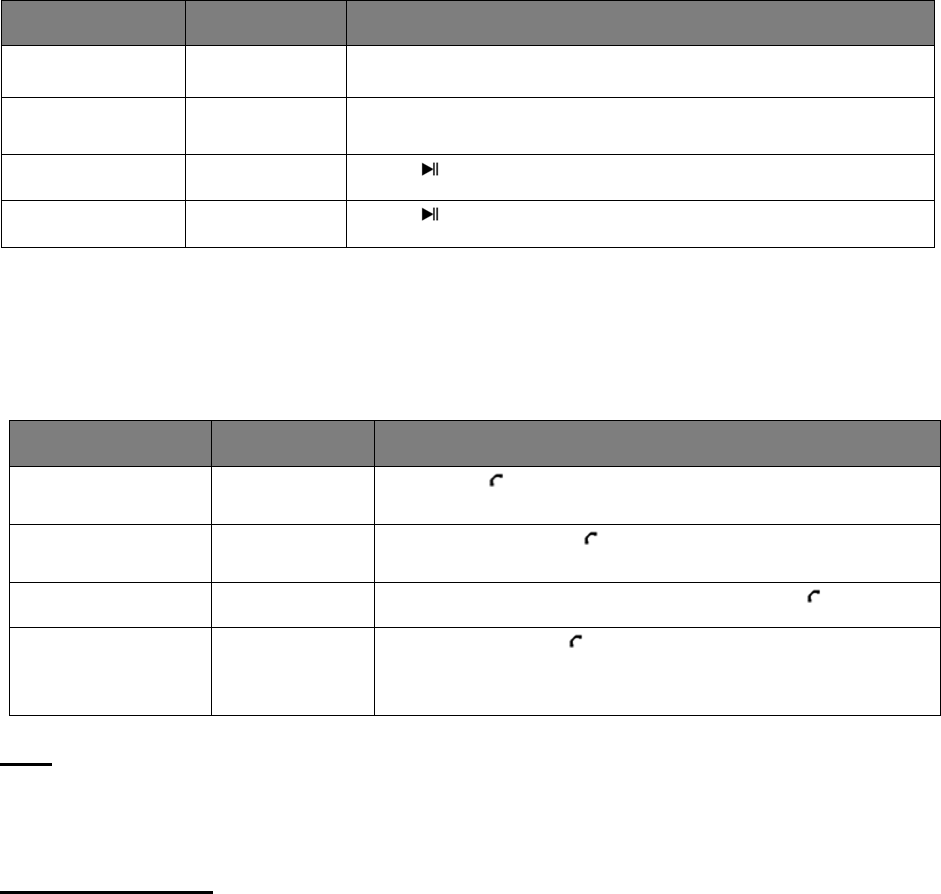
Function Operation Button
Increase Volume Playing music Press & Hold the “>” button to increase the volume
Decrease
Volume
Playing music Press & Hold the “<” button to decrease the volume
Pause Playing music Press once to pause music
Play Pause Press once to play music
Phone calls using the Bluetooth Speaker
Please ensure that you are paired with the Bluetooth Speaker to use the functions below.
When there is an incoming phone call, the music will automatically pause and you will hear
the message “call incoming” and/or phone ringtone depending on your phone.
Function Operation Button
Answer Incoming
Call
Incoming Call Press the button once to answer an incoming call.
Reject
incoming call
Incoming Call Press and hold the button.
End Call Incoming Call After your phone conversation, press the button
Redial last
number Standby mode
and connected
to a device
Quickly press the button twice
TIP:
Do not get too close to the microphone; this will distort your voice. Keep a distance of 12
inches to maximize speaker phone performance.
Do’s and Don’ts
Do not play music at excessive levels as it may result in damage to hearing and/or
equipment.
Do not use outdoors in wet and/or damp surroundings.

7
Specification
Bluetooth version: v2.1 + EDR
Power: 2 Watts
Size: 3 (H) x 3 (W) x 1.8 (D) INCHES
Weight: 3.8 Oz approx.
Play time: 2 to 3 Hours
Charge Voltage: DC 5V (USB)
Bluetooth Range: 27 - 33 Feet
(Note: Battery life and charging time may vary based on usage and type of
device used.)
CAUTION: SPLASH PROOF LIMITATIONS
1. The Bluetooth Speaker can handle a brief splash of water on its surface (IPX4
water resistant). Speaker must never be operated under running water. Under
no circumstance should it ever be fully immersed under water. Before using
the Bluetooth Shower Speaker in a bathroom, make sure that the splash proof
Rubber Flap is tightly closed in the correct position.
2. After use in the bathroom always wipe the outside of the cabinet thoroughly if
it becomes damp with moisture or condensation. This will help prevent the
internal parts of the unit from possible moisture damage.
Troubleshooting
Problem Possible Cause Solution
Low sound level Source (smartphone, tablet,
computer, etc.) volume too low.
Batter
y
dead.
Adjust source volume.
Charge Battery.
Sound distorted Battery nearly dead. Charge Battery.
No sound at all Source (smartphone, tablet,
computer, etc.) turned off.
Speaker turned off.
Volume turned down source.
Media paused on source.
Turn the source on.
Turn the speaker on.
Adjust volume source.
Play media from source.

8
Care and Maintenance
Clean the unit with a soft, dry cloth. Never use chemicals or hard abrasives. Do
not store unit in a wet or damp surrounding.
The crossed out wheelie bin symbol on this item indicates that this product needs
to be disposed of in an environmentally friendly way when it becomes of no
further use or has worn out. Contact your local authorities for details on where to
take the item for re-cycling.
Note: iPod, iPhone and iPad are trademarks of Apple Inc, registered in the US,
and other countries.
FCC Instructions
- Changes or modifications not expressly approved by the party responsible for
compliance could void the user’s authority to operate the product.
NOTE: This product has been tested and found to comply with the limits for a
Class B digital device, pursuant to Part 15 of the FCC Rules. These limits are
designed to provide reasonable protection against harmful interference in a
residential installation. This product generates, uses and can radiate radio
frequency energy and, if not installed and used in accordance with the
instructions, may cause harmful interference to radio communications. However,
there is no guarantee that interference will not occur in a particular installation. If
the product does cause harmful interference to radio or television reception,
which can be determined by turning the equipment off and on, the user is
encouraged to try to correct the interference by one or more of the following
measures:
- Reorient or relocate the receiving antenna.
- Increase the separation between the product and receiver.
- Connect the product into an outlet on a circuit different from that to which the
receiver is connected.
- Consult the dealer or an experienced radio/TV technician for help.
The device complies with Part 15 of the FCC Rules. Operation is subject to the
following two conditions: (1) this device may not cause harmful interference, and
(2) this device must accept any interference received, including interference that
may cause undesired operation.
The device has been evaluated to meet general RF exposure requirement. The
device can be used in portable exposure condition without restriction.

9
LIMITED WARRANTY
This manufacturer's product warranty extends to the original consumer
purchaser of the product. Neither the retailer nor any other company
involved in the sale or promotion of this product is a co-warrantor of this
manufacturer warranty.
WARRANTY DURATION: All materials and workmanship are
warranted to the original consumer purchaser for a period of ninety (90)
days from the original purchase date.
WARRANTY COVERAGE: This product is warranted against defective
materials or workmanship. This warranty is void if the product has been
damaged by accident, in shipment, unreasonable use, misuse, neglect,
improper service, commercial use, repairs by unauthorized personnel
or other causes not arising out of defects in materials or workmanship.
This warranty is effective only if the product is purchased and operated
in USA, and does not extend to any units which have been used in
violation of written instructions furnished by manufacturer or to units
which have been altered or modified or, to damaged products or parts
thereof which have had the serial number removed, altered, defaced or
rendered illegible.
WARRANTY DISCLAIMERS: This warranty is in lieu of all warranties
expressed or implied and no representative or person is authorized to
assume for manufacturer any other liability in connection with the sale
of our products. There shall be no claims for defects or failure under
any theory of tort, contractor commercial law including but not limited to,
negligence, gross negligence, strict liability, breach of warranty and
breach of contract. Under no circumstances will Manufacturer’s /
Distributor’s maximum liability exceed the retail value of the product.
WARRANTY PERFORMANCE: During the above 90 day warranty
period, a product with a defect will be either repaired or replaced with a
reconditioned comparable model (at manufacturer's option). The
repaired or replacement product will be in warranty for the balance of
the 90 day warranty period and an additional one-month period. No
charge will be applicable for such repair or replacement.
SERVICE AND REPAIR: If service is required for this product, you
should first contact Midwest Trading Group Customer Service at
info@mtradinggroup.com or by calling 1 (866) 815-4714, Monday to
Friday 10am to 6pm EST.
NOTE: Manufacturer cannot assume responsibility for loss or damage
during incoming shipment. As a precautionary measure, carefully
package the product for shipment, and insure it with the carrier. Be
sure to enclose the following details with the product: your full name,
return address and daytime phone number, a note describing the
problem you experienced, a copy of your sales receipt or other proof of
10
purchase to determine warranty status. C.O.D. shipments cannot be
accepted.