ADDON Technology ME101HS1000408 Bluetooth Headset User Manual Manual

Add-On Technology Co., Ltd. Bluetooth Headset Manual

Manual

 - 1 -Index Chapter 1  Introduction  - 2 - Chapter 2  Features  - 4 - Chapter 3  Specification  - 5 - Chapter 4  How to Use  - 6 - Chapter 5  Operation Instruction  - 8 - Chapter 6    Important Notice  - 11 - Chapter 7  Certification and Safety Approval - 12 - Chapter 8  Warranty and Parts Replacement - 13 -
 - 2 -Chapter 1 Introduction  This Bluetooth™ headset is the ultimate wireless and hands free solution for mobile phones.  This free communication Bluetooth™ headset utilizing Bluetooth™ wireless technology is also compatible with all Bluetooth™ Version 1.1 technology devices.  It’s lightweight (about 15 grams), comfort and easy usage design accompany you up to 4-5 hrs talking time and 100 hrs of standby time within 10 meters wirelessly from your mobile phone.      The intimate design allows you switching the hear hook to fit either to your right or left side of ear.  A mini USB port and a power adaptor design convenience you to charging the power at your convenience.    It’s designed to provide you the joy of free hands communication.
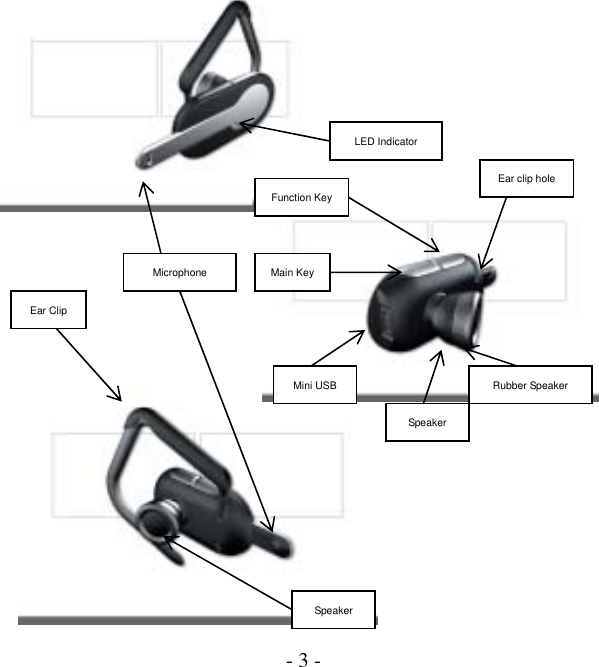
 - 3 -   Ear clip hole SpeakerRubber Speaker Mini USBMain KeyMicrophone LED Indicator Ear Clip SpeakerFunction Key
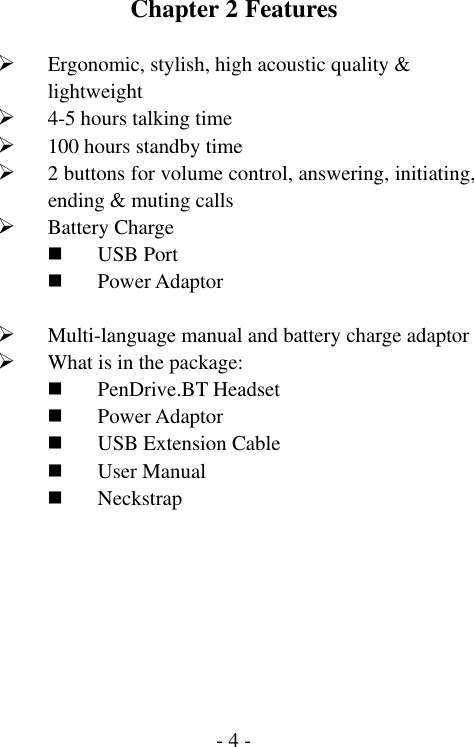
 - 4 -Chapter 2 Features  ¾ Ergonomic, stylish, high acoustic quality & lightweight ¾ 4-5 hours talking time ¾ 100 hours standby time ¾ 2 buttons for volume control, answering, initiating, ending & muting calls ¾ Battery Charge  USB Port  Power Adaptor  ¾ Multi-language manual and battery charge adaptor ¾ What is in the package:  PenDrive.BT Headset  Power Adaptor  USB Extension Cable  User Manual  Neckstrap
 - 5 -Chapter 3 Specification  ¾ PenDrive.BT Headset:  Bluetooth™ Version 1.1 compliant (Class 2)  10 meters of effective range  LED indicator for in use, power off, pairing, talking & low battery (See page: 10)  Switching hear hook for right or left ear  High quality directional microphone and acoustically speaker  Two buttons for operation functions (See page: 9)  Deep sleep mode for power saving  ¾ Power Adaptor:  Input: 100~240VAC 47~63Hz  Output: 5v DC 150~300mA  Re-charging time: less then 2 hours  Rechargeable battery: Li-polymer     USB Power Charging:  USB Interface  5.0 Volt DC USB Bus-Powered
 - 6 -Chapter 4 How to Use  After opening the package, please make sure to do the following steps:  Step 1:  Charge the power into your headset To fully charge your headset at least 12 hours:  You may choose to charge the power by the power adaptor to the wall power jack or the mini USB extension cable to your computer. The Red LED will be steady on when charging. The LED will go off when battery is fully charged.  Step 2:  Link  (Pairing)  this PenDrive.BT Headset with your Bluetooth™ mobile phone or other Bluetooth™ devices for the first time only.    The pairing action only needed at the first time use of two new Bluetooth™ devices as a pair, for the two devices to recognize each other’s ID.  1. Operate your Bluetooth™ mobile phone or other Bluetooth™ device to the Bluetooth™ pairing mode, and leave it close by where you will operate your Bluetooth™ headset..
 - 7 - 2. Press on and hold to the main key   for            five seconds to wait for the Blue and Red LED alternatively flashing that indicates the headset is into the paring mode. Then, press pairing code “1234” on your mobile phone.   3. When the paring is done, the Blue LED will flash 1 time in 3 seconds when it’s pairing to a non-Nokia phone, or flash 3 times in 3 seconds when paring to a Nokia phone.     4. The Bluetooth™ linking icon will show on the screen of the phone it’s paring to.
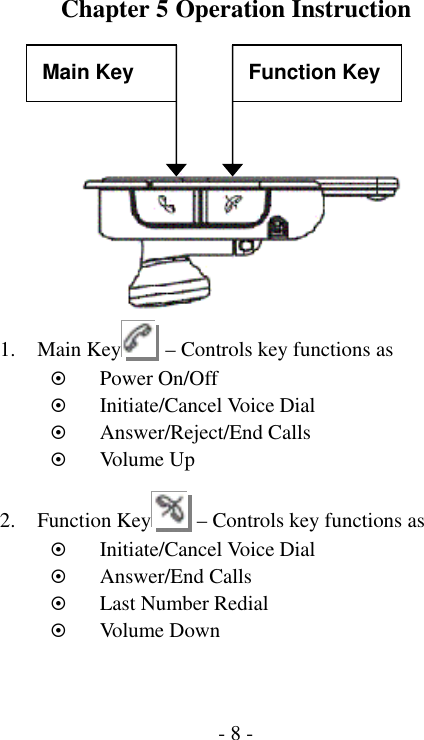
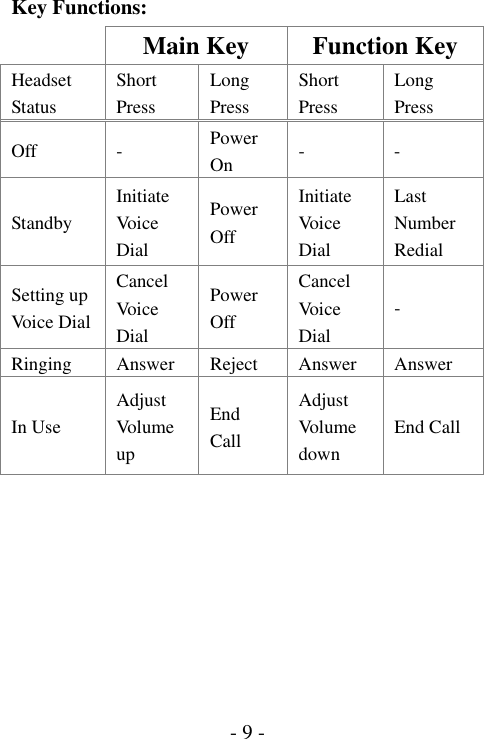
 - 8 -Chapter 5 Operation Instruction     1. Main Key   – Controls key functions as ~ Power On/Off ~ Initiate/Cancel Voice Dial ~ Answer/Reject/End Calls ~ Volu me Up  2. Function Key   – Controls key functions as ~ Initiate/Cancel Voice Dial ~ Answer/End Calls ~ Last Number Redial ~ Volu me Down Main Key  Function Key
 - 9 -Key Functions:  Main Key  Function Key Headset Status Short Press Long Press Short Press Long Press Off -  Power On  - - Standby Initiate Vo i ce  Dial Power Off Initiate Vo i ce  Dial Last Number Redial Setting up Voice D ia l Cancel Vo i ce  Dial Power Off Cancel Vo i ce  Dial - Ringing Answer Reject Answer Answer In Use Adjust Vo l u me  up End Call Adjust Vo l u me  down End Call
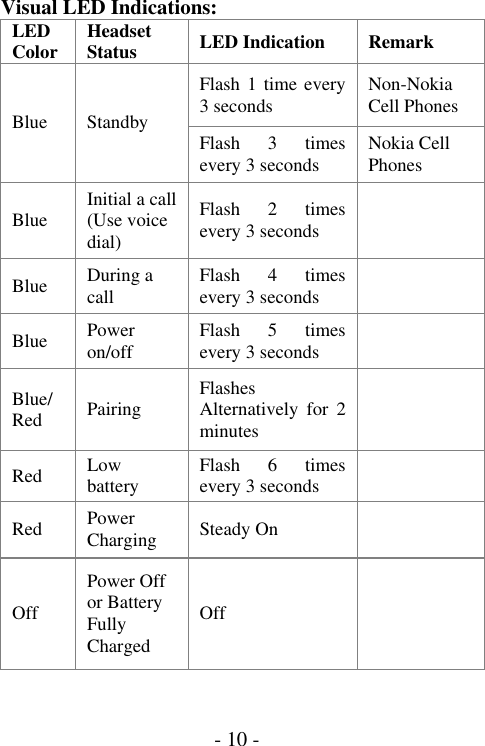
 - 10 -Visual LED Indications:      LED Color  Headset Status  LED Indication  Remark Flash 1 time every 3 seconds  Non-Nokia Cell Phones Blue Standby  Flash 3 times every 3 seconds  Nokia Cell Phones Blue  Initial a call (Use voice dial) Flash 2 times every 3 seconds   Blue  During a call  Flash 4 times every 3 seconds   Blue  Power on/off  Flash 5 times every 3 seconds   Blue/Red  Pairing  Flashes Alternatively for 2 minutes   Red  Low battery  Flash 6 times every 3 seconds   Red  Power Charging  Steady On   Off Power Off or Battery Fully Charged Off
 - 11 -Chapter 6 Important Notice  1. Storage Safety: Please always have the headset well protected away from high temperatures (avoid above 60゚ C/134 ゚ F), such as in a vehicle under hot summer sun, or direct sunlight or from rain or liquids.  2. Battery Explosion Concern: Users are not permitted to open the headset to remove or replace the battery.    That may lead to a great high risk of battery explosion without any warranty protection.  Be sure to use only the supplied power adaptor charger to recharge your headset.
 - 12 -Chapter 7 Certification and Safety Approval  This product is CE, FCC, BQB approved.    Please note that this product uses radio frequency bands not harmonized within EU.    Within the EU, this product is intended to be used in Austria, Belgium, Denmark, Finland, France, Germany, Ireland, Italy, Luxembourg, The Netherlands, Portugal, Spain, Sweden, and United Kingdom and within EFTA in Iceland, Norway and Switzerland.  Users are not permitted to make changes or to modify the device in any way.    Bluetooth™ is a trade mark owned by Bluetooth SIG, Inc.
 - 13 -Chapter 8 Warranty and Parts Replacement   We warrant this product against all defects in material and workmanship for a period of one year from the date of original purchase.  The conditions of this warranty and our responsibilities under this warranty are as following:   The warranty is limited to the original purchaser.   A copy of your receipt or other proof of purchase is required. Without proof of purchase, your warranty is defined as beginning on the date of manufacture as labeled on the products.   The warranty is void if the serial number, date code label or product label is removed, or if the product has been subject to physical abuse, improper installation, modification, or repair by unauthorized third parties.   The responsibility of our products is limited to the repair or replacement of the product at its sole discretion.
 - 14 - Any implied warranty on our products is limited to one year from the date of purchase on all parts, including any cords and connectors.   Specifically exempt from any warranty are limited-life consumable components subject o normal wear and tear, such as microphone, decorative finishes, batteries, and other accessories.   We are not liable for any incidental or consequential damages arising from the use or misuse of any our product.   This warranty gives you specific rights and you may have other rights which vary from area to area.   Unless otherwise instructed in the user guide, the user may not, under any circumstances, attempt to perform service, adjustments or repairs on this unit, whether in or out of warranty. It must be returned to the purchase point, factory or authorized service agency for all such work.   We will not assume any responsibility for any loss or damage incurred in shipping.    Any repair work on our products by unauthorized third parties voids
 - 15 -any warranty.
 - 1 -Portable of end product Federal Communication Commission Interference Statement  This equipment has been tested and found to comply with the limits for a Class B digital device, pursuant to Part 15 of the FCC Rules.    These limits are designed to provide reasonable protection against harmful interference in a residential installation.  This equipment generates, uses and can radiate radio frequency energy and, if not installed and used in accordance with the instructions, may cause harmful interference to radio communications.    However, there is no guarantee that interference will not occur in a particular installation.  If this equipment does cause harmful interference to radio or television reception, which can be determined by turning the equipment off and on, the user is encouraged to try to correct the interference by one of the following measures:  - Reorient or relocate the receiving antenna. - Increase the separation between the equipment and receiver. - Connect the equipment into an outlet on a circuit different from that to which the receiver is connected. - Consult the dealer or an experienced radio/TV technician for help.
 - 2 -This device complies with Part 15 of the FCC Rules. Operation is subject to the following two conditions: (1) This device may not cause harmful interference, and (2) this device must accept any interference received, including interference that may cause undesired operation.  FCC Caution: Any changes or modifications not expressly approved by the party responsible for compliance could void the user's authority to operate this equipment.  IMPORTANT NOTE: FCC Radiation Exposure Statement: This equipment complies with FCC radiation exposure limits set forth for an uncontrolled environment. End users must follow the specific operating instructions for satisfying RF exposure compliance.  This transmitter must not be co-located or operating in conjunction with any other antenna or transmitter.

Navigation menu