ADDON Technology MS5312 Mushroom Jumbo User Manual

ADDON Technology Mushroom Jumbo

User manual

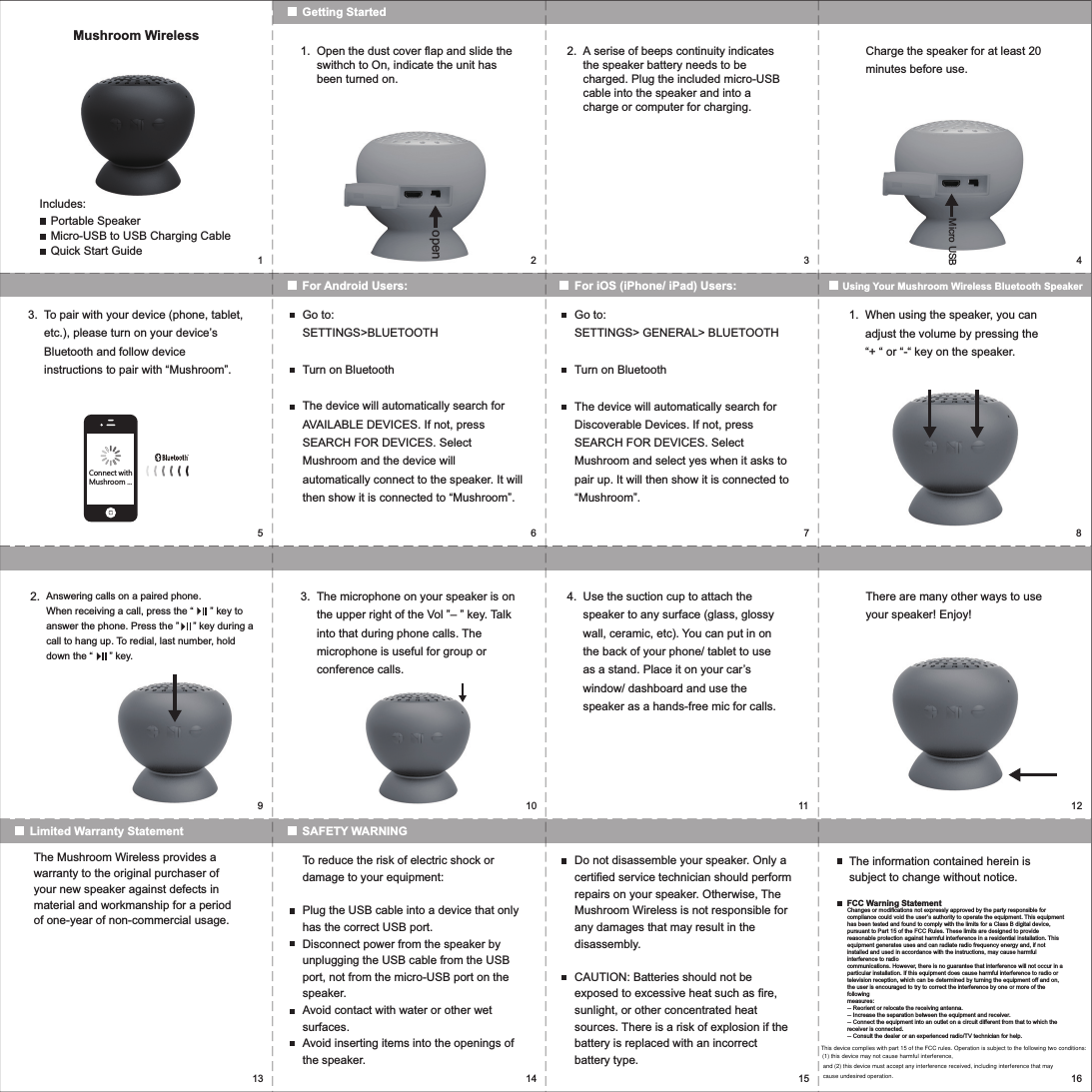
15923467810 11 1213 14 15 16openMushroom WirelessIncludes:Portable SpeakerMicro-USB to USB Charging CableQuick Start GuideGetting StartedFor Android Users: For iOS (iPhone/ iPad) Users: Using Your Mushroom Wireless Bluetooth SpeakerOpen the dust cover flap and slide the swithch to On, indicate the unit has been turned on.1. A serise of beeps continuity indicates the speaker battery needs to be charged. Plug the included micro-USB cable into the speaker and into a charge or computer for charging.Charge the speaker for at least 20 minutes before use.2.To pair with your device (phone, tablet, etc.), please turn on your device’s Bluetooth and follow device instructions to pair with “Mushroom”.Go to:SETTINGS>BLUETOOTHTurn on BluetoothThe device will automatically search for AVAILABLE DEVICES. If not, press SEARCH FOR DEVICES. Select Mushroom and the device will automatically connect to the speaker. It will then show it is connected to “Mushroom”.Go to:SETTINGS> GENERAL> BLUETOOTHTurn on BluetoothThe device will automatically search for Discoverable Devices. If not, press SEARCH FOR DEVICES. Select Mushroom and select yes when it asks to pair up. It will then show it is connected to “Mushroom”.3. When using the speaker, you can adjust the volume by pressing the “+ “ or “-“ key on the speaker.1.Micro USBSAFETY WARNINGLimited Warranty StatementThe microphone on your speaker is on the upper right of the Vol ”– ” key. Talk into that during phone calls. The microphone is useful for group or conference calls.3. Use the suction cup to attach the speaker to any surface (glass, glossy wall, ceramic, etc). You can put in on the back of your phone/ tablet to use as a stand. Place it on your car’s window/ dashboard and use the speaker as a hands-free mic for calls. There are many other ways to use your speaker! Enjoy!4.Answering calls on a paired phone. When receiving a call, press the “      ” key to answer the phone. Press the ”     ” key during a call to hang up. To redial, last number, hold down the “      ” key.2.The Mushroom Wireless provides a warranty to the original purchaser of your new speaker against defects in material and workmanship for a period of one-year of non-commercial usage.To reduce the risk of electric shock or damage to your equipment:Plug the USB cable into a device that only has the correct USB port.Disconnect power from the speaker by unplugging the USB cable from the USB port, not from the micro-USB port on the speaker.Avoid contact with water or other wet surfaces.Avoid inserting items into the openings of the speaker.Do not disassemble your speaker. Only a certified service technician should perform repairs on your speaker. Otherwise, The Mushroom Wireless is not responsible for any damages that may result in the disassembly.CAUTION: Batteries should not be exposed to excessive heat such as fire, sunlight, or other concentrated heat sources. There is a risk of explosion if the battery is replaced with an incorrect battery type.The information contained herein is subject to change without notice.FCC Warning StatementChanges or modifications not expressly approved by the party responsible for compliance could void the user’s authority to operate the equipment. This equipment has been tested and found to comply with the limits for a Class B digital device, pursuant to Part 15 of the FCC Rules. These limits are designed to provide reasonable protection against harmful interference in a residential installation. This equipment generates uses and can radiate radio frequency energy and, if not installed and used in accordance with the instructions, may cause harmful interference to radiocommunications. However, there is no guarantee that interference will not occur in a particular installation. If this equipment does cause harmful interference to radio or television reception, which can be determined by turning the equipment off and on, the user is encouraged to try to correct the interference by one or more of the followingmeasures:-- Reorient or relocate the receiving antenna.-- Increase the separation between the equipment and receiver.-- Connect the equipment into an outlet on a circuit different from that to which thereceiver is connected.-- Consult the dealer or an experienced radio/TV technician for help.Connect withMushroom ...This device complies with part 15 of the FCC rules. Operation is subject to the following two conditions: (1) this device may not cause harmful interference, and (2) this device must accept any interference received, including interference that may cause undesired operation.

Navigation menu