AEE Technology AEEOM51S60S Action Camcorder User Manual YVV AEE50510001 FCC Usermanual
Shenzhen AEE Technology CO., LTD. Action Camcorder YVV AEE50510001 FCC Usermanual
Contents
- 1. USERS MANUAL 1
- 2. USERS MANUAL 2
USERS MANUAL 2

8.0M(3200X2400 4:3)
Caputre Mode: Single
Fast shot: 10
Auto cont capture: 2S
Timed shotting: 3S
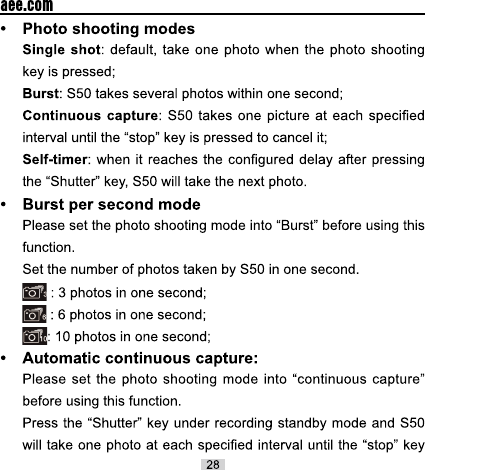
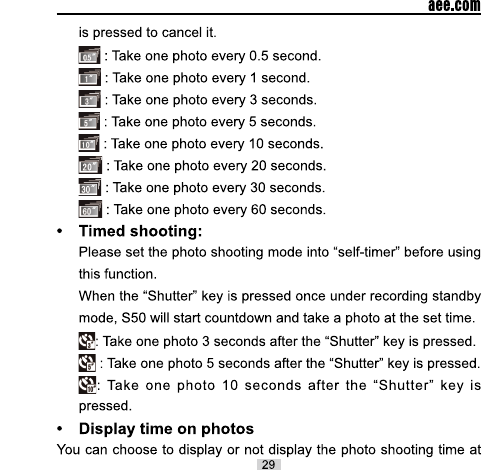
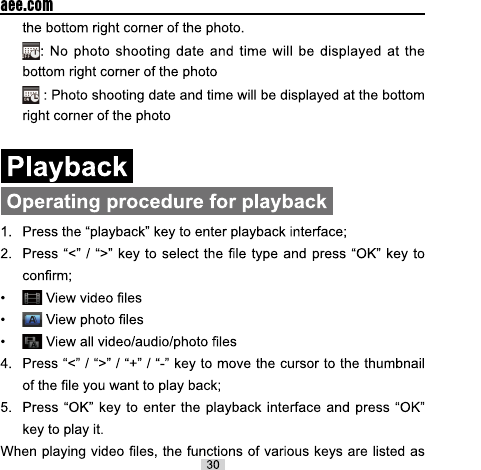

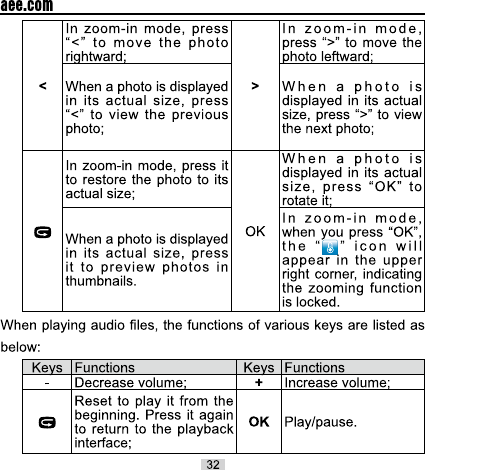


6+'0,LQWHUIDFH
+'0,GDWDFDEOH
79'LVSOD\
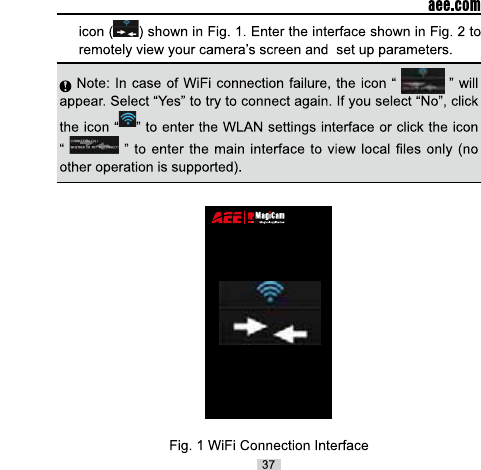

Total number of files
WiFi status
Battery status
Remaining recording
time or number of shots
Number of recorded
videos or shot photos
Maximize preview
Current state icon /
Start/Stop button
Parameter settings
Zoom out
Zoom in
Auto continuous
capture mode
Fast shot mode
Video recording mode
Single shot mode
180°Display turnover
Playback mode
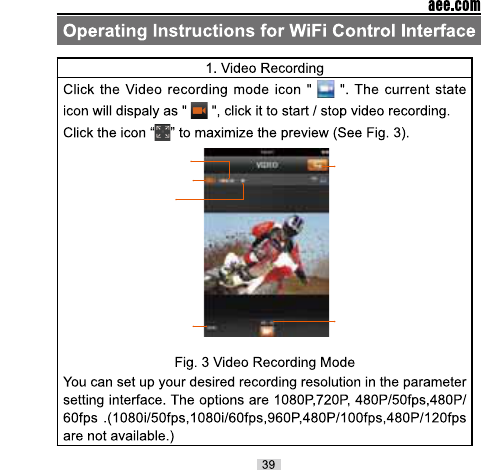
Resolution and
frame rate
Current state
Angle
Remaining
recording time Recording
Duration
Return to main
interface
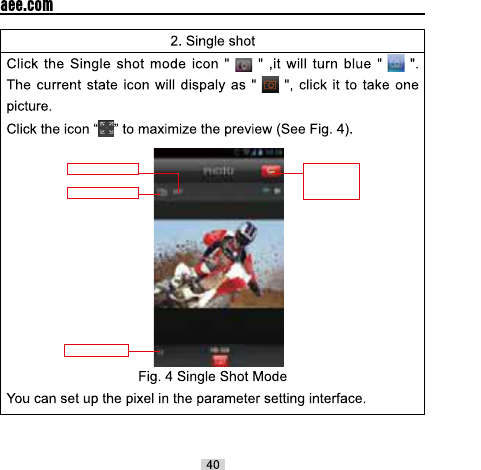
Pixel
Current state
Return to
the main
interface
Photo No.

Burst number
Current state
Return to
the main
interface
Photo No.
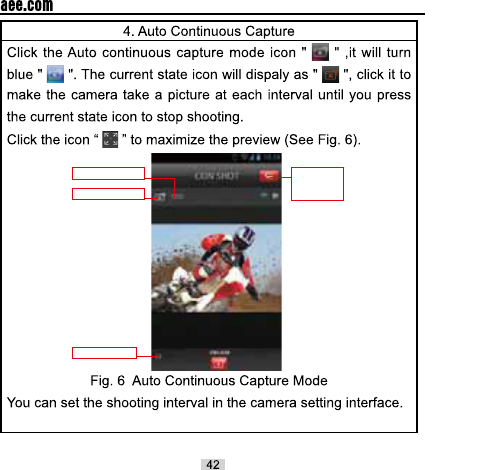
Interval time
Current state
Photo No.
Return to
the main
interface
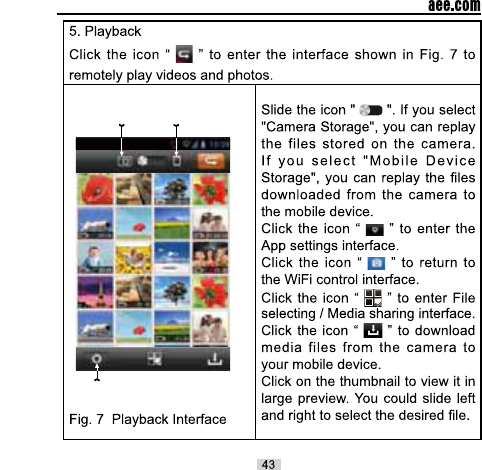
Camera
Storage Mobile Device
Storage
Settings

Files
downloaded
Files in
downloading
Download all the files
from your remote camera
to the mobile device
Cancel
downloading
Files in
waiting
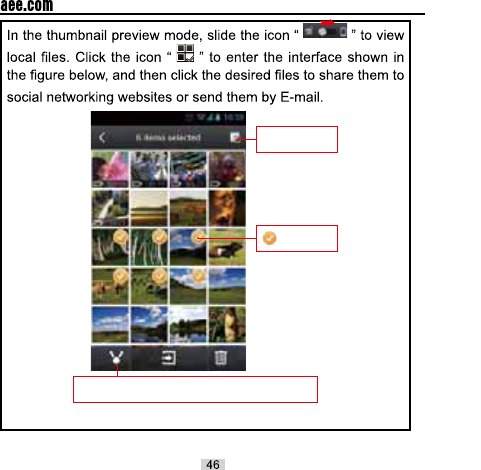
Click here to share the selected files to social
networking websites or send them by E-mail
Select All /
Deselect All
Selected
files


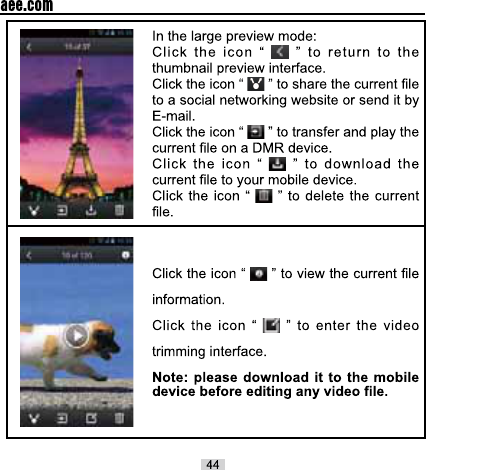
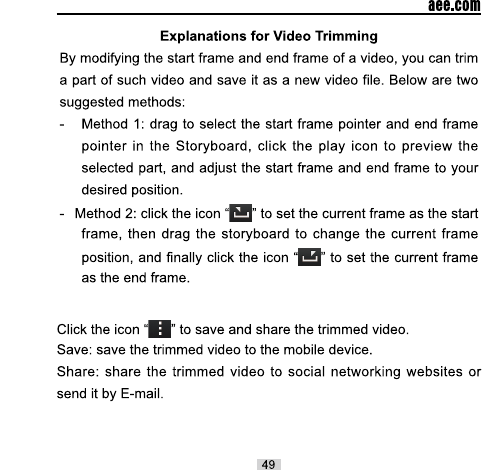
Start frame
Current frame
Storyboard
End frame
Menu
Set the current
frame as the
end frame
Narrow the frame
Expand the frame
Set the current
frame as the
start frame
Play icon


AEE
FCC NOTE:
This equipment has been tested and found to comply with the limits for a Class B digital
device, pursuant to Part 15 of the FCC Rules. These limits are designed to provide reasonable
protection against harmful interference in a residential installation. This equipment generates,
uses and can radiate radio frequency energy and, if not installed and used in accordance with
the instructions, may cause harmful interference to radio communications. However, there is
no guarantee that interference will not occur in a particular installation. If this equipment does
cause harmful interference to radio or television reception, which can be determined by
turning the equipment off and on, the user is encouraged to try to correct the interference by
one or more of the following measures:
-- Reorient or relocate the receiving antenna
-- Increase the separation between the equipment and receiver.
-- Connect the equipment into an outlet on a circuit different
from that to which the receiver is connected.
-- Consult the dealer or an experienced radio/TV technician for help.
This device complies with Part 15 of the FCC Rules. Operation is subject to the following two
conditions: (1) this device may not cause harmful interference, and (2) this device must accept
any interference received, including interference that may cause undesired operation.
The manufacturer is not responsible for any radio or TV interference caused by unauthorized
modifications to this equipment. Such modifications could void the user's authority to operate
the equipment.
61
THE MANUFACTURER IS NOT RESPONSIBLE FOR ANY RADIO OR TV INTERFERENCE CAUSED BY
UNAUTHORIZED MODIFICATIONS OR CHANGE TO THIS EQUIPMENT. SUCH MODIFICATIONS OR
CHANGE COULD VOID THE USER’S AUTHORITY TO OPERATE THE EQUIPMENT.