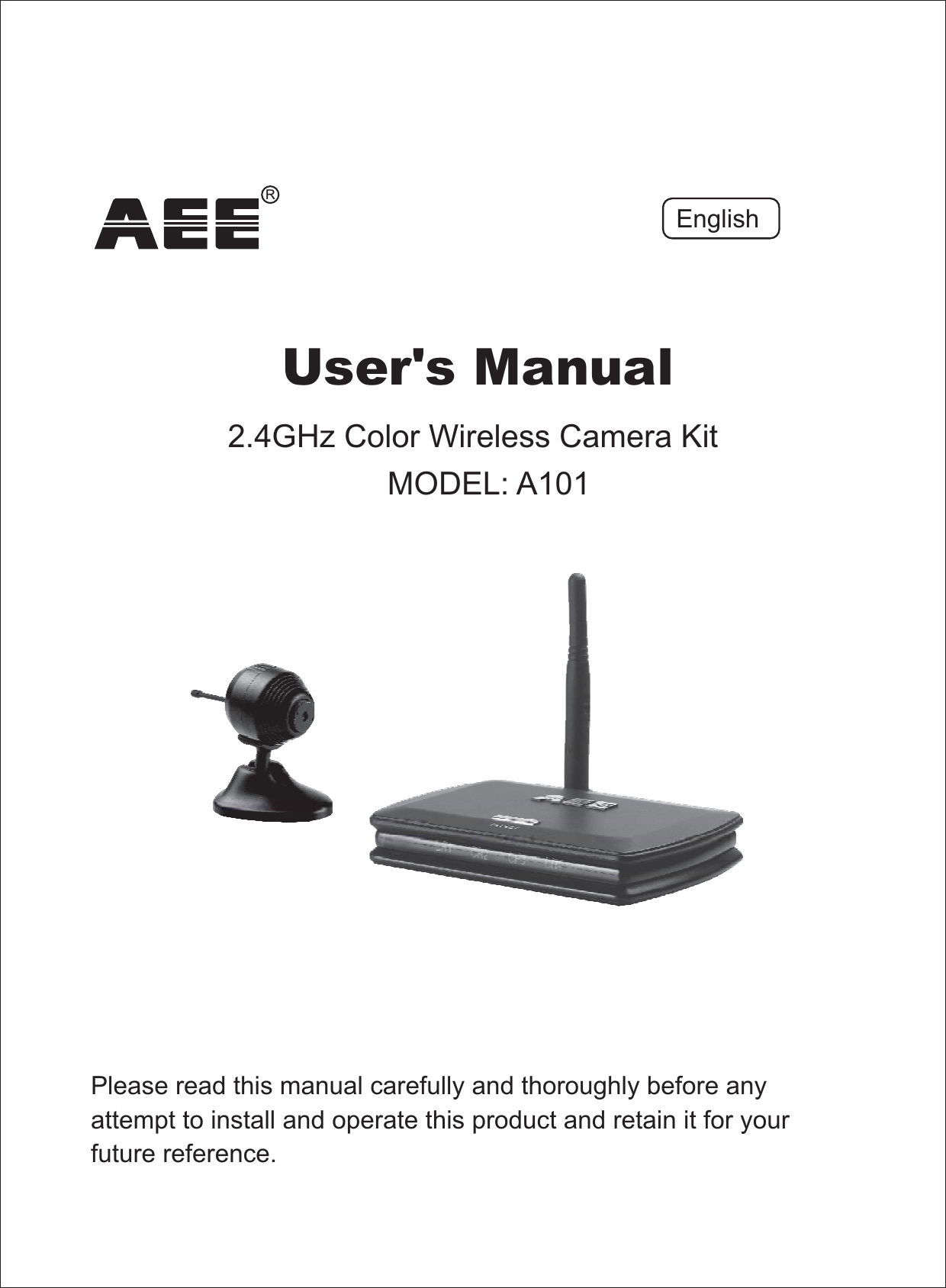
AEE Wireless Technology AT101 2.4G Wireless Camera Kit User Manual

Shenzhen AEE Wireless Technology Co., Ltd. 2.4G Wireless Camera Kit

Users Manual

Please read this manual carefully and thoroughly before anyattempt to install and operate this product and retain it for yourfuture reference.User's Manual2.4GHz Color Wireless Camera KitMODEL: A101EnglishR
EU Environmental ProtectionWaste electrical products should not be disposed of withhousehold waste. Please recycle where facilities exist.Check with your Local Authority or retailer for recyclingadvice.
TABLE OF CONTENTSSPECIFICATIONS 14TROUBLESHOOTING 15PRODUCT 5~7Package ContentsFeature LocationsAdapter & Battery Clip567INSTALLATION & USAGE 8~13InstallationFix the CameraCamera Channel SetupReceiver Mode Setup8~10121213Locate the ReceiverINTRODUCTION 1~4NoticeRestrictionsMaintenanceWarrantyCopyrightApproval Information ( )FCC/CE133441~211~12
INTRODUCTIONThank you for your interest and support in our product and purchasingthis wireless camera kit. This producteel confident that you will be pleased with the quality and featuresof this product.The camera features one CMOS image sensor and a transmittingmodule to capture the image and transmit them wirelessly.The receiver features a receiving module to receive and output AVsignals.works at ISM-2.4GHz frequencyband, which could be legally used worldwide without permission.We fNoticeNotice: This product may cause interferences with other wirelessequipment that operates at 2.4GHz ISM band. Please turn off one ofthe equipments to eliminate the interference.Product Assurance:.This camera will emit electromagnetic wave,just like other wireless products. But its transmitting power is lesserthan other wireless products such as mobile phones. The 2.4GHzwireless camera meets wireless frequency security standards andrecommended indexes while working. These standards and indexesare certificated by academic organization and represent the cogitativeresearch of the scientific workers who continuously explore andannotate the involved fields. So we believe that our products are safefor customers1All our products meet the requirements of FCC or CE, andare granted the FCC or CEapprovalcertification. They are authorized to bearFCC or CE mark.Approval Information
After testing the product, we confirm that it complies with the provisionfor class C digital equipment in the 15th part in FCC regulation; andthe receiver complies with the limitations for class B digital equipmentin Part 15 of FCC regulation. The product generates, applies and emitsradio waves. It might cause harmful interferences to wirelesscommunication if not be installed and used following the descriptionof the manual. The product may cause interference in residential area,and the customer should take remedies to eliminate the interferenceat their own costs. If the product causes any harmful interference towireless equipment or disturbs the receiving of TV signals (it can beidentified by turning on and off the product), you can solve the troubleby following methods:FCCThis product complies with standards including ow oltage eviceDirective 73/23/EEC; Directive 89/336/EEC andDirective 1999/5/EC. It passed the subject tests by the authorityconcerned and is authorized to bear mark.LV DEMC R&TTECECE2This product meets the requirements specified in Part 15 of FCCRegulation. Operation rests with the following two conditions:(1) The equipment should not cause any harmful interference;(2) The equipment must receive and process any interference,including any possible interference caused by operationmistakes.(1) Readjust the product or put it in another place;(2) Extend the distance between the equipment interfered and theproduct; and(3) Refer to dealers or experienced radio electrician for help.
CopyrightThis manual is furnished under license and may be used or copiedonly in accordance with the terms of such license. Except as permittedby such license, no part of this publication may be reproduced, storedin a retrieval system, or transmitted, in any form or any means,electronic, mechanical, recording, or otherwise, including translationto another language or format, without the prior written permission ofAEE Technology.The content of this manual is furnished for informational use only, issubject to change without notice, and should not be construed as acommitment by AEE Technology.AEE Technology assumes no responsibility or liability for any errors orinaccuracies that may appear in this booklet. All other product names,trademarks and registered trademarks in this document are theproperties of their respective holders.WarrantyAEE Technology warrants that this product will be free from defectsin materials and workmanship for period of time specified. Thislimited warranty shall commence from the date of purchase.product warranty is not transferable and is limited to theoriginal purchaser. If the product is found to be defective then, asyour sole remedy and as the manufacturer's only obligation,will repair or replace the product. This warranty shall notapply to products that have been subjected to abuse, misuse,abnormal electrical or environmental conditions, normal wear andtear or any condition other than what can be considered normal use.Should you have problems, please consult the local dealer.AEETechnology 'sAEETechnology3
DO NOT use this product to violate one's privacy. Monitoring one'sactivities without consent is illegal and this product is not designedand manufactured for such purpose;DO NOT put this product near any medical equipment. Radiowaves might potentially cause breakdown of electrical medicalequipment. So this product should be placed at least 1 feet awayfrom any heart pacemaker. Radio waves might potentiallyinfluence heart pacemaker and lead to respiratory disturbance;DO NOT use this product for any illegal activities. AEE Technologyshall not be responsible for any consequences of illegal actscommitted by the user.1.2.3.RestrictionsEnsure the sufficient ventilation space is available;Do not shake or strike the product;Keep it dry and dustless and avoid exposing it to direct sunlight;Do not place product near any magnetic objects;Avoid putting the product in places where the constantly changedtemperature or humidity occurs;Keep product away from heat sources such as electric heater;Do not use the camera near aggressive chemicals;Do not use this camera near water, for example, near a bath tub,wash bowl, kitchen sink or laundry tub, in a wet basement or neara swimming pool and the like;Do not use the camera in the places which are enclosed by metal.The surrounding metal like lifter, cabin, may shield theelectromagnetic wave, and result in failure of signal reception;Please obey the local government's environment protection policy;Please turn off the power when left unused;Do not disassemble or repair the camera or receiver; doing somight cause damages to the product.1.2.3.4.5.6.7.8.9.10.11.12.Maintenance4
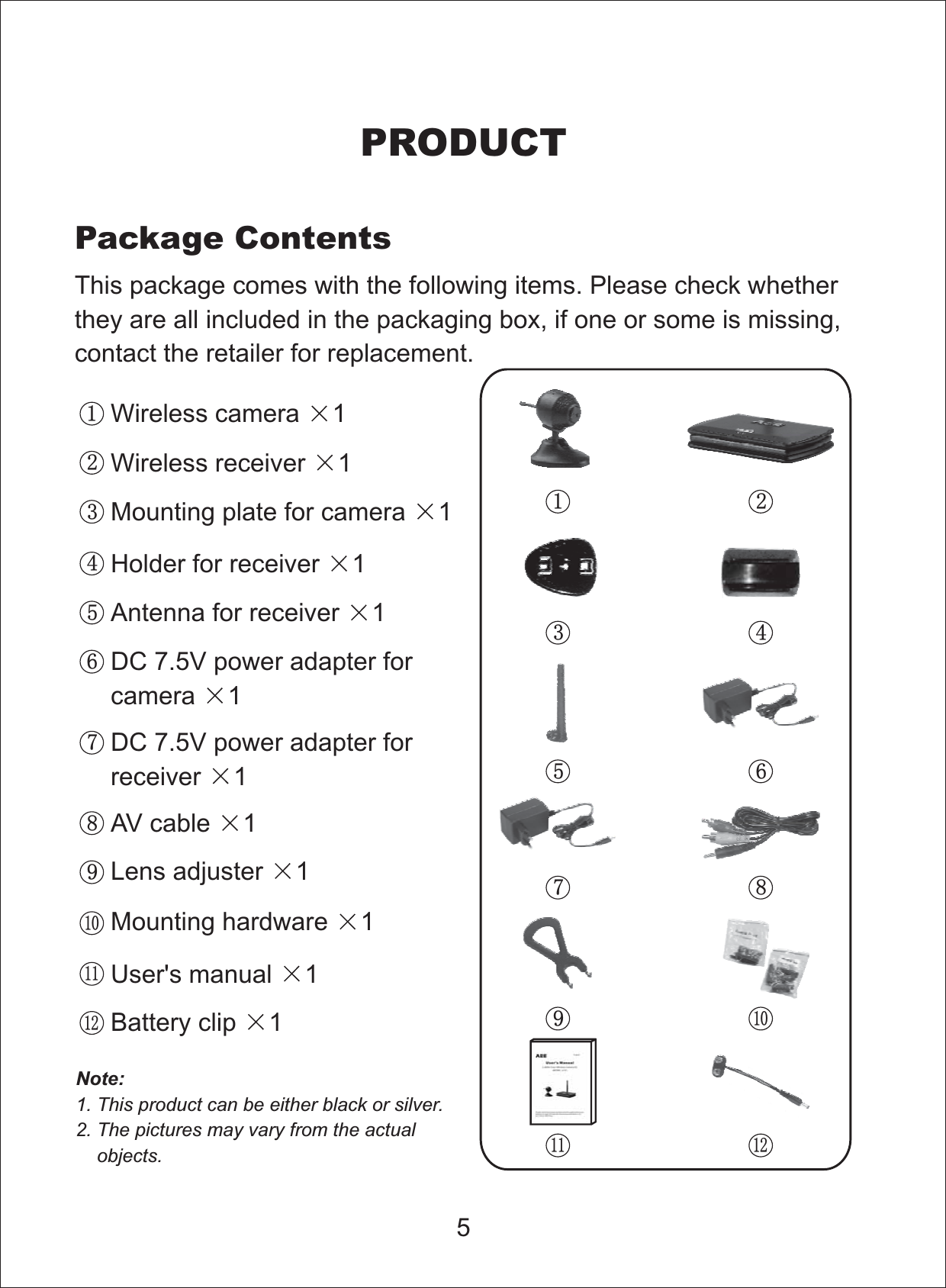
5This package comes with the following items. Please check whetherthey are all included in the packaging box, if one or some is missing,contact the retailer for replacement.Package ContentsPRODUCTNote:1. This product can be either black or silver.2. The pictures may vary from the actualobjects.Wireless camera 11Wireless receiver 12Mounting plate for camera 13Holder for receiver 14Antenna for receiver 15DC 7.5V power adapter forcamera 16DC 7.5V power adapter forreceiver 17AV cable 18Lens adjuster 19Mounting hardware 110User's manual 111Battery clip 112123 4567891011 12
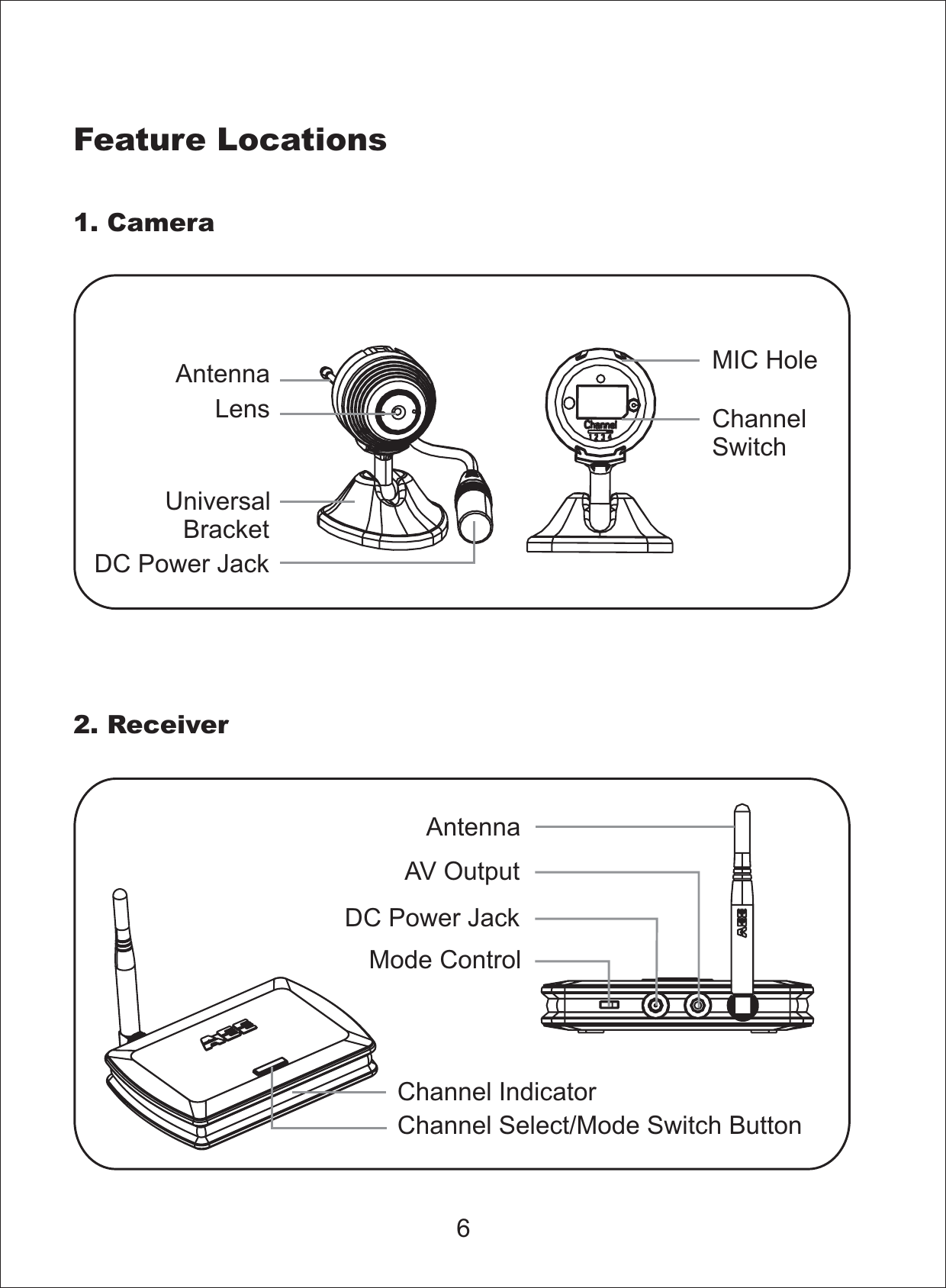
Feature Locations1. Camera2. ReceiverAntennaLensUniversalBracketDC Power JackMIC HoleChannelSwitchMode ControlDC Power JackAV OutputAntennaChannel IndicatorChannel Select/Mode Switch Button6
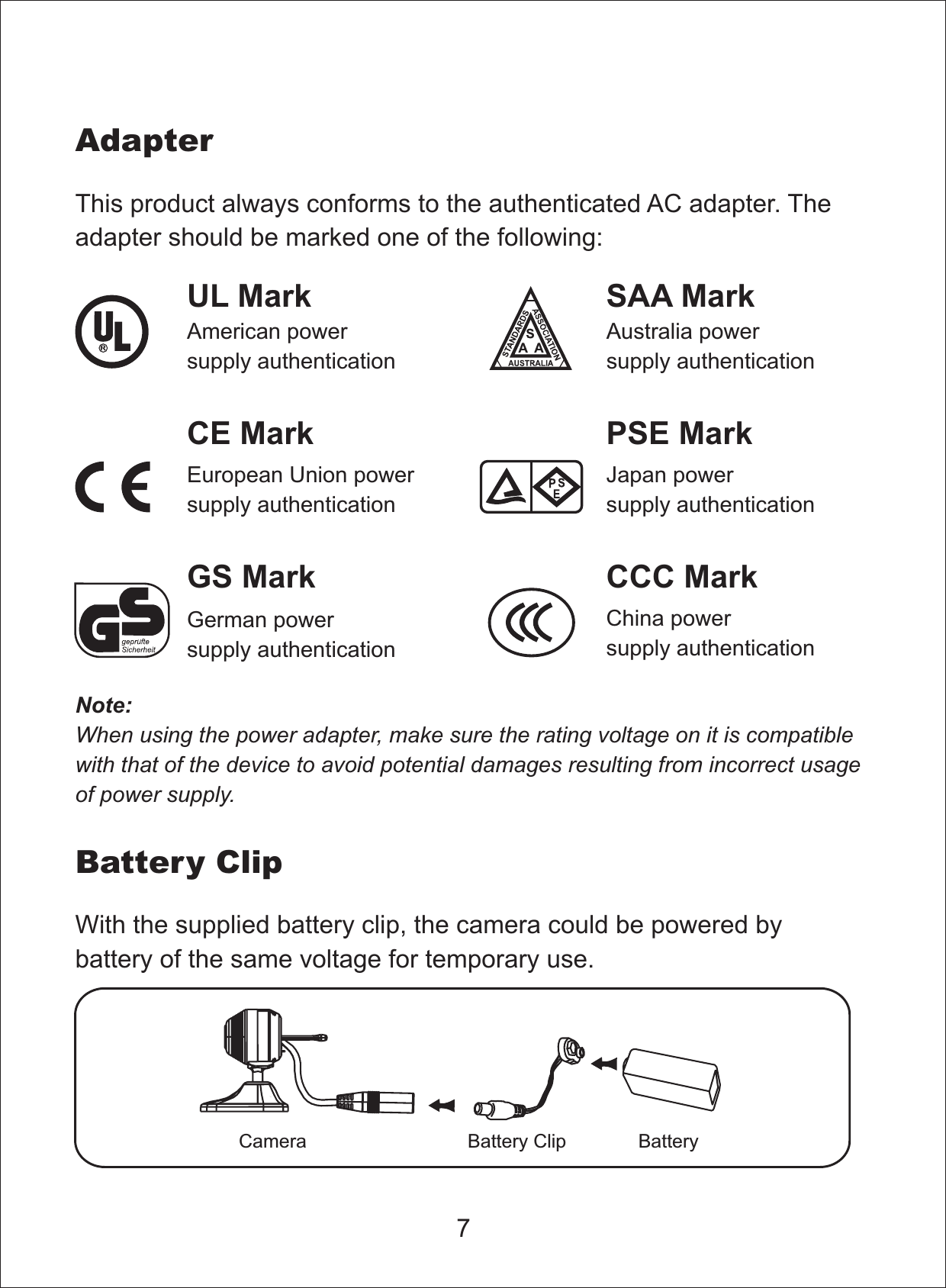
7This product always conforms to the authenticated AC adapter. Theadapter should be marked one of the following:Note:When using the power adapter, make sure the rating voltage on it is compatiblewith that of the device to avoid potential damages resulting from incorrect usageof power supply.UL MarkAmerican powersupply authenticationSAA MarkAustralia powersupply authenticationGS MarkGerman powersupply authenticationCCC MarkChina powersupply authenticationEuropean Union powersupply authenticationCE Mark PSE MarkJapan powersupply authenticationAdapterBattery ClipWith the supplied battery clip, the camera could be powered bybattery of the same voltage for temporary use.BatteryBattery ClipCamera
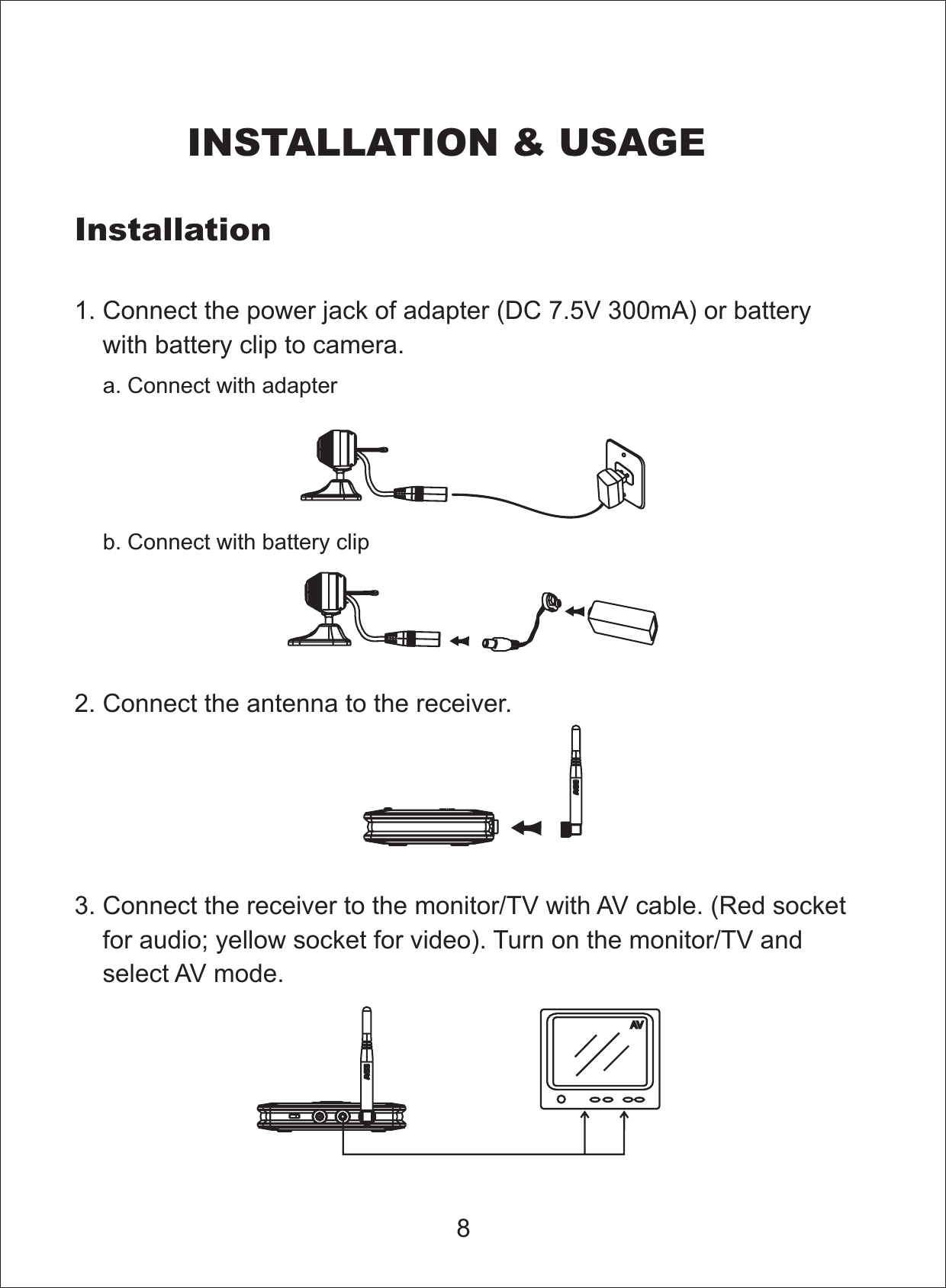
81. Connect the power jack of adapter ( 0mA) or batterywith battery clip to camera.DC 7.5V 302. Connect the antenna to the receiver.3. Connect the receiver to the monitor/TV with AV cable. (Red socketfor audio; yellow socket for video). Turn on the monitor/TV andselect AV mode.InstallationINSTALLATION & USAGEa. Connect with adapterb. Connect with battery clip
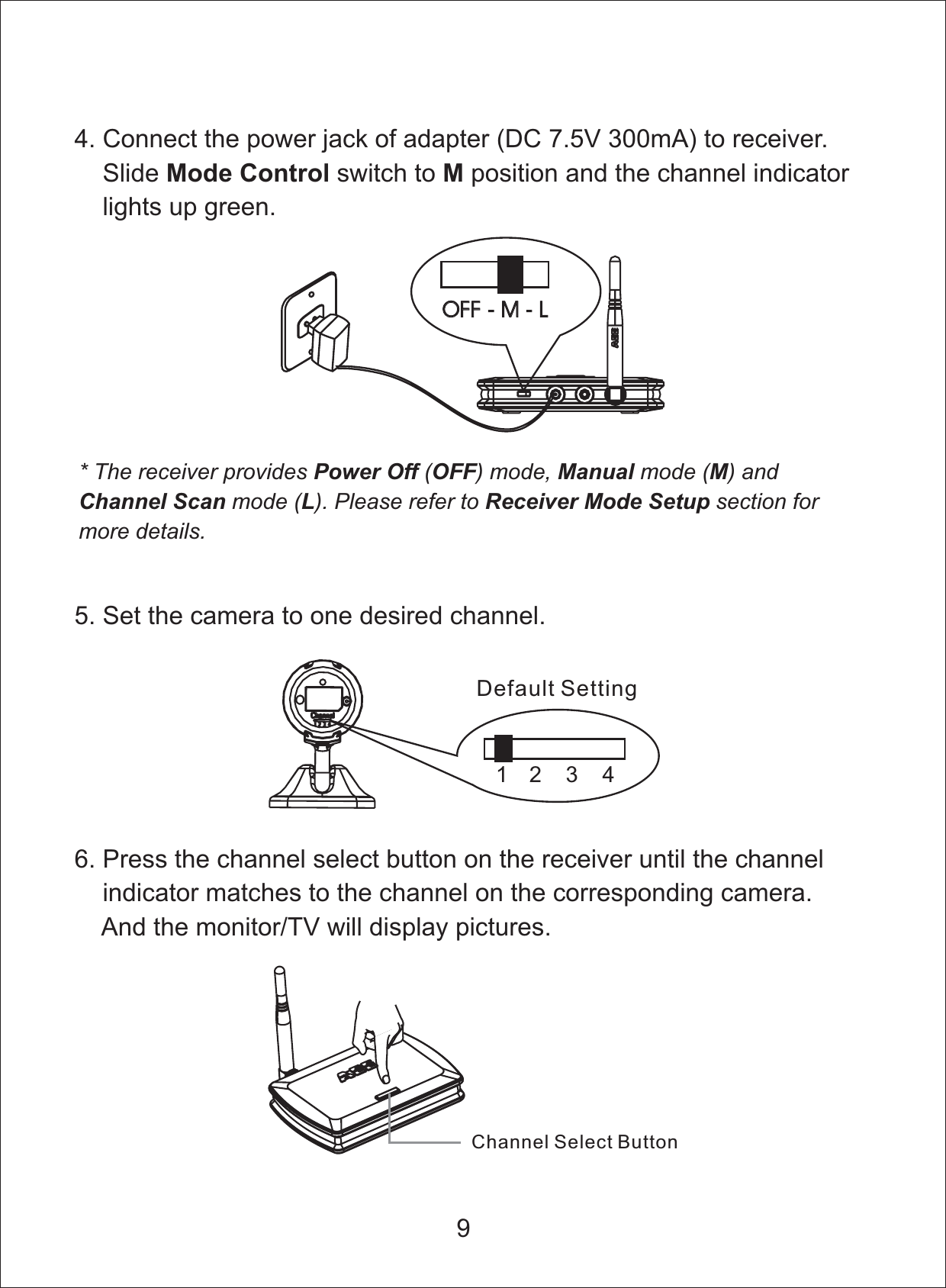
4. Connect the power jack of adapter ( 300mA) to receiver.Slide switch to andDC 7.5Vposition the channel indicatorlights up green.Mode Control MOFF-M-LOFF - M - L* The receiver provides ( ) mode, mode ( ) andmode ( ). Please refer to section formore details.Power Off OFF Manual MChannel Scan L Receiver Mode Setup5. Set the camera to one desired channel.12 3 4Default Setting96. Press the channel select button on the receiver until the channelindicator matches to the channel on the corresponding camera.And the monitor/TV will display pictures.Channel Select Button
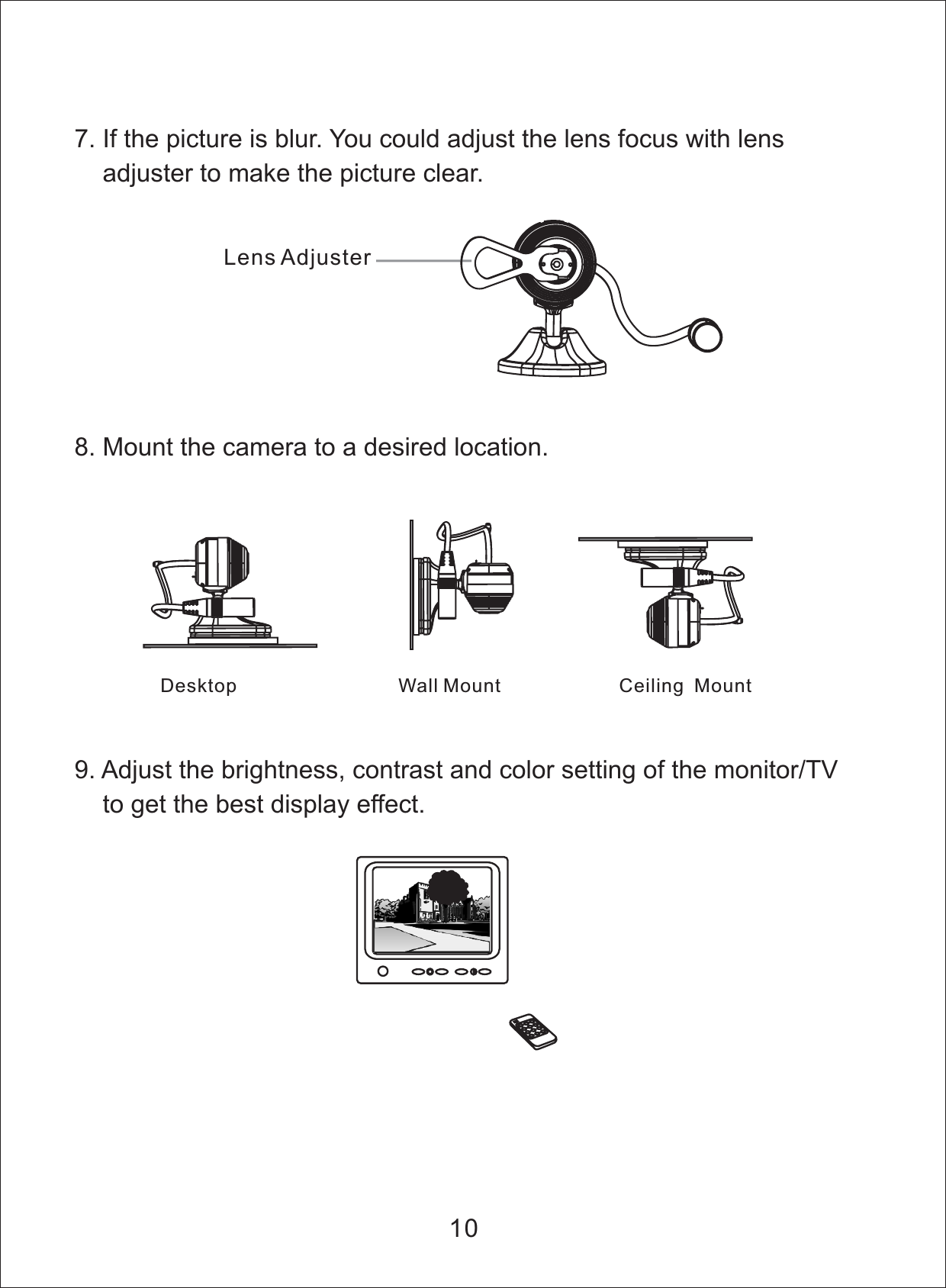
9. Adjust the brightness, contrast and color setting of the monitor/TVto get the best display effect.7. If the picture is blur. You could adjust the lens focus with lensadjuster to make the picture clear.8. Mount the camera to a desired location.Desktop Wall Mount Ceiling Mount10Lens Adjuster
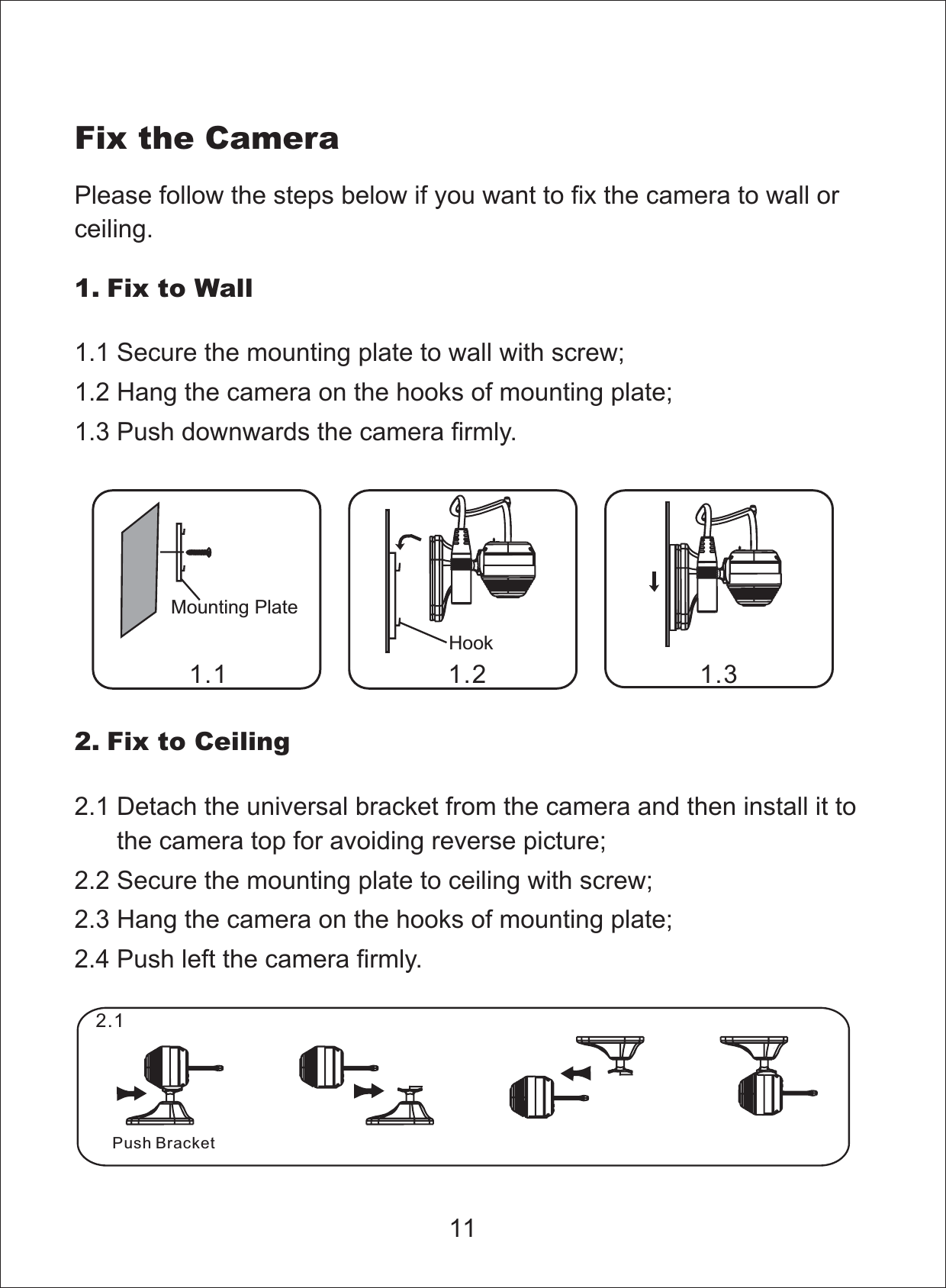
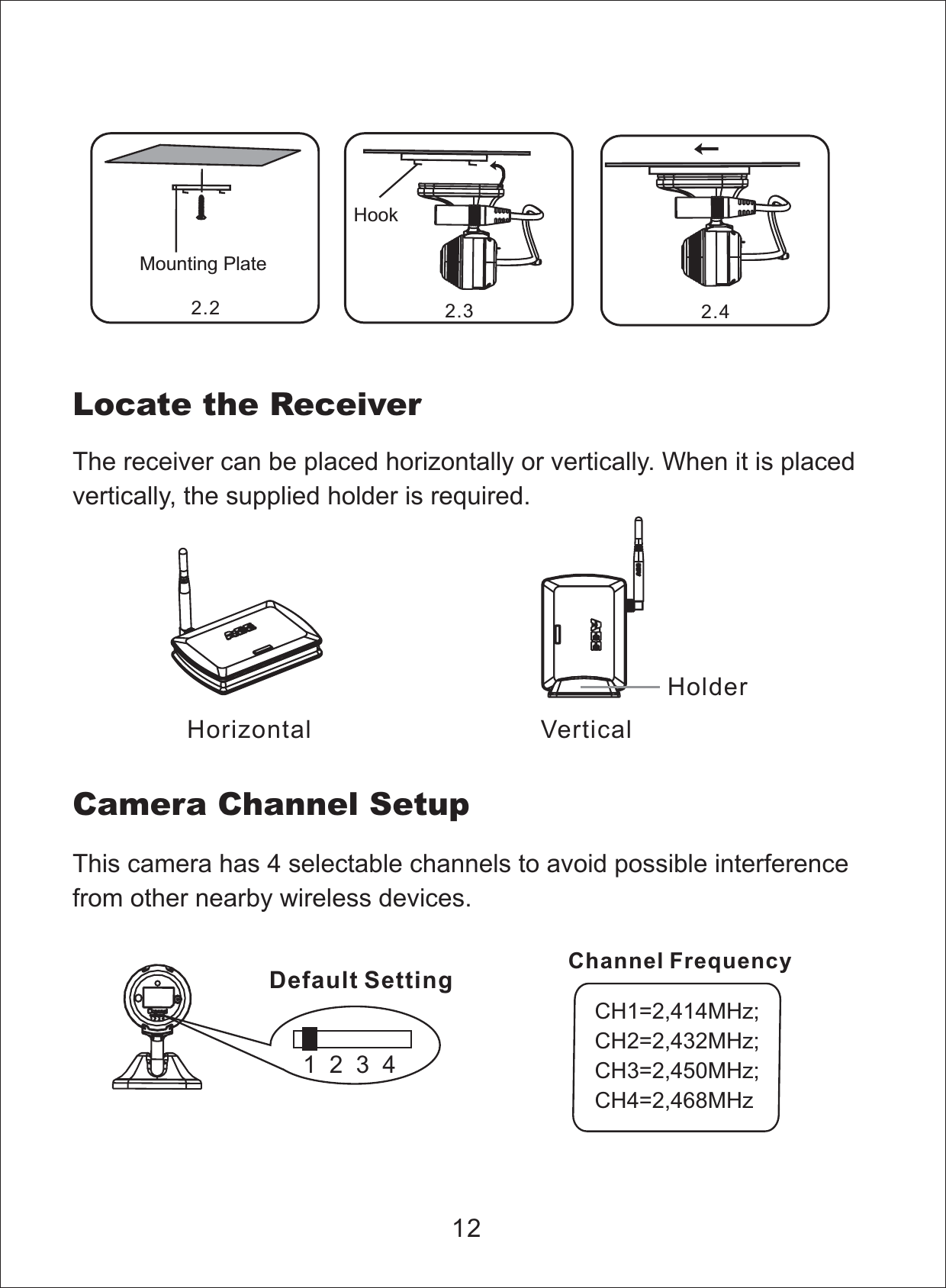
Fix the CameraMounting PlatePlease follow the steps below if you want to fix the camera to wall orceiling.1. Fix to Wall1.1 Secure the mounting plate to wall with screw;1.2 Hang the camera on the hooks of mounting plate;1.3 Push downwards the camera firmly.Hook2. Fix to Ceiling2.1 Detach the universal bracket from the camera and then install it tothe camera top for avoiding reverse picture;2.2 Secure the mounting plate to ceiling with screw;2.3 Hang the camera on the hooks of mounting plate;2.4 Push left the camera firmly.111.1 1.2 1.32.1Push Bracket
Locate the ReceiverThe receiver can be placed horizontally or vertically. When it is placedvertically, the supplied holder is required.12Horizontal VerticalHolderThis camera has 4 selectable channels to avoid possible interferencefrom other nearby wireless devices.Camera Channel Setup1234Default SettingCH1=2,414MHz;CH2=2,432MHz;CH3=2,450MHz;CH4=2,468MHzChannel FrequencyHookMounting Plate2.2 2.3 2.4
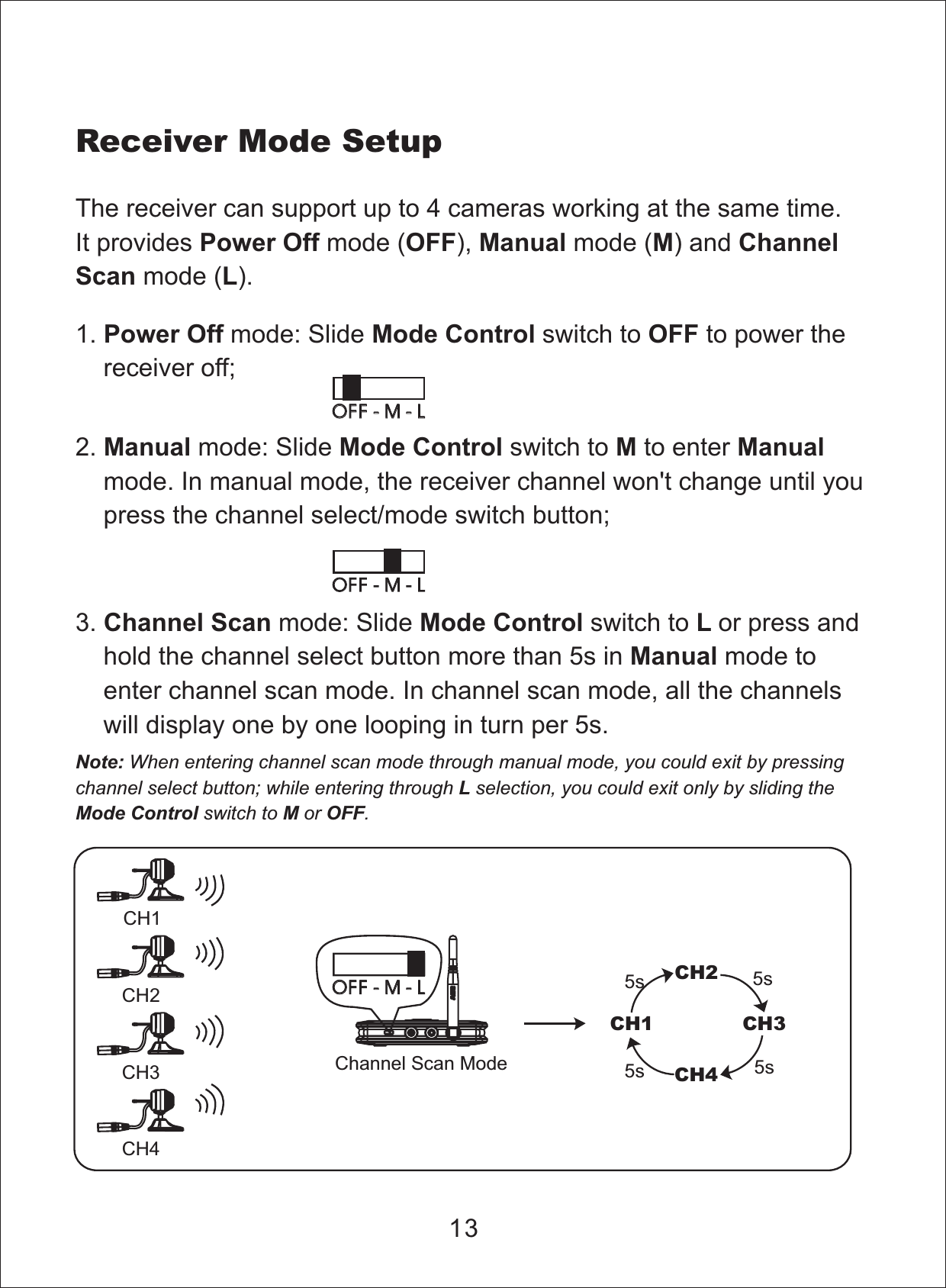
Note:onlyWhen entering channel scan mode through manual mode, you could exit by pressingchannel select button; while entering through selection, you could exit by sliding theswitch to or .LMode Control M OFFReceiver Mode SetupThe receiver can support up to 4 cameras working at the same time.It provides mode ( ), mode ( ) andmode ( ).Power Off OFF Manual M ChannelScan LCH1CH2CH3CH4CH1CH2CH3CH45s 5s5s 5sChannel Scan ModeOFF-M-LOFF - M - L3. mode: Slide switch to or press andhold the channel select button more than 5s in mode toenter channel scan mode. In channel scan mode, all the channelswill display one by one looping in turn per 5s.Channel Scan Mode Control LManual1. mode: Slide switch to to power thereceiver off;Power Off Mode Control OFF2. mode: Slide switch to to entermode. In manual mode, the receiver channel won't change until youpress the channel select/mode switch button;Manual Mode Control M Manual13OFF-M-LOFF - M - LOFF-M-LOFF - M - L
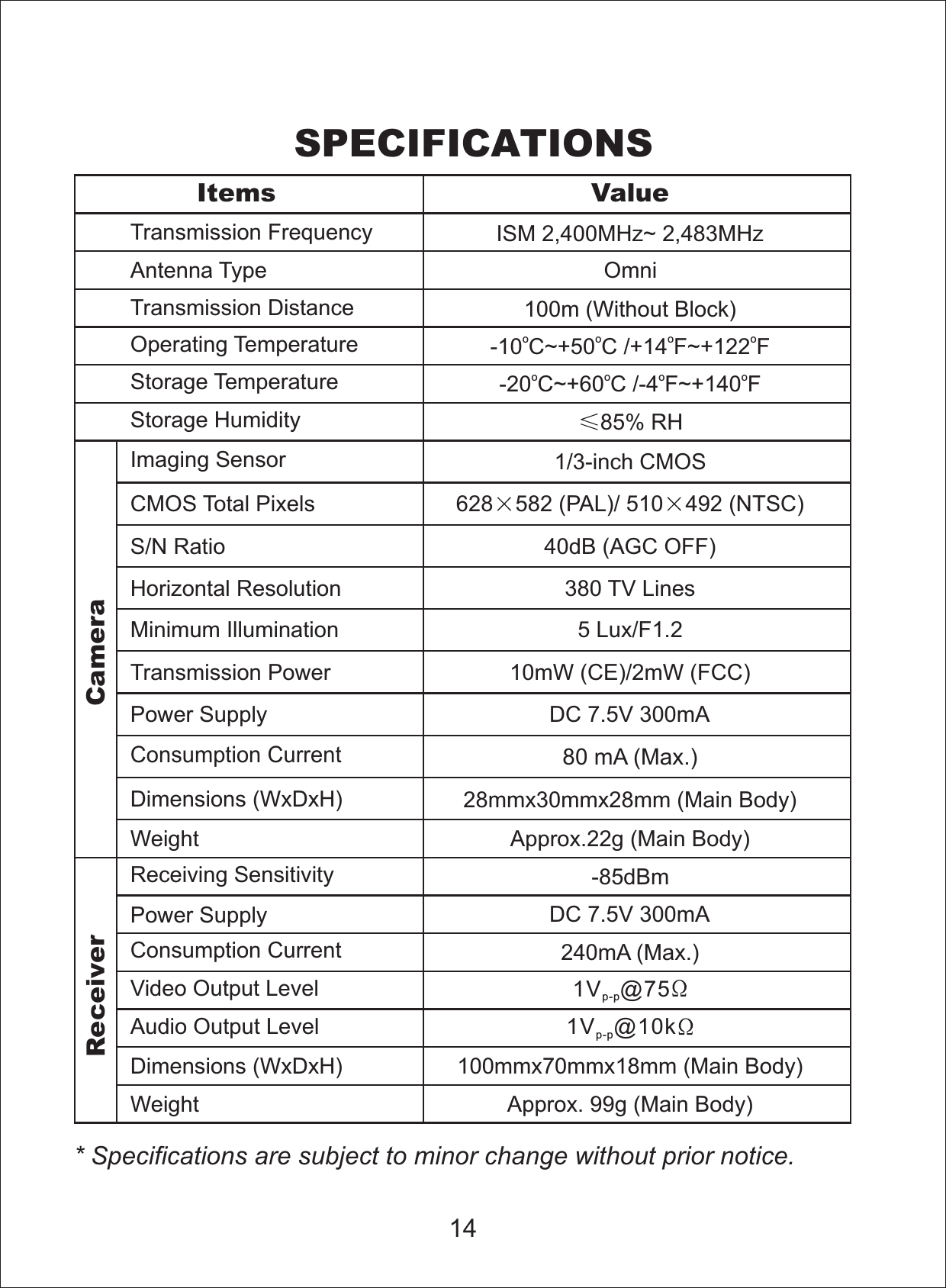
SPECIFICATIONS* Specifications are subject to minor change without prior notice.14Items ValueTransmission Frequency ISM 2,400 z~ 2,483MHzMHAntenna Type OmniPower Supply DC 7.5V 300mAStorage Humidity 85% RHStorage TemperatureImaging Sensor 1/3-inch CMOSCMOS Total Pixels 628 582 (PAL)/ 510 492 (NTSC)S/N Ratio 40dB (AGC OFF)Horizontal Resolution 380 TV LinesMinimum Illumination 5 Lux/F1.2Transmission Power 10mW (CE)/2mW (FCC)Transmission Distance 100m (Without Block)Consumption Current80 mA (Max.)Dimensions (WxDxH) 28mmx30mmx28mm (Main Body)Weight Approx.22g (Main Body)Receiving Sensitivity -85dBmConsumption Current 240mA (Max.)Video Output LevelAudio Output LevelDimensions (WxDxH)Weight Approx. 99g (Main Body)Operating Temperature100mmx70mmx18mm (Main Body)CameraReceiver-20 C~+60 C /-4 ~+140ooo oFF-10 C~+50 C /+14 ~+122ooo oFFPower Supply DC 7.5V 300mA1V @10kp-p1V @75p-p
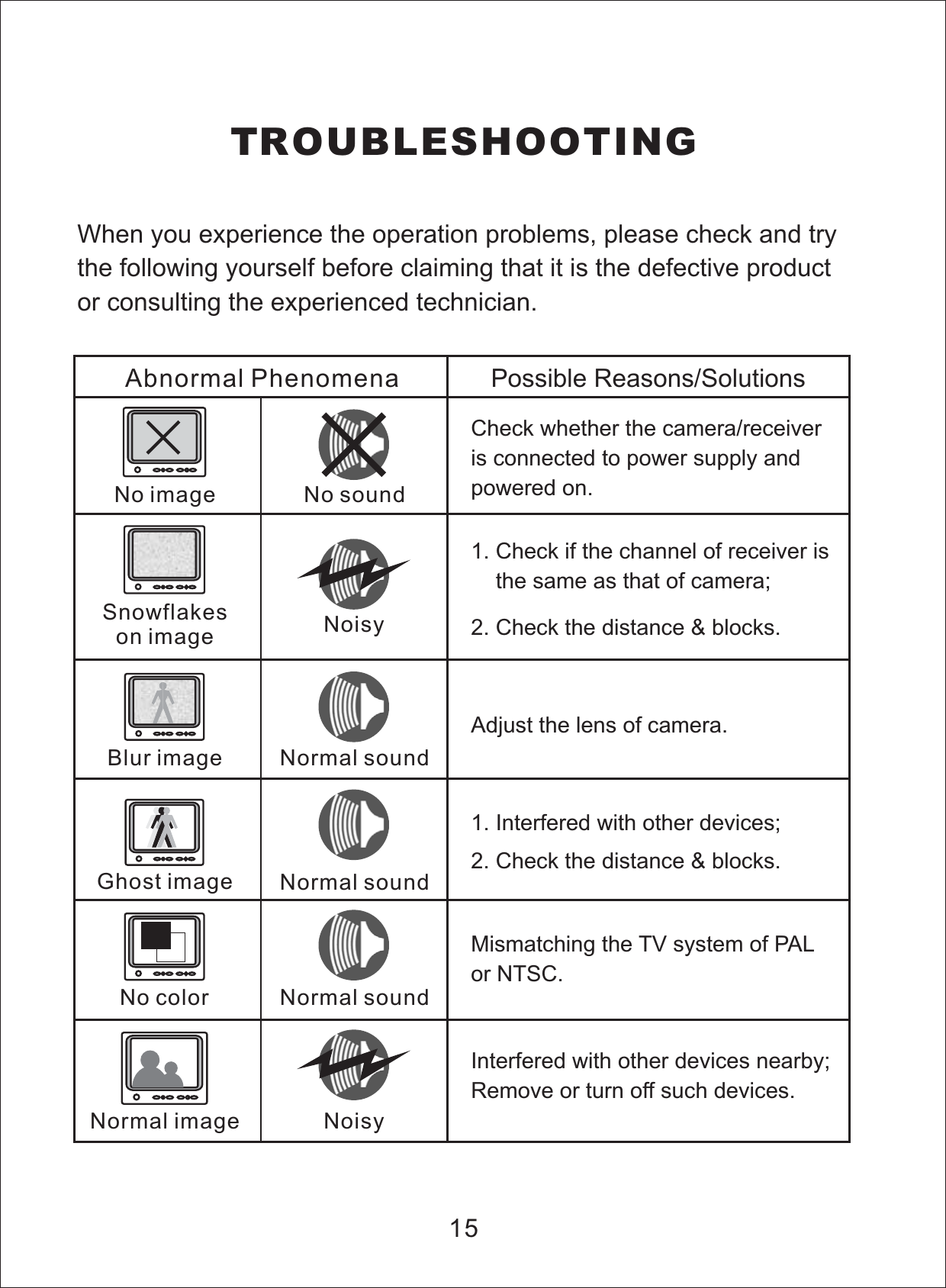
TROUBLESHOOTINGWhen you experience the operation problems, please check and trythe following yourself before claiming that it is the defective productor consulting the experienced technician.15Abnormal Phenomena Possible Reasons/SolutionsCheck whether the camera/receiveris connected to power supply andpowered on.1. Check if the channel of receiver isthe same as that of camera;2. Check the distance & blocks.Mismatching the TV system of PALor NTSC.1. with other devices;Interfered2. Check the distance & blocks.Adjust the lens of camera.Interfered with other devices nearby;Remove or turn off such devices.No imageSnowflakeson imageNormal imageNo colorGhost imageBlur imageNo soundNoisyNoisyNormal soundNormal soundNormal sound
AEE TECHNOLOGY CO.,LTDR

Navigation menu