AKRAPOVIC d d ASK01 Akrapovic Sound Kit/Sound Remote Controller User Manual

AKRAPOVIC d.d. Akrapovic Sound Kit/Sound Remote Controller

User Manual

Instruction Manual for theAkrapovič Sound KitFOR CARSSound Remote Controller andAkrapovič Car Sound Kit App ManualVer 1.0 / April 2015*504471*
CONGRATULATIONS -Congratulations on purchasing the Akrapovič Sound Kit. The Akrapovič Sound Kit is a product of Akrapovič d.d., Malo Hudo 8a, 1295 Ivančna Gorica, Slovenia (“Akrapovič”).Please read this entire installation manual carefully prior to installing and using the Akrapovič Sound Kit.The  Akrapovič  Sound  Kit  should  be  used  only  with  original  Akrapovič exhaust  systems.  The  Akrapovič  Sound  Kit  may  be  operated  using the  enclosed  Sound  Remote  Controller  or  with  the  Akrapovič  Car Sound Kit App.Akrapovič Sound Kit3 / 36
The Akrapovič Sound Kit is intended for use only in cars. Use or adaption of the Sound Kit for other types of vehicles may result in non-working products.Please entrust the installation of the Akrapovič Sound Kit to a trained professional skilled in car electronics and knowledge of exhaust system installation and performance. The instructions provided in this manual should  be  followed  to  ensure  proper  installation  and  safe  use  of  the Akrapovič  Sound  Kit.  Akrapovič  and/or  its  partners  shall  not  be  held liable  for  any  damage  or  personal  injury  (including  direct,  indirect,  or consequential damage) sustained as a result of improper installation of the Akrapovič Sound Kit, use contrary to the instructions and warnings contained  herein,  or  use  with  exhaust  systems  other  than  Akrapovič (original) exhaust systems or vehicles other than those specified on the particular Akrapovič Sound Kit box and/or the official Akrapovič website.If you have any questions regarding the installation and/or proper use of  the  Akrapovič  Sound  Kit  or  these  instructions,  contact  your  local authorized Akrapovič partner.For  more  information  on  the  Akrapovič  Sound  Kit  and/or  Akrapovič exhaust systems, see the official Akrapovič website at:http://www.akrapovic.comCOPYRIGHTS AND OTHER RIGHTS NOTICEThe Akrapovič trademark, including corporate logos and emblems, are subject to copyright as well as trademark rights of Akrapovič, its licensors, or third persons authorizing Akrapovič to use them.Any reproduction, technical or other manipulation, translation, or other use of the copyright and/or trademark rights contained herein is prohibited without the explicit prior written con-sent of Akrapovič. The same especially applies to the entire contents of this manual and/or any of its parts, including but not limited to technical specifications, instructions, graphs, photographs, and so on included in this manual.The photographs and other illustrations in this manual are symbolic and are intended to help represent individual steps for proper installation and use, as well as for a general overview. The actual component parts of the Akrapovič Sound Kit may not entirely correspond to the photographs and other illustrations.© Akrapovič d.d., 2015, All rights reserved.5 / 364 / 36
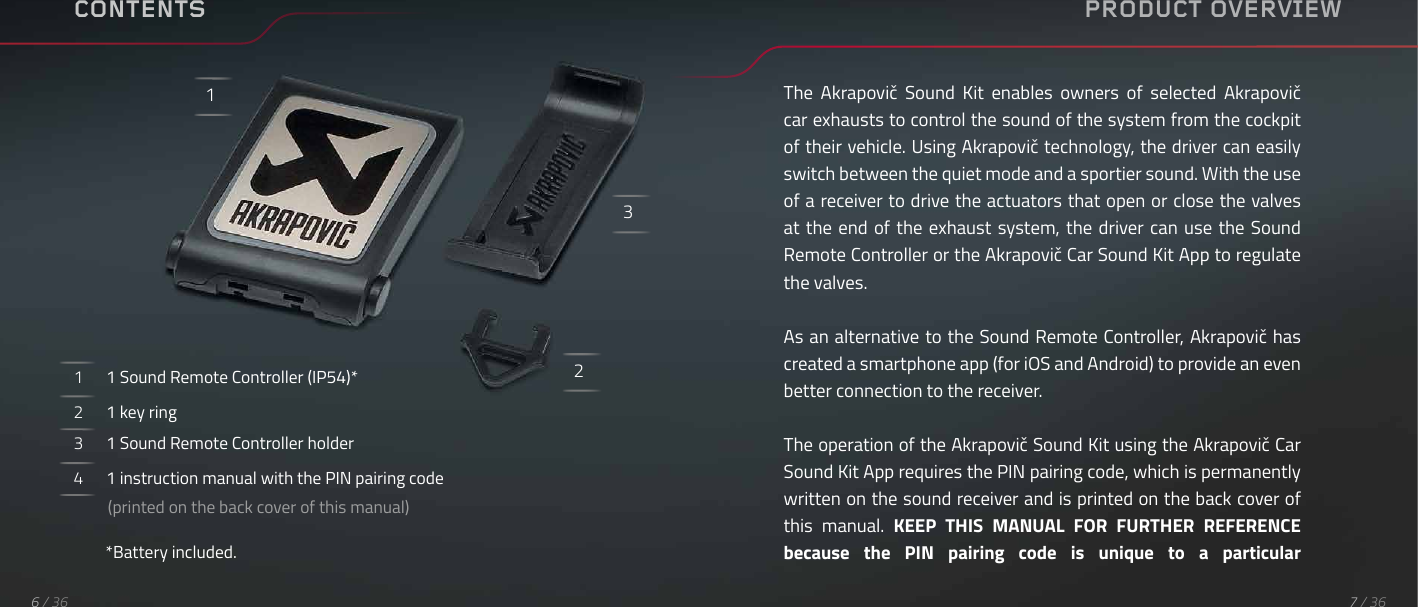
CONTENTS1      1 Sound Remote Controller (IP54)*2      1 key ring3      1 Sound Remote Controller holder4      1 instruction manual with the PIN pairing code          (printed on the back cover of this manual)*Battery included.123PRODUCT OVERVIEWThe  Akrapovič  Sound  Kit  enables  owners  of  selected  Akrapovič car exhausts to control the sound of the system from the cockpit of their vehicle. Using Akrapovič technology, the driver can easily switch between the quiet mode and a sportier sound. With the use of a receiver to drive the actuators that open or close the valves at the end of the exhaust system, the  driver  can  use  the  Sound Remote Controller or the Akrapovič Car Sound Kit App to regulate the valves.As an alternative to the Sound Remote Controller, Akrapovič has created a smartphone app (for iOS and Android) to provide an even better connection to the receiver.The operation of the Akrapovič Sound Kit using the Akrapovič Car Sound Kit App requires the PIN pairing code, which is permanently written on the sound receiver and is printed on the back cover of this  manual.  KEEP  THIS  MANUAL  FOR  FURTHER  REFERENCE because  the  PIN  pairing  code  is  unique  to  a  particular 7 / 366 / 36
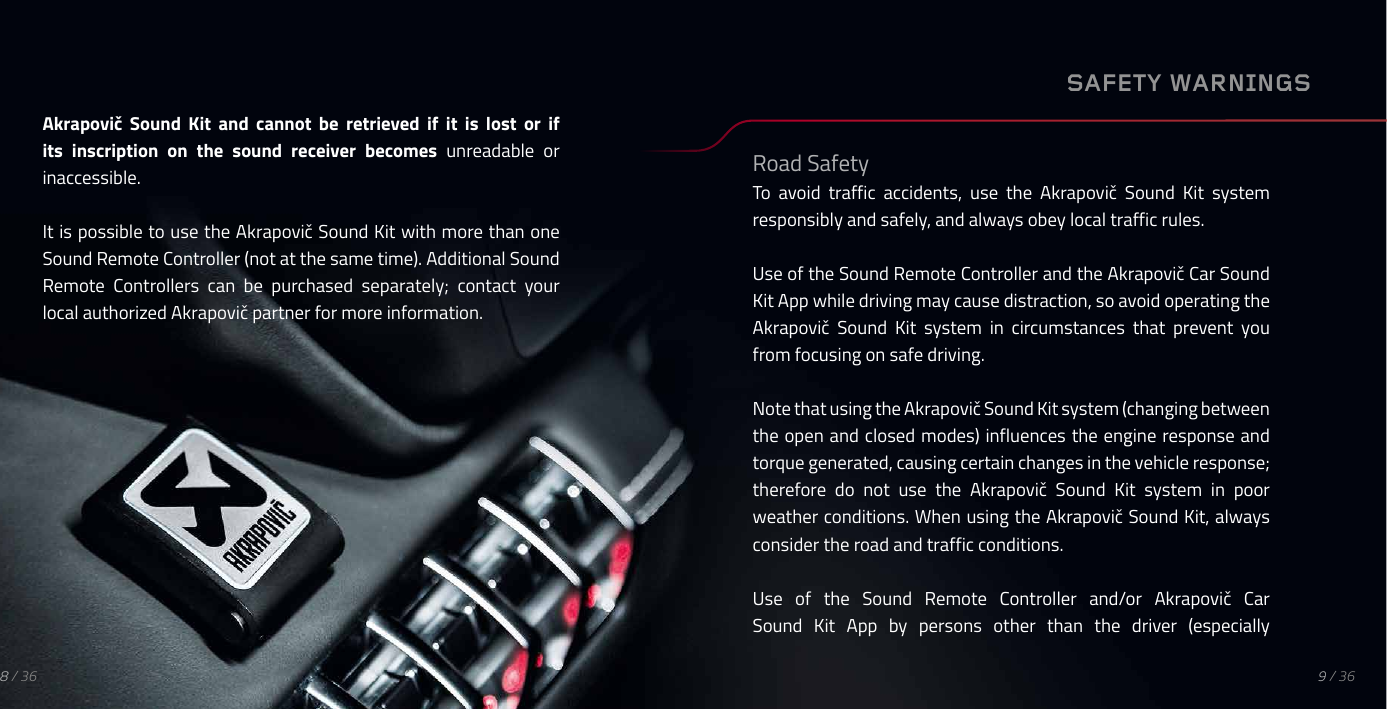
Akrapovič  Sound  Kit  and  cannot  be  retrieved  if  it  is  lost  or  if its inscription on the sound receiver becomes unreadable  or inaccessible.It is possible to use the Akrapovič Sound Kit with more than one Sound Remote Controller (not at the same time). Additional Sound Remote  Controllers  can  be  purchased  separately;  contact  your local authorized Akrapovič partner for more information.SAFETY WARNINGSRoad SafetyTo  avoid  traffic  accidents,  use  the  Akrapovič  Sound  Kit  system responsibly and safely, and always obey local traffic rules.Use of the Sound Remote Controller and the Akrapovič Car Sound Kit App while driving may cause distraction, so avoid operating the Akrapovič  Sound  Kit  system  in  circumstances  that  prevent  you from focusing on safe driving.Note that using the Akrapovič Sound Kit system (changing between the open and closed modes) influences the engine response and torque generated, causing certain changes in the vehicle response; therefore  do  not  use  the  Akrapovič  Sound  Kit  system  in  poor weather conditions. When using the Akrapovič Sound Kit, always consider the road and traffic conditions.Use  of  the  Sound  Remote  Controller  and/or  Akrapovič  Car Sound  Kit  App  by  persons  other  than  the  driver  (especially9 / 368 / 36
children)  and  consequently  unexpected  changes  between  the open  and  closed  modes  in  uncontrolled  circumstances  may  take drivers  by  surprise,  endangering  the  safety  of  the  passengers  in the vehicle and/or other road users or causing interference-related malfunctions. Refer to the Interference section below.InterferenceAll wireless devices are susceptible to or may cause interference. Do not use the Sound Remote Controller in environments where such interference might cause malfunction of machines or devices and/or  endanger  the  lives  of  others  (e.g.,  in  airplanes,  in  hospitals,  or near medical equipment or implanted medical devices) as well as in places where the use of wireless devices is prohibited or restricted.Child SafetyThe Sound Remote Controller should be kept out of reach of children because it contains small parts. The Sound Remote Controller and/or Akrapovič Car Sound Kit App should not be operated by children. Refer to the Road Safety section above.For the Sound Remote Controller to work, it must be paired with the sound receiver. The (original) Akrapovič exhaust system with the valves and  sound  receiver  must  first  be  installed.  Refer  to  the  Akrapovič exhaust system and the Akrapovič Sound Kit Installation Manual.To pair the Sound Remote Controller with the sound receiver, press and hold the button on the Sound Remote Controller until the red LED starts flashing. Switch the car ON to supply the sound receiver.The pairing process will occur automatically within ten seconds. If the pairing process is completed successfully, the LED (white or red) on  the  Sound  Remote Controller will  turn  on  for  fifteen  seconds.PAIRING PROCESSwith a New Sound Remote ControllerOPERATING THE AKRAPOVIČ SOUND KIT WITH THE SOUND REMOTE CONTROLLER11 / 3610 / 36
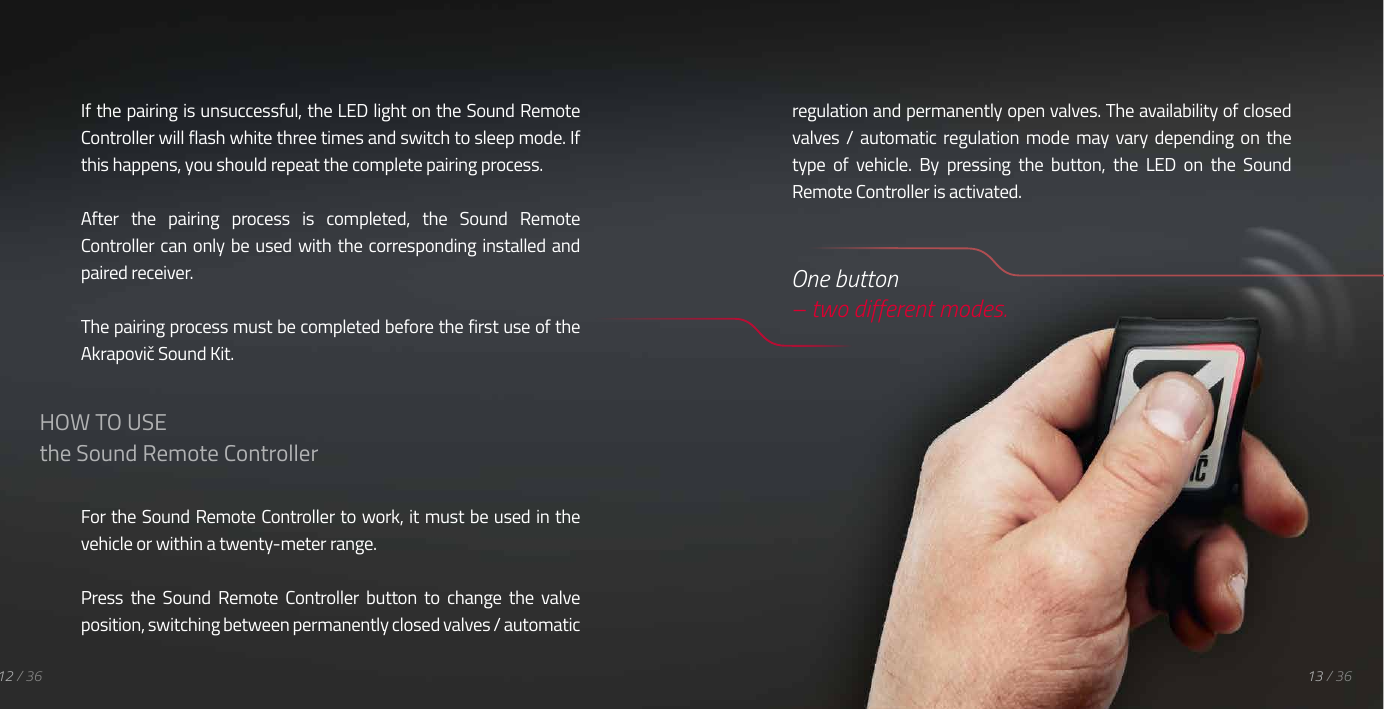
If the pairing is unsuccessful, the LED light on the Sound Remote Controller will flash white three times and switch to sleep mode. If this happens, you should repeat the complete pairing process.After  the  pairing  process  is  completed,  the  Sound  Remote Controller can  only be used with the corresponding installed and paired receiver.The pairing process must be completed before the first use of the Akrapovič Sound Kit.For the Sound Remote Controller to work, it must be used in the vehicle or within a twenty-meter range.Press  the  Sound  Remote  Controller  button  to  change  the  valve position, switching between permanently closed valves / automatic 12 / 36 13 / 36HOW TO USEthe Sound Remote Controllerregulation and permanently open valves. The availability of closed valves /  automatic  regulation  mode  may  vary  depending  on  the type  of  vehicle.  By  pressing  the  button,  the  LED  on  the  Sound Remote Controller is activated.  One button  – two different modes.
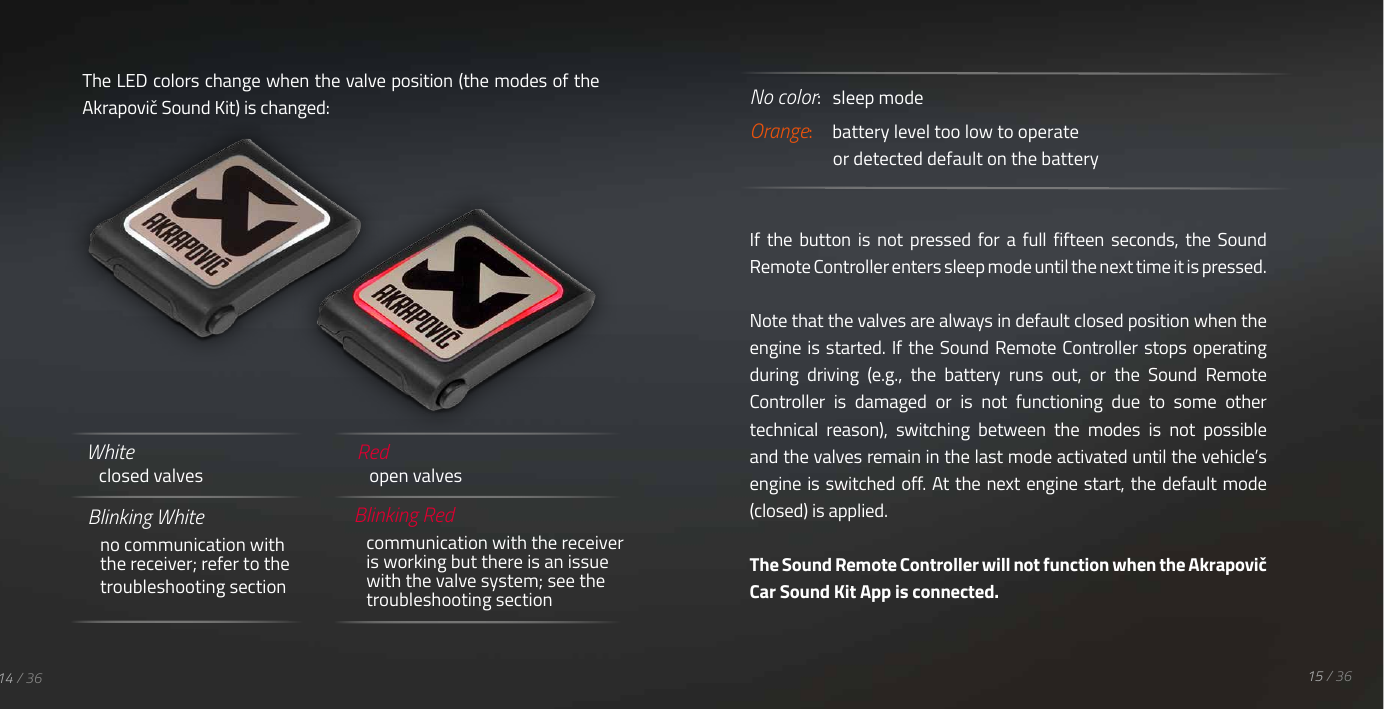
Blinking White no communication with the receiver; refer to the troubleshooting sectionBlinking Redcommunication with the receiver is working but there is an issue with the valve system; see the troubleshooting sectionRed open valvesWhite closed valvesThe LED colors change when the valve position (the modes of the Akrapovič Sound Kit) is changed: No color:   sleep modeOrange:     battery level too low to operate     or detected default on the batteryIf  the  button  is  not  pressed  for  a  full  fifteen  seconds,  the  Sound Remote Controller enters sleep mode until the next time it is pressed.Note that the valves are always in default closed position when the engine is  started. If the  Sound Remote Controller stops operating during  driving  (e.g.,  the  battery  runs  out,  or  the  Sound  Remote Controller  is  damaged  or  is  not  functioning  due  to  some  other technical  reason),  switching  between  the  modes  is  not  possible and the valves remain in the last mode activated until the vehicle’s engine is switched off. At the next engine start, the default mode (closed) is applied.The Sound Remote Controller will not function when the Akrapovič Car Sound Kit App is connected. 15 / 3614 / 36
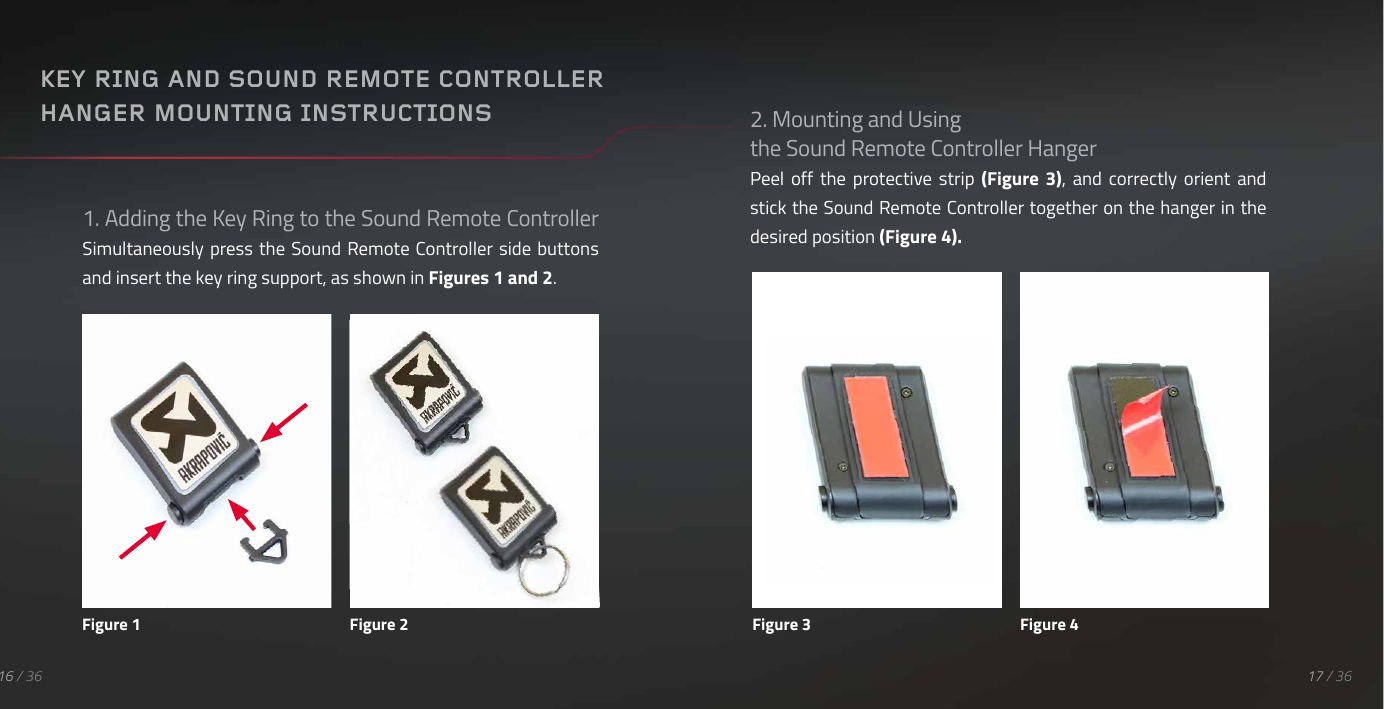
1. Adding the Key Ring to the Sound Remote Controller Simultaneously press the  Sound Remote Controller side  buttons and insert the key ring support, as shown in Figures 1 and 2.17 / 3616 / 36KEY RING AND SOUND REMOTE CONTROLLER HANGER MOUNTING INSTRUCTIONSFigure 1 Figure 22. Mounting and Using the Sound Remote Controller HangerPeel  off  the  protective  strip  (Figure  3),  and  correctly orient  and stick the Sound Remote Controller together on the hanger in the desired position (Figure 4).Figure 3 Figure 4
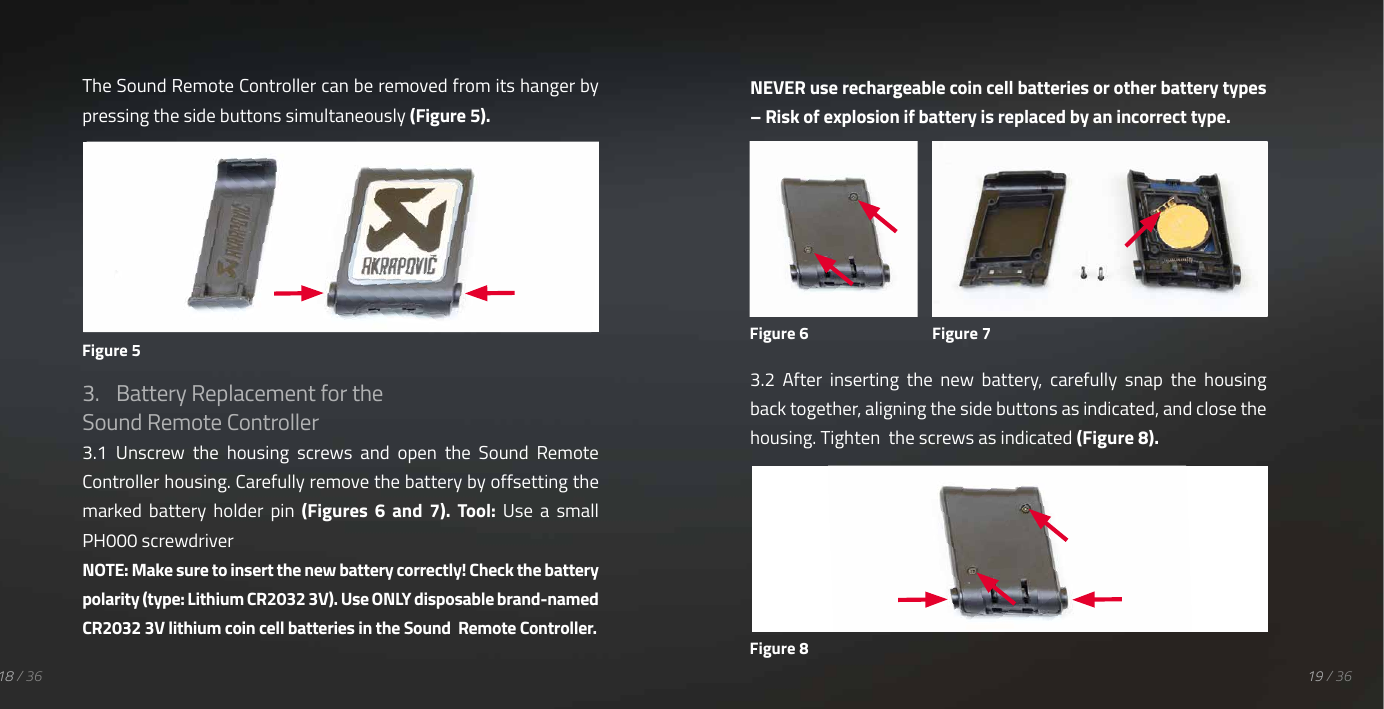
19 / 3618 / 36The Sound Remote Controller can be removed from its hanger by pressing the side buttons simultaneously (Figure 5).3.  Battery Replacement for the Sound Remote Controller 3.1  Unscrew  the  housing  screws  and  open  the  Sound  Remote Controller housing. Carefully remove the battery by offsetting the marked  battery  holder  pin  (Figures  6  and  7).  Tool:  Use  a  small PH000 screwdriver NOTE: Make sure to insert the new battery correctly! Check the battery polarity (type: Lithium CR2032 3V). Use ONLY disposable brand-named CR2032 3V lithium coin cell batteries in the Sound  Remote Controller.NEVER use rechargeable coin cell batteries or other battery types – Risk of explosion if battery is replaced by an incorrect type.3.2  After  inserting  the  new  battery,  carefully  snap  the  housing back together, aligning the side buttons as indicated, and close the housing. Tighten  the screws as indicated (Figure 8).Figure 5Figure 6 Figure 7Figure 8
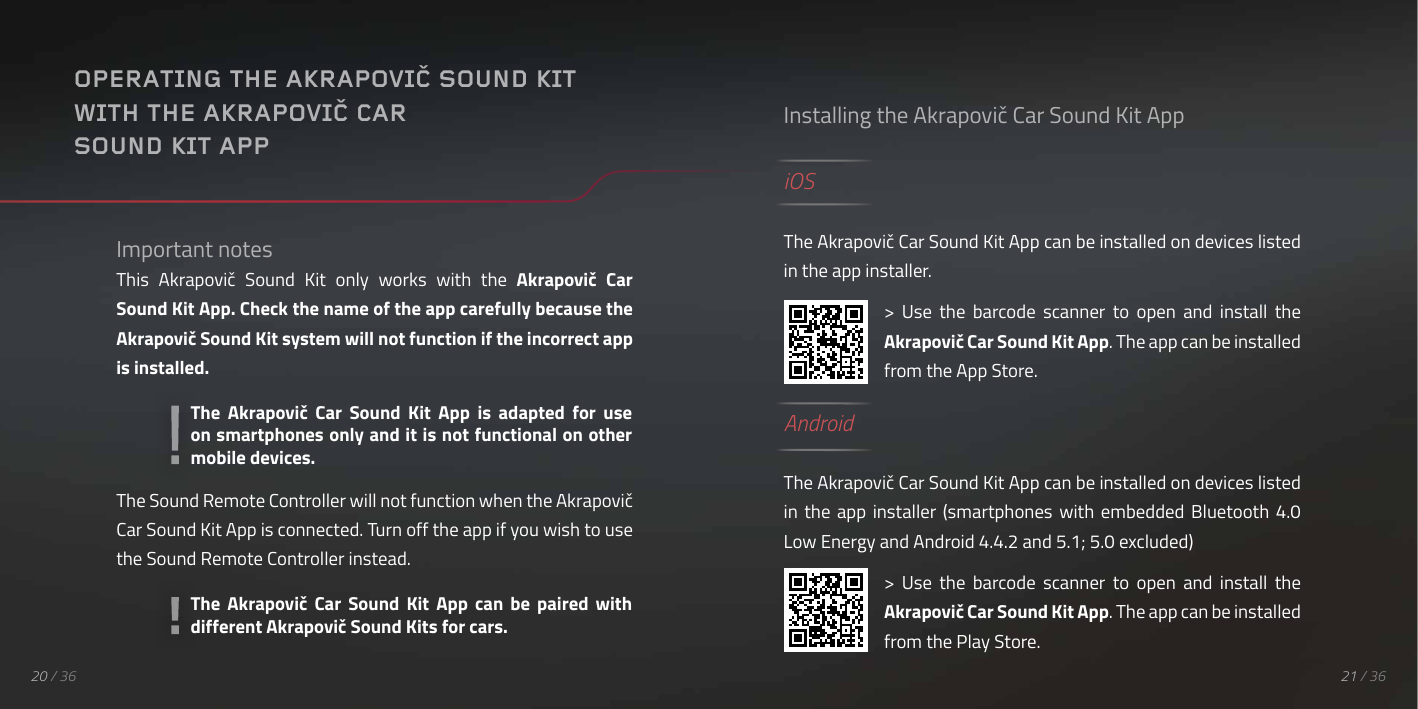
20 / 36Important notesThis  Akrapovič  Sound  Kit  only  works  with  the  Akrapovič  Car Sound Kit App. Check the name of the app carefully because the Akrapovič Sound Kit system will not function if the incorrect app is installed.The Sound Remote Controller will not function when the Akrapovič Car Sound Kit App is connected. Turn off the app if you wish to use the Sound Remote Controller instead.OPERATING THE AKRAPOVIČ SOUND KITWITH THE AKRAPOVIČ CAR SOUND KIT APPInstalling the Akrapovič Car Sound Kit AppiOSThe Akrapovič Car Sound Kit App can be installed on devices listed in the app installer.>  Use  the  barcode  scanner  to  open  and  install  the Akrapovič Car Sound Kit App. The app can be installed from the App Store.AndroidThe Akrapovič Car Sound Kit App can be installed on devices listed in  the  app installer  (smartphones  with  embedded  Bluetooth  4.0 Low Energy and Android 4.4.2 and 5.1; 5.0 excluded)>  Use  the  barcode  scanner  to  open  and  install  the Akrapovič Car Sound Kit App. The app can be installed from the Play Store.The  Akrapovič  Car  Sound  Kit  App  can  be  paired  with different Akrapovič Sound Kits for cars.The  Akrapovič  Car  Sound  Kit  App  is  adapted  for  use on smartphones only and it is not functional on other mobile devices.QR KODA21 / 36
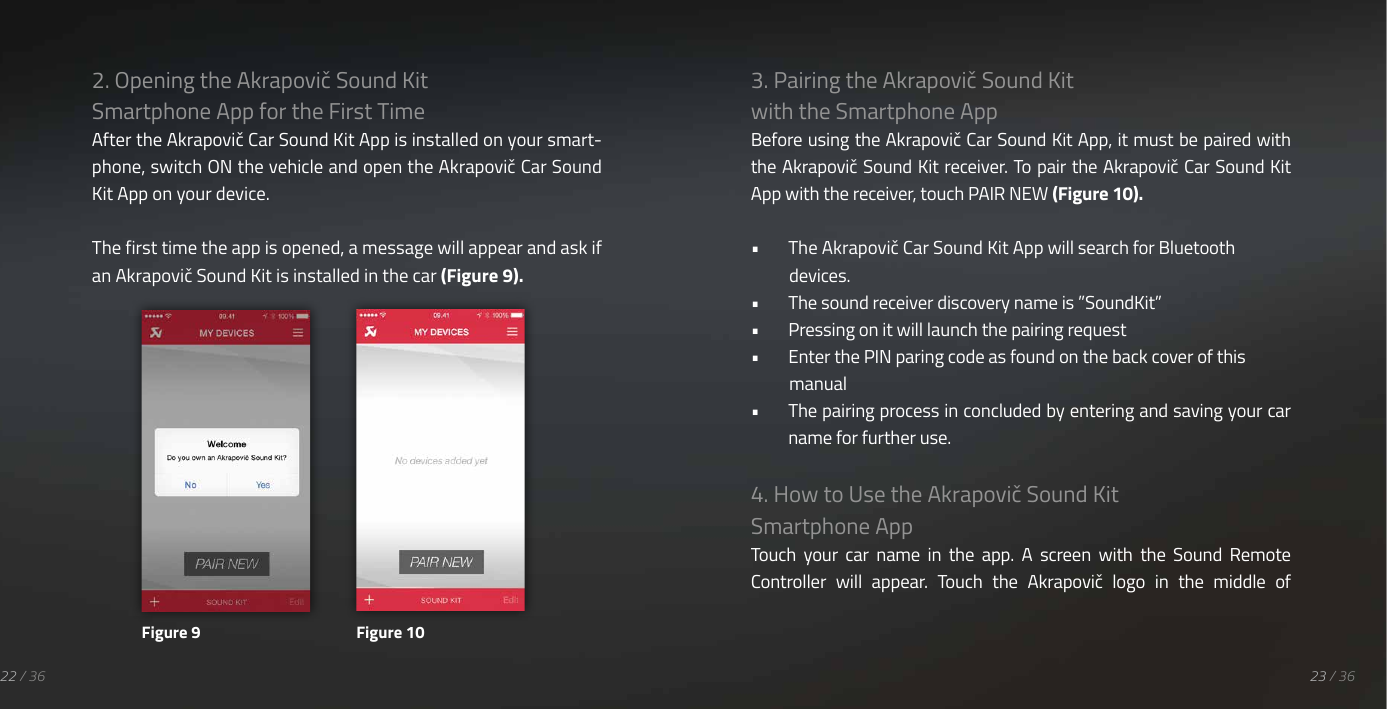
22 / 362. Opening the Akrapovič Sound Kit Smartphone App for the First TimeAfter the Akrapovič Car Sound Kit App is installed on your smart-phone, switch ON the vehicle and open the Akrapovič Car Sound Kit App on your device.The first time the app is opened, a message will appear and ask if an Akrapovič Sound Kit is installed in the car (Figure 9).3. Pairing the Akrapovič Sound Kit with the Smartphone AppBefore using the Akrapovič Car Sound Kit App, it must be paired with the Akrapovič Sound Kit receiver. To pair the Akrapovič Car Sound Kit App with the receiver, touch PAIR NEW (Figure 10).•  The Akrapovič Car Sound Kit App will search for Bluetooth devices.•  The sound receiver discovery name is ”SoundKit”•  Pressing on it will launch the pairing request•  Enter the PIN paring code as found on the back cover of this manual•  The pairing process in concluded by entering and saving your car name for further use.4. How to Use the Akrapovič Sound Kit Smartphone AppTouch  your  car  name  in  the  app.  A  screen  with  the  Sound  Remote Controller  will  appear.  Touch  the  Akrapovič  logo  in  the  middle  of Figure 9 Figure 1023 / 36
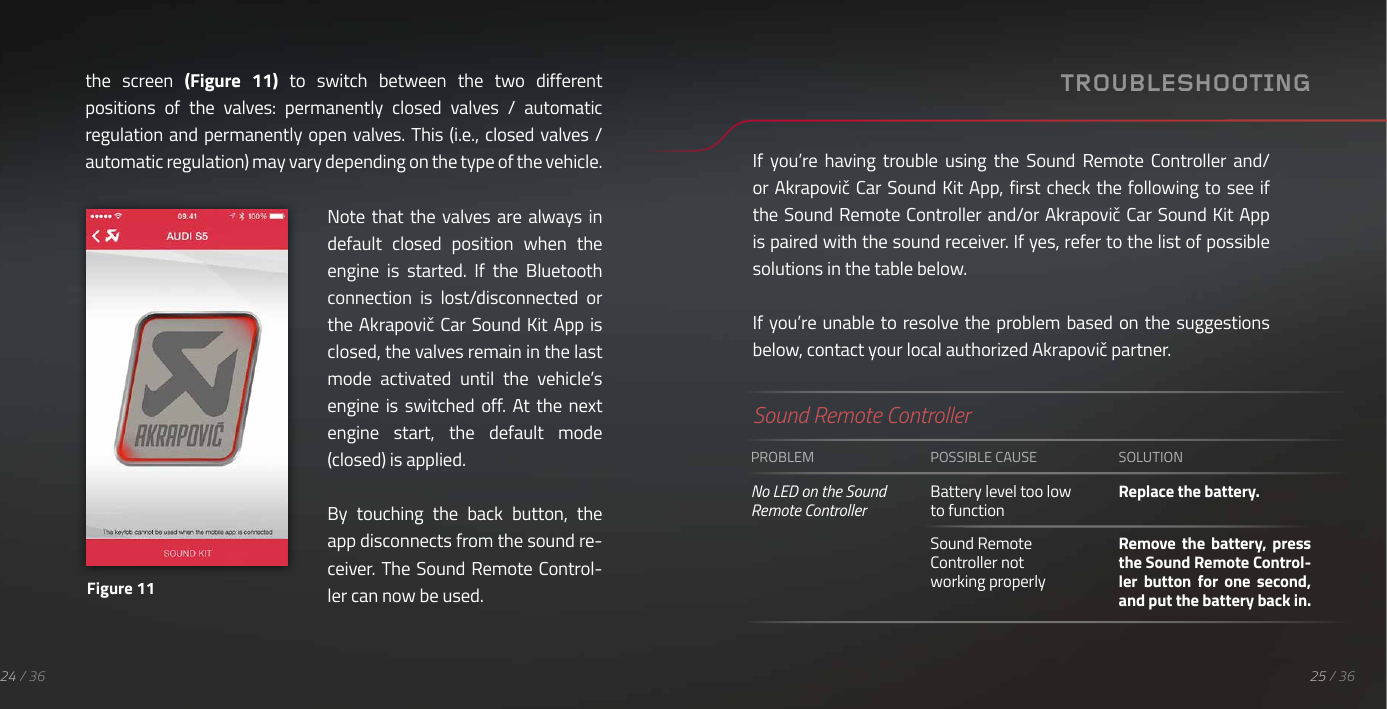
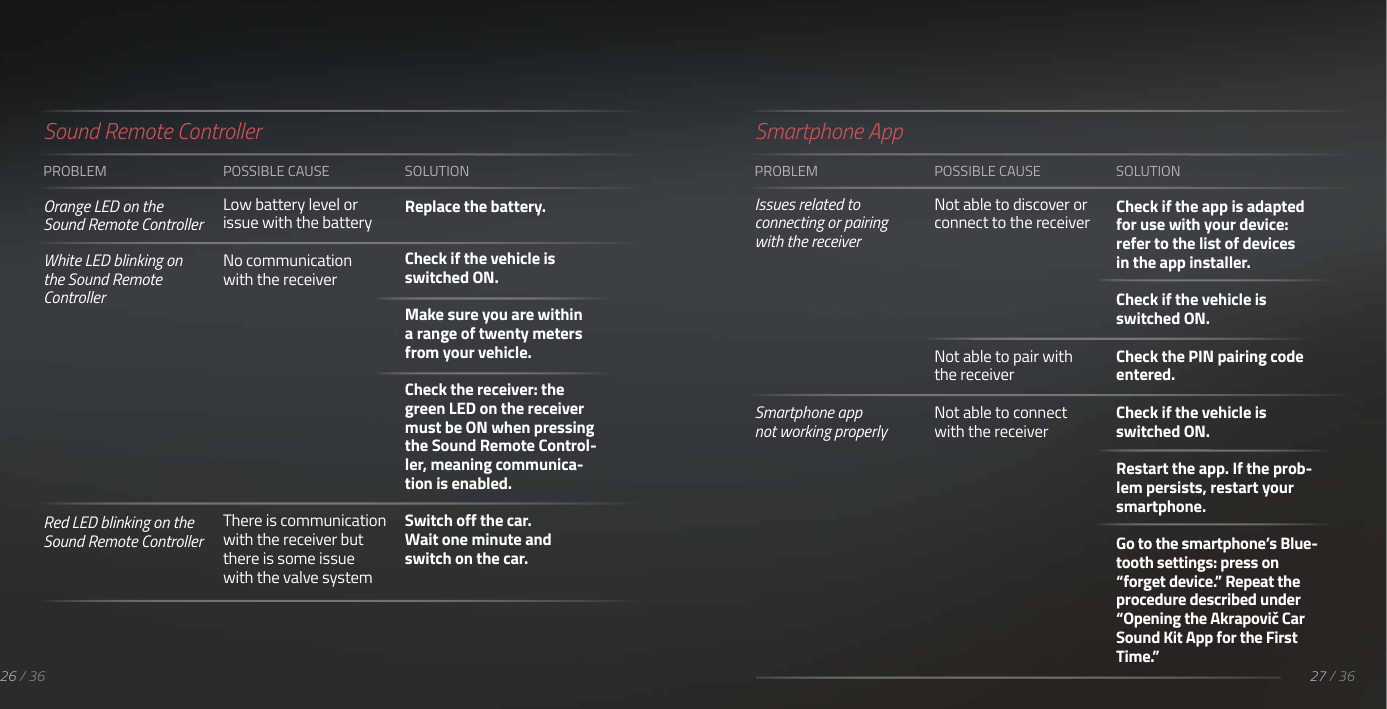
24 / 36the  screen  (Figure  11) to  switch  between  the  two  different positions  of  the  valves:  permanently  closed  valves  /  automatic regulation and permanently open valves. This (i.e., closed valves / automatic regulation) may vary depending on the type of the vehicle.Note that  the  valves are  always  in default  closed  position  when  the engine  is  started.  If  the  Bluetooth connection  is  lost/disconnected  or the Akrapovič Car Sound Kit  App is closed, the valves remain in the last mode  activated  until  the  vehicle’s engine  is  switched  off. At  the  next engine  start,  the  default  mode (closed) is applied.By  touching  the  back  button,  the app disconnects from the sound re-ceiver.  The Sound  Remote Control-ler can now be used.Figure 11TROUBLESHOOTINGIf  you’re  having  trouble  using  the  Sound  Remote  Controller  and/or Akrapovič Car Sound Kit App, first check the following to see if the Sound Remote Controller and/or Akrapovič Car Sound Kit App is paired with the sound receiver. If yes, refer to the list of possible solutions in the table below.If you’re unable to resolve the problem based on  the suggestions below, contact your local authorized Akrapovič partner.Sound Remote ControllerPROBLEMNo LED on the Sound Remote ControllerPOSSIBLE CAUSEBattery level too low to functionSound Remote Controller not working properlySOLUTIONReplace the battery.Remove the  battery,  press the Sound Remote Control-ler  button  for  one  second, and put the battery back in.25 / 36
26 / 36PROBLEMOrange LED on the Sound Remote ControllerWhite LED blinking on the Sound Remote ControllerRed LED blinking on the Sound Remote ControllerPOSSIBLE CAUSELow battery level or issue with the batteryNo communication with the receiverThere is communication with the receiver but there is some issue with the valve systemSOLUTIONReplace the battery.Check if the vehicle is switched ON.Make sure you are within a range of twenty meters from your vehicle.Check the receiver: the green LED on the receiver must be ON when pressing the Sound Remote Control-ler, meaning communica-tion is enabled.Switch off the car. Wait one minute and switch on the car.Sound Remote ControllerPROBLEMIssues related to connecting or pairing with the receiverSmartphone app not working properlyPOSSIBLE CAUSENot able to discover or connect to the receiverNot able to pair with the receiverNot able to connect with the receiverSOLUTIONCheck if the app is adapted for use with your device: refer to the list of devices in the app installer. Check if the vehicle is switched ON.Check the PIN pairing code entered. Check if the vehicle is switched ON.Restart the app. If the prob-lem persists, restart your smartphone.Go to the smartphone’s Blue-tooth settings: press on “forget device.” Repeat the procedure described under “Opening the Akrapovič Car Sound Kit App for the First Time.”Smartphone App27 / 36
28 / 36DECLARATION OF CONFORMITYCOMPANY AkrapovičADDRESS: Malo Hudo 8a, 1295 Ivančna Gorica, Sloveniadeclares that the following products:PRODUCT NAME: Sound KitTRADE NAME: AkrapovičTYPE OR MODEL: P-HF841is in conformity with the requirements of the following Directives of the European Union: Regulation UN/ECE-R10 rev5  E1   10 R-057586This  device  complies  with  part  15  of  the  FCC  rules.  Operation is  subject  to  the  following  two  conditions:  (1)  This  device  may not  cause  harmful  interference,  and  (2)  this  device  must  accept any  interference  received,  including  interference  that  may  cause undesired operation.FCC NOTICEChanges  or  modifications  not  expressly  approved  by  the  party responsible for compliance could void the user’s authority to operate the equipment.NOTE: This equipment has been tested and found to comply with the limits for a Class B digital device, pursuant to part 15 of the FCC Rules. These  limits  are  designed  to  provide  reasonable  protection  against harmful  interference  in  a  residential  installation.  This  equipment generates,  uses  and  can  radiate  radio  frequency  energy  and,  if  not in-stalled  and  used  in  accordance  with  the  instructions,  may  cause harmful  interference  to  radio  communications.  However,  there  is  no guarantee that interference will not occur in a particular installation. If this equipment does cause harmful interference to radio or television reception, which can be determined by turning the equipment off and on, the user is encouraged to try to correct the interference by one or more of the following measures:•  Reorient or relocate the receiving antenna.•  Increase the separation between the equipment and receiver.•  Connect the equipment into an outlet on a circuit different from that to which the receiver is connected.29 / 36
•  Consult the dealer or an experienced radio technician for help.Sound Remote Controller: FCC-ID: 2AECJASK01Sound Receiver: FCC-ID: 2AECJASR01Industry Canada compliance statementThis Class B digital apparatus complies with Canadian ICES-003.This  device  complies  with  Industry  Canada  licence-exempt  RSS standard(s).  Operation  is  subject  to  the  following  two  conditions: (1) this device may not cause interference, and (2) this device must accept  any  interference,  including  interference  that  may  cause undesired operation of the device.Cet appareil numérique de la classe B est conforme à  la norme NMB-003  du  Canada. Le  présent  appareil  est  conforme aux  CNR d’Industrie  Canada  applicables  aux  appareils  radio  exempts  de licence. L’exploitation est autorisée aux deux conditions suivantes : (1) l’appareil ne doit pas produire de brouillage, et (2) l’utilisateur de l’appareil doit accepter tout brouillage radioélectrique subi, même si le brouillage est susceptible d’en compromettre le fonctionnement.European Union Directives conformance StatementCaring for the Environment by Recycling31 / 3630 / 36Akrapovič  d.d.  hereby  declares  that  this  Akrapovič  Sound  Kit P-HF481 is in compliance with the essential requirements and other relevant provisions of Directive 1999/5/ECYou can view your product’s Declaration of Conformity (DoC) to Directive 1999/5/EC (to R&TTE Directive) at www.akrapovic.com/docs/SoundKitCertification.pdf.Please  dispose  of  any  materials  in  accordance  with  local recycling  regulations.  When  discarding  the  unit,  comply  with local  rules  or  regulations.  Batteries  should  never  be  thrown away  or  incinerated,  but  disposed  of  in  accordance with  local regulations concerning battery disposal.Sound Remote Controller: IC: 20099-ASK01Sound Receiver: IC: 20099-ASR01
WARNING / California:California  laws  prohibit  the  use  of  any  aftermarket  exhaust  part or system that  modifies, removes, or  replaces original equipment catalysts unless  the  California Air Resources Board has  issued  an executive order regarding such part or system or unless the part or system is exempted by being used only on racing vehicles on closed courses. Neither Akrapovic d.d. nor any of its subsidiaries make any representation that any of their parts or systems has received such an  executive order  or  that any of  their  parts  or  systems conform with  the  racing  vehicles  exemption.  The  purchasers  are  entirely responsible for informing themselves of applicable California laws and for complying with those laws. 33 / 3632 / 36Because of  the  worldwide  distribution  of Akrapovič d.d.  products, neither  Akrapovič  d.d.  nor  any  of  its  subsidiaries  make  any representation that the products comply with the air and/or noise emissions laws, or labeling laws, of any jurisdiction. The purchasers are entirely responsible for informing themselves of the applicable laws  where  the  products  are  to  be  used  and  for  complying  with those laws.WARNING / USA:Various US  states  and the US  federal government have individual laws regulating the use of aftermarket exhaust parts and systems, especially as  those parts and systems modify, remove, or replace original equipment catalysts. Consult the appropriate laws in your area before installing any aftermarket part or system on your vehicle to ensure compliance with all applicable laws. Neither Akrapovic d.d. nor any of its  subsidiaries nor the  sellers of the  parts or systems make any representation that any of their parts or systems comply with any such laws.GENERAL WARNING
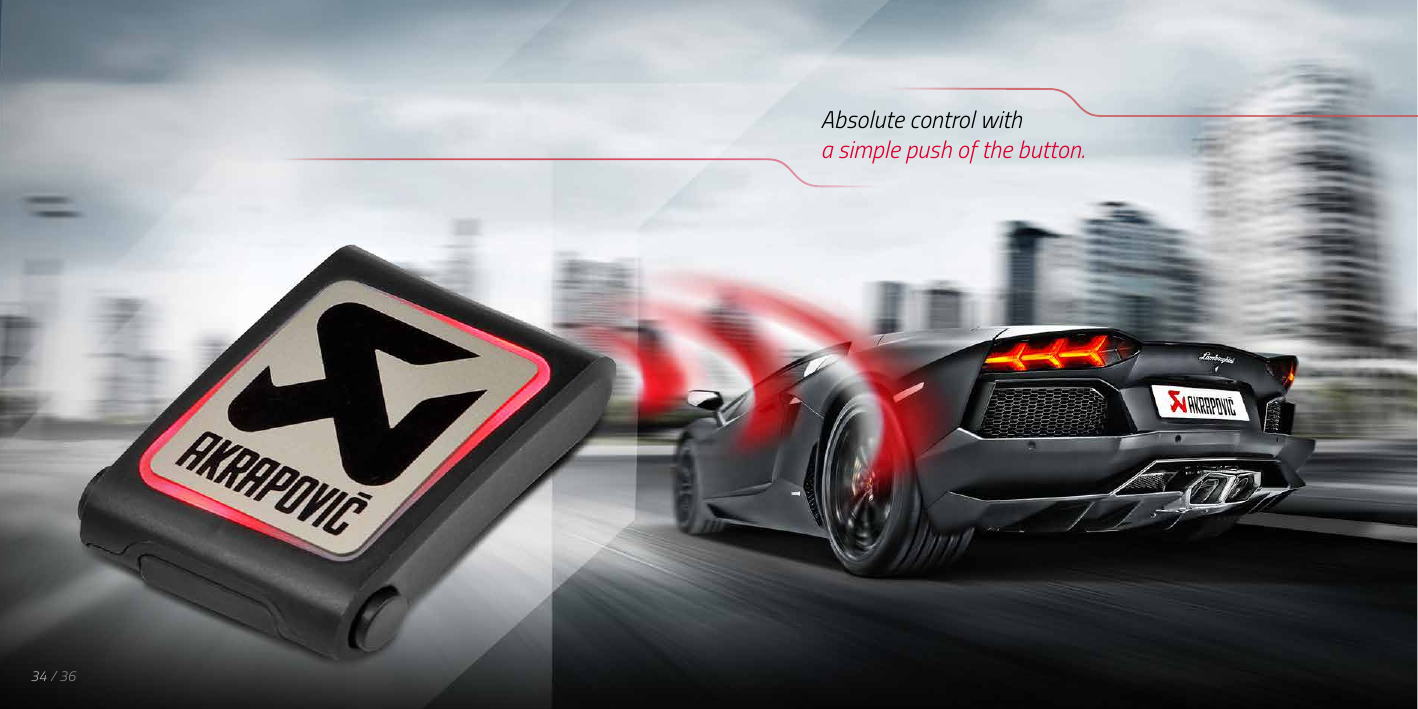
Absolute control witha simple push of the button.34 / 36
www.akrapovic.comPin pairing code:Keep this code for future reference.Refer to the product overview section for important information regarding the pin pairing code.

Navigation menu