AKUVOX DPR26C Door Phone User Manual
AKUVOX (XIAMEN) NETWORKS CO., LTD. Door Phone Users Manual
AKUVOX >
Users Manual

1
R26XDoorPhoneUserManual
Content
Overview......................................................................................3
1ProductDescription.............................................................................................3
2Features................................................................................................................5
3PanelDescription.................................................................................................7
4Unpacking.............................................................................................................9
5Installation..........................................................................................................10
Configuration.............................................................................13
1Weblogin...........................................................................................................13
1.1ObtainingIPaddress................................................................................13
1.2Logintheweb...........................................................................................13
2Status‐Basic........................................................................................................15
3Intercom‐Basic...................................................................................................16
4Intercom‐LEDSetting.........................................................................................17
5Intercom‐Relay&Input......................................................................................18
6Intercom‐LiveStream.........................................................................................20
7Intercom‐AECSetting.........................................................................................21
8Intercom‐RTSP....................................................................................................22
9Intercom‐Onvif...................................................................................................23
10Intercom‐Multicast..........................................................................................24
11Intercom‐CardSetting(Optional).....................................................................25
12Account‐Basic...................................................................................................26
13Account‐Advanced...........................................................................................28
14Network‐Basic..................................................................................................31
15Network‐Advanced..........................................................................................32
16Phone‐Time/Language.....................................................................................34
17Phone‐CallFeature...........................................................................................35
18Phone‐Voice.....................................................................................................36
19Multicast..........................................................................................................37
20CallLog.............................................................................................................38
21DoorLog...........................................................................................................39
22Upgrade‐Basic..................................................................................................40
23Upgrade‐Advanced..........................................................................................41
24Security‐Basic...................................................................................................43
3
Overview
1ProductDescription
AkuvoxR26XisaSIP‐complianthandfreevideooutdoorphone.Itcanbeconnected
withyourAkuvoxIPPhoneforremoteunlockcontrolandmonitor.Youcanoperate
theindoorhandsettocommunicatewithvisitorsviavoiceandvideo,andunlockthe
doorifyouwish.UsercanalsouseRFcardtounlockthedoor(OnlyR26C).It’s
applicableinvillas,officeandsoon.
FCCCaution:
AnyChangesormodificationsnotexpresslyapprovedbythepartyresponsiblefor
compliancecouldvoidtheuser'sauthoritytooperatetheequipment.
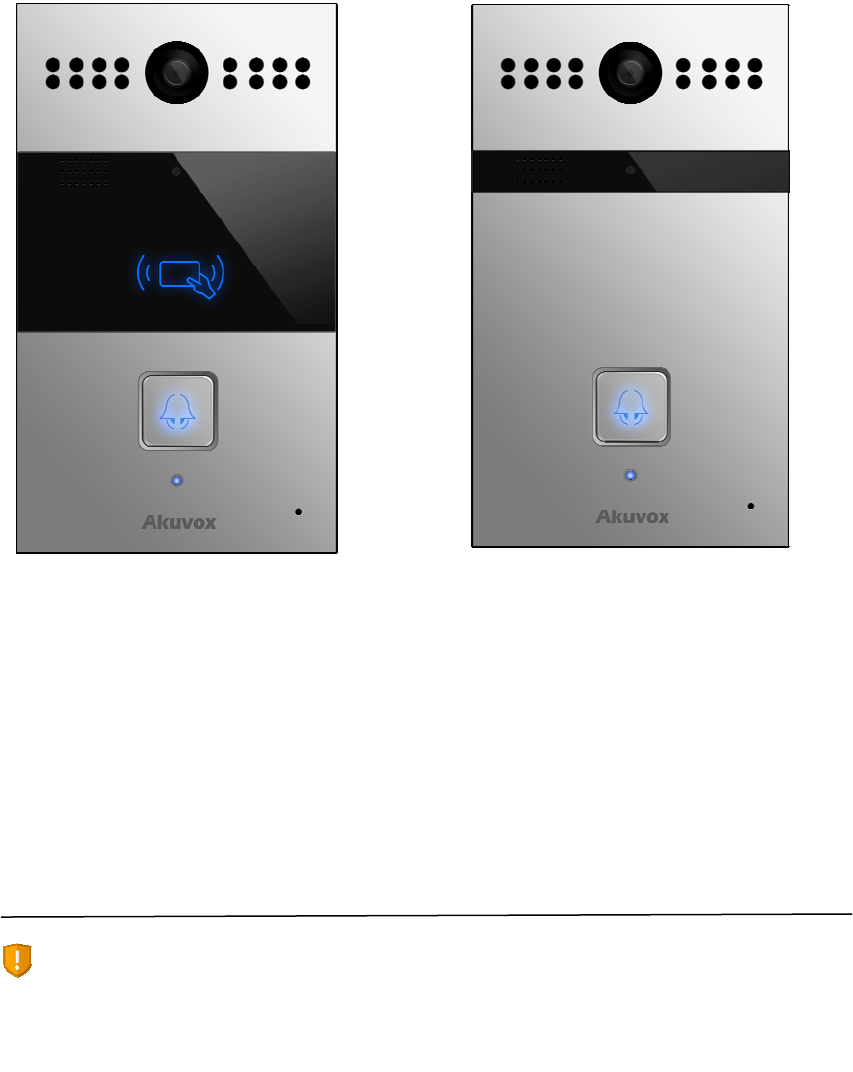
R26CR26P

4
Thisdevicecomplieswithpart15oftheFCCRules.Operationissubjecttothe
followingtwoconditions:(1)Thisdevicemaynotcauseharmfulinterference,and(2)
thisdevicemustacceptanyinterferencereceived,including interferencethatmay
causeundesiredoperation.
Note:ThisequipmenthasbeentestedandfoundtocomplywiththelimitsforaClass
Bdigitaldevice,pursuantto part15oftheFCCRules.Theselimitsaredesignedto
providereasonableprotectionagainstharmfulinterferencein aresidential
installation.Thisequipmentgenerates,usesandcanradiateradiofrequencyenergy
and,ifnotinstalled andusedinaccordancewiththeinstructions,maycause
harmfulinterferencetoradiocommunications.However, thereisnoguaranteethat
interferencewillnotoccurinaparticularinstallation.Ifthisequipmentdoescause
harmful interferencetoradioortelevisionreception,whichcanbedeterminedby
turningtheequipmentoffandon,theuseris encouragedtotrytocorrectthe
interferencebyoneormoreofthefollowingmeasures:
—Reorientorrelocatethereceivingantenna.
—Increasetheseparationbetweentheequipmentandreceiver.
—Connecttheequipmentintoanoutletonacircuitdifferentfromthattowhichthe
receiverisconnected.
—Consultthedealeroranexperiencedradio/TVtechnicianforhelp.
5
2Features
Highlight
Vandalresistantbody,withaflushbutton
Wild‐anglecamera:90°
POE(IEEE802.3af,Power‐over‐Ethernet)
Two‐wayaudiocommunicationoverIPnetworkwithEchocancelfeature
ComplieswithSIPStandardforeasyintegrationineachSIPPBXes
Physical&Power
Bodymaterial:all‐aluminum
Camera:3Mpixels,automaticlighting
Button:1callbutton
InfraredSensor
RFCardReader:13.56MHzSupported(Optional)
OutputRelay:2outputrelaysfordooropener
802.3afPower‐Over‐Ethernet
12VDCconnector(ifnotusingPOE)
Powerconsumption:lessthan12w
Waterproof&Dustproof:IP65
Installation:Wall‐mounted
Dimension:190x110x35mm
SIPEndpoint
SIPv1(RFC2543),SIPv2(RFC3261)
Audiocodecs:G.711a,G.711μ,G.722,G.729
Videocodecs:H263,H264
6
SpeechQuality:7kHzAudio
EchoCancellation
VoiceActivationDetection
ComfortNoiseGenerator
Video
Resolution:upto1080p
Maximumimagetransferrate:1080p‐30pfs
HighintensitywhiteLEDsforpicturelightingduringdarkhourswithinternallight
sensor
Compatiblewith3rd.Party.Videocomponents,e.g.NVRs.
DoorEntryFeature
RelaycontrolindividuallybyDTMFtones
Camerapermanentlyoperational
WhiteBalance:Auto
Auto‐nightmodewithLEDillumination
Minimumillumination:0.1LUX
NetworkFeatures
1x10/100MbpsEthernetPort
Protocolssupport:IPv4,HTTP,HTTPS,FTP,SNMP,DNS,NTP,RTSP,RTP,TCP,UDP,
ICMP,DHCP,ARP
7
3PanelDescription
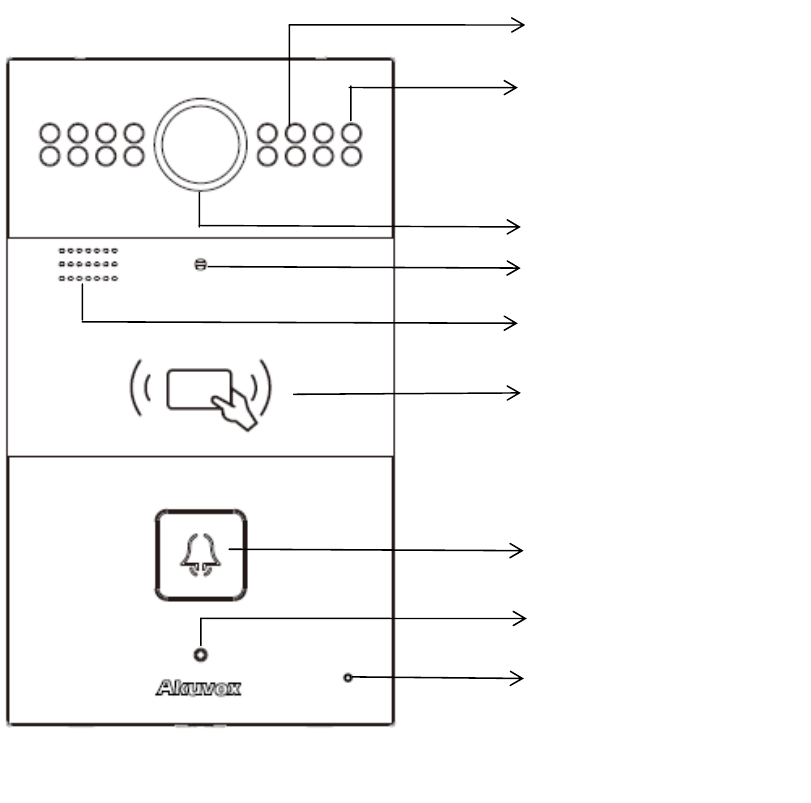
InfraredLED
Photosensitivesensor
Infraredsensor
Camera
Speaker
RFcardreader
Callbutton
StatusLED
Mic
R26C
8
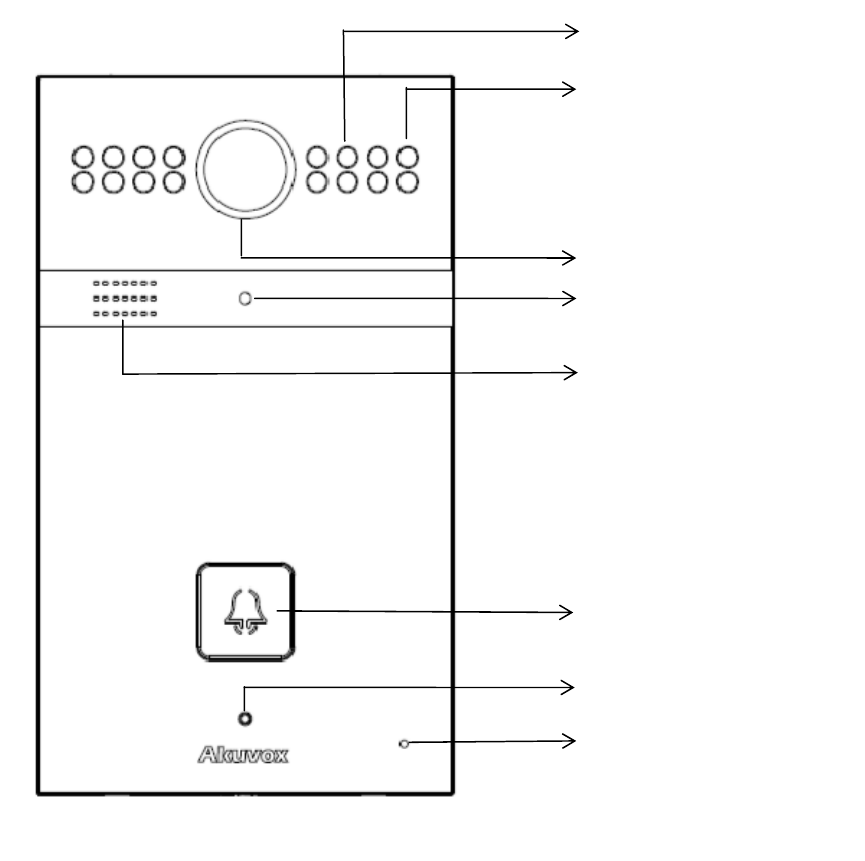
InfraredLED
Photosensitivesensor
Camera
Infraredsensor
Speaker
Callbutton
StatusLED
Mic
R26P

9
4Unpacking
NameQuantity
R26C/P1
Backcover1
Wallbracket1
Cablebuckle1
M4X20screw2
ST4x20screw4
Screwfixingseat4
M3X5screw4
M3X10screw1
10
5Installation
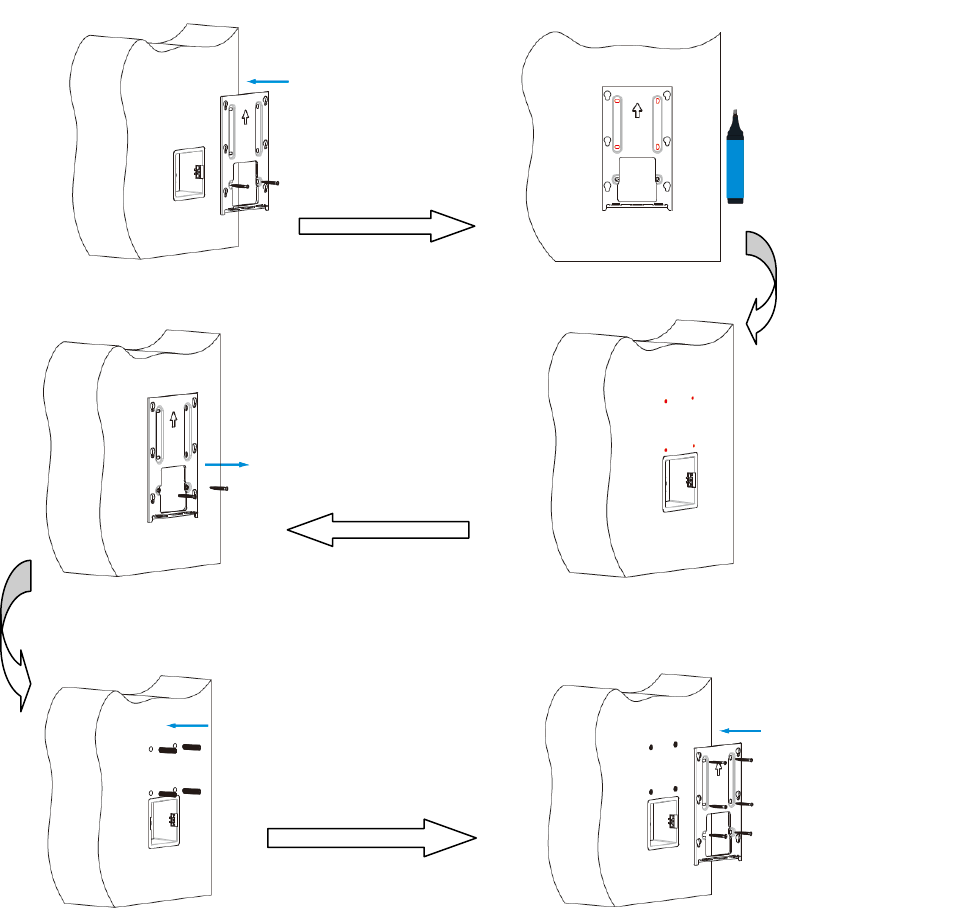
With86embeddedbox:
Use2M4X20
screwstofixthe
wallbracketand
Embeddedbox.
Usethepento
markthehole
locationonthe
wallbracket
Takedownthe
M4screwsand
removethewall
bracket
Use6mmhanddrill
tomakethered
holeyoumarked
before
Insertthe
screwfixing
seatintothe
hole
Use4St4screws
and2M4screws
tofixthewall
bracket
11
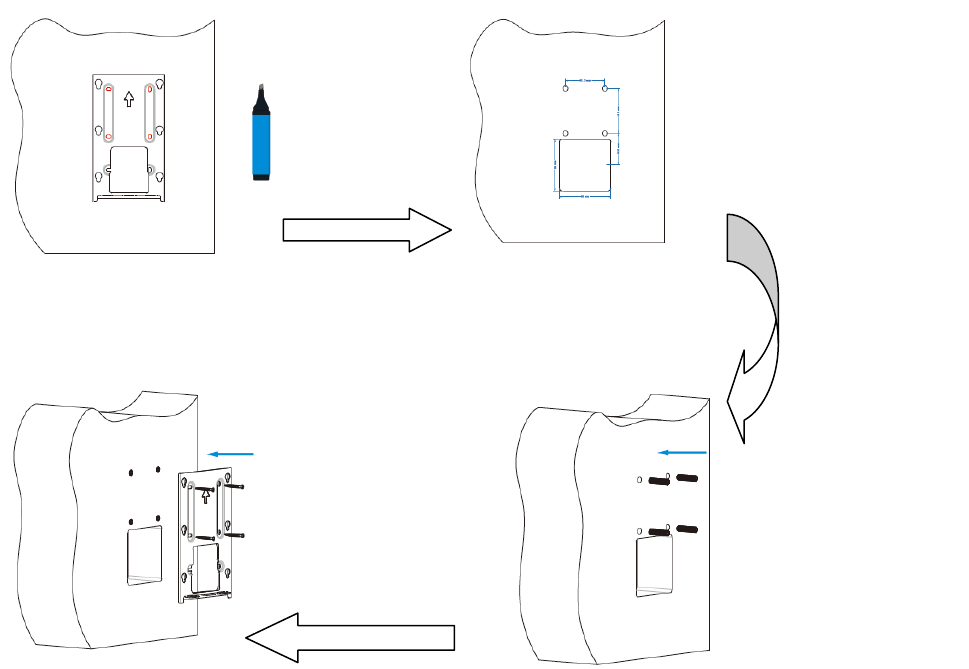
Without86embeddedbox,youcanfollowthebelowstep:
Markthered
holeofthe
bracketinthe
wallviausing
pen
Use6mmhanddrillto
maketheredholeyou
markedbefore,anddiga
5cmdepthsquarehole
Insertthe
screwfixing
seatintothe
hole
Use4ST4
screwstofix
thewall
bracket
12
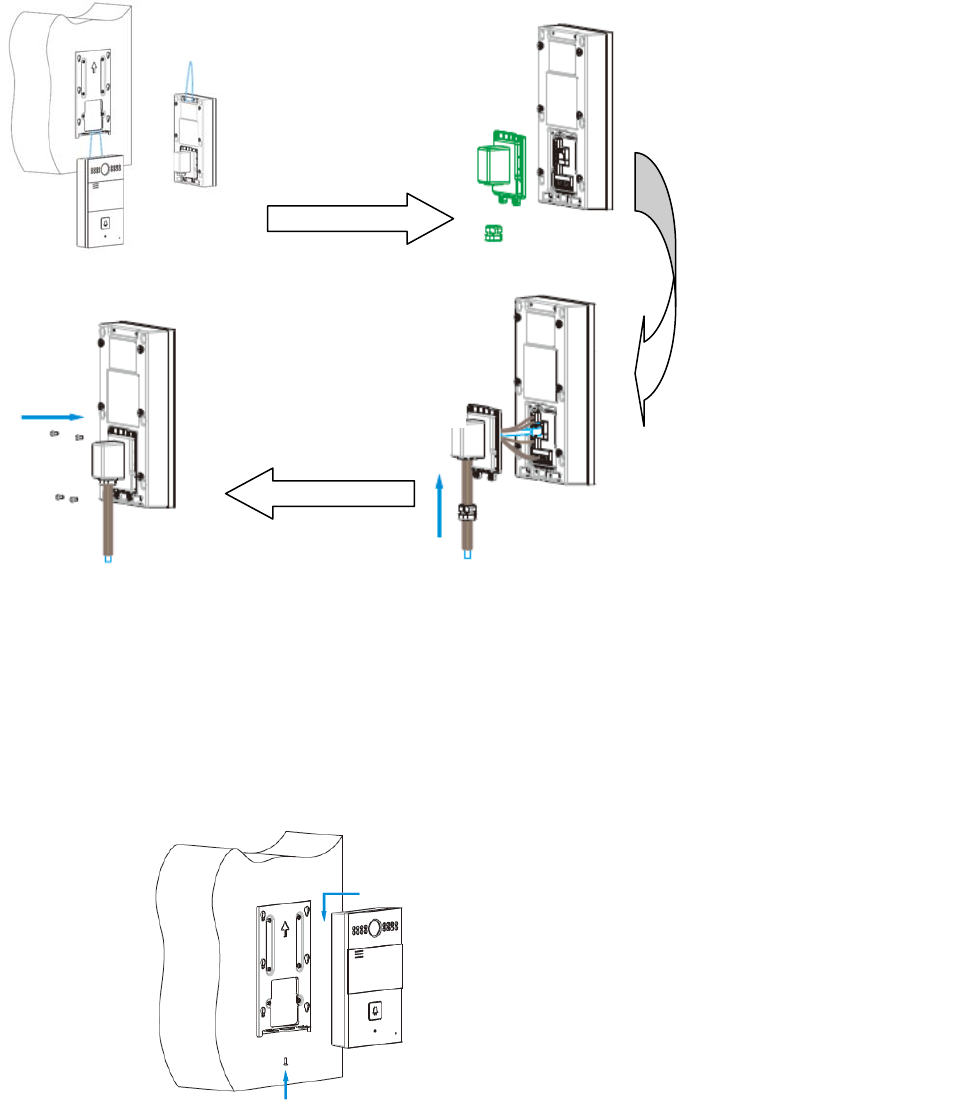
Backcoverinstallation:
Devicemounting:
Takedowntheback
cover,cablebuckle
andsealingring
Makecablesgothroughall
thecomponentsofthe
bottomholeoftheback
cover,connectwiththe
contactsinthemainboard.
Thenputthecablebuckle
andsealingringintotheback
cover.
Use4M3x5screwsto
fixthebackcover
PlaceR26intothewall
brackethole.Push
downsothatthedevice
isfixedsecurely.Lock
thetheM3X10screwsat
thebottomofdevice.
Forconvenient
wiring,hangR26Xin
thebracketviausing
rope
13
Configuration
1Weblogin
1.1ObtainingIPaddress
TheAkuvoxR26XusesStaticIPbydefault,andthedefaultIPaddressis
192.168.1.100.
IftheIPaddressisunknown,afterpoweron,whenyouseetheLEDlightturnsBlue,
pressthecallbuttonabout5s,thephonewillannounceitsIP.
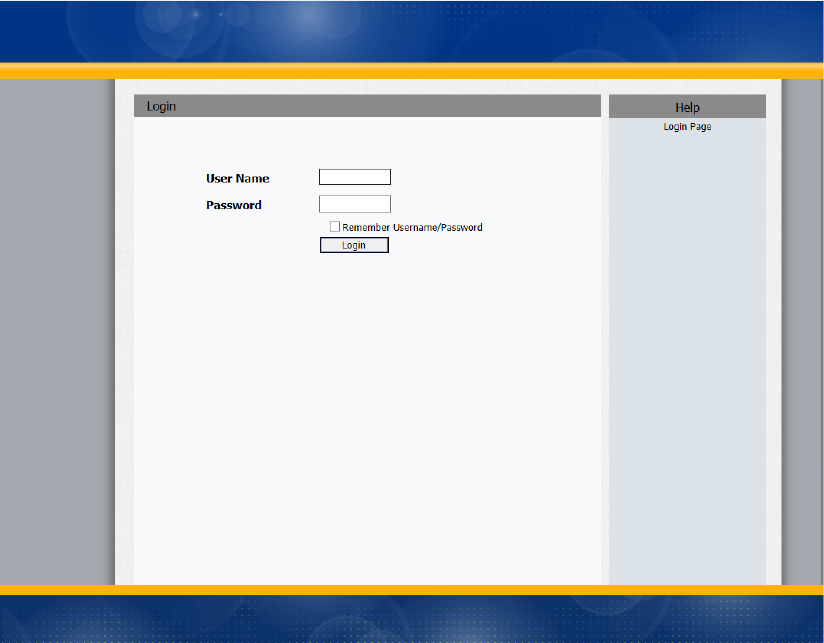
1.2Logintheweb
OpenaWebBrowser,enterthecorrespondingIPaddress.Then,typethedefaultuser
nameandpasswordtologin.ThedefaultUserNameandPasswordareasbelow:
Username:admin
Password:admin
14
15
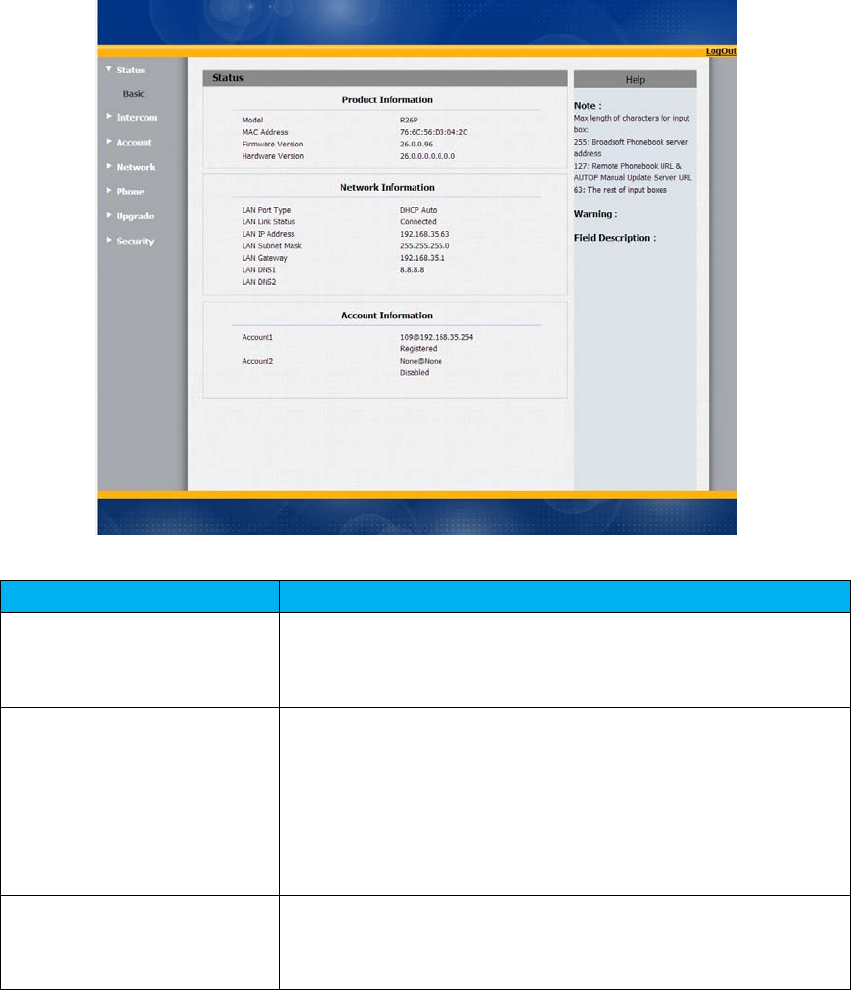
2Status‐Basic
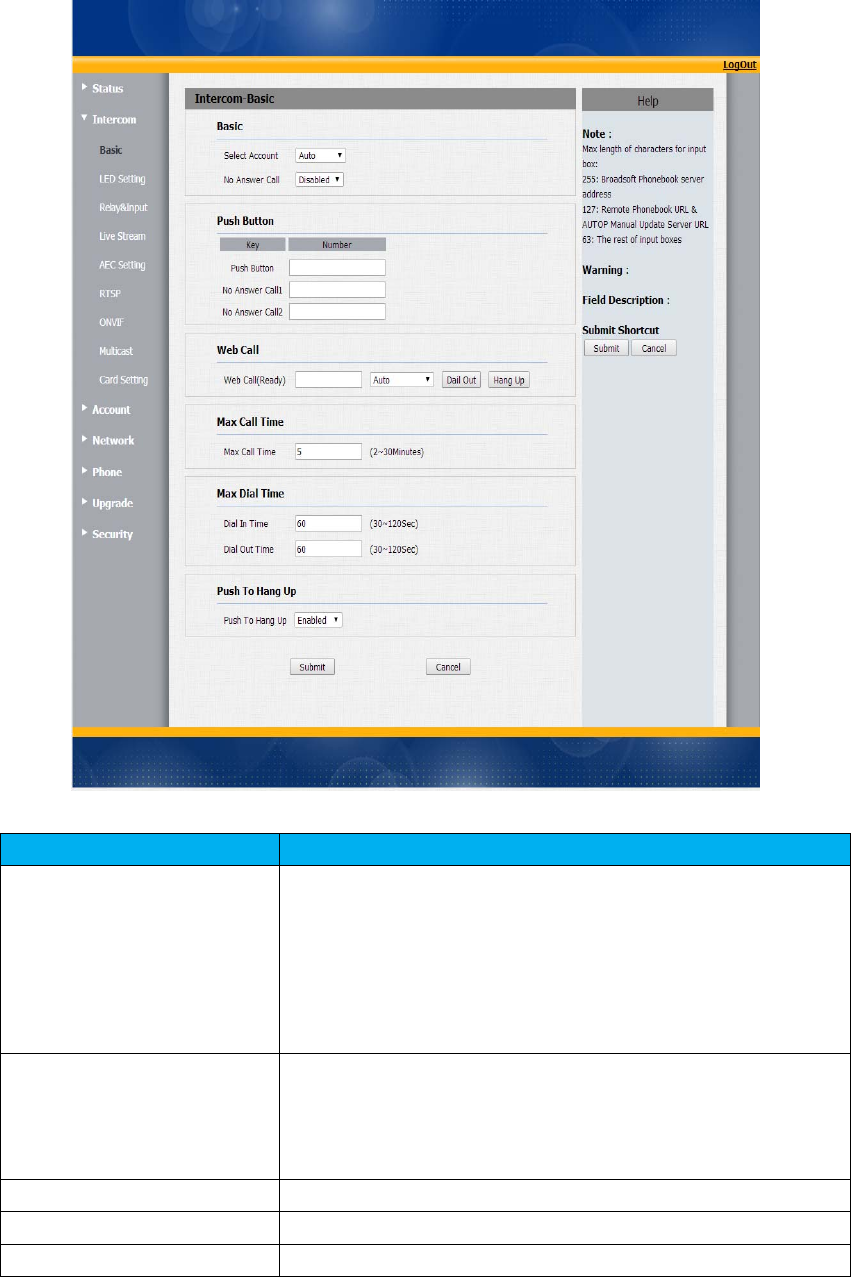
Status,includingproductinformation,networkinformationandAccountinformation,
canbeviewedfromStatus‐>Basic.
SectionsDescription
ProductInformationTodisplaythedevice’sinformationsuchasModelname,
MACaddress(IPdevice’sphysicaladdress),Firmwareversion
andHardwarefirmware.
NetworkInformationTodisplaythedevice’sNetworkingstatus(LANPort),suchas
PortType(whichcouldbeDHCP/Static/PPPoE),LinkStatus,IP
Address,SubnetMask,Gateway,PrimaryDNSserver,
SecondaryDNSserver,PrimaryNTPserverandSecondary
NTPserver(NTPserverisusedtosynchronizetimefrom
INTERNETautomatically).
AccountInformationTodisplaydevice’sAccountinformationandRegistration
status(accountusername,registeredserver’saddress,
Registerresult).
16
3Intercom‐Basic
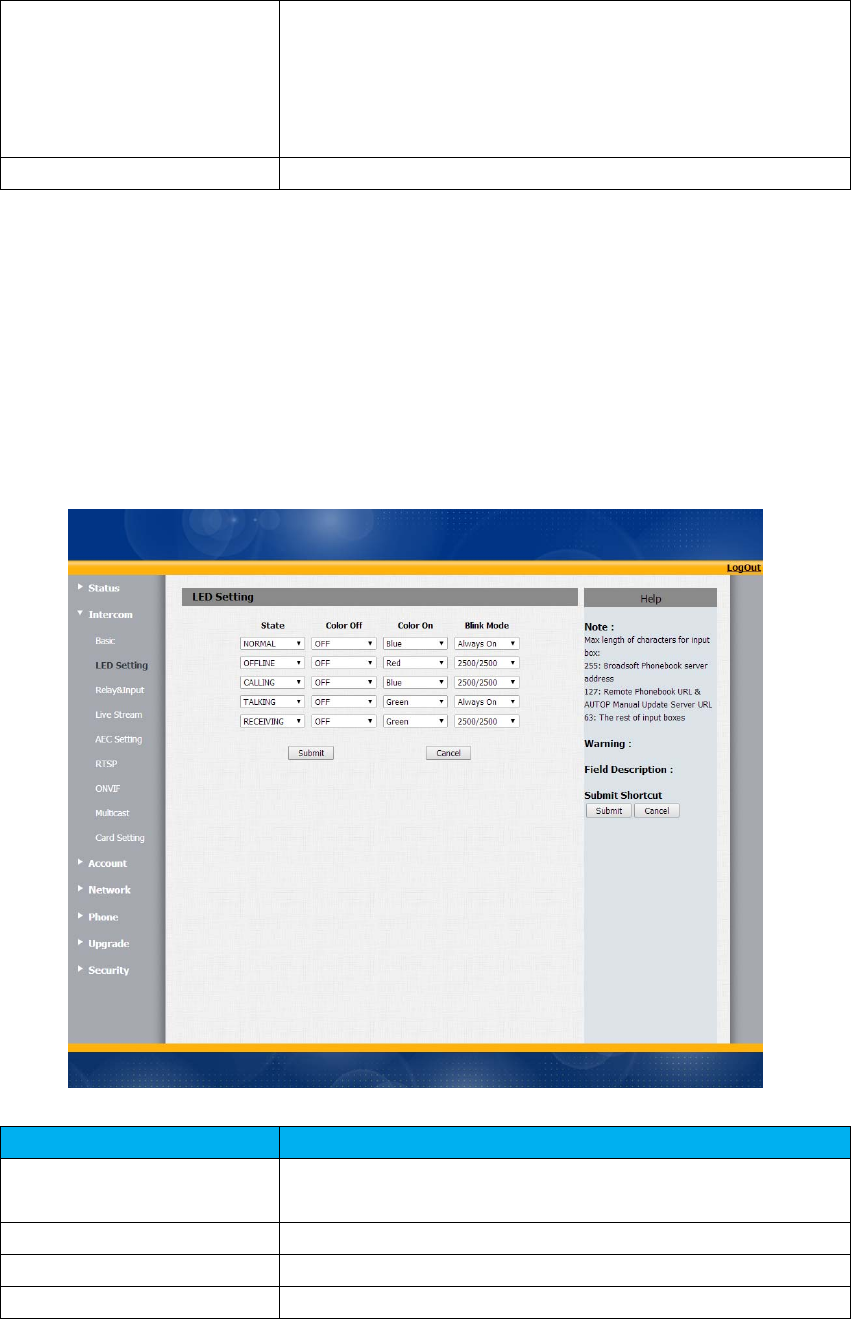
Gotothepath:Intercom‐Basic
SectionsDescription
Basic SelectAccount:R26supports2accounts.Youcan
chooseoneaccountorAutomodeforthefollowing
Intercombasicsettings.
NoAnswerCall:R26willcalltotheNoanswercall
numberinorderwhentheringtoneistimeoutwithout
answerofthepushbuttonnumber.Disablebydefault.
PushButton PushButton:ToconfigurethedestinationnumberorIP
youwanttocontactwith.
NoAnswerCall1&2:Tosetuptwonoansercallnumbers
oronenoanswercallnumber.
WebCallTodialoutoranswerthephonefromwebsite.
MaxCallTimeToconfigurethemaxcalltime
MaxDialTime DialinTime:WhenotherphonecallstoR26,ifringtone
17
isovertheDialinTimewithoutanswer.Thecallwillbe
hangup.
DialoutTime:WhenR26callstotheotherparty,ifthe
ringtoneisovertheDialoutTimewithoutanswer.R26
willcontinuecallstonoanswercallnumberinorder.
PushtoHangupToenableordisablethePushtoHangupfunction
4Intercom‐LEDSetting
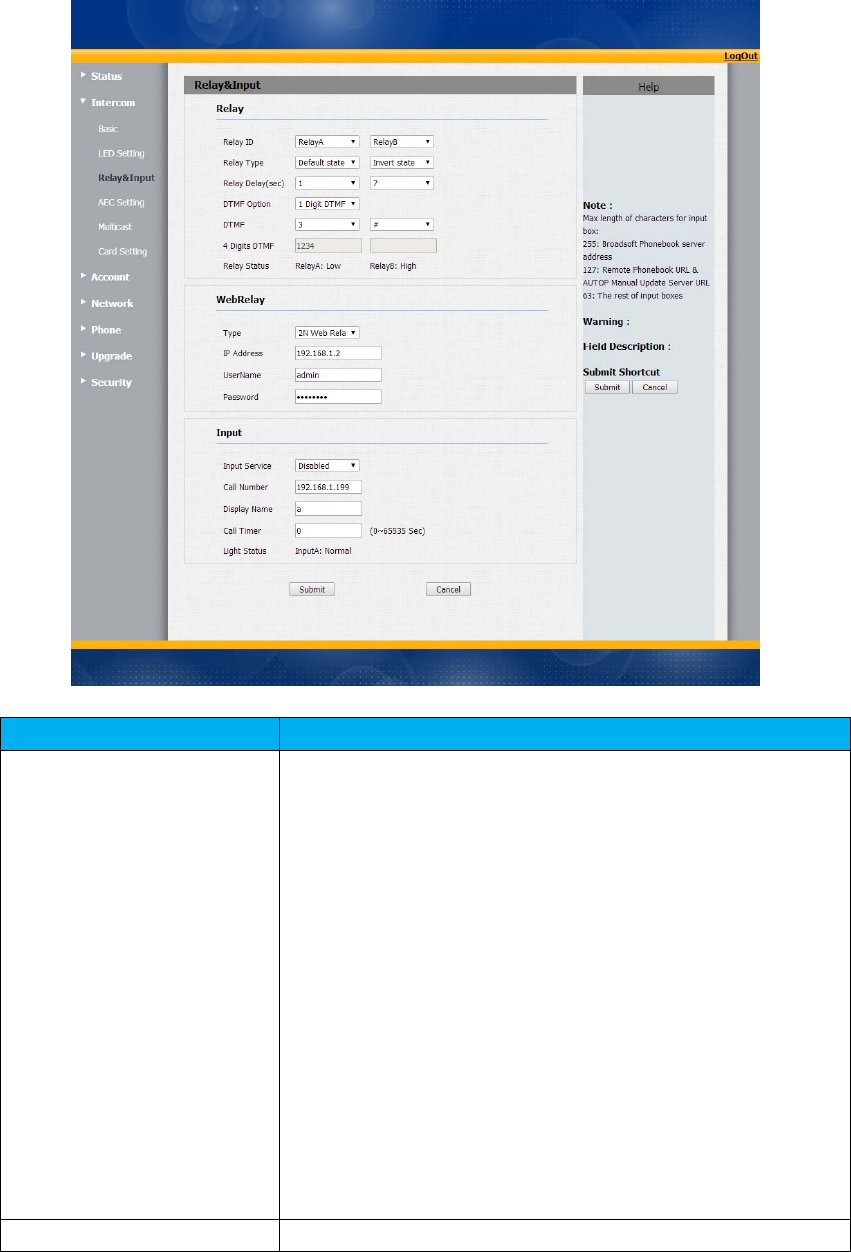
TosetuptheLEDlightingmode.
SectionsDescription
StateThereisfivestates:Normal,Offline,Calling,Talkingand
Receiving.
ColorOffThedefaultstatusisOFF.
ColorOnItcansupportthreecolor:Red,Green,Blue.
BlinkModeTosetupthedifferentblinkfrequency.
18
5Intercom‐Relay&Input
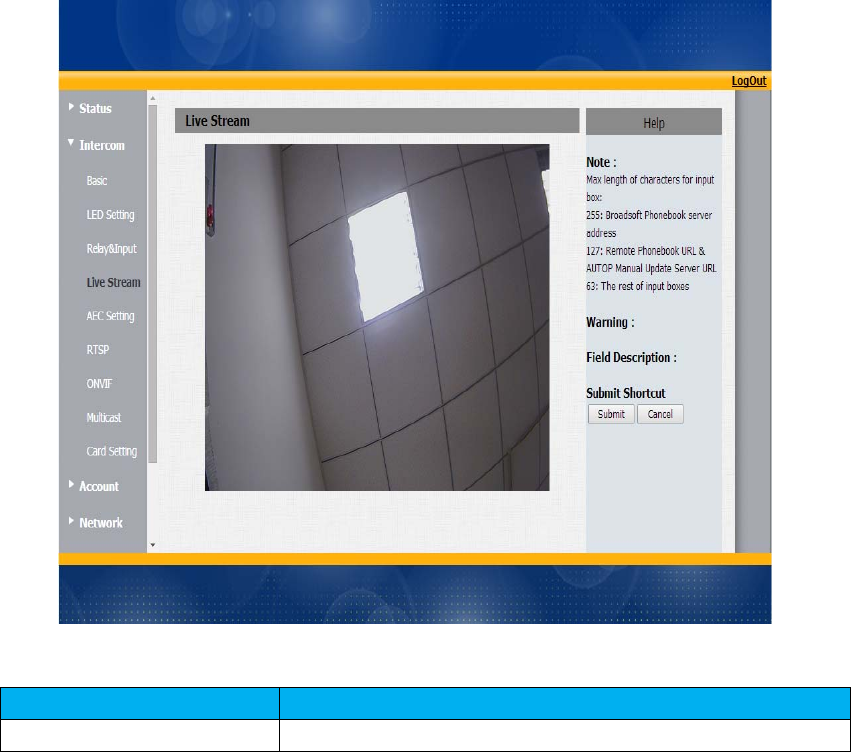
SectionsDescription
RelayTo configuresomesettingsaboutunlock
RelaySelect:R26supports2relays
RelayType:Differentlocksusedifferentrelaytypes,
positiveornegative.IfyouconnecttheLockinNO
connector,selectpositivetype.Otherwiseusingnegative
type.
RelayDelay(sec):Allowsdoorremain“open”forcertain
periodTherangeisfrom1to10seconds
DTMFOption:R26supports1digitor4digitsDTMF
unlockcode.Pleaseselectonetypeandenterthe
correspondingcode.
DTMF:Setup1digitDTMFcodeforremoteunlock
4DigitsDTMF:Setup4digitsDTMFcodeforremote
unlock.
Status:Differentrelaytypeswillshowdifferentstatus.
WebrelayR26cansupportextrawebrelay.Thisfunctionismoresafety

19
touseDTMFcodetoremoteunlock.
Type:Connectwebrelayandchoosethetype.
IPAddress:EnterwebrelayIPaddress.
Username:itisanauthenticationforconnectingweb
relay
password:itisanauthenticationforconnectingweb
relay
Note:Userscanmodifyusernameandpasswordinwebrelay
website.
InputThereisasensorthatusedtoantivandalinR26X.When
R26Xisbrokenbyviolentmeans.Thesensorwillbe
triggered,thenmanagementcenterwillreceivethealarm.
Service:Enablebydefault
CallNumber:Tosetupmanagementcenternumberfor
alarm.
DisplayName:Whichissenttotheothercallpartyfor
displaying
CallTimer:Theintervalforcalling.Forinstant,theCall
timeris5sec,ifyouhangupthecallinginthethird
second,thecallingwillautocalloutafter2sec.
LightStatus:Thestatuswillchangeaccordingtothe
sensor.Oncethesensoristriggered,thestatuswill
showWarning.Normalbydefault.
20
6Intercom‐LiveStream
SectionsDescription
LiveStreamTocheckthereal‐timevideofromR26.
21
7Intercom‐AECSetting
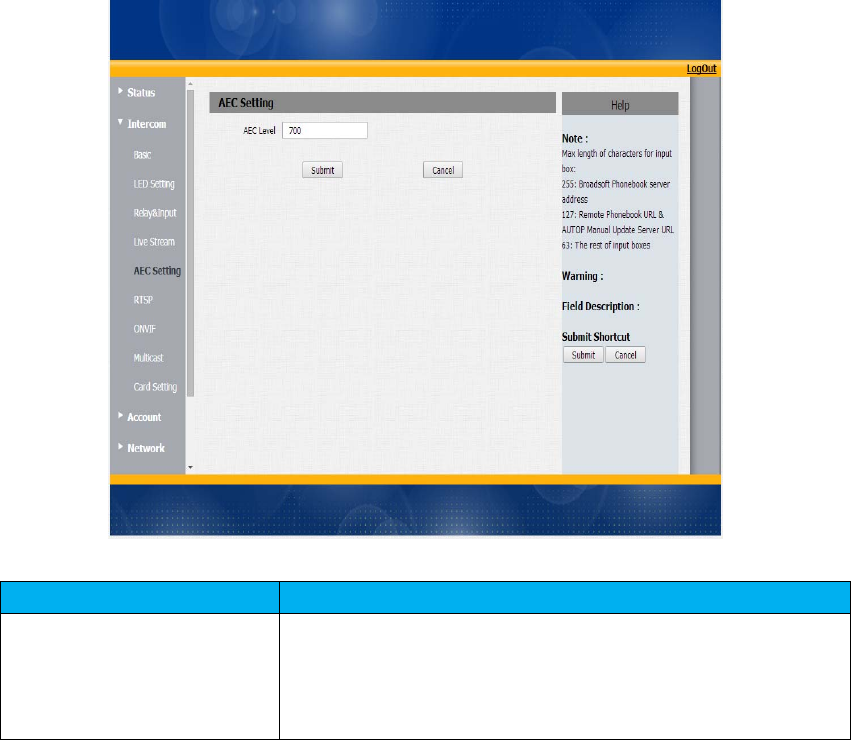
SectionsDescription
AECLevelAEC(ConfigurableAcousticandLineEchoCancelers)isused
toadjusttheechoeffectduringthecommunication.The
defaultvalueis700.Increasethelevel,theechocontrolis
better.
22
8Intercom‐RTSP
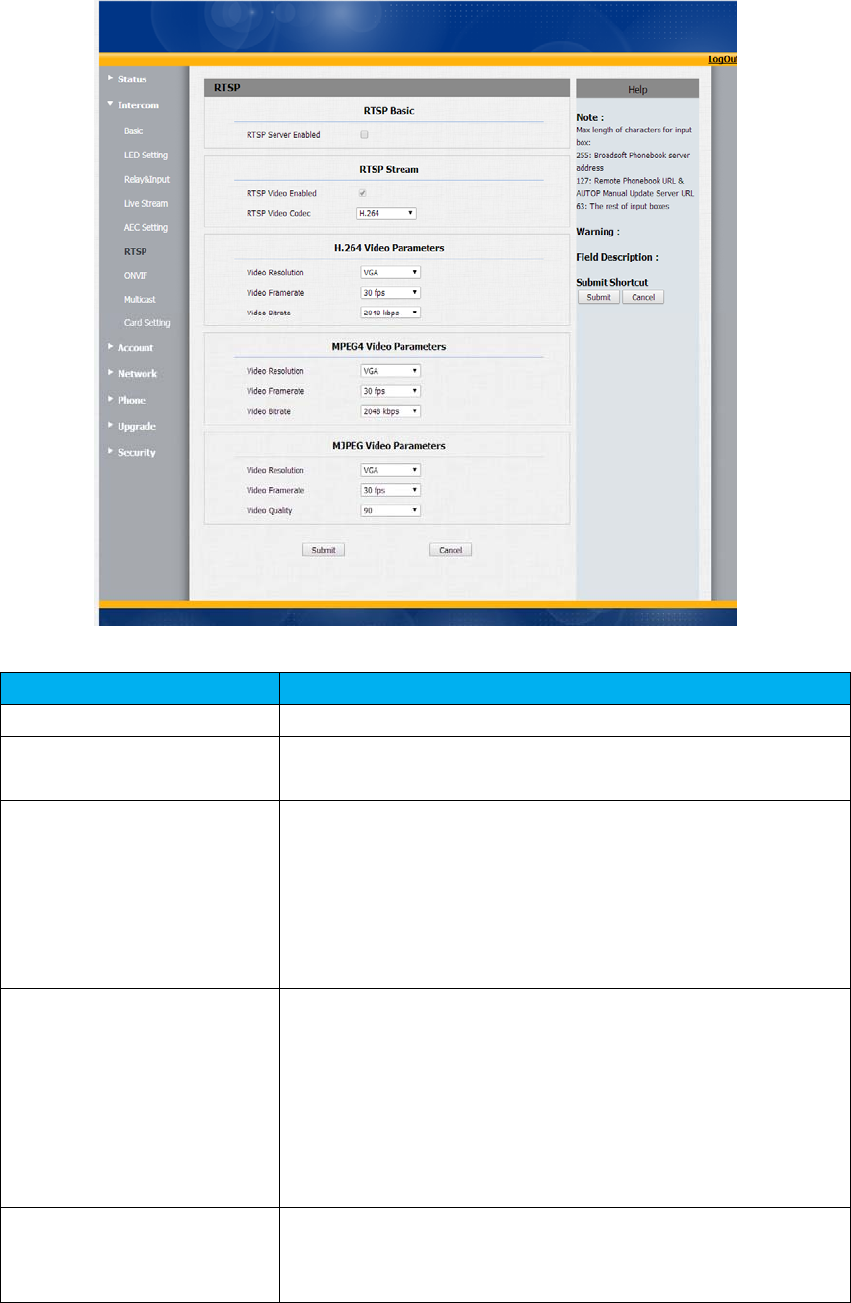
SectionsDescription
RTSPBasicToactivetheRTSPfunction,thenR26canbemonitored.
RTSPStreamToenabledRTSPvideoandselectthevideocodec.R26
supportsH264,H263videocodec.H264bydefault.
H.264VideoParametersH264:Avideostreamcompressionstandard.Differentfrom
H263,itprovidesanapproximatelyidenticallevelofvideo
streamqualitybutahalfbitrate.Thistypeofcompressionis
sometimescalledMPEG‐4part10.
Tomodifytheresolution,framerateandbitrateofH264
MPEG4VideoParametersMPEG4:itisoneofthenetworkvideoimageCompression
standard.ItsupportsthemaximumCompressionratio
4000:1.Itisanimportantandcommomvideofunctionwith
greatcommunicationapplicationintegrationabilityandless
coreprogramspace.
Tomodifytheresolution,framerateandbitrateofMPEG4
MJPEGVideoParametersMJPEG:calledMotionJointPhotographicExpertsGroup.Itis
avideoencodingformat.inwhicheachimageiscompressed
separatelybyJPEG.MJPEGcompressioncanproducehigh
23
qualityvideoimageandhasaflexibleconfigurationinvideo
definitionandCompressedframes
Tomodifytheresolution,framerateandbitrateofMJPEG
9Intercom‐Onvif
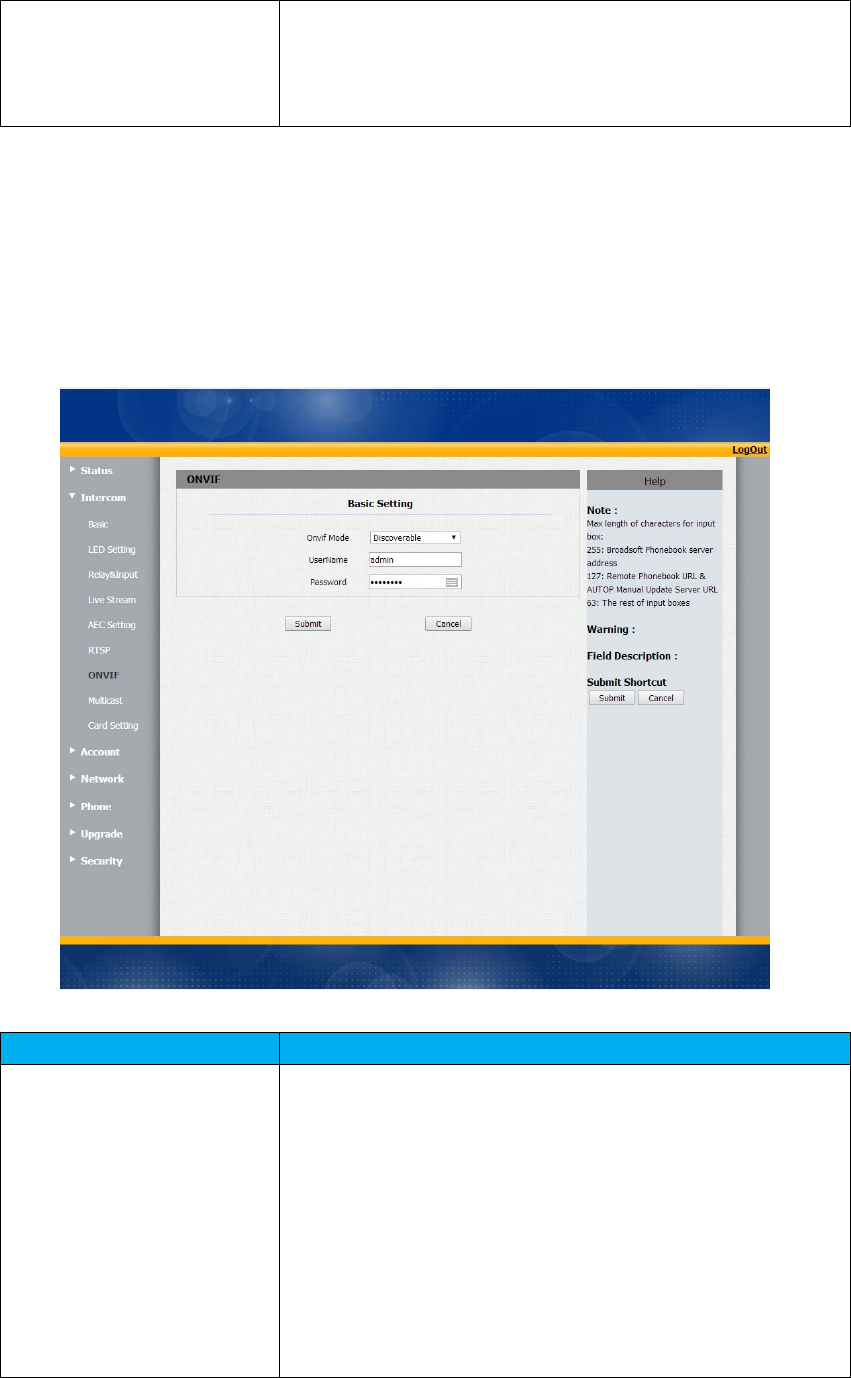
SectionsDescription
BasicSettingTosetuptheOnviffunctionparameters.Itisusedtoconnect
withthecorrespondingOnviftool.
OnvifMode:Twomodes‐Discoverableand
Non‐discoverable.Discoverablebydefault.Only
Discoverablemode,thenOnvifsoftwarecansearchR26.
UserName:Tomodifytheusernameyouneed.Admin
bydefault.
Password:Tomodifythepasswordyouwant.Adminby
default.
Note:Usernameandpasswordisusedforauthentication.
24
10Intercom‐Multicast
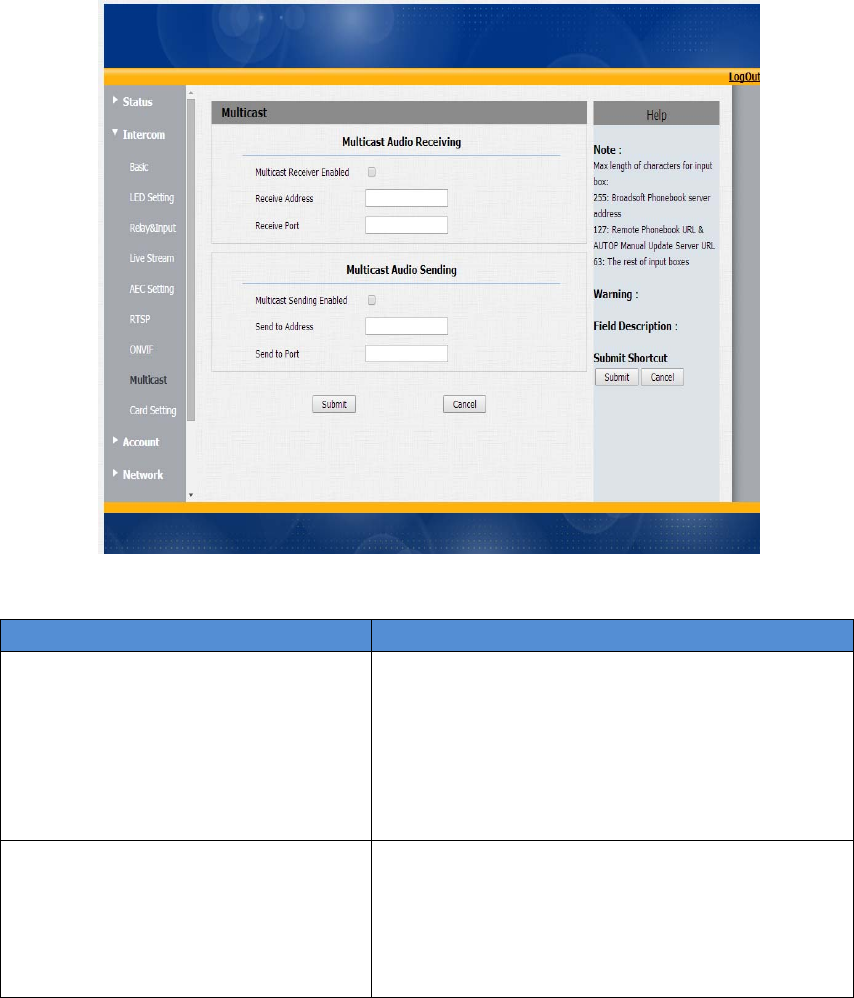
SectionsDescription
MulticastAudioReceivingTodisplayandconfiguretheMulticastsetting.
MulticastReceiverEnable:Enablereceiver
multicastfunction.
Receiveraddress:Setupthemulticastaddress.
Receiverport:setupthemulticastaddress
port.
MulticastAudioSendingTosetupthemulticastparameters.
MulticastSendingEnable:Enablesender
multicastfunction
SendtoAddress:setupthemulticastaddress.
Sendtoport:setupthemulticastaddressport.
25
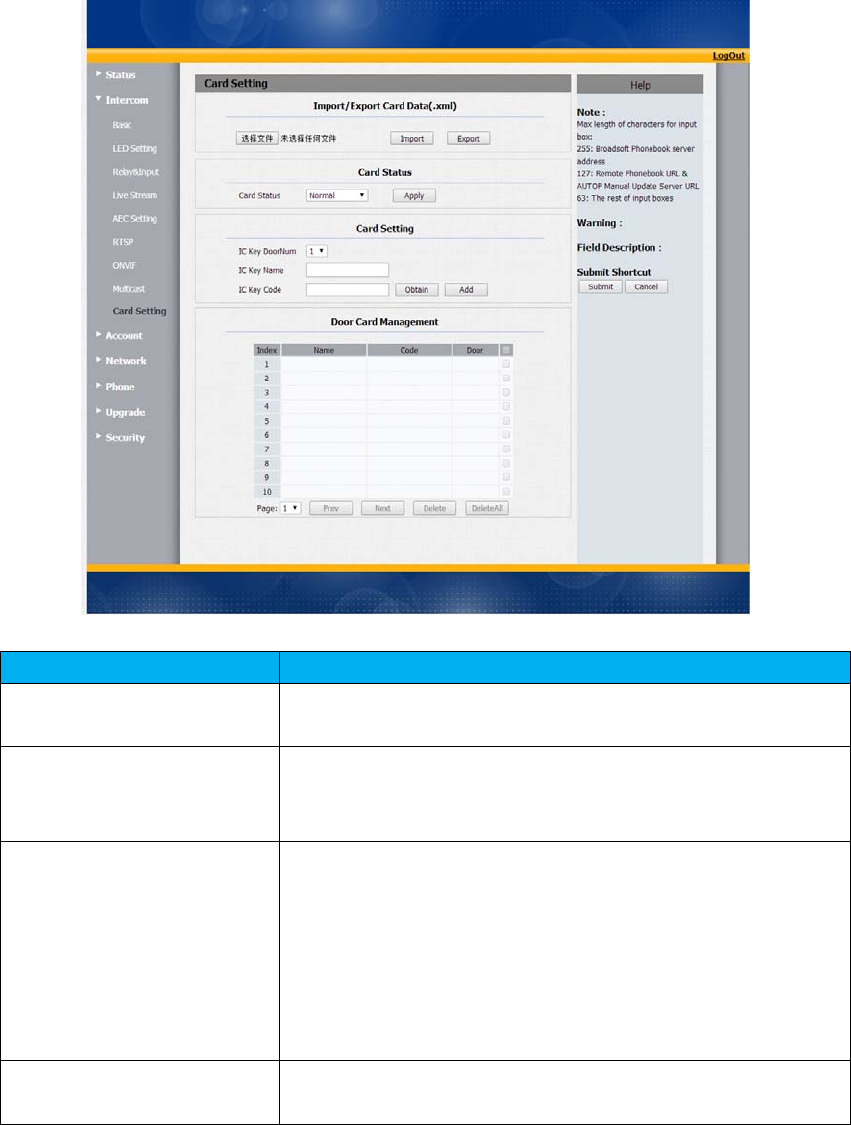
11Intercom‐CardSetting(Optional)
SectionsDescription
Import/ExportCardDataToimportorexportthecarddatafile.Onlysupport.xml
format.
CardStatus Normal:ChooseNormalmodewhenreadingcard.
CardIssuing:ChooseCardIssuingmodewhenwriting
card
CardSetting ICKeyDoorNum:R23Xcansupporttoconnect2doors.
Chooseoneandaddthevalidcardforunlock.
ICKeyName:Tosetupcorrespondingnameforthecard.
ICKeyCode:PlacethecardintheR26RFCardRead
area,thenclickAbtainbutton.AfterR26readthecard
code,clickAdd,thecardinformationwillshowinthe
DoorCardManagementlist.
DoorCardManagementValidcardinformationwillshowinthelist.Userscantickthe
currentcardinformationthendeleteoneorallinthelist.
26
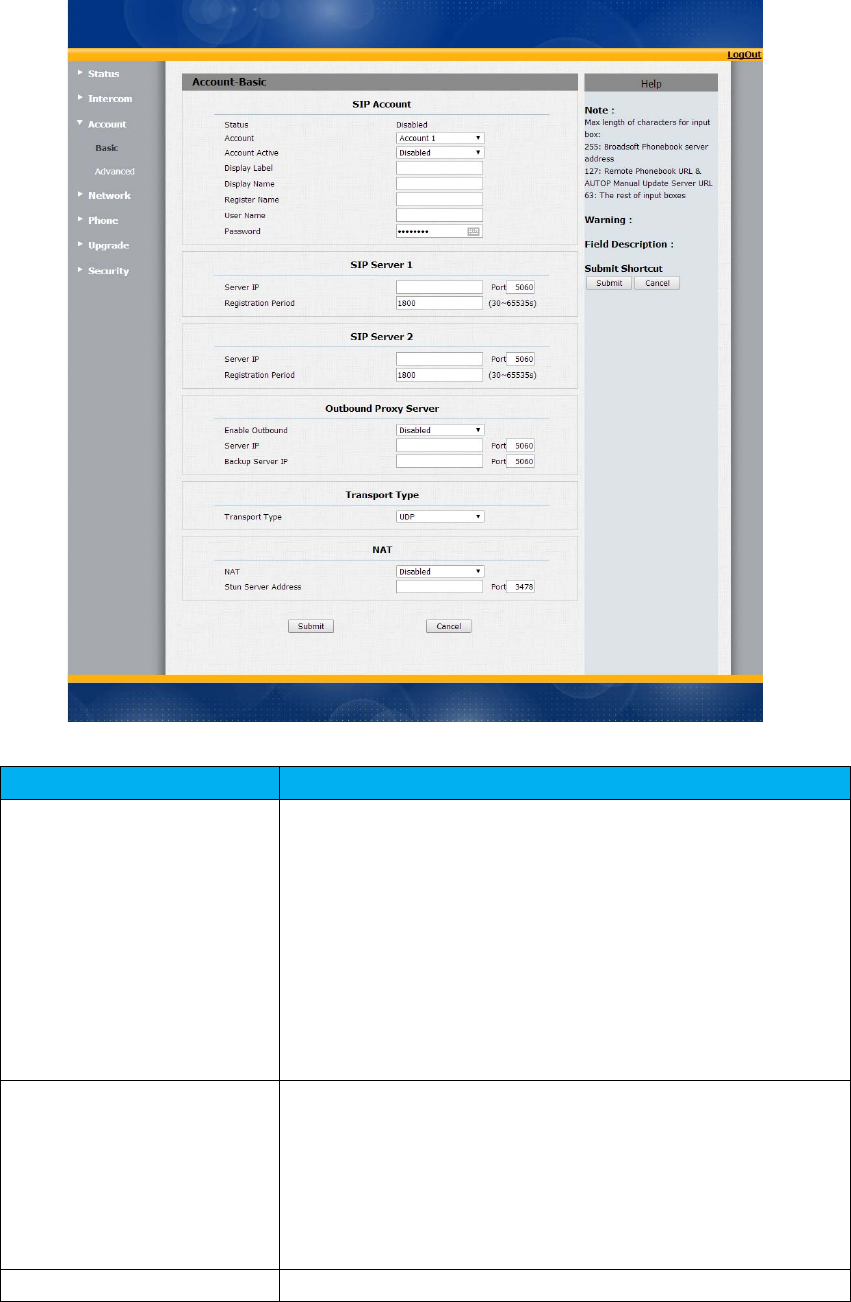
12Account‐Basic
SectionsDescription
SIPAccountTodisplayandconfigurethespecificAccountsettings.
Status:Todisplayregisterresult.
DisplayName:Whichissenttotheothercallpartyfor
display.
RegisterName:AllocatedbySIPserverprovider,usedfor
authentication.
UserName:AllocatedbyyourSIPserverprovide,used
forauthentication.
Password:Usedforauthorization.
SIPServer1TodisplayandconfigurePrimarySIPserversettings.
ServerIP:SIPserveraddress,itcouldbeanURLorIP
address.
RegistrationPeriod:Theregistrationwillexpireafter
Registrationperiod,theIPphonewillre‐register
automaticallywithinregistrationperiod.
SIPServer2TodisplayandconfigureSecondarySIPserversettings.

27
Thisisforredundancy,ifregisteringtoPrimarySIPserver
fails,theIPphonewillgotoSecondarySIPserverfor
registering.
Note:SecondarySIPserverisusedforredundancy,itcanbe
leftblankifthereisnotredundancySIPserverinuser’s
environment.
OutboundProxyServerTodisplayandconfigureOutboundProxyserversettings.
Anoutboundproxyserverisusedtoreceiveallinitiating
requestmessagesandroutethemtothedesignatedSIP
server.
Note:Ifconfigured,allSIPrequestmessagesfromtheIP
phonewillbesenttotheoutboundproxyserverforcefully.
TransportTypeTodisplayandconfigureTransporttypeforSIPmessage
UDP:UDPisanunreliablebutveryefficienttransport
layerprotocol.
TCP:Reliablebutless‐efficienttransportlayerprotocol.
TLS:SecuredandReliabletransportlayerprotocol.
DNS‐SRV:ADNSRRforspecifyingthelocationof
services.
NATTodisplayandconfigureNAT(NetAddressTranslator)
settings.
STUN:ShortforSimpleTraversalofUDPoverNATS,a
solutiontosolveNATissues.
Note:Bydefault,NATisdisabled.
28
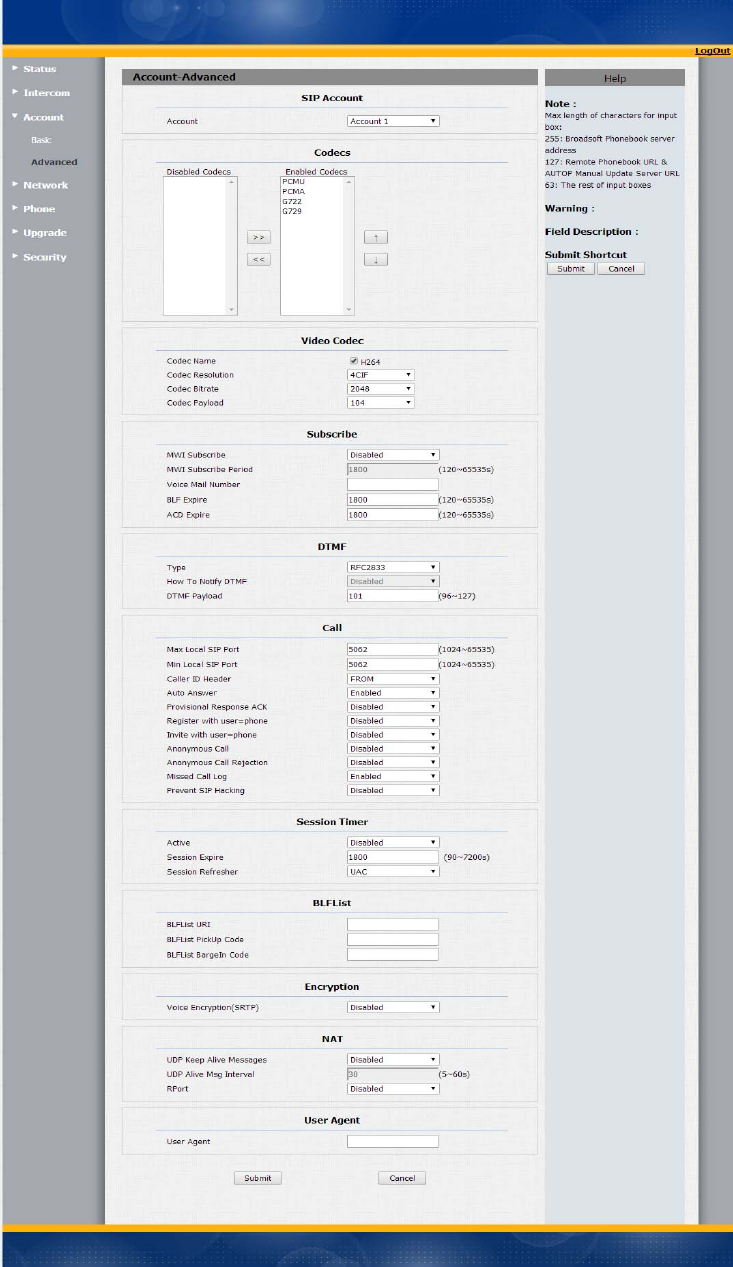
13Account‐Advanced

29
SectionsDescription
SIPAccountTodisplaycurrentAccountsettingsortoselectwhichaccount
todisplay.
CodecsTodisplayandconfigureavailable/unavailablecodecslist.
Codecmeanscoder‐decoderwhichisusedtotransferanalog
signaltodigitalsignalorviceversa.
FamiliarcodecsarePCMU(G711U),PCMA(G711A),G722
(wide‐bandthcodecs),G729andsoon.
VideoCodecToconfigurethevideoquality
CodecName:ThedefaultvideocodecisH264.
CodecResolution:ItcansupportQCIF,CIF,VGA,4CIF,
720P.
CodecBitrate:Thelowestbitrateis128,thehighest
bitrateis2048.
Codecpayload:From90‐119.
SubscribeTodisplayandconfigureMWI,BLF,ACDsubscriptionsettings.
MWI:MessageWaitingIndicatorwhichisusedto
indicatewhetherthereisunreadnewvoicemessage.
BLF:BLFisshortforBusyLampFieldwhichisusedto
monitorthedesignatedextensionstatus.
ACD:AutomaticCallDistributionisoftenusedinoffices
forcustomerservice,suchascallcenter.Thesetting
hereistonegotiatewiththeserveraboutexpiretimeof
ACDsubscription.
DTMFTodisplayandconfigureDTMFsettings.
Type:SupportInband,Info,RFC2833ortheir
combination.
HowToNotifyDTMF:OnlyavailablewhenDTMFTypeis
Info.
DTMFPayload:ToconfigurepayloadtypeforDTMF.
Note:Bydefault,DTMFtypeisRFC2833whichisthe
standard.TypeInbandusesinbandfrequencytoindicate
DTMFtonewhichismostusedtobecompatibleto
traditionaltelephoneserver.TypeInfouseSIPInfomessage
toindicateDTMFmessage.
CallTodisplayandconfigurecall‐relatedfeatures.
MaxLocalSIPPort:Toconfiguremaximumlocalsipport
fordesignatedaccount.
MinLocalSIPPort:To configureminimumlocalsipport
fordesignatedaccount.
CallerIDHeader:ToconfigurewhichCallerIDformatto
fetchfordisplayingonPhoneUI.
AutoAnswer:Ifenabled,IPphonewillbeauto‐answered

30
whenthereisanincomingcallfordesignatedaccount.
Ringtones:Choosetheringtoneforeachaccount.
ProvisioningResponseACK:100%reliabilityforall
provisionalmessages,thismeansitwillsendACKevery
timetheIPphonereceivesaprovisionalSIPmessage
fromSIPserver.
User=phone:Ifenabled,IPphonewillsenduser=phone
withinSIPmessage.
PTime:IntervaltimebetweentwoconsecutiveRTP
packets.
AnonymousCall:Ifenabled,alloutgoingcallforthe
designatedaccountwillbeanonymousnumber.
AnonymousCallRejection:Ifenabled,allincoming
anonymous‐outcallforthedesignatedaccountwillbe
rejected.
IsescapenonAsciicharacter:Totransferthesymbolto
Asciicharacter.
MissedCallLog:Todisplaythemisscalllog.
PreventSIPHacking:EnabletopreventSIPfromhacking.
SessionTimerTodisplayorconfiguresessiontimersettings.
Active:To enableordisablethisfeature,Ifenable,the
ongoingcallwillbedisconnectedautomaticallyonce
thesessionexpiredunlessit’sbeenrefreshedbyUACor
UAS.
SessionExpire:Configuresessionexpiretime.
SessionRefresher:Toconfigurewhoshouldberesponse
forrefreshingasession.
Note:UACmeansUserAgentClient,herestandsforIP
phone.UASmeansUserAgentServer,herestandsforSIP
server.
BLFListTodisplayorconfigureBLFListURIaddress.
BLFListURI:BLFListisshortforBusyLampFieldList.
BLFListPickUpCode:TosettheBLFpickupcode.
BLFListBargeInCode:TosettheBLFbargeincode.
EncryptionToenableordisabledSRTPfeature.
VoiceEncryption(SRTP):Ifenabled,allaudiosignal
(technicallyspeakingit’sRTPstreams)willbeencrypted
formoresecurity.
NATTodisplayNAT‐relatedsettings.
UDPKeepAlivemessage:Ifenabled,IPphonewillsend
UDPkeep‐alivemessageperiodicallytoroutertokeep
NATportalive.
UDPAliveMsgInterval:Keepalivemessageinterval.
Rport:RemotePort,ifenabled,itwilladdRemotePort
31
intooutgoingSIPmessagefordesignatedaccount.
UserAgentOnecancustomizeUserAgentfieldintheSIPmessage;If
useragentissettospecificvalue,usercouldseethe
informationfromPCAP.Ifuseragentisnotsetbydefault,
usercouldseethecompanyname,modelnumberand
firmwareversionfromPCAP
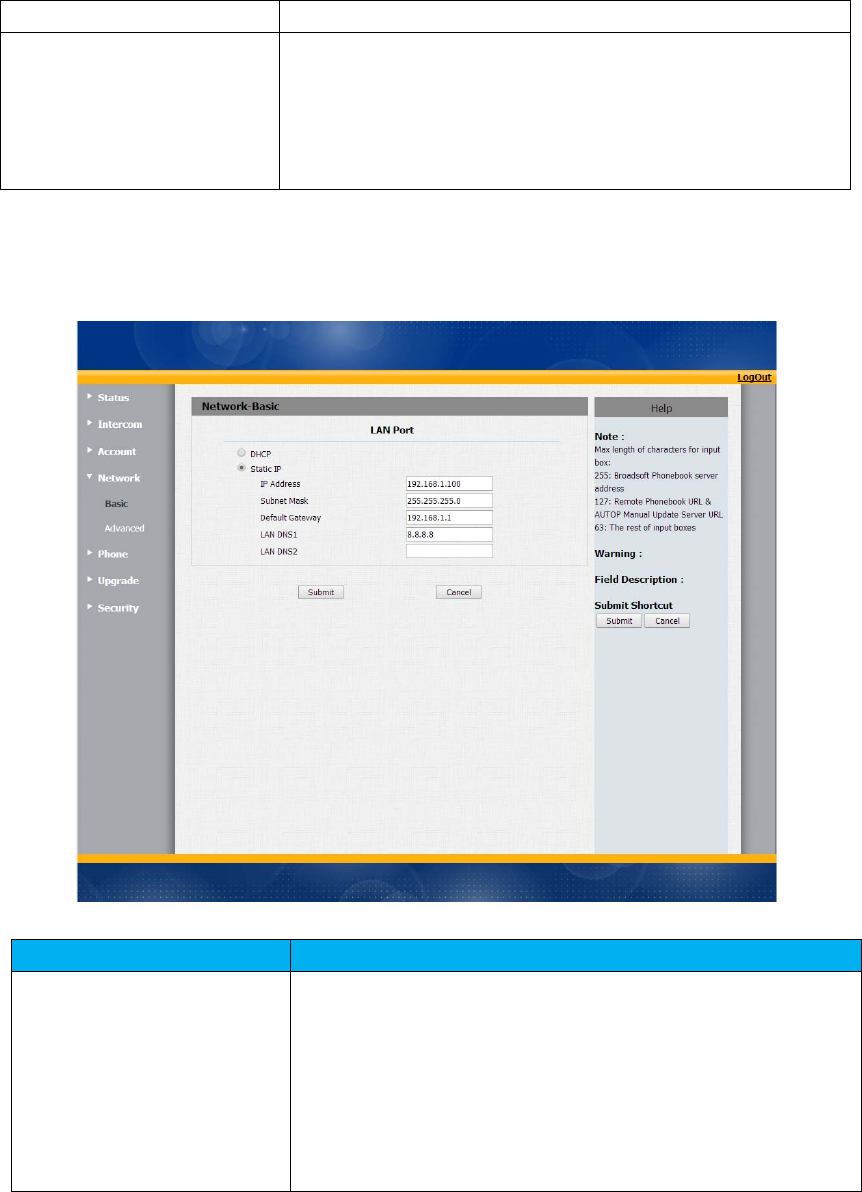
14Network‐Basic
SectionsDescription
LANPortTo displayandconfigureLANPortsettings.
DHCP:Ifselected,IPphonewillgetIPaddress,Subnet
Mask,DefaultGatewayandDNSserveraddressfrom
DHCPserverautomatically.
StaticIP:Ifselected,youhavetosetIPaddress,Subnet
Mask,DefaultGatewayandDNSservermanually.
32
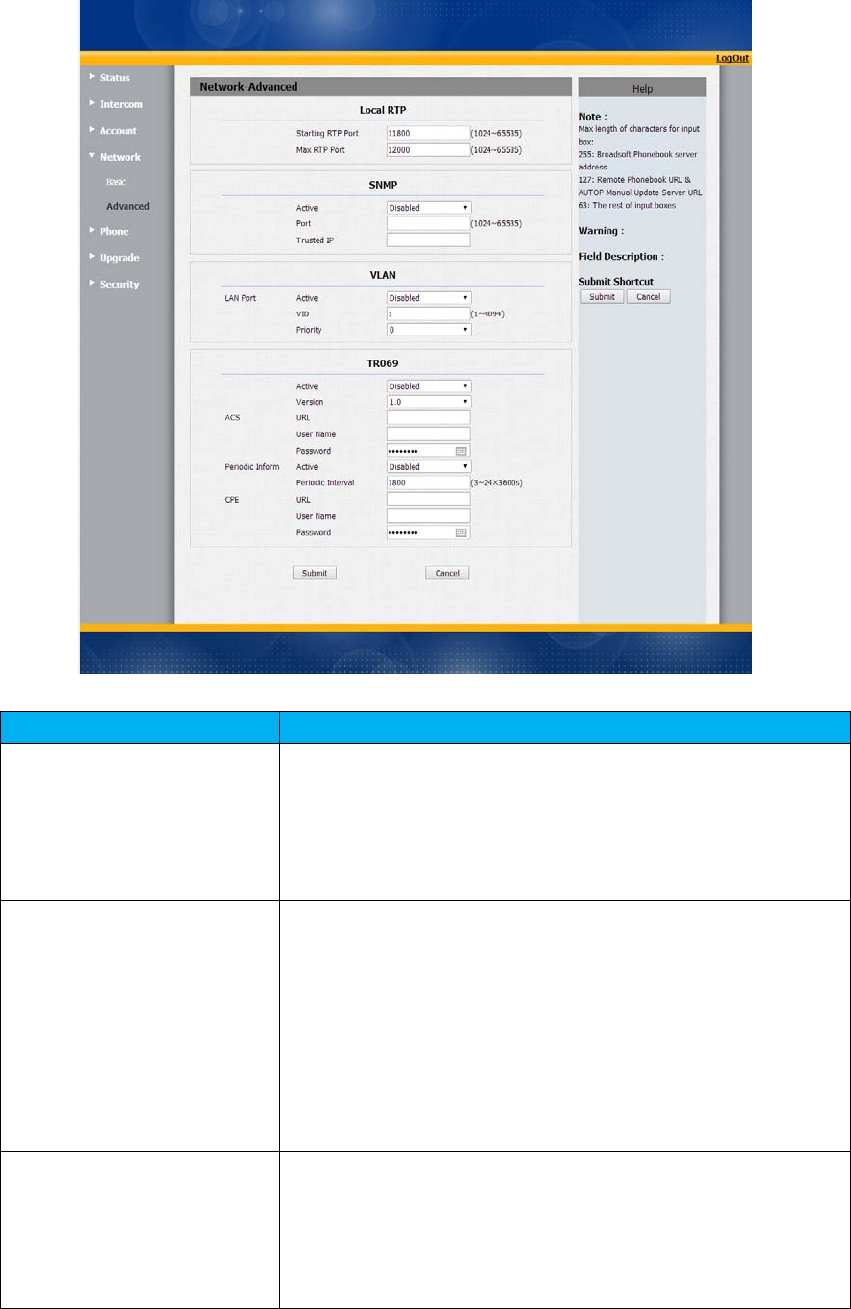
15Network‐Advanced
SectionsDescription
LocalRTPTodisplayandconfigureLocalRTPsettings.
MaxRTPPort:DeterminethemaximumportthatRTP
streamcanuse.
StartingRTPPort:DeterminetheminimumportthatRTP
streamcanuse.
SNMPTodisplayandconfigureSNMPsettings.
Active:To enableordisableSNMPfeature.
Port:ToconfigureSNMPserver’sport.
TrustedIP:ToconfigureallowedSNMPserveraddress,it
couldbeanIPaddressoranyvalidURLdomainname.
Note:SNMP(SimpleNetworkManagementProtocols)is
Internet‐standardprotocolformanagingdevicesonIP
networks.
VLANTodisplayandconfigureVLANsettings.
Active:To enableordisableVLANfeaturefordesignated
port.
VID:ToconfigureVLANIDfordesignatedport.
Priority:ToselectVLANpriorityfordesignatedport.

33
Note:PleaseconsultyouradministratorforspecificVLAN
settingsinyournetworkingenvironment.
TR069TodisplayandconfigureTR069settings.
Active:To enableordisableTR069feature.
Version:ToselectsupportedTR069version(version1.0
or1.1).
ACS/CPE:ACSisshortforAutoconfigurationserversas
serverside,CPEisshortforCustomer‐premise
equipmentasclientsidedevices.
URL:ToconfigureURLaddressforACSorCPE.
Username:ToconfigureusernameforACSorCPE.
Password:ToconfigurePasswordforACSorCPE.
PeriodicInform:Toenableperiodicallyinform.
PeriodicInterval:Toconfigureintervalforperiodic
inform.
Note:TR‐069(TechnicalReport069)isatechnical
specificationentitledCPEWANManagementProtocol
(CWMP).Itdefinesanapplicationlayerprotocolforremote
managementofend‐userdevices.
34
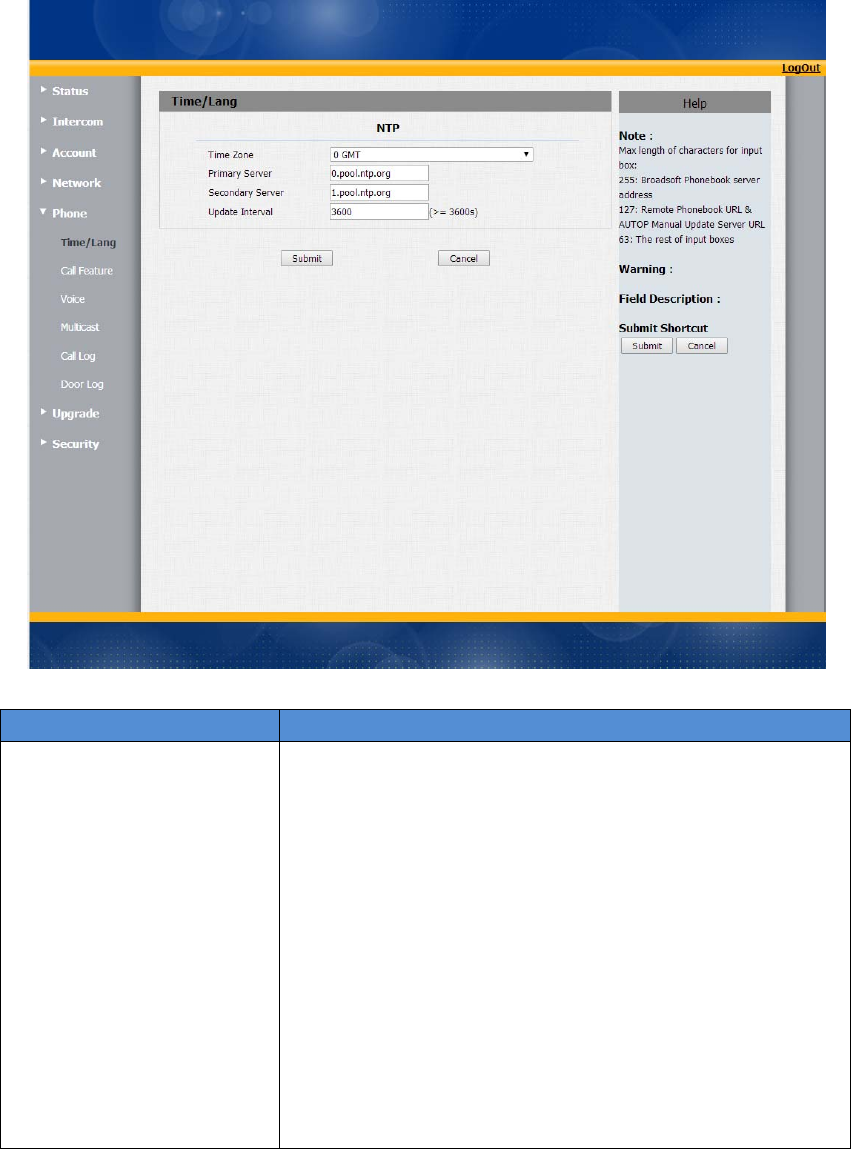
16Phone‐Time/Language
SectionsDescription
NTPToconfigureNTPserverrelatedsettings.
TimeZone:ToselectlocalTimeZoneforNTPserver.
PrimaryServer:ToconfigureprimaryNTPserver
address.
SecondaryServer:ToconfiguresecondaryNTPserver
address,ittakeseffectifprimaryNTPserveris
unreachable.
Updateinterval:Toconfigureintervalbetweentwo
consecutiveNTPrequests.
Note:NTP,NetworkTimeProtocolisusedtoautomatically
synchronizedlocaltimewithINTERNETtime,sinceNTP
serveronlyresponseGMTtime,sothatyouneedtospecify
theTimeZoneforIPphonetodecidethelocaltime.
35
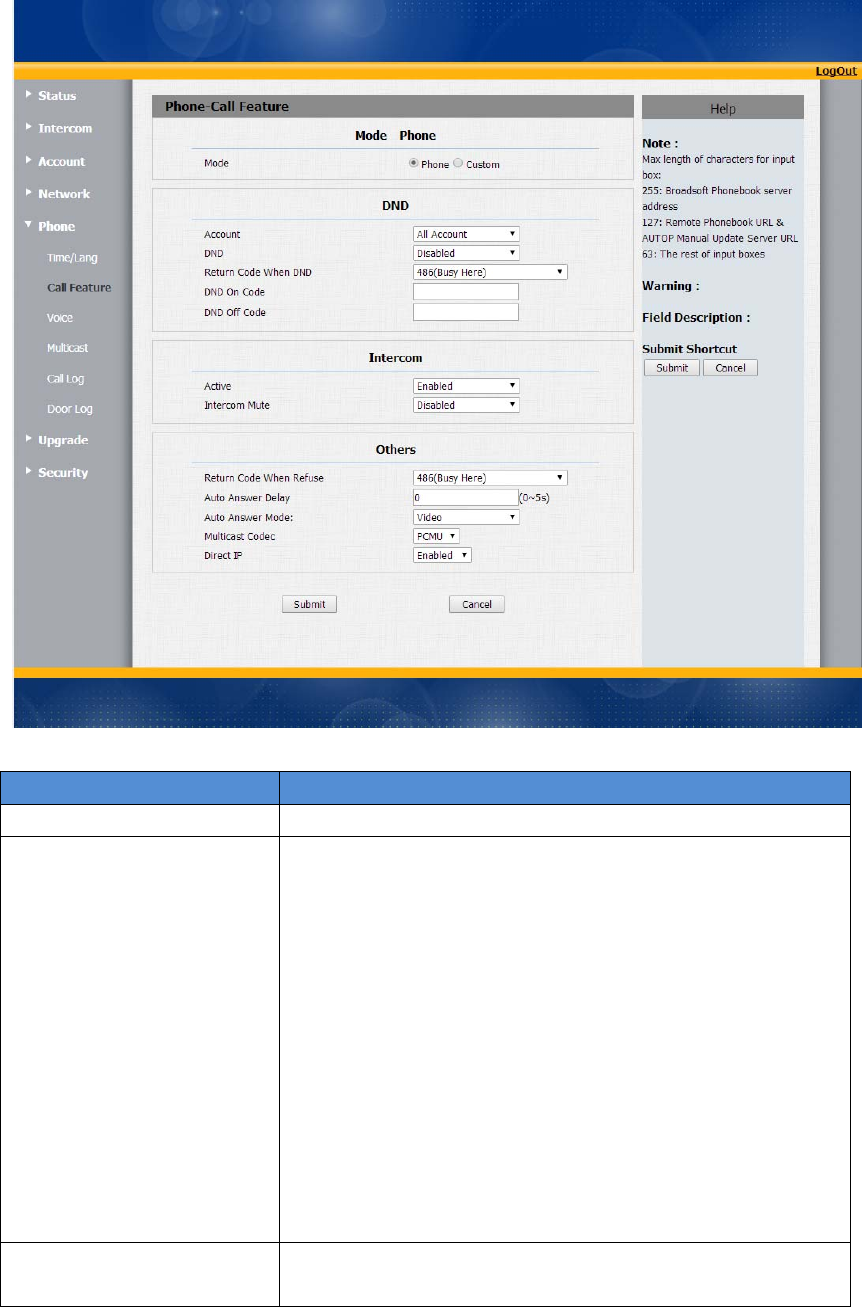
17Phone‐CallFeature
SectionsDescription
Mode Mode:Selectthedesiredmode.
DNDDND(DoNotDisturb)allowsIPphonestoignoreany
incomingcalls.
ReturnCodewhenDND:Determinewhatresponsecode
shouldbesentbacktoserverwhenthereisanincoming
callifDNDon.
DNDOnCode:TheCodeusedtoturnonDNDon
server’sside,ifconfigured,IPphonewillsendaSIP
messagetoservertoturnonDNDonserversideifyou
pressDNDwhenDNDisoff.
DNDOffCode:TheCodeusedtoturnoffDNDon
server’sside,ifconfigured,IPphonewillsendaSIP
messagetoservertoturnoffDNDonserversideifyou
pressDNDwhenDNDison.
IntercomIntercomallowsusertoestablishacalldirectlywiththe
callee.
36
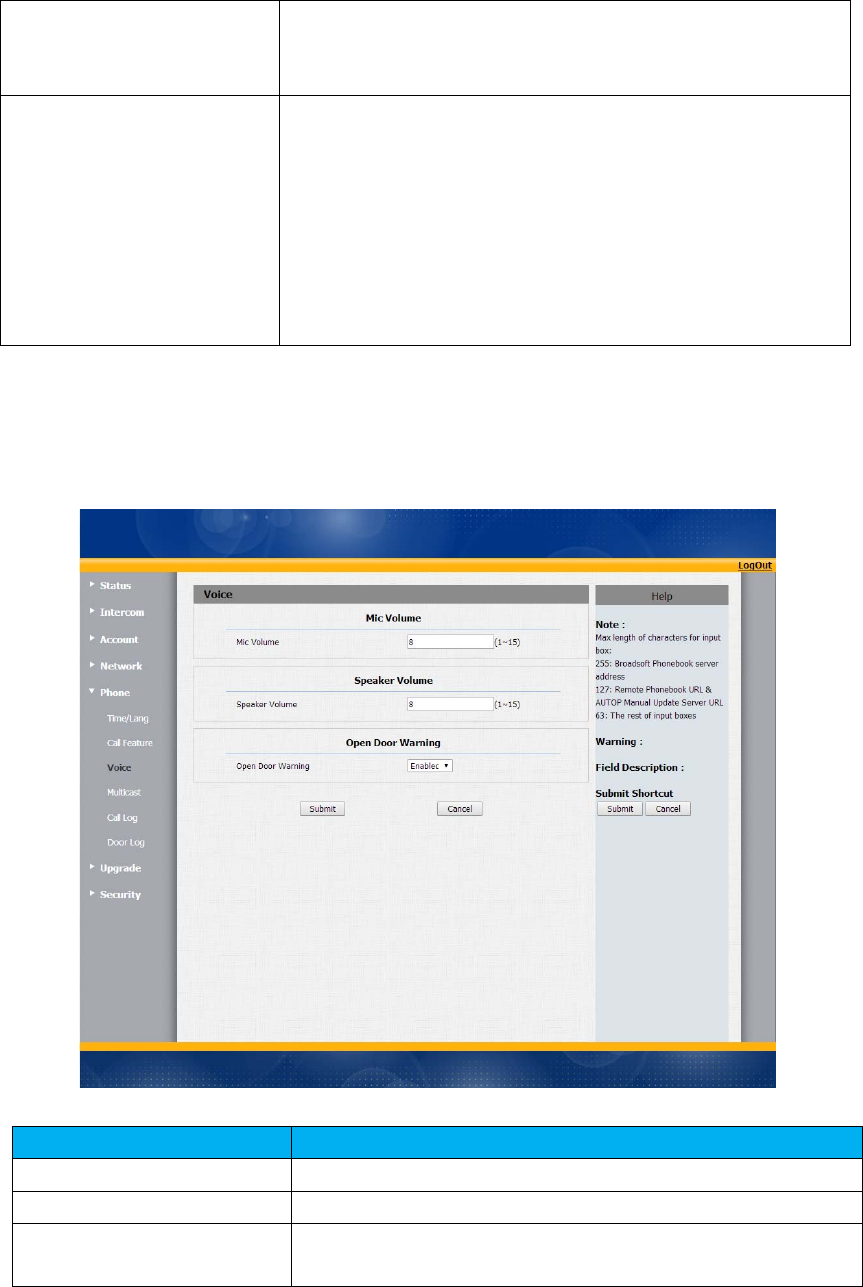
18Phone‐Voice
SectionsDescription
MicVolumeToconfigureMicrophonevolume,from1‐15.8bydefault.
SpeakerVolumeToconfigureSpeakerVolume,from1‐15,8bydefault.
OpenDoorWarningToconfiguredooropeningvoice.Disableit,youwon’thear
thepromptvoicewhenthedoorisopened.
Active:To enableordisableIntercomfeature.
IntercomMute:Ifenabled,oncethecallestablished,the
calleewillbemuted.
Others ReturnCodeWhenRefuse:Allowsusertoassignspecific
codeasreturncodetoSIPserverwhenanincomingcall
isrejected.
AutoAnswerDelay:Toconfiguredelaytimebeforean
incomingcallisautomaticallyanswered.
AutoAnswerMode:Tosetvideooraudiomodeforauto
answerbydefault.
DirectIP:DirectIPcallwithoutSIPproxy.
37
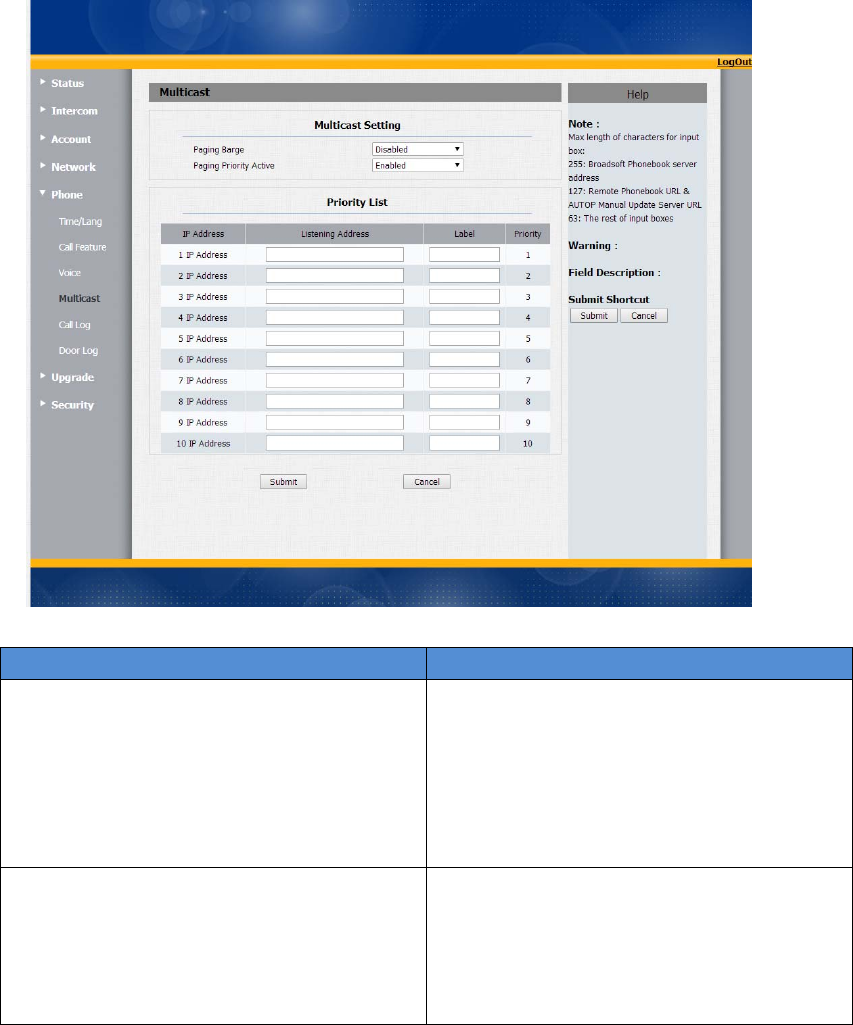
19Multicast
SectionsDescription
MulticastSettingTodisplayandconfiguretheMulticast
setting.
PagingBarge:Choosethemulticast
number,therangeis1‐10.
PagingpriorityActive:Enableodisable
themulticast.
PriorityList Tosetupthemulticastparameters.
ListeningAddress:EntertheIPaddress
youneedtolisten
Label:Inputthelabelforeachlistening
address
38
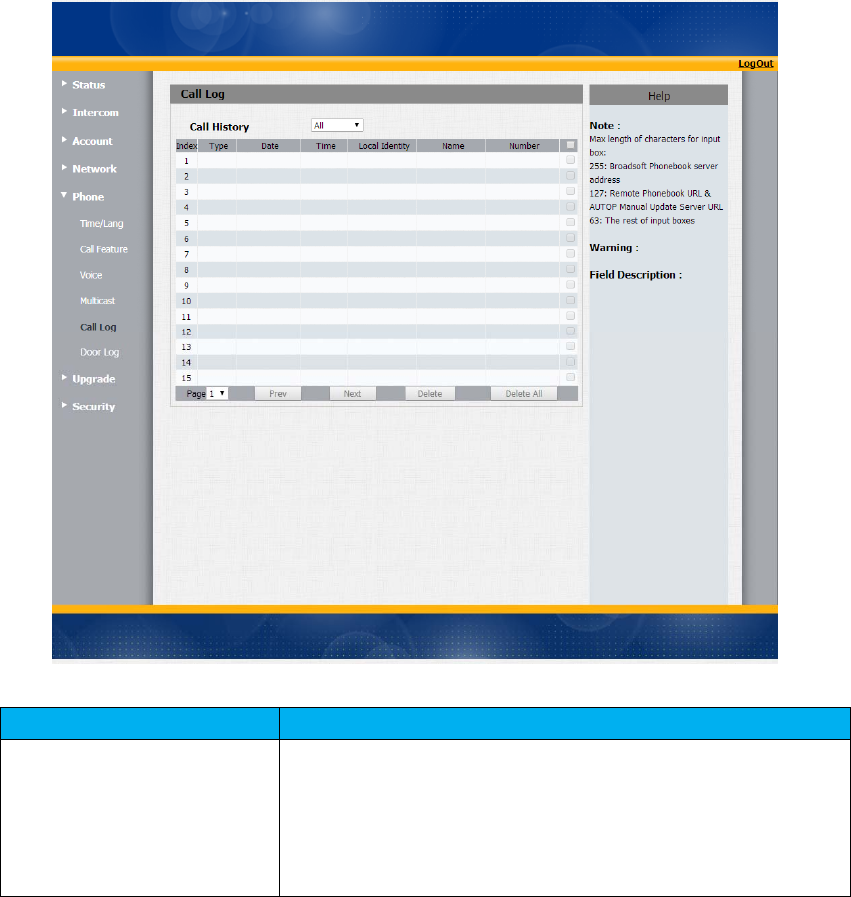
20CallLog
SectionsDescription
CallHistoryTodisplaycallhistoryrecords.
AvailablecallhistorytypesareAllcalls,Dialedcalls,Received
calls,Missedcalls,Forwardedcalls.
Userscancheckthecallhistoryindetail.Tickthenumberto
deleteordeletealllogs.R26supports100calllogs.
39
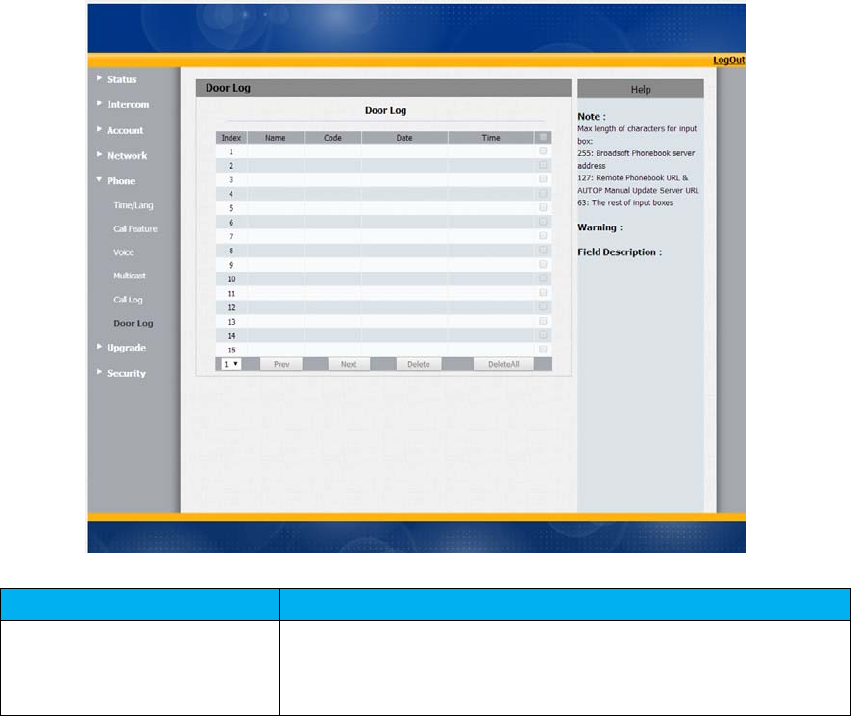
21DoorLog
SectionsDescription
DoorLogTodisplayunlockhistory
Userscanchecktheunlockinformationindetail.Usercan
deleteoneoralllogs.Themaximumdoorlogis500.
40
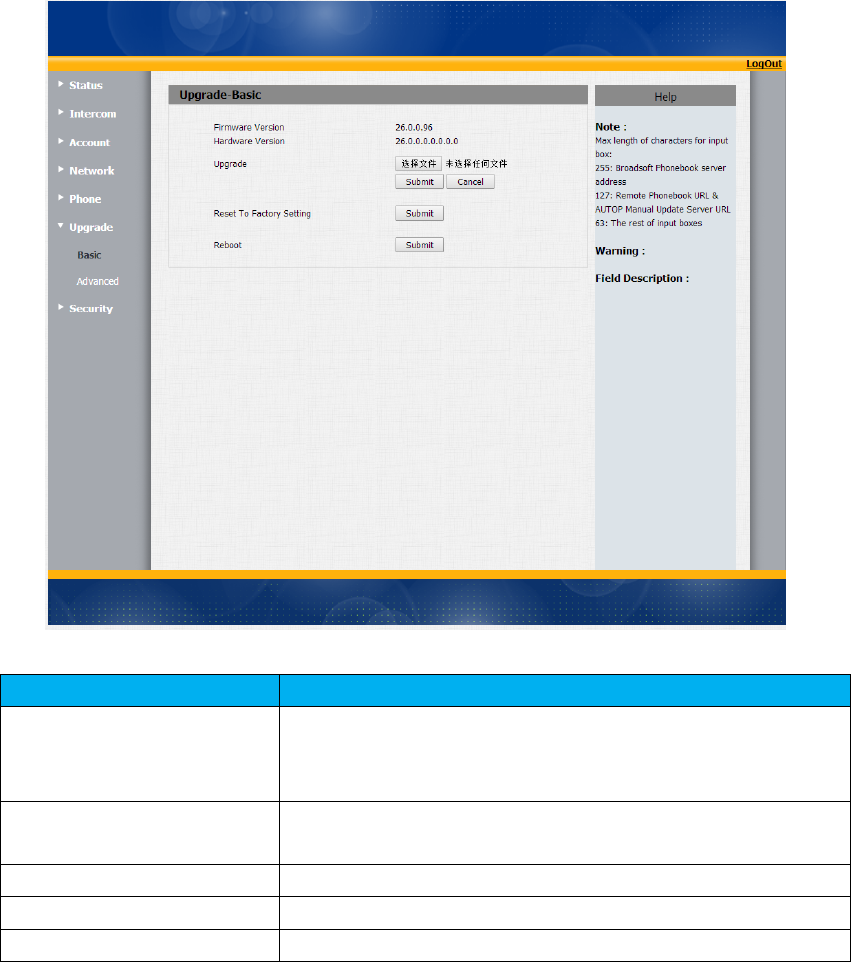
22Upgrade‐Basic
SectionsDescription
UpgradeToselectupgradingzipfilefromlocaloraremoteserver
automatically.
Note:Pleasemakesureit’srightfileformatforrightmodel.
FirmwareversionTodisplayfirmwareversion,firmwareversionstartswith
MODELname.
HardwareVersionTodisplayHardwareversion.
ResettoFactorySettingToenableyoutoresetIPphone’ssettingtofactorysettings.
RebootTorebootIPphoneremotelyfromWebUI.
41
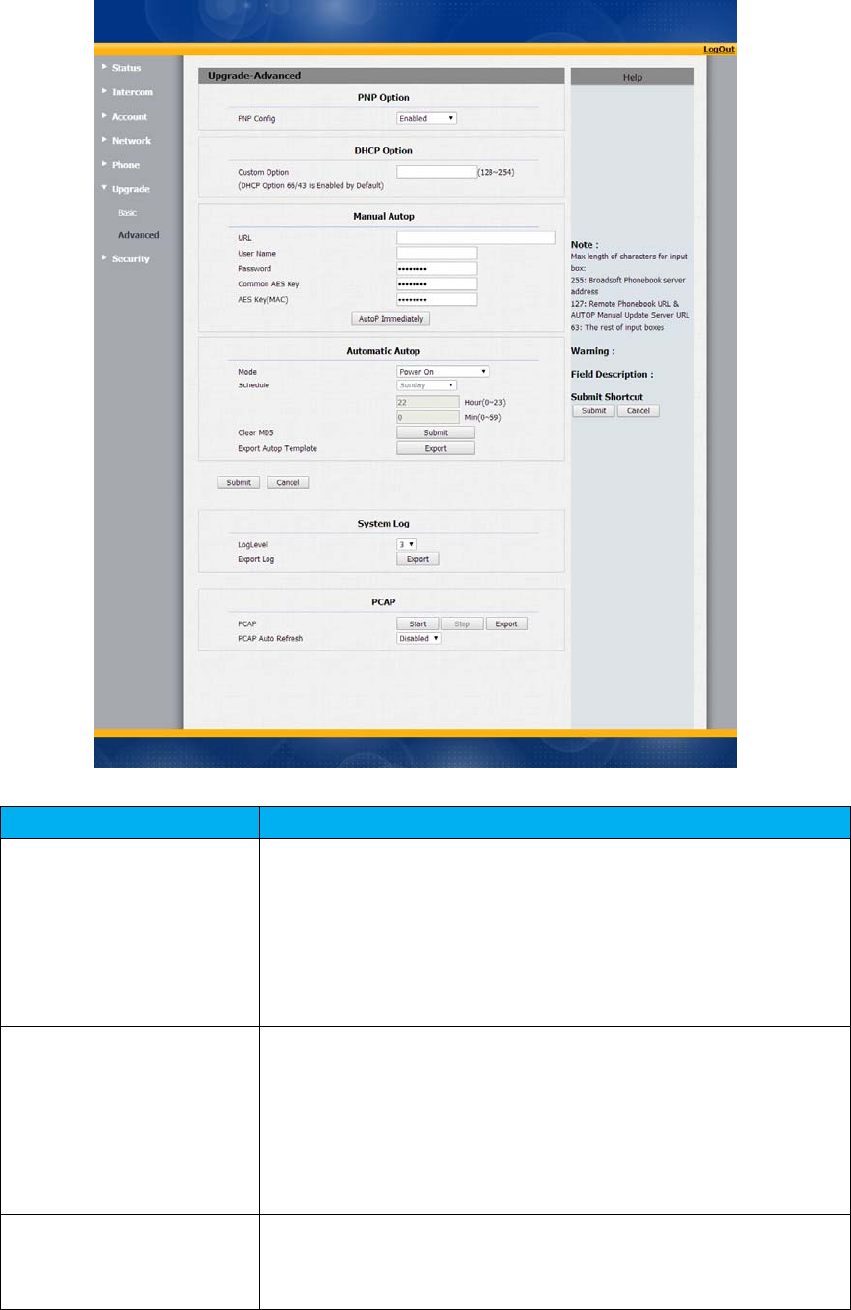
23Upgrade‐Advanced
SectionsDescription
PNPOptionTodisplayandconfigurePNPsettingforAutoProvisioning.
PNP:PlugandPlay,oncePNPisenabled,thephonewill
sendSIPsubscriptionmessagetoPNPserverautomatically
togetAutoProvisioningserver’saddress.
Bydefault,thisSIPmessageissenttomulticastaddress
224.0.1.75(PNPserveraddressbystandard).
DHCPOptionTodisplayandconfigurecustomDHCPoption.
DHCPoption:Ifconfigured,IPPhonewillusedesignated
DHCPoptiontogetAutoProvisioningserver’saddressvia
DHCP.
ThissettingrequireDHCPservertosupportcorresponding
option.
ManualUpdateServerTodisplayandconfiguremanualupdateserver’ssettings.
URL:Autoprovisioningserveraddress.
Username:Configureifserverneedsanusernameto

42
access,otherwiseleftblank.
Password:Configureifserverneedsapasswordtoaccess,
otherwiseleftblank.
CommonAESKey:UsedforIPphonetodeciphercommon
AutoProvisioningconfigurationfile.
AESKey(MAC):UsedforIPphonetodecipher
MAC‐orientedautoprovisioningconfigurationfile(for
example,filenamecouldbe0c1105888888.cfgifIP
phone’sMACaddressis0c1105888888).
Note:AESisoneofmanyencryption,itshouldbeconfigure
onlyconfigurefileiscipheredwithAES,otherwiseleftblank.
AutoPTodisplayandconfigureAutoProvisioningmodesettings.
ThisAutoProvisioningmodeisactuallyself‐explanatory.
Forexample,mode“Poweron”meansIPphonewillgotodo
Provisioningeverytimeitpowerson.
SystemLogTodisplaysystemloglevelandexportsystemlogfile.
Systemloglevel:Fromlevel0~7.Thehigherlevelmeans
themorespecificsystemlogissavedtoatemporaryfile.
Bydefault,it’slevel3.
ExportLog:Clicktoexporttemporarysystemlogfileto
localPC.
PCAPTostart,stoppacketscapturingortoexportcapturedPacket
file.
Start:Tostartcapturingallthepacketsfilesentorreceived
fromIPphone.
Stop:Tostopcapturingpackets.
Note:IPphonewillsavecapturedpacketsfiletoatemporary
file,thisfilemaximumsizeis1M(megabytes),andwilltop
capturingoncereachingthismaximumsize.
43
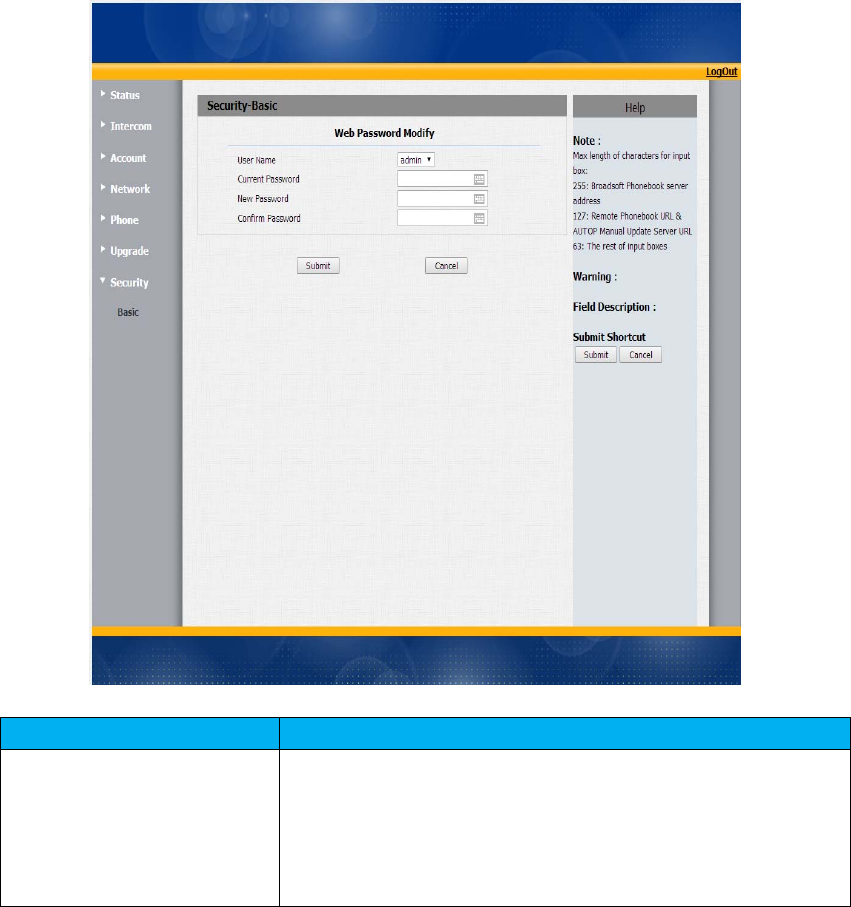
24Security‐Basic
SectionsDescription
WebPasswordModifyTomodifyuser’spassword.
CurrentPassword:Thecurrentpasswordyouused.
NewPassword:Inputnewpasswordyouintendtouse.
ConfirmPassword:Repeatthenewpassword.