AKUVOX IT82X Indoor Monitor User Manual Akuvox IT82
AKUVOX (XIAMEN) NETWORKS CO., LTD. Indoor Monitor Akuvox IT82
AKUVOX >
User Manual

1
IT82Series
IndoorMonitorUserManual
Content
1ProductionOverview.................................................................4
1.1ProductionDescription.......................................................................................................4
1.2TechnicalSpecification........................................................................................................6
1.3ButtonInstruction...............................................................................................................6
1.4Dimension...........................................................................................................................7
1.5EquipmentAppearanceAndInterfaceDescription.............................................................8
1.6Installation...........................................................................................................................9
1.7InstallationConsiderations................................................................................................10
1.8EquipmentPackaging........................................................................................................11
2Setting....................................................................................12
2.1Maininterfaceinstruction.................................................................................................12
2.2Network.............................................................................................................................12
2.2.1DHCP......................................................................................................................12
2.2.2StaticIP...................................................................................................................13
2.3RegisterAccount...............................................................................................................14
2.4Display...............................................................................................................................15
2.4.1Brightness...............................................................................................................15
2.4.2Sleep.......................................................................................................................16
2.4.3ScreenSaver...........................................................................................................17
2.4.4ScreenClean...........................................................................................................17
2.5Sound................................................................................................................................18
2.5.1Volume...................................................................................................................18
2.5.2Ringtones...............................................................................................................18
2.5.3NotificationSound..................................................................................................18
2.6Time..................................................................................................................................18
2.7SystemInfo........................................................................................................................19
2.8Language...........................................................................................................................20
2.9Reboot...............................................................................................................................21
2.10Reset................................................................................................................................22
2.11Folder..............................................................................................................................22
3Function..................................................................................24
3.1Makeacall........................................................................................................................24
3.1.1CallSIP....................................................................................................................24
3.1.2Callresident............................................................................................................25
3.1.3CallfromCallLog....................................................................................................25
3.1.4CallfromContacts..................................................................................................25
3.1.5CallCenter..............................................................................................................27
3.2Receiveacall.....................................................................................................................27
3.3Answeracall.....................................................................................................................28
3.4Rejectacall.......................................................................................................................29
3.5Contacts.............................................................................................................................29
3.5.1Newcontacts..........................................................................................................29
3.5.2Modifythecontact.................................................................................................30
3.5.3Deletethecontact..................................................................................................31
3.6Calllog...............................................................................................................................31
3.6.1Modifythecalllog..................................................................................................31
3.6.2Deletethelog.........................................................................................................32
3.7Capture..............................................................................................................................32
3.8Message............................................................................................................................32
3.9LiveView...........................................................................................................................33
3.10Unlock..............................................................................................................................33
3.11SOS..................................................................................................................................34
3.12Security............................................................................................................................35
4Website...................................................................................38
4.1Weblogin..........................................................................................................................38
4.2Status................................................................................................................................39
4.2.1Basic.......................................................................................................................39
4.3Account.............................................................................................................................40
4.3.1Basic.......................................................................................................................40
4.3.2Advance..................................................................................................................42
4.4Network.............................................................................................................................47
4.4.1Basic.......................................................................................................................47
4.4.2Advance..................................................................................................................47
4.5Phone................................................................................................................................48
4.5.1Time/Language......................................................................................................48
4.5.2CallFeature............................................................................................................49
4.5.3Audio......................................................................................................................53
4.5.4Video......................................................................................................................54
4.6PhoneBook........................................................................................................................55
4.6.1LocalBook..............................................................................................................55
4.6.2CallLog...................................................................................................................57
4.7Upgrade.............................................................................................................................58
4.7.1Basic.......................................................................................................................58
4.7.2Advance..................................................................................................................59
4.8Security..............................................................................................................................62
4.8.1Basic.......................................................................................................................62
4.8.2Advance..................................................................................................................63
4
1 ProductionOverview
1.1 ProductionDescription
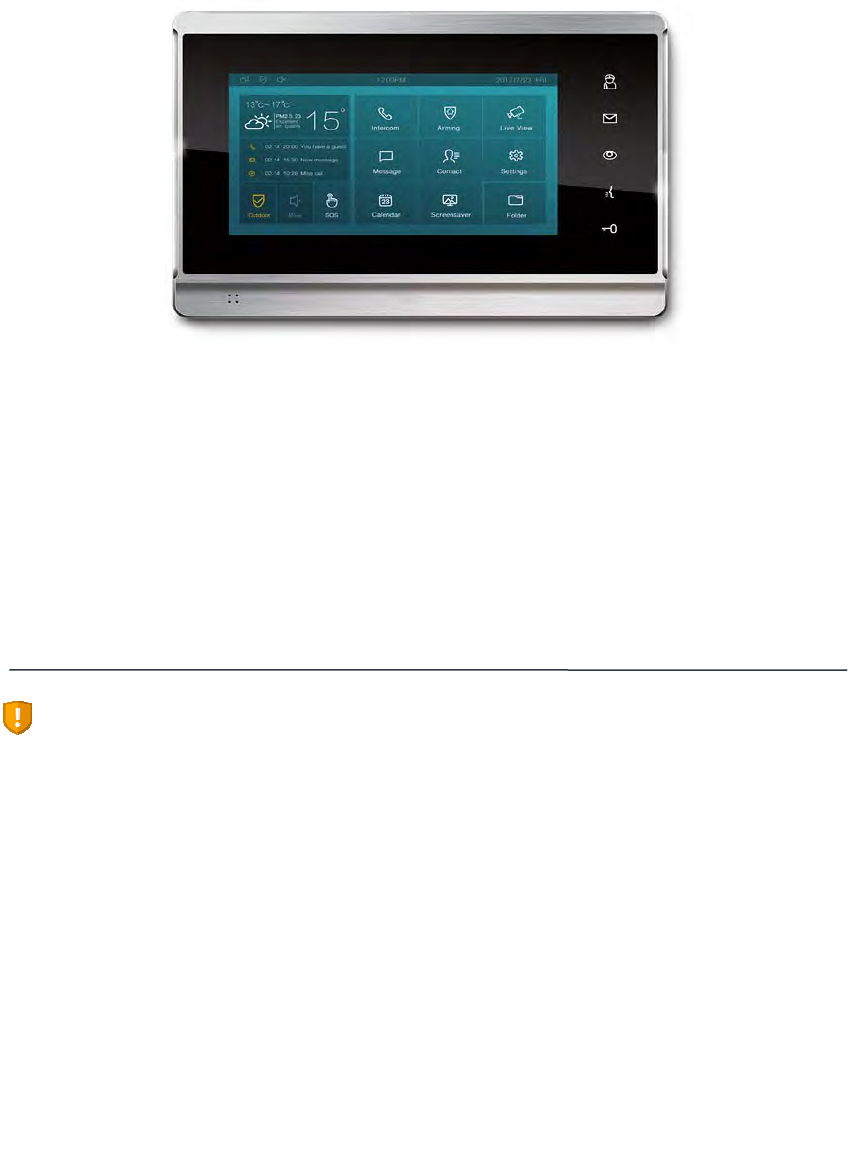
IT82seriesisanAndroidSIP‐basedwithsmoothtouch‐screenIndoormonitor.Itcan
beconnectedwithAkuvoxdoorphoneforunlockandmonitor.Residentscan
communicatewithvisitorsviaaudioandvideocall,andsupportremoteunlockthe
door.Itismoreconvenientandsafeforresidentstocheckthevisitoridentitythrough
itsvideopreviewfunction.IT82seriesisoftenapplicableinvillas,apartments,
buildingandsoon.
FCCCaution:
AnyChangesormodificationsnotexpresslyapprovedbythepartyresponsiblefor
compliancecouldvoidtheuser'sauthoritytooperatetheequipment.
Thisdevicecomplieswithpart15oftheFCCRules.Operationissubjecttothe
followingtwoconditions:(1)Thisdevicemaynotcauseharmfulinterference,and(2)
thisdevicemustacceptanyinterferencereceived,includinginterferencethatmay
causeundesiredoperation.
Note:Thisequipmenthasbeentestedandfoundtocomplywiththelimitsfora
ClassBdigitaldevice,pursuanttopart15oftheFCCRules.Theselimitsaredesigned
toprovidereasonableprotectionagainstharmfulinterferenceinaresidential
installation.Thisequipmentgenerates,usesandcanradiateradiofrequencyenergy
and,ifnotinstalledandusedinaccordancewiththeinstructions,maycauseharmful
interferencetoradiocommunications.However,thereisnoguaranteethat

5
interferencewillnotoccurinaparticularinstallation.Ifthisequipmentdoescause
harmfulinterferencetoradioortelevisionreception,whichcanbedeterminedby
turningtheequipmentoffandon,theuserisencouragedtotrytocorrectthe
interferencebyoneormoreofthefollowingmeasures:
—Reorientorrelocatethereceivingantenna.
—Increasetheseparationbetweentheequipmentandreceiver.
—Connecttheequipmentintoanoutletonacircuitdifferentfromthattowhichthe
receiverisconnected.
—Consultthedealeroranexperiencedradio/TVtechnicianforhelp.
FCCRadiationExposureStatement:
ThisequipmentcomplieswithFCCradiationexposurelimitssetforthforan
uncontrolledenvironment.
Thistransmittermustnotbeco‐locatedoroperatinginconjunctionwithanyother
antennaortransmitter.
Thisequipmentshouldbeinstalledandoperatedwithminimumdistance20cm
betweentheradiator&yourbody.
6
1.2 TechnicalSpecification
ModelIT82series
GraphicDisplay 7inchcapacitivetouchscreenTFTLCD,1024x600
resolution,16:9widescreenaspectratio
Network
Protocol SIPRFC3261,TCP/UDP/IP,RTP
VoiceCodec G.711A/U,G.729,G.722,iLBC_13_3,iLBC_15_2,OPUS
VideoCodec H.264,H.263,H.265,MJPEG
Network
Interface Dualswitched10/100Mbpsport
IPassignment StaticIP,DHCP
Memory RAM:2GB,Flash:4GB
Management LCDMenuConfiguration,WebUI
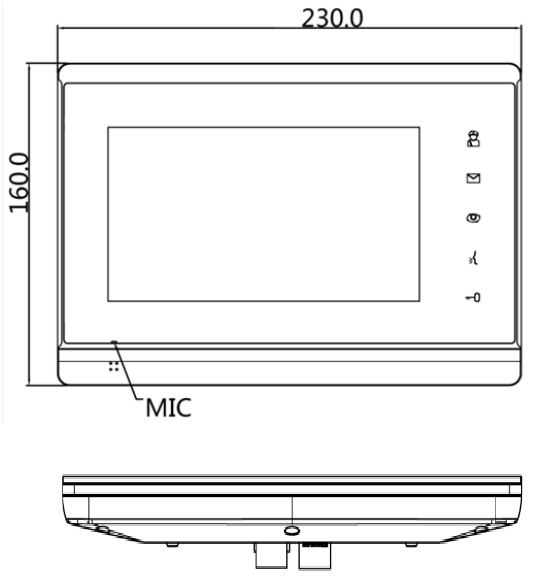
Dimension 230x160x30mm
Storage Album
ExternalSDdevice
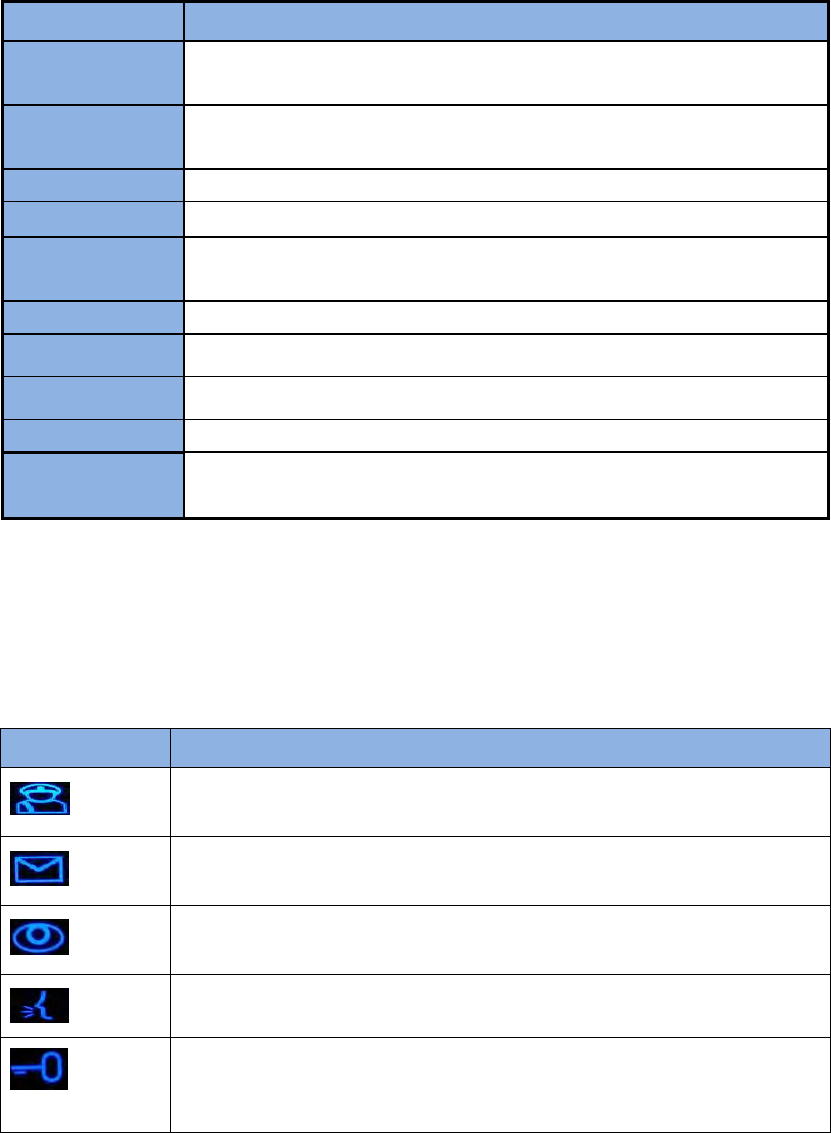
1.3 ButtonInstruction
InterfaceDescription
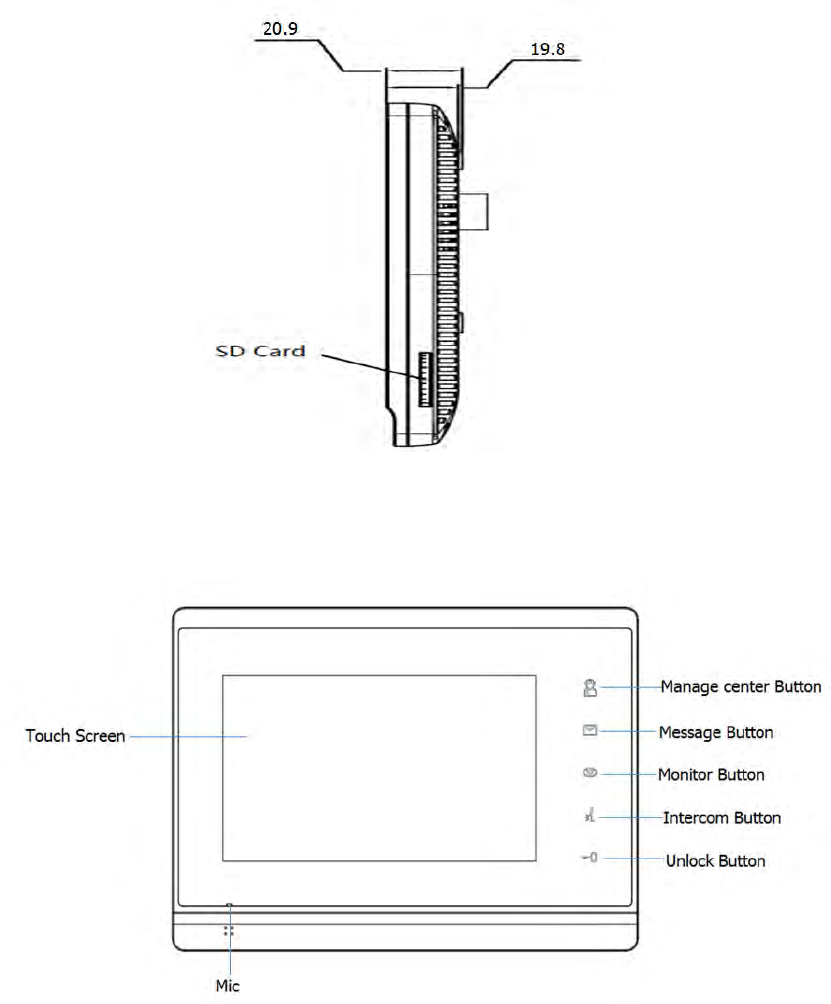
Managecenterbutton.Clicktomakeacallwithmanagecenter.
Messagebutton.Clicktodirectaccesstomessageinterface.
Monitorbutton.Clicktoviewthemonitoringfromoutdoor
environment.
Intercombutton.Clicktoenterthedialinginterface.
Unlocksensorbutton.ThephysicalUnlockkeyisonlyusedfor
E10Snow.
7
1.4 Dimension
8
1.5 EquipmentAppearanceAndInterfaceDescription
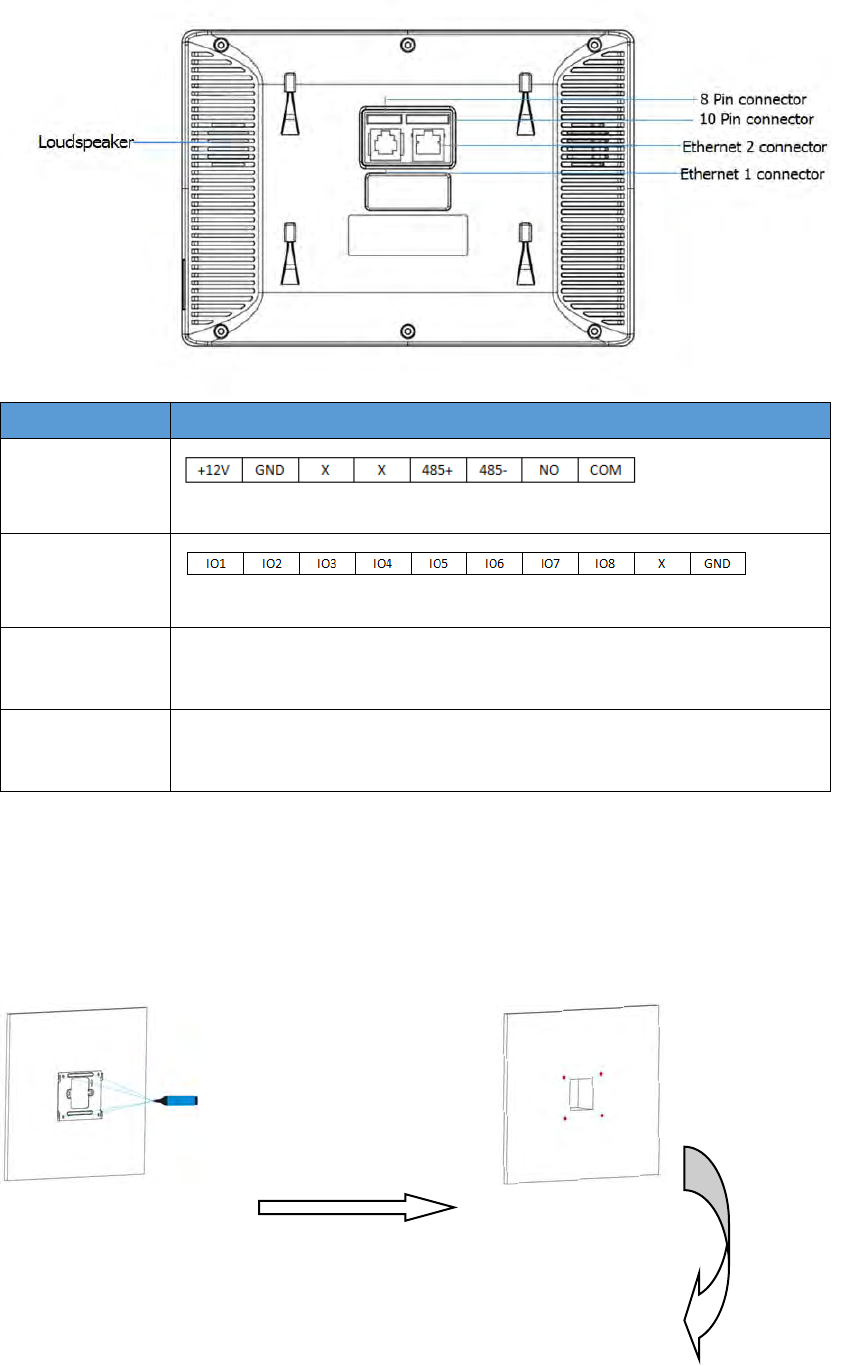
9
InterfaceDescription
8PIN
connector
Forpowersupplyand485connector
10PINconnect
For8securityconnector
Ethernet1Networkinterfacecanbeconnectedtoahub,switchorother
networkaccessdevices.
Ethernet2Sharethenetworkaccessfromethernet1port,andforPCand
otherequipmentconnection.
1.6 Installation
Usethepencilto
mark4fixationholes
throughwallbracket
onthewall
Usea5mmhand
drilltomakethe4
fixationholeson
thewall
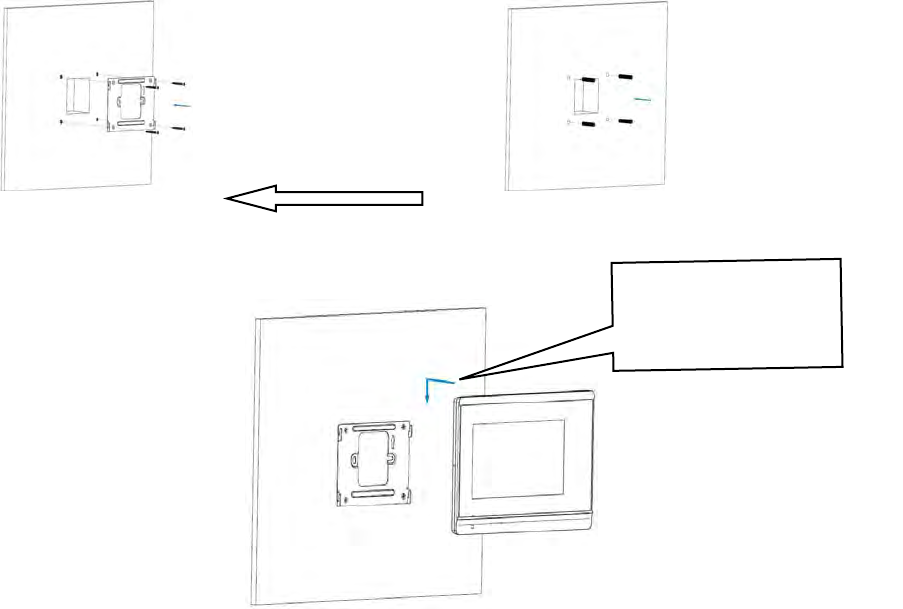
10
DeviceMounting
1.7 InstallationConsiderations
Herearesomesafetyrecommendationsabouttheinstallationandtheusage:
Donotusethisproductnearwater,suchas:bath,washbasin,kitchensinkand
otherdampplacesandsoon.
Placethedeviceinaplaceawayfromheat.
Placethedeviceawayfromtrafficareastopreventcollisions.
PleaseusetheequipmentwiththematchingpoweradapterorPOE.
Oncethefixation
holesaremade,
insertthefour
expansionanchors
provided
Use4ST4X20screws
tofixthewall
bracketinthewall
Pushdownsothatthe
deviceisfixedsecurely

11
1.8 EquipmentPackaging
NameQuantity
IT821
Wallbracket 1
QuickStartGuide1
10Pincable1
8Pincable1
Expansionanchor 4
ST4x20screw 4
12
2 Setting
2.1
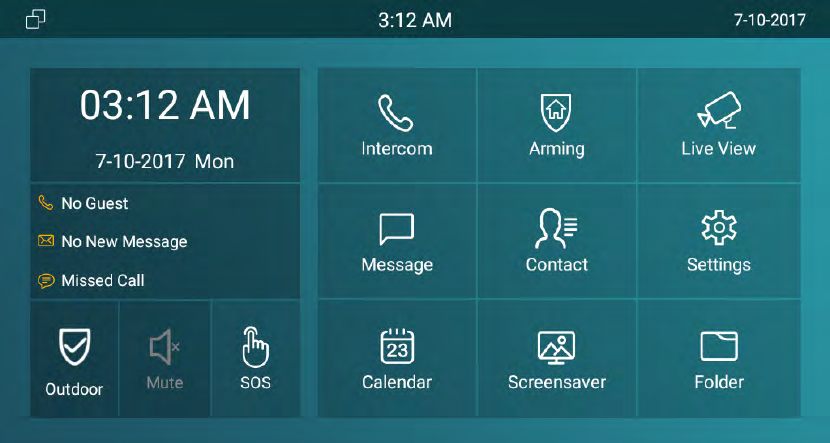
Maininterfaceinstruction
It82supportstwopagesofmaininterface.Clickthecorrespondingareatooperate.
2.2
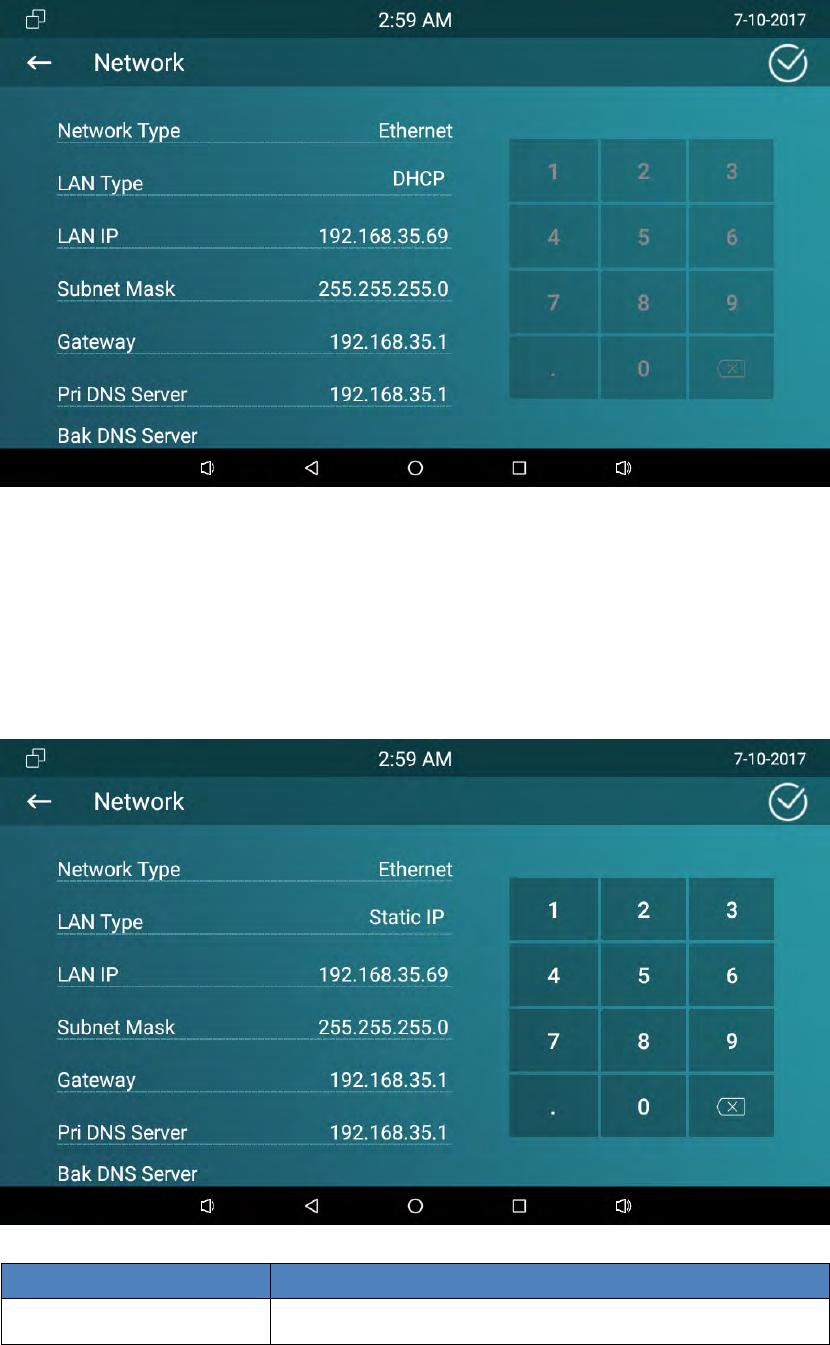
Network
2.2.1 DHCP
IT82seriesuseHCPmodetogetIPaddressbydefault.PleasegotoSetting‐Advanced
(password:123456)‐Network
ChooseDHCP,pressCONFIRM,thephonewillgetIPaddressautomatically.
13
2.2.2 StaticIP
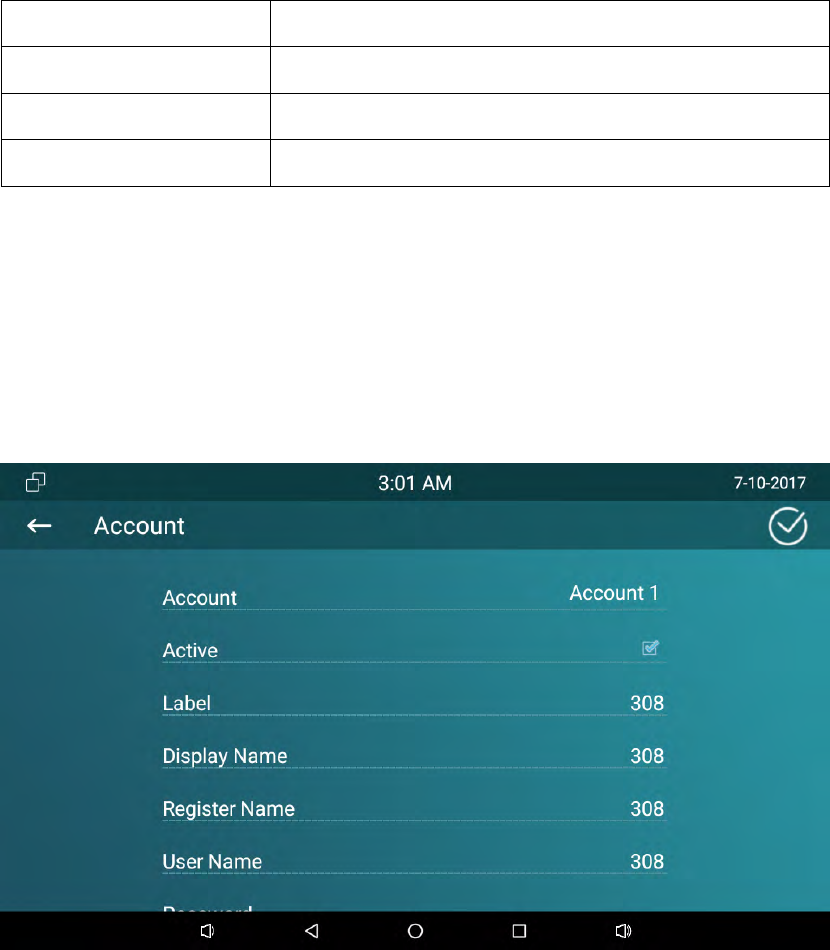
SelectStaticIPinLANType.EntertheIPaddressparametersinthecorresponding
area.
ParameterSpecification
IPaddresssettheIPaddressofthedevice
14
SubnetMasksetthesubnetmaskofthedevice
Gatewaysetthedefaultgateway
DNS1settheDNSaddress
DNS2setthebackupDNSaddress
2.3
RegisterAccount
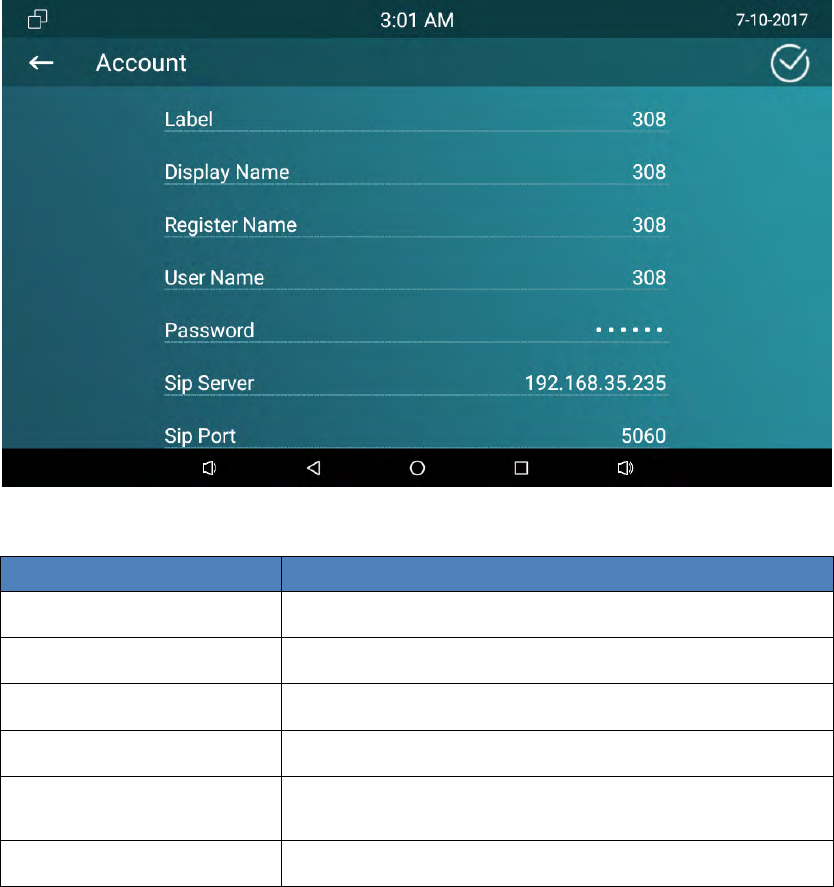
SIPaccountisprovidedbySIPserver.GotoSetting‐Advanced‐SipAccount.Please
consultadministratoraboutsipserverinformation.
15
Filltheparametersinthecorrespondingarea.ClickCONFIRMtosave.
ParameterSpecification
RegisterNameSIPAccountIDprovidedbyISP
UserNameSIPUserNameprovidedbyISP
PasswordSIPPasswordprovidedbyISP
DisplayNameSIPDisplayname
RegServerIPSIPRegisterServer,format:domain/IP,forexample:
194.168.1.2
RegServerPortThedefaultportis5060.
2.4
Display
2.4.1 Brightness
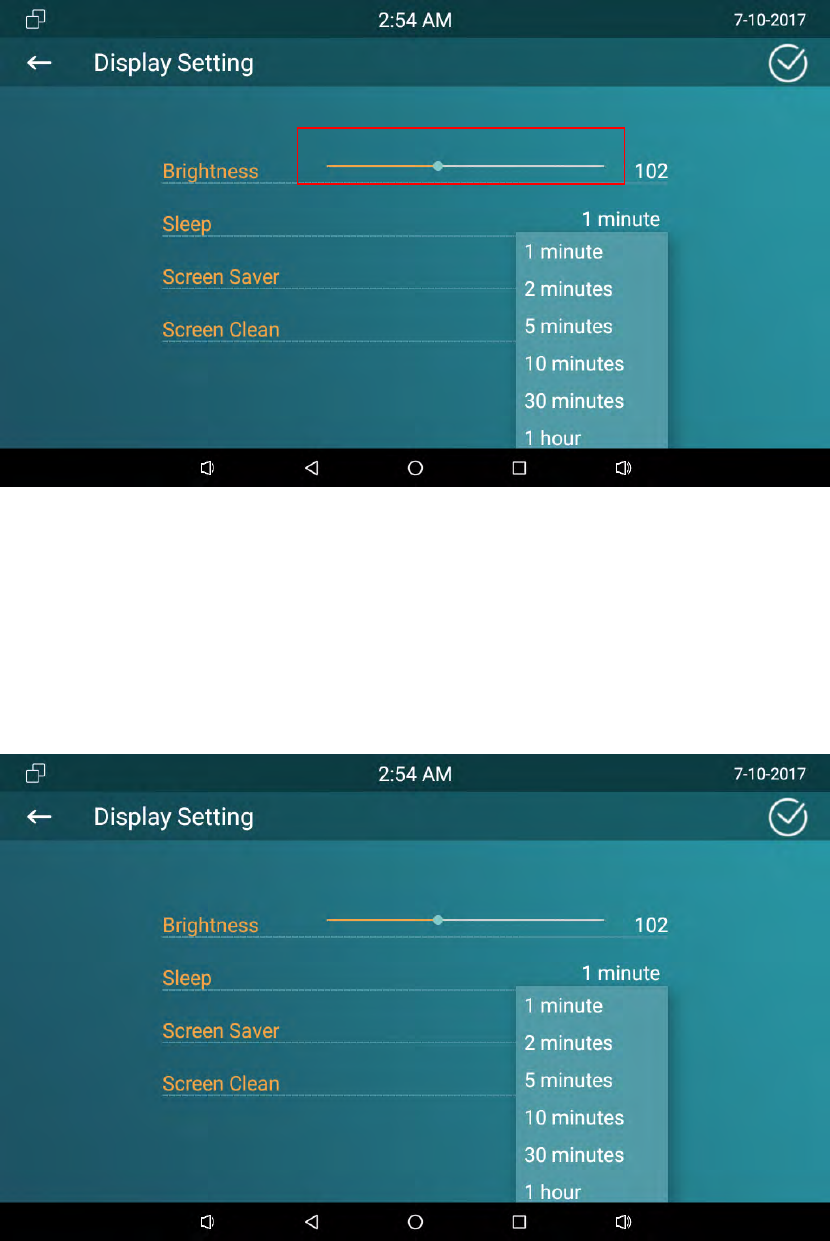
Slidethepointleftorrighttoadjustthescreenbrightness,clickCONFIRMtosave.
16
2.4.2 Sleep
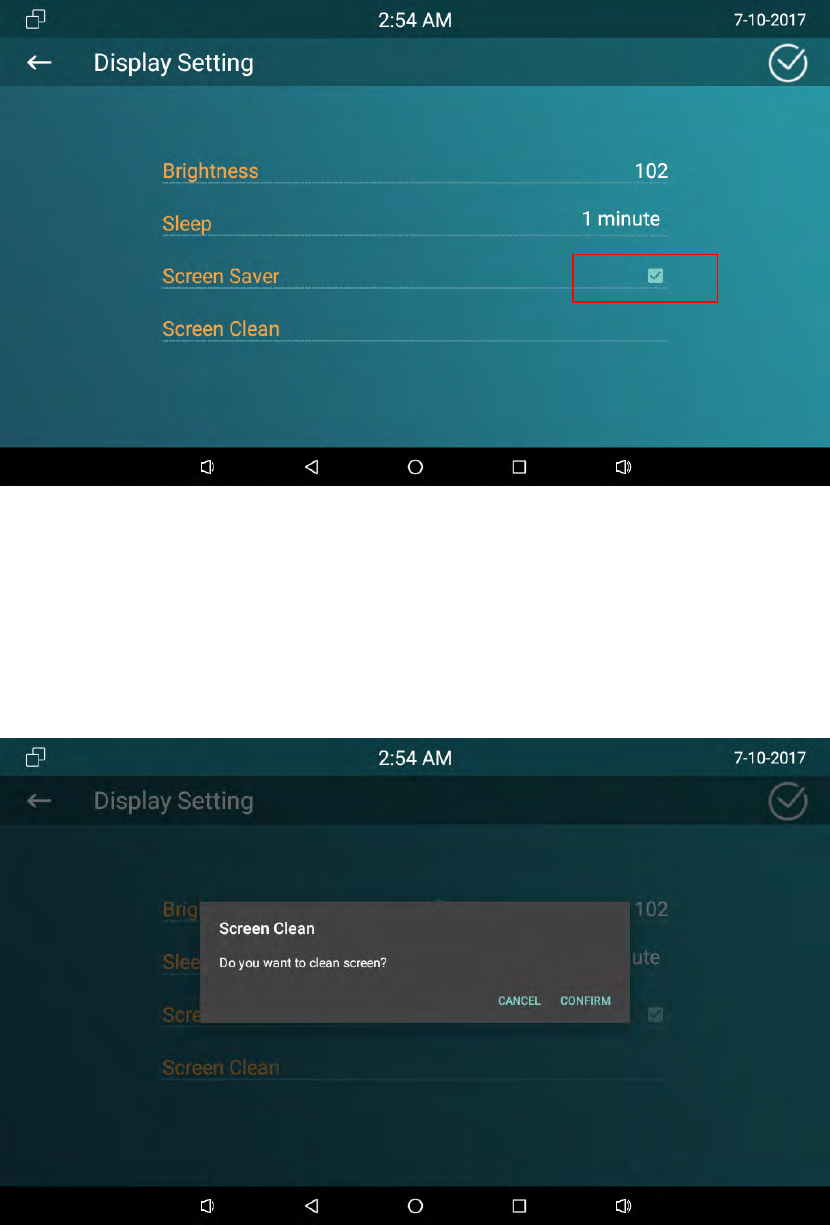
Choosethesleeptimefrom15secondstoNever.IT82seriessetup1minuteby
default.Afterthesleeptimewithoutanyoperation,thephonewillblackscreen.
Touchittowakeup.
17
2.4.3 ScreenSaver
2.4.4 ScreenClean
Thisfunctionisusedtoprotectthedevicefrombeingpressedanykeyswhenusers
cleanthescreen.
18
2.5
Sound
2.5.1 Volume
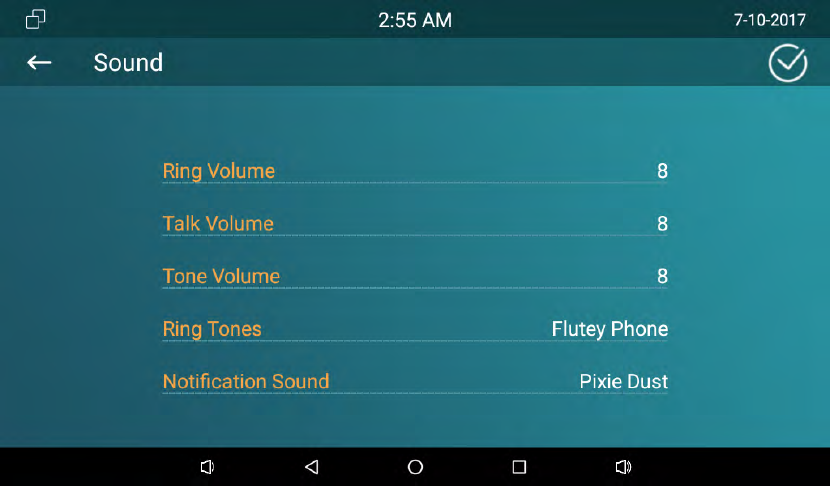
SlidethepointrightorlefttoadjusttheRing/Talk/ToneVolume.
2.5.2 Ringtones
TosetupthePhoneRingtone,clickOKtoconfirm
2.5.3 NotificationSound
Selectthesuitablenotificationsound,clickOKtoconfirm.
2.6
Time
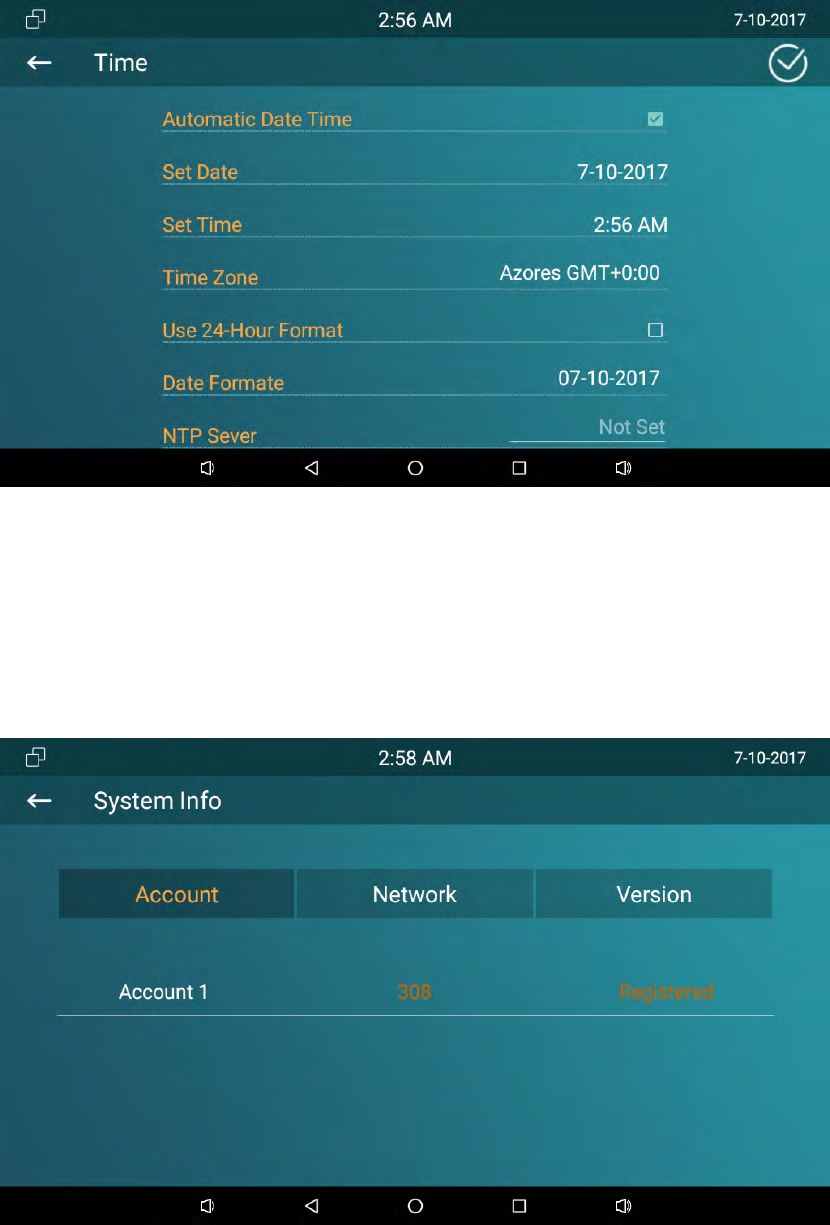
Setupthedateandtimeinthecorrespondingarea.
EnableAutomaticDateTime,thephonewillgettheDateandTimeautomatically.
IfyouuncheckAutomaticDateTime,usersneedtosetuptheDateandTime
19
manually.
UserscanalsoselectthesuitableTimeZoneanduse24‐Hourformat.
2.7
SystemInfo
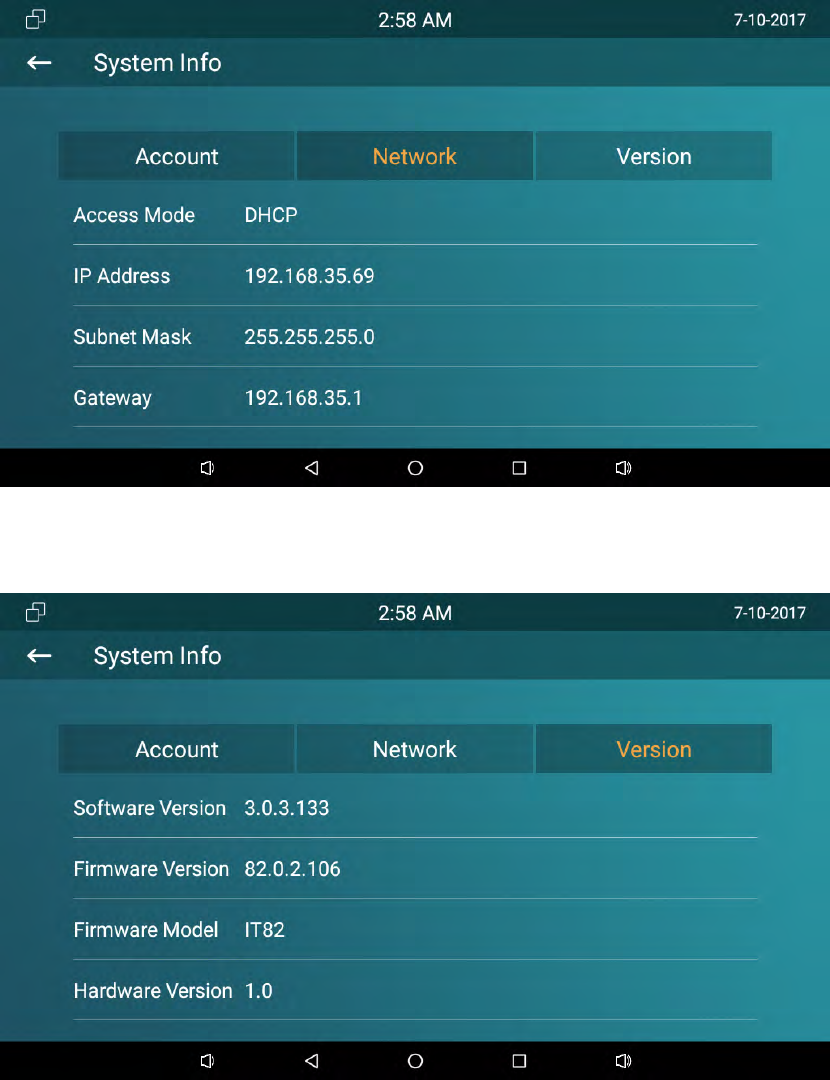
EnterSystemInfointerfacetocheckAccount,NetworkandVersioninformation.
TochecktheSIPaccountstatus
20
TochecktheNetworkAccessModeAndparameters.
TochecktheSoftwareversion,Firmwareversion,FirmwareModelandHardware
version.
2.8
Language
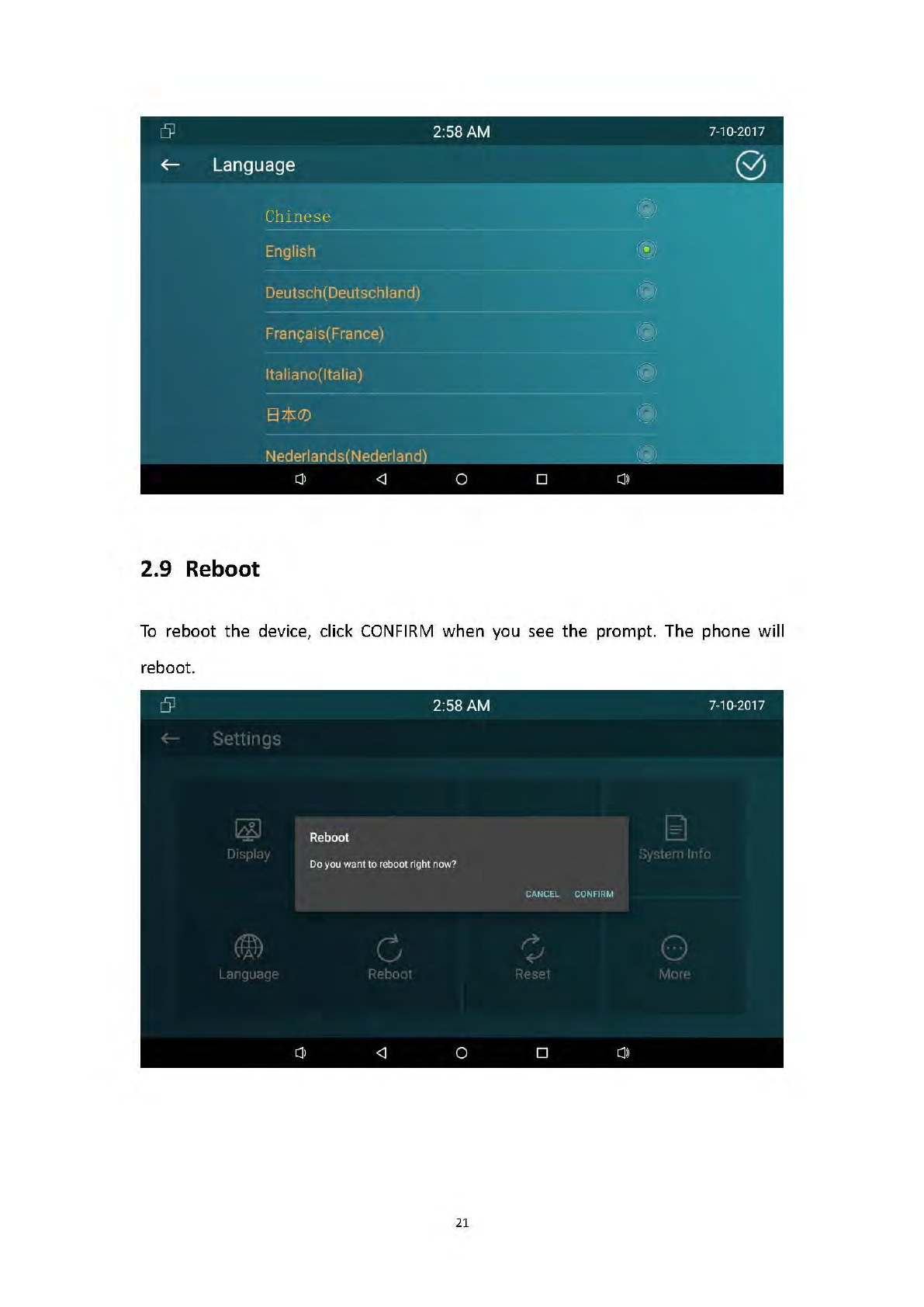
Choosethesuitablephonelanguage.IT82seriesuseEnglishbydefault.
22
2.10
Reset
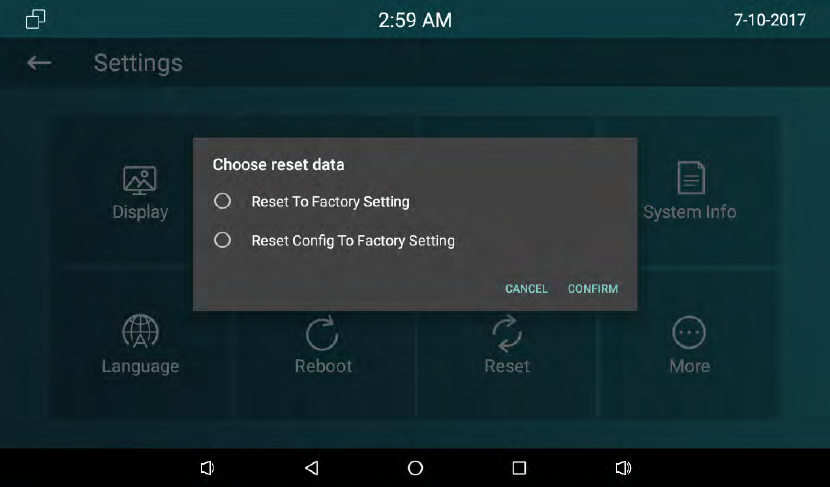
GotoAdvance‐Reset.ChoosetheResetmode,clickCONFIRMwhenyouseethe
prompt.Thephonewillresettofactorysettingautomatically.
2.11
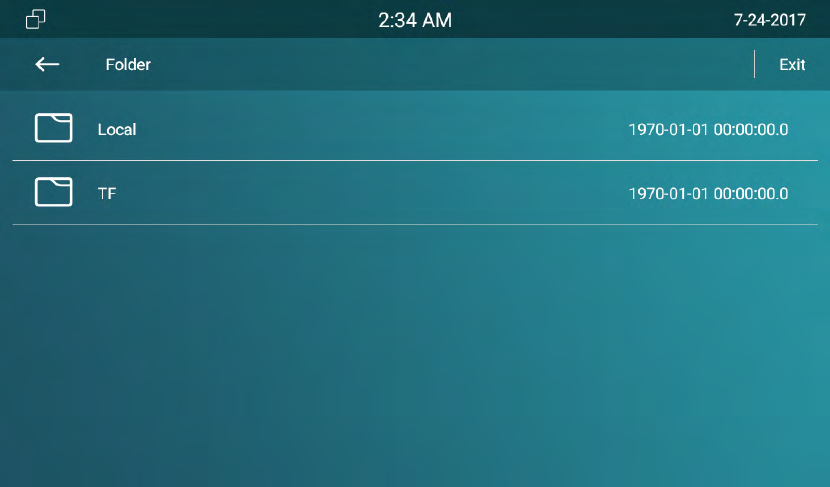
Folder
ClickFoldertocheckthelocalandSDcardfiles.IT82seriessupportsexternalSDcard.
23
24
3 Function
3.1 Makeacall
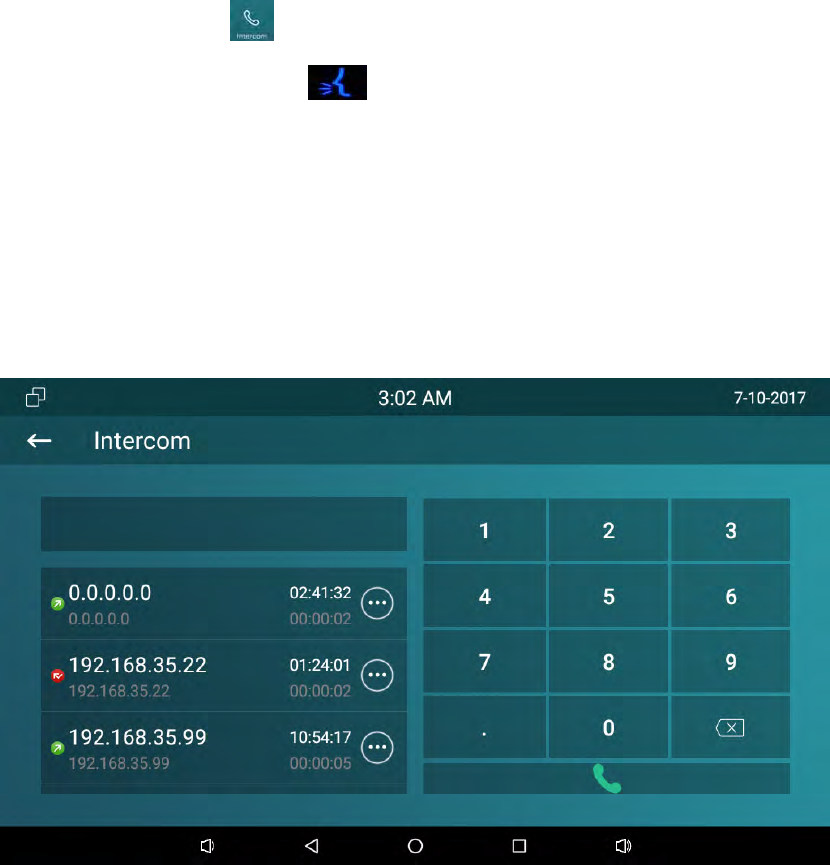
Usercandirectlydialfromthesoftkeypad,selectfromthecontactlistorfromcall
logtocalloutthenumber.
Usercanchooseoneofthefollowingstepstoenterthedialinginterface.
Mode1:ClickCallicon onthemainscreen.
Mode2:ClickIntercombutton.
3.1.1 CallSIP
Ifyouwanttocallsipnumber,youcanselectCallSIPlabel.Clickthesipnumberto
makeacall.Themoreinformationaboutsipaccountpleaseconsultadministrator.
25
3.1.2 Callresident
Ifyouwanttocallroomnumber,youcanselectCallResidentlabel.Forexample,if
youwanttocallcommunity1,Building1,Unit1,Floor1,Room1,youcaninputdigits
“001001010101”.
3.1.3 CallfromCallLog
Usercanenterthecalllogpagetomakeacall.
1. Inthedialinginterface‐>clickIntercomicon
2. ClickIntercombutton.
Directlyslideupanddowntochoosethenumberfromthecallhistory.ClickDailkey
tocallout.
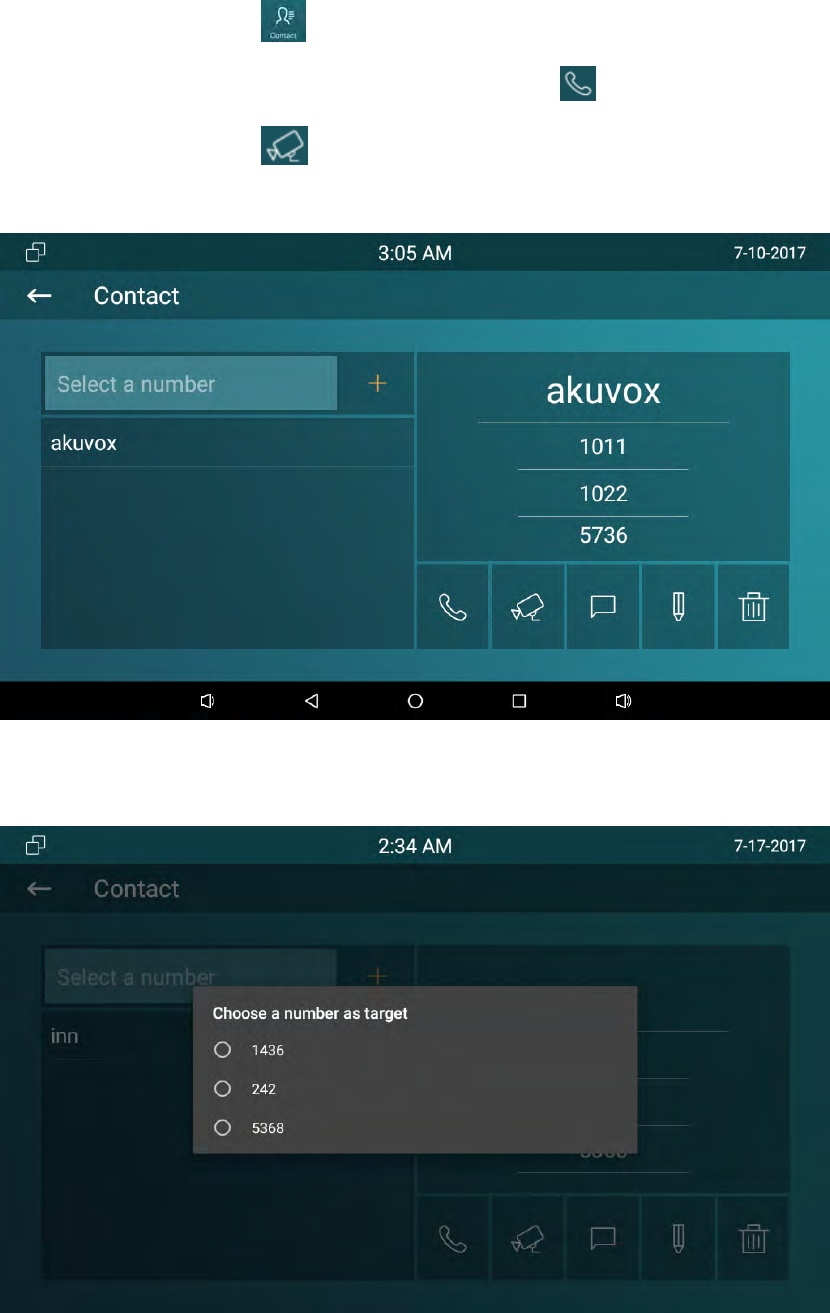
3.1.4 CallfromContacts
Usercanenterphonebookinterfacetomakeacall.
26
DirectlyclickContacticon.
Ifyouwanttomakeanaudiocall,clickAudioCallicon.Ifyouwanttomakea
videocall,clickVideoCall.
Contactisshownasbelow:
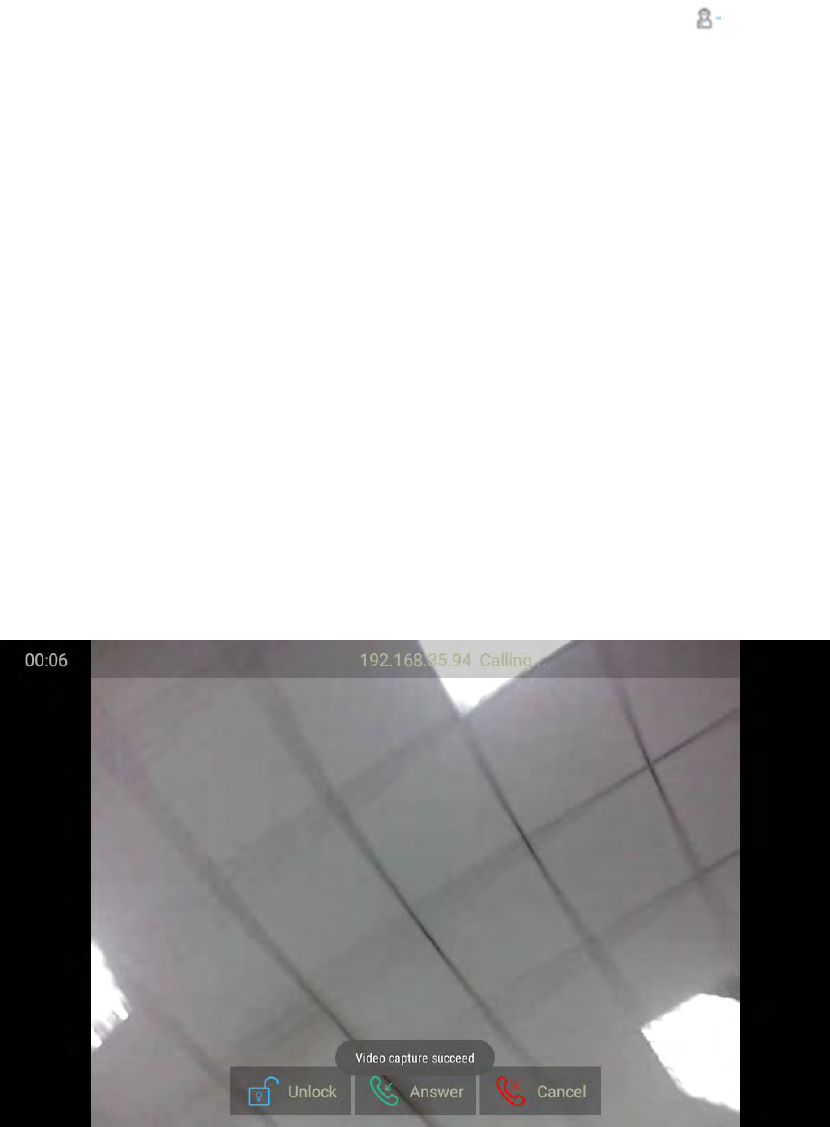
Ifthecontacthasmultiplenumbers,afterclickingthecallingmode,userneedto
choosethenumberyouwanttocall.
27
3.1.5 CallCenter
Ifyouwanttocallmanagementcenter(SDMCsystem),youcanpress tocallout.
ThisfunctiononlycanbeusedwhenIT82serieshasregisteredfromSDMC.
3.2 Receiveacall
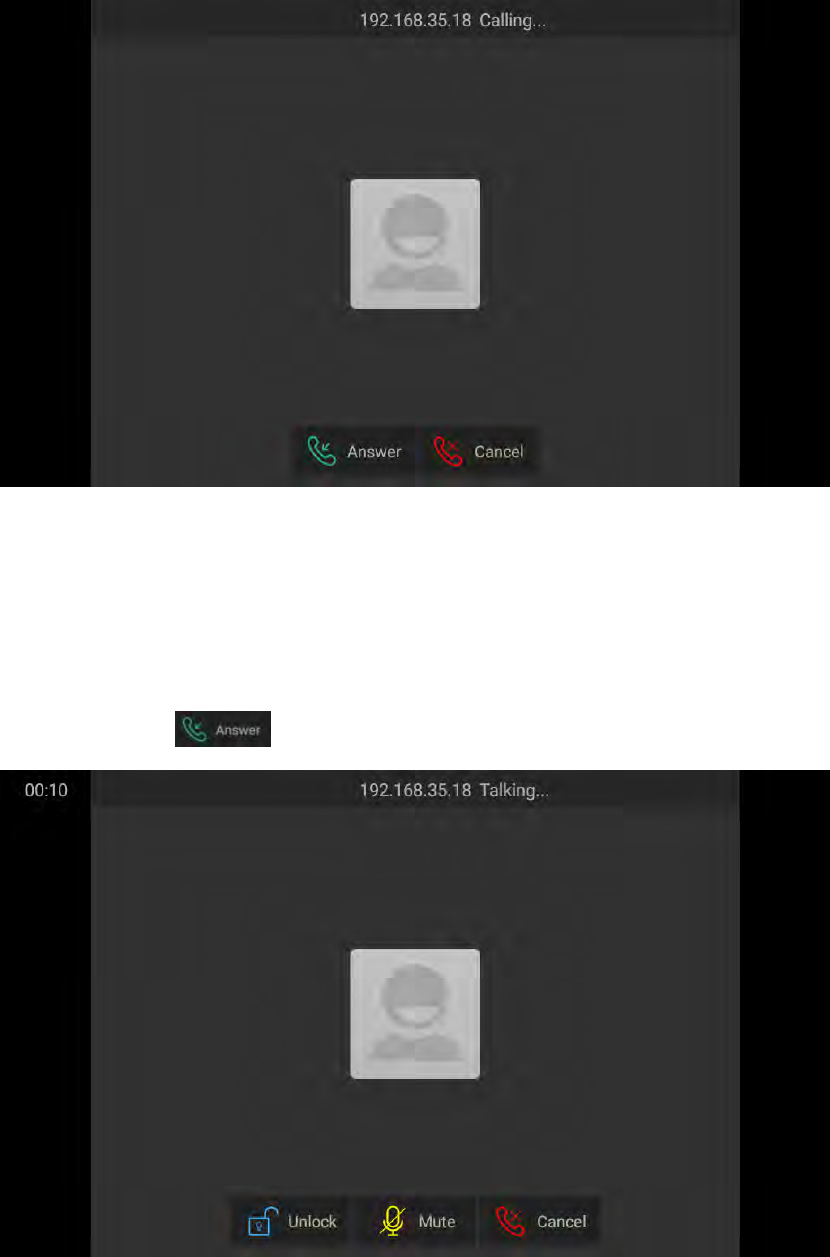
Incomingcallsincludeaudioandvideocalls.Ifthecallerhasbeenstoredinthe
contacts,itwillshowthecontactname,otherwisethecallernumberwillbe
displayed.WhenIT82seriesreceivedthevideocall,itcanautomaticallygeta
screenshotandsaveitintheAlbum.
Videocall:
AudioCall:
28
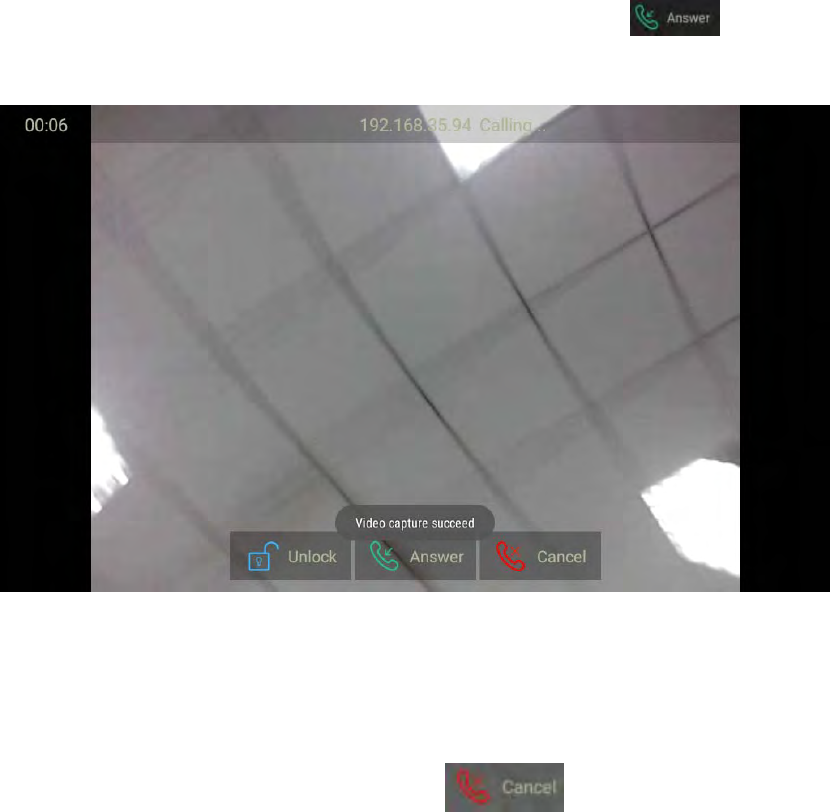
3.3 Answeracall
1) Answeraaudio
ClickAnswerKeytoanswerthecall,Asshownbelow:
2) Answeravideocall
Whenreceivinganvideocall,thephonewillautomaticallyopenthevideopreviewso
29
thatresidentcanviewthevisitorsidentity.PressAnswerkeytoanswer
thecall.Asshownbelow:
3.4 Rejectacall
Ifuserwanttorejectacall,clickCancellabel inincominginterface.
3.5 Contacts
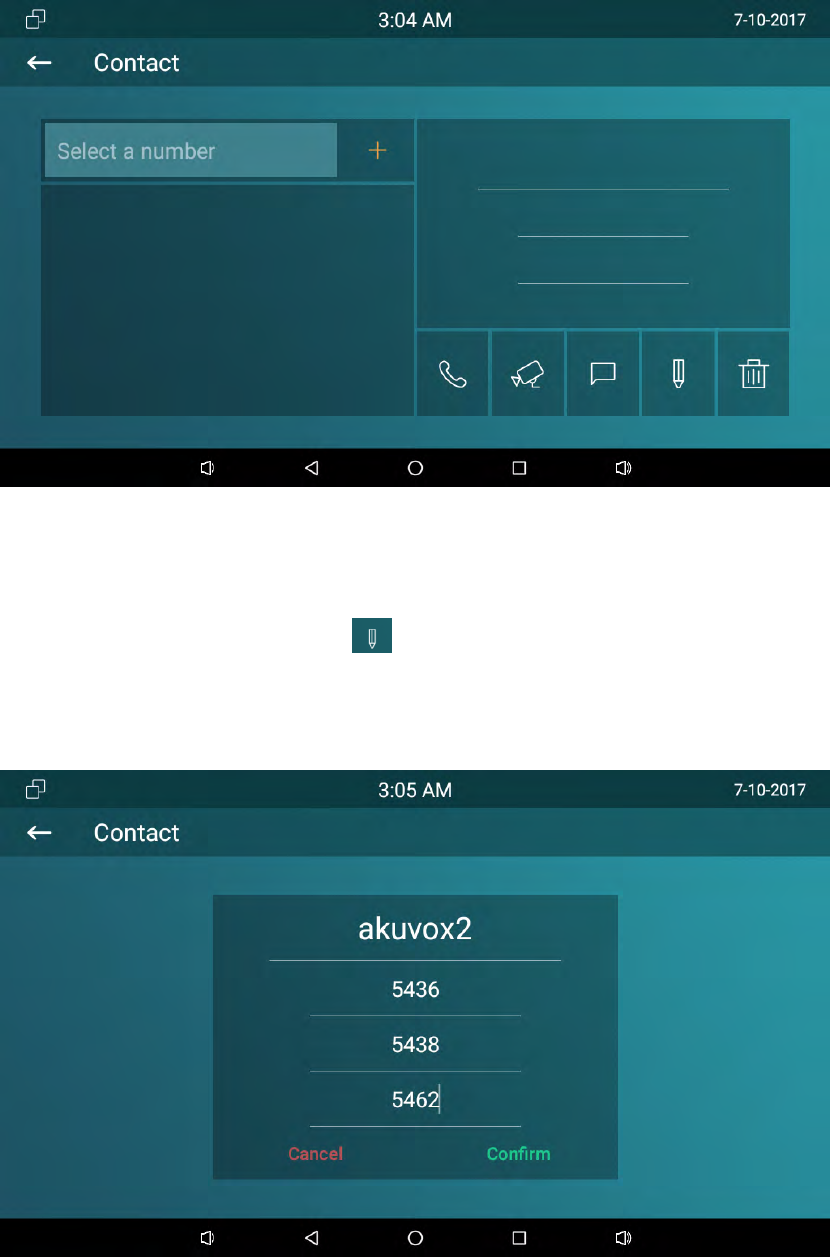
3.5.1 Newcontacts
1.ClickAddbutton.
2.Enterthename.
3.Selectthenumbertype,andentertheparametersinthecorrespondingarea.
4.ClickCONFIRMtosave.
30
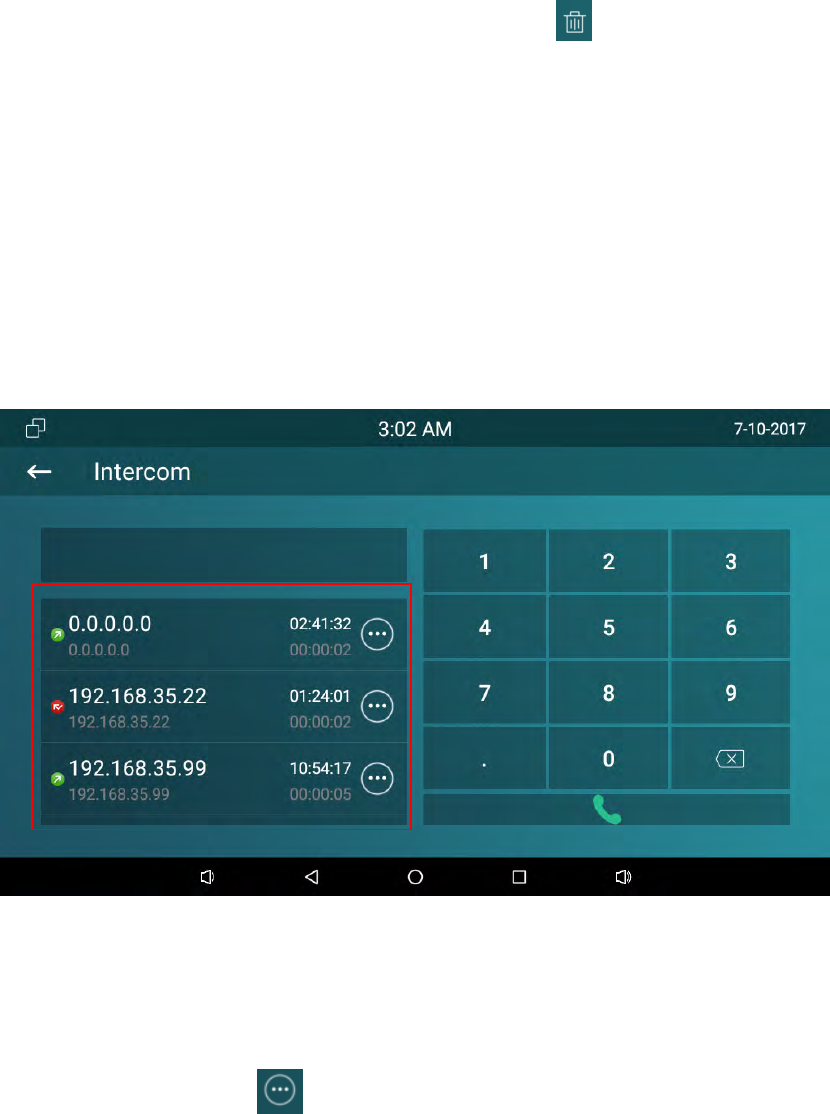
3.5.2 Modifythecontact
1. Choosetheexistedcontact,clicktoedit.
2. Thenmodifythecontactyouneed.
3. ClickCONFIRMtosave.
31
3.5.3 Deletethecontact
Choosethetheexistedcontactyouneedtodelete.Click todelete.
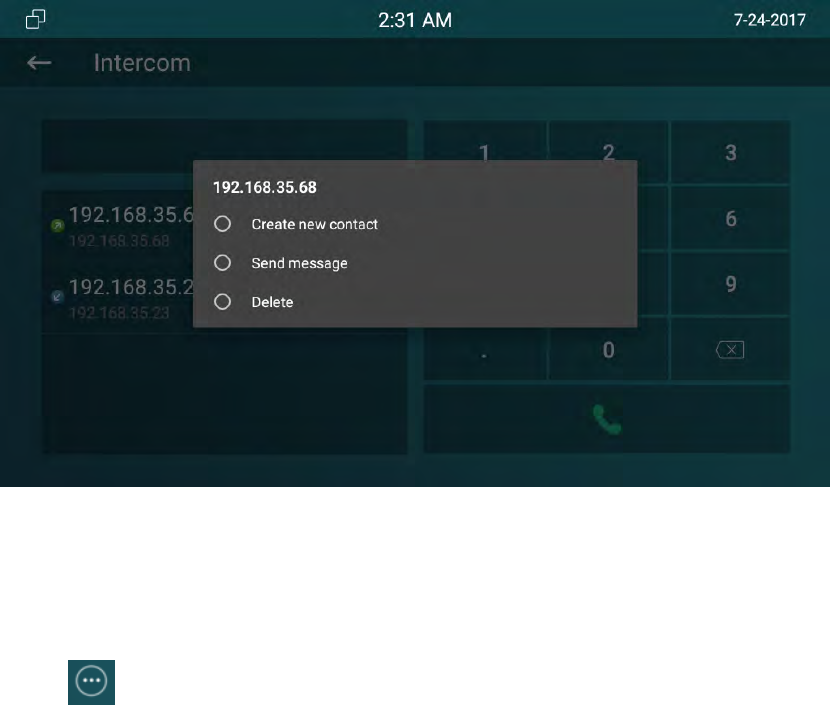
3.6 Calllog
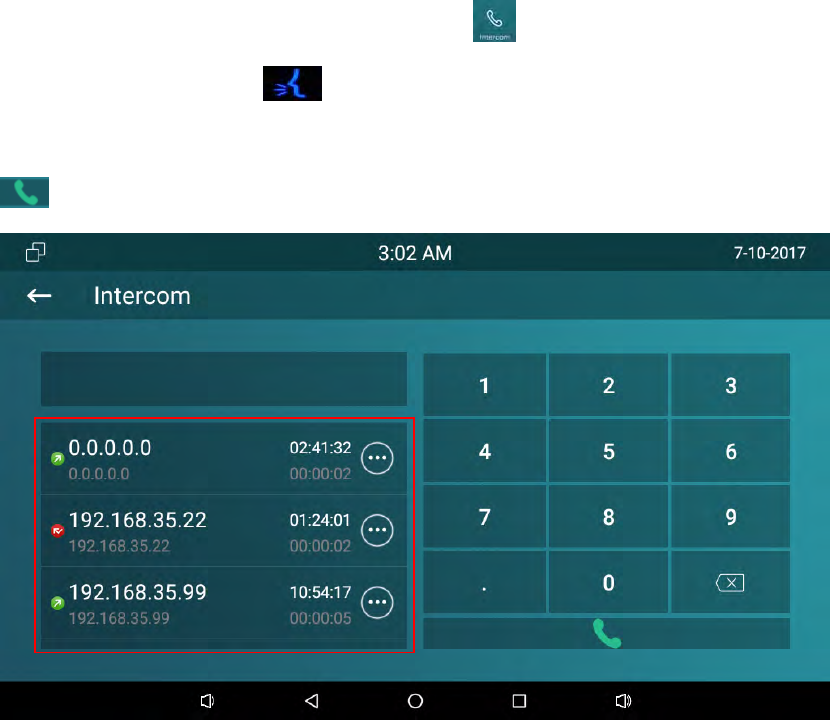
ClickIntercom,slideupanddowntochecktheallcallloginthemarkedboxasshown
below.
3.6.1 Modifythecalllog
Chooseonecalllog,click tomodifythelog.Userscancreateanewcontactor
sendthemessagetothiscalllog.
32
3.6.2 Deletethelog
Clickinthecorrespondinglog,chooseDeletetoremovethecalllognumber.
3.7 Capture
IT82supportscapturethevisitorphotowhenincomingpreview.IT82seriescanauto
captureifringingfor3secondswithoutanswer.
3.8 Message
Userscanreceiveandwritethemessage.
33
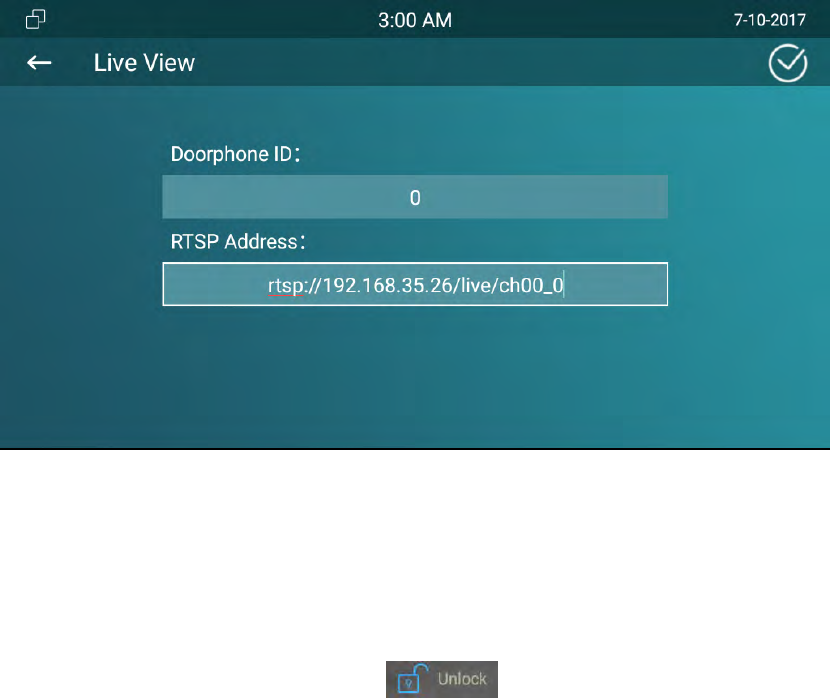
3.9 LiveView
LiveviewisusedtomonitorthedoorphoneviausingRTSP.
1.Path:Settings‐>More‐>LiveView
2.EnterthedoorphoneRTSPaddress.(pleasemakesuretheaddressformatisright)
3.ClickCONRIMtosave.
Thenuserscancheckthelivevideofromthedoorphoneanytime.
3.10 Unlock
IT82seriessupportsremoteunlockthedoorphoneviausingDTMFcode.Duringthe
call,userscanpressOpenLobbylabel orUnlocktouchkeytoopenthe
doorduringthecall.
SetupUnlock
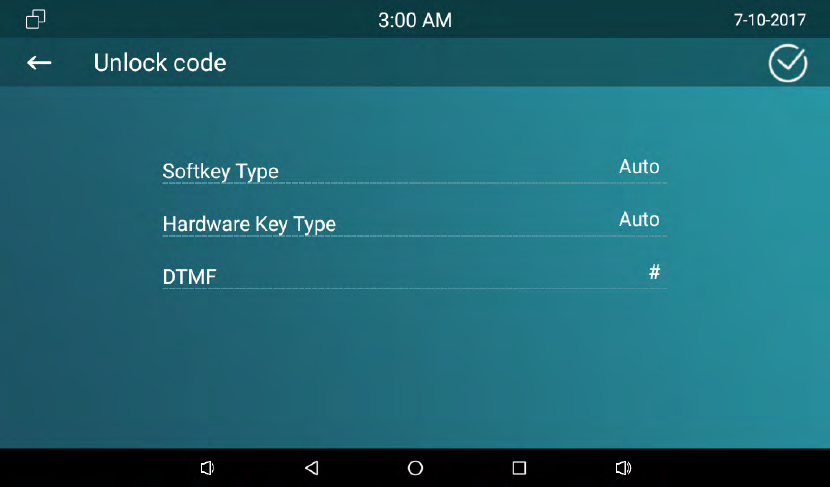
IT82supportunlocklocaldoorlockorremoteunlock.Andtherearetwounlockkeys‐
softkeyduringthetalking,physicalunlockkey.Ifyouwanttounlockthelocaldoor
lock,choosethetypeasRelay.Otherwise,setupthetypeasDTMF,thenchoosethe
DTMFcode.
Gotothepath:Setting‐>More(123456)‐>UnlockCode
34
Note:IT82seriesdefaultDTMFcodeis#.UsersneedtopredefinethesameDTMF
codeofdoorphoneandIT82.ConfigurationDTMFcode,pleaseconsultyour
administrator.
3.11 SOS
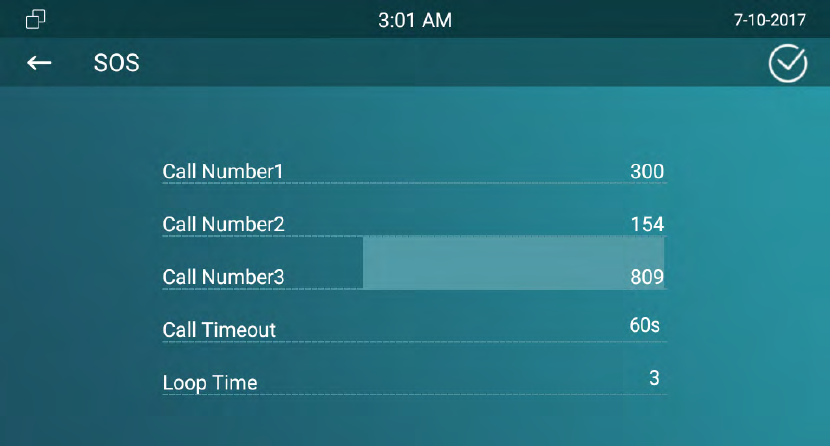
SOSkeyisusedtocallouttheemergencynumberincaseofemergency.IT82series
willcalloutforthreepredefinednumbersinaloop,eachnumberwillbecalledfor
60s(bydefault).
1. GotoSetting‐>More‐(password)>SOS
2. Setup3emergencynumber
3. SetupthecallTimeout
4. Setupthelooptime
5. ClickCONFIRMtosave
35
3.12
Security
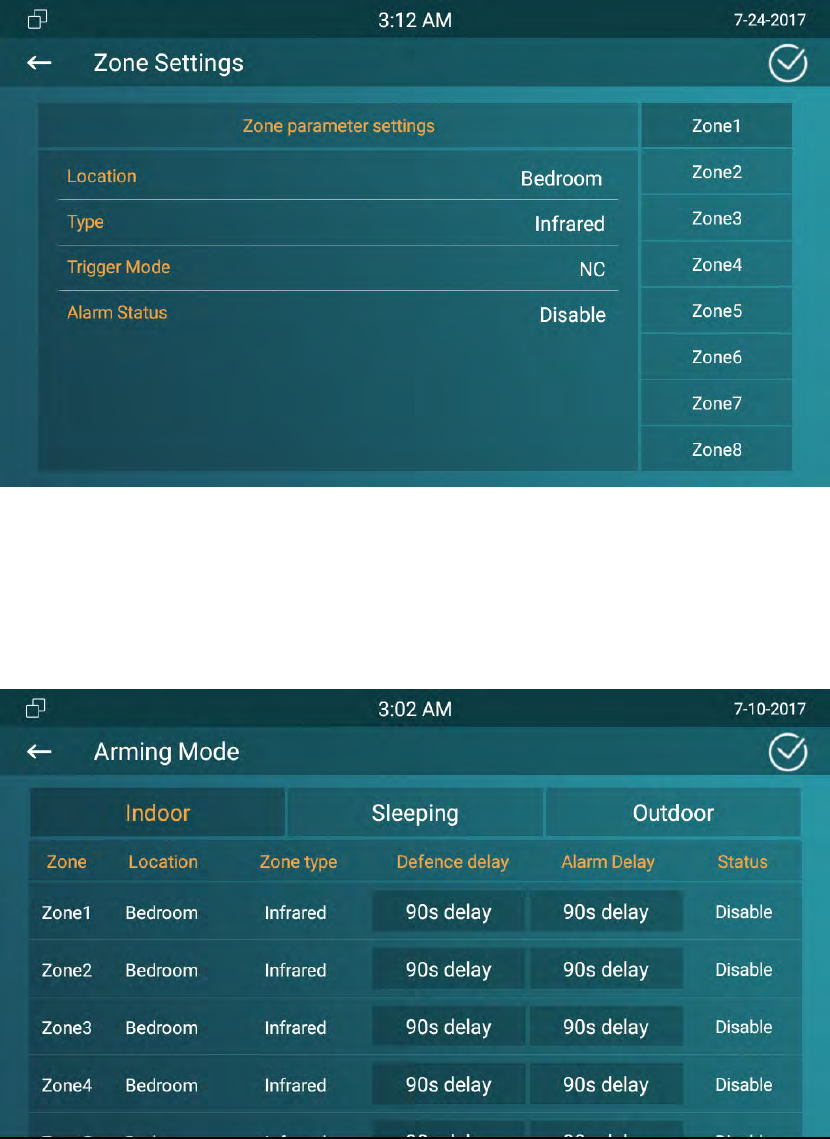
IT82seriessupportconnect8alarmzonesviaIO1‐8interface.Upto5AlarmType‐
Infrared,Drmagnet,Smoke,GasandUrgencyandtwotriggermode‐NC(normalclose)
andNO(normalopen).
Gotothepath:Settings‐>More(Password:123456)‐>Arming
Differentalarmsensorissuitablefordifferenttype.Forexample,ifyouusethe
smokedetectorinyourbedroom(zoon1),connectthesensorinIO1andGND
contactinIT82,thenyoucansetupthetypeasSmoke.
TriggerModedependsonconnectingmode.
AlarmStatusincludes3types:Disable,Enable,24H.Disable:alarmfunctionis
invalid.Enable:AlarmfunctionisvalidafteryouchoosetheArmingmode(indoor,
sleep,outdoor).24H:Alarmfunctionisworkingwhetheryouchoosethemode
ornot.
36
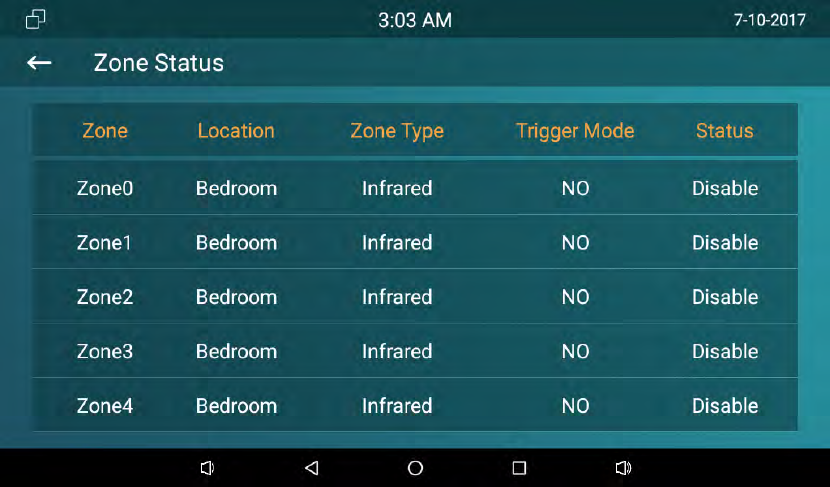
Returntothemaininterface,clickArming.
Setupalarmdelay,thealarmwillringingafterthealarmhasbeentriggered.Openor
closeAlarmStatustoenableordisablethisfunction.
EnterZoneStatustocheck8alarmzonesworkingmode.
37
Whenthealarmistriggered,clickCancelandinput“0000”todisableit.
38
4 Website
4.1
Weblogin
TheAkuvoxIT82seriessesDHCPIPaddressbydefault,gotothepath:Settings‐System
Info‐NetworktochecktheIPaddress.
OpenaWebBrowser,enterthecorrespondingIPaddress.Then,typethedefaultuser
nameandpasswordtologin.ThedefaultUserNameandPasswordareasbelow:
Username:admin
Password:admin
39
4.2 Status
4.2.1
Basic
SectionsDescription
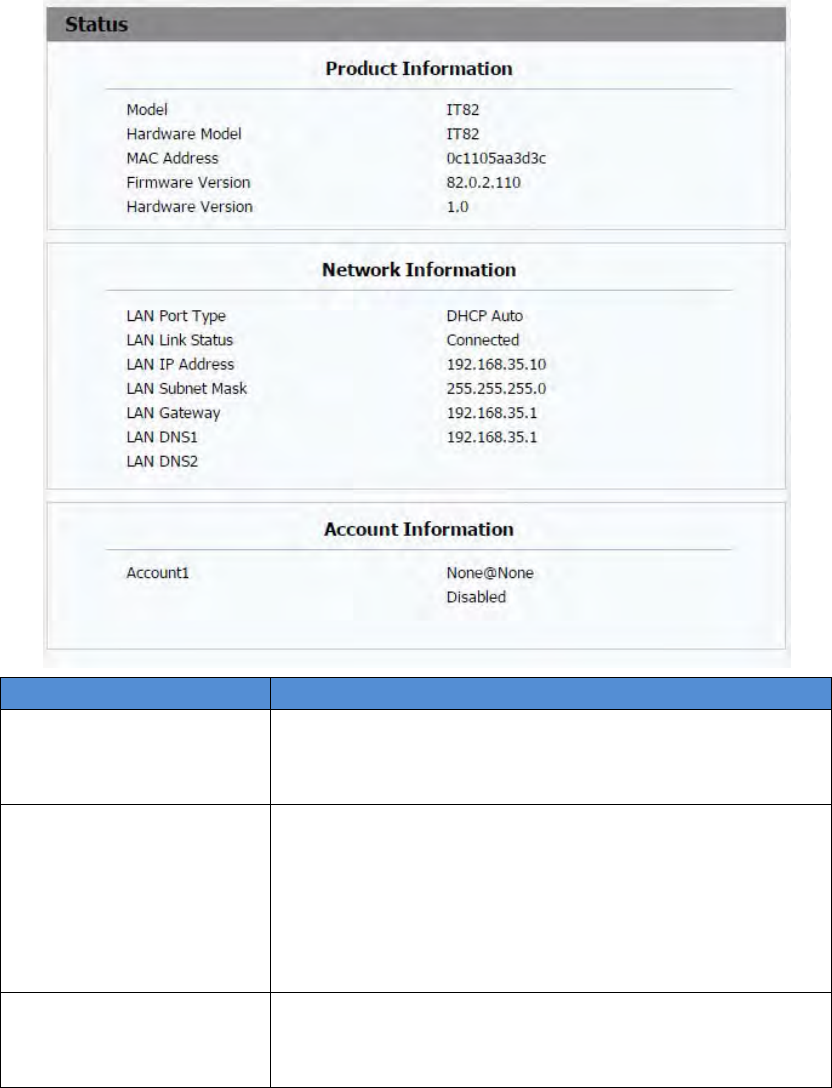
ProductInformationTodisplaythedevice’sinformationsuchasModelname,
MACaddress(IPdevice’sphysicaladdress),Firmware
versionandHardwarefirmware.
NetworkInformationTodisplaythedevice’sNetworkingstatus(LANPort),suchas
PortType(whichcouldbeDHCP/Static/PPPoE),LinkStatus,
IPAddress,SubnetMask,Gateway,PrimaryDNS
server,SecondaryDNSserver,PrimaryNTPserver
andSecondaryNTPserver(NTPserverisusedtosynchronize
timefromINTERNETautomatically).
AccountInformationTodisplaydevice’sAccountinformationandRegistration
status(accountusername,registeredserver’saddress,
Registerresult).
40
4.3
Account
4.3.1
Basic
SectionsDescription
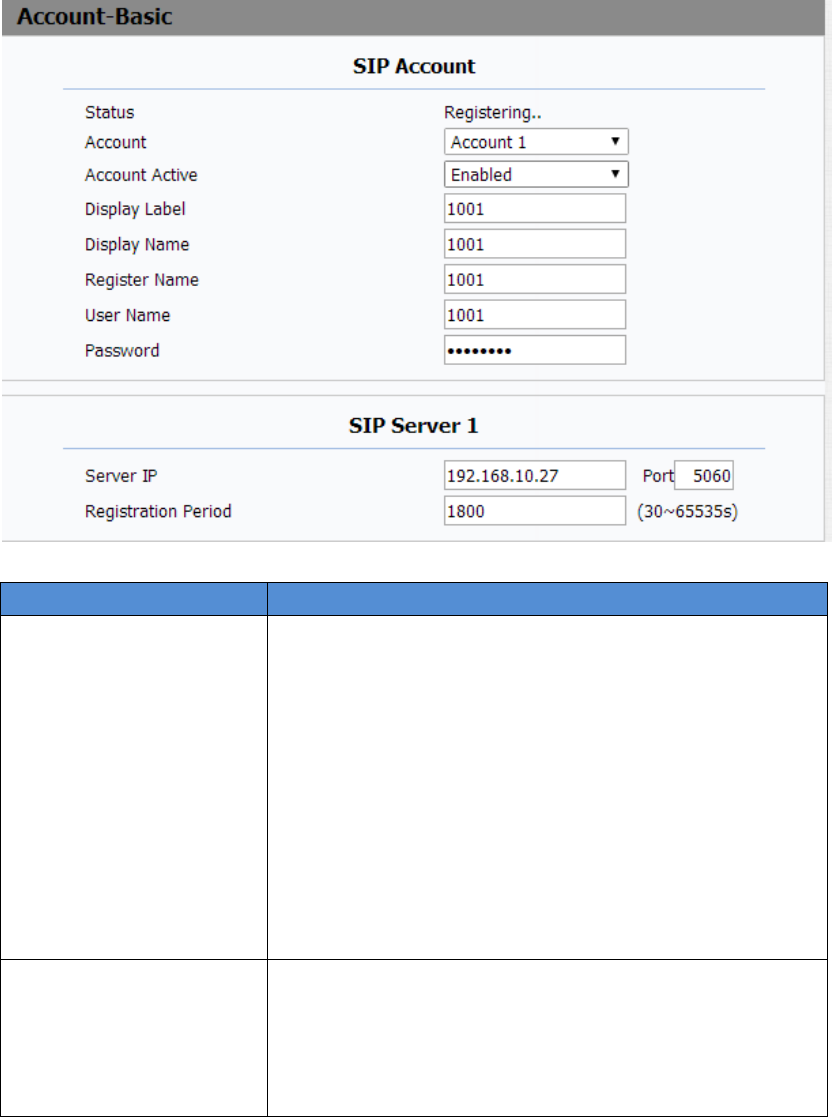
SIPAccountTodisplayandconfigurethespecificAccountsettings.
Status:Todisplayregisterresult.
DisplayLabel:Whichisdisplayedonthephone’sLCD
screen.
DisplayName:Whichissenttotheothercallpartyfor
displaying.
RegisterName:AllocatedbySIPserverprovider,used
forauthentication.
UserName:AllocatedbyyourSIPserverprovide,used
forauthentication.
Password:Usedforauthorization.
SIPServer1TodisplayandconfigurePrimarySIPserversettings.
ServerIP:SIPserveraddress,itcouldbeanURLorIP
address.
RegistrationPeriod:Theregistrationwillexpireafter
Registrationperiod,theIPphonewillre‐register
41
SectionsDescription
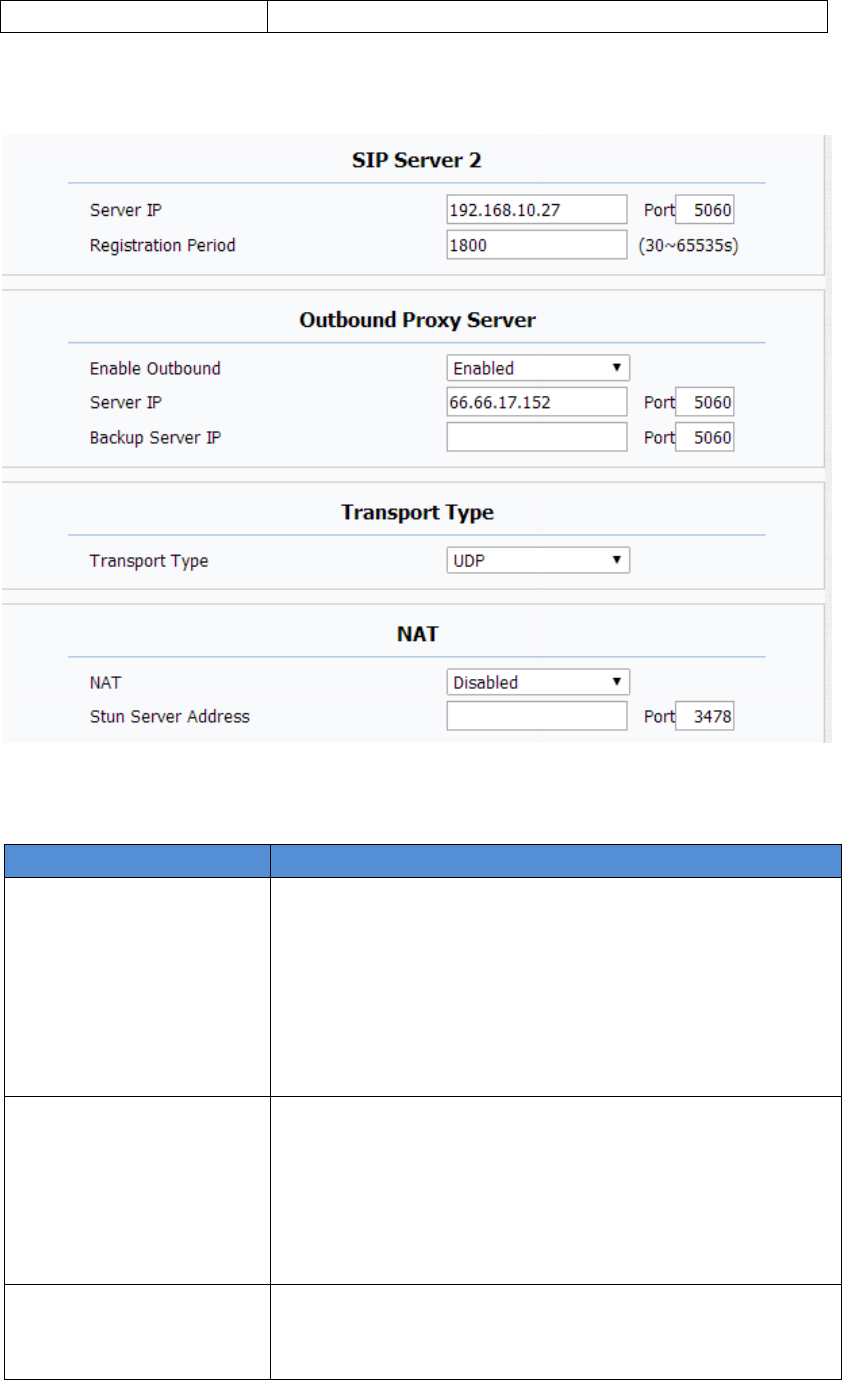
SIPServer2TodisplayandconfigureSecondarySIPserversettings.
Thisisforredundancy,ifregisteringtoPrimarySIPserver
fails,theIPphonewillgotoSecondarySIPserverfor
registering.
Note:SecondarySIPserverisusedforredundancy,itcanbe
leftblankifthereisnotredundancySIPserverinuser’s
environment.
OutboundProxyServerTodisplayandconfigureOutboundProxyserversettings.
Anoutboundproxyserverisusedtoreceiveallinitiating
requestmessagesandroutethemtothedesignatedSIP
server.
Note:Ifconfigured,allSIPrequestmessagesfromtheIP
phonewillbesenttotheoutboundproxyserverforcefully.
TransportTypeTodisplayandconfigureTransporttypeforSIPmessage
UDP:UDPisanunreliablebutveryefficienttransport
layerprotocol.
automaticallywithinregistrationperiod.
42
TCP:Reliablebutless‐efficienttransportlayerprotocol.
TLS:SecuredandReliabletransportlayerprotocol.
DNS‐SRV:ADNSRRforspecifyingthelocationof
services.
NATTodisplayandconfigureNAT(NetAddressTranslator)
settings.
STUN:ShortforSimpleTraversalofUDPoverNATS,a
solutiontosolveNATissues.
Note:Bydefault,NATisdisabled.
4.3.2
Advance

43
SectionsDescription
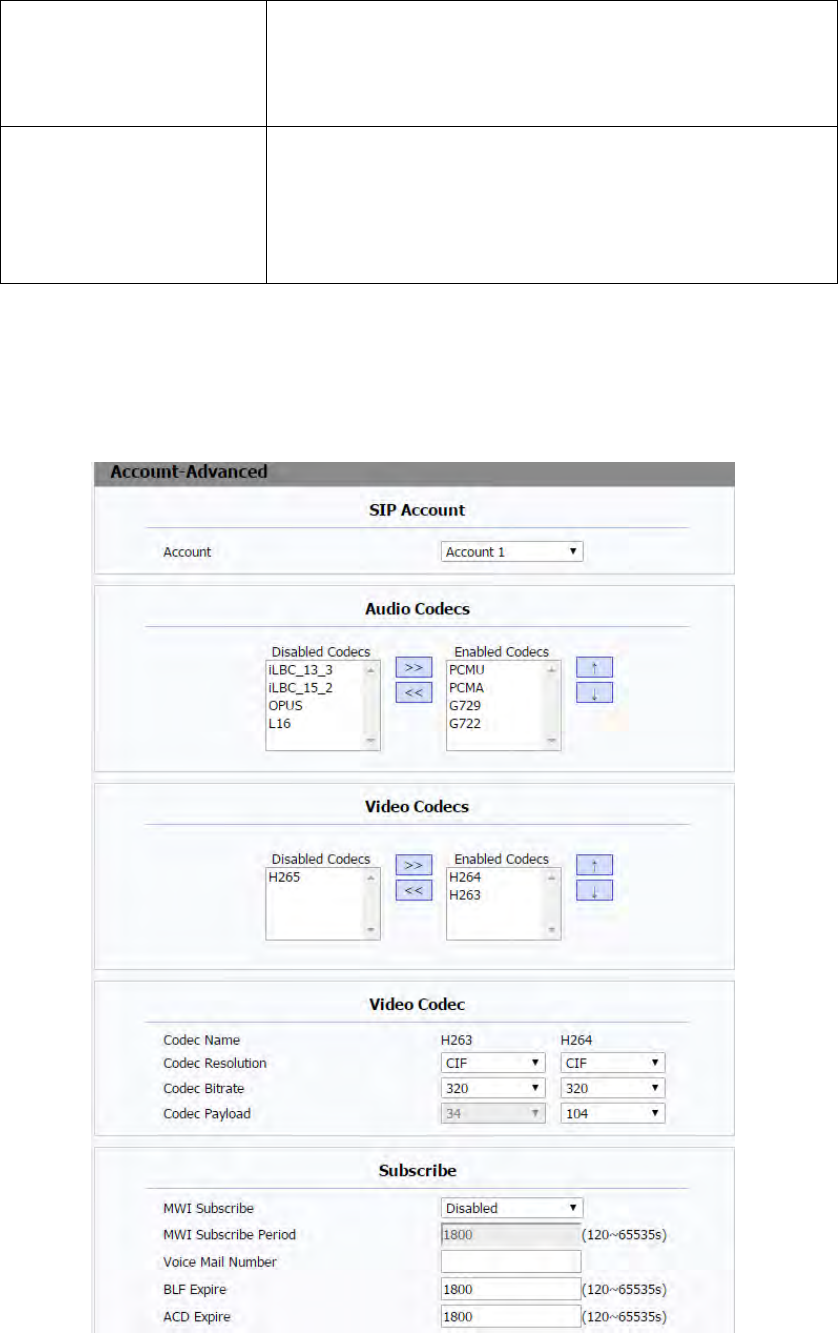
SIPAccountTodisplaycurrentAccountsettingsortoselectwhichaccount
todisplay.
AudioCodecsTodisplayandconfigureavailable/unavailablecodecslist.
Codecmeanscoder‐decoderwhichisusedtotransferanalog
signaltodigitalsignalorviceversa.
FamiliarcodecsarePCMU(G711U),PCMA(G711A),G722
(wide‐bandthcodecs),G729andsoon.
VideoCodecsToconfigurethevideoquality.
CodecName:ThedefaultvideocodecisH264.
CodecResolution:ItcansupportQCIF,CIF,VGA,4CIF,
720P.
CodecBitrate:Thelowestbitrateis128,thehighest
bitrateis2048.
Codecpayload:From90‐119.
SubscribeTodisplayandconfigureMWI,BLF,ACDsubscriptionsettings.
MWI:MessageWaitingIndicatorwhichisusedto
indicatewhetherthereisunreadnewvoicemessage.
BLF:BLFisshortforBusyLampFieldwhichisusedto
monitorthedesignatedextensionstatus.
ACD:AutomaticCallDistributionisoftenusedinoffices
forcustomerservice,suchascallcenter.Thesetting
hereistonegotiatewiththeserveraboutexpiretimeof
ACDsubscription.
44
SectionsDescription
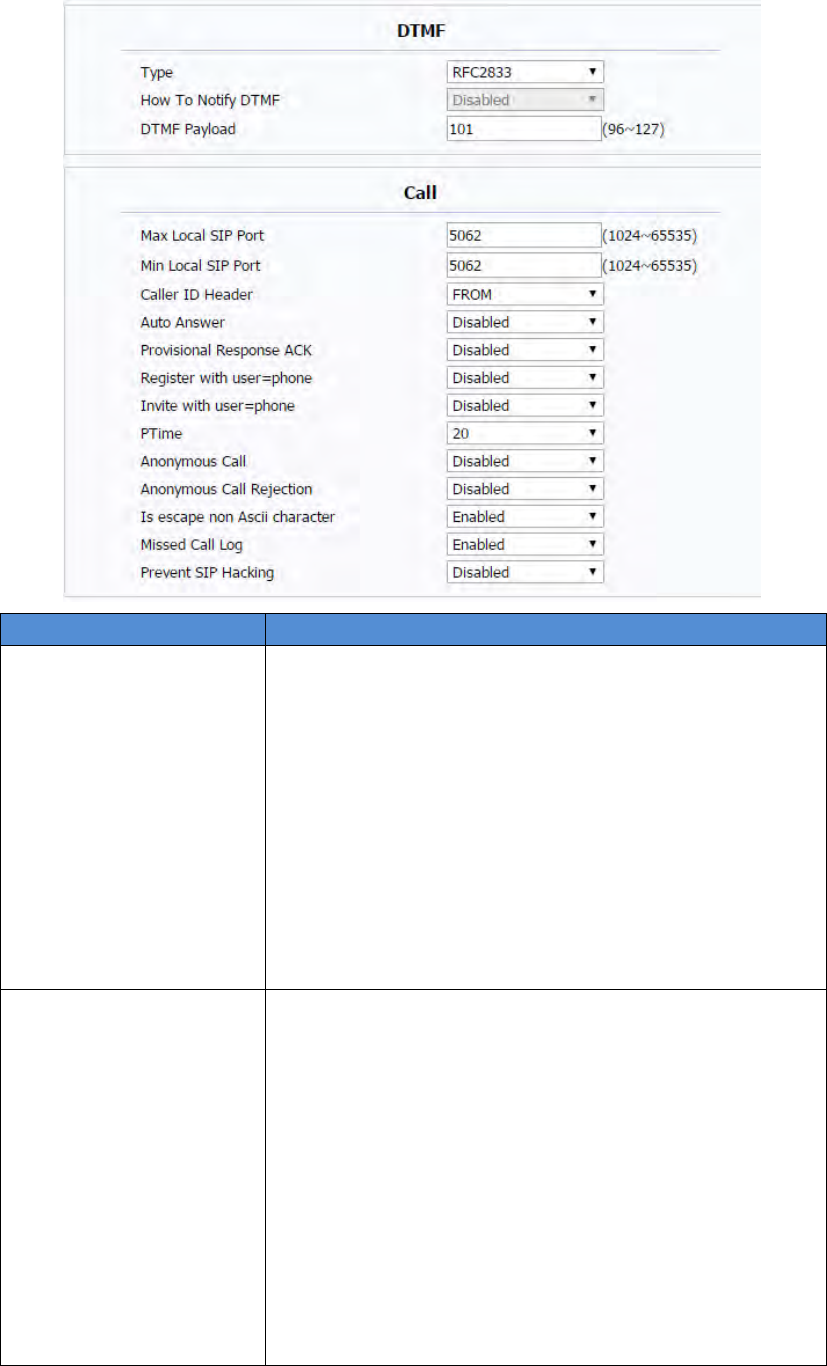
DTMFTodisplayandconfigureDTMFsettings.
Type:SupportInband,Info,RFC2833ortheir
combination.
HowToNotifyDTMF:OnlyavailablewhenDTMFType
isInfo.
DTMFPayload:ToconfigurepayloadtypeforDTMF.
Note:Bydefault,DTMFtypeisRFC2833whichisthe
standard.TypeInbandusesinbandfrequencytoindicate
DTMFtonewhichismostusedtobecompatibleto
traditionaltelephoneserver.TypeInfousesSIPInfomessage
toindicateDTMFmessage.
CallTodisplayandconfigurecall‐relatedfeatures.
MaxLocalSIPPort:Toconfiguremaximumlocalsip
portfordesignatedaccount.
MinLocalSIPPort:To configureminimumlocalsipport
fordesignatedaccount.
CallerIDHeader:ToconfigurewhichCallerIDformatto
fetchfordisplayingonPhoneUI.
AutoAnswer:Ifenabled,IPphonewillbe
auto‐answeredwhenthereisanincomingcallfor
designatedaccount.
Ringtones:Choosetheringtoneforeachaccount.
ProvisioningResponseACK:100%reliabilityforall
45
provisionalmessages,thismeansitwillsendACKevery
timetheIPphonereceivesaprovisionalSIPmessage
fromSIPserver.
User=phone:Ifenabled,IPphonewillsenduser=phone
withinSIPmessage.
PTime:IntervaltimebetweentwoconsecutiveRTP
packets.
AnonymousCall:Ifenabled,alloutgoingcallforthe
designatedaccountwillbeanonymousnumber.
AnonymousCallRejection:Ifenabled,allincoming
anonymous‐outcallforthedesignatedaccountwillbe
rejected.
IsescapenonAsciicharacter:Totransferthesymbolto
Asciicharacter.
MissedCallLog:Todisplaythemisscalllog.
PreventSIPHacking:EnabletopreventSIPfrom
hacking.

46
SectionsDescription
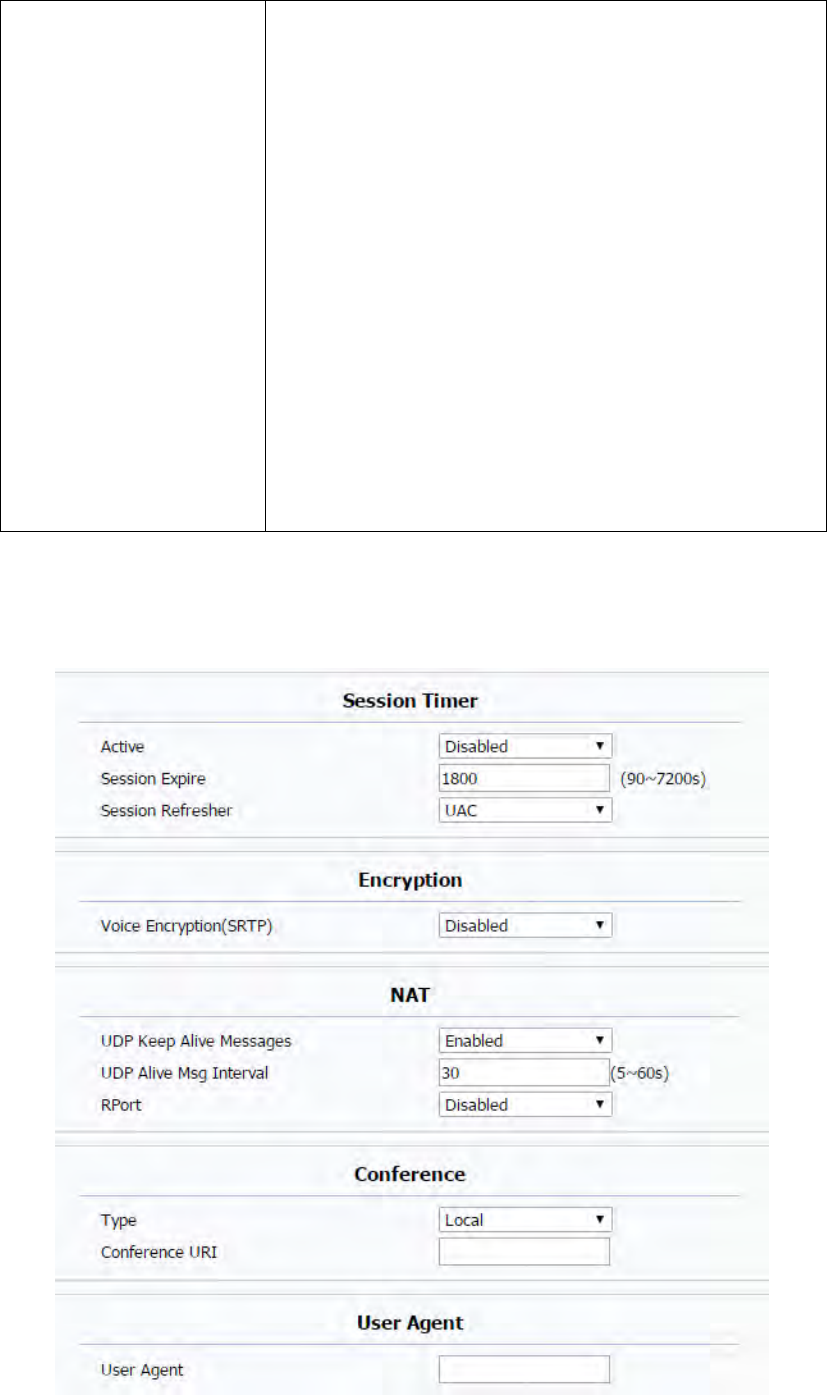
SessionTimerTodisplayorconfiguresessiontimersettings.
Active:Toenableordisablethisfeature,Ifenable,the
ongoingcallwillbedisconnectedautomaticallyonce
thesessionexpiredunlessit’sbeenrefreshedbyUACor
UAS.
SessionExpire:Configuresessionexpiretime.
SessionRefresher:Toconfigurewhoshouldbe
responseforrefreshingasession.
Note:UACmeansUserAgentClient,herestandsforIP
phone.UASmeansUserAgentServer,herestandsforSIP
server.
EncryptionToenableordisabledSRTPfeature.
VoiceEncryption(SRTP):Ifenabled,allaudiosignal
(technicallyspeakingit’sRTPstreams)willbeencrypted
formoresecurity.
NATTodisplayNAT‐relatedsettings.
UDPKeepAlivemessage:Ifenabled,IPphonewillsend
UDPkeep‐alivemessageperiodicallytoroutertokeep
NATportalive.
UDPAliveMsgInterval:Keepalivemessageinterval.
Rport:RemotePort,ifenabled,itwilladdRemotePort
intooutgoingSIPmessagefordesignatedaccount.
ConferenceToselectLocalornetworkconference.
Type:Toselectdesiredconferencetype
ConferenceURI:Ifnetworkconferenceisselected,a
networkconferenceURIisneededtobeinput.
UserAgentOnecancustomizeUserAgentfieldintheSIPmessage;If
useragentissettospecificvalue,usercouldseethe
informationfromPCAP.Ifuseragentisnotsetbydefault,
usercouldseethecompanyname,modelnumberand
firmwareversionfromPCAP
47
4.4
Network
4.4.1
Basic
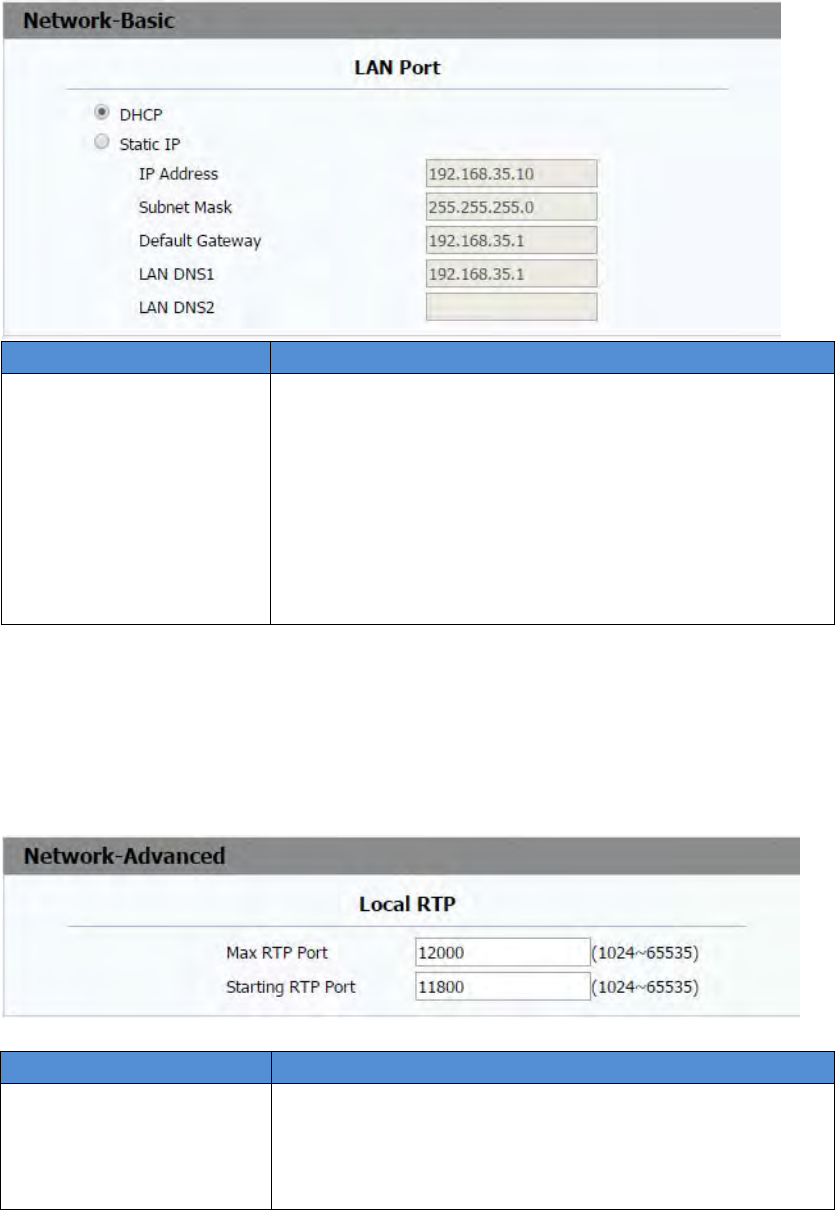
SectionsDescription
LANPortTodisplayandconfigureLANPortsettings.
DHCP:Ifselected,IPphonewillgetIPaddress,Subnet
Mask,DefaultGatewayandDNSserveraddressfrom
DHCPserverautomatically.
StaticIP:Ifselected,youhavetosetIPaddress,Subnet
Mask,DefaultGatewayandDNSservermanually.
PPPoE:UsePPPoEusername/passwordtoconnectto
PPPoEserver.
4.4.2
Advance
SectionsDescription
LocalRTPTodisplayandconfigureLocalRTPsettings.
MaxRTPPort:DeterminethemaximumportthatRTP
streamcanuse.
MinRTPPort:DeterminetheminimumportthatRTP
48
4.5
Phone
4.5.1
Time/Language
SectionsDescription
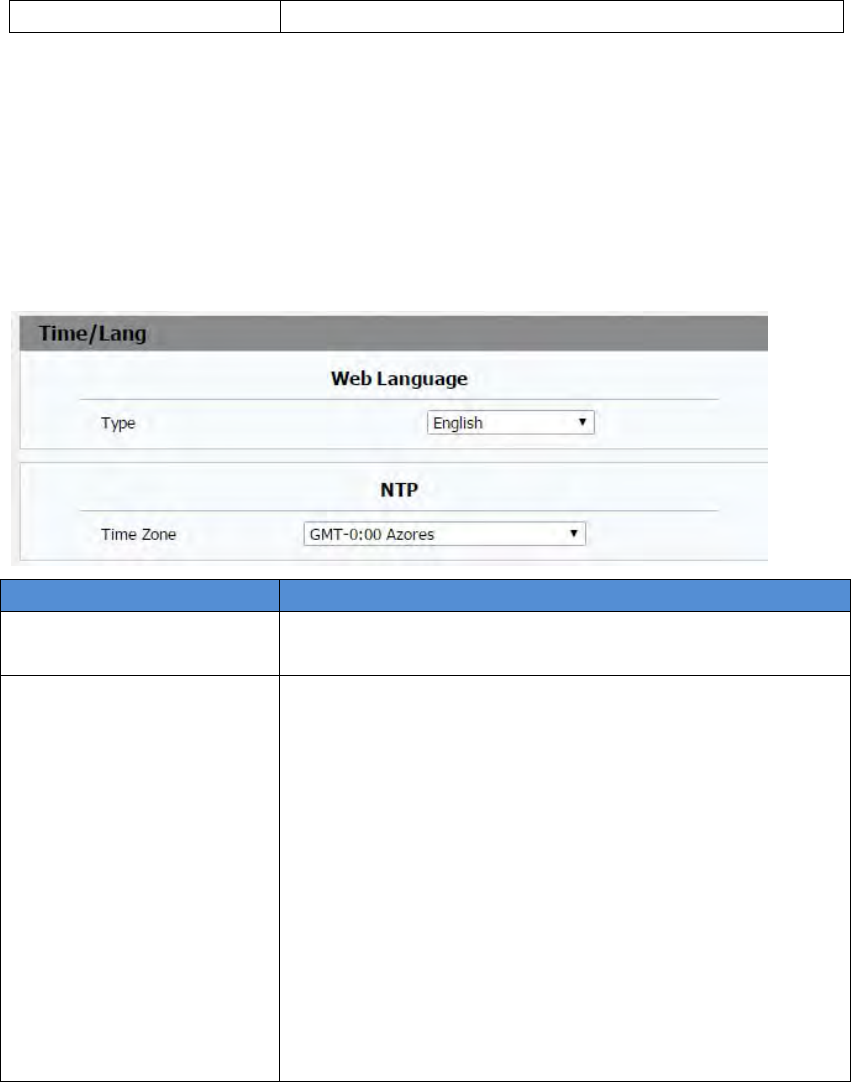
WebLanguageChoosethesuitableweblanguageyouneed.Englishby
default.
NTPToconfigureNTPserverrelatedsettings.
TimeZone:ToselectlocalTimeZoneforNTPserver.
PrimaryServer:ToconfigureprimaryNTPserver
address.
SecondaryServer:ToconfiguresecondaryNTPserver
address,ittakeseffectifprimaryNTPserveris
unreachable.
Updateinterval:Toconfigureintervalbetweentwo
consecutiveNTPrequests.
Note:NTP,NetworkTimeProtocolisusedtoautomatically
synchronizedlocaltimewithINTERNETtime,sinceNTP
serveronlyresponseGMTtime,sothatyouneedtospecify
theTimeZoneforIPphonetodecidethelocaltime.
streamcanuse.
49
4.5.2
CallFeature
SectionsDescription
ModeToenableordisablefeaturekeysync.
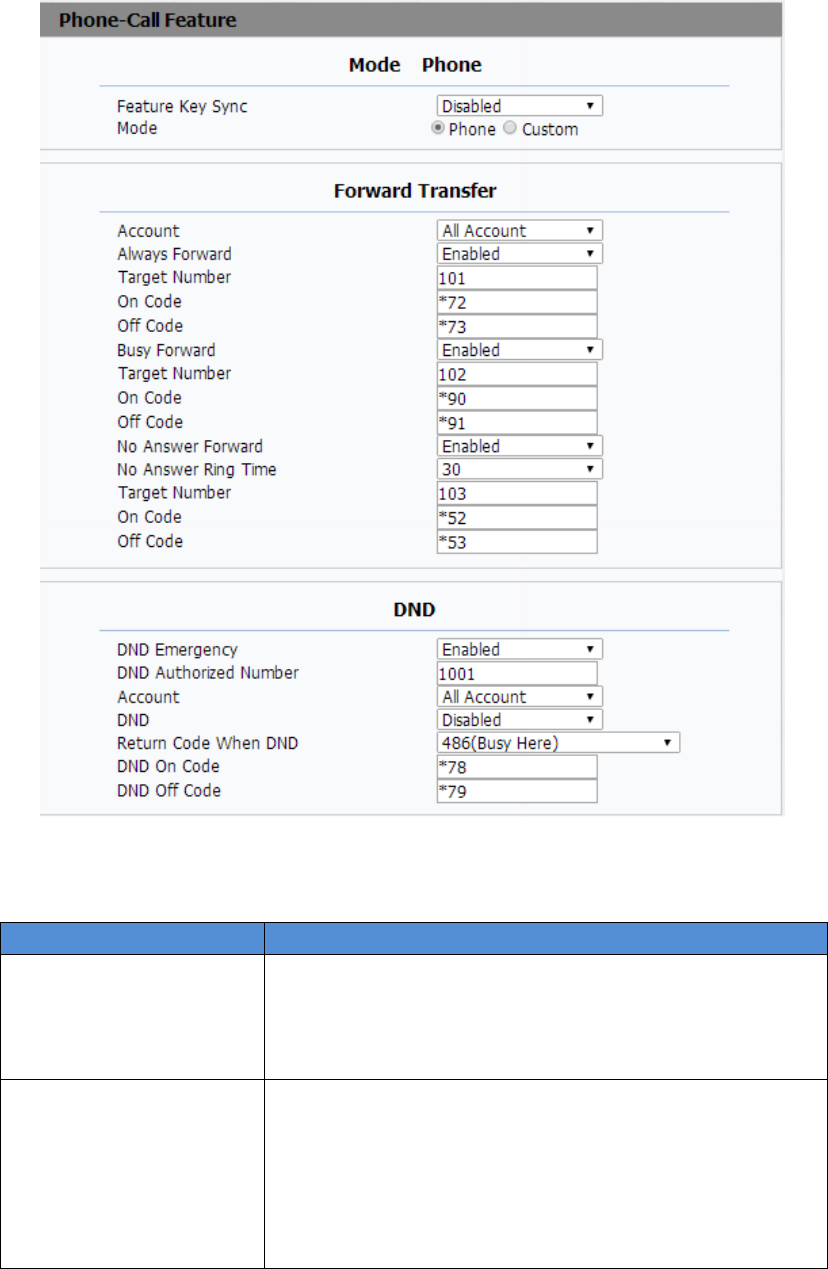
FeatureKeySync:Toenableordisablefeaturekey
sync.
Mode:Selectthedesiredmode.
ForwardTransferTodisplayandconfigureForwardsetting.
Note:Therearethreetypesofforward:AlwaysForward,
BusyForwardandNoanswerForward.
AlwaysForward:Anyincomingcallwillbeforwardedin
anysituation.
BusyForward:AnyincomingcallwillbeforwardedifIP

50
phoneisbusy.
NoanswerForward:Anyincomingcallwillbe
forwardedifit’snoanswerafteraspecifictime.
DNDDND(DoNotDisturb)allowsIPphonestoignoreany
incomingcalls.
DNDEmergency:thephonefromtheAuthorized
numbercanstillbereceivedafterenablethisfunction.
DNDAuthorizedNumber:Setupauthorizednumbers
forDNDEmergency.
Account:SelectanaccountforDND
DND:Disablebydefault.
ReturnCodewhenDND:Determinewhatresponses
codeshouldbesentbacktoserverwhenthereisan
incomingcallifDNDon.
DNDOnCode:TheCodeusedtoturnonDNDon
server’sside,ifconfigured,IPphonewillsendaSIP
messagetoservertoturnonDNDonserversideifyou
pressDNDwhenDNDisoff.
DNDOffCode:TheCodeusedtoturnoffDNDon
server’sside,ifconfigured,IPphonewillsendaSIP
messagetoservertoturnoffDNDonserversideifyou
pressDNDwhenDNDison.
51
SectionsDescription
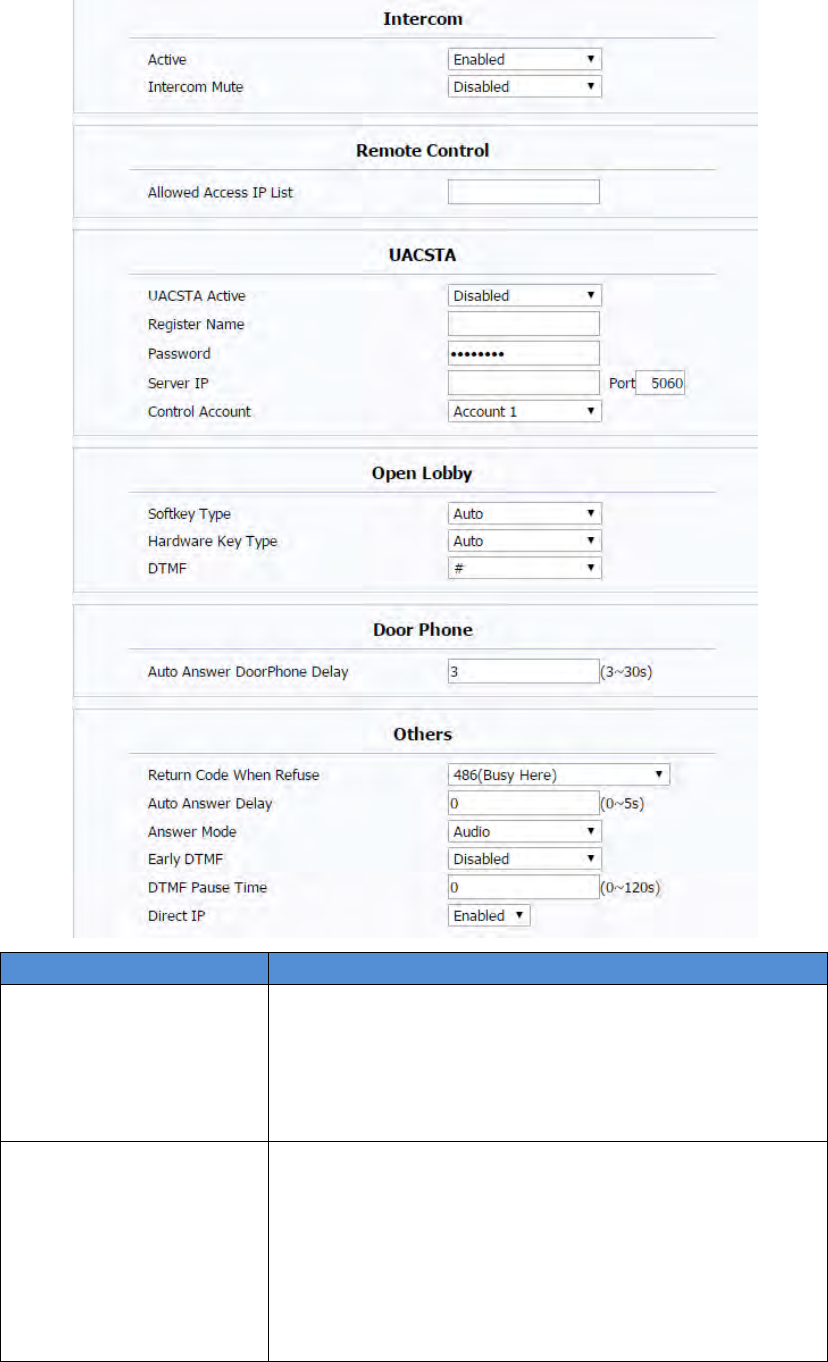
IntercomIntercomallowsusertoestablishacalldirectlywiththe
callee.
Active:ToenableordisableIntercomfeature.
IntercomMute:Ifenabled,oncethecallestablished,
thecalleewillbemuted.
RemoteControlRemoteControlallowsspecifichosttointeractwithIP
phonebysendingHTTPorHTTPSrequests.Thespecific
actioncouldbeansweringanincomingcall,hangupan
ongoingcallandsoon.
AllowedAccessIPList:Toconfiguretheallowedhost
address.
Note:Fornow,IPphonecanonlysupportIPaddress,IP

52
addresslistandIPaddresspatternasallowedhosts
UACSTAUsingCSTAforSIPphoneuseragents.Itcancontrolsome
featuresofcalling.UACSTAisusedtosendECMA‐323(CSTA
XML)informationduringSIPcalling.Thedefaultstatusis
disabled
OpenLobbyUsercanchoosewhichtypesyouneedforeachkey.Akuvox
IT82supports2typestounlock‐DTMFandRelay.DTMFis
usedtounlockthelobbydoorremotly,Relayisusedto
openthelocaldoor.
Softkey:Duringthetalking,usercanpressUnlockkeyto
openthedoor.
HardwareKey:Usercanalsopresshardwarekeytounlock
thedoor.
DTMF:IfyouchooseDTMFcodeforoneunlockkey.Please
setuptheDTMFcode.
DoorPhoneWhenthereisanincomingcallfromdoorphone,setupthe
delayautoanswertime,IT82serieswillautoanswerthecall
afterthetimeout.
Note:ifyouenableAutoAnswerfunction,thisfeaturewill
benotavailable.
Others ReturnCodeWhenRefuse:Allowsusertoassign
specificcodeasreturncodetoSIPserverwhenan
incomingcallisrejected.
AutoAnswerDelay:Toconfiguredelaytimebeforean
incomingcallisautomaticallyanswered.
AutoAnswerMode:Tosetvideooraudiomodefor
autoanswerbydefault.
EarlyDTMF:EnableordisableearlyDTMFfunction
DirectIP:DirectIPcallwithoutSIPproxy.
53
4.5.3
Audio
SectionsDescription
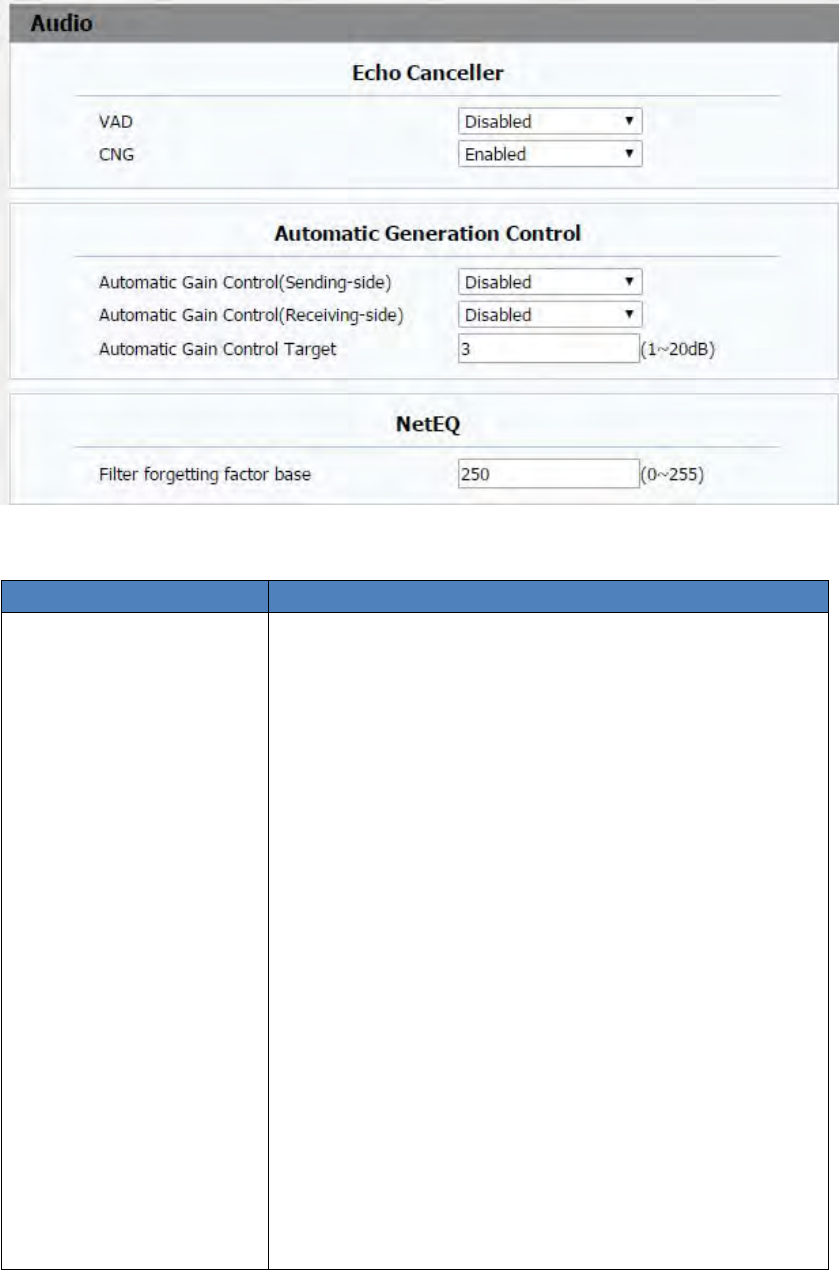
EchoCancellerEchoCanceller:Toremoveacousticechofromavoice
communicationinordertoimprovethevoicequality.
VAD(VoiceActivityDetection):AllowIPphonetodetect
thepresenceorabsenceofhumanspeechduringacall.
Whendetectingperiodof“silence”,VADreplacesthat
silenceefficientlywithspecialpacketsthatindicate
silenceisoccurring.Itcanfacilitatespeechprocessing,
anddeactivatesomeprocessesduringnon‐speech
sectionofanaudiosession.Itcanavoidunnecessary
codingortransmissionofsilencepacketsinVoIP
applications,savingoncomputationandnetwork
bandwidth.
CNG(ComfortNoiseGeneration):AllowIPphoneto
generatecomfortablebackgroundnoiseforvoice
communicationsduringperiodsofsilenceina
conversation.Itisapartofthesilencesuppressionor
VADhandlingforVoIPtechnology.CNG,inconjunction
withVADalgorithms,quicklyrespondswhenperiodsof
silenceoccurandinsertsartificialnoiseuntilvoice
activityresumes.Theinsertionofartificialnoisegives
theillusionofaconstanttransmissionstream,sothat
54
backgroundsoundisconsistentthroughoutthecalland
thelistenerdoesnotthinkthelinehasreleased.
AutomaticalGeneration
Control
R48Gwillautoadjustamplificationcircuitgainviasignal.
AutomaticGainControl(Sending‐side):Disabledby
default
AutomaticGainControl(Receiving‐side):Disabledby
default
AutomaticGainControlTarget:Rangefrom1to20dB.
3dBbydefault.
NetEQFilter forgetting factor base: Range from 0~255. 250 by default.
4.5.4
Video
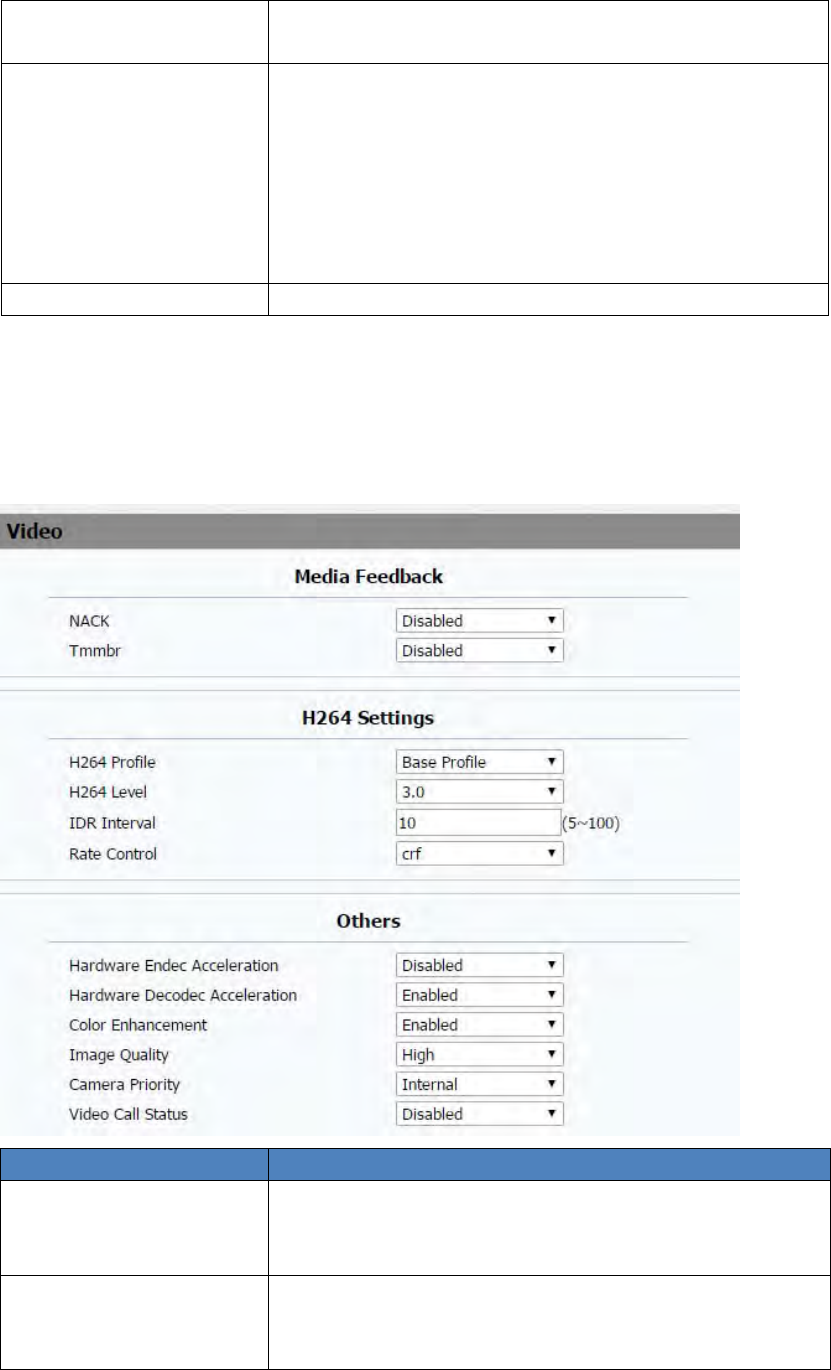
SectionsDescription
MediaFeedback NACK:Enabledittofiltermosaic.
Tmmbr:Sendthemaximumtemporaryraterequest.
Disabledbydefault.
H264SettingsH264:Avideostreamcompressionstandard.Differentfrom
H263,itprovidesanapproximatelyidenticallevelofvideo
streamqualitybutahalfbitrate.Thistypeofcompressionis

55
sometimescalledMPEG‐4part10.
TosetupcorrespondingH264videoparameters.
H264Profile:Thereare4modes‐Base、Main、High、
Extendprofile.Differentprofilesmakesdifferentcoding
functionandvideoquality.
H264Level:DifferentprofileshascorrespondingLevel
value.
IDRInterval:IDRmeansInstantaneousDecoding
Refresh.Itisusedtocontroltheprocessofcodingand
decoding.
RateControl:ChooseoneH264videorate.
Others HardwareEndecAcceleration:Thisfunctionisusedto
solvetheimageissue.UsercanenabletheHardware
EndecAccelerationwhenyouneed.
HardwareDecodecAcceleration:Disabledbydefault.
ColorEnhancement:Toincreasethephonedisplay
color.Enabledbydefault.
ImageQuality:UsercanselectLow,MiddleorHigh
mode.
CameraPriority:IT82seriescanconnectextracamera.
IfR48Ghas2cameras,pleasesetupthepriorityfor
externalcameraorinternalone.
VideoCallStatus
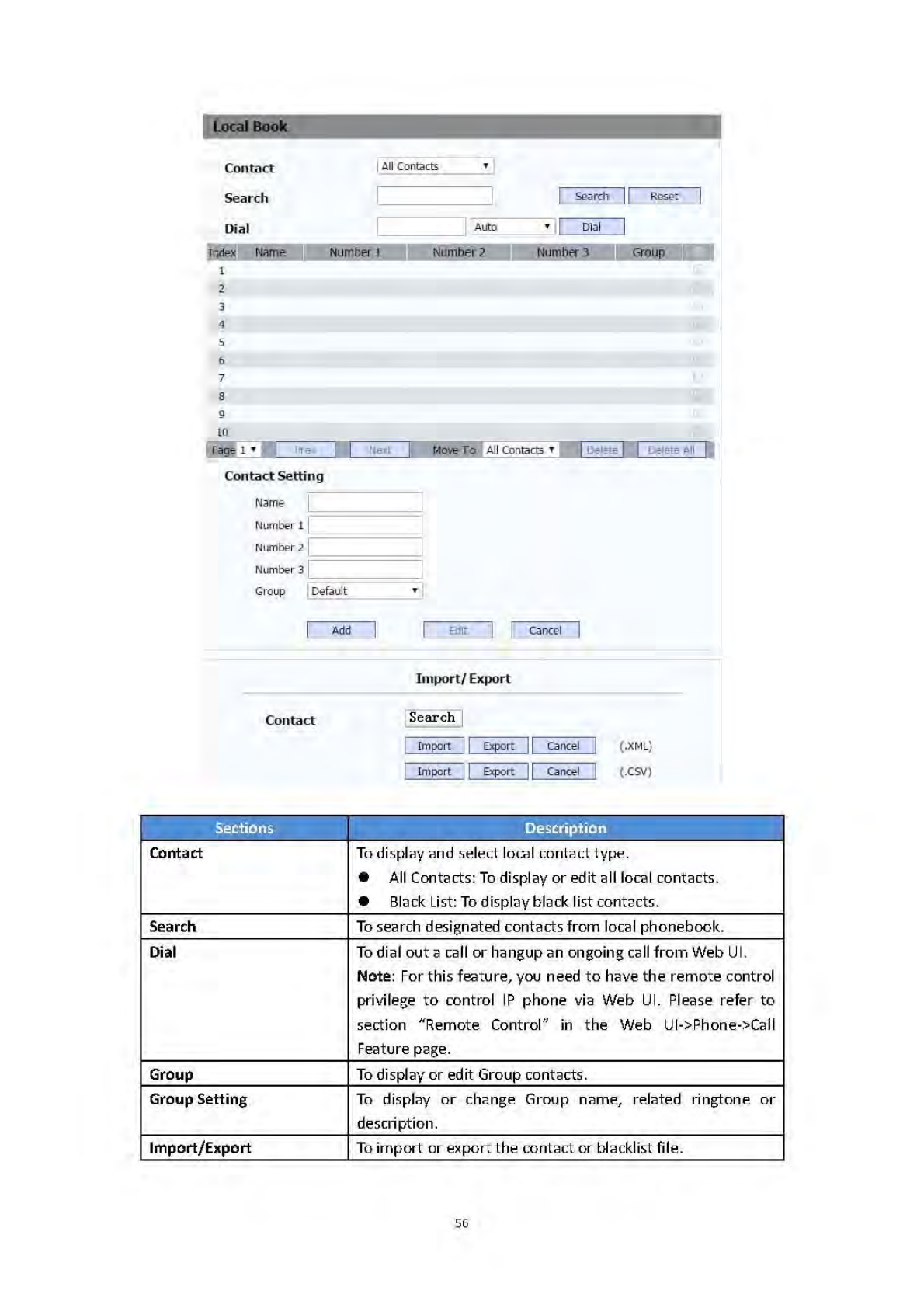
4.6
PhoneBook
4.6.1
LocalBook
57
4.6.2
CallLog
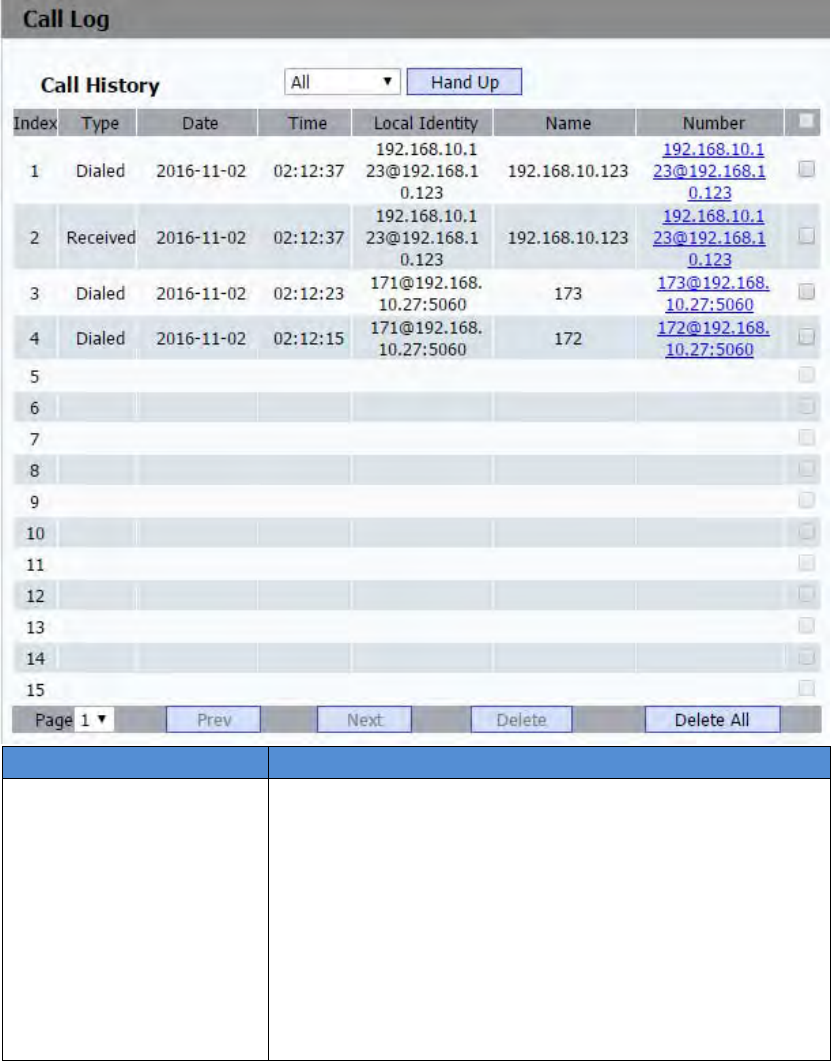
SectionsDescription
CallHistoryTodisplaycallhistoryrecords.
AvailablecallhistorytypesareAllcalls,Dialedcalls,
Receivedcalls,Missedcalls,Forwardedcalls.
HangUp:ToclicktohangupongoingcallontheIP
phone.
Note:For“HangUp”feature,youneedtohavetheremote
controlprivilegetocontrolIPphoneviaWebUI.Pleaserefer
tosection“RemoteControl”intheWebUI‐>Phone‐>Call
Featurepage.
59
4.7.2
Advance
SectionsDescription
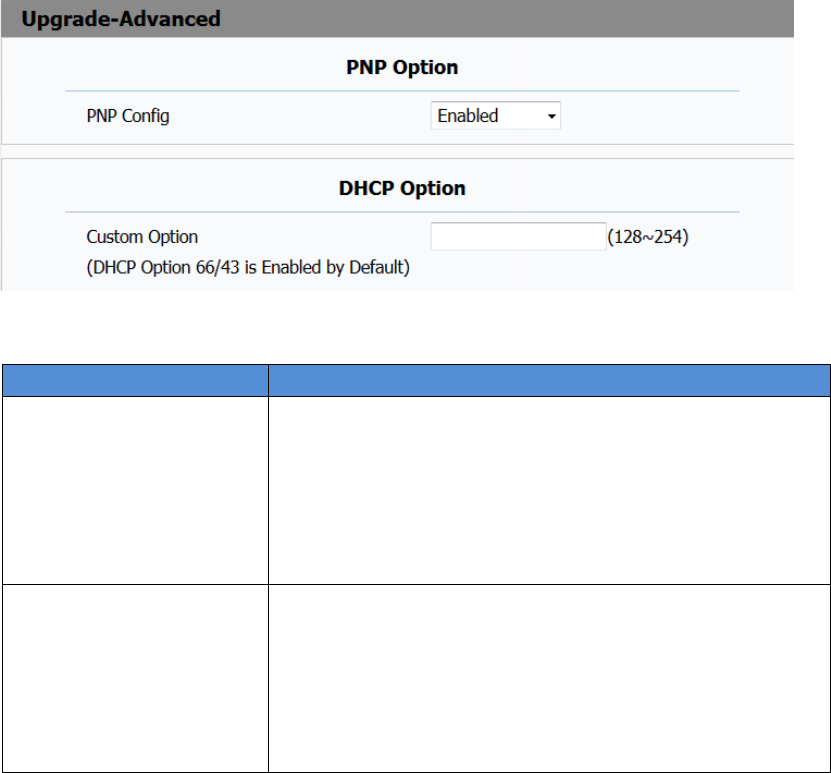
PNPOptionTodisplayandconfigurePNPsettingforAutoProvisioning.
PNP:PlugandPlay,oncePNPisenabled,thephonewill
sendSIPsubscriptionmessagetoPNPserver
automaticallytogetAutoProvisioningserver’saddress.
Bydefault,thisSIPmessageissenttomulticastaddress
224.0.1.75(PNPserveraddressbystandard).
DHCPOptionTodisplayandconfigurecustomDHCPoption.
DHCPoption:Ifconfigured,IPPhonewilluse
designatedDHCPoptiontogetAutoProvisioning
server’saddressviaDHCP.
ThissettingrequireDHCPservertosupportcorresponding
option.
60
SectionsDescription
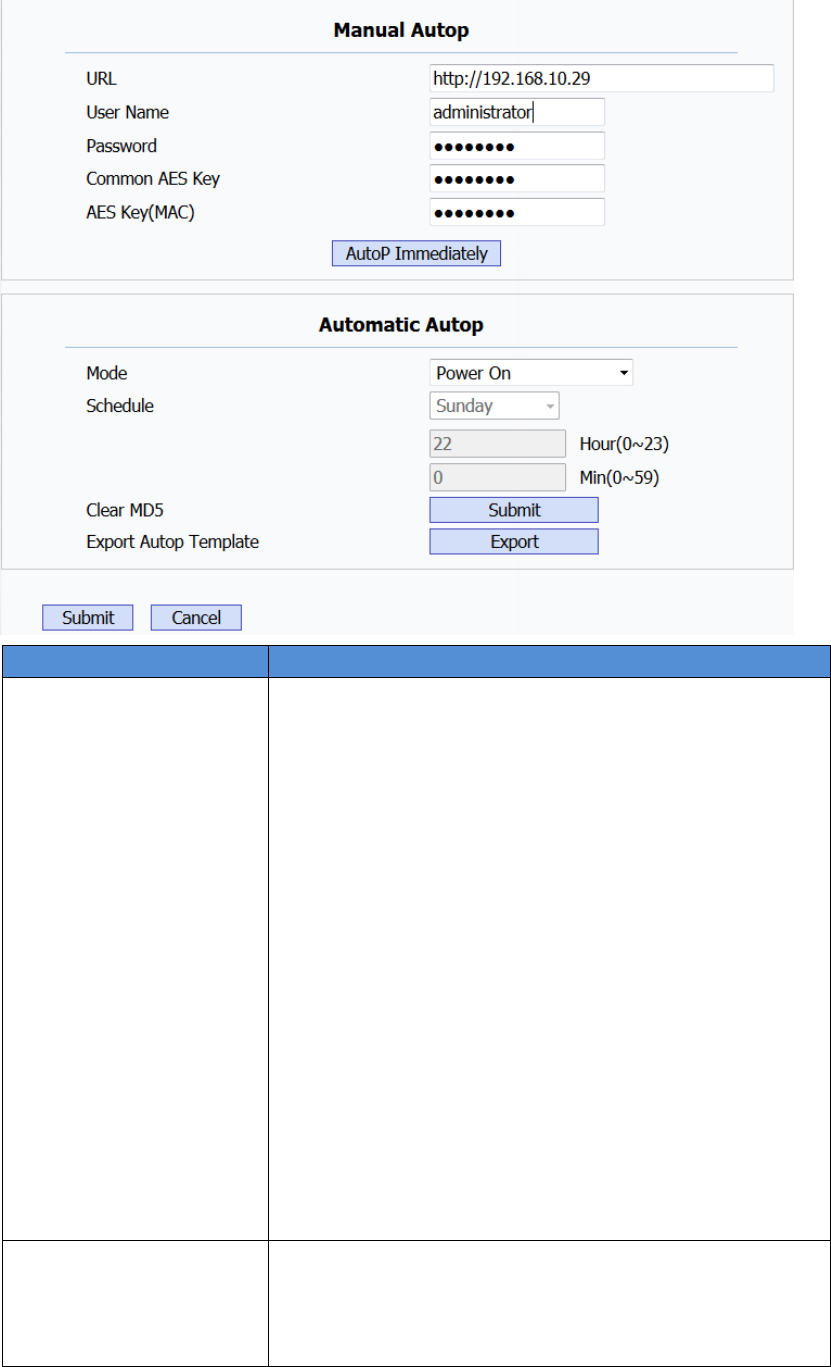
ManualAutoTodisplayandconfiguremanualupdateserver’ssettings.
URL:Autoprovisioningserveraddress.
Username:Configureifserverneedsanusernameto
access,otherwiseleftblank.
Password:Configureifserverneedsapasswordto
access,otherwiseleftblank.
CommonAESKey:UsedforIPphonetodecipher
commonAutoProvisioningconfigurationfile.
AESKey(MAC):UsedforIPphonetodecipher
MAC‐orientedautoprovisioningconfigurationfile(for
example,filenamecouldbe0c1105888888.cfgifIP
phone’sMACaddressis0c1105888888).
EntertheURLaddress,thenclicktheAutoPImmediately
label,thephonewillaccordingtheURLtoaskfor
configurationfiletoupdate.
Note:AESisoneofmanyencryption,itshouldbeconfigure
onlyconfigurefilediscipheredwithAES,otherwiseleft
blank.
AutomaticAutoPTodisplayandconfigureAutoProvisioningmodesettings.
ThisAutoProvisioningmodeisactuallyself‐explanatory.
Forexample,mode“Poweron”meansIPphonewillgoto
doProvisioningeverytimeitpowerson.
62
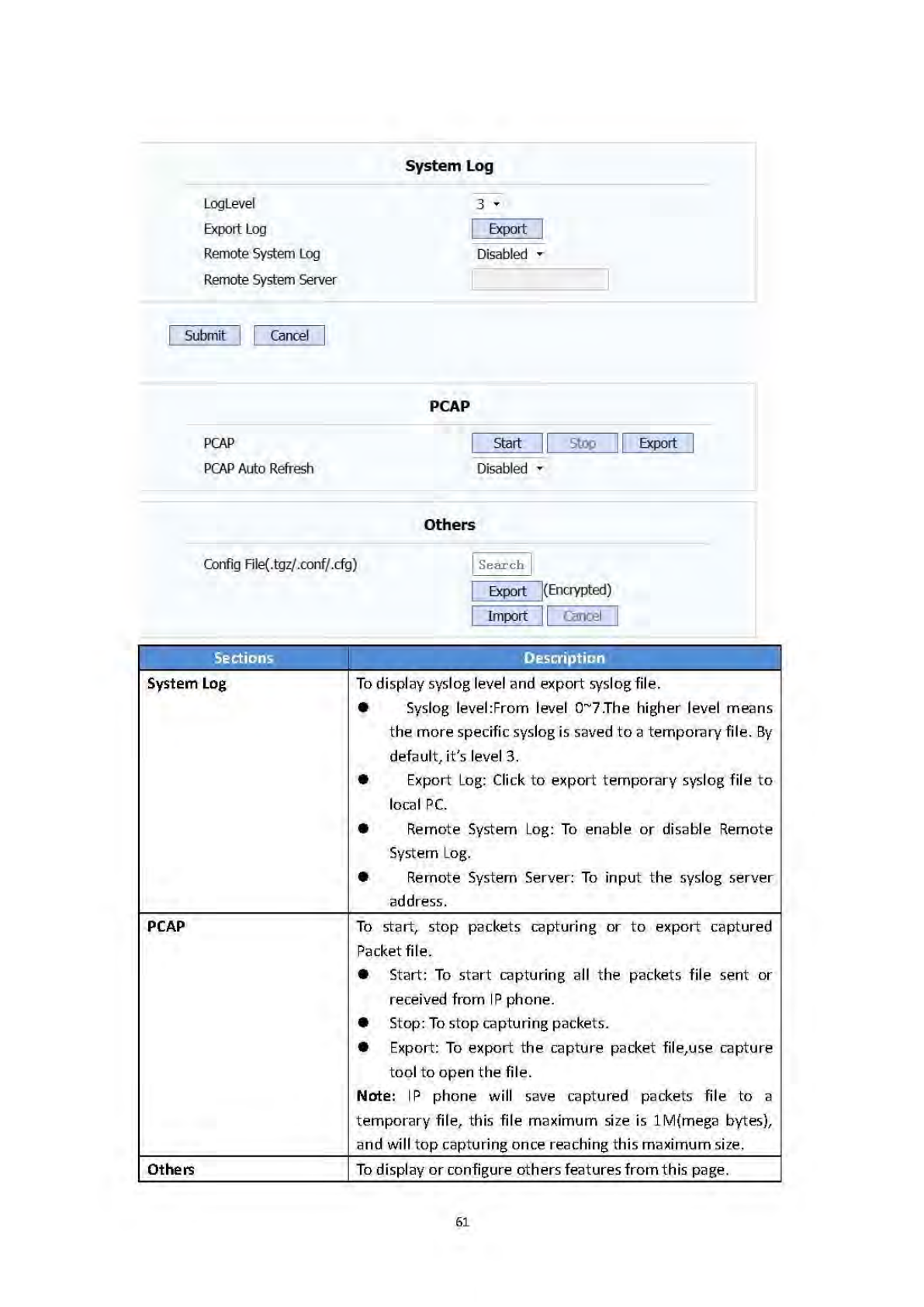
Configfile:ToexportorimportconfigurefileforIP
phone.
4.8
Security
4.8.1
Basic
SectionsDescription
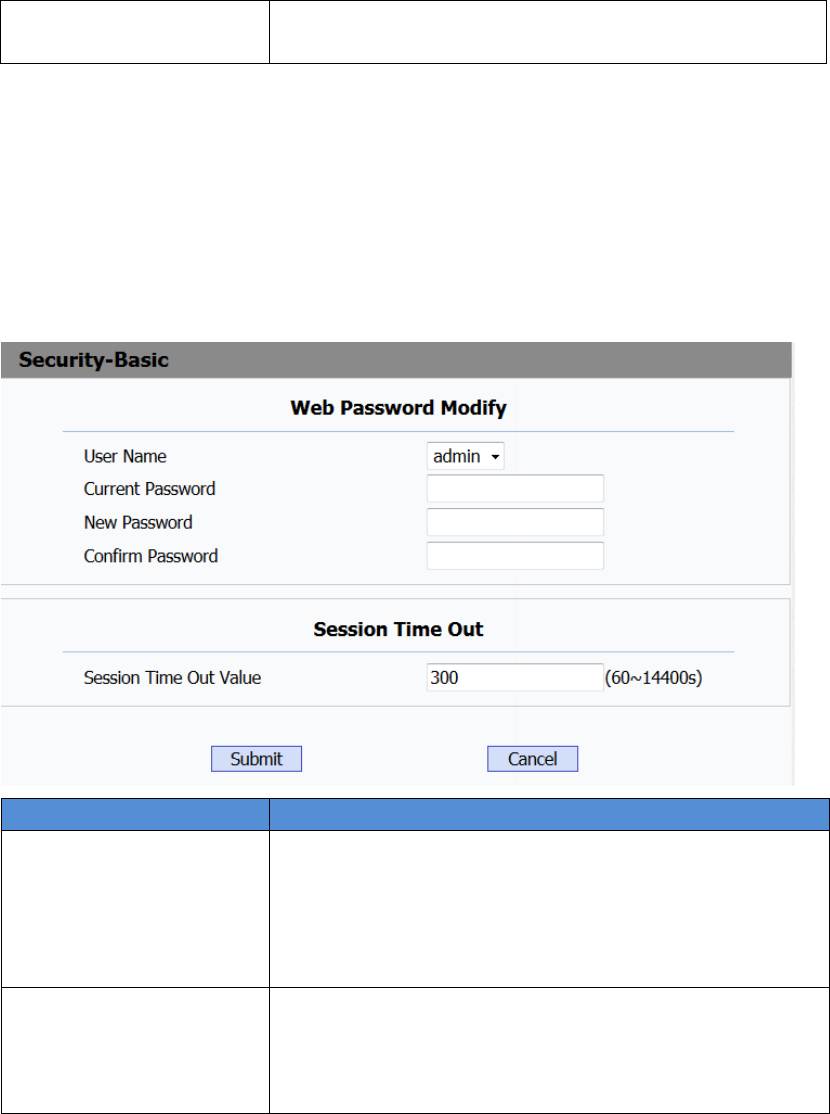
WebPasswordModifyTomodifyuser’spassword.
CurrentPassword:Thecurrentpasswordyouused.
NewPassword:Inputnewpasswordyouintendtouse.
ConfirmPassword:Repeatthenewpassword.
Note:Fornow,IPphonecanonlysupportuseradmin.
SessionTimeOutValueOverthesessiontimeoutvalue,usersneedtologininthe
webagain.
SessionTimeOutValue:therangerisfrom60sto
14400s.

64
SectionsDescription
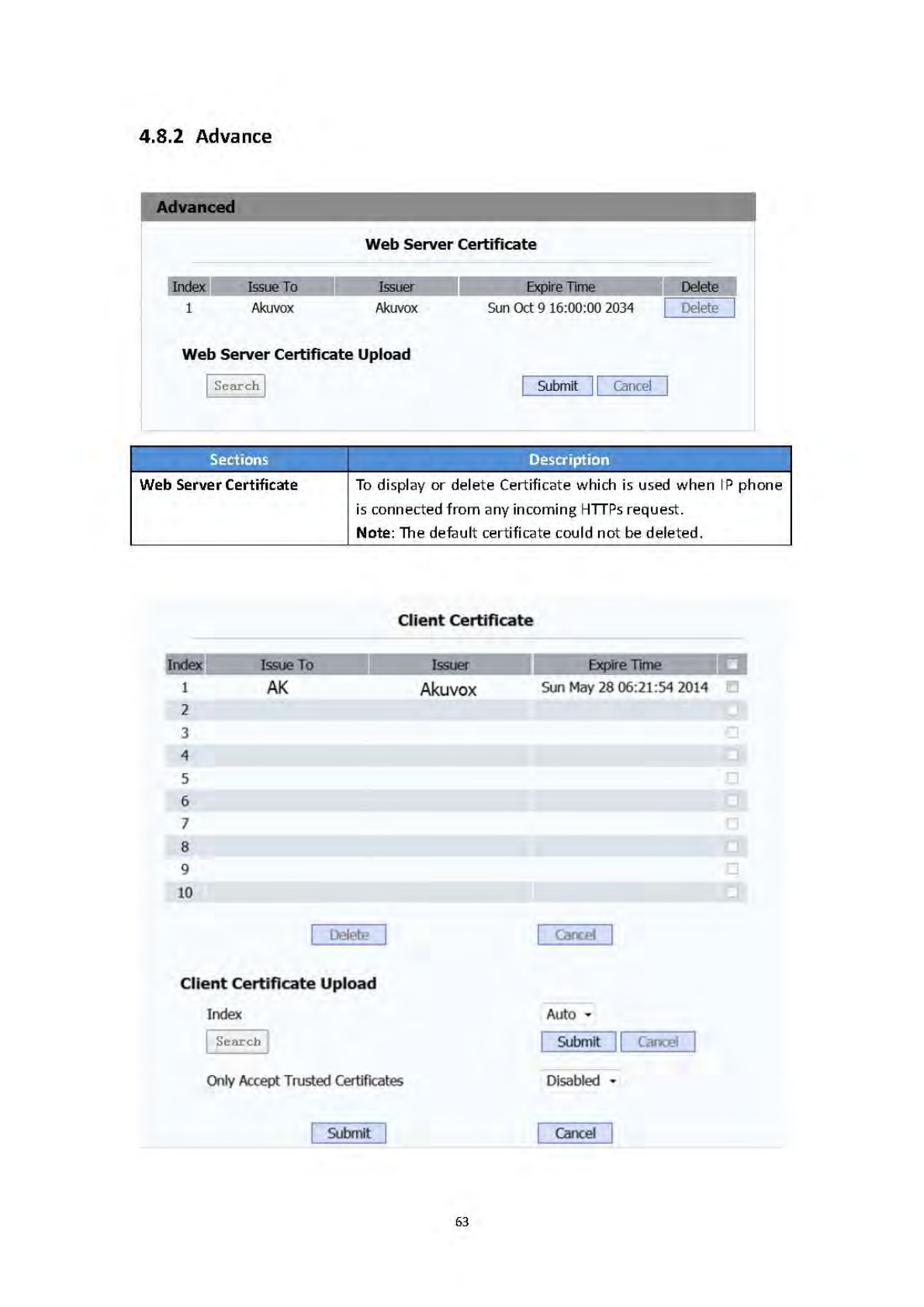
WebServerCertificate
Upload
Touploadacertificatefilewhichwillbeusedasserver
certificate.
ClientCertificateTodisplayordeleteCertificateswhichisusedwhenIPphone
isconnectingtoanyHTTPsserver.
ClientCertificateUploadTouploadcertificatefiles,thisisusedasclientcertificate.
OnlyAccepttrustedCertificates:Ifthisoptionisenabled,
onlytrustedcertificateswillbeaccepted.