ANHUI KONKA ELECTRONIC WD40FL2480 LCD TV User Manual

ANHUI KONKA ELECTRONIC CO., LTD LCD TV

Contents

User Manual 1

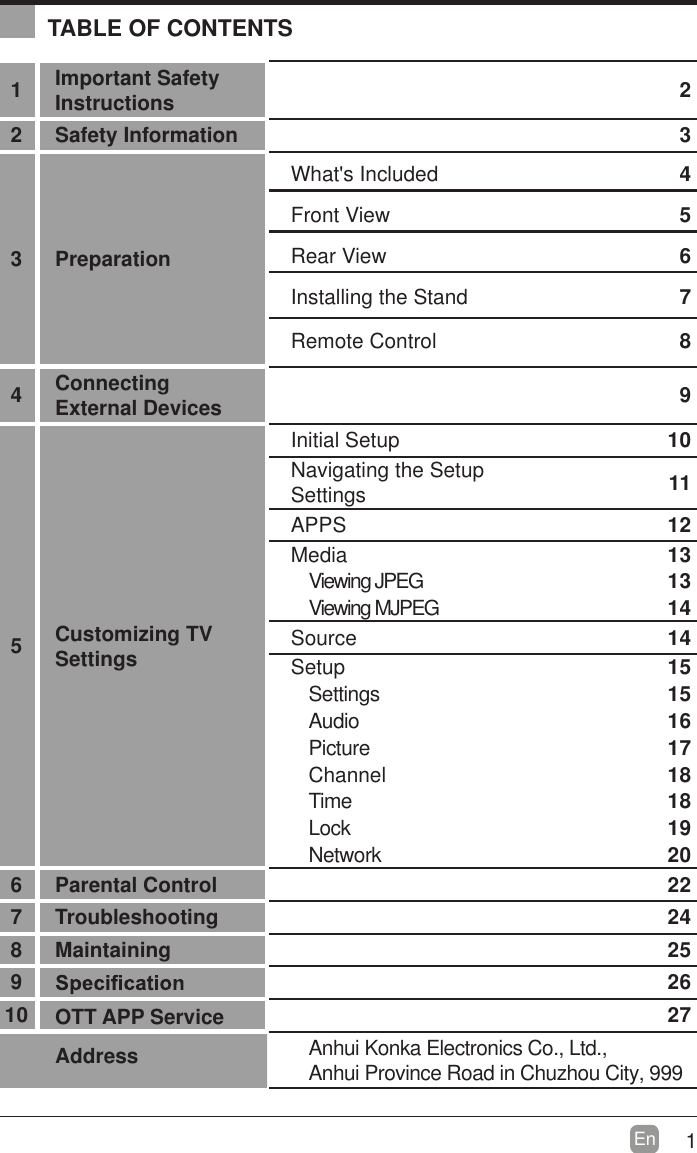
1En  TABLE OF CONTENTS1Important Safety Instructions 22 Safety Information 33 PreparationWhat's Included 4Front View 5Rear View 6Installing the Stand 7Remote Control 84Connecting External Devices 95Customizing TV SettingsInitial Setup 10Navigating the Setup Settings 11APPS 12Media                                                                                13Viewing JPEG   13Viewing MJPEG 14Source 14S e t u p                                                                                15Settings 15Audio 16Picture 17Channel 18Time 18Lock 19NetworAnhui Konka Electronics Co., Ltd., Anhui Province Road in Chuzhou City, 999k206 Parental Control 227 Troubleshooting 248 Maintaining 2592610 OTTAddress APP Service 27
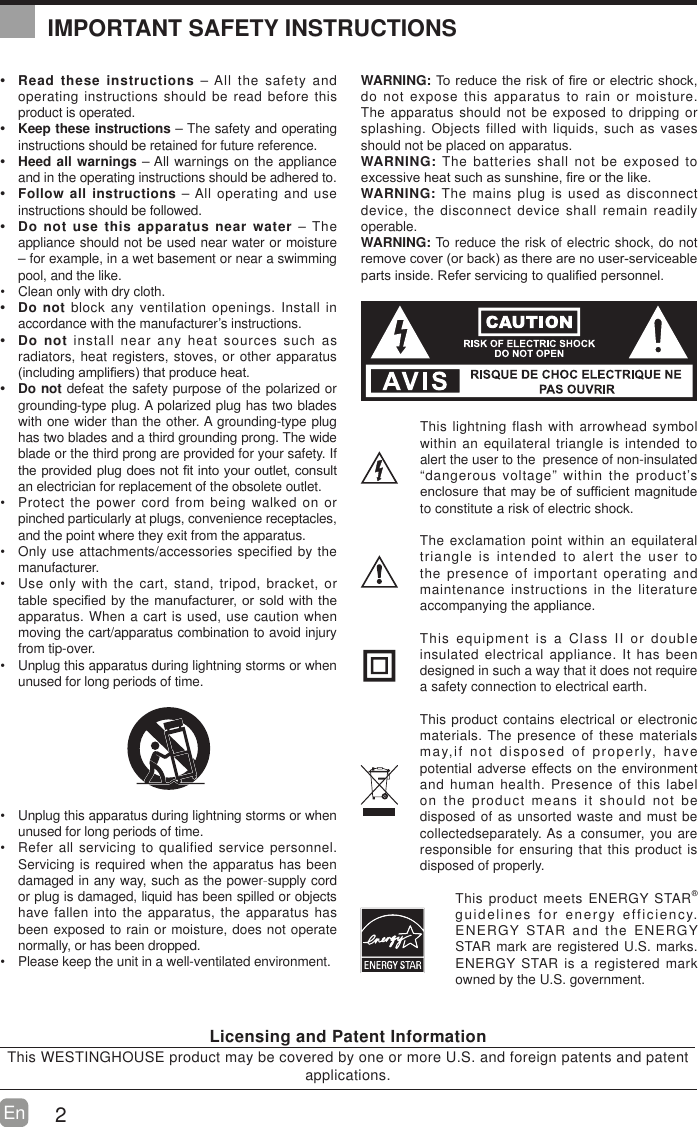
2En   Read these instructions – All the safety and operating instructions should be read before this product is operated.  Keep these instructions – The safety and operating instructions should be retained for future reference.  Heed all warnings – All warnings on the appliance and in the operating instructions should be adhered to.  Follow all instructions – All operating and use instructions should be followed.  Do not use this apparatus near water – The appliance should not be used near water or moisture – for example, in a wet basement or near a swimming pool, and the like. Clean only with dry cloth. Do not block any ventilation openings. Install in accordance with the manufacturer’s instructions. Do not install near any heat sources such as radiators, heat registers, stoves, or other apparatus LQFOXGLQJDPSOL¿HUVWKDWSURGXFHKHDW Do not defeat the safety purpose of the polarized or grounding-type plug. A polarized plug has two blades with one wider than the other. A grounding-type plug has two blades and a third grounding prong. The wide blade or the third prong are provided for your safety. If WKHSURYLGHGSOXJGRHVQRW¿WLQWR\RXURXWOHWFRQVXOWan electrician for replacement of the obsolete outlet. Protect the power cord from being walked on or pinched particularly at plugs, convenience receptacles, and the point where they exit from the apparatus. Only use attachments/accessories specified by the manufacturer. Use only with the cart, stand, tripod, bracket, or WDEOHVSHFL¿HGE\WKHPDQXIDFWXUHURUVROGZLWKWKHapparatus. When a cart is used, use caution when moving the cart/apparatus combination to avoid injury from tip-over.  Unplug this apparatus during lightning storms or when unused for long periods of time. Unplug this apparatus during lightning storms or when unused for long periods of time. Refer all servicing to qualified service personnel. Servicing is required when the apparatus has been damaged in any way, such as the power-supply cord or plug is damaged, liquid has been spilled or objects have fallen into the apparatus, the apparatus has been exposed to rain or moisture, does not operate normally, or has been dropped. Please keep the unit in a well-ventilated environment.WARNING:7RUHGXFHWKHULVNRI¿UHRUHOHFWULFVKRFNdo not expose this apparatus to rain or moisture. The apparatus should not be exposed to dripping or splashing. Objects filled with liquids, such as vases should not be placed on apparatus. WARNING: The batteries shall not be exposed to H[FHVVLYHKHDWVXFKDVVXQVKLQH¿UHRUWKHOLNHWARNING: The mains plug is used as disconnect device, the disconnect device shall remain readily operable.WARNING: To reduce the risk of electric shock, do not UHPRYHFRYHURUEDFNDVWKHUHDUHQRXVHUVHUYLFHDEOHSDUWVLQVLGH5HIHUVHUYLFLQJWRTXDOL¿HGSHUVRQQHOThis lightning flash with arrowhead symbol within an equilateral triangle is intended to alert the user to the  presence of non-insulated “dangerous voltage” within the product’s HQFORVXUHWKDWPD\EHRIVXI¿FLHQWPDJQLWXGHto constitute a risk of electric shock.The exclamation point within an equilateral triangle is intended to alert the user to the presence of important operating and maintenance instructions in the literature accompanying the appliance. This equipment is a Class II or double insulated electrical appliance. It has been designed in such a way that it does not require a safety connection to electrical earth.This product contains electrical or electronic materials. The presence of these materials may,if not disposed of properly, have potential adverse effects on the environment and human health. Presence of this label on the product means it should not be disposed of as unsorted waste and must be collectedseparately. As a consumer, you are responsible for ensuring that this product is disposed of properly.This product meets ENERGY STAR® guidelines for energy efficiency. ENERGY STAR and the ENERGY STAR mark are registered U.S. marks. ENERGY STAR is a registered mark owned by the U.S. government.IMPORTANT SAFETY INSTRUCTIONSLicensing and Patent InformationThis WESTINGHOUSE product may be covered by one or more U.S. and foreign patents and patent applications.
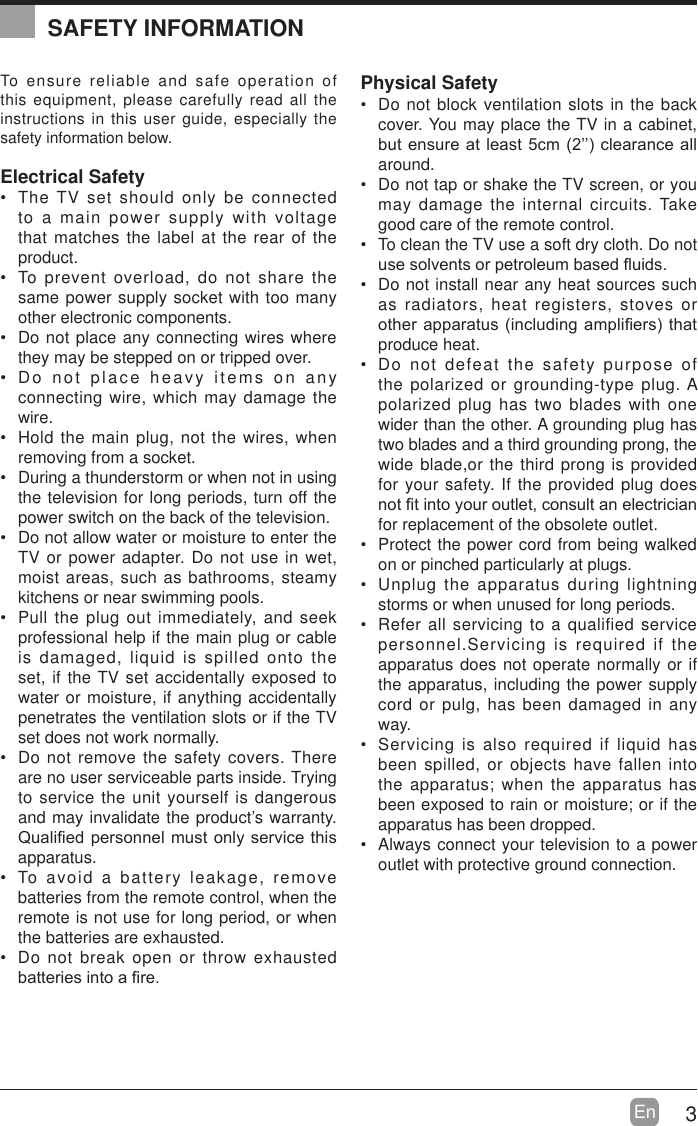
3En  To ensure reliable and safe operation of this equipment, please carefully read all the instructions in this user guide, especially the safety information below.Electrical Safety  The TV set should only be connected to a main power supply with voltage that matches the label at the rear of the product. To prevent overload, do not share the same power supply socket with too many other electronic components. Do not place any connecting wires where they may be stepped on or tripped over. Do not place heavy items on any connecting wire, which may damage the wire. Hold the main plug, not the wires, when removing from a socket. During a thunderstorm or when not in using the television for long periods, turn off the power switch on the back of the television. Do not allow water or moisture to enter the TV or power adapter. Do not use in wet, moist areas, such as bathrooms, steamy kitchens or near swimming pools. Pull the plug out immediately, and seek professional help if the main plug or cable is damaged, liquid is spilled onto the set, if the TV set accidentally exposed to water or moisture, if anything accidentally penetrates the ventilation slots or if the TV set does not work normally. Do not remove the safety covers. There are no user serviceable parts inside. Trying to service the unit yourself is dangerous and may invalidate the product’s warranty. 4XDOL¿HGSHUVRQQHOPXVWRQO\VHUYLFHWKLVapparatus. To avoid a battery leakage, remove batteries from the remote control, when the remote is not use for long period, or when the batteries are exhausted. Do not break open or throw exhausted EDWWHULHVLQWRD¿UHPhysical Safety  Do not block ventilation slots in the back cover. You may place the TV in a cabinet, EXWHQVXUHDWOHDVWFP¶¶FOHDUDQFHDOOaround. Do not tap or shake the TV screen, or you may damage the internal circuits. Take good care of the remote control. To clean the TV use a soft dry cloth. Do not XVHVROYHQWVRUSHWUROHXPEDVHGÀXLGV Do not install near any heat sources such as radiators, heat registers, stoves or RWKHUDSSDUDWXVLQFOXGLQJDPSOL¿HUVWKDWproduce heat. Do not defeat the safety purpose of the polarized or grounding-type plug. A polarized plug has two blades with one wider than the other. A grounding plug has two blades and a third grounding prong, the wide blade,or the third prong is provided for your safety. If the provided plug does QRW¿WLQWR\RXURXWOHWFRQVXOWDQHOHFWULFLDQfor replacement of the obsolete outlet.  Protect the power cord from being walked on or pinched particularly at plugs.  Unplug the apparatus during lightning storms or when unused for long periods. Refer all servicing to a qualified service personnel.Servicing is required if the apparatus does not operate normally or if the apparatus, including the power supply cord or pulg, has been damaged in any way. Servicing is also required if liquid has been spilled, or objects have fallen into the apparatus; when the apparatus has been exposed to rain or moisture; or if the apparatus has been dropped. Always connect your television to a power outlet with protective ground connection. SAFETY INFORMATION
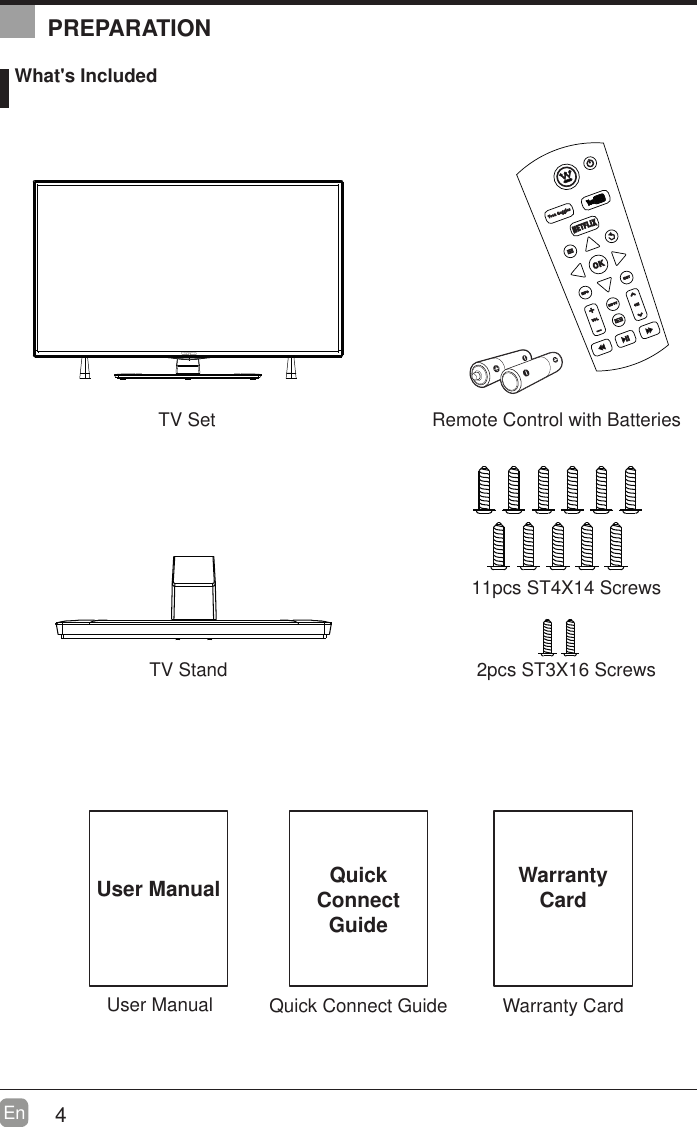
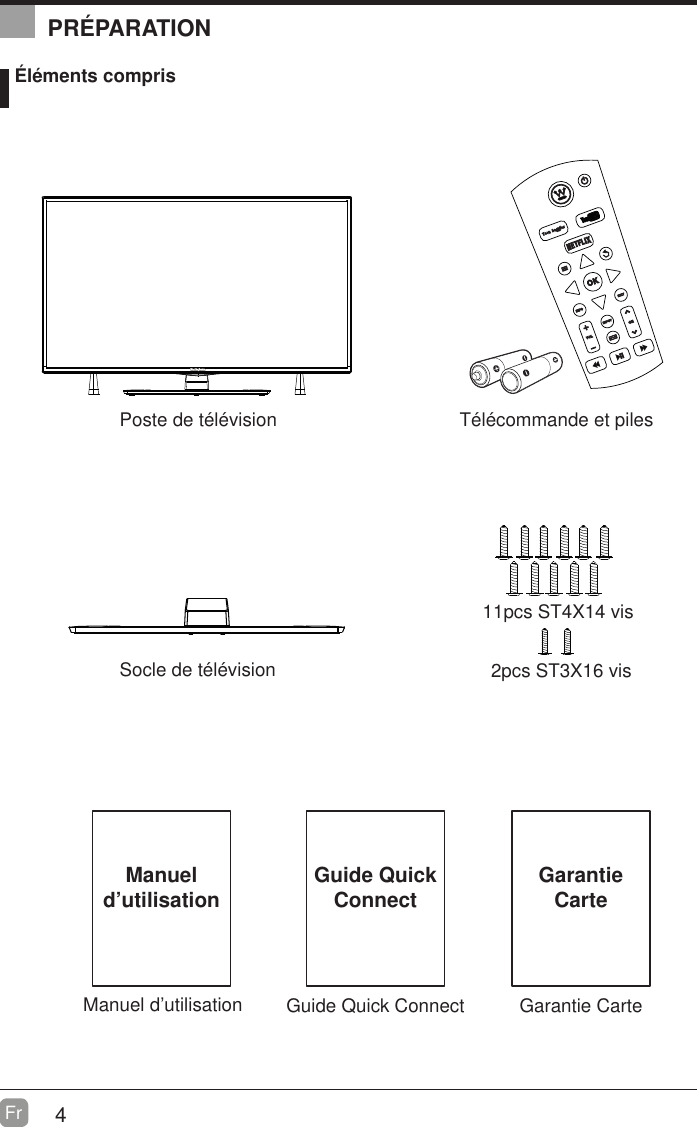
4En  User ManualUser Manual What's IncludedRemote Control with BatteriesTV StandTV Set  2pcs ST3X16 Screws 11pcs ST4X14 ScrewsQuick Connect GuideQuickConnect GuidePREPARATIONWarranty CardWarrantyCard
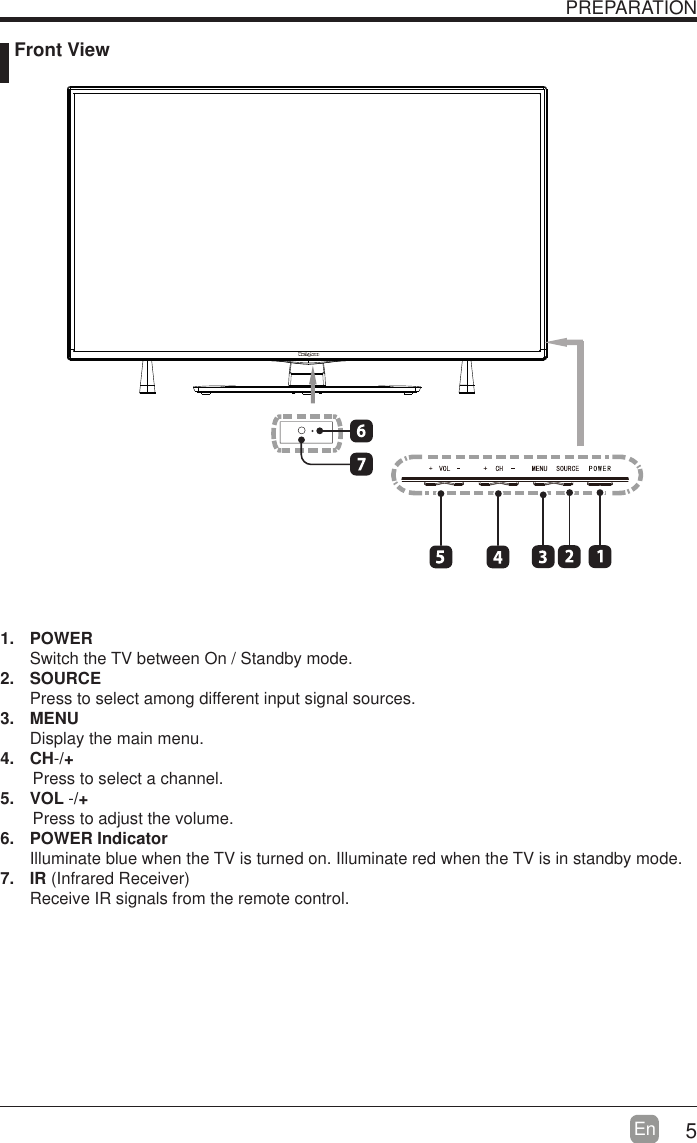
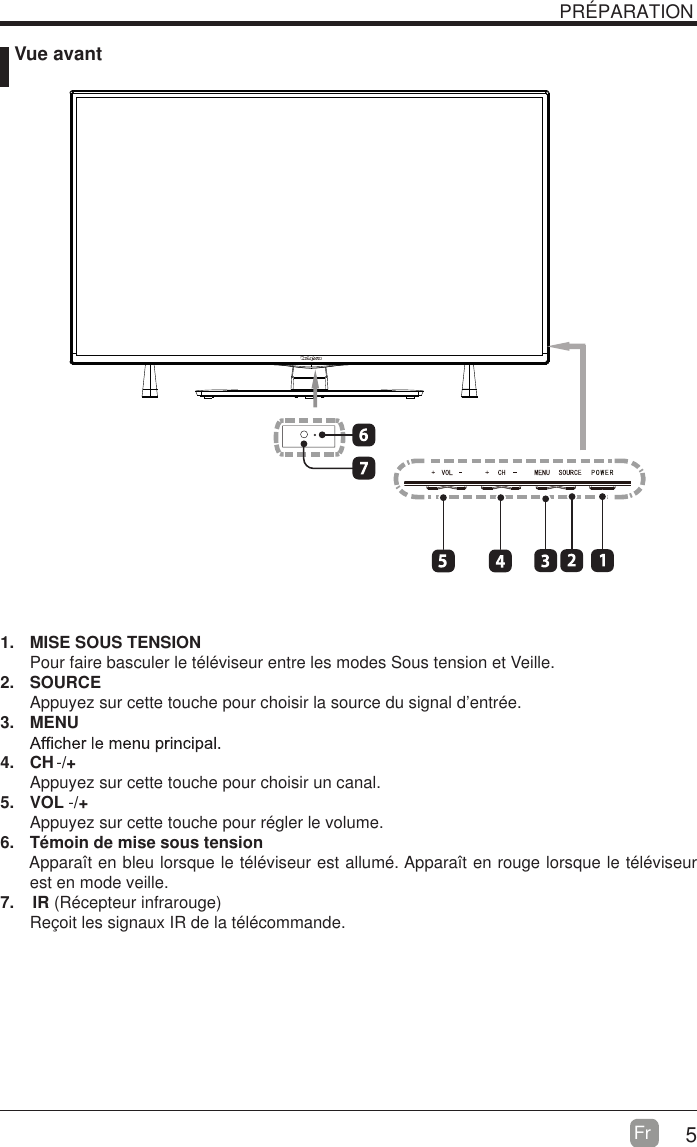
5En   Front ViewPREPARATION1. POWER Switch the TV between On / Standby mode.2. SOURCEPress to select among different input signal sources.3. MENUDisplay the main menu.4. CH        Press to select a channel.5. VOL -/+-/+       Press to adjust the volume.6. POWER IndicatorIlluminate blue when the TV is turned on. Illuminate red when the TV is in standby mode.7. IR (Infrared Receiver)Receive IR signals from the remote control.
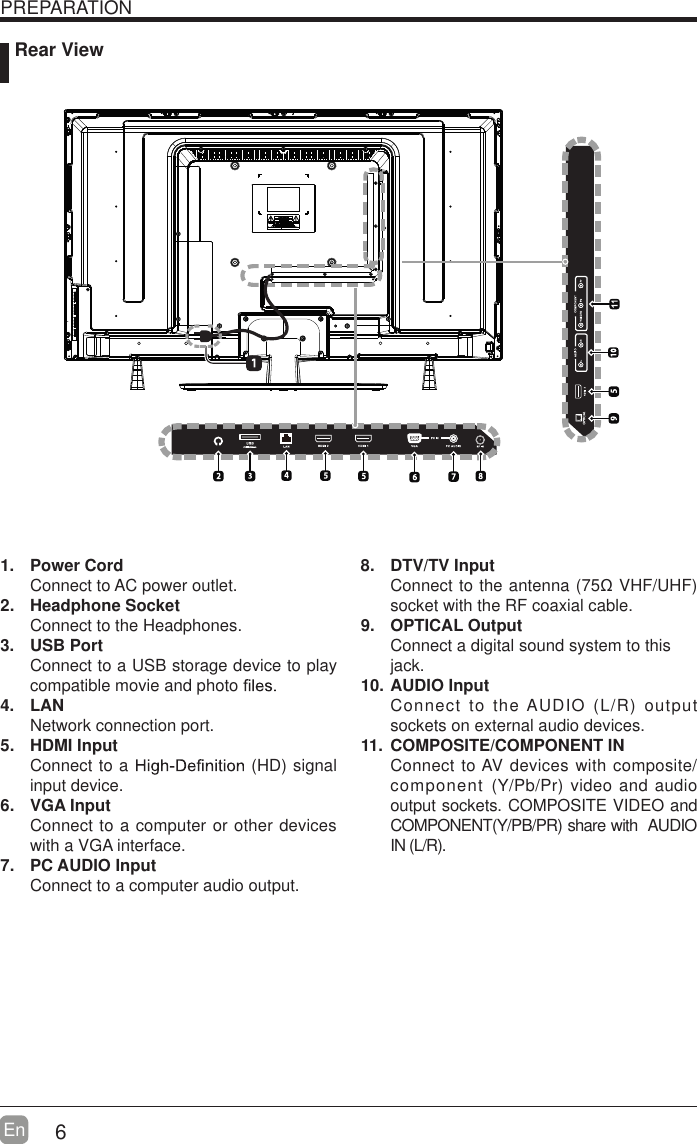
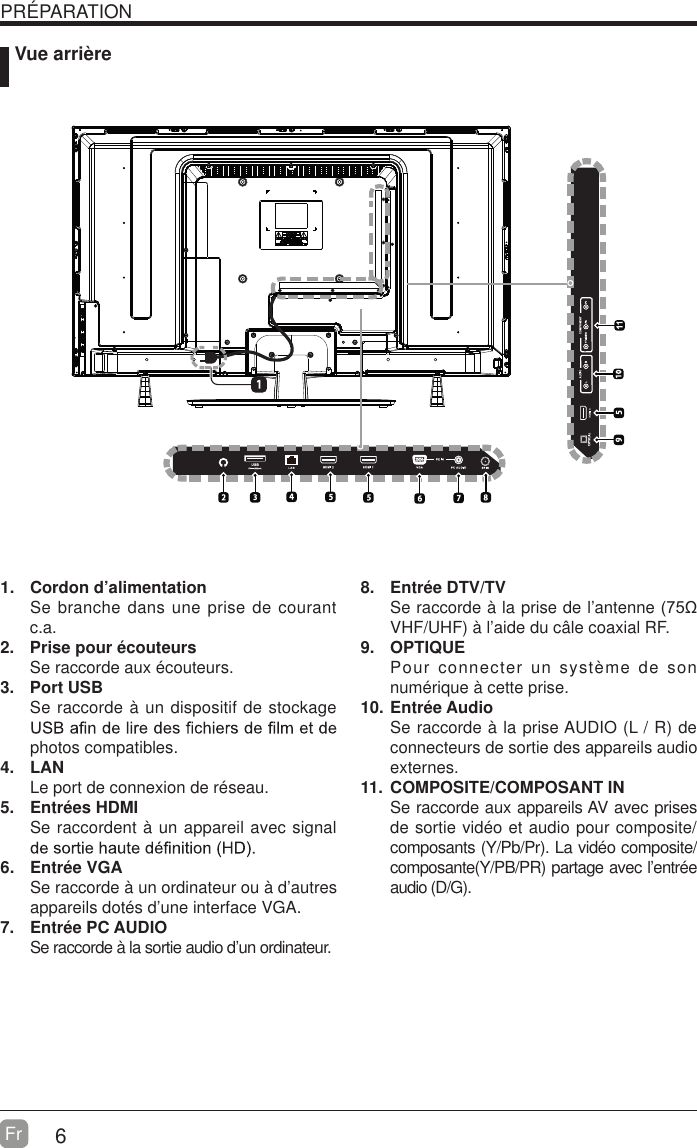
6En  PREPARATION1. Power CordConnect to AC power outlet.2. Headphone SocketConnect to the Headphones.3. USB PortConnect to a USB storage device to play compatible movie and photo   4. LANNetwork connection port.5. HDMI InputConnect to a   (HD) signal input device.6. VGA InputConnect to a computer or other devices with a VGA interface.7. PC AUDIO InputConnect to a computer audio output.8. DTV/TV Input Connect to the antenna (75ȍ VHF/UHF) socket with the RF coaxial cable.9. OPTICAL OutputConnect a digital sound system to thisjack.10. AUDIO InputConnect to the AUDIO (L/R) output sockets on external audio devices.11.  COMPOSITE/COMPONENT IN   Connect to AV devices with composite/component (Y/Pb/Pr) video and audio output sockets. COMPOSITE VIDEO and COMPONENT(Y/PB/PR) share with   AUDIO IN (L/R).      Rear View
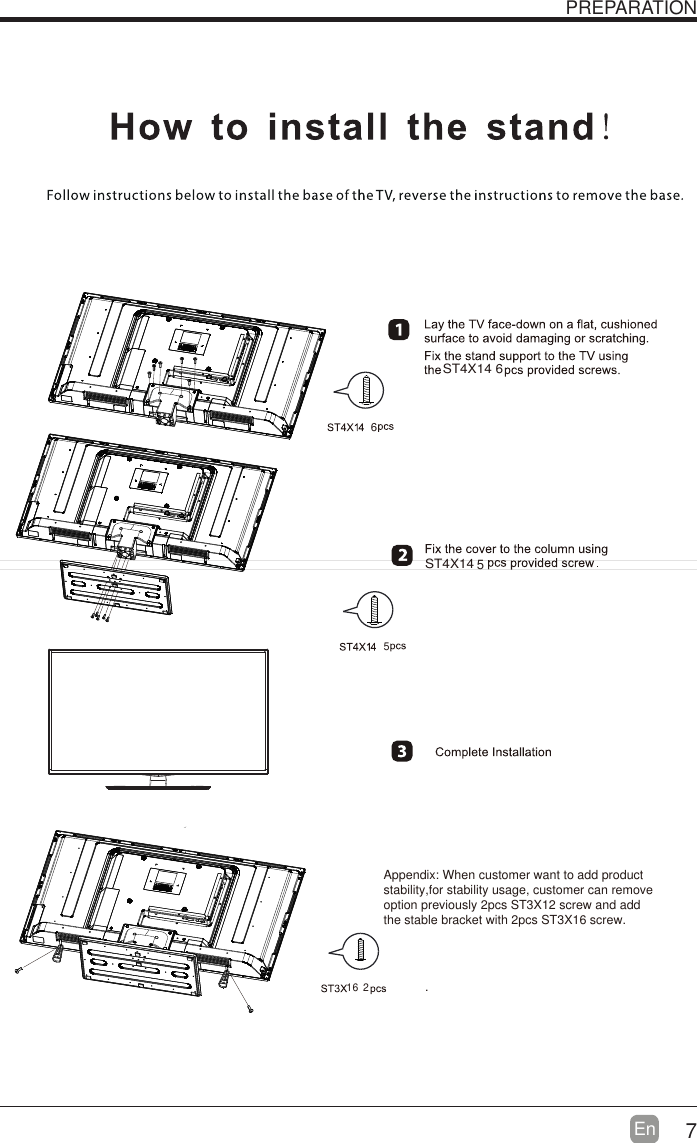
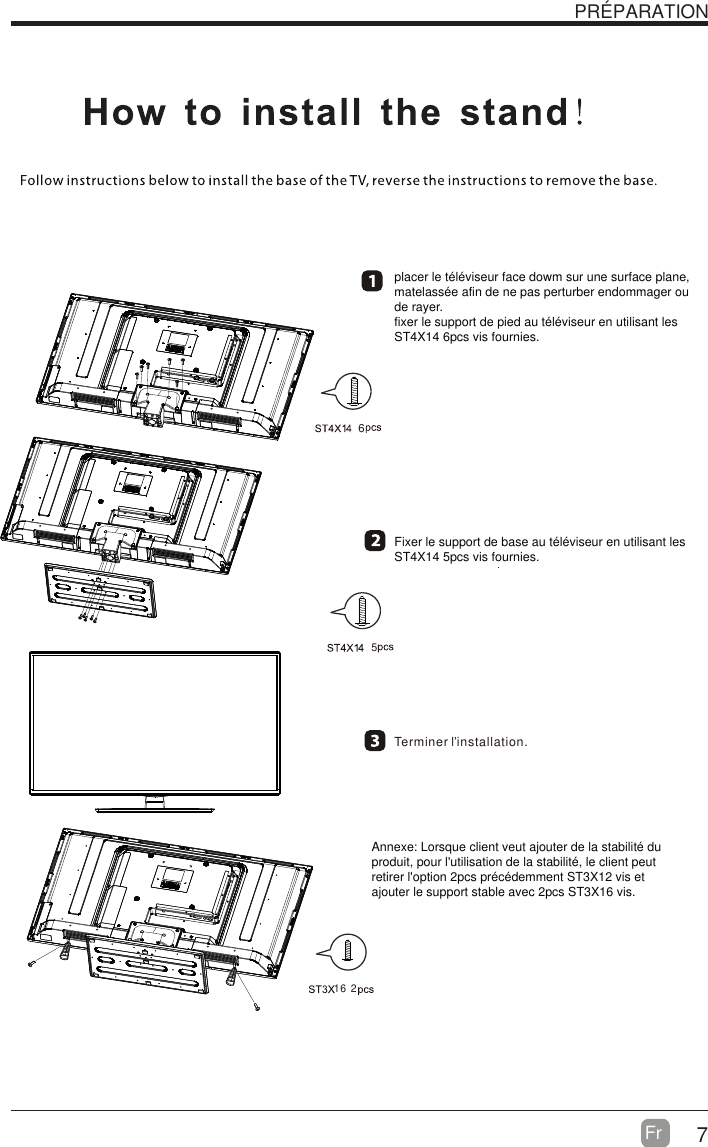
7En  PREPARATIONAppendix: When customer want to add productstability,for stability usage, customer can removeoption previously 2pcs ST3X12 screw and add the stable bracket with 2pcs ST3X16 screw.. 16ST4X14 6 ST4X14 2655
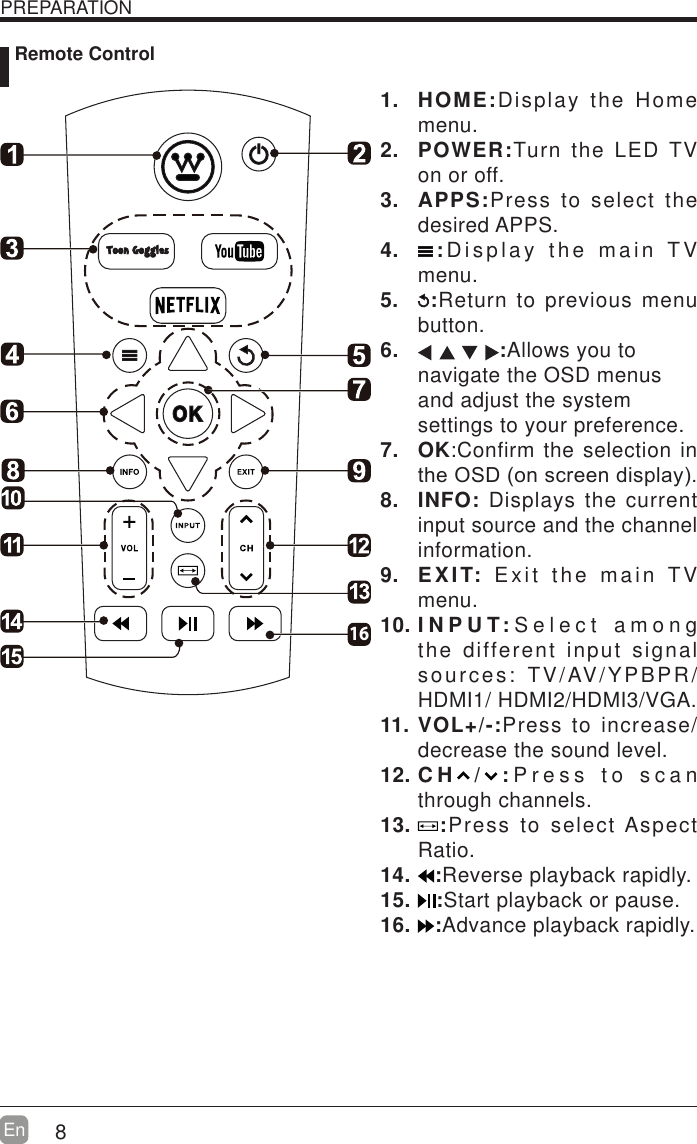
8En  PREPARATION Remote Control1. HOME:Display the Home menu.2. POWER:Turn the LED TV on or off.3. APPS:Press to select the desired APPS.4.  :Display the main TV menu.5.  :Return to previous menu button.6.  :Allows you to navigate the OSD menus and adjust the system settings to your preference.7. OK:Confirm the selection in WKH26'RQVFUHHQGLVSOD\8. INFO: Displays the current input source and the channel information.9. EXIT: Exit the main TV menu.10. I N P U T: Select among the different input signal sources: TV/AV/YPBPR/HDMI1/ HDMI2/HDMI3/VGA.11. VOL+/-:Press to increase/decrease the sound level.12. C H / : Press to scan through channels.13.  :Press to select Aspect Ratio.14.  :Reverse playback rapidly.15.  :Start playback or pause.16.  :Advance playback rapidly.16
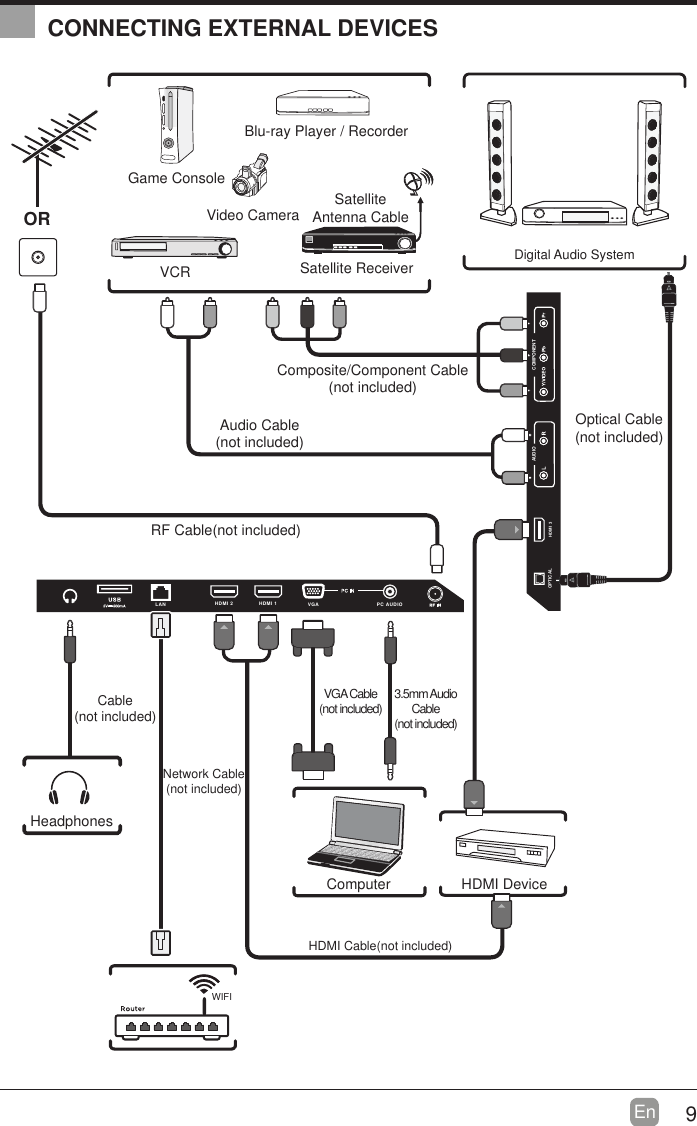
9En  CONNECTING EXTERNAL DEVICESCOMPONENTAUDIOHDMI 3OPTICALHDMI 2 HDMI 1 PC AUDIOVGALANRF Cable(not included)Audio Cable(not included)Composite/Component Cable(not included)Video CameraGame ConsoleBlu-ray Player / RecorderVCR Satellite ReceiverSatelliteAntenna CableORHDMI DeviceComputerDigital Audio SystemVGA Cable(not included) 3.5mm Audio Cable(not included)HeadphonesCable(not included)HDMI Cable(not included)Optical Cable(not included)WIFINetwork Cable(not included)
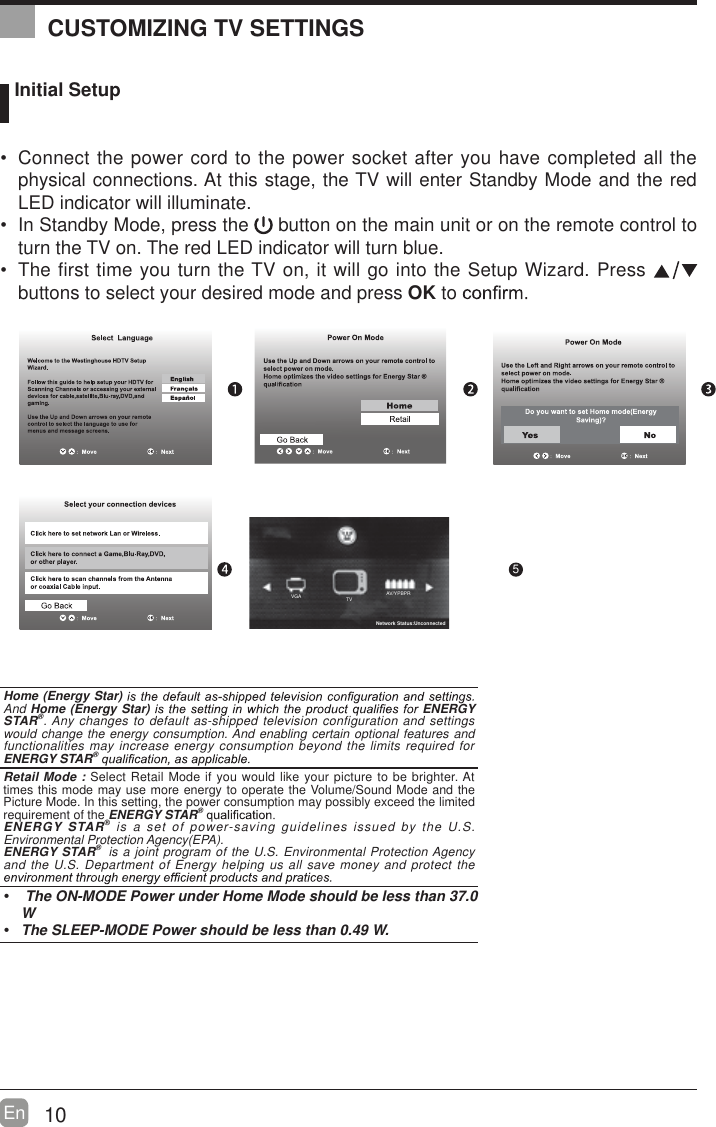
10En   Initial Setup Connect the power cord to the power socket after you have completed all the physical connections. At this stage, the TV will enter Standby Mode and the red LED indicator will illuminate.  In Standby Mode, press the   button on the main unit or on the remote control to turn the TV on. The red LED indicator will turn blue. The first time you turn the TV on, it will go into the Setup Wizard. Press   buttons to select your desired mode and press OK to     OK :NextHome (Energy Star) And Home (Energy Star)  ENERGY STAR®. Any changes to default as-shipped television configuration and settings would change the energy consumption. And enabling certain optional features and functionalities may increase energy consumption beyond the limits required for ENERGY STAR® Retail Mode : Select Retail Mode if you would like your picture to be brighter. At times this mode may use more energy to operate the Volume/Sound Mode and the Picture Mode. In this setting, the power consumption may possibly exceed the limited requirement of the ENERGY STAR® ENERGY STAR® is a set of power-saving guidelines issued by the U.S. Environmental Protection Agency(EPA).ENERGY STAR®  is a joint program of the U.S. Environmental Protection Agency and the U.S. Department of Energy helping us all save money and protect the   The ON-MODE Power under Home Mode should be less than 37.0 W The SLEEP-MODE Power should be less than 0.49 W.CUSTOMIZING TV SETTINGS5AV/YPBPRTVVGANetwork Status:Unconnected
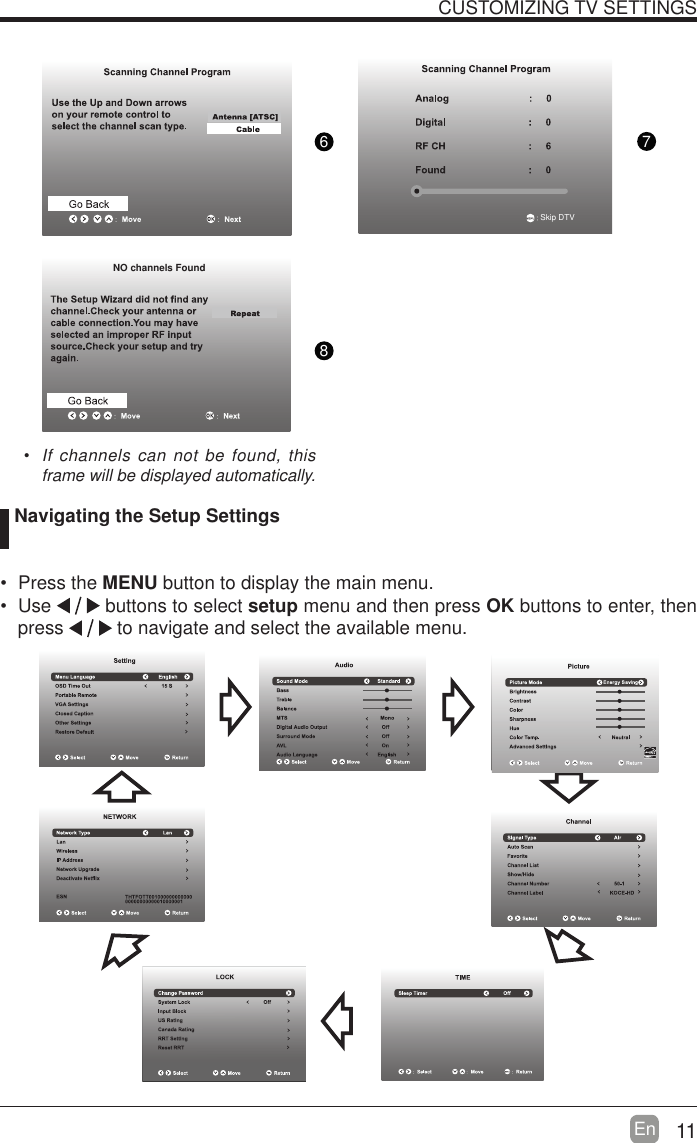
11En  CUSTOMIZING TV SETTINGS  If channels can not be found, this frame will be displayed automatically.  Navigating the Setup Settings Press the MENU button to display the main menu.  Use   buttons to select setup menu and then press OK buttons to enter, then press   to navigate and select the available menu.876 NO channels FoundSkip DTV
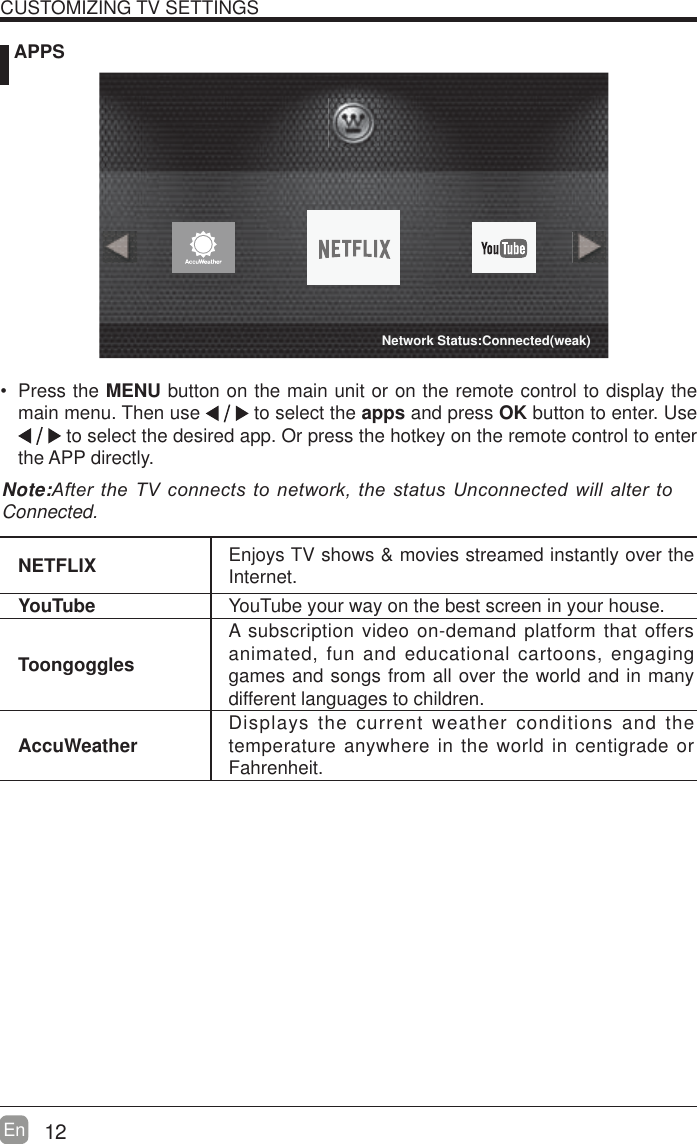
12En   APPSNETFLIX Enjoys TV shows & movies streamed instantly over the Internet.YouTube YouTube your way on the best screen in your house.ToongogglesA subscription video on-demand platform that offers animated, fun and educational cartoons, engaging games and songs from all over the world and in many different languages to children.AccuWeather Displays the current weather conditions and the temperature anywhere in the world in centigrade or Fahrenheit.CUSTOMIZING TV SETTINGS Press the MENU button on the main unit or on the remote control to display the main menu. Then use   to select the apps and press OK button to enter. Use  to select the desired app. Or press the hotkey on the remote control to enter the APP directly.Note:$IWHUWKH79FRQQHFWV WRQHWZRUNWKHVWDWXV8QFRQQHFWHGZLOODOWHUWRConnected.Network Status:Connected(weak)
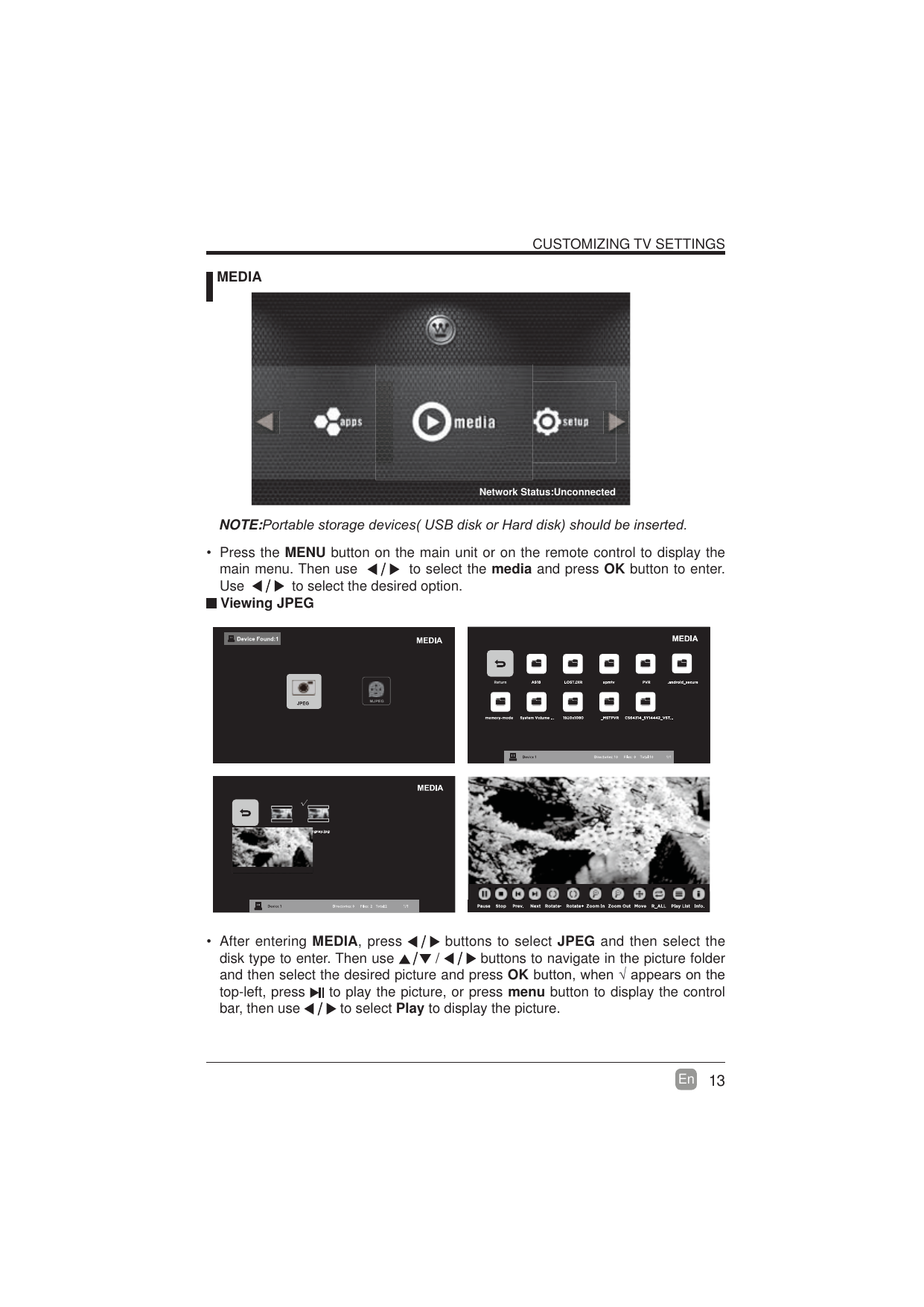
13En  CUSTOMIZING TV SETTINGS MEDIANOTE:3RUWDEOHVWRUDJHGHYLFHV86%GLVNRU+DUGGLVNVKRXOGEHLQVHUWHG Viewing JPEG After entering MEDIA, press   buttons to select JPEG and then select the disk type to enter. Then use   /   buttons to navigate in the picture folder and then select the desired picture and press OKEXWWRQZKHQ¥DSSHDUVRQWKHtop-left, press   to play the picture, or press menu button to display the control bar, then use   to select Play to display the picture. Press the MENU button on the main unit or on the remote control to display the main menu. Then use     to select the media and press OK button to enter. Use     to select the desired option.Network Status:Unconnected
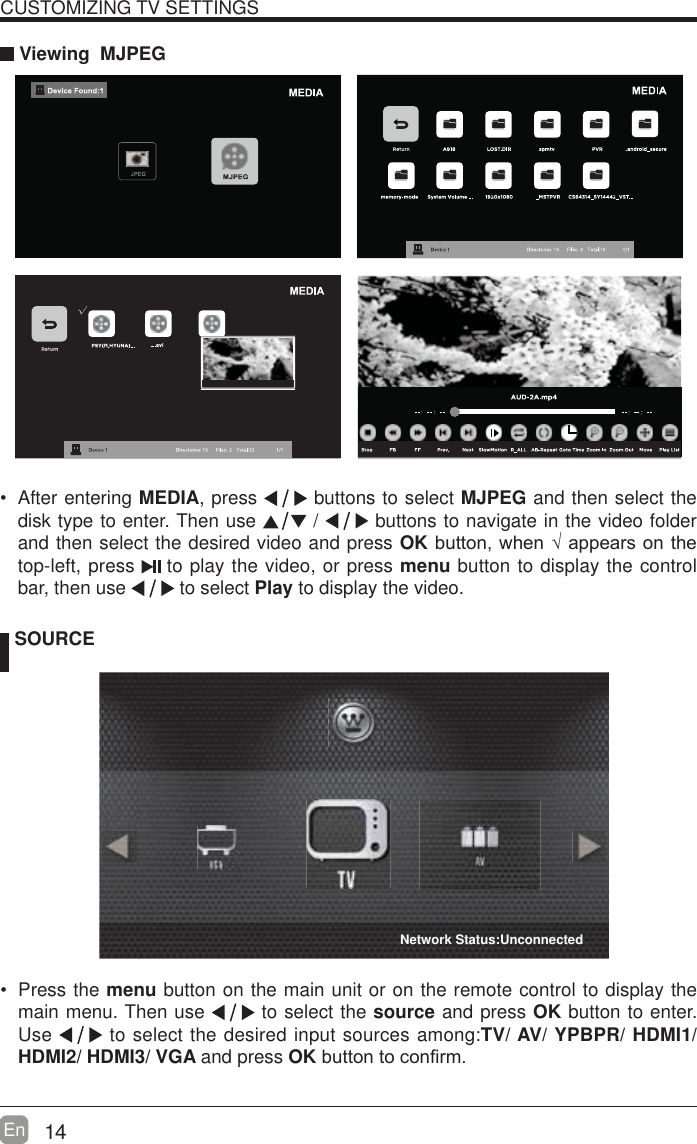
14En  CUSTOMIZING TV SETTINGS Viewing  MJPEG SOURCE Press the menu button on the main unit or on the remote control to display the main menu. Then use   to select the source and press OK button to enter. Use   to select the desired input sources among:TV/ AV/ YPBPR/ HDMI1/ HDMI2/ HDMI3/ VGA and press OKEXWWRQWRFRQ¿UP  After entering MEDIA, press   buttons to select MJPEG and then select the disk type to enter. Then use   /   buttons to navigate in the video folder and then select the desired video and press OKEXWWRQZKHQ¥DSSHDUVRQWKHtop-left, press   to play the video, or press menu button to display the control bar, then use   to select Play to display the video.    Network Status:Unconnected
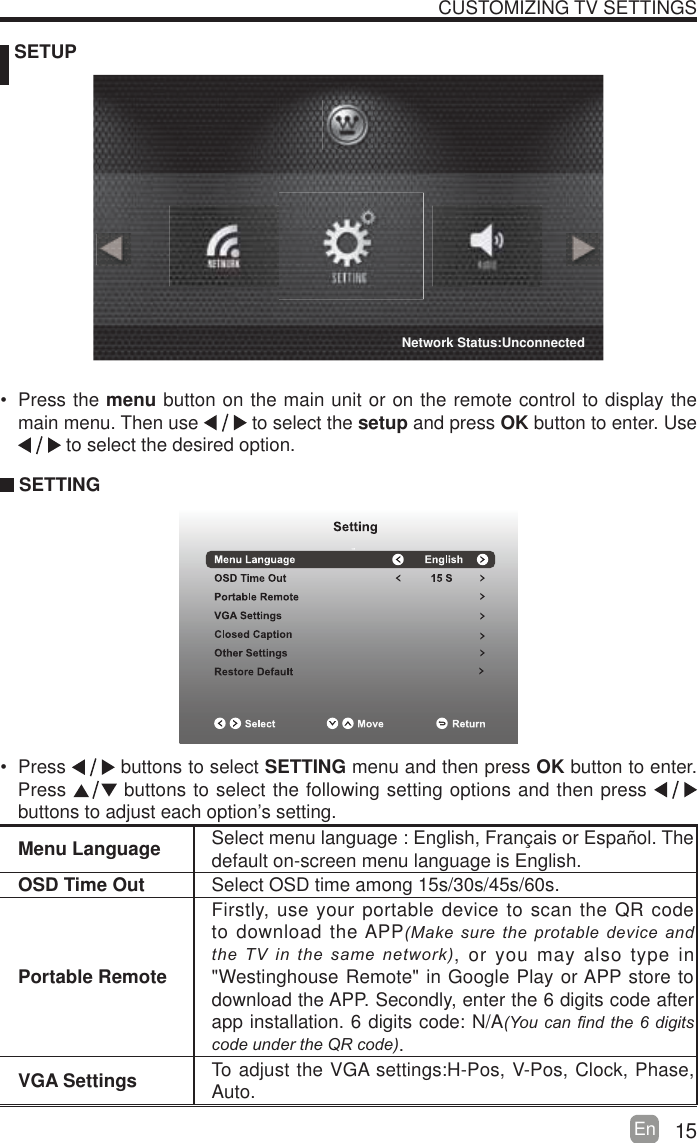
15En   SETUPCUSTOMIZING TV SETTINGSMenu Language Select menu language : English, Français or Español. Thedefault on-screen menu language is English.OSD Time Out Select OSD time among 15s/30s/45s/60s.Portable RemoteFirstly, use your portable device to scan the QR code to download the APP0DNHVXUHWKH SURWDEOHGHYLFHDQGWKH79LQWKHVDPHQHWZRUN, or you may also type in "Westinghouse Remote" in Google Play or APP store to download the APP. Secondly, enter the 6 digits code after app installation. 6 digits code: N/A<RXFDQ¿QGWKH GLJLWVFRGHXQGHUWKH45FRGH.VGA Settings To adjust the VGA settings:H-Pos, V-Pos, Clock, Phase, Auto. Press the menu button on the main unit or on the remote control to display the main menu. Then use   to select the setup and press OK button to enter. Use  to select the desired option.  SETTING Press   buttons to select SETTING menu and then press OK button to enter. Press   buttons to select the following setting options and then press    buttons to adjust each option’s setting. Network Status:Unconnected
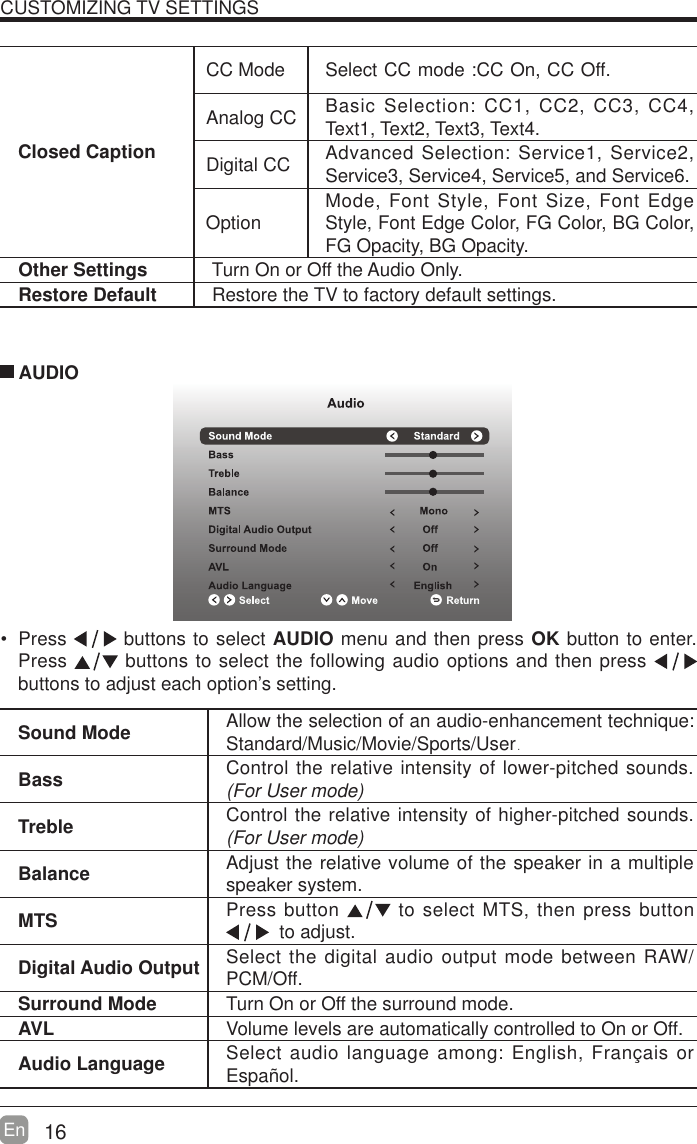
16En  CUSTOMIZING TV SETTINGSClosed CaptionCC Mode Select CC mode :CC On, CC Off.Analog CC Basic Selection: CC1, CC2, CC3, CC4, Text1, Text2, Text3, Text4.Digital CC Advanced Selection: Service1, Service2, Service3, Service4, Service5, and Service6.Option Mode, Font Style, Font Size, Font Edge Style, Font Edge Color, FG Color, BG Color, FG Opacity, BG Opacity.Other Settings Turn On or Off the Audio Only.Restore Default Restore the TV to factory default settings. Press   buttons to select AUDIO menu and then press OK button to enter. Press   buttons to select the following audio options and then press   buttons to adjust each option’s setting.  AUDIOSound Mode Allow the selection of an audio-enhancement technique: Standard/Music/Movie/Sports/User.Bass Control the relative intensity of lower-pitched sounds. (For User mode)Treble Control the relative intensity of higher-pitched sounds. (For User mode)Balance Adjust the relative volume of the speaker in a multiple speaker system.MTS Press button   to select MTS, then press button   to adjust.Digital Audio Output Select the digital audio output mode between RAW/PCM/Off.Surround Mode Turn On or Off the surround mode.AVL Volume levels are automatically controlled to On or Off.Audio Language Select audio language among: English, Français or Español.
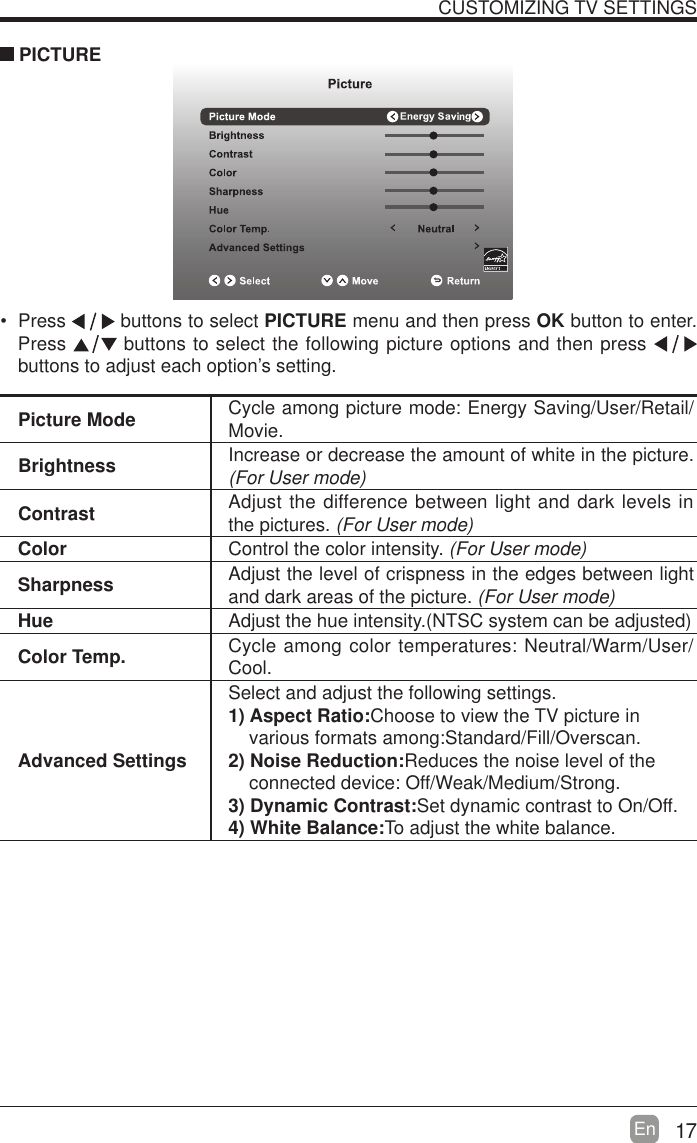
17En  CUSTOMIZING TV SETTINGS Press   buttons to select PICTURE menu and then press OK button to enter. Press   buttons to select the following picture options and then press   buttons to adjust each option’s setting.  PICTUREPicture Mode Cycle among picture mode: Energy Saving/User/Retail/Movie.Brightness Increase or decrease the amount of white in the picture. (For User mode)Contrast Adjust the difference between light and dark levels in the pictures. (For User mode)Color Control the color intensity. (For User mode)Sharpness Adjust the level of crispness in the edges between light and dark areas of the picture. (For User mode)Hue Adjust the hue intensity.(NTSC system can be adjusted)Color Temp. Cycle among color temperatures: Neutral/Warm/User/Cool.Advanced SettingsSelect and adjust the following settings.1) Aspect Ratio:Choose to view the TV picture in       various formats among:Standard/Fill/Overscan.2) Noise Reduction:Reduces the noise level of the        connected device: Off/Weak/Medium/Strong.3) Dynamic Contrast:Set dynamic contrast to On/Off.4) White Balance:To adjust the white balance.
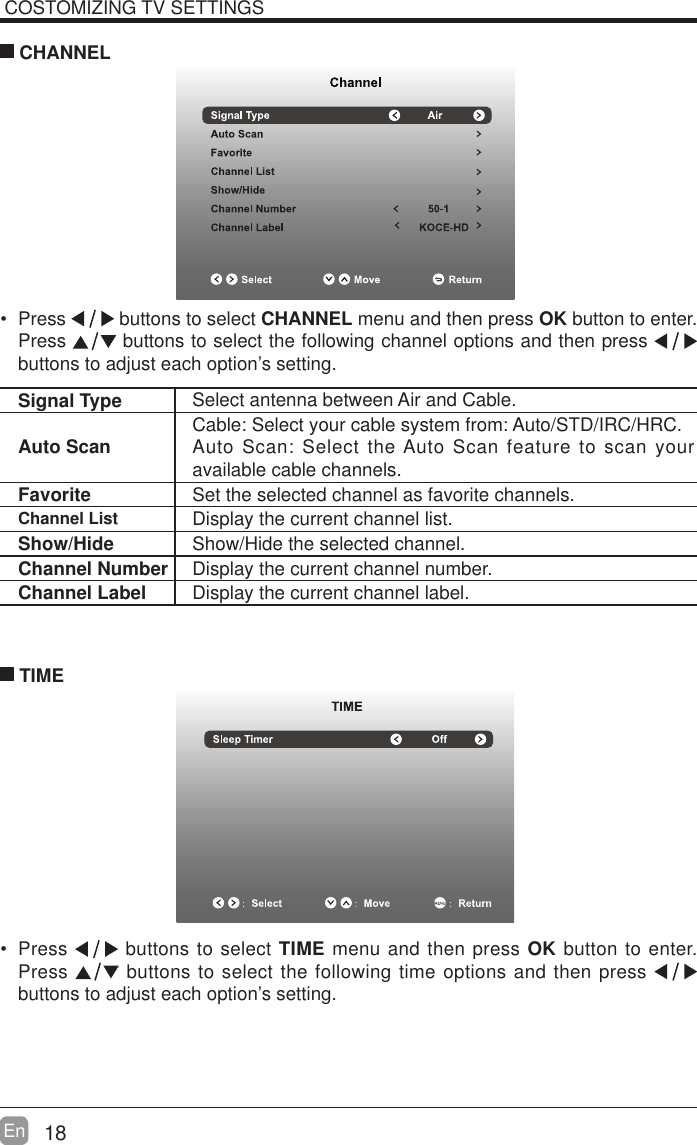
18En  COSTOMIZING TV SETTINGS Press   buttons to select CHANNEL menu and then press OK button to enter. Press   buttons to select the following channel options and then press    buttons to adjust each option’s setting.  CHANNELSignal Type Select antenna between Air and Cable. Auto Scan Cable: Select your cable system from: Auto/STD/IRC/HRC.Auto Scan: Select the Auto Scan feature to scan your available cable channels.Favorite Set the selected channel as favorite channels.Channel List Display the current channel list.Show/Hide Show/Hide the selected channel.Channel Number Display the current channel number.Channel Label Display the current channel label. Press   buttons to select TIME menu and then press OK button to enter. Press   buttons to select the following time options and then press buttons to adjust each option’s setting.      TIME
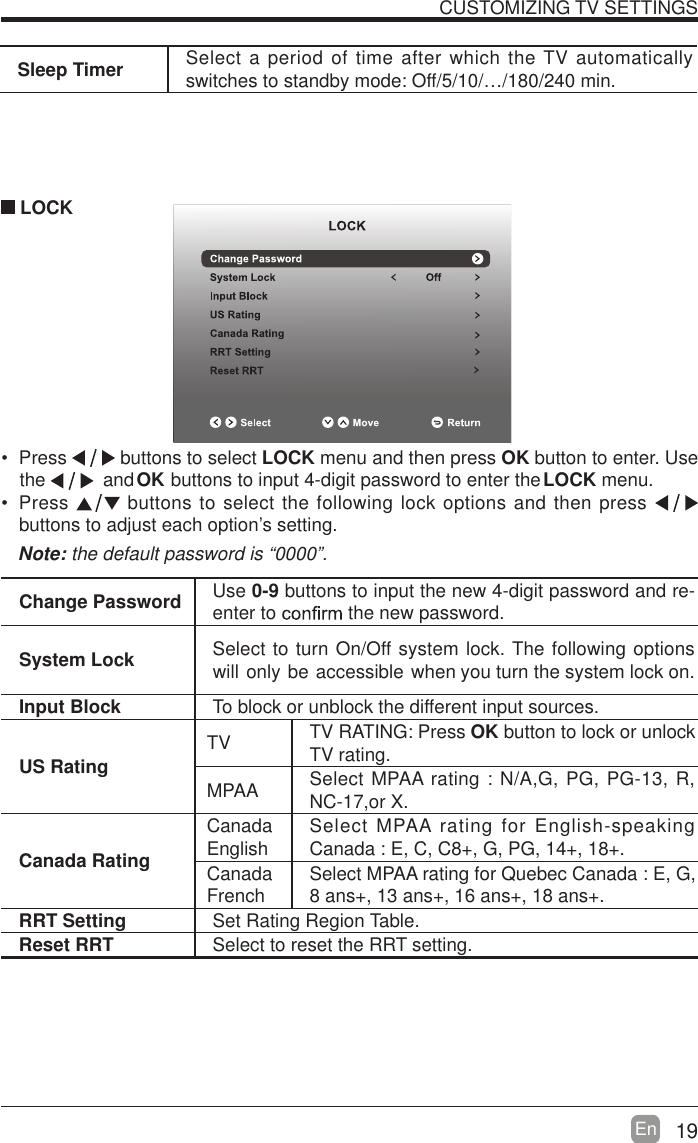
19En  Sleep Timer Select a period of time after which the TV automatically switches to standby mode: Off/5/10/…/180/240 min. Press   buttons to select LOCK menu and then press OK  button to enter. Use the           and       buttons to input 4-digit password to enter the LOCKOK  menu. Press   buttons to select the following lock options and then press buttons to adjust each option’s setting. LOCKNote: the default password is “0000”. Change Password Use 0-9 buttons to input the new 4-digit password and re-enter to   the new password.System Lock Select to turn On/Off system lock. The following options      will only be accessible when you turn the system lock on.Input Block To block or unblock the different input sources. US Rating TV TV RATING: Press OK button to lock or unlock TV rating.MPAA Select MPAA rating : N/A,G, PG, PG-13, R, NC-17,or X.Canada RatingCanada English Select MPAA rating for English-speaking Canada : E, C, C8+, G, PG, 14+, 18+.Canada French Select MPAA rating for Quebec Canada : E, G, 8 ans+, 13 ans+, 16 ans+, 18 ans+.RRT Setting Set Rating Region Table.Reset RRT Select to reset the RRT setting.CUSTOMIZING TV SETTINGS
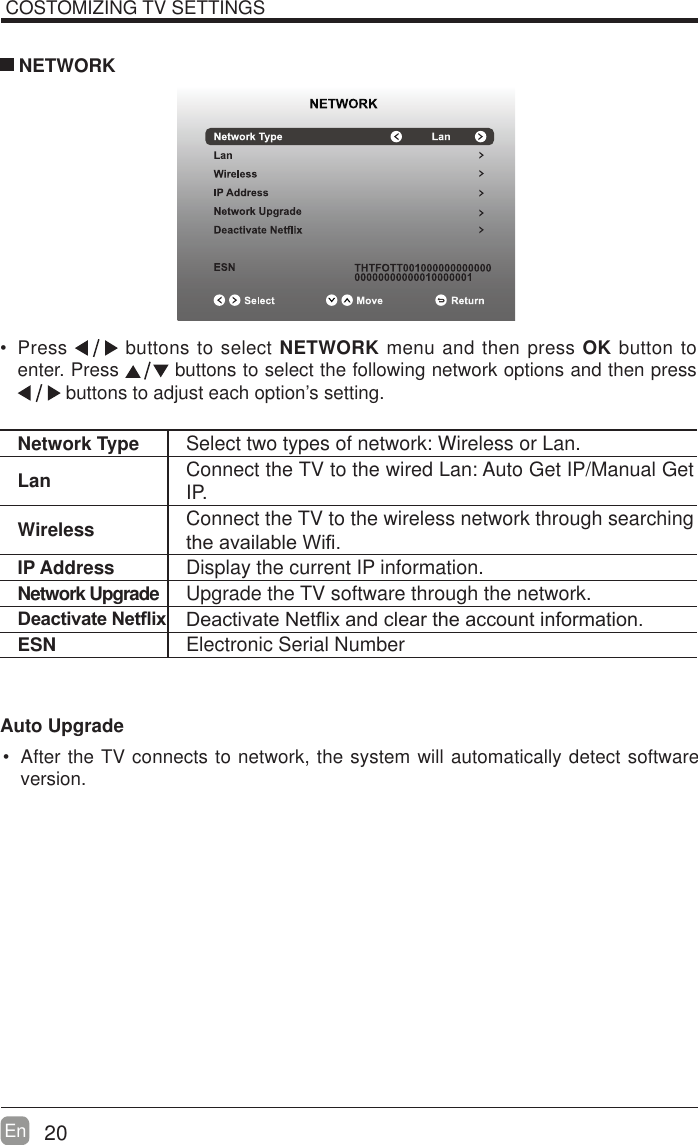
20En   Press   buttons to select NETWORK menu and then press OK button to enter. Press   buttons to select the following network options and then press  buttons to adjust each option’s setting.   NETWORKNetwork Type Select two types of network: Wireless or Lan.Lan Connect the TV to the wired Lan: Auto Get IP/Manual Get IP. Wireless Connect the TV to the wireless network through searching WKHDYDLODEOH:L¿IP Address Display the current IP information.Network Upgrade Upgrade the TV software through the network.'HDFWLYDWH1HWÀL[ 'HDFWLYDWH1HWÀL[DQGFOHDUWKHDFFRXQWLQIRUPDWLRQESN Electronic Serial NumberAuto Upgrade After the TV connects to network, the system will automatically detect software version. COSTOMIZING TV SETTINGS
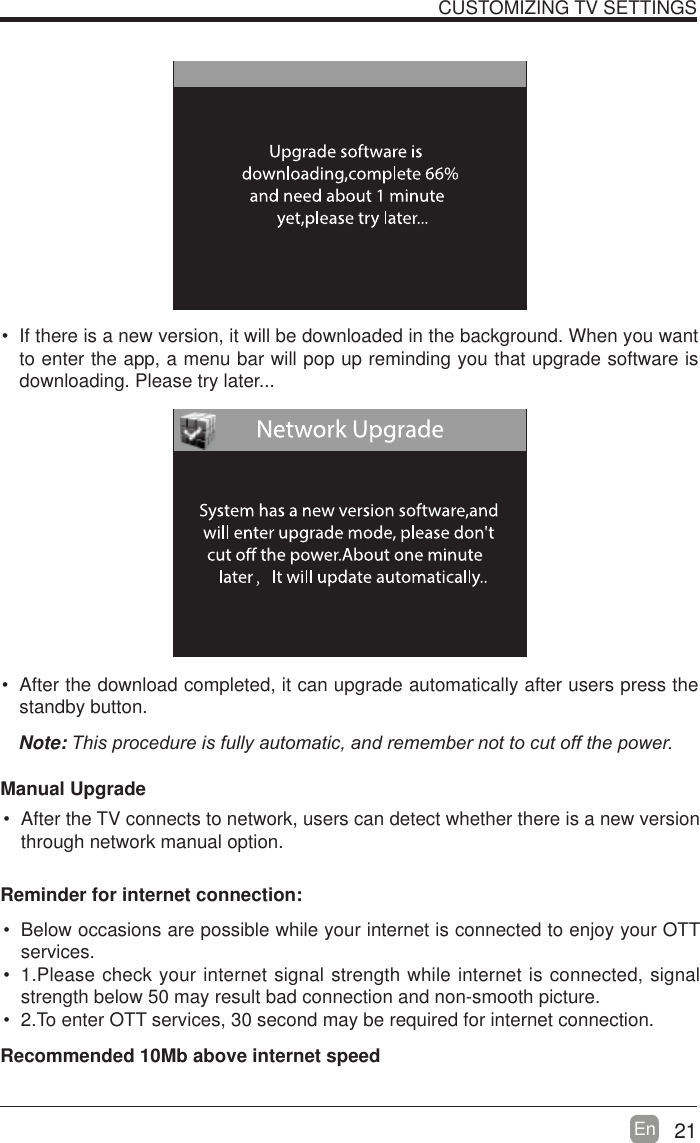
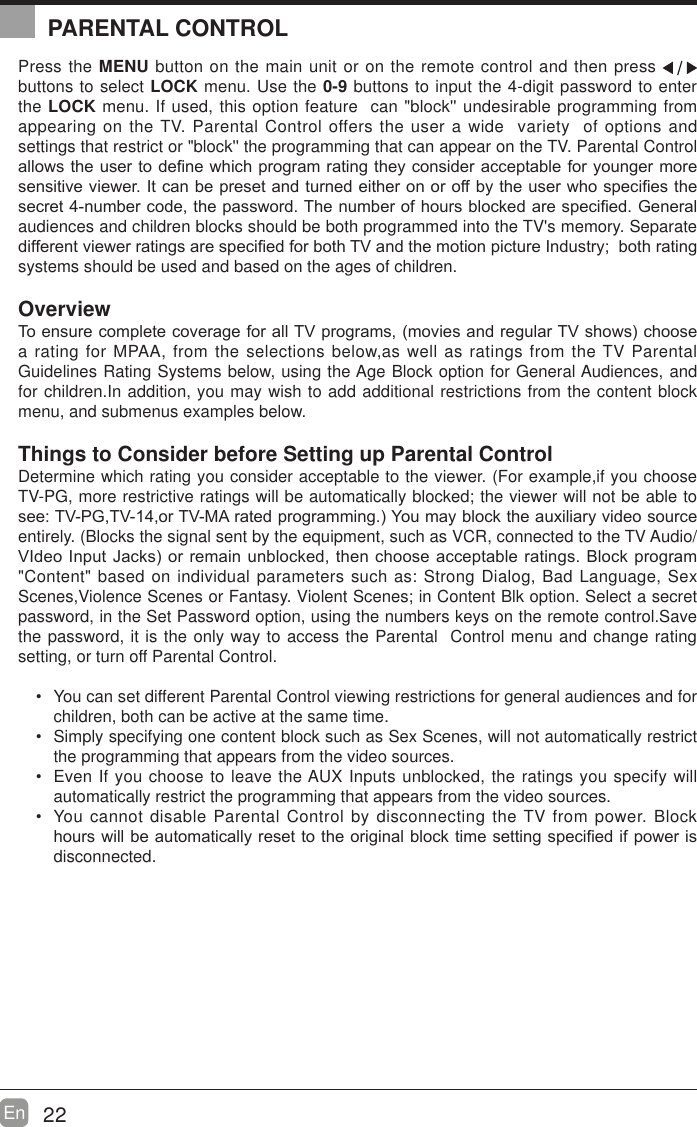
21En   If there is a new version, it will be downloaded in the background. When you want to enter the app, a menu bar will pop up reminding you that upgrade software is downloading. Please try later... After the download completed, it can upgrade automatically after users press the standby button.Note:7KLVSURFHGXUHLVIXOO\DXWRPDWLFDQGUHPHPEHUQRWWRFXWRIIWKHSRZHUManual Upgrade After the TV connects to network, users can detect whether there is a new version through network manual option.  CUSTOMIZING TV SETTINGS Below occasions are possible while your internet is connected to enjoy your OTT services. 1.Please check your internet signal strength while internet is connected, signal strength below 50 may result bad connection and non-smooth picture. 2.To enter OTT services, 30 second may be required for internet connection.Reminder for internet connection:Recommended 10Mb above internet speed
22En  Press the MENU button on the main unit or on the remote control and then press   buttons to select LOCK menu. Use the 0-9 buttons to input the 4-digit password to enter the LOCK menu. If used, this option feature  can "block'' undesirable programming from appearing on the TV. Parental Control offers the user a wide  variety  of options and settings that restrict or "block'' the programming that can appear on the TV. Parental Control DOORZVWKHXVHUWRGH¿QHZKLFKSURJUDPUDWLQJWKH\FRQVLGHUDFFHSWDEOHIRU\RXQJHUPRUHVHQVLWLYHYLHZHU,WFDQEHSUHVHWDQGWXUQHGHLWKHURQRURIIE\WKHXVHUZKRVSHFL¿HVWKHVHFUHWQXPEHUFRGHWKHSDVVZRUG7KHQXPEHURIKRXUVEORFNHGDUHVSHFL¿HG*HQHUDOaudiences and children blocks should be both programmed into the TV's memory. Separate GLIIHUHQWYLHZHUUDWLQJVDUHVSHFL¿HGIRUERWK79DQGWKHPRWLRQSLFWXUH,QGXVWU\ERWKUDWLQJsystems should be used and based on the ages of children.Overview7RHQVXUHFRPSOHWHFRYHUDJHIRUDOO79SURJUDPVPRYLHVDQGUHJXODU79VKRZVFKRRVHa rating for MPAA, from the selections below,as well as ratings from the TV Parental Guidelines Rating Systems below, using the Age Block option for General Audiences, and for children.In addition, you may wish to add additional restrictions from the content block menu, and submenus examples below.Things to Consider before Setting up Parental ControlDetermine which rating you consider acceptable to the viewer. (For example,if you choose TV-PG, more restrictive ratings will be automatically blocked; the viewer will not be able to VHH793*79RU790$UDWHGSURJUDPPLQJ<RXPD\EORFNWKHDX[LOLDU\YLGHRVRXUFHentirely. (Blocks the signal sent by the equipment, such as VCR, connected to the TV Audio/9,GHR,QSXW-DFNVRUUHPDLQXQEORFNHGWKHQFKRRVHDFFHSWDEOHUDWLQJV%ORFNSURJUDP"Content" based on individual parameters such as: Strong Dialog, Bad Language, Sex Scenes,Violence Scenes or Fantasy. Violent Scenes; in Content Blk option. Select a secret password, in the Set Password option, using the numbers keys on the remote control.Save the password, it is the only way to access the Parental  Control menu and change rating setting, or turn off Parental Control. You can set different Parental Control viewing restrictions for general audiences and for children, both can be active at the same time. Simply specifying one content block such as Sex Scenes, will not automatically restrict the programming that appears from the video sources. Even If you choose to leave the AUX Inputs unblocked, the ratings you specify will automatically restrict the programming that appears from the video sources. You cannot disable Parental Control by disconnecting the TV from power. Block KRXUVZLOOEHDXWRPDWLFDOO\UHVHWWRWKHRULJLQDOEORFNWLPHVHWWLQJVSHFL¿HGLISRZHULVdisconnected.PARENTAL CONTROL
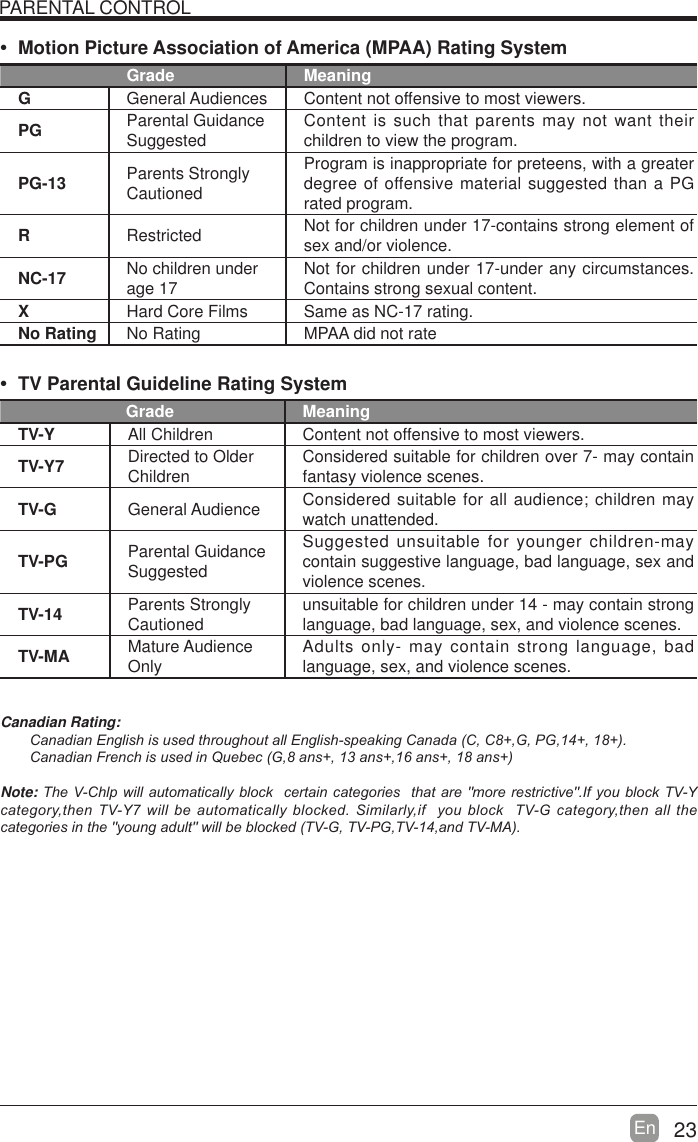
23En  PARENTAL CONTROL Motion Picture Association of America (MPAA) Rating SystemGrade MeaningGGeneral Audiences Content not offensive to most viewers.PG Parental Guidance Suggested Content is such that parents may not want their children to view the program.PG-13 Parents Strongly CautionedProgram is inappropriate for preteens, with a greater degree of offensive material suggested than a PG rated program.RRestricted  Not for children under 17-contains strong element of sex and/or violence.NC-17 No children under age 17 Not for children under 17-under any circumstances. Contains strong sexual content.XHard Core Films Same as NC-17 rating.No Rating No Rating MPAA did not rate TV Parental Guideline Rating System Grade MeaningTV-Y All Children Content not offensive to most viewers.TV-Y7 Directed to Older Children Considered suitable for children over 7- may contain fantasy violence scenes.TV-G General Audience Considered suitable for all audience; children may watch unattended.TV-PG Parental Guidance SuggestedSuggested unsuitable for younger children-may contain suggestive language, bad language, sex and violence scenes.TV-14 Parents Strongly Cautioned unsuitable for children under 14 - may contain strong language, bad language, sex, and violence scenes.TV-MA Mature Audience Only Adults only- may contain strong language, bad language, sex, and violence scenes.Canadian Rating:&DQDGLDQ(QJOLVKLVXVHGWKURXJKRXWDOO(QJOLVKVSHDNLQJ&DQDGD&&*3*&DQDGLDQ)UHQFKLVXVHGLQ4XHEHF*DQVDQVDQVDQVNote:7KH9&KOSZLOODXWRPDWLFDOO\EORFNFHUWDLQFDWHJRULHVWKDWDUHPRUHUHVWULFWLYH,I\RXEORFN79<FDWHJRU\WKHQ79<ZLOOEHDXWRPDWLFDOO\EORFNHG6LPLODUO\LI\RXEORFN79*FDWHJRU\WKHQDOOWKHFDWHJRULHVLQWKH\RXQJDGXOWZLOOEHEORFNHG79*793*79DQG790$
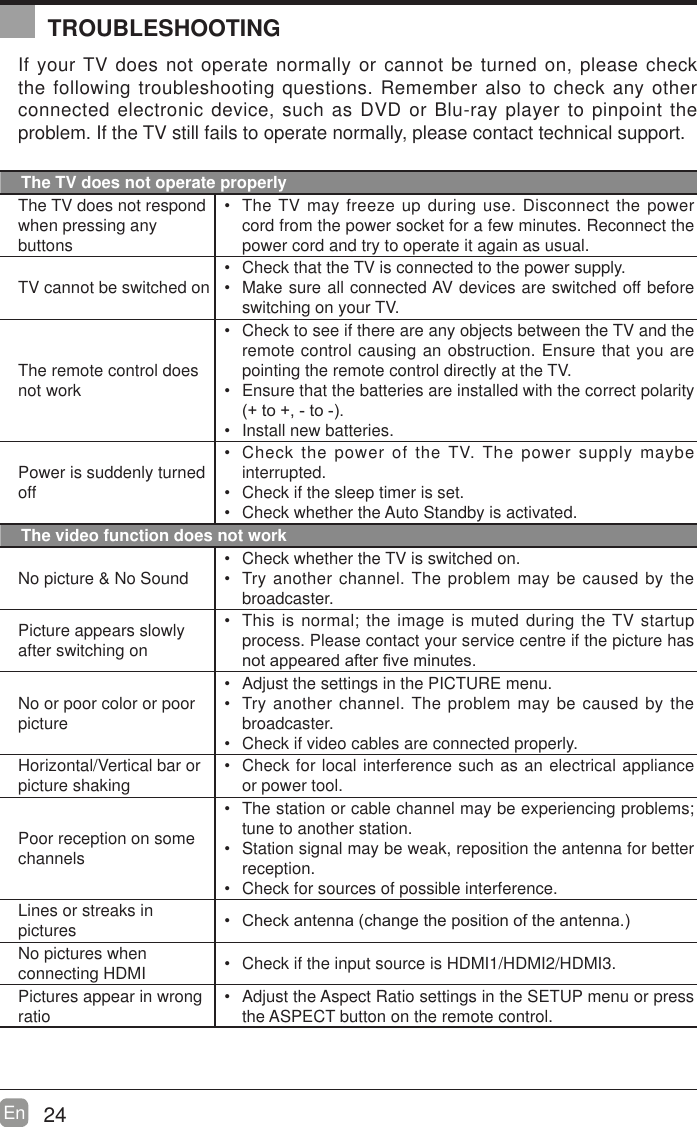
24En  If your TV does not operate normally or cannot be turned on, please check the following troubleshooting questions. Remember also to check any other connected electronic device, such as DVD or Blu-ray player to pinpoint the problem. If the TV still fails to operate normally, please contact technical support.The TV does not operate properlyThe TV does not respond when pressing any buttons The TV may freeze up during use. Disconnect the power cord from the power socket for a few minutes. Reconnect the power cord and try to operate it again as usual.TV cannot be switched on Check that the TV is connected to the power supply. Make sure all connected AV devices are switched off before switching on your TV.The remote control does not work Check to see if there are any objects between the TV and the remote control causing an obstruction. Ensure that you are pointing the remote control directly at the TV. Ensure that the batteries are installed with the correct polarity WRWR Install new batteries. Power is suddenly turned off Check the power of the TV. The power supply maybe interrupted. Check if the sleep timer is set. Check whether the Auto Standby is activated. The video function does not workNo picture & No Sound Check whether the TV is switched on. Try another channel. The problem may be caused by the broadcaster.Picture appears slowly after switching on This is normal; the image is muted during the TV startup process. Please contact your service centre if the picture has QRWDSSHDUHGDIWHU¿YHPLQXWHVNo or poor color or poor picture Adjust the settings in the PICTURE menu. Try another channel. The problem may be caused by the broadcaster. Check if video cables are connected properly.Horizontal/Vertical bar or picture shaking Check for local interference such as an electrical appliance or power tool.Poor reception on some channels The station or cable channel may be experiencing problems; tune to another station. Station signal may be weak, reposition the antenna for better reception. Check for sources of possible interference.Lines or streaks in pictures  &KHFNDQWHQQDFKDQJHWKHSRVLWLRQRIWKHDQWHQQDNo pictures when connecting HDMI  Check if the input source is HDMI1/HDMI2/HDMI3.Pictures appear in wrong ratio Adjust the Aspect Ratio settings in the SETUP menu or press the ASPECT button on the remote control.TROUBLESHOOTING
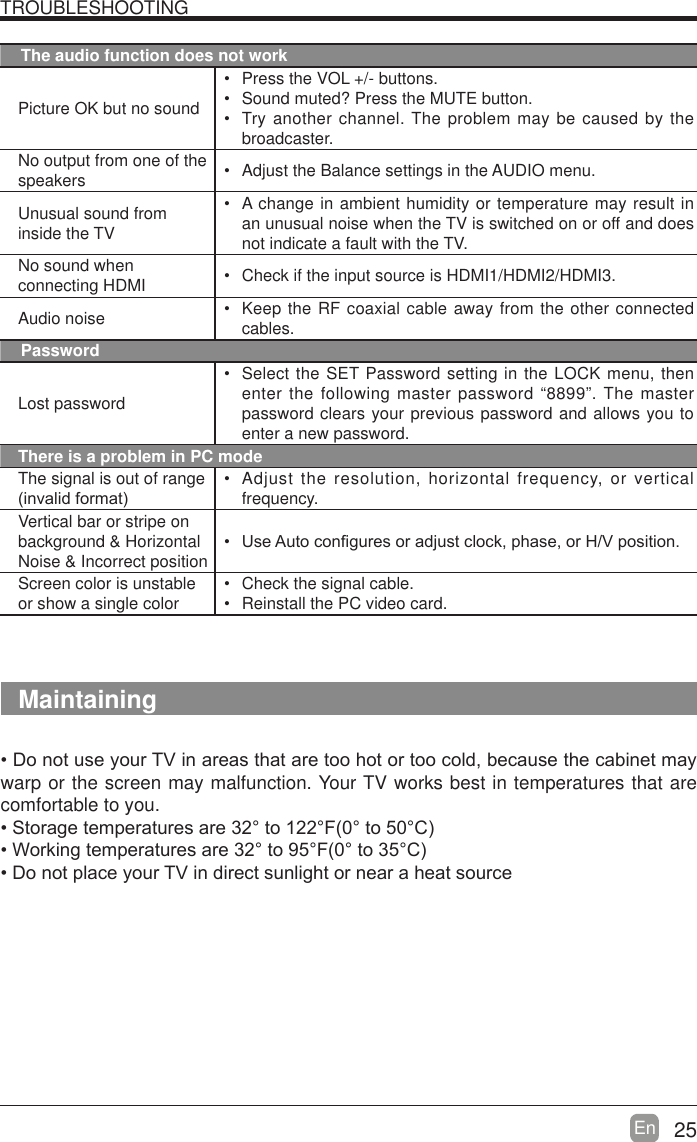
25En  TROUBLESHOOTINGThe audio function does not workPicture OK but no sound Press the VOL +/- buttons. Sound muted? Press the MUTE button. Try another channel. The problem may be caused by the broadcaster.No output from one of the speakers  Adjust the Balance settings in the AUDIO menu.Unusual sound from inside the TV A change in ambient humidity or temperature may result in an unusual noise when the TV is switched on or off and does not indicate a fault with the TV. No sound when connecting HDMI  Check if the input source is HDMI1/HDMI2/HDMI3.Audio noise  Keep the RF coaxial cable away from the other connected cables.PasswordLost password Select the SET Password setting in the LOCK menu, then enter the following master password “8899”. The master password clears your previous password and allows you to enter a new password.There is a problem in PC modeThe signal is out of range LQYDOLGIRUPDW Adjust the resolution, horizontal frequency, or vertical frequency.Vertical bar or stripe on background & Horizontal Noise & Incorrect position 8VH$XWRFRQ¿JXUHVRUDGMXVWFORFNSKDVHRU+9SRVLWLRQScreen color is unstable or show a single color Check the signal cable. Reinstall the PC video card.Maintaining'RQRWXVH\RXU79LQDUHDVWKDWDUHWRRKRWRUWRRFROGEHFDXVHWKHFDELQHWPD\warp or the screen may malfunction. Your TV works best in temperatures that are comfortable to you.6WRUDJHWHPSHUDWXUHVDUHWR)WR&:RUNLQJWHPSHUDWXUHVDUHWR)WR&'RQRWSODFH\RXU79LQGLUHFWVXQOLJKWRUQHDUDKHDWVRXUFH
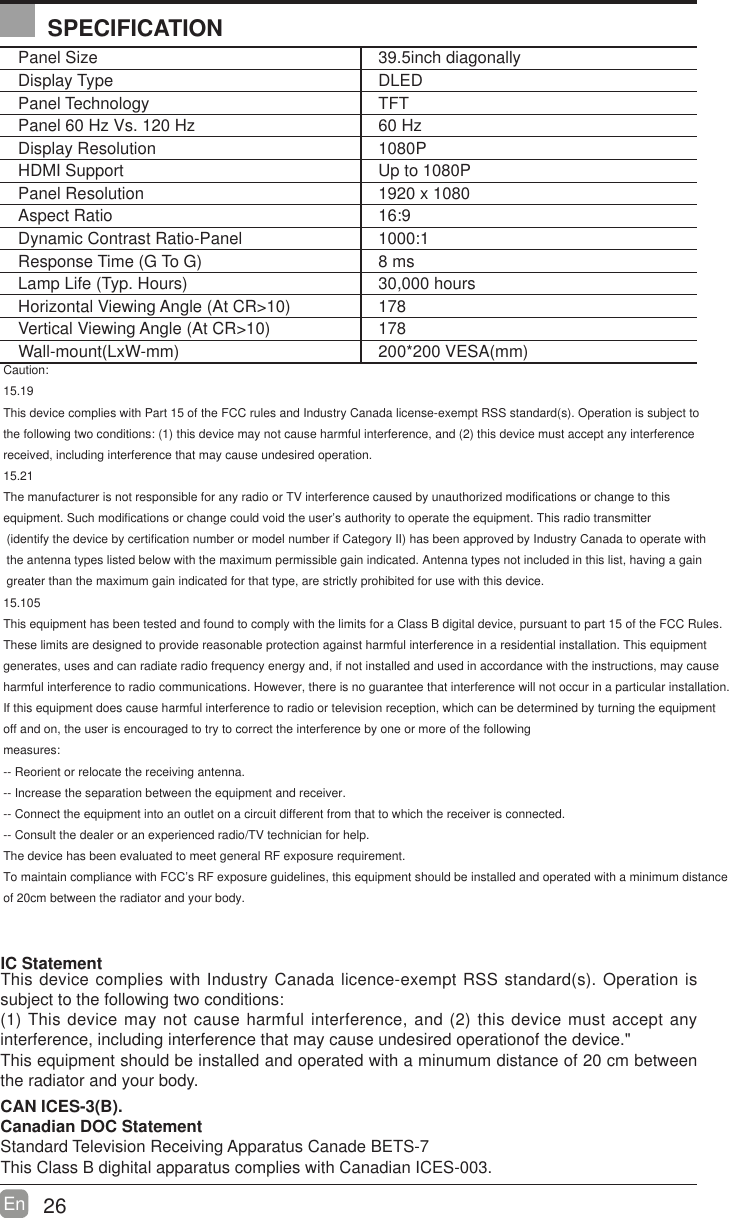
26En  Panel Size 39.5inch diagonally Display Type DLEDPanel Technology  TFTPanel 60 Hz Vs. 120 Hz 60 HzDisplay Resolution  1080PHDMI Support Up to 1080PPanel Resolution  1920 x 1080Aspect Ratio 16:9Dynamic Contrast Ratio-Panel 1000:1Response Time (G To G) 8 msLamp Life (Typ. Hours) 30,000 hoursHorizontal Viewing Angle (At CR>10) 178Vertical Viewing Angle (At CR>10) 178Wall-mount(LxW-mm) 200*200 VESA(mm)IC Statement This device complies with Industry Canada licence-exempt RSS standard(s). Operation is subject to the following two conditions:(1) This device may not cause harmful interference, and (2) this device must accept any interference, including interference that may caCaution:15.19This device complies with Part 15 of the FCC rules and Industry Canada license-exempt RSS standard(s). Operation is subject tothe following two conditions: (1) this device may not cause harmful interference, and (2) this device must accept any interference received, including interference that may cause undesired operation.15.21The manufacturer is not responsible for any radio or TV interference caused by unauthorized modifications or change to this equipment. Such modifications or change could void the user’s authority to operate the equipment. This radio transmitter (identify the device by certification number or model number if Category II) has been approved by Industry Canada to operate with the antenna types listed below with the maximum permissible gain indicated. Antenna types not included in this list, having a gain greater than the maximum gain indicated for that type, are strictly prohibited for use with this device.15.105This equipment has been tested and found to comply with the limits for a Class B digital device, pursuant to part 15 of the FCC Rules.These limits are designed to provide reasonable protection against harmful interference in a residential installation. This equipmentgenerates, uses and can radiate radio frequency energy and, if not installed and used in accordance with the instructions, may causeharmful interference to radio communications. However, there is no guarantee that interference will not occur in a particular installation.If this equipment does cause harmful interference to radio or television reception, which can be determined by turning the equipmentoff and on, the user is encouraged to try to correct the interference by one or more of the followingmeasures: -- Reorient or relocate the receiving antenna. -- Increase the separation between the equipment and receiver. -- Connect the equipment into an outlet on a circuit different from that to which the receiver is connected. -- Consult the dealer or an experienced radio/TV technician for help.The device has been evaluated to meet general RF exposure requirement. To maintain compliance with FCC’s RF exposure guidelines, this equipment should be installed and operated with a minimum distanceof 20cm between the radiator and your body.use undesired operationof the device."This equipment should be installed and operated with a minumum distance of 20 cm between the radiator and your body.CAN ICES-3(B).Canadian DOC StatementStandard Television Receiving Apparatus Canade BETS-7This Class B dighital apparatus complies with Canadian ICES-003.SPECIFICATION
27En   If you want to know about these APP information or get more service. Please refer to following content.t Netix          You can call the following telephone for more help: 866-579-7172         If your matter is regarding customer service, please refer to https://contactus.netix.com/help for               alternative contact information.t YouTu b e           You can browse the following website for more help:         https://productforums.google.com/forum/#!categories/youtube/smart-tvst TG          You can call the following telephone for more help: 888-874-5411t AccuWeather          You can send E-mail to AccuWeather for more help: CustomerService@AccuWeather.com  OTT APP SERVICE
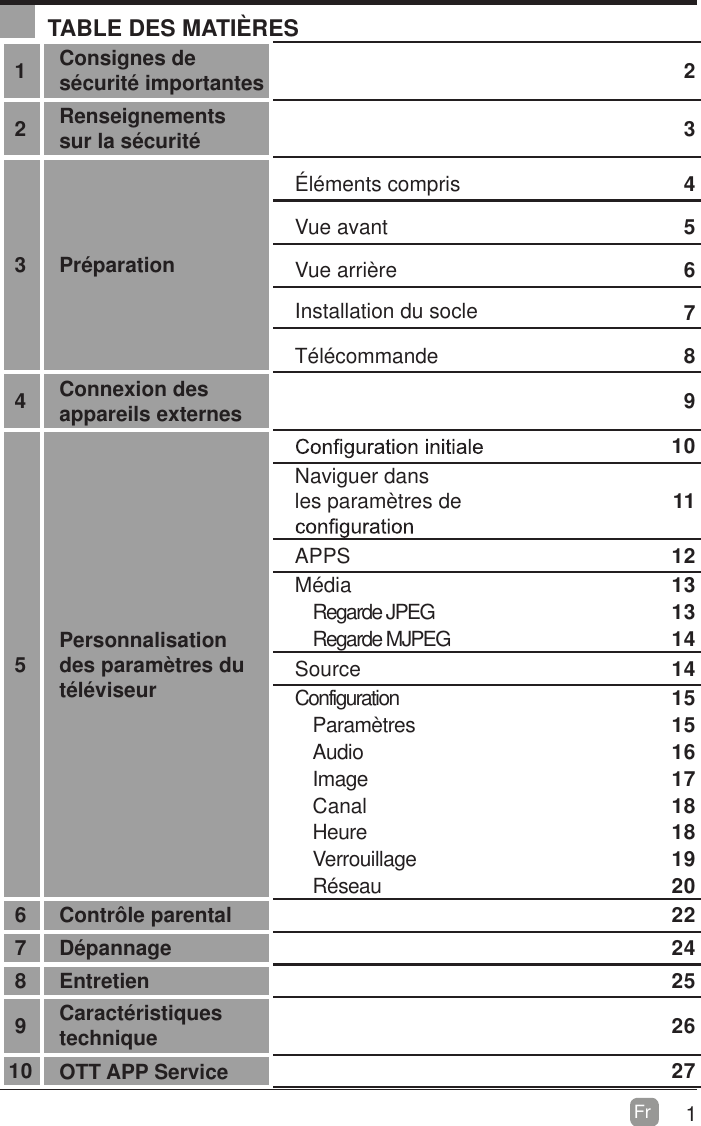
1Fr  TABLE DES MATIÈRES1Consignes de sécurité importantes 22Renseignements sur la sécurité 33 PréparationÉléments compris 4Vue avant 5Vue arrière 6Installation du socle 7Télécommande 84Connexion des appareils externes 95Personnalisation des paramètres du téléviseur10Naviguer dans les paramètres de  11APPS 12Média                                                                                 13Regarde JPEG  13Regarde MJPEG 14Source 14Configuration                                                                               15Paramètres 15Audio 16Image 17Canal 18Heure 18Verrouillage 19Réseau 206 Contrôle parental 227 Dépannage 248 Entretien 259Caractéristiques technique  2610 OTT APP Service 27
2Fr  CONSIGNES DE SÉCURITÉ IMPORTANTES Lisez ces consignes – Avant d’utiliser ce produit, vous devez lire toutes les consignes liées à la sécurité et au fonctionnement de l’appareil.  Conservez ces consignes – Nous vous conseillons de conserver les consignes liées à sécurité et au fonctionnement de l’appareil pour consultation future.  Observez toutes les mises en garde –Vous devez suivre toutes les consignes liées au fonctionnement et à l’utilisation de l’appareil.  Suivez toutes les consignes – Vous devez suivre toutes les consignes liées au fonctionnement et à l’utilisation de l’appareil.  N’utilisez pas cet appareil près de l’eau – L’appareil ne doit pas être utilisé près de l’eau ou dans un lieu humide, par exemple dans un sous-sol humide ou près d’une piscine et autres. Nettoyez uniquement à l’aide d’un chiffon sec. 1¶REVWUXH]SDVOHVRUL¿FHVGHYHQWLODWLRQ,QVWDOOH]O¶DSSDUHLOconformément aux consignes du fabriquant. N’installez pas l’appareil à proximité d’une source de chaleur comme un radiateur, une bouche de chaleur, une cuisinière ou d’autres appareils qui produisent de la FKDOHXU\FRPSULVOHVDPSOL¿FDWHXUV Ne contournez pas le dispositif de sécurité de la fiche polarisée ou de la fiche de mise à la terre. Une fiche polarisée comporte deux lames dont l’une est plus large TXHO¶DXWUH8QH¿FKHDYHFPLVHjODWHUUHFRPSRUWHGHX[lames, en plus d’une broche de masse. La lame plus large ou la broche de masse vise à assurer votre sécurité. 6LOD¿FKHIRXUQLHQ¶HVWSDVFRPSDWLEOHDYHFYRWUHSULVHadressez-vous à un électricien pour faire remplacer la prise, qui est probablement désuète.Protect the power cord from being walked on or pinched particularly at plugs, convenience receptacles, and the point where they exit from the apparatus. Placez le cordon d’alimentation de sorte qu’il ne risque pas d’être piétiné ou coincé, particulièrement au niveau de la ¿FKHHWGHODSULVHGHFRXUDQWDLQVLTX¶DXSRLQWGHVRUWLHde l’appareil. N’utilisez que les fixations et les accessoires recommandés par le fabricant. Utilisez l’appareil uniquement avec le chariot de manutention, le support, le trépied ou la table recommandé par le fabricant ou vendu avec l’appareil. Si vous utilisez XQFKDULRWGpSODFH]OHDYHFSUpFDXWLRQD¿QG¶pYLWHUGHOHrenverser et de vous blesser.  Débranchez l’appareil en cas d’orage ou lorsqu’il reste inutilisé pendant une période prolongée. Confiez toute réparation à un technicien qualifié. Une réparation est nécessaire si l’appareil a été endommagé d’une manière ou d’une autre, par exemple lorsque le cordon d’alimentation ou la fiche est endommagé, si un liquide a été renversé sur l’appareil, ou si des objets sont tombés sur celui-ci, l'appareil a été exposé à la pluie ou à l'humidité, s’il fonctionne mal ou s’il est tombé.Please keep the unit in a well-ventilated environment. Veuillez installer l’appareil à un endroit bien aéré.MISE EN GARDE : pour réduire les risques d’incendie et de choc électrique, n’exposez pas cet appareil à la pluie ou à l’humidité. Ne l’exposez pas non plus aux égouttements ou aux éclaboussures. Ne placez pas d’objets remplis de liquide, par exemple un vase, sur le dessus de l’appareil. MISE EN GARDE : n’exposez pas les piles à une chaleur excessive comme celle induite par la lumière du soleil, un feu ou autrement.MISE EN GARDE :la prise secteur sert de dispositif de désaccouplage; elle doit demeurer facilement accessible.MISE EN GARDE : afin de réduire les risques d’électrocution, retirez pas le couvercle (ou le panneau DUULqUHFDULOQ¶\DDXFXQHSLqFHUpSDUDEOHSDUl’utilisateur à l’intérieur. Confiez les réparations à un WHFKQLFLHQTXDOL¿pLe symbole représentant un éclair terminé par une flèche à l’intérieur d’un triangle équilatéral vise à avertir l’utilisateur du danger de la présence d’une«tension dangereuse »présentée pardes pièces non isolées à l’intérieur de l’appareil, éventuellement suffisante pour constituer un risque d’électrocution.Le symbole de point d’exclamation à l’intérieur un triangle équilatéral, vise à informer l’utilisateur de la présence de consignes de fonctionnement et de maintenance importantes dans la documentation qui accompagne l’appareil. Cet équipement est un appareil électrique de classe II ou à double isolation. Il a été conçu desorte àne pas nécessiter une connexion de sécurité mise à la terre.Ce produit contient des composants électriques ou électroniques. S’ils ne sont pas mis auxrebuts adéquatement, ces composants pourraient nuire à l’environnement ou à la santé des humains.La présence de cette étiquette sur le produit VLJQL¿HTX¶LOQHGRLWSDVrWUHPLVDX[UHEXWVHQtantque déchet non trié, mais faire l’objet d’une collecte sélective. Comme consommateur, vous devez vous assurer que ce produit est mis aux rebuts de la bonne manière.Ce produit est conforme aux directives ENERGY STAR® pour l'efficacité énergétique. ENERGY STAR et la marque ENERGY STAR sont des marques américaines déposées. ENERGY STAR est une marque déposée appartenant au gouvernement des États-Unis.Licences et brevets informationCe produit WESTINGHOUSE peut être couvert par un ou plusieurs brevets américains et étrangers et des brevetsapplications.
3Fr  Pour vous assurer du fonctionnement fiable et sécuritaire de cet équipement, veuillez lire avec attention les consignes de ce guide d’utilisation, et plus particulièrement les renseignements ci-dessous portant sur la sécurité.Sécurité électrique  Le téléviseur ne doit être raccordé qu’à l’alimentation principale, à une tension correspondant à celle indiquée sur l’étiquette à l’arrière de l’appareil. Pour éviter les surcharges, ne branchez pas plusieurs autres appareils électroniques sur la prise utilisée pour le téléviseu. Pour éviter le piétinement et les chutes, ne placez pas les câbles de connexion à des endroits où les gens circulent. Pour éviter d’endommager les câbles de connexion, ne posez pas d’objets lourds sur ceux-ci. /RUVGXGpVDFFRXSOHPHQWGHOD¿FKHG¶XQHSULVHWLUH]VXUOD¿FKHHWQRQVXUOHFkEOH En cas d’orage ou lorsque le téléviseur reste inutilisé pendant une période prolongée, fermez l’interrupteur d’alimentation à l’arrière de l’appareil. Évitez de laisser de l’eau ou de l’humidité pénétrer à l’intérieur du téléviseur ou de l’adaptateur de courant. N’utilisez PAS l’appareil dans une pièce mouillée ou humide, comme une salle de bain ou une cuisine pleine de vapeur, ou près d’une piscine. Débranchez immédiatement l’appareil et demandez l’aide d’un professionnel si la fiche ou le câble est endommagé, si du liquide a été renversé sur le téléviseur, si celui-ci est exposé accidentellement à de l’eau ou de l’humidité, si un objet quelconque pénètre dans les orifices de ventilation par inadvertance ou si le téléviseur ne fonctionne pas normalement. Laissez les couvercles de sécurité en place. Il n’y a aucune pièce réparable par l’utilisateur à l’intérieur. Il est dangereux de tenter par vous-même de réparer l’appareil; en outre, cela pourrait annuler la garantie GXSURGXLW6HXOVGHVWHFKQLFLHQVTXDOL¿pVpeuvent réparer cet appareil. Pour éviter qu’elles fuient, retirez les piles de la télécommande si vous ne l’utilisez pas pendant une période prolongée ou si les piles sont épuisées. N’ouvrez pas les piles et ne les jetez pas au feu lorsqu’elles sont épuisées.Sécurité physique  N’obstruez pas les orifices de ventilation sur le panneau arrière. Vous pouvez placer le téléviseur dans un meuble, mais assurez-vous de . laisser un espace de GpJDJHPHQWG¶DXPRLQVFPSRWRXWautour. Ne tapez sur l’écran du téléviseur et ne le secouez pas; vous risqueriez d’endommager les circuits à l’intérieur. Prenez bien soin de la télécommande. Pour nettoyer le téléviseur, utilisez un chiffon doux sec. N’utilisez pas de solvants, ni de liquides à base de pétrole.. N’installez pas l’appareil à proximité d’une source de chaleur comme un radiateur, une bouche de chaleur, une cuisinière ou d’autres appareils .quiproduisent de la FKDOHXU\FRPSULVOHVDPSOL¿FDWHXUV Ne contournez pas le dispositif de sécurité de la fiche polarisée ou de la fiche de type mise à la terre. Une fiche polarisée comporte deux lames dont l’une est plus ODUJHTXHO¶DXWUH8QH¿FKHDYHFPLVHjODterre comporte deux lames, en plus d’une broche de masse. La lame plus large ou la broche de masse vise à assurer votre sécurité. Si la fiche fournie n’est pas compatible avec votre prise, adressez-vous à un électricien pour faire remplacer la prise, qui est probablement désuète.  Placez le cordon d’alimentation de sorte qu’il ne risque pas d’être piétiné ou coincé, SDUWLFXOLqUHPHQWDXQLYHDXGHOD¿FKH Confiez toute réparation à un technicien qualifié. Une réparation est nécessaire si l’appareil fonctionne mal ou s’il a été endommagé d’une manière ou d’une autre (y compris le cordon d’alimentation ou la ¿FKH Une réparation est aussi nécessaire lorsqu’un liquide a été renversé sur l’appareil ou que des objets sont tombés sur celui-ci, si l’appareil a été exposé à la pluie ou à l’humidité, ou s’il est tombé Raccordez toujours votre téléviseur à une prise de courant protégée par une connexion de masse. RENSEIGNEMENTS SUR LA SÉCURITÉ
4Fr  Manuel d’utilisationManuel d’utilisation Éléments comprisTélécommande et pilesSocle de télévisionPoste de télévision    2pcs ST3X16 vis  11pcs ST4X14 visGuide Quick ConnectGuide Quick ConnectPRÉPARATIONGarantie CarteGarantie Carte
5Fr   Vue avantPRÉPARATION 1.  MISE SOUS TENSION Pour faire basculer le téléviseur entre les modes Sous tension et Veille.2. SOURCEAppuyez sur cette touche pour choisir la source du signal d’entrée.3. MENU4. CHAppuyez sur cette touche pour choisir un canal.5. VOL -/+-/+Appuyez sur cette touche pour régler le volume.6.  Témoin de mise sous tension     Apparaît en bleu lorsque le téléviseur est allumé. Apparaît en rouge lorsque le téléviseur est en mode veille.7.    IR (Récepteur infrarouge)Reçoit les signaux IR de la télécommande.
6Fr  PRÉPARATION Vue arrière1. Cordon d’alimentationSe branche dans une prise de courant c.a.2.  Prise pour écouteursSe raccorde aux écouteurs.3. Port USBSe raccorde à un dispositif de stockage photos compatibles. 4. LANLe port de connexion de réseau.5. Entrées HDMISe raccordent à un appareil avec signal 6. Entrée VGASe raccorde à un ordinateur ou à d’autres appareils dotés d’une interface VGA.7. Entrée PC AUDIOSe raccorde à la sortie audio d’un ordinateur. 8. Entrée DTV/TV Se raccorde à la prise de l’antenne ȍVHF/UHF) à l’aide du câle coaxial RF.9. OPTIQUEPour connecter un système de son numérique à cette prise.10. Entrée AudioSe raccorde à la prise AUDIO (L / R) de connecteurs de sortie des appareils audio externes.11.  COMPOSITE/COMPOSANT IN   Se raccorde aux appareils AV avec prises de sortie vidéo et audio pour composite/composants (Y/Pb/Pr). La vidéo composite/ composante(Y/PB/PR) partage avec l’entrée audio (D/G).
7Fr  PRÉPARATION Terminer lಬinstallation.placer le téléviseur face dowm sur une surface plane, matelassée afin de ne pas perturber endommager ou de rayer.fixer le support de pied au téléviseur en utilisant les ST4X14 6pcs vis fournies.Fixer le support de base au téléviseur en utilisant les ST4X14 5pcs vis fournies.Annexe: Lorsque client veut ajouter de la stabilité du produit, pour l'utilisation de la stabilité, le client peut retirer l'option 2pcs précédemment ST3X12 vis et ajouter le support stable avec 2pcs ST3X16 vis.  16 265
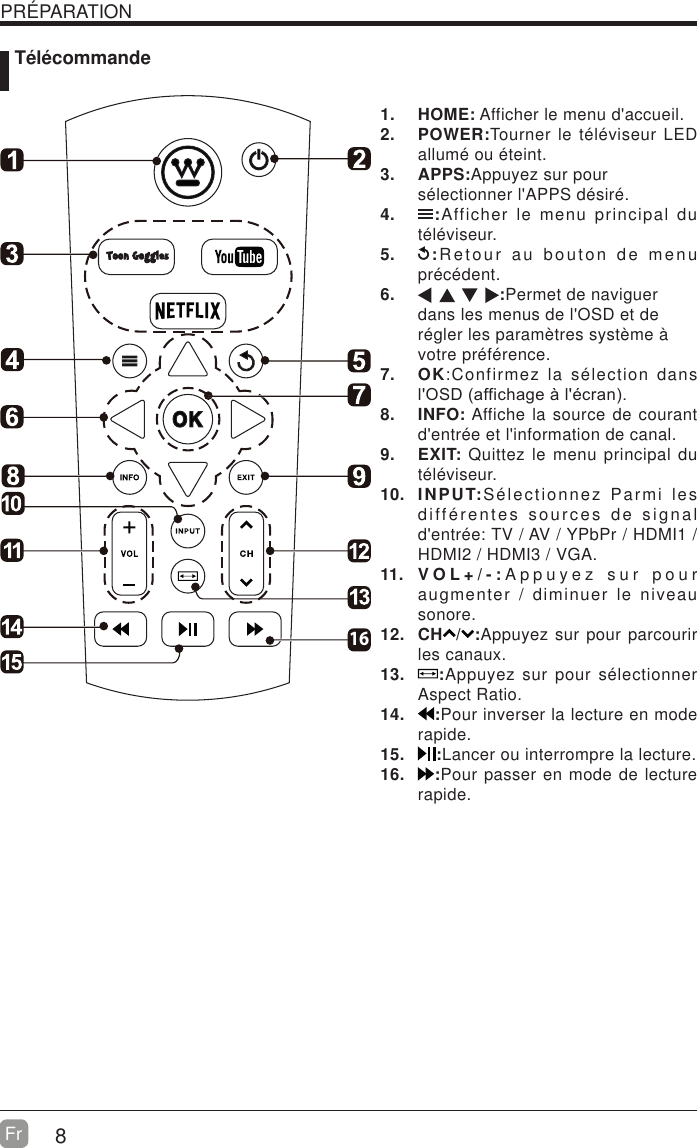
8Fr  PRÉPARATION Télécommande1. HOME: Afficher le menu d'accueil.2. POWER:Tourner le téléviseur LED allumé ou éteint.3. APPS:Appuyez sur pour sélectionner l'APPS désiré.4.  :Afficher le menu principal du téléviseur.5.  :Retour au bouton de menu précédent.6.  :Permet de naviguer dans les menus de l'OSD et de régler les paramètres système à votre préférence.7. OK:Confirmez la sélection dans O26'DIILFKDJHjOpFUDQ8. INFO: Affiche la source de courant d'entrée et l'information de canal.9. EXIT: Quittez le menu principal du téléviseur.10. INPUT:Sélectionnez Parmi les différentes sources de signal d'entrée: TV / AV / YPbPr / HDMI1 / HDMI2 / HDMI3 / VGA.11. VOL+/-:Appuyez sur pour augmenter / diminuer le niveau sonore.12. CH / :Appuyez sur pour parcourir les canaux.13.  :Appuyez sur pour sélectionner Aspect Ratio.14.  :Pour inverser la lecture en mode rapide.15.  :Lancer ou interrompre la lecture.16.  :Pour passer en mode de lecture rapide.16
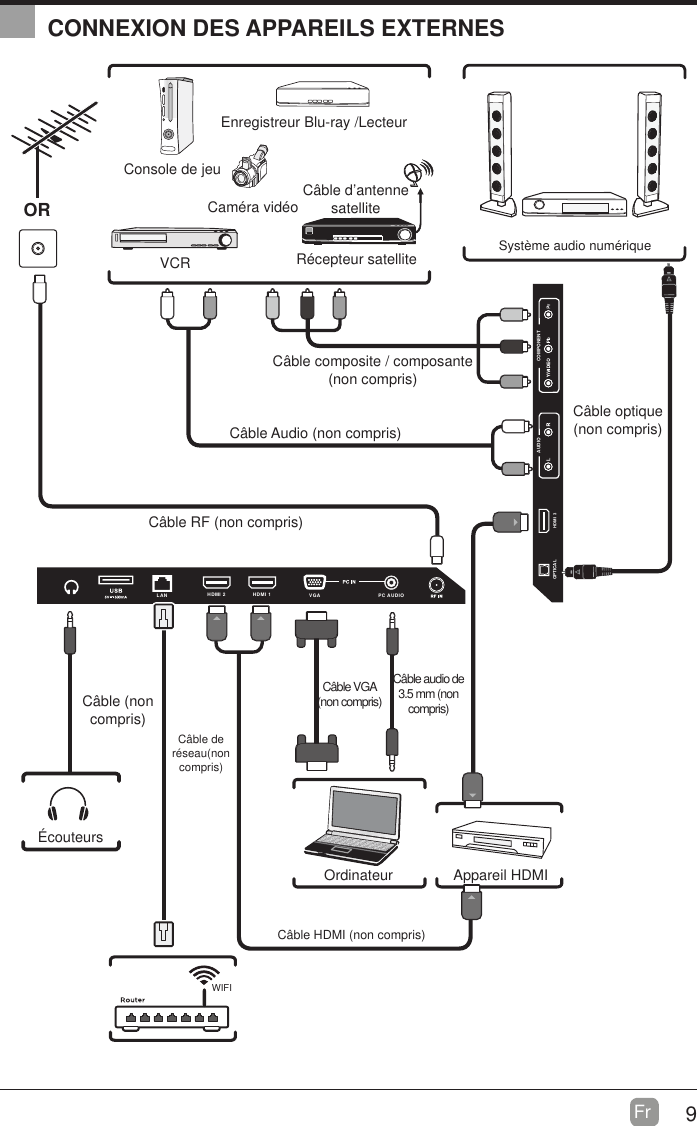
9Fr  CONNEXION DES APPAREILS EXTERNESCOMPONENTAUDIOHDMI 3OPTICALHDMI 2 HDMI 1 PC AUDIOVGALANCâble RF (non compris)Câble Audio (non compris)Câble composite / composante (non compris)Caméra vidéoConsole de jeuEnregistreur Blu-ray /LecteurVCR Récepteur satelliteCâble d’antenne satelliteORAppareil HDMIOrdinateurSystème audio numériqueCâble VGA (non compris)Câble audio de 3.5 mm (non compris)ÉcouteursCâble (non compris)Câble HDMI (non compris)Câble optique (non compris)WIFICâble de réseau(non compris)
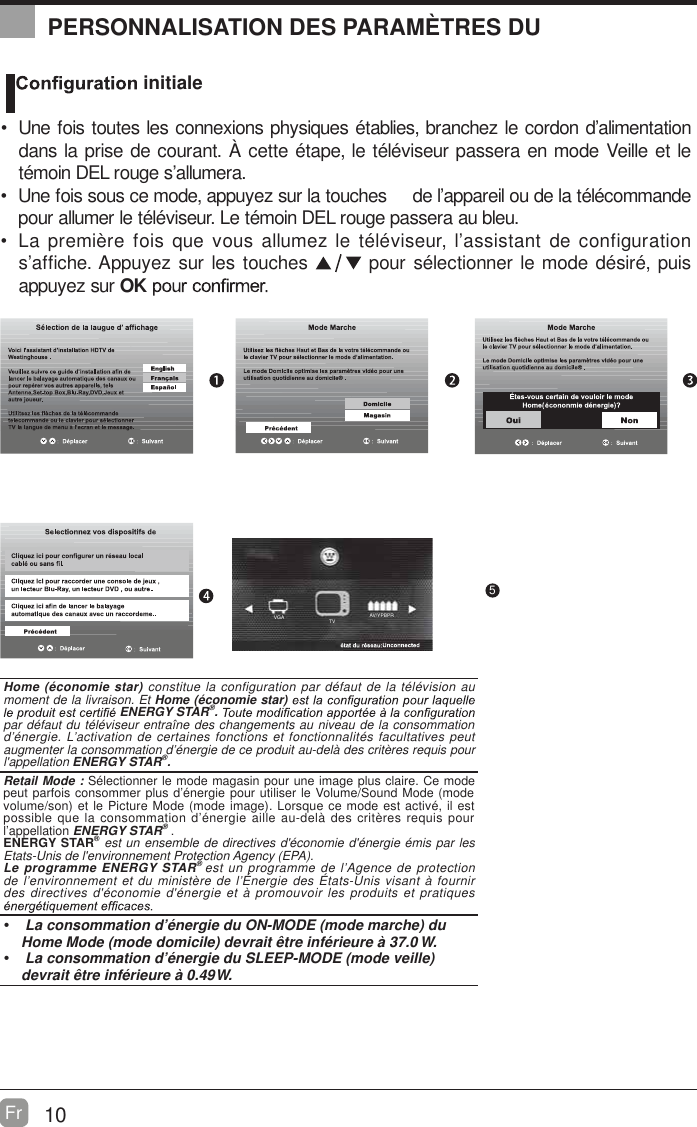
AV/YPBPRTVVGA10Fr  OK :Next5PERSONNALISATION DES PARAMÈTRES DU   initiale  Une fois toutes les connexions physiques établies, branchez le cordon d’alimentation dans la prise de courant. À cette étape, le téléviseur passera en mode Veille et le témoin DEL rouge s’allumera.  Une fois sous ce mode, appuyez sur la touches     de l’appareil ou de la télécommande pour allumer le téléviseur. Le témoin DEL rouge passera au bleu.            noitarugifnoc ed tnatsissa’l ,ruesivélét el zemulla suov euq siof erèimerp aLs’affiche. Appuyez sur les touches   pour sélectionner le mode désiré, puis appuyez sur OKHome (économie star) constitue la configuration par défaut de la télévision au moment de la livraison. Et Home (économie star) ENERGY STAR®. par défaut du téléviseur entraîne des changements au niveau de la consommation d’énergie. L’activation de certaines fonctions et fonctionnalités facultatives peut augmenter la consommation d’énergie de ce produit au-delà des critères requis pour l'appellation ENERGY STAR®.    Retail Mode : Sélectionner le mode magasin pour une image plus claire. Ce mode peut parfois consommer plus d’énergie pour utiliser le Volume/Sound Mode (mode volume/son) et le Picture Mode (mode image). Lorsque ce mode est activé, il est possible que la consommation d’énergie aille au-delà des critères requis pour l’appellation ENERGY STAR® .ENERGY STAR® est un ensemble de directives d'économie d'énergie émis par les Etats-Unis de l'environnement Protection Agency (EPA).Le programme ENERGY STAR® est un programme de l’Agence de protection de l’environnement et du ministère de l’Énergie des États-Unis visant à fournir des directives d'économie d'énergie et à promouvoir les produits et pratiques   La consommation d’énergie du ON-MODE (mode marche) du Home Mode (mode domicile) devrait être inférieure à 37.0 W.  La consommation d’énergie du SLEEP-MODE (mode veille) devrait être inférieure à 0.49 W.
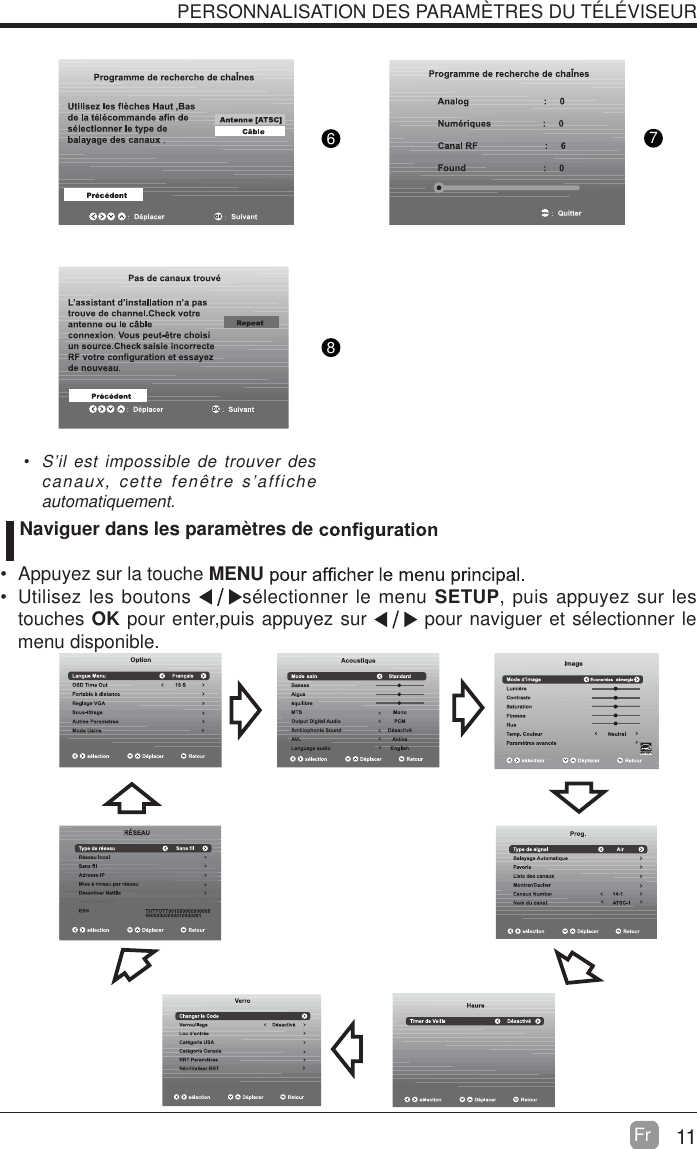
11Fr  876PERSONNALISATION DES PARAMÈTRES DU TÉLÉVISEUR  S’il est impossible de trouver des canaux, cette fenêtre s’affiche automatiquement.   Naviguer dans les paramètres de   Appuyez sur la touche MENU  Utilisez les boutons  sélectionner le menu SETUP, puis appuyez sur les touches OK pour enter,puis appuyez sur   pour naviguer et sélectionner le menu disponible.

Navigation menu