ARCTIC P614BT P614BT Bluetooth Headphones with Microphone User Manual manual P614BT 140507 r5
ARCTIC (HK) Ltd. P614BT Bluetooth Headphones with Microphone manual P614BT 140507 r5
ARCTIC >
User manual
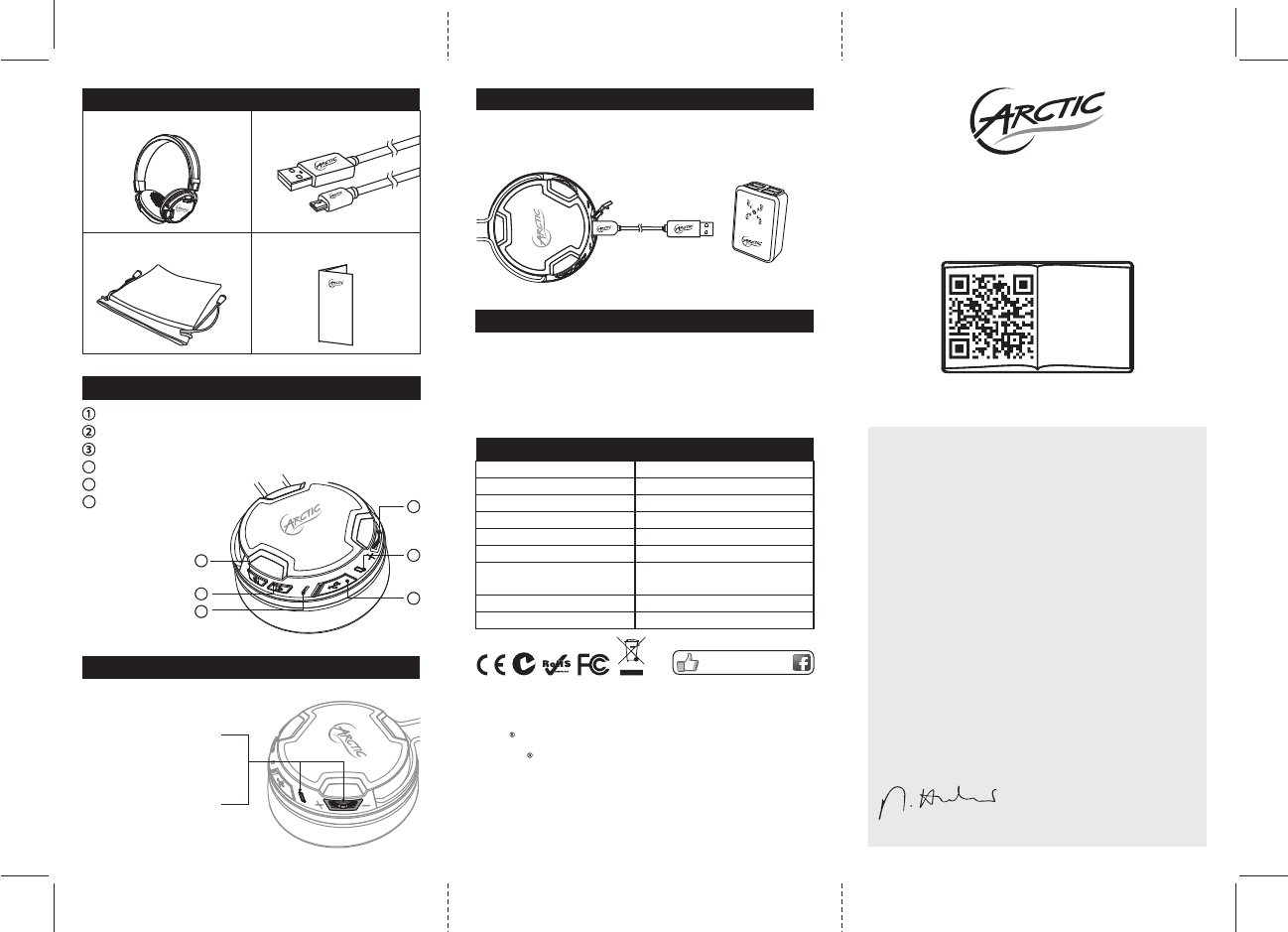
Micro USB Cable x 1
Packaging Contents
P614 BT x 1
User Manual x 1
Travel Pouch x 1
User Manual
P614 BT
www.arctic.ac
Dear Customer,
Thank you for choosing the ARCTIC P614 BT.
Based on the P402 BT, these on-ear headphones
come with an even higher level of comfort and a far
improved sound clarity. High end drivers and the
most comfortable cushioning were incorporated to
make the P614 BT an everyday essential.
I hope you enjoy the P614 BT as much as I do and
we at ARCTIC look forward to further enriching
your life with our products. If you would like to
share how you use ARCTIC's products please do
so at https://www.facebook.com/ARCTIC.en
ARCTIC is a fully carbon neutral company and your
support helps us to compensate every kilogram of
CO we produce. Thank You.
2
Sincerely,
Magnus Huber
ARCTIC CEO
Function Diagram
Switch On / Off multifunction button
LED indicator
Micro-USB charging / line in port
4
5
6
Microphone
Previous track
Next track
1
2
3
6
5
4
Switch the Headset On or Off
Switch On
Switch Off
Press the multifunction
button for 3 seconds until
the blue LED lights up
Press the multifunction
button for 3 seconds until
the red LED lights up
The P614 BT can be charged while switched on or off.
1. Insert the micro USB cable into the P614 BT and the USB side
into a power source. (We recommend the Home Charger 4500).
2. When the Blue light on constantly the P614 BT is fully charged.
Charging the Headset
Home Charger 4500
It is recommended to fully charge before initial use for better battery life
Cautions
Ÿ Wireless connections are affected by obstructions such as walls,
human body and other devices.
Ÿ Keep P614 BT dry, moisture may damage electronic components.
Ÿ Exposure to high temperature will shorten the life and damage
electronic components.
Ÿ Opening / altering the P614 BT voids all product warranty.
Ÿ Rough handling may damage inside electronic components.
Like us on facebook
www.facebook.com/ARCTIC.en
© 2014 ARCTIC Switzerland AG. All Rights Reserved.
No part of this manual including the products described in it, may be reproduced, transmitted,
stored in a retrieval system, or translated into any language in any form or by any means,
except documentation kept by the purchaser for backup purpose, without the express written
permission of ARCTIC Switzerland AG. In no event shall ARCTIC its directors or employees be
liable for any indirect damages, incidental or consequential damages arising from any defect or
error in this manual or product.
FCC ID Z3AP614B
This device complies with Part 15 of the FCC Rules. Operation is subject to the following two
conditions:(1) this device may not cause harmful interference, and (2) this device must accept
any interference received, including interference that may cause undesired operation.
© 2013 CSR plc and its group companies.
The aptX mark and the aptX logo are trade marks of CSR plc or one of its group companies
and may be registered in one or more jurisdictions
The Bluetooth word mark and logos are registered trademarks owned by Bluetooth SIG,
Inc., and any use of such marks by ARCTIC (HK) Ltd. is under license. Other trademarks and
trade names are those of their respective owners.
Playback Time
Wearing Style
Bluetooth Version
Frequency Response
Driver Size
Impedance
Microphone Sensitivity
Battery
30 hours
Supra-aural, On-ear
V4.0 Class 2
20 Hz – 20 kHz
40 mm
32Ω
-42dB +/- 3dB
Rechargeable 850mAh
Lithium-ion battery
Specifications
Weight 142 g
support.arctic.ac/p614bt
EN
PL
FR
DE ...
FCC ID Z3AP614BT
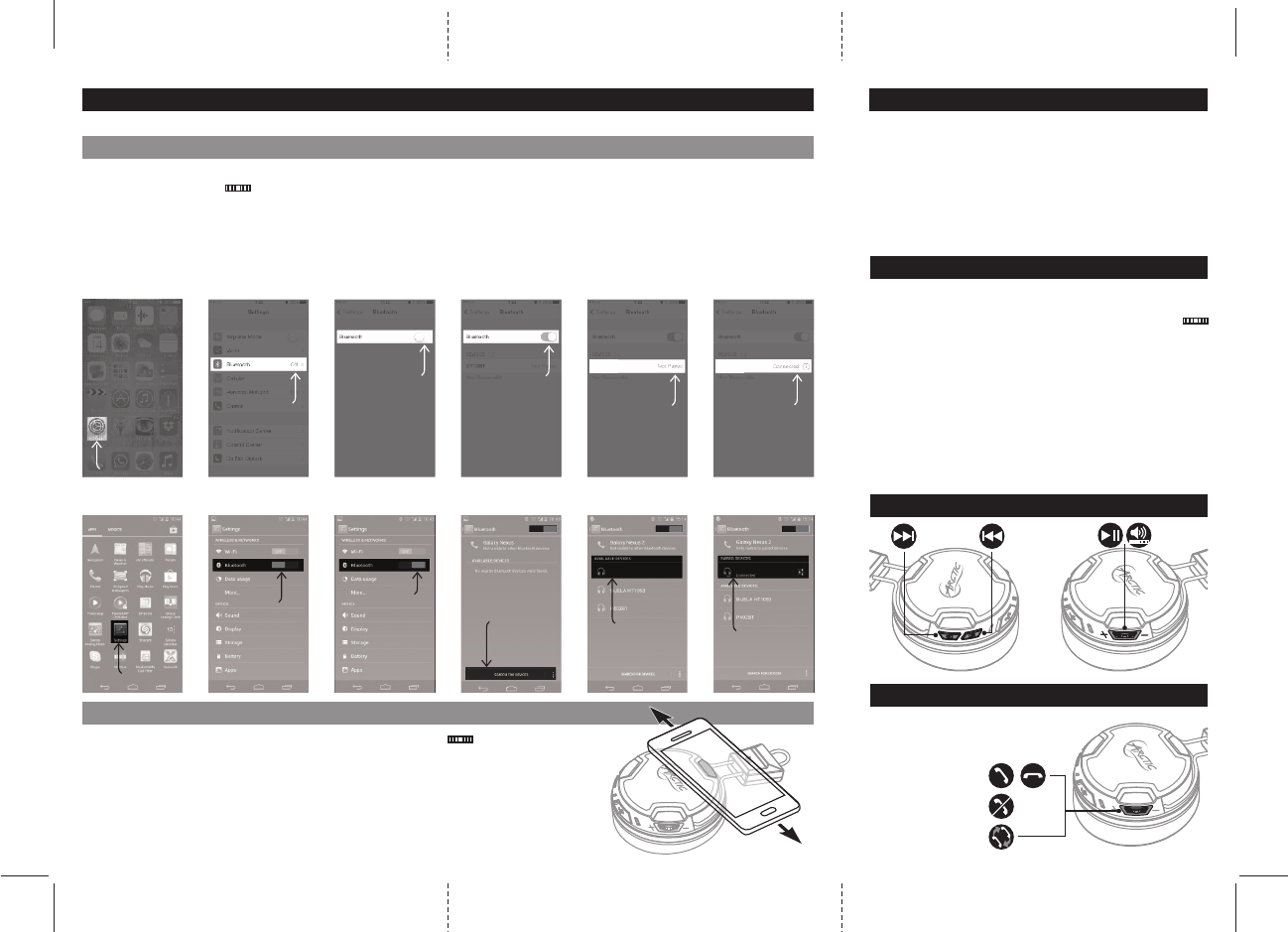
Getting Connected
The P614 BT allows you to pair with your mobile device in 2 different ways:
Notes:
Ÿ Pairing mode will last up to ten minutes or until a device is
found, two tones will sound to let you know when pairing has
stopped.
Ÿ If you exceed the effective range of approx. 10M (33ft) the
headphone will disconnect and will automatically reconnect if
the speaker re-enters the effective range within ten minutes.
A. Bluetooth Pairing
Example: iOS
Press Settings > Bluetooth and switch Bluetooth on > P614 BT > Pair
Example: Android 4.0
Press Menu > Settings > Switch on Bluetooth > Bluetooth > Search for devices > P614 BT > Pair
Click Settings
Select Bluetooth
Notes:
Ÿ Pairing mode will last up to ten minutes or until a device is
found, two tones will sound to let you know when pairing has
stopped.
Ÿ If you exceed the effective range of approx. 10M (33ft) the
headphone will disconnect and will automatically reconnect if
the speaker re-enters the effective range within ten minutes.
Switch On
Bluetooth
Notes:
Ÿ Pairing mode will last up to ten minutes or until a device is
found, two tones will sound to let you know when pairing has
stopped.
Ÿ If you exceed the effective range of approx. 10M (33ft) the
headphone will disconnect and will automatically reconnect if
the speaker re-enters the effective range within ten minutes.
Bluetooth
is On
Notes:
Ÿ Pairing mode will last up to ten minutes or until a device is
found, two tones will sound to let you know when pairing has
stopped.
Ÿ If you exceed the effective range of approx. 10M (33ft) the
headphone will disconnect and will automatically reconnect if
the speaker re-enters the effective range within ten minutes.
Select P614 BT
P614BT
Notes:
Ÿ Pairing mode will last up to ten minutes or until a device is
found, two tones will sound to let you know when pairing has
stopped.
Ÿ If you exceed the effective range of approx. 10M (33ft) the
headphone will disconnect and will automatically reconnect if
the speaker re-enters the effective range within ten minutes.
Now Connected
P614BT
ON
Click Search
for Devices
ON
Bluetooth
is On
OFF
Switch On
Bluetooth
Click
Settings
ON
Select
P614 BT
P614B T
ON
Now
Connected
P614B T
1. Switch on the P614 BT by Press the
Multifunction Button for 3 seconds.
2. The P614 BT automatically enters pairing mode
shown by the red and blue LED flash alternately.
3. Turn on Bluetooth on your phone and pair it with
the headphone.
1. Switch on the P614 BT by Press the Multifunction Button for
3 seconds.
2. Slide your phone very slowly from top to bottom across the shown
area of the left side of the headphone until you hear a beep and
a confirmation message comes up on your mobile device.
3. Play music!
Music Controls
Blue
Ÿ Blue light flashing slowly means the headphone is paired
Ÿ Blue light on constantly means the headphone is fully charged
LED Light Signals
Red
Ÿ Red light flashing means battery is low
Ÿ Red light on constantly means charging
Red & Blue
Ÿ When both the red and the blue lights are rapidly flashing, it
means the headphone is in pairing mode
Reconnection
Via Bluetooth
1. Turn on Bluetooth on phone.
2. Switch on the P614 BT by Press the Multifunction Button
for 3 seconds.
3. If your device was the latest one to be paired with the P614
BT it will connect automatically otherwise please repeat
pairing section.
Phone Controls
If the mobile device that is paired
(via Bluetooth) with the P614 BT
headphone is a cellular phone
you can: x1
3 Sec.
2 Sec.
FCCWarningStatement
ThisequipmenthasbeentestedandfoundtocomplywiththelimitsforaClassBdigitaldevice,
pursuanttoPart15oftheFCCRules.Theselimitsaredesignedtoprovidereasonable
protectionagainstharmfulinterferenceinaresidentialinstallation.Thisequipmentgenerates
usesandcanradiateradiofrequencyenergyand,ifnotinstalledandusedinaccordancewiththe
instructions,maycauseharmfulinterferencetoradiocommunications.However,thereisno
guaranteethatinterferencewillnotoccurinaparticularinstallation.Ifthisequipmentdoes
causeharmfulinterferencetoradioortelevisionreception,whichcanbedeterminedbyturning
theequipmentoffandon,theuserisencouragedtotrytocorrecttheinterferencebyoneor
moreofthefollowingmeasures:
‐‐Reorientorrelocatethereceivingantenna.
‐‐Increasetheseparationbetweentheequipmentandreceiver.
‐‐Connecttheequipmentintoanoutletonacircuitdifferentfromthattowhichthereceiveris
connected.
‐‐Consultthedealeroranexperiencedradio/TVtechnicianforhelp
Any changes or modifications not expressly approved by the party responsible for compliance
could void your authority to operate the equipment.