ARTSYSTEM AGW-300 USN Gateway User Manual AGW 300 x

ARTSYSTEM Co., Ltd. USN Gateway AGW 300 x

Users Manual

PrepaCHOTitle AG        arer / PositionO HYUNJUN/ SResearcher   GW-300 User’s M YYYY20n DocumPositioenior  CHO Manual AGY/MM/DD 011/03/03 Dment Manageron HYUNJUN / SeResearcher GW-300Document No. /  Review /nior 0 User’. RevisCode/ Position  ’s Mansion e 1.0 File/RUser’s DocumenType  ual  Reference Manual t  DocumeClass  nt
 http:// VePrepDocNS   2  /www.artsystem.cersion 1paration Scument Name ADate 2State IDate 2011.03.03           YYYY/M2011/co.krD1.0 Senior ReseaAGW-300 Us2011/03/04 In Working Ver. 1.0          MM/DD /03/04 DocAdvanced RDocumearcher CHO Hser’s ManuaHistorDInitial Prepa         cument No.  Real Time Systement InfoHYUNJUN l ry of ReDetails aration Revision Code 1.0 m co., LTDormatioevisionRevCHOFile/Refere  User’s M210X297mn vised by  HYUNJUN          ence Manual Pagemm 인쇄용지 70PositionSenior Researche         e 2(9)0g/m2n er
 http://  Tab1. 1.11.21.32. 2.12.22.32.4 /www.artsystem.cble of CoOVERVIEW1. PURPOS2. SCOPE ..3. CAUTIOBASIC STR1. NAME A2. DETAILE3. CONSID4. SPECIFIC YYYY/M2011/co.krontents W ......................SE .............................................ONS .................RUCTURE .......AND FUNCTED FUNCTIODERATIONS CATION ........MM/DD /03/04 DocAdvanced R........................................................................................................................TION OF EAON OF EACHIN INSTALL........................cument No.  Real Time System.............................................................................................................................CH PART OH PART OF ALATION ...................................Revision Code 1.0 m co., LTD.............................................................................................................................F AGW-300AGW-300 ......................................................File/Refere  User’s M210X297m.............................................................................................................................0 ...................................................................................................ence Manual Pagemm 인쇄용지 70.................................................................................................................................................................................................................................e 3(9)0g/m2......... 4 ......... 4 ......... 4 ......... 4 ......... 5 ......... 5 ......... 6 ......... 7 ......... 8
 http:// 1TeuTpIF 111--- /www.artsystem.c1. OvervThis documeequipment aunderstand The specificaperformanceIf you have aFor safety, ca1.1. PurThis d1.2. ScoThis d1.3. Cau CautionBeware oV powerhave ele- Check wresponsi- Avoid a an  instalplace uncan redu Caution- Do  not Otherwisshort.  YYYY/M2011/co.krview ent is preparat the best cthis manual ation is subje any inquiriesarefully readrpose document is ope document coutions ns for Installof electric shr. Do not puctric shock. whether the ble for probplace with dllation  and nder room tuce the life sns for Maintplace  a  strose, the equiMM/DD /03/04 DocAdvanced Rred for the rcondition witbefore usinect to changs, please do d safety itemthe user’s movers the strulation and Ohock in instaull out the poutput of tblems causeddirect sun raystorage  posemperature.span of the ptenance ong impact pment  may cument No.  Real Time Systemright use of Ath right hang the equipge without nnot hesitatems in this mamanual of AGucture and tOperation alling and opower supplythe adaptord by using ays and a closition.  Install. Installing aproduct on  the  eqube  broken Revision Code 1.0 m co., LTDAGW-300, Udling methoment. notice, if nece to contact anual before GW-300. the operatioperating they and touchr is DC 12V power otheosed hot andl and store and storing ipment  and or the life File/Refere  User’s M210X297mUSN Gatewayods, carefullycessary for imus, the Art use. n methods oe equipmenth it with wetV before usiner than DC 1d humid placthe  equipmit  in  a hot do  not drispan  of  theence Manual Pagemm 인쇄용지 70y. To maintay read and fumprovementSystem Co., of AGW-300t as it uses Dt hands. Young it. We ar12V. ce when selement  in  an  iand  humid ll  the  equipe product cae 4(9)0g/m2in the ully t of Ltd. 0   DC 12 u may re not ecting ndoor place pment. an  be
 http:// - -    /www.artsystem.c Caution- Do not dWe are n Caution- This  pcommun YYYY/M2011/co.krns for Disassdisassemble,not responsins Accordingroduct  adnication statuMM/DD /03/04 DocAdvanced Rsembly  repair and ble for any g to Surrounopts  wirelus can be wocument No.  Real Time Systemmodify the problems canding Enviroess  commorse becausRevision Code 1.0 m co., LTDequipment, aused by disnment munication e of surrounFile/Refere  User’s M210X297mexcept an aassembly wiusing  Zignding enviroence Manual Pagemm 인쇄용지 70uthorized peithout permigBee.  There 5(9)0g/m2erson. ission refore,        SPECIFY SERVICE INSTRUCTIONS AND WARRANTY TERMS      This device complies with part 15 of the FCC Rules. Oper           (1) this device may not cause harmful interference; and (2) this device must accept any interference           received, including interference that may cause undesired operation.            This equipment has been tested and found to comply with the limits for a Class B digital device, pursuant to           Part 15 of FCC Rules. These limits are designed to provide reasonable protection against harmful           interference in a residential installation. This equipme           energy. If not installed and used in accordance with the instructions, it may cause harmful interference to           radio communications. However, there is no guarantee that interference will not occu           installation. If this equipment does cause harmful interference to radio or television reception, which can be           determined by turning the equipment off and on, the user is encouraged to try and correct the interference            by one or more of the following measures:            - Reorient or relocate the receiving antenna.            - Increase the distance between the equipment and the receiver.            - Connect the equipment to outlet on a circuit different from that to which the receiver            - Consult the dealer or an experienced radio/TV technician for help.           Any changes or modifications not expressly approved by the party responsible for compliance could void the           user’s authority to operate the equipment.         FCC NOTE:        THE MANUFACTURER IS NOT RESPONSIBLE FOR ANY RADIO OR TV INTERFERENCE       CAUSED BY UNAUTHORIZED MODIFICATIONS TO THIS EQUIPMENT.       SUCH MODIFICATIONS COULD VOID THE USER'S AUTHORITY TO OPERATE THE        EQUIPMENT SPECIFY SERVICE INSTRUCTIONS AND WARRANTY TERMS This device complies with part 15 of the FCC Rules. Operation is subject to the following two conditions:(1) this device may not cause harmful interference; and (2) this device must accept any interferencereceived, including interference that may cause undesired operation. been tested and found to comply with the limits for a Class B digital device, pursuant toPart 15 of FCC Rules. These limits are designed to provide reasonable protection against harmfulinterference in a residential installation. This equipment generates, uses, and can radiate radio frequencyenergy. If not installed and used in accordance with the instructions, it may cause harmful interference toradio communications. However, there is no guarantee that interference will not occur in a particularinstallation. If this equipment does cause harmful interference to radio or television reception, which can bedetermined by turning the equipment off and on, the user is encouraged to try and correct the interferenceone or more of the following measures: Reorient or relocate the receiving antenna. Increase the distance between the equipment and the receiver. Connect the equipment to outlet on a circuit different from that to which the receiver Consult the dealer or an experienced radio/TV technician for help. Any changes or modifications not expressly approved by the party responsible for compliance could void theuser’s authority to operate the equipment. THE MANUFACTURER IS NOT RESPONSIBLE FOR ANY RADIO OR TV INTERFERENCECAUSED BY UNAUTHORIZED MODIFICATIONS TO THIS EQUIPMENT. SUCH MODIFICATIONS COULD VOID THE USER'S AUTHORITY TO OPERATE THEation is subject to the following two conditions: (1) this device may not cause harmful interference; and (2) this device must accept any interference been tested and found to comply with the limits for a Class B digital device, pursuant to Part 15 of FCC Rules. These limits are designed to provide reasonable protection against harmful nt generates, uses, and can radiate radio frequency energy. If not installed and used in accordance with the instructions, it may cause harmful interference to r in a particular installation. If this equipment does cause harmful interference to radio or television reception, which can be determined by turning the equipment off and on, the user is encouraged to try and correct the interference  is connected. Any changes or modifications not expressly approved by the party responsible for compliance could void the THE MANUFACTURER IS NOT RESPONSIBLE FOR ANY RADIO OR TV INTERFERENCE     SUCH MODIFICATIONS COULD VOID THE USER'S AUTHORITY TO OPERATE THE
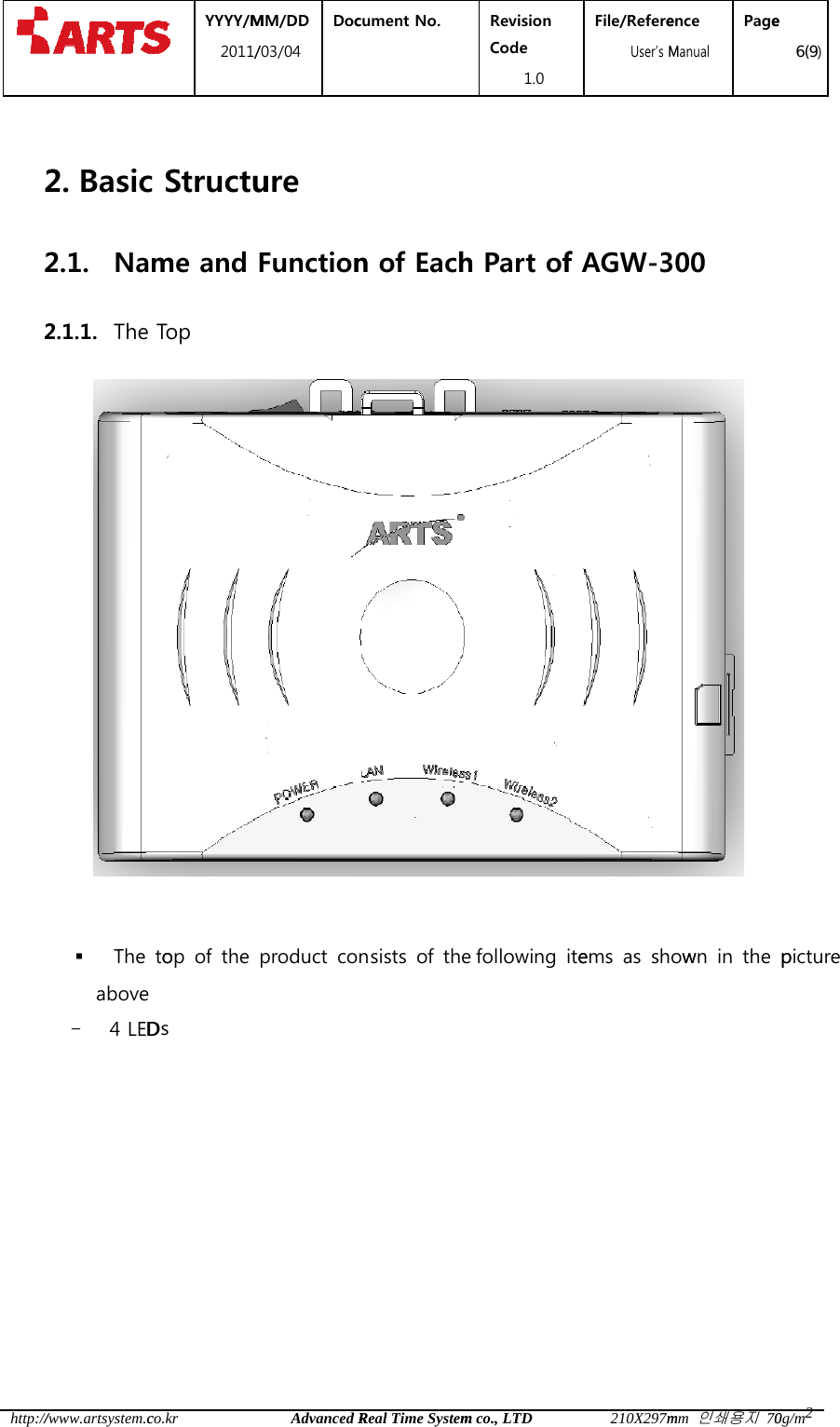
 http://     222/www.artsystem.c2. Basic2.1. Nam2.1.1. The  YYYY/M2011/co.kr Structume and Top MM/DD /03/04 DocAdvanced Rure Functioncument No.  Real Time Systemn of EachRevision Code 1.0 m co., LTDh Part ofFile/Refere  User’s M210X297mf AGW-3ence Manual Pagemm 인쇄용지 70   00    e 6(9)0g/m2 The  toop  of  the  product  con ists  of  thes following  iteems  as  showwn  in  the  ppicture  above - 4 LEDDs
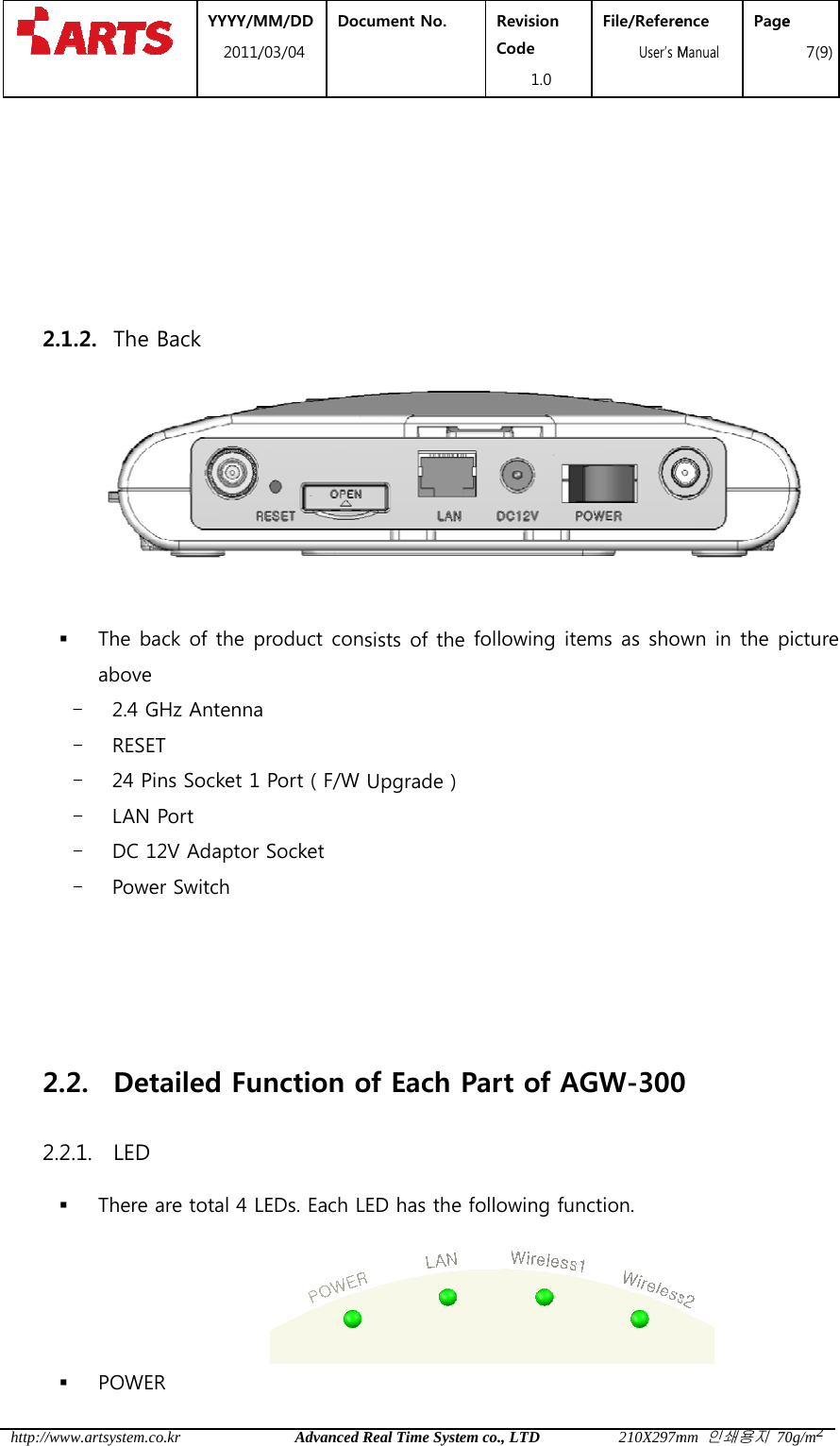
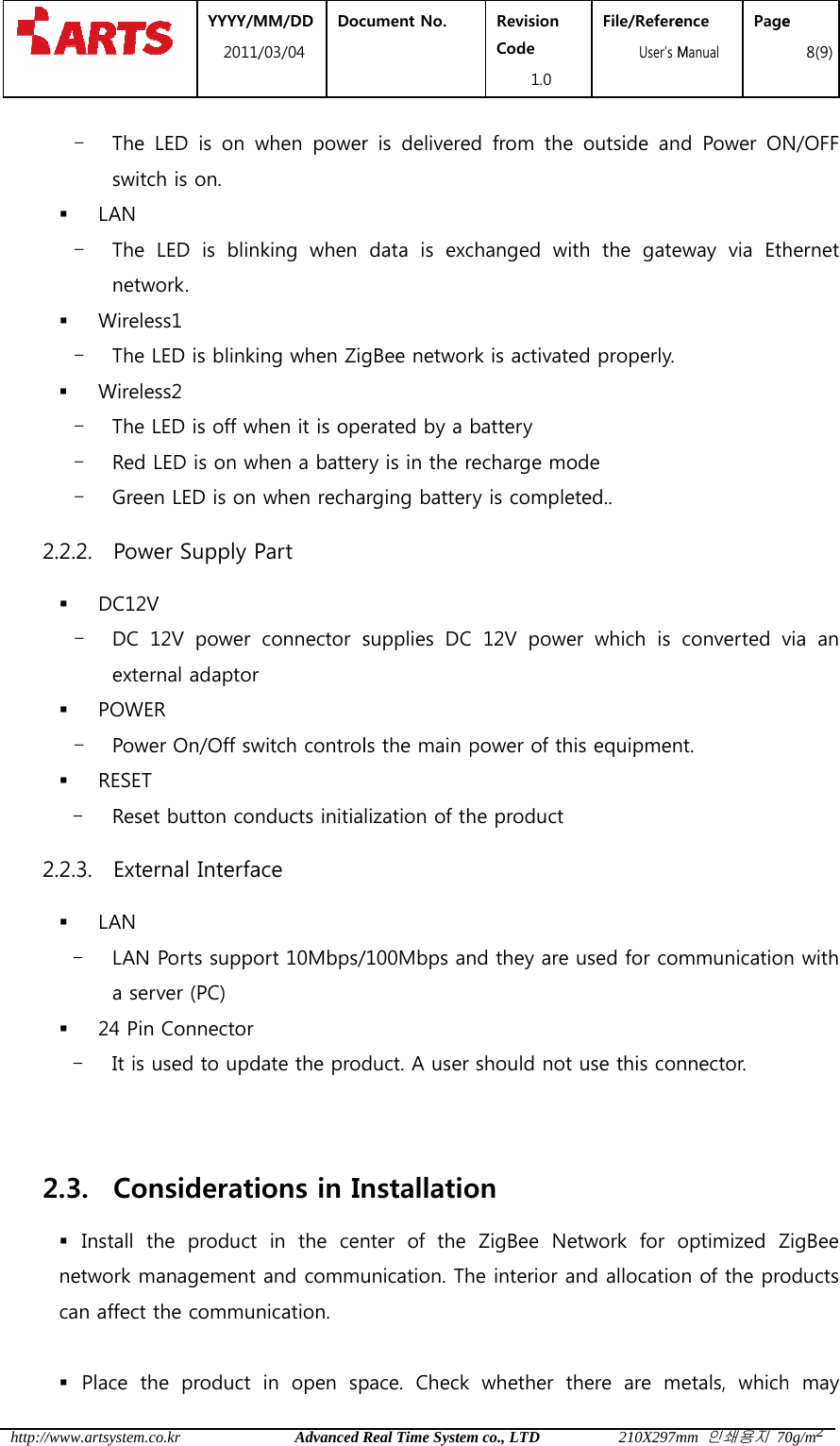
 http:// 2    22/www.artsystem.c  2.1.2. The   The baabove - 2.4 G- RESE- 24 P- LAN - DC 1- Powe2.2. Det2.2.1. LED  There  POWE YYYY/M2011/co.kr Back ack of the p GHz AntennaET ins Socket 1Port 12V Adaptorer Switch tailed Fu are total 4 LR   MM/DD /03/04 DocAdvanced Rproduct cona 1 Port ( F/W r Socket unction oLEDs. Each Lcument No.  Real Time System sists of the Upgrade )of Each PLED has the fRevision Code 1.0 m co., LTDfollowing itPart of Afollowing fuFile/Refere  User’s M210X297mems as showAGW-300nction. ence Manual Pagemm 인쇄용지 70wn in the p0  e 7(9)0g/m2picture
 http:// 22 2 /www.artsystem.c- The switc LAN - The netw Wirele- The  Wirele- The - Red - Gree2.2.2. Pow DC12V- DC 1exter POWE- Powe RESET - Rese2.2.3. Exte LAN - LAN a ser 24 Pin- It is 2.3. Con Install  tnetwork mcan affect  Place  th YYYY/M2011/co.krLED  is  on wch is on. LED  is  blinwork. ess1 LED is blinkiess2 LED is off wLED is on wen LED is on wer Supply PV 12V  power rnal adaptorR er On/Off swt button conrnal InterfaPorts supporver (PC) n Connector used to updnsideratihe  product management the communhe  product MM/DD /03/04 DocAdvanced Rwhen  powerking  when ing when Zighen it is opehen a batterwhen rechaPart   connector sr witch controlnducts initiaace ort 10Mbps/date the prodions in Inin the cenand communication. in  open  spcument No.  Real Time Systemr  is  deliveredata  is  excgBee networerated by a ry is in the rarging battersupplies  DCls the main lization of th/100Mbps anduct. A user nstallationter  of  the unication. Thpace.  Check Revision Code 1.0 m co., LTDd  from  the changed  witrk is activatebattery recharge mory is completC 12V powepower of thihe productnd they are should not on   ZigBee  Nehe interior awhether  thFile/Refere  User’s M210X297moutside  anth  the  gateed properly. ode ted.. er  which  is is equipmenused for comuse this conetwork  for ond allocatiohere  are  mence Manual Pagemm 인쇄용지 70d  Power  ONway  via  Ethconverted vnt.  mmunicationnnector.   optimized Zn of the proetals,  whiche 8(9)0g/m2N/OFF hernet via  an n with ZigBee oducts h may
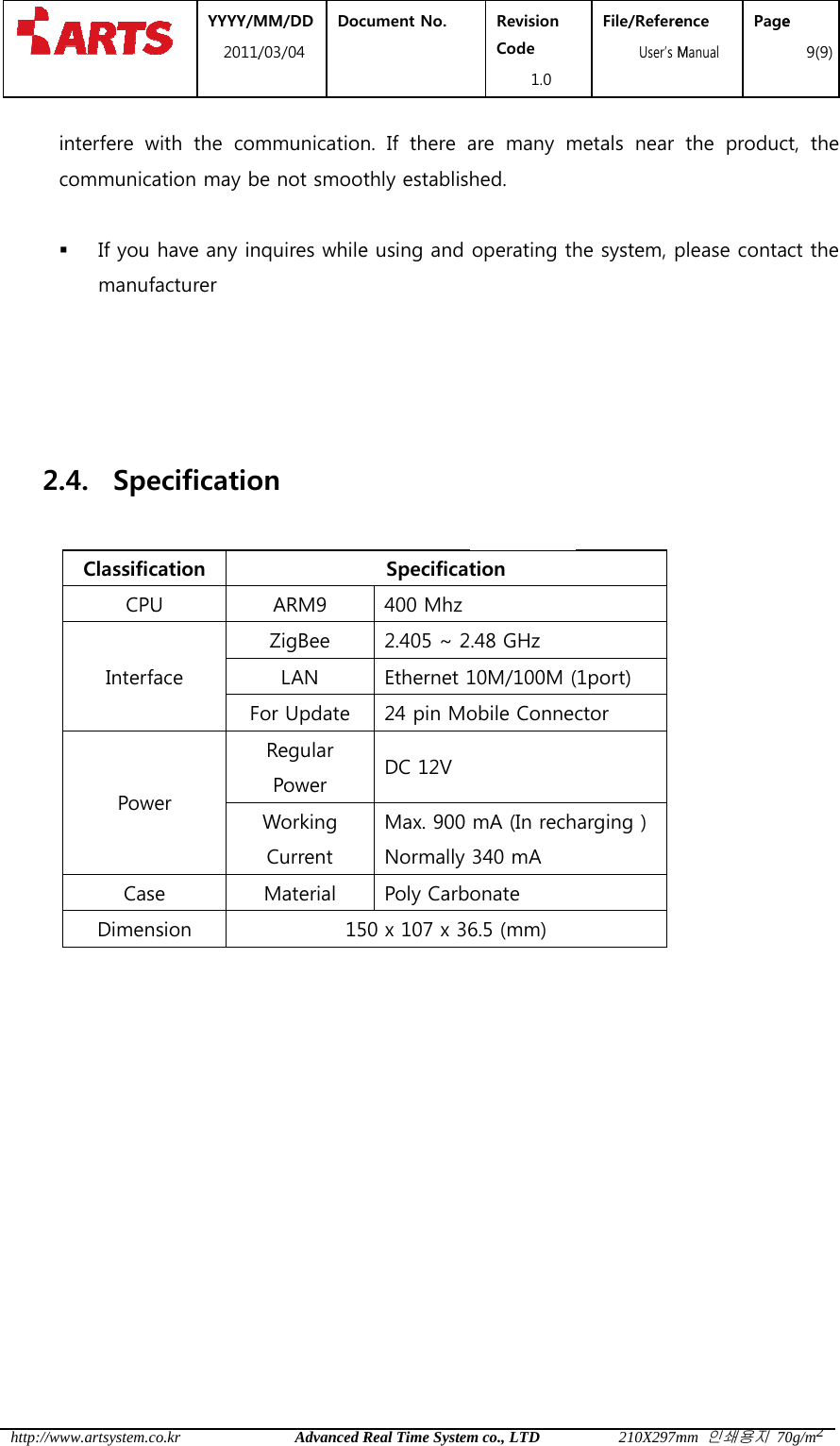
 http://   2     /www.artsystem.cinterfere wcommunica If you manuf 2.4. SpeClassificCPUInterfPowCasDimen YYYY/M2011/co.krwith  the  comation may bhave any infacturer ecificatiocation U face Fwer se nsion MM/DD /03/04 DocAdvanced Rmmunicationbe not smootnquires whileon ARM9 ZigBee LAN For UpdateRegular Power Working Current Material 15cument No.  Real Time Systemn.  If  there athly establise using and Specificat400 Mhz2.405 ~ 2Ethernet 124 pin MoDC 12V Max. 900 NormallyPoly Carb50 x 107 x 36Revision Code 1.0 m co., LTDare  many mhed. operating thtion .48 GHz 10M/100M (obile ConnecmA (In rech340 mA   onate 6.5 (mm) File/Refere  User’s M210X297mmetals  near he system, p(1port) ctor   arging ) ence Manual Pagemm 인쇄용지 70the  producplease contae 9(9)0g/m2ct,  the ct the

Navigation menu