ATEN Technology IOGEAR GBHFK331 Bluetooth speakerphone User Manual

ATEN Technology, Inc., dba IOGEAR Bluetooth speakerphone

user manual

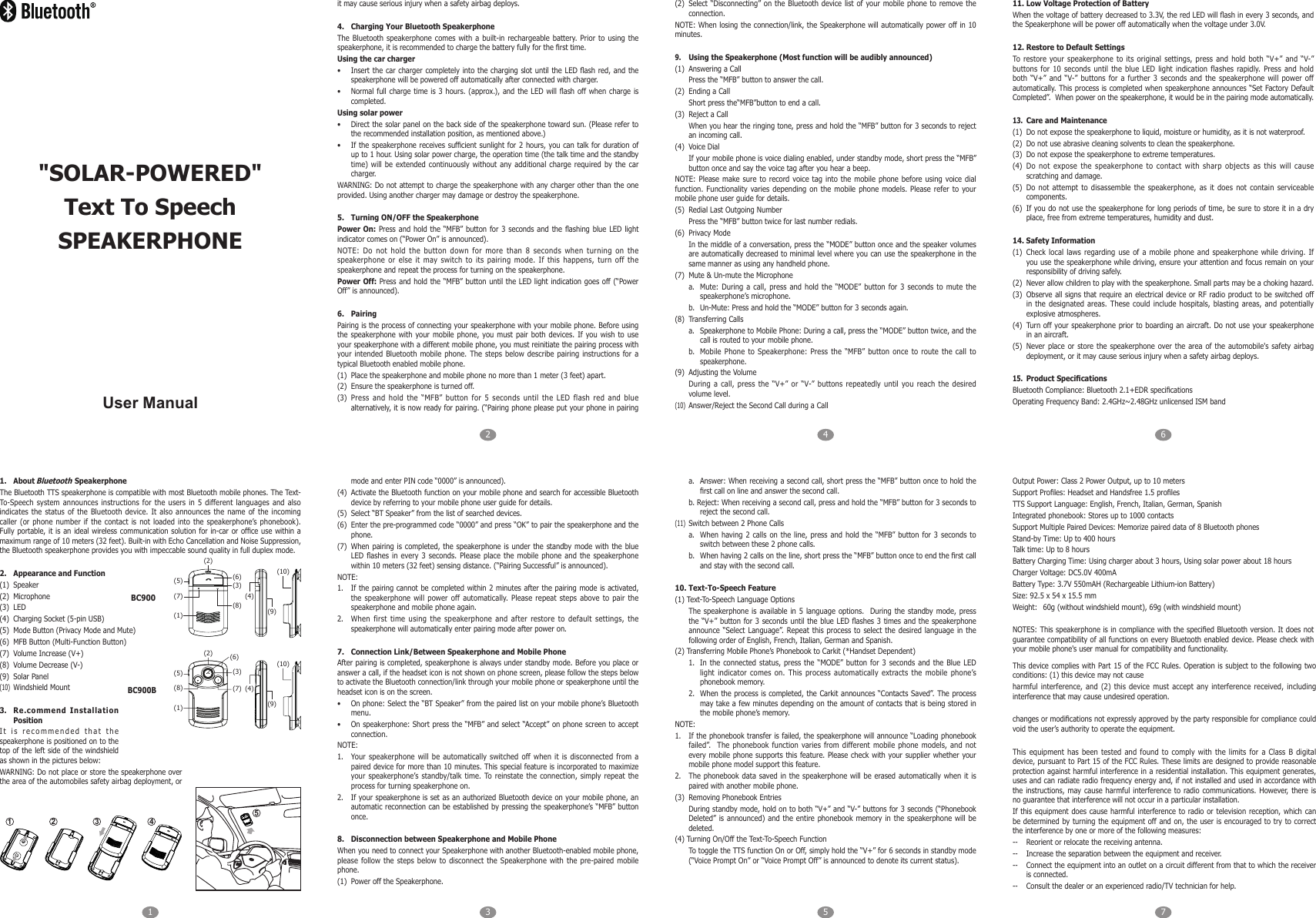
1 325476User Manual1.  About Bluetooth SpeakerphoneThe Bluetooth TTS speakerphone is compatible with most Bluetooth mobile phones. The Text-To-Speech system  announces instructions  for the  users in  5 different languages and also indicates  the  status of the Bluetooth  device.  It  also  announces  the  name  of  the  incoming caller  (or  phone  number if the contact  is not loaded  into  the  speakerphone’s phonebook). Fully portable,  it is an ideal wireless  communication solution for in-car  or ofce  use within a maximum range of 10 meters (32 feet). Built-in with Echo Cancellation and Noise Suppression, the Bluetooth speakerphone provides you with impeccable sound quality in full duplex mode.2.  Appearance and Function(1)  Speaker(2)  Microphone(3)  LED(4)  Charging Socket (5-pin USB)(5)  Mode Button (Privacy Mode and Mute)(6)  MFB Button (Multi-Function Button)(7)  Volume Increase (V+)(8)  Volume Decrease (V-)(9)  Solar Panel(10)  Windshield Mount3.  Re.commend Installation PositionIt is  recommended that  the speakerphone is positioned on to the top of the left side of the  windshield as shown in the pictures below:WARNING: Do not place or store the speakerphone over the area of the automobiles safety airbag deployment, or it may cause serious injury when a safety airbag deploys.4.  Charging Your Bluetooth SpeakerphoneThe  Bluetooth  speakerphone  comes  with  a built-in  rechargeable  battery. Prior to using  the speakerphone, it is recommended to charge the battery fully for the rst time.Using the car charger•  Insert the  car charger completely into the  charging slot until the  LED ash  red, and the speakerphone will be powered off automatically after connected with charger.•  Normal full  charge time  is 3  hours. (approx.), and  the LED  will ash  off when  charge is completed.Using solar power•  Direct the solar panel on the back side of the speakerphone toward sun. (Please refer to the recommended installation position, as mentioned above.)•  If the  speakerphone receives sufcient sunlight for 2  hours, you can  talk for duration of up to 1 hour. Using solar power charge, the operation time (the talk time and the standby time) will be extended continuously  without any  additional charge  required by  the car charger.WARNING: Do not attempt to charge the speakerphone with any charger other than the one provided. Using another charger may damage or destroy the speakerphone. 5.  Turning ON/OFF the SpeakerphonePower On:  Press and  hold the “MFB” button for 3 seconds and the  ashing blue  LED light indicator comes on (“Power On” is announced).NOTE:  Do  not  hold  the  button  down  for  more  than  8  seconds  when  turning  on  the speakerphone  or  else  it  may  switch  to  its  pairing  mode.  If  this  happens,  turn  off  the speakerphone and repeat the process for turning on the speakerphone.Power Off: Press and  hold the “MFB”  button until the LED light indication goes off (“Power Off” is announced).6.  PairingPairing is the process of connecting your speakerphone with your mobile phone. Before using the speakerphone  with your  mobile phone,  you must  pair both  devices. If  you wish  to use your speakerphone with a different mobile phone, you must reinitiate the pairing process with your  intended Bluetooth mobile  phone.  The  steps  below  describe pairing  instructions  for  a typical Bluetooth enabled mobile phone.(1)  Place the speakerphone and mobile phone no more than 1 meter (3 feet) apart.(2)  Ensure the speakerphone is turned off.(3)  Press  and  hold  the  “MFB”  button  for  5  seconds  until  the  LED  flash  red  and  blue alternatively, it is now ready for pairing. (“Pairing phone please put your phone in pairing mode and enter PIN code “0000” is announced).(4)  Activate the Bluetooth function on your mobile phone and search for accessible Bluetooth device by referring to your mobile phone user guide for details.(5)  Select “BT Speaker” from the list of searched devices.(6)  Enter the pre-programmed code “0000” and press “OK” to pair the speakerphone and the phone.(7)  When pairing is completed, the speakerphone  is under  the standby  mode with the blue LED ashes  in every  3 seconds.  Please place  the mobile phone and the speakerphone within 10 meters (32 feet) sensing distance. (“Pairing Successful” is announced).NOTE:1.  If the pairing cannot  be completed within 2 minutes after the pairing  mode is activated, the  speakerphone will  power  off  automatically.  Please  repeat steps above  to  pair  the speakerphone and mobile phone again.2.  When  first  time  using  the  speakerphone  and  after  restore  to  default  settings,  the speakerphone will automatically enter pairing mode after power on.7.  Connection Link/Between Speakerphone and Mobile Phone After pairing is completed, speakerphone is always under standby mode. Before you place or answer a call, if the headset icon is not shown on phone screen, please follow the steps below to activate the Bluetooth connection/link through your mobile phone or speakerphone until the headset icon is on the screen.•  On phone: Select the “BT Speaker” from the paired list on your mobile phone’s Bluetooth menu.•  On speakerphone: Short press the “MFB” and select “Accept” on phone screen to accept connection.NOTE:1.  Your speakerphone will be  automatically switched  off when  it is  disconnected from  a paired device for more than 10 minutes. This special feature is incorporated to maximize your  speakerphone’s standby/talk  time. To reinstate  the  connection,  simply  repeat  the process for turning speakerphone on.2.  If your speakerphone is set as an authorized Bluetooth device on your mobile phone, an automatic reconnection can be established by pressing the speakerphone’s “MFB” button once.8.  Disconnection between Speakerphone and Mobile PhoneWhen you need to connect your Speakerphone with another Bluetooth-enabled mobile phone, please follow the steps below to disconnect the  Speakerphone with  the pre-paired  mobile phone.(1)  Power off the Speakerphone.(2)  Select “Disconnecting”  on the  Bluetooth device list of your mobile phone to remove the connection.NOTE: When losing the connection/link, the  Speakerphone will automatically power  off in 10 minutes.9.  Using the Speakerphone (Most function will be audibly announced)(1)  Answering a CallPress the “MFB” button to answer the call.(2)  Ending a CallShort press the“MFB”button to end a call.(3)  Reject a CallWhen you hear the ringing tone, press and hold the “MFB” button for 3 seconds to reject an incoming call.(4)  Voice DialIf your mobile phone is voice dialing enabled, under standby mode, short press the “MFB” button once and say the voice tag after you hear a beep.NOTE: Please make sure  to record  voice tag into  the mobile phone before  using  voice dial function.  Functionality  varies  depending  on  the  mobile  phone  models.  Please  refer  to  your mobile phone user guide for details.(5)  Redial Last Outgoing NumberPress the “MFB” button twice for last number redials.(6)  Privacy ModeIn the middle of a conversation, press the “MODE” button once and the speaker volumes are automatically decreased to minimal level where you can use the speakerphone in the same manner as using any handheld phone.(7)  Mute & Un-mute the Microphonea.  Mute: During a call, press and hold the “MODE” button for 3 seconds to mute the speakerphone’s microphone.b.  Un-Mute: Press and hold the “MODE” button for 3 seconds again.(8)  Transferring Callsa.  Speakerphone to Mobile Phone: During a call, press the “MODE” button twice, and the call is routed to your mobile phone.b.  Mobile  Phone  to  Speakerphone:  Press  the  “MFB”  button  once  to  route  the  call to speakerphone.(9)  Adjusting the VolumeDuring a  call, press the “V+” or “V-” buttons  repeatedly until  you reach  the desired volume level.(10)  Answer/Reject the Second Call during a Call11. Low Voltage Protection of BatteryWhen the voltage of battery decreased to 3.3V, the red LED will ash in every 3 seconds, and the Speakerphone will be power off automatically when the voltage under 3.0V.12. Restore to Default SettingsTo  restore  your  speakerphone  to  its  original  settings,  press  and  hold  both  “V+”  and  “V-” buttons  for  10  seconds  until  the  blue  LED  light  indication  flashes  rapidly. Press and  hold both  “V+”  and  “V-”  buttons  for  a  further  3  seconds  and  the  speakerphone  will  power  off automatically. This process is completed when speakerphone announces “Set Factory Default Completed”.  When power on the speakerphone, it would be in the pairing mode automatically.13.  Care and Maintenance(1)  Do not expose the speakerphone to liquid, moisture or humidity, as it is not waterproof.(2)  Do not use abrasive cleaning solvents to clean the speakerphone.(3)  Do not expose the speakerphone to extreme temperatures.(4)  Do  not  expose  the  speakerphone  to  contact  with  sharp  objects  as  this  will  cause scratching and damage.(5)  Do  not attempt  to disassemble  the speakerphone, as it does not contain  serviceable components.(6)  If you do not use the speakerphone for long periods of time, be sure to store it in a dry place, free from extreme temperatures, humidity and dust.14. Safety Information(1)  Check  local  laws regarding  use  of  a mobile  phone  and  speakerphone  while driving.  If you use the speakerphone while driving, ensure your attention and focus remain on your responsibility of driving safely.(2)  Never allow children to play with the speakerphone. Small parts may be a choking hazard.(3)  Observe all signs  that require an electrical device or  RF radio product to be switched off in  the  designated areas.  These could  include  hospitals, blasting  areas,  and  potentially explosive atmospheres.(4)  Turn off your speakerphone prior to boarding an aircraft. Do not use your speakerphone in an aircraft.(5)  Never  place or  store the  speakerphone over  the area  of the  automobile's safety  airbag deployment, or it may cause serious injury when a safety airbag deploys.15. Product SpecicationsBluetooth Compliance: Bluetooth 2.1+EDR specicationsOperating Frequency Band: 2.4GHz~2.48GHz unlicensed ISM banda.  Answer: When receiving a second call, short press the “MFB” button once to hold the rst call on line and answer the second call.b. Reject: When receiving a second call, press and hold the “MFB” button for 3 seconds to reject the second call.(11)  Switch between 2 Phone Callsa.  When  having  2 calls  on the line, press and hold  the  “MFB” button for  3 seconds to switch between these 2 phone calls.b.  When having 2 calls on the line, short press the “MFB” button once to end the rst call and stay with the second call.10. Text-To-Speech Feature(1) Text-To-Speech Language OptionsThe speakerphone is available in  5 language  options.   During the standby mode, press the “V+”  button for 3  seconds until the blue  LED ashes 3 times and  the speakerphone announce “Select Language”.  Repeat this process to select the  desired language  in the following order of English, French, Italian, German and Spanish.(2) Transferring Mobile Phone’s Phonebook to Carkit (*Handset Dependent)1.  In  the connected  status,  press  the “MODE” button for 3 seconds  and the Blue  LED light indicator  comes on. This process automatically extracts the  mobile phone’s phonebook memory.2.  When the process is completed, the Carkit announces “Contacts Saved”. The process may take a few minutes depending on the amount of contacts that is being stored in the mobile phone’s memory.NOTE:1.  If the phonebook transfer is failed, the speakerphone will announce “Loading phonebook failed”.  The phonebook function varies  from different mobile  phone models,  and not every mobile  phone supports this feature.  Please check with your supplier  whether your mobile phone model support this feature.2.  The phonebook  data saved in  the speakerphone will be erased automatically when it is paired with another mobile phone.(3)  Removing Phonebook EntriesDuring standby mode, hold on to both “V+” and “V-” buttons for 3 seconds (“Phonebook Deleted” is announced) and the entire phonebook memory in the speakerphone will be deleted.(4) Turning On/Off the Text-To-Speech FunctionTo toggle the TTS function On or Off, simply hold the “V+” for 6 seconds in standby mode (“Voice Prompt On” or “Voice Prompt Off” is announced to denote its current status).Output Power: Class 2 Power Output, up to 10 metersSupport Proles: Headset and Handsfree 1.5 prolesTTS Support Language: English, French, Italian, German, SpanishIntegrated phonebook: Stores up to 1000 contactsSupport Multiple Paired Devices: Memorize paired data of 8 Bluetooth phonesStand-by Time: Up to 400 hoursTalk time: Up to 8 hoursBattery Charging Time: Using charger about 3 hours, Using solar power about 18 hoursCharger Voltage: DC5.0V 400mABattery Type: 3.7V 550mAH (Rechargeable Lithium-ion Battery)Size: 92.5 x 54 x 15.5 mmWeight:  60g (without windshield mount), 69g (with windshield mount)NOTES: This speakerphone is in compliance with the specied Bluetooth version. It does not guarantee compatibility of all functions on every Bluetooth enabled device. Please check with your mobile phone's user manual for compatibility and functionality.41 2 35(5) (6)(3)(4)(2)(7)(8) (9)(10)(1)BC900(5)(6)(3)(4)(2)(8) (7)(9)(10)(1)BC900B"SOLAR-POWERED"Text To SpeechSPEAKERPHONEThis device complies  with Part 15 of the  FCC Rules. Operation is subject  to the following two conditions: (1) this device may not causeharmful interference,  and  (2)  this  device  must  accept  any  interference  received,  including interference that may cause undesired operation.changes or modications not expressly approved by the party responsible for compliance could void the user’s authority to operate the equipment.This  equipment  has  been  tested  and found  to  comply  with  the  limits  for  a  Class  B  digital device, pursuant to Part 15 of the FCC Rules. These limits are designed to provide reasonable protection against harmful interference in a residential installation. This equipment generates, uses and can radiate radio frequency energy and, if not installed and used in accordance with the instructions, may cause  harmful interference  to radio communications. However,  there is no guarantee that interference will not occur in a particular installation.If this  equipment does  cause harmful interference to  radio or television reception, which  can be determined by turning  the equipment off and on, the user is encouraged to  try to correct the interference by one or more of the following measures:--  Reorient or relocate the receiving antenna.--  Increase the separation between the equipment and receiver.--  Connect the equipment into an outlet on a circuit different from that to which the receiver is connected.--  Consult the dealer or an experienced radio/TV technician for help.

Navigation menu