ATEN Technology IOGEAR GKB635W Wireless RF2.4 Keyboard w/Trackball User Manual eng
ATEN Technology, Inc., dba IOGEAR Wireless RF2.4 Keyboard w/Trackball eng
User manual
ModelNo.:GKB635W&GKB635WR
WirelessRF2.4Keyboardw/Trackball&WirelessRF2.4Keyboardw/TrackballReceiver
User’sManual
CongratulationsandthanksyouchoosingtheIogear(Aten)RF2.4GHzwirelessTrackballKeyboardasitcanbecommunication
amongWindowOSdevicesorMacOSXdevicesviapluginNanodongle.TheGKB635Wembeddeda19mmdiameters
trackballwhichissameasanopticalsensormousefunctionofferyoucaneasilysurfingwebsite,thiskeyboardisdesignedby
IOGEAR.Beforeyoustartingusethisdevice,pleasedetailREADthisuser’smanual.
Contents:
1.PackageandEncloses
2.OScompatible
3.Prodcutfunctiondescription
4.Operating
5.Troubleshooting
6.ProductGuarantee
7.RadiofrequencyWarning
PackageandEncloses
1. KeyboardUnit*1
2. AABatteries*2(withstorebox)
3. User’smanual*1
OSCompatible:
1. Windows:WindowsX P/2 0 0 0 /7/8/1 0 . x
2. MacOSX:MacOS10.6above
(forWindowsdevices,itiseasilytolinkNotebookorPCviaNanodongleplugin)
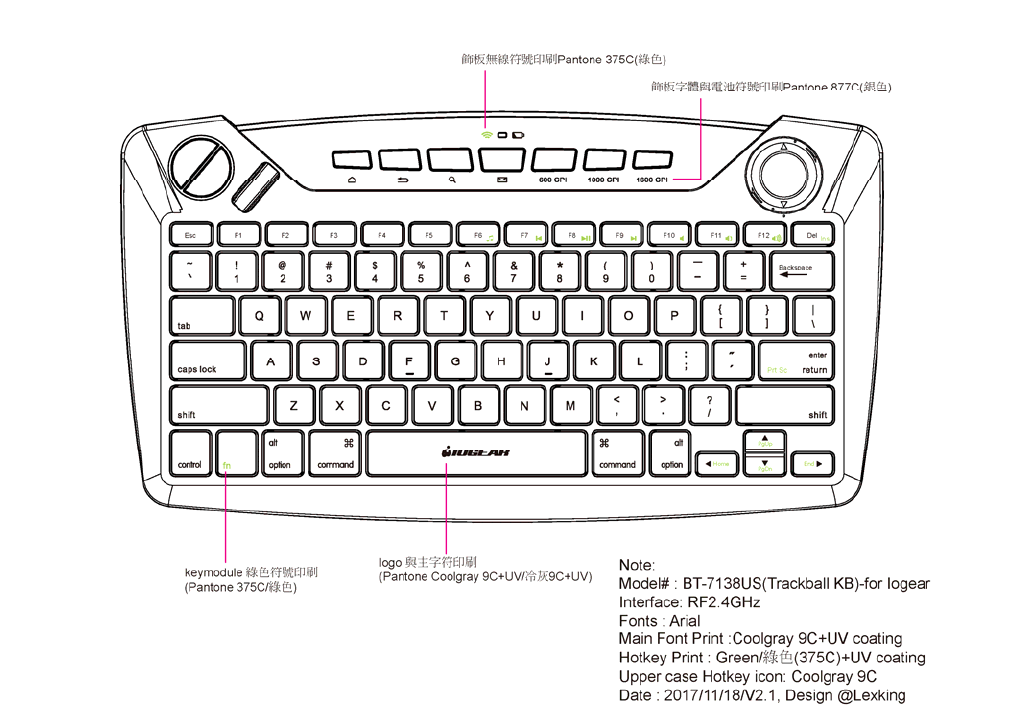
GKB635WProductprofileandfunctiondescriptions
MechanicalBasicSpec.
Interface:RF2.4GHzwithUSBNanodongleiterface
Dim.:314.0*170.0*35.15mm
Weight:445g±15g
KeyPitch:19.0mm(largesizekeypitchwhichclosetostandardkeyboardofferingyoucaneasytyping)
KeyNo.:78keys(US),80keys(JA)
KeyTravel:2.2±0.2mm(fulltravel2.45mm@120g)
KeyStructure:ScissorsKeyStructure.
KeyLife:8Million(innormaluse)
TrackballSize:19.0mm(byopticalsensorofPAN3025)
(EmbeddedScrollingwheelandmouseright/leftbuttonforcombinewithtrackballuse)
Languagelayout:JA
ElectricalBasicSpec.
CarrierFrequency:Keyboard:ISM2402MHz‐2480MHz.Receiver:2402MHz‐2480MHz.
KeyboardRFICmodel#:BK2535,ReceiverRFICmodel#:BK2541
Modulationmethod:GFSK
DataTransmissionRate:1Mbps,
Transmissionspower:‐14dBmMax.(Class2)
OperatingVoltage:1.8VDC‐3.6VDC
PowerOffer:AA*2pcsalkalinebatteries
PowerSavingMode:
*Active(Normaltyping)
*Standby(notypingisstandbymode),keyboardwillgointhismodeforpowersaving.
*Sleeping(after6minutesnotyping,keyboardwillgointosleepingmodeforpowersaving)
AveragePowerConsumption:
*KeyboardwithTrackballnormalactivemode(averagearound13.0mA)
*Standbymode(average1.5mA)
*Sleepingmode(averagearound125uA)
OperationRange:7~10meters
(keyboardoperatingdistancemayshortto3metersifitoperateundermetalsurface,soitneedtoavoidingoperateatany
metaldeskenvironment.)
Hotkeyfunctions;
1.Mainhotkeys;
Previouspage,NextPage,Home,Fn,
2.Trackballresolutionschangeablehotkeys
600dpi/1,000dpi/1,600dpihotkeysforchangetrackballmousecurser’sresolution.
3.Othersnormalkeys;
Youcanfollowbelowdescriptionhotkeysfunctiontooperate(Fnkeyismaincombinationhotkeys)
MediaHokeys
Fn+F6PreviousTrack,Fn+F7Play/Pause,Fn+F8NextTrack,Fn+F9Mute,Fn+F10VolumeDown,
Fn+F11VolumeUp,Fn+F12PrtSc,Fn+DelIns,Fn+ArrowkeysHome/End/PgUp/PgDn,
LEDsignaldescription
LED1haveBluecolorandRedColorinkeyboard
**BlueColor:itwillbeblinkedwhenpairingmodeprocess.
**RedColor:itwillbeblinkedwhenlowbatterystatus?
RF2.4GHzPairingProcess
1. PresstheIDbottomwhichislocateatkeyboardbacksidebutton.
2. ThenplugNanodongleintoyourNotebookorPCUSBslot.
One/OffPowerSwitch
On/OffsliderswitchwhichlocateinbacksideofKeyboardunit,whenthesliderswitchhaveturnon,thepowerwillbe
turnedon.Whenyouturnoffthesliderswitch,thepowerwillbeoff.
(**suggestyouturnoffthebatterypowerforsavingbatterypowerconsumption,ifyoudon’tusethiskeyboardforlong
time)
HowtoOperating:
Beforeyoustartingusethiskeyboard,pleasedetailREADbelowoperatinginformation;
(Notice:PleaseusenewAAbatteryforthiskeyboardorusetheenclosebatteriesbeforeyoufirsttimeuseGKB635W
keyboardunit.)
ConnecttoBluetoothhostdevices;
1.TakeoutGKB635Wkeyboardunitfrompackagebox
2.OpenPEbagofkeyboardthenloadtheAAalkalinebattery.
3.TurnOnswitchbuttonto“on”status,itismeanpoweronstatusforkeyboard.
4.PressIDbuttonwhichislocatedkeyboardbackside,thekeyboardblueLEDwillhaveblinkmeansthekeyboardhaveready
forvpairingprocess.YoucanputNanodongleintoUSBslot,thenkeyboardcanbeworkingwell.
(ifyoudon’twanttoconnectGKB635W,youcanpulloutNanodongle)
BasicTroubleshooting
Q1:Youcan’tpairingthiskeyboard
1.Aspowersavingdesignconcern,ifyoucan’tconnectkeyboardwithNanodongle.
YoucanrepeattheprocessaspressIDbuttonlocateatkeyboardbackside,thenputNanadongleintodevicesUSBslot.
2.ifthekeyboardhaveanybatterypowerissue,mayyoucantrytoturnoffpowerswitchthenturnonitagain,oryoucould
replaceanynewAAalkalinebatterythenyoucanre‐pairingkeyboardandNanodongle.
3.Pleasemakesuredoesbatterypowerisfullyenoughforkeyboardworking,mayyoucancheckRedcolorLED,iftheLEDis
blinkstatusduringyoutypinganykey,Ifso,thebatteryisnotenoughpower,itneedtoreplaceanewoneimmediately.

Q2:KeyboardhaveconnectwithiDevicesuccessfullybutitisstillnotworking:
1.Pleasemakesure,doesbatterypowerisfullyenoughforworkingwithkeyboard,mayyoucancheckRedcolorLED,ifthe
LEDisblinkstatusduringyoutypinganykey,Ifso,thebatteryisnotenoughpower,itneedtoreplaceanewoneimmediately.
2.Makesure,doestheRF2.4GHzwirelessKeyboardisworkingontometalsurface,ifso,pleasemoveoutkeyboardunitfrom
themetalsurface,becausewirelesskeyboardshouldavoidingtooperateclosetometalsurface,ifworkonmetalsurfacewill
causeconflictBluetoothwirelesskeyboardtransmissionsignal.
ifyoustillcan’tsmoothlytroubleshootingtheproblem,pleasereachcustomerservicepeopleorcustomerserviceemail
accountorreturnthenewkeyboardwithpackagebacktoyourpurchasedshop.
ProductGuarantee:
1yearguaranteeduringnormalused.
Abnormalusearenotincludingguarantee.
FederalCommunicationsCommission(FCC)Statement
Notice:
Theusershallbecautionedthatchanges/modificationsnotapprovedbytheresponsiblepartycouldvoidtheuser’s
authoritytooperatetheequipment.
Thechangesormodificationsnotexpresslyapprovedbythepartyresponsibleforcompliancecouldvoidtheuser’sauthority
tooperatetheequipment.
ThisdevicecomplieswithPart15oftheFCCRules.Operationissubjecttothefollowingtwoconditions:
(1)thisdevicemaynotcauseharmfulinterference,and
(2)thisdevicemustacceptanyinterferencereceived,includinginterferencethatmaycauseundesiredoperation.
IMPORTANTNOTE:
TocomplywiththeFCCRFexposurecompliancerequirements,nochangetotheantennaorthedeviceispermitted.Any
changetotheantennaorthedevicecouldresultinthedeviceexceedingtheRFexposurerequirementsandvoiduser’s
authoritytooperatethedevice.
NOTE:ThisequipmenthasbeentestedandfoundtocomplywiththelimitsforaClassBdigitaldevice,pursuanttopart
15oftheFCCRules.Theselimitsaredesignedtoprovidereasonableprotectionagainstharmfulinterferenceinaresidential
installation.Thisequipmentgenerates,usesandcanradiateradiofrequencyenergyand,ifnotinstalledandusedin
accordancewiththeinstructions,maycauseharmfulinterferencetoradiocommunications.However,thereisnoguarantee
thatinterferencewillnotoccurinaparticularinstallation.Ifthisequipmentdoescauseharmfulinterferencetoradioor
televisionreception,whichcanbedeterminedbyturningtheequipmentoffandon,theuserisencouragedtotrytocorrect
theinterferencebyoneormoreofthefollowingmeasures:
—Reorientorrelocatethereceivingantenna.
—Increasetheseparationbetweentheequipmentandreceiver.
—Connecttheequipmentintoanoutletonacircuitdifferentfromthattowhichthereceiverisconnected.
—Consultthedealeroranexperiencedradio/TVtechnicianforhelp.

ICESStatement
ThisdevicecomplieswithindustryCanadalicence‐exemptRSSStandard(s).
Operationissubjecttothefollowingtwoconditions:
1.Thisdevicemaynotcauseharmfulinterference,and
2.Thisdevicemustacceptanyinterferencereceived,includinginterferencethatmaycauseundesiredoperation.
LeprésentappareilestconformeauxCNRd'IndustrieCanadaapplicablesauxappareilsradioexemptsdelicence.
L'exploitationestautoriséeauxdeuxconditionssuivantes:
1.l’appareilnedoitpasproduiredebrouillage,et
2.l’utilisateurdel’appareildoitacceptertoutbrouillageradioélectriquesubi,mêmesilebrouillageestsusceptibled’en
compromettrelefonctionnement.