ATEN Technology IOGEAR KBGKM553R 2.4GHz Wireless Keyboard User Manual

ATEN Technology, Inc., dba IOGEAR 2.4GHz Wireless Keyboard Users Manual

Users Manual

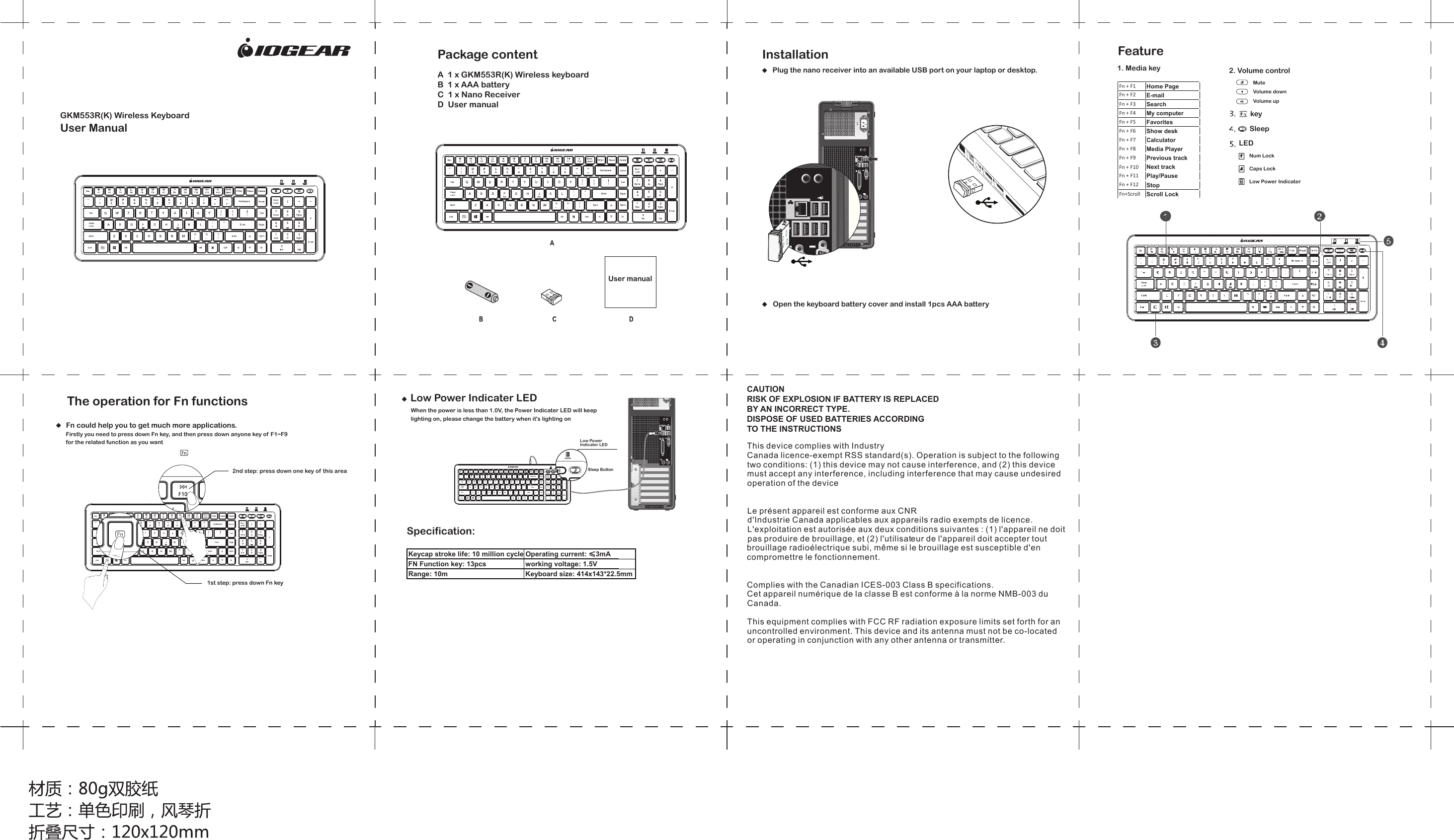
GKM553R(K) Wireless KeyboardUser ManualInstallationPlug the nano receiver into an available USB port on your laptop or desktop. 1. Media key 2. Volume controlMute Volume down Volume up Fn + F1Home PageFn + F2E-mailFn + F3SearchFn + F4My computerFn + F5FavoritesFn + F6Show deskFn + F7CalculatorFn + F8Media PlayerFn + F9Previous trackFn + F10Next trackFn + F11Play/PauseFn + F12StopFn+ScrollScroll LockkeyLEDSleepNum Lock Caps Lock Low Power Indicater Sleep ButtonCAUTIONRISK OF EXPLOSION IF BATTERY IS REPLACEDBY AN INCORRECT TYPE.DISPOSE OF USED BATTERIES ACCORDINGTO THE INSTRUCTIONSThis device complies with IndustryCanada licence-exempt RSS standard(s). Operation is subject to the followingtwo conditions: (1) this device may not cause interference, and (2) this devicemust accept any interference, including interference that may cause undesiredoperation of the deviceLe présent appareil est conforme aux CNRd'Industrie Canada applicables aux appareils radio exempts de licence.L'exploitation est autorisée aux deux conditions suivantes : (1) l'appareil ne doitpas produire de brouillage, et (2) l'utilisateur de l'appareil doit accepter toutbrouillage radioélectrique subi, même si le brouillage est susceptible d'encompromettre le fonctionnement.Complies with the Canadian ICES-003 Class B specifications.Cet appareil numérique de la classe B est conforme à la norme NMB-003 duCanada.This equipment complies with FCC RF radiation exposure limits set forth for an uncontrolled environment. This device and its antenna must not be co-located or operating in conjunction with any other antenna or transmitter.  A  1 x GKM553R(K) Wireless keyboard   B  1 x AAA battery  C  1 x Nano Receiver   D  User manual   Package content User manual Open the keyboard battery cover and install 1pcs AAA batteryFeatureThe operation for Fn functionsFn could help you to get much more applications.Firstly you need to press down Fn key, and then press down anyone key of F1~F9 for the related function as you want2nd step: press down one key of this area1st step: press down Fn keyLow Power Indicater LEDLow Power Indicater LEDWhen the power is less than 1.0V, the Power Indicater LED will keep lighting on, please change the battery when it's lighting onKeycap stroke life: 10 million cyclesOperating current: ≤3mAFN Function key: 13pcs working voltage: 1.5VRange: 10m Keyboard size: 414x143*22.5mmSpecification:

Navigation menu