AUTOEQUIPS TECH CB214 Digital Wireless System User Manual
AUTOEQUIPS TECH CO., LTD. Digital Wireless System
User Manual
USER MANUAL
Digital Wireless System
Wireless Interface
r
o
f
e
s
s
i
o
n
a
l
S
a
f
e
t
y
V
i
d
e
o
S
y
s
t
e
m
V
e
h
i
c
l
e
P
r
o
f
e
s
s
i
o
n
a
l
V
e
h
i
c
l
e
S
a
f
e
t
y
V
i
d
e
o
S
y
s
t
e
m
SPECIFICATION
ACCESSORIES
1.Antenna*2pcs
2.Screw packages (EVA gasket*2,Screws)
CLEANING AND CARING
Causion!
Unplug or power off the system before cleaning.
Do not use sharp or hard objects to clean the device as these may damage
the device.
Do not use liquid cleanser or aerosol cleanser.
Clean the device with a soft, damp cloth from time to time.
CONNECTION
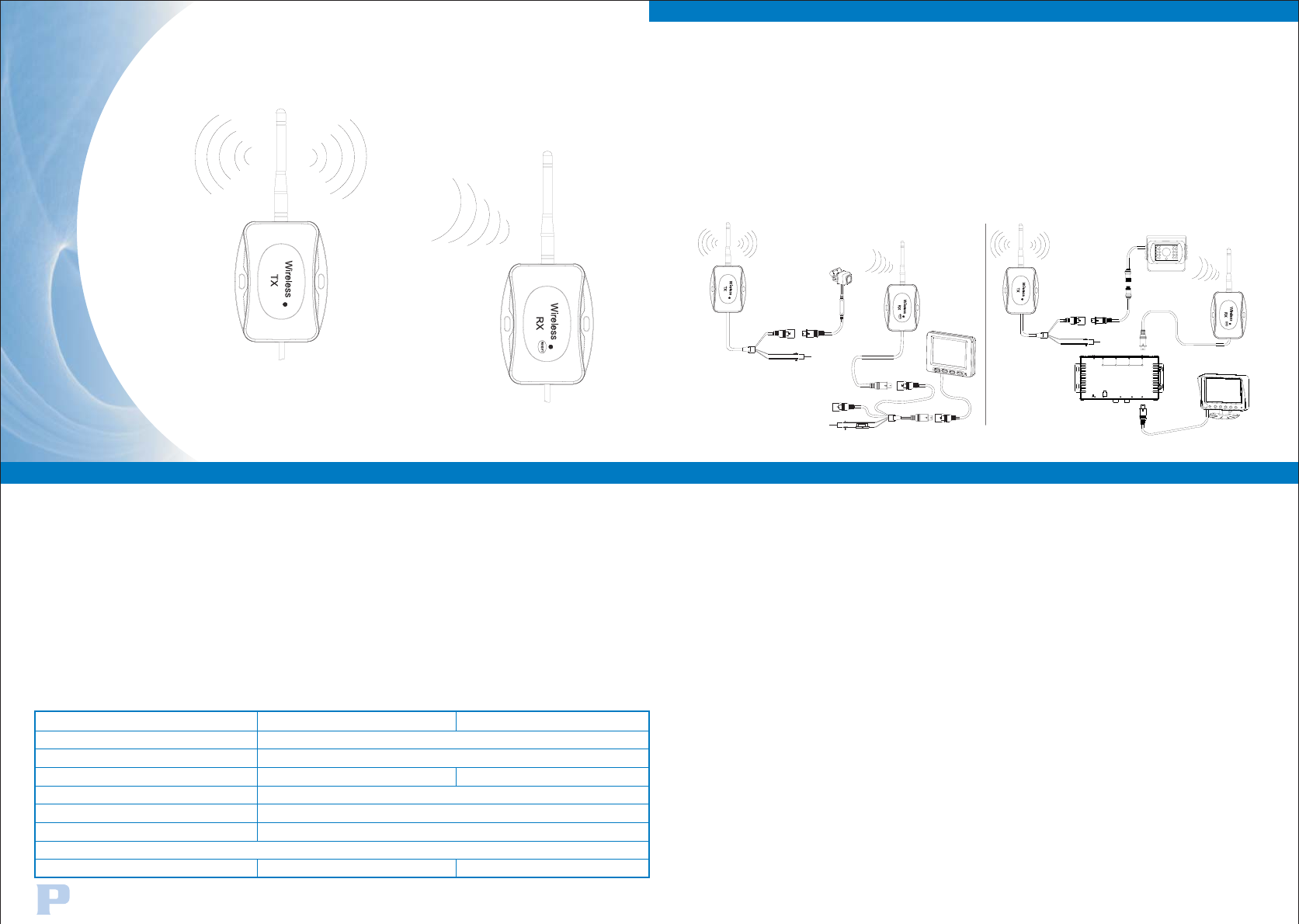
1.Wireless transmitter control box(T)
2.Wireless receiver control box(R)
3.
Connect the camera input socket to the rear view camera.
Connect the red cable to +12/24V DC power and black cable to GND.
Connect the control box to the camera input socket on our standard control
box or to if the monitor is with built-in control box
function.
Photo guide as below
extension Y cable
FEATURES
1.
2.
3.
4.
5.
6.
This set of wireless system is designed for commercial vehicle.
With significant long-distance and stable transmission capacity, the transmission
range can be as far as 170M.
When the system is connected, the receiver will automatically search the signal
from transmitter and display without any interference.
Small and extremely light design to greatly simplify your installation process.
Separate transmitter matches receiver exclusively,The wireless system can work
with any monitors and cameras.
Provide manual re-pairing function, allow interchanging transmitter or receiver
easily.
Frequency Range:
Barrier-free Transmission Distance:
Power Consumption:
Waterproof:
Operation Temperature:
Dimension:
Video And Audio Output Synchronization
Connect
2.4G HZ
≤170M(free sight)
IP65
-20 C+70 C
104(L)*80(W)*30(H)MM
Control box type Wireless transmitter Control Box Wireless Receiver Control Box
Connect With Camera Connect With Monitor
OO
12V/24V 12V
CAMERA
MIR/NOR
MONITOR
CAM TRIGGER
POWER IN
DC 12-24V
CONTR LO
AUDIO
OUT
VIDEO
OUT
432 1
+
1 4
2 3
-
(OPTIONAL)
Re-pairing Manually
Press "RESET" button on receiver for a few seconds to enter into pairing
mode,countdown to pair with 50 seconds,power on transmitter,then finish
the re-pairing setting. When paired for the first time, it will not longer be
interference.
(OPTIONAL)
FCC Radiation Exposure Statement:
This equipment complies with FCC radiation exposure limits set forth for an uncontrolled environment. This
equipment should be installed and operated with minimum distance 20cm between the radiator & your body.
FCC Warning
This device complies with Part 15 of the FCC Rules. Operation is subject to the following two conditions:
(1) This device may not cause harmful interference, and (2) this device must accept any interference received,
including interference that may cause undesired operation.
NOTE: Any changes or modifications to this unit not expressly approved by the party responsible for compliance
could void the user's authority to operate the equipment.