AUTOVISION BCX-300 BLUETOOTH HANDSFREE CAR KIT User Manual User s Manual H ok
AUTOVISION Co., Ltd BLUETOOTH HANDSFREE CAR KIT User s Manual H ok
Users Manual

Order Number : GETEC-C1-09-135 FCC Part 15 Subpart C
Test Report Number : GETEC-E3-09-083 Page 1 / 1
EUT Type: Bluetooth handsfree car kit
FCC ID.: XGVBCX-300
APPENDIX H
: USER’S MANUAL
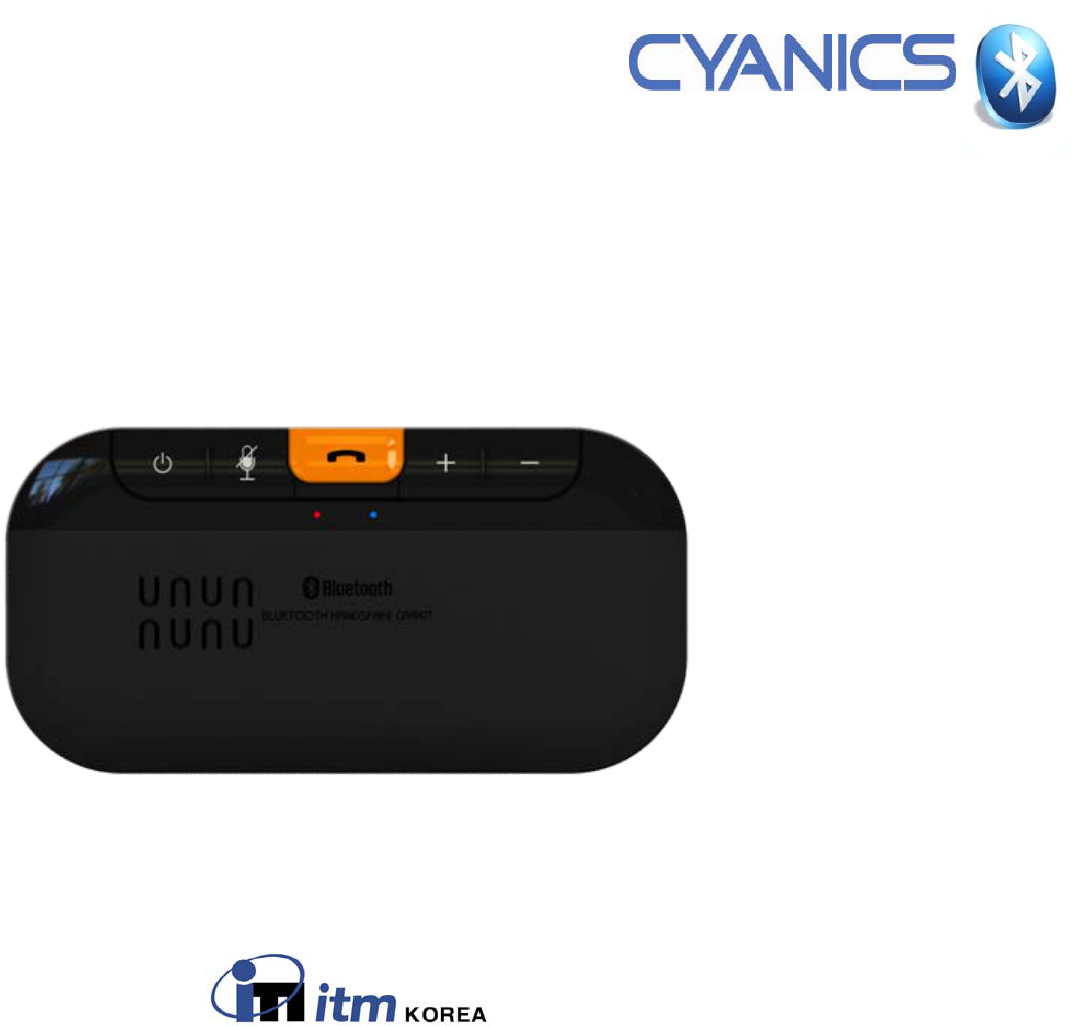
Bluetooth
Bluetooth®
®Hands
Hands-
-free car kit
free car kit
BCX
BCX-
-300 User guide
300 User guide
ITM Korea
BT Hands-Free Car Kit
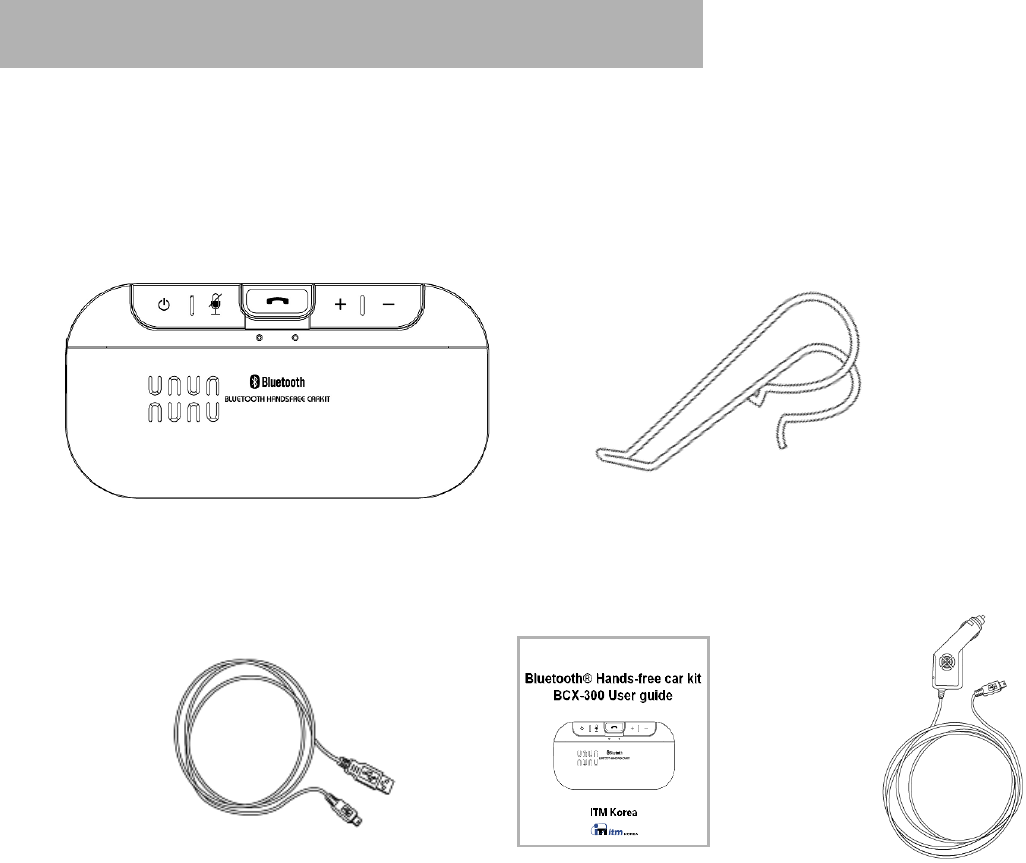
[BCX-300] Package contents & features
Ensure that the following is included in the package;
Hands-free car kit Sun visor clip
USB charging cable User guide
[Note] The basic package contents are a hands-free car kit, a sun visor clip, a USB charging cable, and an user guide.
Cigar jack adapter is an optional item separately sold or only contained in the full package.
Cigar jack adapter [An optional item]
ConfidentialandProprietary
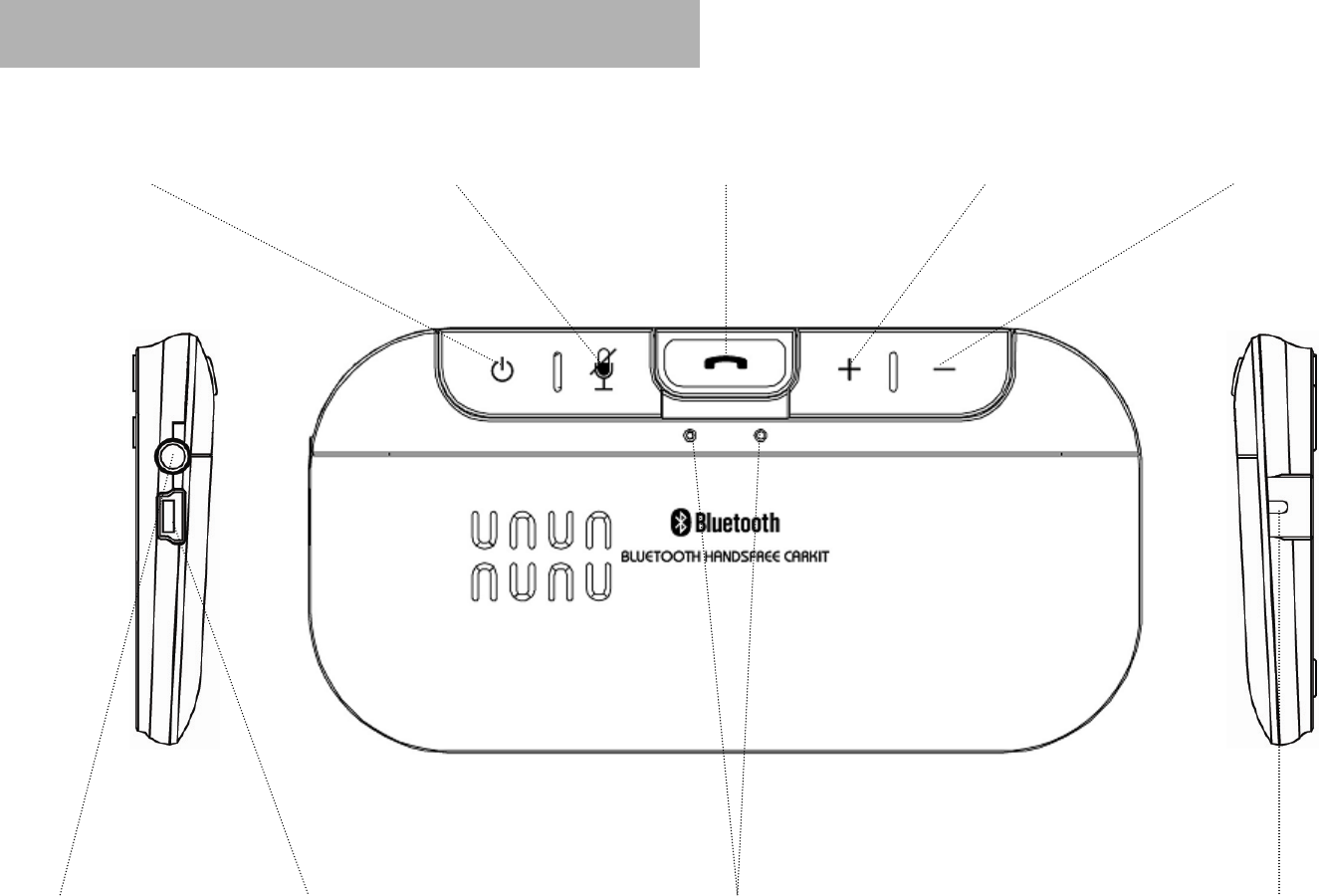
MICCharging PortEar Set Jack
Volume up Button Volume down ButtonPower (On/Off) Button MIC Mute (On/ Off) Button
LED Indicator
Call (Answer) Button
[BCX-300] Product description
ConfidentialandProprietary

1. Charging BCX-300
BCX-300 comes with a built-in rechargeable battery. Please ensure that your BCX-300 is fully charged before first use.
(1) Plug the mini USB 5 pin connector of the charging cable/or the cigar jack adapter into the charging port located on
the side of BCX-300.
(2) Charge BCX-300 through;
1) USB charging cable
You can charge BCX-300 directly from your PC or MAC by plugging the USB end of the charging cable into a USB port
in your personal computer. Make sure that your computer is on when trying to charge BCX-300.
2) Cigar jack adapter (An optional item)
Plug the cigar jack of the adapter into a car outlet.
(3) While charging, the RED LED light will turn on and remain lit until BCX-300 is fully charged.
(4) When charging is complete, the RED LED light will turn off. Unplug BCX-300 from the charging cable/or the cigar jack
adapter. It takes about 3 hours to charge a fully depleted battery of BCX-300.
[BCX-300] Getting Started
▪Low Battery Indication
When the battery is nearly depleted in either active or standby mode,
(1) BCX-300 will make a beep sound once every 30 seconds and
(2) The RED LED light will flash once every 4 seconds.
ConfidentialandProprietary
[BCX-300] Getting Started
2. Pairing BCX-300
BCX-300 works with Bluetooth® enabled devices. Before pairing your BCX-300 hands-free car kit for the first time, please
make sure that your mobile phone is Bluetooth® capable and the Bluetooth® features are enabled. Paring is only required
for the first time you use BCX-300 with your mobile phone. The hands-free car kit pairing procedure will be various depending
on the model of your mobile phone. Please refer to your mobile phone user guide for more detailed paring instructions.
▪Steps for pairing BCX-300
(1) Make sure that your BCX-300 is off. (The LED indicator should not be flashing).
(2) Place BCX-300 within a meter away from your mobile phone.
(3) Activate your mobile phone’s Bluetooth function.
(4) There are two types of BCX-300 paring modes.
1) Manual pairing mode
Press and hold (Power) button for 7~8 seconds until BLUE & RED LED light rapidly flash alternately.
2) Auto pairing mode (Easy pairing)
①Press and hold ( Power) button for 2~3 seconds to turn BCX-300 on.
②When BCX-300 is turned on for the first time, it will automatically try auto reconnection function.
The function, auto reconnection, will be failed to activate and then BCX-300 will be in pairing mode as BLUE &
RED LED light rapidly flash alternately.
(5) Set the mobile phone to search for all available Bluetooth® devices around. When searching is complete, select
“BCX-300” from the list of devices shown.
ConfidentialandProprietary
(6) Enter the passkey “0000(Four zeros)” and press “OK” to pair BCX-300 with your mobile phone. When paring is
successfully done, BCX-300 will make the short beep sound twice rapidly and then the BLUE LED light will flash once
every 10 seconds.
(7) If prompted by the phone to connect, select “Yes” (This will vary between phones).

[BCX-300] Getting Started
3. Turning BCX-300 on
In order to turn BCX-300 on, press and hold (Power) button for 2~3seconds. The indication tone of turning on will be heard
and then, the BLUE LED light will flash 3 times rapidly.
4. Turning BCX-300 off
In order to turn BCX-300 off, press and hold (Power) button for at least 5seconds. While holding the button, 3-times beep
sound and the indication tone of turning off will be heard in series at 1.5second intervals. The RED LED light will glow for
2seconds and then turn off.
ConfidentialandProprietary
[Note] Once BCX-300 is registered and paired with a Bluetooth® mobile phone, it will remain in the paired status
unless being deleted from the mobile phone, turned off, or out of the operation range, 10 meters(33feets)
from the mobile phone.

[BCX-300] Using BCX-300
1. Answering a call
When you have a incoming call, you will hear the ring through the BCX-300 speaker. Briefly press (Call) button,
(Volume up) button, or (Volume down) button once to accept the call.
2. Ending a call
Briefly press (Call) button to terminate the call.
3. Last number redialing
Press (Call) button for 2~3 seconds until you hear the beep sound twice from the BCX-300 speaker. This will activate
the last number redial features. Subject to different models of mobile phones, it will show you the recently dialed or placed
call list on the mobile phone. Select one on the list via the mobile phone, then press (Call) button briefly to make a call.
4. Voice dialing
If your mobile phone is equipped with a standard voice dialing function, you can activate voice dialing. Briefly press
(Call) button until you hear the beep sound once from the BCX-300 speaker, and then say the registered name on the voice
dialing list of the mobile phone. For the better voice dialing performance we recommend that you record the voice tag
in your mobile phone.
5. Adjusting the volume
Press (Volume up) or (Volume down) button to increase or decrease the speaker volume. BCX-300 has eight
volume levels.
6. Transferring a call from BCX-300 to your mobile phone
In order to transfer a call from BCX-300 to your mobile phone, press (Volume up) button for 2~3 seconds.
ConfidentialandProprietary
[BCX-300] Using BCX-300
7. Transferring a call from your mobile phone to BCX-300
In order transfer a call from your mobile phone, press (Volume up) button for 2~3 seconds.
8. Call waiting
Answering the second call without hanging up the first call by pressing (Call) button for 2~3 seconds. In order to return to
the first call, press (Call) button for 2~3 seconds again. Press (Call) button to end both call at once.
9. Rejecting a call
If you do not wish to answer an incoming call, press (Call) button for 2~3 seconds.
10. Auto reconnecting
BCX-300 and your mobile phone will be disconnected (link-lost) each other at the moment when the distance between
BCX-300 and the mobile phone is above the operation range, 10 meters(33feets). When both devices come close
within the range, BCX-300 and the mobile phone will be auto-reconnected each other; however, for the activation of
the auto reconnecting function, they must be brought back in that range within 14 hours. After 14 hours (around 850 minutes)
out of the operation range, BCX-300 will be automatically turned off by itself.
[Note] From the moment when BCX-300 and your mobile phone are not in the operation range, which means
both devices are link-lost each other, BCX-300 will seek your mobile phone as emitting signals to reconnect
with the mobile phone. BCX-300 emits the signal 100 times at 2-minute intervals (for 200 minutes) and then 150 times
at 4minute 20 seconds intervals (for 650 minutes). In order to use the auto reconnecting function, an initial paring
between both devices must be done before.
11. MIC mute on & off
In order to turn MIC off, briefly press (MIC mute) button. Reversely in order to turn MIC on, briefly press (MIC mute)
button.
ConfidentialandProprietary
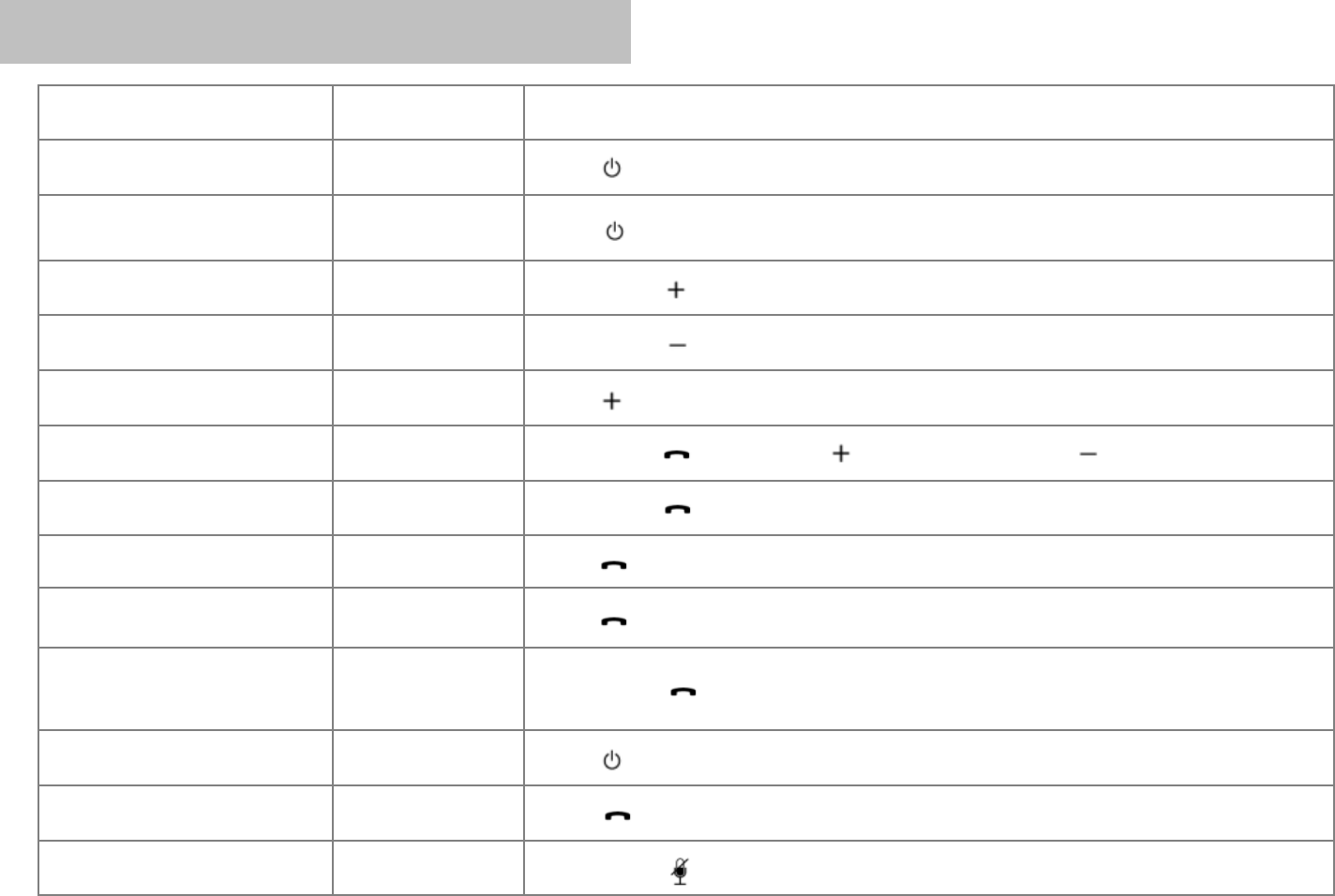
Functions BCX-300 Status Action
Turning on Power Off Press (Power) button for 2~3 seconds.
Turning off Power On Press (Power) button for 5 seconds.
Volume up Talking Briefly press (Volume up) button.
Volume down Talking Briefly press (Volume down) button.
Transferring a call Talking Press (Volume up) button for 2~3 seconds.
Answering a call Talking Briefly press (Call) button, (Volume up) button, or (Volume down) button.
Ending a call Talking Briefly press (Call) button.
Call waiting Talking Press (Call) button for 2~3 seconds.
Last number redialing Power On Press (Call) button for 2~3 seconds (until hear the beep sound twice from the speaker).
Voice dialing
(Handset must support voice function)
Power On
(Voice Command) Briefly press (Call) button (until hear the beep sound once from the speaker).
Enter pairing Power Off Press (Power) button for 7~8 seconds.
Rejecting a call Ringing Press (Call) button for 2~3 seconds.
MIC Mute On & Off Talking Briefly press (MIC Mute) button.
[BCX-300] Summary of button functions
ConfidentialandProprietary

Function & Condition BCX-300 Status LED Indication
Turn On Blue LED light flickers 3 times.
Turn Off Red LED light is on for 2 seconds and then the light is turned off.
Pairing Mode Blue and Red LED light rapidly flash alternately
Hands-Free or Headset Profile
connected Blue LED light flashes once every 10 seconds.
Incoming call Blue LED light flashes rapidly.
Call connected Blue LED light flashes once every 10 seconds.
Bluetooth not connected Blue LED light flashes once every 5 seconds.
Charging Red LED light is lit.
Charging completed LED is turned off.
Link Loss Out of operation range (10M) Blue LED light flashes once every 5 seconds.
Battery Low Battery Warning Red LED light flashes once every 4 seconds.
Charging
Functions
[BCX-300] Summary of LED indication
ConfidentialandProprietary

Trouble Shooting
BCX-300 isn’t turned on. Check whether the battery of BCX-300
hands-free car kit is fully charged. Charge the battery.
Check whether the handset supports
Bluetooth Headset or Hands-free profile.
Determine whether your handset supports
Bluetooth Headset or Hands-free profile.
Check whether the battery of BCX-300
hands-free car kit is low or out. Charge the battery.
Check and make sure BCX-300 hands-free
car kit is turned on.
Press and hold (Power) button for 2~3
seconds to turn on the hands-free car kit.
Check and make sure BCX-300 hands-free
car kit is placed in the pairing mode.
In the Power off state, press and hold
(Power) button for 8 seconds to place
the hands-free car kit in the pairing mode.
Low Sound (Speaker) Check the speaker volume. Increase the volume level through briefly
pressing (Volume up) button.
Unable to pair BCX-300 hands-
free car kit with Bluetooth device.
Unable to communicate with
BCX-300 hands-free car kit
[BCX-300] Troubleshooting
ConfidentialandProprietary

[BCX-300] Product Specification
ConfidentialandProprietary
Product name Bluetooth hands-free car kit BCX-300
Bluetooth specification Ver 2.1
Supported profiles HFP, HSP
Operastion range 10m
RX sensitivity Typ-84dBm
Frequency 2401MHz~2480MHz
Modulation (Frequency-shift keying) GFSK
Output level Below 0.1mW
Antenna Ceramic Chip Antenna
Battery 3.7V/ 800mAh/ Li-Ion rechargeable battery
Rated input 5.0V/ 0.3A
Speaker 40Ω/ 8Ø
Microphone Omni directional
Standby time Up to 900hrs
Talk time Up to 20hrs
Charging time Up to 3hrs
Operating temperature -20°C ~ 60°C
Dimension & Weight 118mm(L) * 60mm(W) * 11.3mm(D) / 70g
FCC ID : XGVBCX-300
This device complies with Part 15 of FCC Rules. Operation is subject to the following two conditions :
(1) This device may not cause harmful interface, and (2) This device must accept any interference received, including
interference that may cause undesired operation. Changers or modification not expressly approved by the party responsible
for Compliance could void the user’s authority to operate the equipment. Connecting of peripherals requires the use of grounded
shielded signal cables.
RF exposure statements
This equipment complies with FCC RF radiation exposure limits set forth for an uncontrolled environment. This transmitter
must not be co-located or operated in conjunction with any other antenna or transmitter.
European Union Notice
Product with CE marking comply with the R&TTE Directive (99/5/EC), the EMC Directive (89/336/EEC) and the Low Voltage
Directive (73/23/EEC) issued by the Commission of the European Community.
Safety
1. Caution
Danger of explosion if battery is incorrectly replaced.
2. Batteries shall not be exposed to excessive heat such as sunshine, fire or the like.
[BCX-300] Declaration of Confirmation
ConfidentialandProprietary
▪All the certificates holder : AutoVision
FCC ID : XGVBCX-300
IAB-BCX-300HFCK
0197 E4
XX XXXX

Limited one(1)-Year Warranty
ITM warrants to the original purchaser for 1year from your purchase date against deficiencies in material and workmanship
under normal use. Should this unit fail to operate in a satisfactory manner within the warranty period. ITM will repair or,
at its discretion, replace the product without charge. We may use functionally equivalent, reconditioned, refurbished,
remanufactured, pre-owned or new products or parts.
If service required
Should this unit fail to operate in a satisfactory manner, it is best to first check with the store where it was originally purchased.
Should this fail to resolve the matter and if you believe your unit meets the criteria for warranty replacement or repair,
please email to warranty@itm-korea.com for an RMA [Return Merchandise Authorization] number with detail description of problem.
All returns require an RMA number and this number is only issued by email. Please note that an RMA number does not guarantee
final disposition. All returns are subject to inspection. Please note that we may ask you to return all accessories, Manual, and
original packaging with your unit.
We recommend that all returns be padded and packed securely, insured and sent certified and/ or return receipt requested.
In addition, please include following;
1. Reason for return & RMA number
2. Proof of purchase [receipt, copies accepted]
3. Your return address and contact information [phone or email]
4. We may ask you to return all accessories, manual, and original packaging [box, labels, and etc] with your unit.
Please do not write or tape the original package.
Note : Failure to follow criteria listed above may delay or void your warranty process.
[BCX-300] Warranty
ConfidentialandProprietary

Please send the return with postage or shipping prepaid to:
ITM Korea
RM#210 2nd FL,227-1, Yongdap-Dong, Seongdong-Gu, Seoul, 133-847, South Korea
If you still have questions, please email us at warranty@itm-korea.com or visit us at www.cyanics.net/service.
What this warranty does not cover
This limited warranty does not cover;
1. Due to alternation, normal wear and tear, misuse, lack of maintenance, accidents, willful actions which have been modified and
repaired by unauthorized person or entity.
2. Products that are operated in combination with ancillary or peripheral equipment not furnished or otherwise certified by
ITM Korea for use with the product or any damage to the products or ancillary equipment as a result of such use.
3. Consumable spares and accessories [unless they are non-functional or broken upon purchase of product] such as;
a. Cases
b. Cable
c. Decorative finishes
d. Key buttons
e. Battery
[BCX-300] Warranty
ConfidentialandProprietary
◆Product manufacturer information :
1. Name : XXXXXXXXXXX (T.XXXX.XXX.XXXX/ F.XXXX.XXX.XXXX)
◆Country of Origin : Republic of Korea

ITM Korea
RM210 2nd FL 227-1 Yongdap-Dong, Seongdong-Gu,
Seoul, 133-847, Republic Of Korea
Tel : 8270-7018-0939
Fax : 8270-7016-2210
© 2009 ITM. All rights reserved. ITM, CYANICS, the logo design, and BCX are trademarks or registered trademarks of ITM.
The Bluetooth® word mark and logos are owned by the Bluetooth® SIG,Inc. and any use of such marks by ITM is under license.
All other trademarks included herein are the property of their respective owners.
BT Hands-Free Car Kit