AVS BTR-1 Bluetooth stereo headest User Manual
AVS (Ningbo) Industrial Co.Ltd Bluetooth stereo headest
AVS >
User Manual
Bluetooth stereo headsets
Model:BTR-1
FCC ID : FWHBTR-1
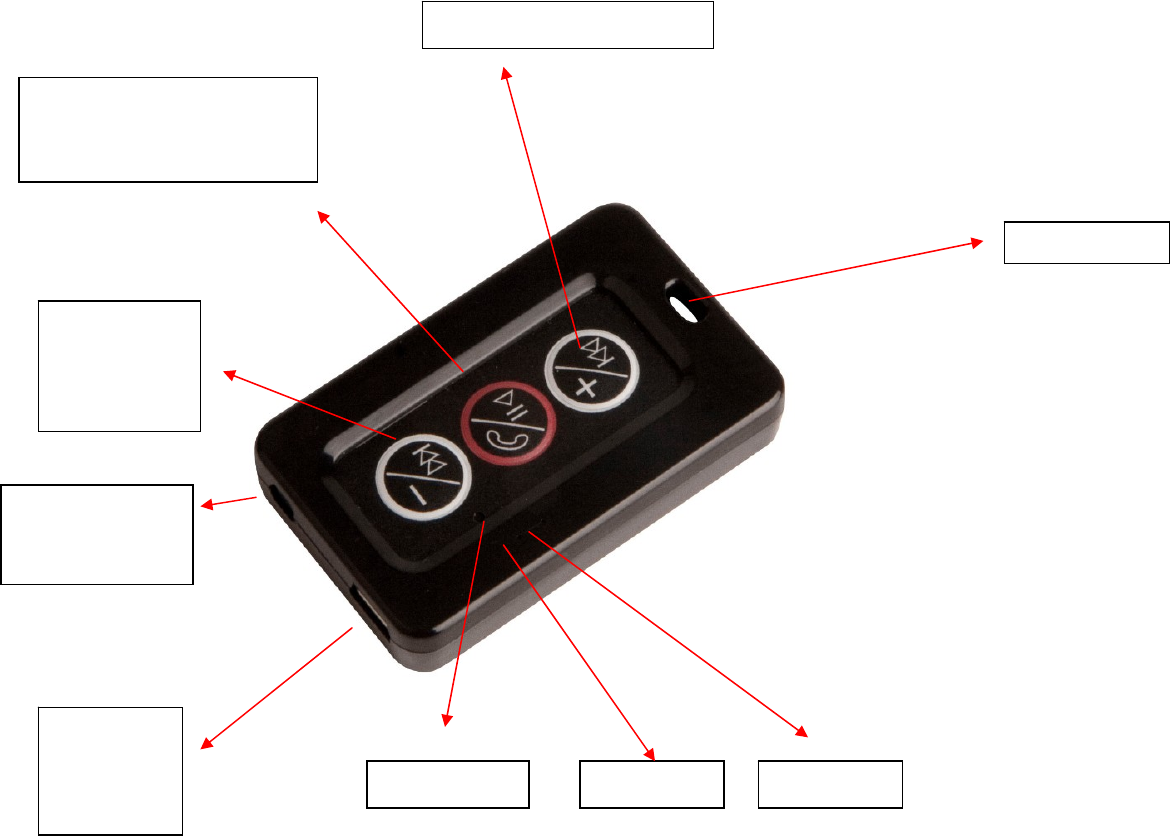
ABOUT YOUR BTR-1 (blue tooth stereo headset):
The BTR-1 (blue tooth stereo headset) has the following function:
• Answer calls
• End calls
• Reject calls
• Calls divert
• Automatic connention
• Play music
•Battery charging protection
Specifications:
z HTP
z V2.1 + EDR Class 2
z A2DP
z AVRCP
z ECHO CANCELATION
Next track/VOL up
Previous
track/VOL
down
Poweron/of
f
Play/Pause
Answer/end button
RedLEDBlueLEDMicrophone
MiniUSB
charging
socket
Headphone
connedtor
plug(3.5mm)
Hanghole

z Standby time: 300 hours
z Talk time: up to 15 hours
z Music time: up to 14 hours
You should follow three steps before using your headset:
1. Charge your headset
2. Activate Bluetooth on your mobile phone (refer to the manual for your Mobile phone)
3. Pair your headset to your mobile phone
The BTR-1 (blue tooth stereo headset) is easy to operate. The buttons performs different functions depending on how long you press them:
Instruction
Duration of press
Tap
Press briefly
Press
Approx: 1 second
Press and
hold
Approx: 4 seconds
Your headset indicates the charging level while charging:
What you see
Status
Solid Red
Charging
Red LED
Gets Off
Fully Charged
Please note: The lifetime of the battery will be significantly reduced if your device is left uncharged for a long period. We therefore recommend that you recharge
your device at least once a month.
BATTERY LEVEL
z When the voltage is below 3.1v, red LED twinks 5 times after every 30 seconds, with warning sound; It's time to charge the
device
z The device gets off when voltage is below 2.9v, in order to protect the device
Turning your headset on an d off
•Press and hold the until you see a burst of flashes on the indicator light (BLUE LED) to turn the headset off.
ٛ
•Press and hold the until you see a burst of flashes on the indicator light (RED LED) to turn the headset off.
ٛ
Pairing your headset with your phone
Headsets are connected to phones using a procedure called ‘ pairing’ . By following a few simple steps, a phone can easily be paired with a headset.
1. Put the headset in pairing mode

Pressandhold buttonuntilseeredandblueLEDtwinksininterval.Atthistime,itgetsintopairstatus
2. Set your Bluetooth phone to ‘ discover’ the IQBTR
Follow your phone’ s instruction guide. First make sure that Bluetooth is activated on your mobile phone. Then set your phone to discover the headset. This
usually involves going to a ‘ setup,’ ‘ connect’ or ‘ Bluetooth’ menu on your phone and selecting the option to ‘ discover’ or ‘ add’ a Bluetooth device.*
(See example from a typical mobile phone in fig. 1).
3. Your phone will find the IQBTR
Your phone will find the headset under the name IQBTR. Your
phone then asks if you want to pair with the headset. Accept by
pressing ‘ Yes’ or ‘ OK’ on the phone and confirm with the passkey
or PIN = 0000 (4 zeros). Your phone will confirm when pairing is
complete.
Fig. 1
if the pairing fails, please turn off the device and repeat the above processes.
use it whatever way you like
Play music (Some phones may require you to start a media player first)
•Tap the button once
Pause music
•Tap the button , tap again to resume playing.
Answer a call when playing music
•Tap the and the music will be paused and the call will be connected.
• When you end the call, your music will start again
Skip one track forward
•Tap the Skip Forward button ;continue tapping to skip several tracks forward.
Skip one track back
Tap the Skip Back button;continue tapping to skip several tracks backward.
Answer a call
Tap the on your headset to answer a call when phone is ringing.
End a call
•Tap the to end an active call.

Reject a call
•Press and hold the when the phone rings to reject an incoming call. Depending on your phone settings,
the person who called you will either be forwarded to voice mail or hear the busy signal.
Adjust sound and volume
Press the volume up or down (+ or -) to adjust the volume.
Taking care of your hea dset
ٛ • A lways store the with the power off and safely protected.
ٛ • D o not expose the Product to rain or other liquids.
IMPORTANT REGULATORY INFORMATION
This device complies with Part 15 of the FCC Rules: Operation is subject to the following two conditions:
1. This device may not cause harmful interference and
2. This device must accept any interference that is received, including any interference that may cause undesired operation.
WARNING:
Changes or modifications to this unit not expressly approved by the party responsible for compliance could void the user’s authority to
operate the equipment.