AVWOO TECHNOLOGY A021 Portable waterproof Speaker User Manual 2017 0727 A021

SHENZHEN AVWOO TECHNOLOGY CO., LTD Portable waterproof Speaker 2017 0727 A021

15_MMA3623 UserMan

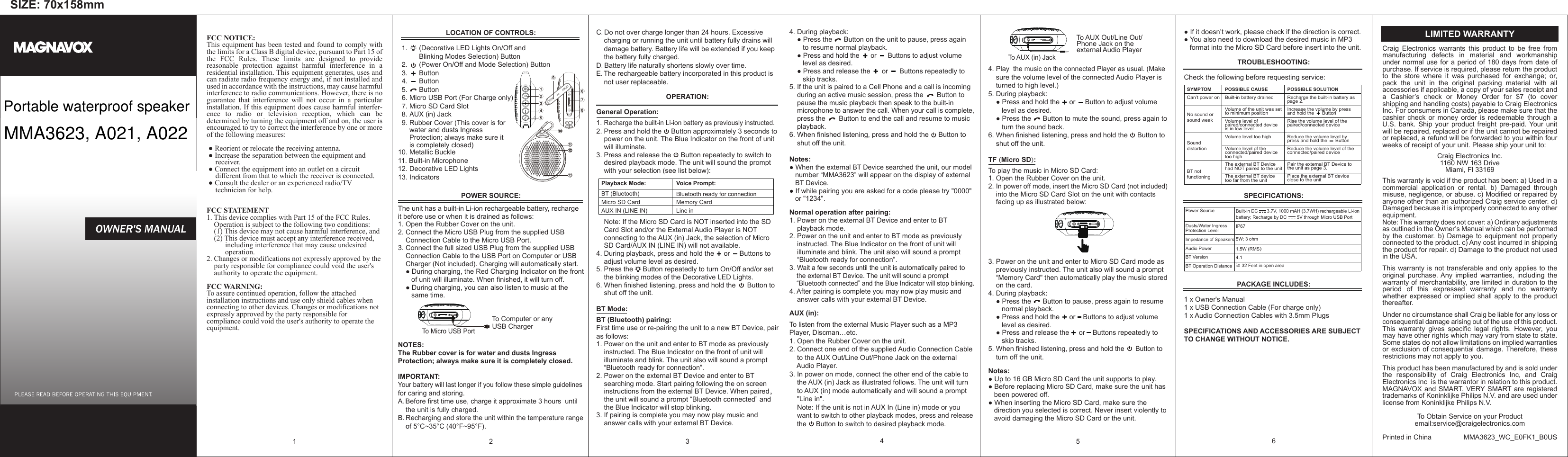
SIZE: 70x158mmFCC NOTICE:This equipment has been tested and found to comply with the limits for a Class B digital device, pursuant to Part 15 of the FCC Rules. These limits are designed to provide reasonable protection against harmful interference in a residential installation. This equipment generates, uses and can radiate radio frequency energy and, if not installed and used in accordance with the instructions, may cause harmful interference to radio communications. However, there is no guarantee that interference will not occur in a particular installation. If this equipment does cause harmful interfer-ence to radio or television reception, which can be determined by turning the equipment off and on, the user is encouraged to try to correct the interference by one or more of the following measures: ● Reorient or relocate the receiving antenna.   ● Increase the separation between the equipment and      receiver.    ● Connect the equipment into an outlet on a circuit      different from that to which the receiver is connected.   ● Consult the dealer or an experienced radio/TV      technician for help.FCC STATEMENT1. This device complies with Part 15 of the FCC Rules.     Operation is subject to the following two conditions:    (1) This device may not cause harmful interference, and    (2) This device must accept any interference received,           including interference that may cause undesired           operation.2. Changes or modifications not expressly approved by the     party responsible for compliance could void the user's     authority to operate the equipment.FCC WARNING:To assure continued operation, follow the attached installation instructions and use only shield cables when connecting to other devices. Changes or modifications not expressly approved by the party responsible for compliance could void the user's authority to operate the equipment.                                                                1 POSSIBLE SOLUTIONRecharge the built-in battery as page 2.Increase the volume by press and hold the      ButtonRise the volume level of the paired/connected deviceReduce the volume level by press and hold the      ButtonReduce the volume level of the connected/paired devicePair the external BT Device to the unit as page 3.Place the external BT device close to the unitPOSSIBLE CAUSEBuilt-in battery drainedVolume of the unit was set to minimum positionVolume level of paired/connected device is in low levelVolume level too highVolume level of the connected/paired device too highThe external BT Device had NOT paired to the unitThe external BT device too far from the unitSYMPTOMCan’t power onNo sound or sound weakSound distortionBT not functioningC. Do not over charge longer than 24 hours. Excessive     charging or running the unit until battery fully drains will     damage battery. Battery life will be extended if you keep     the battery fully charged.D. Battery life naturally shortens slowly over time.E. The rechargeable battery incorporated in this product is     not user replaceable.OPERATION:General Operation: 1. Recharge the built-in Li-ion battery as previously instructed.2. Press and hold the     Button approximately 3 seconds to     power on the unit. The Blue Indicator on the front of unit     will illuminate.3. Press and release the     Button repeatedly to switch to     desired playback mode. The unit will sound the prompt      with your selection (see list below):    Note: If the Micro SD Card is NOT inserted into the SD     Card Slot and/or the External Audio Player is NOT     connecting to the AUX (in) Jack, the selection of Micro     SD Card/AUX IN (LINE IN) will not available.4. During playback, press and hold the     or     Buttons to     adjust volume level as desired.5. Press the     Button repeatedly to turn On/Off and/or set     the blinking modes of the Decorative LED Lights.6. When finished listening, press and hold the      Button to     shut off the unit.BT Mode:BT (Bluetooth) pairing:First time use or re-pairing the unit to a new BT Device, pair as follows:1. Power on the unit and enter to BT mode as previously     instructed. The Blue Indicator on the front of unit will     illuminate and blink. The unit also will sound a prompt     “Bluetooth ready for connection”.2. Power on the external BT Device and enter to BT     searching mode. Start pairing following the on screen     instructions from the external BT Device. When paired,    the unit will sound a prompt “Bluetooth connected” and     the Blue Indicator will stop blinking.3. If pairing is complete you may now play music and     answer calls with your external BT Device.34. During playback:    ● Press the      Button on the unit to pause, press again        to resume normal playback.    ● Press and hold the      or      Buttons to adjust volume        level as desired.    ● Press and release the      or      Buttons repeatedly to       skip tracks.5. If the unit is paired to a Cell Phone and a call is incoming     during an active music session, press the       Button to     pause the music playback then speak to the built-in     microphone to answer the call. When your call is complete,     press the       Button to end the call and resume to music     playback.6. When finished listening, press and hold the     Button to     shut off the unit.Notes:● When the external BT Device searched the unit, our model    number “MMA3623” will appear on the display of external    BT Device.● If while pairing you are asked for a code please try "0000"    or "1234".Normal operation after pairing:1. Power on the external BT Device and enter to BT     playback mode.2. Power on the unit and enter to BT mode as previously     instructed. The Blue Indicator on the front of unit will     illuminate and blink. The unit also will sound a prompt     “Bluetooth ready for connection”.3. Wait a few seconds until the unit is automatically paired to     the external BT Device. The unit will sound a prompt     “Bluetooth connected” and the Blue Indicator will stop blinking.4. After pairing is complete you may now play music and     answer calls with your external BT Device.AUX (in):To listen from the external Music Player such as a MP3 Player, Discman…etc.1. Open the Rubber Cover on the unit.2. Connect one end of the supplied Audio Connection Cable     to the AUX Out/Line Out/Phone Jack on the external     Audio Player.3. In power on mode, connect the other end of the cable to     the AUX (in) Jack as illustrated follows. The unit will turn      to AUX (in) mode automatically and will sound a prompt     "Line in".    Note: If the unit is not in AUX In (Line in) mode or you     want to switch to other playback modes, press and release     the     Button to switch to desired playback mode.4                                              To AUX Out/Line Out/                                              Phone Jack on the                                              external Audio Player                                                                                                          4. Play  the music on the connected Player as usual. (Make     sure the volume level of the connected Audio Player is     turned to high level.) 5. During playback:    ● Press and hold the     or     Button to adjust volume        level as desired.    ● Press the      Button to mute the sound, press again to        turn the sound back.6. When finished listening, press and hold the     Button to     shut off the unit.TF (Micro SD): To play the music in Micro SD Card:1. Open the Rubber Cover on the unit.2. In power off mode, insert the Micro SD Card (not included)     into the Micro SD Card Slot on the unit with contacts     facing up as illustrated below:3. Power on the unit and enter to Micro SD Card mode as     previously instructed. The unit also will sound a prompt     “Memory Card" then automatically play the music stored     on the card.4. During playback:    ● Press the      Button to pause, press again to resume        normal playback.    ● Press and hold the     or    Buttons to adjust volume       level as desired.     ● Press and release the     or    Buttons repeatedly to        skip tracks.5. When finished listening, press and hold the      Button to     turn off the unit.Notes:● Up to 16 GB Micro SD Card the unit supports to play.● Before replacing Micro SD Card, make sure the unit has    been powered off.● When inserting the Micro SD Card, make sure the    direction you selected is correct. Never insert violently to    avoid damaging the Micro SD Card or the unit.5● If it doesn’t work, please check if the direction is correct.● You also need to download the desired music in MP3    format into the Micro SD Card before insert into the unit. TROUBLESHOOTING:Check the following before requesting service:SPECIFICATIONS:PACKAGE INCLUDES: 1 x Owner's Manual1 x USB Connection Cable (For charge only)1 x Audio Connection Cables with 3.5mm Plugs SPECIFICATIONS AND ACCESSORIES ARE SUBJECT TO CHANGE WITHOUT NOTICE.6LOCATION OF CONTROLS:                                                                                                            1.      (Decorative LED Lights On/Off and            Blinking Modes Selection) Button                2.      (Power On/Off and Mode Selection) Button   3.      Button    4.      Button    5.      Button  6. Micro USB Port (For Charge only)  7. Micro SD Card Slot        8. AUX (in) Jack  9. Rubber Cover (This cover is for      water and dusts Ingress      Protection; always make sure it       is completely closed)10. Metallic Buckle  11. Built-in Microphone12. Decorative LED Lights13. Indicators  POWER SOURCE:The unit has a built-in Li-ion rechargeable battery, recharge it before use or when it is drained as follows:1. Open the Rubber Cover on the unit.2. Connect the Micro USB Plug from the supplied USB     Connection Cable to the Micro USB Port.3. Connect the full sized USB Plug from the supplied USB     Connection Cable to the USB Port on Computer or USB     Charger (Not included). Charging will automatically start.     ● During charging, the Red Charging Indicator on the front        of unit will illuminate. When finished, it will turn off.     ● During charging, you can also listen to music at the        same time.                                                 To Computer or any                                                  USB ChargerNOTES:The Rubber cover is for water and dusts Ingress Protection; always make sure it is completely closed.                              IMPORTANT:Your battery will last longer if you follow these simple guidelines for caring and storing.A. Before first time use, charge it approximate 3 hours  until     the unit is fully charged.B. Recharging and store the unit within the temperature range     of 5°C~35°C (40°F~95°F).2Power SourceDusts/Water Ingress Protection Level Impedance of SpeakersAudio PowerBT VersionBT Operation Distance                                   Built-in DC       3.7V, 1000 mAH (3.7WH) rechargeable Li-ion battery; Recharge by DC        5V through Micro USB PortIP675W; 3 ohm1.5W (RMS)4.1≧ 32 Feet in open area Voice Prompt:Bluetooth ready for connectionMemory CardLine inPlayback Mode:BT (Bluetooth)Micro SD CardAUX IN (LINE IN)Craig Electronics warrants this product to be free from manufacturing defects in material and workmanship under normal use for a period of 180 days from date of purchase. If service is required, please return the product to the store where it was purchased for exchange; or, pack the unit in the original packing material with all accessories if applicable, a copy of your sales receipt and a Cashier’s check or Money Order for $7 (to cover shipping and handling costs) payable to Craig Electronics Inc. For consumers in Canada, please make sure that the cashier check or money order is redeemable through a U.S.  bank.  Ship  your  product  freight  pre-paid. Your  unit will be repaired, replaced or if the unit cannot be repaired or replaced, a refund will be forwarded to you within four weeks of receipt of your unit. Please ship your unit to:Craig Electronics Inc.1160 NW 163 DriveMiami, Fl 33169This warranty is void if the product has been: a) Used in a commercial application or rental. b) Damaged through misuse, negligence, or abuse. c) Modified or repaired by anyone other than an authorized Craig service center. d) Damaged because it is improperly connected to any other equipment.Note: This warranty does not cover: a) Ordinary adjustments as outlined in the Owner’s Manual which can be performed by the customer. b) Damage to equipment not properly connected to the product. c) Any cost incurred in shipping the product for repair. d) Damage to the product not used in the USA.This warranty is not transferable and only applies to the original purchase. Any implied warranties, including the warranty of merchantability, are limited in duration to the period of this expressed warranty and no warranty whether expressed or implied shall apply to the product thereafter.Under no circumstance shall Craig be liable for any loss or consequential damage arising out of the use of this product. This  warranty  gives  specific  legal  rights.  However,  you may have other rights which may vary from state to state. Some states do not allow limitations on implied warranties or exclusion of consequential damage. Therefore, these restrictions may not apply to you.This product has been manufactured by and is sold under the responsibility of Craig Electronics Inc, and Craig Electronics Inc  is the warrantor in relation to this product. MAGNAVOX and  SMART. VERY SMART are registered trademarks of Koninklijke Philips N.V. and are used under license from Koninklijke Philips N.V.To Obtain Service on your Productemail:service@craigelectronics.comPrinted in China  MMA3623_WC_E0FK1_B0USLIMITED WARRANTYTo AUX (in) JackTo Micro USB PortPortable waterproof speakerMMA3623, A021, A022

Navigation menu