AVWOO TECHNOLOGY A052 Portable speaker User Manual BT27S use manual x

SHENZHEN AVWOO TECHNOLOGY CO., LTD Portable speaker BT27S use manual x

User manual

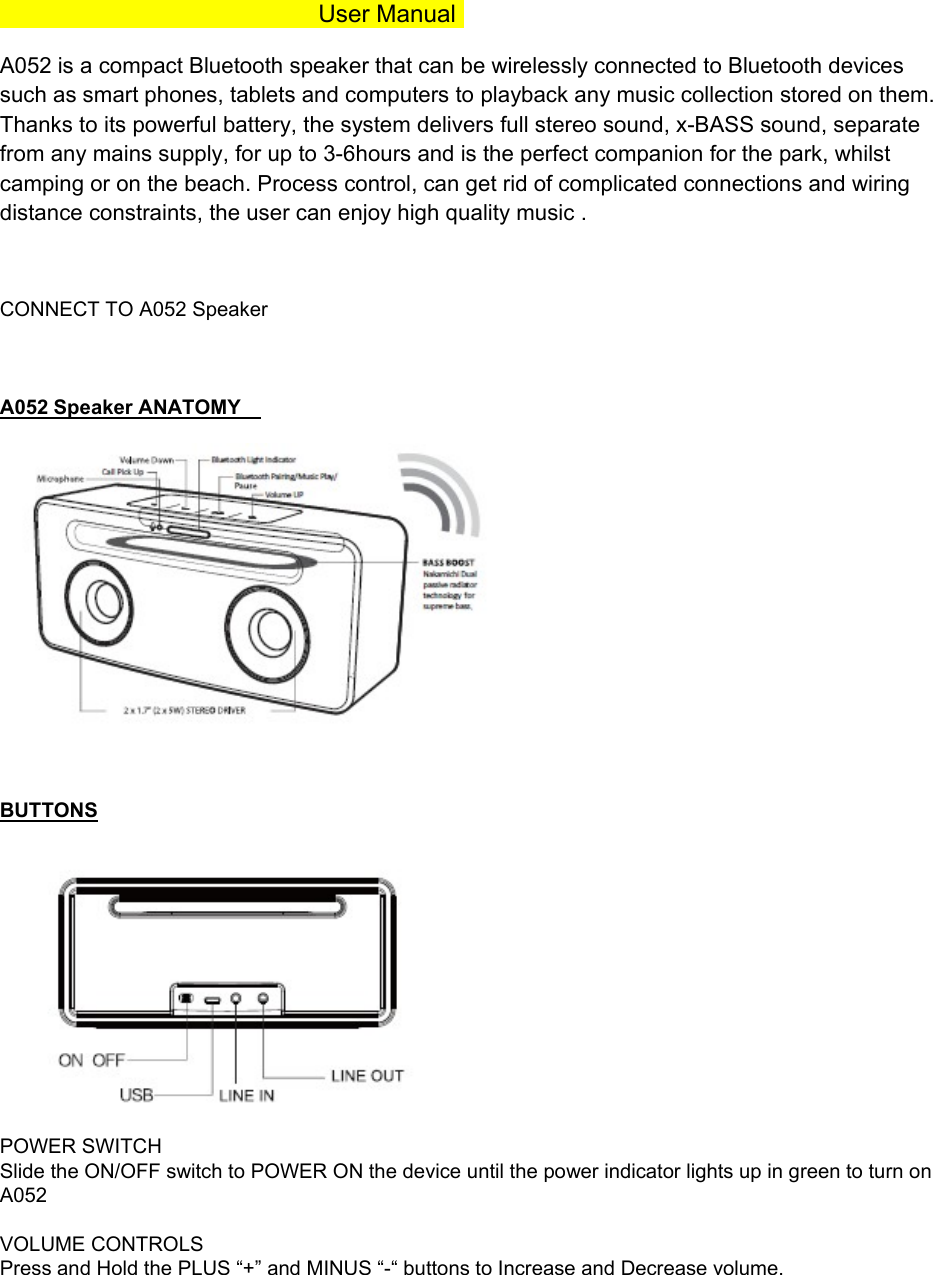
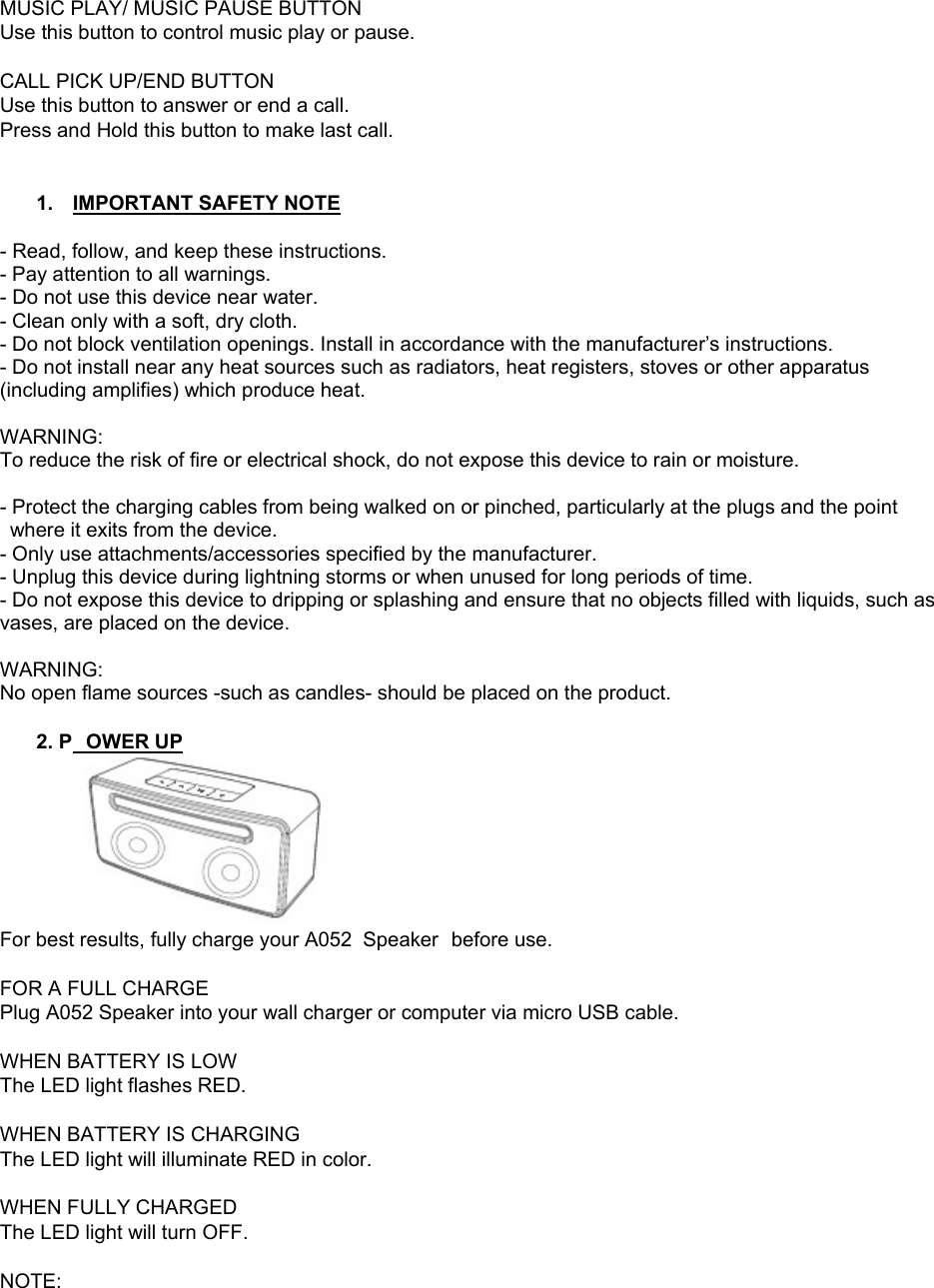
 User Manual A052 is a compact Bluetooth speaker that can be wirelessly connected to Bluetooth devices such as smart phones, tablets and computers to playback any music collection stored on them. Thanks to its powerful battery, the system delivers full stereo sound, x-BASS sound, separate from any mains supply, for up to 3-6hours and is the perfect companion for the park, whilst camping or on the beach. Process control, can get rid of complicated connections and wiring distance constraints, the user can enjoy high quality music .    CONNECT TO A052 Speaker O   A052 Speaker ANATOMY      BUTTONS   POWER SWITCH Slide the ON/OFF switch to POWER ON the device until the power indicator lights up in green to turn on A052  VOLUME CONTROLS Press and Hold the PLUS “+” and MINUS “-“ buttons to Increase and Decrease volume.
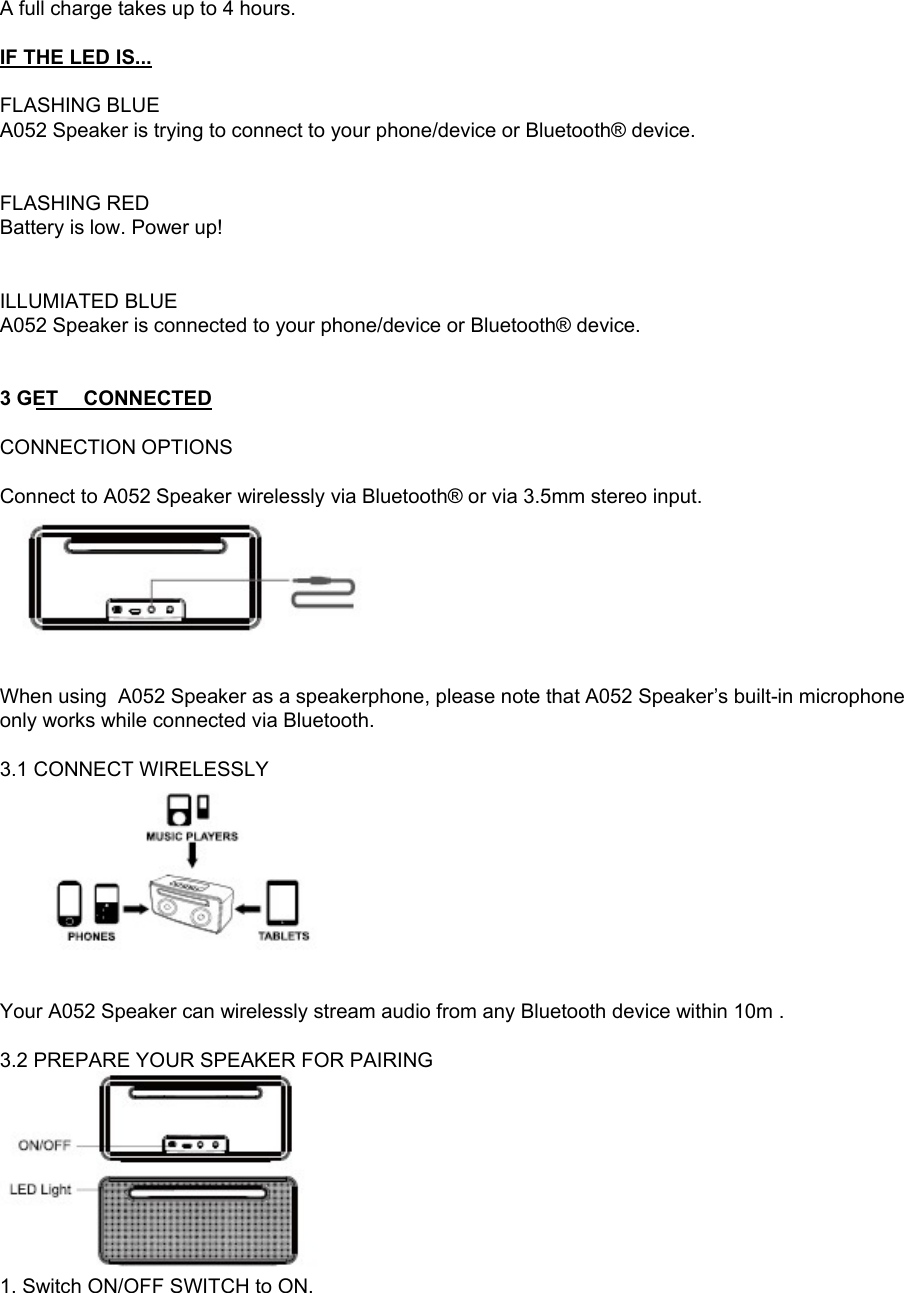
MUSIC PLAY/ MUSIC PAUSE BUTTON  Use this button to control music play or pause.  CALL PICK UP/END BUTTON Use this button to answer or end a call. Press and Hold this button to make last call.   1.  IMPORTANT SAFETY NOTE  - Read, follow, and keep these instructions. - Pay attention to all warnings. - Do not use this device near water. - Clean only with a soft, dry cloth. - Do not block ventilation openings. Install in accordance with the manufacturer’s instructions. - Do not install near any heat sources such as radiators, heat registers, stoves or other apparatus (including amplifies) which produce heat.  WARNING: To reduce the risk of fire or electrical shock, do not expose this device to rain or moisture.  - Protect the charging cables from being walked on or pinched, particularly at the plugs and the point where it exits from the device. - Only use attachments/accessories specified by the manufacturer. - Unplug this device during lightning storms or when unused for long periods of time. - Do not expose this device to dripping or splashing and ensure that no objects filled with liquids, such as vases, are placed on the device.  WARNING: No open flame sources -such as candles- should be placed on the product.  2. P OWER UP  For best results, fully charge your A052  Speaker  before use.  FOR A FULL CHARGE Plug A052 Speaker into your wall charger or computer via micro USB cable.  WHEN BATTERY IS LOW The LED light flashes RED.  WHEN BATTERY IS CHARGING The LED light will illuminate RED in color.  WHEN FULLY CHARGED The LED light will turn OFF.  NOTE:
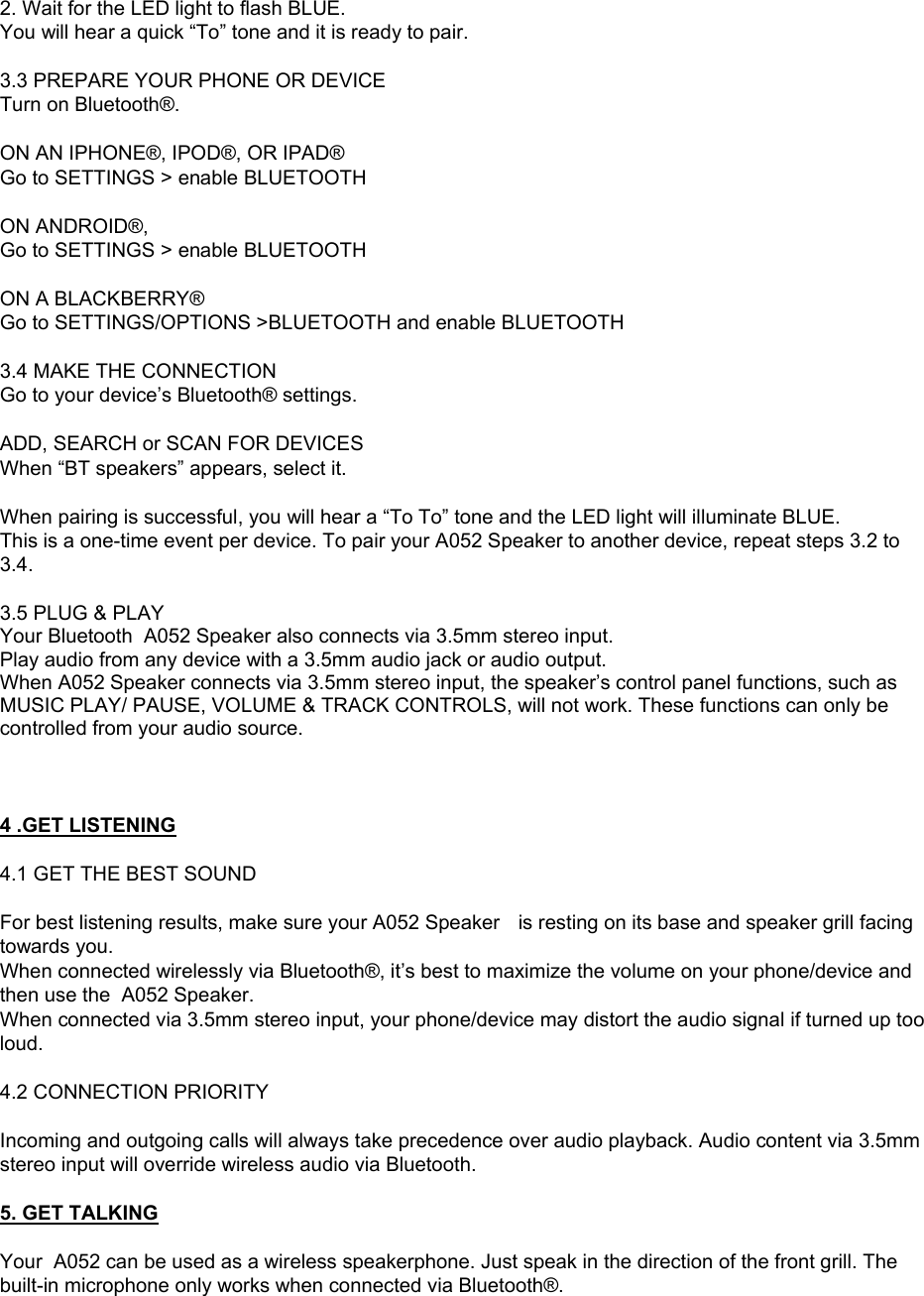
A full charge takes up to 4 hours.  IF THE LED IS...  FLASHING BLUE A052 Speaker is trying to connect to your phone/device or Bluetooth® device.   FLASHING RED Battery is low. Power up!  BUTTONS ILLUMIATED BLUE  A052 Speaker is connected to your phone/device or Bluetooth® device.    3 GET CONNECTED  CONNECTION OPTIONS  Connect to A052 Speaker wirelessly via Bluetooth® or via 3.5mm stereo input.    When using  A052 Speaker as a speakerphone, please note that A052 Speaker’s built-in microphone only works while connected via Bluetooth.  3.1 CONNECT WIRELESSLY    Your A052 Speaker can wirelessly stream audio from any Bluetooth device within 10m .   3.2 PREPARE YOUR SPEAKER FOR PAIRING  1. Switch ON/OFF SWITCH to ON.
2. Wait for the LED light to flash BLUE.  You will hear a quick “To” tone and it is ready to pair.  3.3 PREPARE YOUR PHONE OR DEVICE Turn on Bluetooth®.  ON AN IPHONE®, IPOD®, OR IPAD® Go to SETTINGS > enable BLUETOOTH  ON ANDROID®,  Go to SETTINGS > enable BLUETOOTH  ON A BLACKBERRY® Go to SETTINGS/OPTIONS >BLUETOOTH and enable BLUETOOTH  3.4 MAKE THE CONNECTION Go to your device’s Bluetooth® settings.  ADD, SEARCH or SCAN FOR DEVICES When “BT speakers” appears, select it.  When pairing is successful, you will hear a “To To” tone and the LED light will illuminate BLUE. This is a one-time event per device. To pair your A052 Speaker to another device, repeat steps 3.2 to 3.4.  3.5 PLUG & PLAY Your Bluetooth  A052 Speaker also connects via 3.5mm stereo input. Play audio from any device with a 3.5mm audio jack or audio output. When A052 Speaker connects via 3.5mm stereo input, the speaker’s control panel functions, such as MUSIC PLAY/ PAUSE, VOLUME & TRACK CONTROLS, will not work. These functions can only be controlled from your audio source.    4 .GET LISTENING  4.1 GET THE BEST SOUND  For best listening results, make sure your A052 Speaker  is resting on its base and speaker grill facing towards you. When connected wirelessly via Bluetooth®, it’s best to maximize the volume on your phone/device and then use the  A052 Speaker. When connected via 3.5mm stereo input, your phone/device may distort the audio signal if turned up too loud.   4.2 CONNECTION PRIORITY  Incoming and outgoing calls will always take precedence over audio playback. Audio content via 3.5mm stereo input will override wireless audio via Bluetooth.  5. GET TALKING  Your  A052 can be used as a wireless speakerphone. Just speak in the direction of the front grill. The built-in microphone only works when connected via Bluetooth®.
 5.1 ANSWER/END A CALL Press the PHONE CALL BUTTON on your A052 Speaker to both answer and end a call. 5.2 DECLINE AN INCOMING CALL Press and Hold the PHONE CALL BUTTON for  2 seconds. 5.3 MAKE A CALL Use your phone to dial as usual. Listen and talk through your A052 Speaker.  TROUBLESHOOTING  1. HEARING DISTORTION A. Lower the volume on your A052 Speaker   and/or phone/device. (See section 4.1 GET THE BEST SOUND) B. Make sure it’s charged. Check for low battery, then charge A052 Speaker via USB.  2. NOT LOUD ENOUGH? A. Turn up the volume on your phone/device or your  A052 Speaker. B. Make sure it’s charged up.  3. UNABLE TO PAIR WITH BLUETOOTH® DEVICE? A. Confirm that your phone/device is Bluetooth compatible. B. Follow Section 4.1 GET CONNECTED instructions in this guide.  4. EXPERIENCING SIGNAL LOSS OR DROPOUTS VIA BLUETOOTH? A. Move A052 Speaker closer to your phone/device. B. Make sure it’s charged up. C. Turn off your A052 Speaker and phone/device, then power up and reconnect.   SPECIFICATIONS  Bluetooth: 4.0+EDR Bluetooth Profile: A2DP, AVRCP  3.5mm Aux-in Speaker Diameter: 1.7” x 2 + Passive Radiator Power Output: 5W x 2, 10W  Frequency Response: 140Hz - 20KHz Built-in  Microphone  BATTERY & POWER Battery:4000mah  Music Streaming Time: 5 to 6 hours Charging Time: 3 to 4 hours Bluetooth Transmission Distance:  SAFETY INFORMATION  WARNING  Please read these safety warnings and cautions carefully to ensure your personal safety and prevent property damage.  Fire and Electric Shock Hazard Audio Power Output: 5W x 2, 10W Audio Frequency Response: 140Hz - 20KHz Built-in Microphone
•Do not expose your A052 Speaker to liqu id, moisture, humidity, or  rain. Do no t us e the A052  Speaker near a ba thtub, s ink, saun a, po ol, or s team ro om. Ex posure of th e A052 S peaker to moisture could result in electric shock. • Do not dr op, disassemble, open, crush, bend, deform, puncture, shred, microwave, incinerate, paint, or insert foreign objects in to the A052 Speaker. Such actions could result in electric shock. • Clean the A052  Speaker only with a soft, dry cloth. • Do not expose your  A052 Speaker to extremely high or low temperatures. • Do not leave your  A052 Speaker in direct sunlight for extended periods of time. • Do not leave your  A052 Speaker near open flames such as cooking burners, candles, or fireplaces. • Do not block any ventilation openings.  BATTERY/CHARGER HAZARD  • Do not dispose of your A052 Speaker in a fire. The battery could explode causing injury or death. • Only charge the battery in accordance with the user instructions supplied with the A052 Speaker. • Do not attempt to disassemble the A052 Speaker charger or force open the built-in battery because this may result in electric shock. • Do not charge the A052 Speaker in damp areas or in  extremely h igh or low temperatures because this could result in electric shock. • Do not clean the A052 Speaker when it is being charged. Always unplug the charger before cleaning. Automobile Accident Hazard  • Do not leave or store the A052 Speaker or any of its a ccessories near or over your automobile’s air bag because serious injury may result when an air bag deploys. Fall Hazard • Do not place the A052 Speaker on high surfaces such as shelves. During music playback the A052  Speaker may move which could cause the A052 Speaker to shift and fall off of the edge.   CAUTION  • Do not use abrasive cleaners to cle an your A052 Speaker because this could ca use scratches and damage. • Do n ot b ring you r A052 Spe aker in to conta ct w ith an y sha rp objects be cause this c ould c ause scratches and damage. • Do not insert anything into your A052 Speaker unless otherwise specified in the user instructions. This may damage the internal components. • Do not attempt to repair, modify, or disassemble your A052 Speaker yourself, it does not contain any user-serviceable components. • Do not attempt to replace your A052 Speaker battery, it is built-in and is not changeable. • Observe all signs and displays that require an electrical device or RF radio product to be switched off in designated areas. • Turn off your A052 Speaker prior to boarding an aircraft. Do n ot use the A052 Speaker inside an aircraft unless allowed by your airline. • Dispo se of  the A052 Speaker and the A052 Speaker S peaker’s ba ttery in  acc ordance with loca l regulations. Do not dispose of the battery with regular household waste.
 Federal Communications Commission (FCC) Statement This device complies with part 15 of the FCC Rules. Operation is subject to the following two conditions: (1) This device may not cause harmful interference, and (2) this device must accept any interference received, including interference that may cause undesired operation.   Note: This equipment has been tested and found to comply with the limits for a Class B digital device, pursuant to part 15 of the FCC Rules. These limits are designed to provide reasonable protection against harmful interference in a residential installation. This equipment generates, uses and can radiate radio frequency energy and, if not installed and used in accordance with the instructions, may cause harmful interference to radio communications. However, there is no guarantee that interference will not occur in a particular installation. If this equipment does cause harmful interference to radio or television reception, which can be determined by turning the equipment off and on, the user is encouraged to try to correct the interference by one or more of the following measures:    ●Reorient or relocate the receiving antenna. ●Increase the separation between the equipment and receiver.       ●Connect the equipment into an outlet on a circuit different from that to which the receiver is connected.       ●Consult the dealer or an experienced radio/TV technician for help.      Warning: Changes or modifications made to this device not expressly approved by SHENZHEN AVWOO TECHNOLOGY CO., LTD  may void the FCC authorization to operate this device.     Note: The manufacturer is not responsible for any radio or tv interference caused by unauthorized modifications to this equipment. Such modifications could void the user’s authority to operate the equipment.

Navigation menu