AVer Information VC32016-1 VC320 All-in-one Portable Conference Camera User Manual VC320 QG EN
AVer Information Inc. VC320 All-in-one Portable Conference Camera VC320 QG EN
User manual
© 2016 AVer Information Inc. All rights reserved.
VC320 All-in-one Portable Conference
Camera
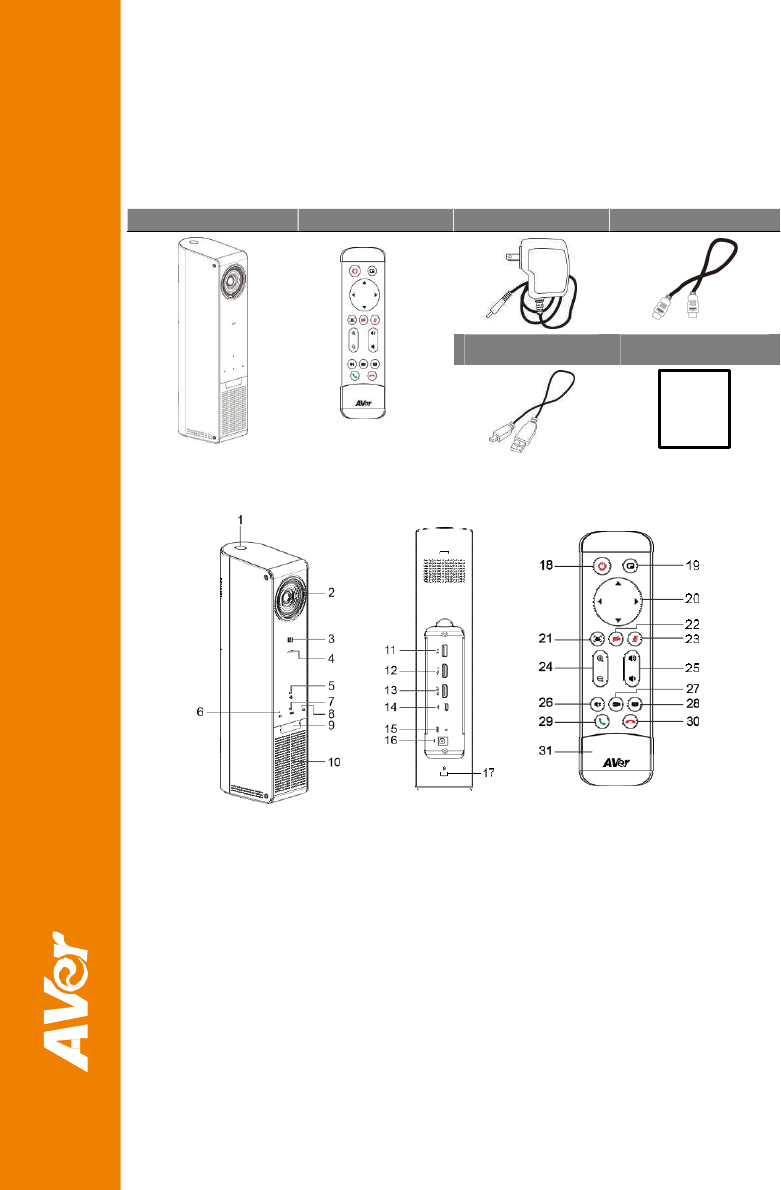
Package Contents
Main Unit Remote Control Power Adaptor HDMI Cable
USB Cable Quick Guide
Overview
1 Power on/off button & LED
2 Camera with ±10 degree
tilting
3 NFC
4 Microphone
5 Mute and mute LED
6 Bluetooth and status LED
7 USB and status LED
8 Presentation and status
LED
9 IR receiver
10 Speaker
11 2.1A
12 HDMI input
13 HDMI output
14 USB to PC/Mac
15 Reset
16 Power
17 Kensington lock
18 Power
19 Layout
20 Pan and tilt
21 EZCrop
22 Camera privacy shutter
23 Mute microphone
24 Zoom in and out
25 Volume up and down
26 Bluetooth mode
27 Video conference mode
28 Presentation mode
29 Make/Answer call
30 Hang up call
31 Battery compartment
cover
Installation Steps
1. VC320 comes with rechargeable battery,
connect external power, charge 8 hours till
LED steady orange
2. Connect USB
3. Connect HDMI if you want to use
Presentation mode. Select TV source to
correct HDMI.
Start using VC320
1. Press power button, when VC320 is ready,
LED turns green/blue and a tone is played.
2. Select usage mode by pressing mode
button on unit or remote control. Follow
instructions.
3. Video conference mode: Open PC or Mac
communication app, select VC320
camerea and audio.
4. Bluetooth mode: connect to mobil
e
d
ev
ic
e
by NFC or hold Bluetooth over 3
seconds for pairing to new device (enable
Bluetooth on mobile device, scan, select
AVer handsfree). A paired tone will be
played.
5. Presentation mode: display HDMI input on
TV. You can combine it with Bluetooth
and Video conference mode.
In Bluetooth mode, users can turn on NFC function on mobile device, touch VC320 N logo
to pair to VC320.
Quick Reference
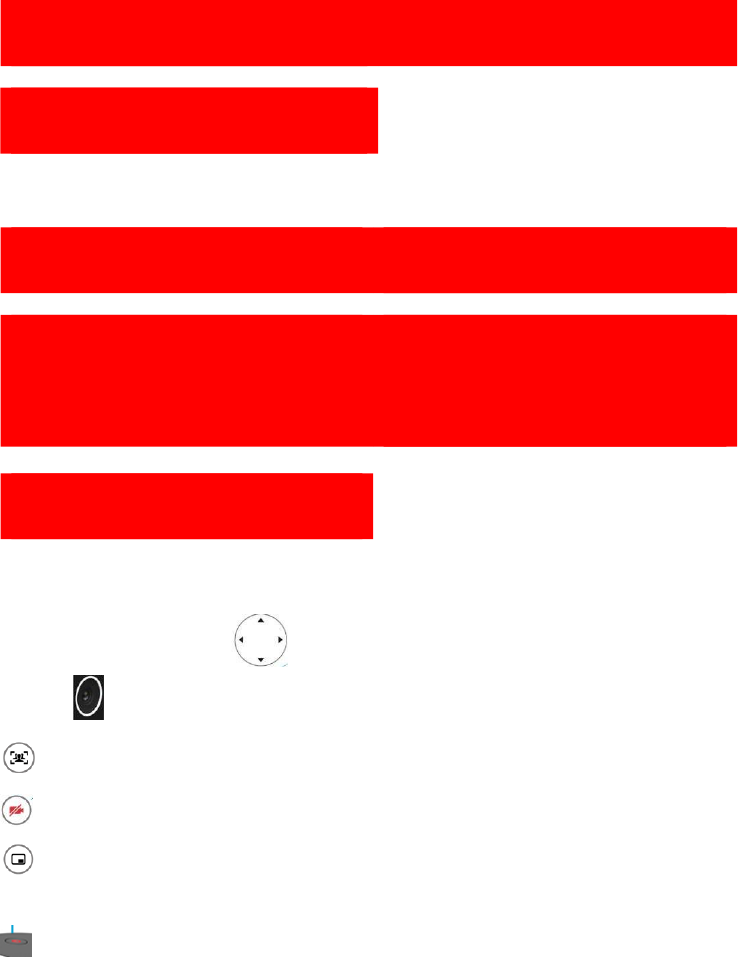
Camera Electronic Pan and Tilt on remote control or push camera up
wa
rd
/
do
w
n
wa
rd
manu
a
ll
y
In Video Conference mode, EZCrop automatically crops camera video to fill faces detected
into frame, drawing wide with 4 faces, effect after EZCrop**
In Video Conference mode, Camera Privacy Shutter stops live camera, similar to close camera
shutter.
In Video Conference and Presentation modes, Layout switches or mixes HDMI or camera
input(s) to HDMI or USB output for best local and remote collaboration usage scenario.
Power LED: blinking amber: charging; steady amber: charge complete; blink green/blue:
powering up; steady green/blue: powered up
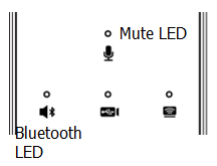
Mute, Bluetooth, Video Conference, Presentation buttons are
capacitor touch sensitive
Status LEDs are right above the button
Mute: blue: unmute; red: mute
Bluetooth: white: on; blinking white: pairing; dark: off
Video conference: white: on; dark: off
Presentation: blue on: dark off
No
t
e:
VC320 is a Plug-n-Play Conference Camera for small, huddle to mid conference room. The system
requires no special drivers. But we highly recommend installing the AVer PTZ app for the best user
experience.
Please visit averusa.com/video-collaboration for more information.
VC320 contains built-in Li-ion rechargeable battery and Bluetooth radio; please reference safety
instruction and FCC conditions on averusa.com/video-collaboration.

Federal Communication Commission Interference Statement
This device complies with Part 15 of the FCC Rules. Operation is subject to the following
two conditions: (1) This device may not cause harmful interference, and (2) this device
must accept any interference received, including interference that may cause undesired
operation.
This equipment has been tested and found to comply with the limits for a Class B digital device,
pursuant to Part 15 of the FCC Rules. These limits are designed to provide reasonable protection
against harmful interference in a residential installation. This equipment generates, uses and can
radiate radio frequency energy and, if not installed and used in accordance with the instructions, may
cause harmful interference to radio communications. However, there is no guarantee that interference
will not occur in a particular installation. If this equipment does cause harmful interference to radio or
television reception, which can be determined by turning the equipment off and on, the user is
encouraged to try to correct the interference by one of the following measures:
- Reorient or relocate the receiving antenna.
- Increase the separation between the equipment and receiver.
- Connect the equipment into an outlet on a circuit different from that to which the receiver is
connected.
- Consult the dealer or an experienced radio/TV technician for help.
FCC Caution: Any changes or modifications not expressly approved by the party responsible for
compliance could void the user's authority to operate this equipment.
This transmitter must not be co-located or operating in conjunction with any other antenna or
transmitter.
Radiation Exposure Statement:
This equipment complies with FCC radiation exposure limits set forth for an uncontrolled environment.
This equipment should be installed and operated with minimum distance 20cm between the radiator &
your body.
Industry Canada statement:
This device complies with ISED’s licence-exempt RSSs. Operation is subject to the following two
conditions: (1) This device may not cause harmful interference, and (2) this device must accept any
interference received, including interference that may cause undesired operation.
Le présent appareil est conforme aux CNR d’ ISED applicables aux appareils radio exempts de licence.
L’exploitation est autorisée aux deux conditions suivantes : (1) le dispositif ne doit pas produire de
brouillage préjudiciable, et (2) ce dispositif doit accepter tout brouillage reçu, y compris un brouillage
susceptible de provoquer un fonctionnement indésirable.
Radiation Exposure Statement:
This equipment complies with ISED radiation exposure limits set forth for an uncontrolled environment.
This equipment should be installed and operated with minimum distance 20cm between the radiator &
your body.
Déclaration d'exposition aux radiations:
Cet équipement est conforme aux limites d'exposition aux rayonnements ISED établies pour un
environnement non contrôlé. Cet équipement doit être installé et utilisé avec un minimum de 20 cm de
distance entre la source de rayonnement et votre corps.

低功率電波輻射性電機管理辦法
第十二條經型式認證合格之低功率射頻電機,非經許可,公司、商號或使用者均不得擅自變更頻率、加
大功率或變更原設計之特性及功能。
第十四條低功率射頻電機之使用不得影響飛航安全及干擾合法通信;經發現有干擾現象時,應立即停
用,並改善至無干擾時方得繼續使用。
前項合法通信,指依電信法規定作業之無線電通信。
低功率射頻電機須忍受合法通信或工業、科學及醫療用電波輻射性電機設備之干擾。
この装置は、クラスB情報技術装置です。この装置は、家庭環境で使用することを目的としています
が、この装置がラジオやテレビジョン受信機に近接して使用されると、受信障害を引き起こすことが
あります。取扱説明書に従って正しい取り扱いをして下さい。VCCI-B
CAUTION
Risk of explosion if battery is replaced by an incorrect type.
Dispose of used batteries in a safe and proper manner.