Adtran T200 H4Tu R Users Manual 61223424L2 5A
T200 H4TU-R to the manual 906eff58-d4c9-6a74-1530-08a7fe280f68
2015-01-24
: Adtran Adtran-T200-H4Tu-R-Users-Manual-345171 adtran-t200-h4tu-r-users-manual-345171 adtran pdf
Open the PDF directly: View PDF  .
.
Page Count: 26
Section 61223424L2-5A
Issue 1, December 2003
CLEI Code: T1L497PC_ _
61223424L2-5A 1
Trademarks: Any brand names and product names included in this document are
trademarks, registered trademarks, or trade names of their respective holders.
CONTENTS
1. General...................................................................................... 1
2. Installation ................................................................................ 2
3. Connections .............................................................................. 5
4. HDSL4 System Testing ............................................................ 5
5. Front Panel Operation............................................................... 7
6. Control Port Operation.............................................................. 7
7. HDSL4 Deployment Guidelines ............................................. 18
8. Maintenance............................................................................ 23
9. Specifications.......................................................................... 23
10. Warranty and Customer Service ............................................. 23
Appendix A. HDSL4 Loopbacks.............................................. A-1
TABLES
Table 1. ADTRAN Unit Compatability........................................ 1
Table 2. H2TU-R Enclosure Compatibility .................................. 2
Table 3. Compliance Codes .......................................................... 2
Table 4. Front Panel Indicators ..................................................... 3
Table 5. Provisioning Options ...................................................... 4
Table 6. Attenuation limits ......................................................... 18
Table 7. Range Limits: 26 Gauge / 70°F / PIC .......................... 18
Table 8. Range Limits: 24 Gauge / 70°F / PIC .......................... 18
Table 9. Single Pair DC Resistance Value.................................. 19
Table 10. HDSL4 Insertion Loss Values ...................................... 22
Table 11. Single Span and First Segment of Repeatered Loop .... 22
Table 12. Second or Third Segment of Repeatered Loop............. 22
Table 13. Troubleshooting Guide ................................................. 23
Table 14. HDSL4 T200 H4TU-R Specifications.......................... 24
Table A-1. HDSL4 Loopback Control Codes............................ A-2
Table A-2. Loopback Control Codes ......................................... A-3
1. GENERAL
The ADTRAN 4-wire T200 HDSL4 transceiver unit for
the remote end (H4TU-R), P/N 1223424L2, is a
network terminating unit used to deploy an HDSL4 T1
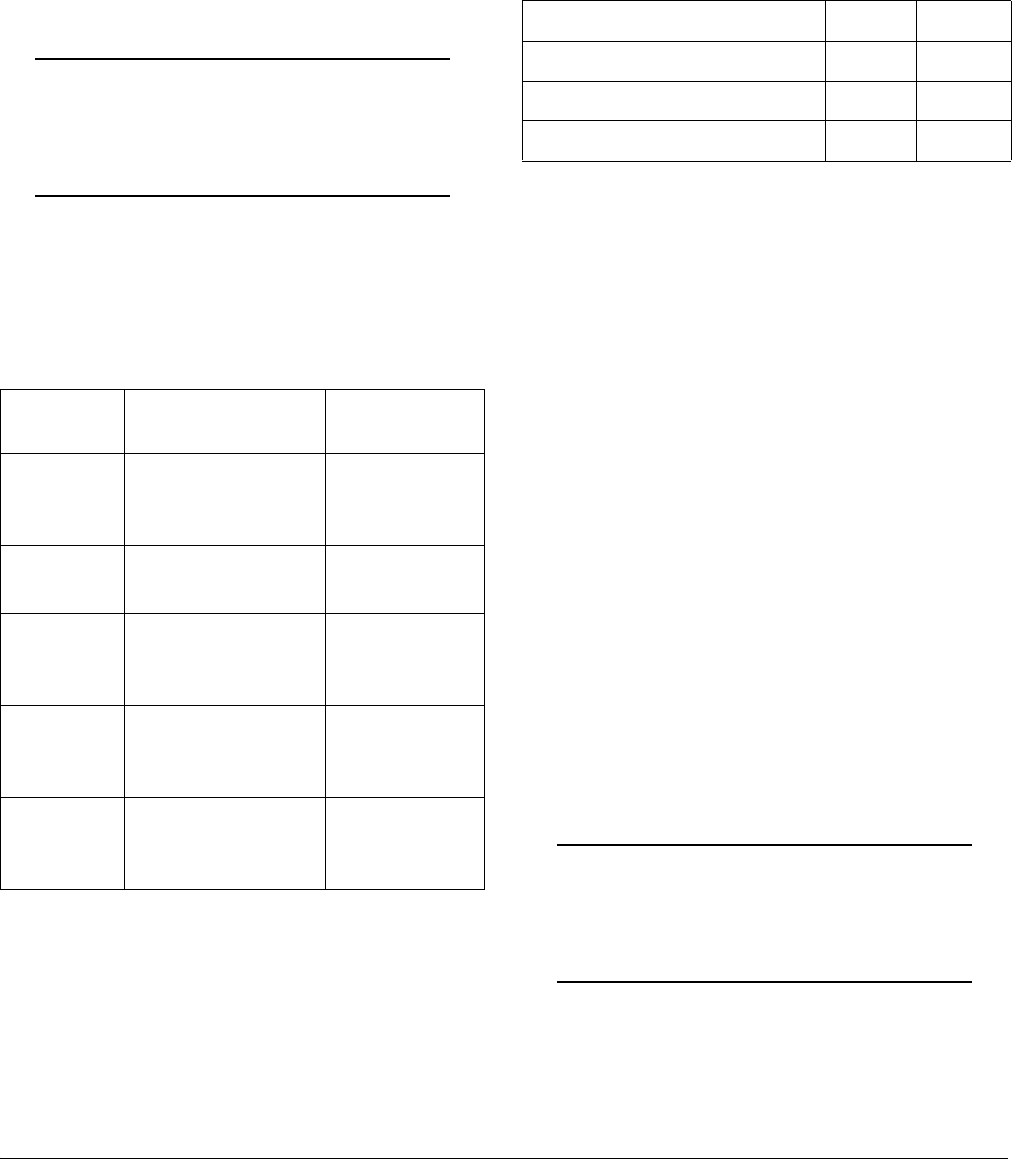
circuit using 4-wire metallic facilities. See Figure 1.
This version of the H4TU-R works with multiple list
versions of the HDSL4 transceiver unit for the central
office (H4TU-C) and repeater (H4R) as listed in
Table 1.
Revision History
This is the initial release of this document. Future
revisions to this document will be explained in this
subsection.
Figure 1. ADTRAN HDSL4 T200 H4TU-R
NOTE: x = any generic release number
Table 1. ADTRAN Unit Compatability
Unit Number Description
122x401L1 or L2 220 H4TU-C
122x403L1 or L2 DDM+ H4TU-C
122x404L1 or L2 3192 H4TU-R
118141xL1 Total Access H4TU-C
122x441L1 T200 H4R
122x445L1 239 H4R
TX
R
X
REM
LOC
LBK
1223424L2
LOCAL
DSL 1
DSL 2
DS1
ALM
(GRN)
SF
(YEL)
ESF/
(GRN)
AMI
(YEL)
B8ZS
/
(GRN)
RLB
(YEL)
LLB
/
RX
M
O
N
TX
R
S
2
3
2
HDSL4 T200 H4TU-R
Installation and Maintenance Practice
2 Issue 1, December 2003 61223424L2-5A
Description
The T200 H4TU-R can be deployed in circuits using
one H4TU-C, one H4TU-R, and up to two H4Rs.
The T200 H4TU-R terminates local loop HDSL4
signals originating from the Central Office (CO) unit
and transforms the HDSL4 signal into traditional DS1
signals to be delivered to the customer.
The T200 H4TU-R can be used with any H4TU-C to
complete an HDSL4 circuit with up to two H4Rs. Local
power is provided through the enclosure.
NOTE
This unit is intended for Local Power Only. If
a span powered unit is needed, refer to P/N
122x426L2.
The H4TU-R is a T200 mechanics card which will fit
Type 200 or Type 400 mechanics enclosures, as listed
in Table 2. This table also provides reference infor-
mation on the ADTRAN enclosures.
1 In all applications the H4TU-R must be installed in NEBS
compliant and UL listed enclosures to insure full compli-
ance with this unit.
2 ADTRAN’s T200 Dual-Mount housing (P/N 1245034L1)
is required when using the T200 H4TU-R for HDSL Loop
Support System (H-LSSTM) protection circuits.
Compliance
Tabl e 3 shows the compliance codes for the T200
H4TU-R. This product is intended for installation in
equipment with a Type “B” or “E” enclosure.
This product meets all requirements of Bellcore GR-
1089-CORE (Class A2), ANSI T1.418-2002 and is
NRTL listed to the applicable UL standards.
2. INSTALLATION
After unpacking the unit, inspect it for damage. If
damage is discovered, file a claim with the carrier, then
contact ADTRAN. Refer to the Warranty and Customer
Service section in this practice. The settings on the
H4TU-C are encoded and transmitted to the T200
H4TU-R once the circuit has achieved synchronization.
There are no switch settings on the T200 H4TU-R.
To install the T200 H4TU-R, perform the following
steps:
1. If present, remove the Access Module Blank from
the appropriate access module slot of the
enclosure.
2. Hold the T200 H4TU-R by the front panel while
supporting the bottom edge of the module.
3. Align the module edges to fit in the lower and
upper guide grooves for the module slot.
4. Slide the module into the slot. Simultaneous thumb
pressure at the top and at the bottom of the module
will ensure that the module is firmly seated against
the backplane of the enclosure.
WARNING
Up to –200 VDC may be present on telecom-
munications wiring. Ensure chassis ground is
properly connected.
Table 2. H4TU-R Enclosure Compatibility
Part
Number
Description1Document
Number
1242007Lx HR12 Metal
Enclosure Remote
Shelf
61242007LX-5x
1242008L1 HR4 Installation/
Maintenance
61242008L1-5
1242034L2 T400 Single Mount
(removable RJ-48
jacks)
61242034L2-5
1242034L3 T400 Single-Mount
High Voltage
Enclosure
61242034L3-5
1245034L12T200 Dual-Mount
Installation/
Maintenance
61245034L1-5
Table 3. Compliance Codes
Code Input Output
Power Code (PC) C C
Telecommunication Code (TC) X X
Installation Code (IC) A –
61223424L2-5A Issue 1, December 2003 3
Front Panel LED Indicators
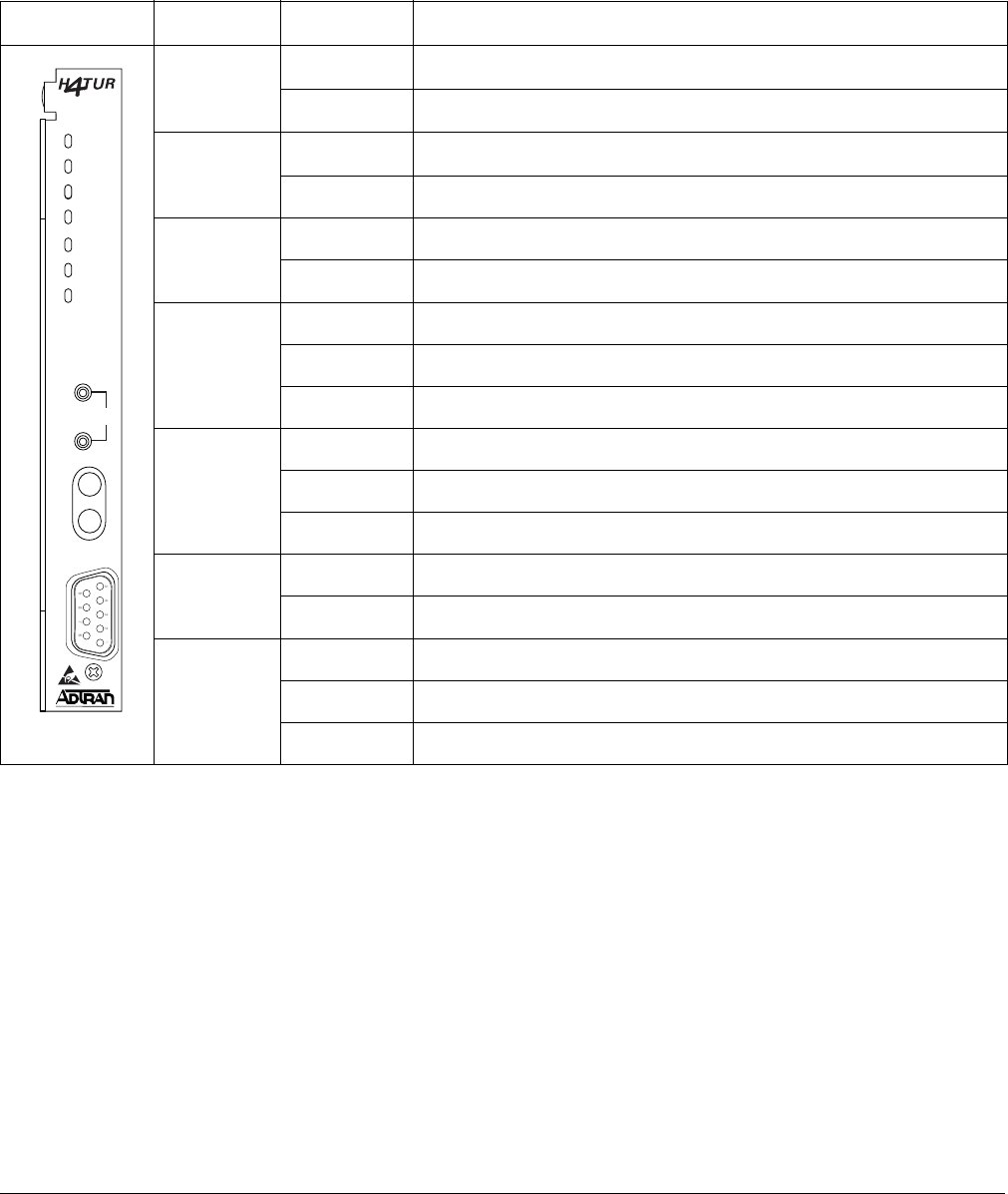
There are seven front panel mounted status LED
indicators. Each indicator is described in Tabl e 4.
Table 4. Front Panel LED Indicators
Front Panel Name Indication Description
DSL 1 Green DSL Loop 1 sync, no errors currently detected, and signal margin ≥3dB
Red No DSL Loop 1 sync, errors being detected, or signal margin <3dB
DSL 2 Green DSL Loop 2 sync, no errors currently detected, and signal margin ≥3dB
Red No DSL Loop 2 sync, errors being detected, or signal margin <3dB
DS1 Green DS1 signal is present and no errors currently being detected
Red No DS1 signal or signal is present with errors
ALM OFF No active alarm present
Red Loss of DS1 signal to the unit
Yellow Loss of DSX-1 signal to the H4TU-C
ESF/SF OFF Unit is provisioned for UNFRAMED data
Yellow Unit is provisioned for ESF data
Green Unit is provisioned for SF data
B8ZS/AMI Yellow Unit is provisioned for B8ZS coded data
Green Unit is provisioned for AMI data
LLB/RLB OFF Unit is NOT in loopback
Yellow Unit is in loopback (network and/or customer)
Green H4TU-C is in loopback toward this unit
TX
R
X
REM
LOC
LBK
1223424L2
LOCAL
DSL 1
DSL 2
DS1
ALM
(GRN)
SF
(YEL)
ESF/
(GRN)
AMI
(YEL)
B8ZS
/
(GRN)
RLB
(YEL)
LLB
/
RX
M
O
N
TX
R
S
2
3
2

4 Issue 1, December 2003 61223424L2-5A
Remote Provisioning
There are no configuration switches for the T200
H4TU-R. Configuration is performed via software
discussed in the Control Port Operation section of this
practice.
The provisioning settings can be viewed and manipu-
lated through management access via the front panel
RS-232 port. Tab le 5 lists the available provisioning
options and their factory default settings.
Table 5. Provisioning Options
Provisioning Option Option Settings Default Settings
1. DSX-1 Line Build Out 0-133 ft., 133-266 ft., 266-399 ft.,
399-533 ft., 533-655 ft.
0 to 133 ft.
2. DSX-1/DS1 Line Code B8ZS, AMI B8ZS
3. DSX-1/DS1 Framing SF, ESF, Unframed, Auto ESF
4. Force Frame Conversion 1Disabled, Enabled Disabled
5. Smartjack Loopback Disabled, Enabled Enabled
6. Loopback Time Out None, 120 Min 120 Minutes
7. Latching Loopback Mode 2T1 (Disabled), FT1 (Enabled) T1 (Disabled)
8. DS1 Tx Level 0 dB, -7.5 dB, -15 dB 0 dB
9. Customer Loss Indicator 3AIS, Loopback, AIS/CI AIS/CI
11. Performance Reporting Messages None, SPRM, NPRM, AUTO (both) AUTO
12. Loop Attenuation Alarm Threshold 0 (Disabled), 1-99 dB 34 dB
13. SNR Margin Alarm Threshold 0 (Disabled), 1-15 dB 04 dB
14. Remote Provisioning Disabled, Enabled Enabled
1 The forced frame format conversion (FFFC) mode sets the H2TU-C to ESF and the H2TU-R to SF. This mode should be used to force
SF (DS1 from customer) to ESF (DSX-1 to network) conversion in the absence of network-provided ESF framing.
2 Latching Loopback Mode
• T1 — When optioned for T1 mode, the unit does not respond to DDS Latching Loopback codes.
• FT1 — DDS Latching Loopback operation is supported. The H4TU-C and any H4R units which are in the HDSL circuit are treated
as identical Tandem Data ports and the HTU-R is treated as a different Tandem Data port.
NOTE: When operating in FT1 mode and during periods of T1 loss of signal, LOS, or T1 AIS from the customer CI, the HDSL
system will send in the network direction from the HTU-C a Fractional DS1 idle signal consisting of a repeating 7E (HEX) byte
payload within a framed/unframed T1 signal. In addition, when optioned for FT1 mode, the setting for Customer Loss Response is
ignored.
3 Customer Loss Indicator
• AIS — Send AIS to network upon T1 loss of signal or T1 AIS from customer.
• LPBK — HTU-R initiates a network loopback upon T1 loss of signal or T1 AIS from customer.
• AIS/CI — HTU-R sends customer disconnect indication upon loss of signal, loss of synchronization, or receipt of T1 AIS from
customer.
NOTE: The CI is generated by transmitting the framing received from the network while overwriting the payload with a repeating
pattern. For applications where the DS1 is Extended Superframe, the data link is overwritten with a Yellow Alarm that is interrupted
once every second by a 100 milli-second code burst of 7E (HEX).
61223424L2-5A Issue 1, December 2003 5
3. CONNECTIONS
All connections of the T200 H4TU-R are made through
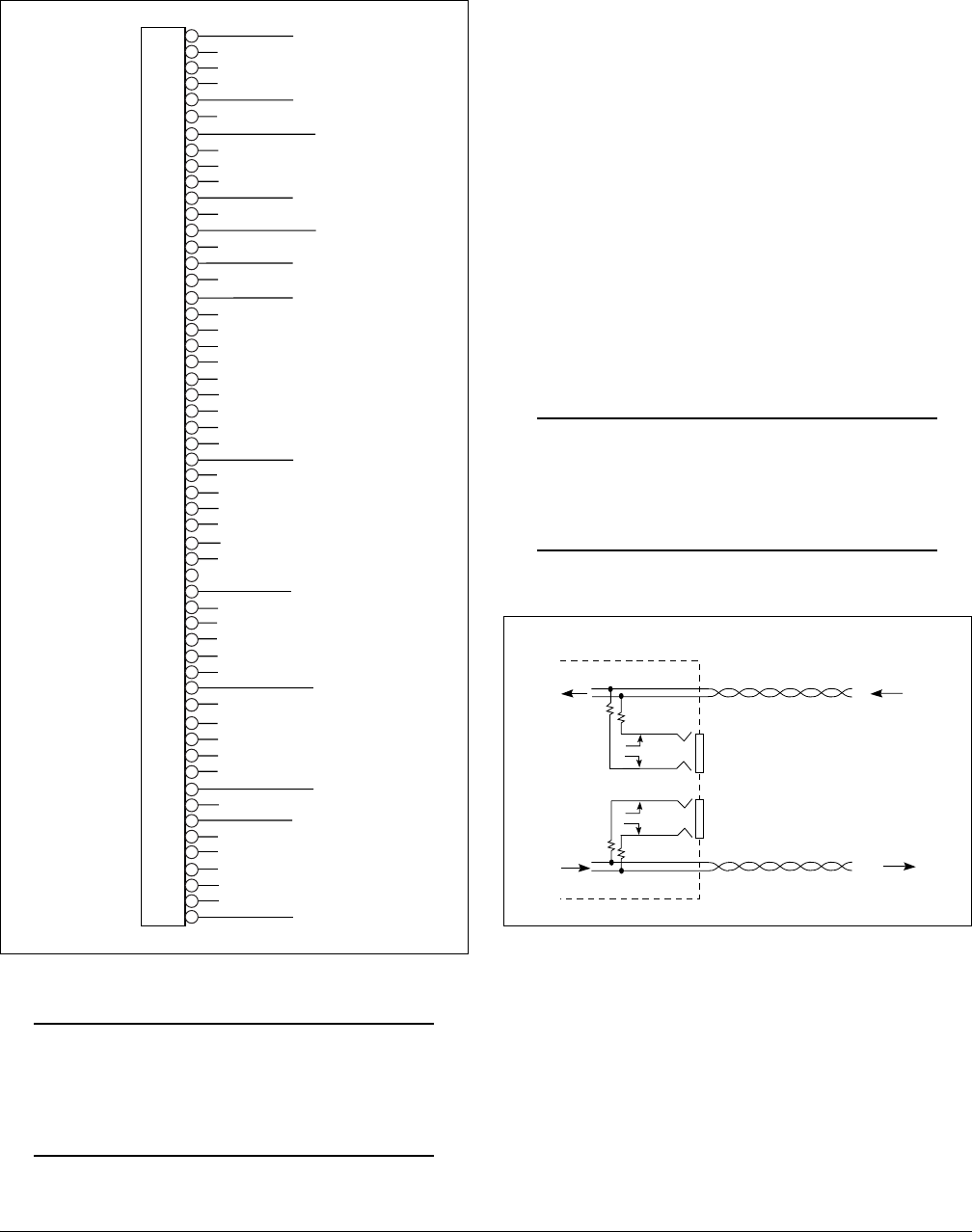
card edge connectors. Figure 2 gives the card edge pin
assignments for the T200 H4TU-R circuit pack.
Figure 2. H4TU-R Edge Connector Wiring
CAUTION
Ensure chassis ground is properly connected
for either standalone or shelf-mounted applica-
tions.
4. HDSL4 SYSTEM TESTING
The T200 H4TU-R provides diagnostic, loopback, and
signal monitoring capabilities.
The seven front panel LEDs provide diagnostics for
HDSL4 loops, DS1 signals, alarms, provisioning, and
loopbacks. Refer to the Installation section for details.
The H4TU-R provides a bidirectional loopback via the
loopback button on the front panel. Refer to the
H4TU-R Network Loopbacks and Customer Loopbacks
sections for more details.
DS1 MON Bantam Jacks
The MON jack provides a non intrusive access point for
monitoring the characteristics of the transmit and
receive signals at the DS1 interface point.
For example, the DS1 MON jack on the H4TU-R could
be used to connect to a bit error rate tester to monitor for
synchronization, test patterns, etc.
Figure 3 is an illustration of specific jack detail.
NOTE
For the MON jacks, the TX and RX indications
relate to the direction of the signal to/from the
CPE.
Figure 3. H4TU-R MON Diagram
1
2
3
4
5
6
7
8
9
10
11
12
13
14
15
16
17
18
19
20
21
22
23
24
25
26
27
28
29
30
31
32
33
34
35
36
37
38
39
40
41
42
43
44
45
46
47
48
49
50
51
52
53
54
55
Chassis Ground
Chassis Ground
HDSL4 Ring Loop 1
Chassis Ground
DS1 RX Ring
HDSL4 Tip Loop 2
HDSL4 Ring Loop 2
DS1 RX Tip
DS1 TX Ring
HDSL4 Tip Loop 1
–24 V/-48 V Return
–24 VDC/-48 VDC
DS1 TX Tip
RX
TX
DS1
MON
CPE
DS1
INTERFACE
H4TU-R
T
R
T1
R1
6 Issue 1, December 2003 61223424L2-5A
H4TU-R Network Loopbacks
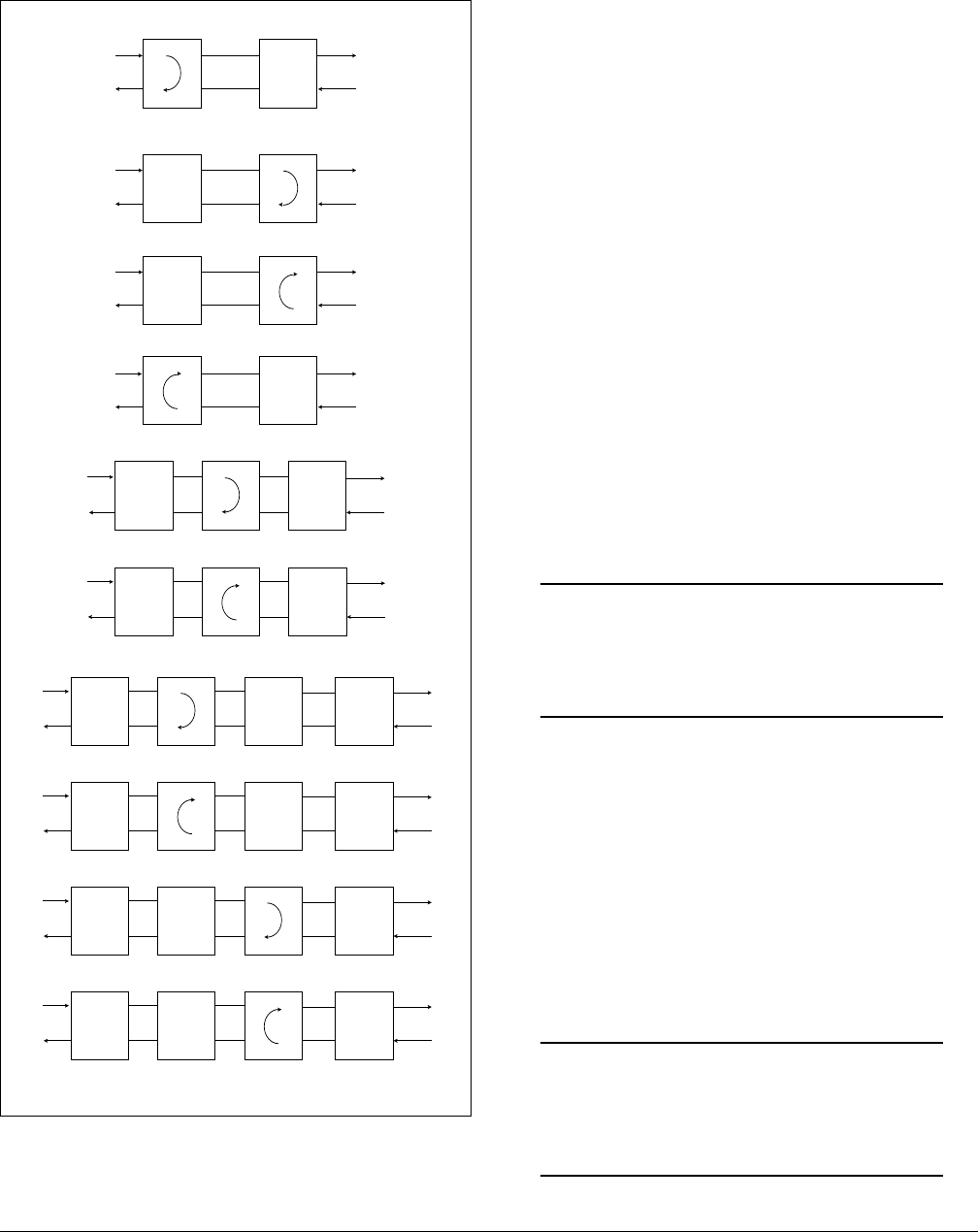
The loopback position is a logic loopback located
within the H4TU-R internal HDSL4 transceiver. See
Figure 4.
Figure 4. HDSL4 Loopbacks
The H4TU-R responds to multiple loopback activation
processes:
• First, manual loopback on the H4TU-R and/or the
H4TU-C unit may be controlled from the front
panel. Refer to the Front Panel Operation section
of this practice for more detail.
• Second, loopback activation may be accomplished
using the control port of the H4TU-R.
• Third, the H4TU-R will respond to the industry
standard HDSL loopback codes as designated in the
ANSI document T1E1.4/92. These are described in
Appendix A, HDSL4 Loopbacks.
• Fourth, the H4TU-R responds to T1 Network Inter-
face Unit (NIU) loopback codes as described in
Bellcore TR-TSY-000312, as follows:
In-Band Codes
Loop up 11000 (2 in 5)
Loop down 11100 (3 in 5)
ESF Codes
Loop up 1111 1111 0100 1000 (FF 48)
Loop down 1111 1111 0010 0100 (FF 24)
Receiving the in-band codes for more than five seconds
or the ESF codes four consecutive times will cause the
appropriate loopback action. The ESF codes must be
transmitted in the Facility Data Link (FDL).
NOTE
The NIU loopback option must be enabled
before the H4TU-R can respond to the NIU
loopback.
The H4TU-R will respond to the loopback codes by
activating the NIU loopback from either the disarmed or
armed state. The loop down codes will return the
H4TU-R to the disarmed or de-activated state
depending upon the code utilized.
Customer Loopbacks
In addition to the loopbacks in the direction of the
network, the H4TU-R may also be looped back in the
direction of the customer. The H4TU-C and H4TU-R
Customer Side Loopbacks are illustrated in Figure 4.
NOTE
Network and customer loopbacks are governed
by the loopback time out option (Default=120
minutes).
DSX-1
H4TU-C
LOCAL
LOOP
H4TU-C Network-Side Loopback
H4TU-R
H4TU-C
LOCAL
LOOP
H4TU-R Customer-Side Loopback
H4TU-R
H4TU-C
LOCAL
LOOP
H4TU-C Customer-Side Loopback
H4TU-R
X
X
DS1
DSX-1
DSX-1
DSX-1
H4TU-C
LOCAL
LOOP
H4TU-R Network-Side Loopback and/or
H4TU-R NIU Loopback
H4TU-RX
DS1
DS1
DS1
X
AIS
AIS
X
H4R Customer-Side Loopback
DS1
AIS
AIS
H4TU-C
H4R Network-Side Loopback
H4TU-R
DS1DSX-1
DSX-1
H4R
AIS
AIS
AIS
X
H4TU-C H4TU-RH4R
H4R1 Network-Side Loopback
DS1
D
SX-1
H4TU-C H4TU-RH4R1 H4R2
AIS
X
H4R1 Customer-Side Loopback
DS1
D
SX-1
H4TU-C H4TU-RH4R1 H4R2
X = Signal Inactive
X
AIS
H4R2 Network-Side Loopback
DS1
D
SX-1
H4TU-C H4TU-RH4R1 H4R2
AIS
X
H4R2 Customer-Side Loopback
DS1
D
SX-1
H4TU-C H4TU-RH4R1 H4R2
X

61223424L2-5A Issue 1, December 2003 7
5. FRONT PANEL OPERATION
The front panel contains two pushbuttons. These are
labeled LOC and REM.
The LOC pushbutton controls a bidirectional loopback
at the H4TU-R. Pressing the button causes a bidirec-
tional loopback to occur. If the bidirectional loopback is
active, pressing the button a second time will disable the
loopback.
The REM pushbutton controls a bidirectional loopback
at the H4TU-C. Pressing the button causes a loopback
toward the H4TU-R and network to occur. If the
loopback is active, pressing the button a second time
will disable the loopback.
6. CONTROL PORT OPERATION
The H4TU-R provides a front panel-mounted DB-9
connector that supplies an RS-232 interface for
connection to a controlling terminal. The pinout of the
DB-9 is illustrated in Figure 5.
Figure 5. RS-232 (DB-9) Connector Pinout
The terminal interface operates at data rates from 1.2,
2.4, 4.8, 9.6, and 19.2 kbps. The asynchronous data
format is fixed at 8 data bits, no parity, and 1 stop bit.
NOTE
If a personal computer with terminal emulation
capability is being used, be sure to disable any
power-saving programs. Otherwise, communi-
cation between the PC and the HDSL4 unit
may be disrupted, resulting in misplaced
characters or screen time outs.
Operation
The screens illustrated in the following section apply to
an HDSL4 circuit deployed with the ADTRAN HDSL4
technology. The circuit includes an H4TU-C, up to two
H4Rs and an H4TU-R. Other configurations are
possible (such as use of another vendor's equipment)
and their displays will vary slightly from those shown in
this section.
A terminal session is initiated by entering multiple
spacebar characters which are used by the H4TU-R to
determine the speed of the terminal. Once the speed has
been determined, an HDSL4 Main Menu is presented as
illustrated in Figure 6.
6
7
8
9
1
2
3
4
5
TXD (Transmit Data
)
RXD (Receive Data
)
SGN (Signal Groun
d)

8 Issue 1, December 2003 61223424L2-5A
This ADTRAN HDSL4 Main Menu provides access to
detailed performance and configuration information.
The OAM&P (Operation, Administration, Mainte-
nance, and Provisioning) screens are available as listed
on the Main Menu (Figure 6). To access a particular
menu item, press the number associated with that item,
and press ENTER.
The HDSL4 Unit Information Screen (Figure 7)
provides detailed product information on each
component in the HDSL4 circuit. This screen also
displays contact information for ADTRAN Technical
Support, Internet site, and address.
Figure 6. HDSL4 Main Menu
Figure 7. Unit Information Screen
Circuit ID: 10/01/03 09:29:45
Adtran HDSL4 Main Menu
1. HDSL4 Unit Information
2. Provisioning
3. Span Status
4. Loopbacks and Test
5. Performance History
6. Scratch Pad, Ckt ID, Time/Date
7. Terminal Modes
8. Alarm History
9. Event History
10. System PM/Screen Report
11. Clear PM and Alarm Histories
12. Troubleshooting
13. Virtual Terminal Control
Selection:
Circuit ID: 10/01/03 09:29:45
Press ESC to return to previous menu
ADTRAN
901 Explorer Boulevard
Huntsville, Alabama 35806-2807
--------------------- For Information or Technical Support ---------------------
Support Hours ( Normal 7am - 7pm CST, Emergency 7 days x 24 hours )
Phone: 800.726.8663 / 888.873.HDSL Fax: 256.963.6217 Internet: www.adtran.com
--------------------------------------------------------------------------------
ADTN H4TU-C ADTN H4TU-R
P/N: 1223403L2 P/N: 1223424L2
S/N: 123456789 S/N: 123456789
CLEI: T1L7PODAAA CLEI: T1L497PCAA
Manf: 01/01/2000 Manf: 01/01/2000
Ver: A00 Ver: A01
ADTN H4R1 ADTN H4R2
P/N: 1221445L1 P/N: 1221445L1
S/N: BB50A8343 S/N: BB50A8353
CLEI: T1R5YP3DAA CLEI: T1R5YP3DAA
Manf: 02/12/2002 Manf: 02/12/2002
Ver: A01 Ver: A01

61223424L2-5A Issue 1, December 2003 9
The Provisioning menu (Figure 8) displays current
provisioning settings for the HDSL4 circuit. Options
that can be changed from this screen are labeled with a
number (for example, “1” for DSX-1 Line Build Out).
To change a particular option setting, select the appro-
priate number, and a new menu will appear with a list of
the available settings.
The options shown in Table 5 are available with the
T200 H4TU-R (P/N 1223426L2). Some settings may
differ when using different H4TU-Rs.
The Span Status Screen (Figure 9) provides quick
access to status information for each HDSL4 receiver in
the circuit.
Figure 8. Provisioning Menu
Figure 9. Span Status Screen
Circuit ID: 10/01/03 09:29:45
Press ESC to return to previous menu
Provisioning
1. DSX-1 Line Buildout = 0-133 ft
2. DSX-1/DS1 Line Code = B8ZS
3. DSX-1/DS1 Framing = ESF
4. Forced Frame Conversion = Disabled
5. Smartjack Loopback = Enabled
6. Loopback Timeout = 120 Min
7. Latching Loopback Mode = T1 (Disabled)
8. DS1 TX Level = 0 dB
9. Span Power = Enabled
10. Customer Loss Indicator = AIS/CI
11. PRM Setting = AUTO
12. Loop Atten Alarm Thres = 34dB
13. SNR Margin Alarm Thres = 04dB
14. Remote Provisioning = Enabled
D. Restore Factory Defaults
Selection:
Circuit ID: 10/01/03 09:29:45
Press ESC to return to previous menu
Span Status Screen
______ ______ ______ ______
NET | | | | | | | | CUST
| | | | | | | |
----->| |-------| |-------| |----------------------| |----->
| | | | | | | |
| | | | | | | |
<-----| |-------| |-------| |----------------------| |<-----
| | | | | | | |
DSX-1 |______| |______| |______| |______| DS1
H4TUC H4R 1 H4R 2 H4TUR
1. View Detailed Status
Selection:

10 Issue 1, December 2003 61223424L2-5A
The Detailed Status Screen from the Span Status menu
(Figure 10), displays the HDSL4 status for each
receiver point.
The Loopbacks and Test Commands menu (Figure 11)
provides the ability to invoke or terminate all available
HDSL4 loopbacks.
Each HDSL4 circuit component can be looped toward
the network or customer from this screen. Unit self tests
can also be initiated from this screen.
Figure 10. Detailed Status Screen
Figure 11. Loopbacks and Test Commands Menu
Circuit ID: 10/01/03 09:29:45
Press ESC to return to previous menu
Detailed Status Screen
LOOP 1 LOOP 2
MARGIN ATTEN MARGIN ATTEN
Interface (CUR/MIN/MAX) (CUR/MAX) (CUR/MIN/MAX) (CUR/MAX)
--------- ------------- --------- ------------- ---------
H4TUC 17/00/17 00/00 17/00/17 00/00
H4R1 NETW 17/00/17 00/00 17/13/17 00/00
H4R1 CUST 17/17/17 00/00 17/00/17 00/00
H4R2 NETW 17/00/17 00/00 17/13/17 00/00
H4R2 CUST 17/17/17 00/00 17/00/17 00/00
H4TUR 17/00/17 00/00 17/00/17 00/00
1. Reset Min/Max
2. View Performance History
Selection:
Circuit ID: 10/01/03 09:29:45
Press ESC to return to previous menu
Loopbacks and Test Commands
______ ______ ______ ______
NET | | | | | | | | CUST
| | | | | | | |
----->| |-------| |-------| |----------------------| |----->
| | | | | | | |
| | | | | | | |
<-----| |-------| |-------| |----------------------| |<-----
| | | | | | | |
DSX-1 |______| |______| |______| |______| DS1
H4TUC H4R 1 H4R 2 H4TUR
1. Run Self Tests 7. H4R1 Loopup Cust
2. H4TU-C Loopup Net 8. H4R1 Loopup Net
3. H4TU-C Loopup Cust 9. H4R2 Loopup Cust
4. H4TU-R Loopup Net
5. H4TU-R Loopup Cust
6. H4R1 Loopup Net
Selection:

61223424L2-5A Issue 1, December 2003 11
The Performance History screens (Figure 12 and
Figure 13) are used to select and display the historical
HDSL4 and T1 performance data in several different
registers. At each 15-minute interval, the performance
information is transferred to the 15-minute performance
data register. This unit stores performance data in 15-
minute increments for the previous 24-hour period. At
each 24-hour interval, the performance data is trans-
ferred into the 24-hour performance data registers. This
unit stores up to 31 days of 24-hour interval data. Line
Data or Path Data results are available by selecting the
appropriate menu item.
Figure 12. 15-Minute Performance Data Screen
Figure 13. 24-Hour Performance Data Screen
Circuit ID: 10/01/03 09:29:45
Press ESC to return to previous menu
Menu 15 Minute H4TUC DSX-1 Performance Data
1. Definitions ES-L SES-L LOSS-L CV-L
2. Reset Data 000 000 000 00000
3. 15 Min Data 14:15 000 000 000 00000
4. 60 Min Data 14:00 000 000 000 00000
5. 24 Hr Data 13:45 000 000 000 00000
6. Line Data 13:30 000 000 000 00000
7. Path Data 13:15 000 000 000 00000
8. H4TUC DSX-1 13:00 000 000 000 00000
9. H4TUR LOOP 12:45 000 000 000 00000
10. H4TUR LOOP 12:30 000 000 000 00000
11. H4TUR DS1
12. H4R #1 NETW
13. H4R #1 CUST
14. H4R #2 NETW ___ ___ ___ ___
15. H4R #2 CUST | C | |#1 | |#2 | | R |
-8->| |-----| |-----| |---------------| |--->
| |9 12| |13 14| |15 10| |
<---| |-----| |-----| |---------------| |<-11
|___| |___| |___| |___|
Selection:
Circuit ID: 10/01/03 09:29:45
Press ESC to return to previous menu
Menu 24 Hour H4TUC LOOP Performance Data
LOOP 1 LOOP 2
1. Definitions ES-L SES-L UAS-L ES-L SES-L UAS-L
2. Reset Data 00000 00000 00000 00000 00000 00000
3. 15 Min Data 10/17 ----- ----- ----- ----- ----- -----
4. 60 Min Data 10/16 ----- ----- ----- ----- ----- -----
5. 24 Hr Data 10/15 ----- ----- ----- ----- ----- -----
6. Line Data 10/14 ----- ----- ----- ----- ----- -----
7. Path Data 10/13 ----- ----- ----- ----- ----- -----
8. H4TUC DSX-1 10/12 ----- ----- ----- ----- ----- -----
9. H4TUC LOOP 10/11 ----- ----- ----- ----- ----- -----
10. H4TUR LOOP
11. H4TUR DS1
12. H4R #1 CUST
13. H4R #1 CUS
14. H4R #2 NETW ___ ___ ___ ___
15. H4R #2 CUST | C | |#1 | |#2 | | R |
-8->| |-----| |-----| |---------------| |--->
| |9 12| |13 14| |15 10| |
<---| |-----| |-----| |---------------| |<-11
|___| |___| |___| |___|
Selection:

12 Issue 1, December 2003 61223424L2-5A
Abbreviations used in the Performance History screens
are defined in Performance Data Definitions screens
(Figure 14 and Figure 15).
Line related definitions are shown in Figure 14 while
Path related definitions are provided in Figure 15.
Figure 14. Performance Data Definitions
Figure 15. Performance Data Definitions (Continued)
Circuit ID: 10/01/03 09:29:45
Performance Data Definitions
H4TUC, H4TUR, and H4R LOOP Related: HDSL4 Framing
ES-L Errored Seconds CRC>=1 or LOSW>=1
SES-L Severely Errored Seconds CRC>=50 or LOSW>=1
UAS-L Unavailable Seconds >10 cont. SES-Ls
DS1 and DSX-1 Line Related: Superframe and Extended Superframe
ES-L Errored Seconds (BPV+EXZ)>=1 or LOS>= 1
SES-L Severely Errored Seconds (BPV+EXZ)>=1544 or LOS>=1
LOSS-L Loss of Signal Seconds LOS>= 1
PDVS-L Pulse Density Violation Secs EXZ>=1; >7 zeros if B8ZS, >15 if AMI
B8ZS-L B8ZS Seconds B8ZS coded signal received
CV-L Code Violation Count (BPV+EXZ) count
NOTE: Reverse video indicates invalid data due to a terminal restart (or power
cycle), a data register reset, or a system date or time change.
N. Next
P. Previous Selection:
Circuit ID: 10/01/03 09:29:45
Performance Data Definitions
DS1 and DSX-1 Path Related: Superframe Extended Superframe
ES-P Errored Seconds FE>=1 or CRC>=1 or
SEF>=1 or AIS>=1 SEF>=1 or AIS>=1
SES-P Severely Errored Seconds FE>=8 or CRC>=320 or
SEF>=1 or AIS>=1 SEF>=1 or AIS>=1
UAS-P Unavailable Seconds >10 cont. SES-Ps >10 cont. SES-Ps
SAS-P SEF/AIS Seconds SEF>=1 or AIS>=1 SEF>=1 or AIS>=1
ES-PFE Far End Errored Seconds n/a PRM bits G1-G6,SE,
or SL=1, or RAI
CV-P Code Violation Count FE count CRC error count
NOTE: Under a UAS-P condition, ES-P and SES-P counts are inhibited.
Under a SES-L or SES-P condition, the respective CV-L or CV-P count is
inhibited.
P. Previous Selection:

61223424L2-5A Issue 1, December 2003 13
The Scratch Pad, Circuit ID, and Time/Date Screen
(Figure 16) provides a Scratch Pad for user-defined
information and can be any alphanumeric string up to
50 characters in length. The Circuit ID can be any
alphanumeric string up to 25 characters in length. The
time should be entered using military time. (For
example, enter 3:15 p.m. as “151500”.) The date should
be entered in the MMDDYY format. (For example,
enter January 02, 2003, as “010203”.)
The T1 Alarm History menu (Figure 17) and HDSL4
Span History menu (Figure 18) provide a detailed alarm
history and events log for the HDSL4 and T1 spans.
These screens include a time, date, first and last occur-
rence, and count for each type of HDSL4 or T1 alarm.
A historical alarm log is also available in the System
Alarm menu.
Figure 16. Scratch Pad, Circuit ID, and Time/Date Screen
Figure 17. T1 Alarm History Menu
Circuit ID: 10/01/03 09:29:45
Current Scratch Pad:
New Scratch Pad =
New Circuit ID =
New Date = / / (MM/DD/YY)
New Time = : : (HH:MM:SS)
Press TAB to skip to next entry field.
Circuit ID: 10/01/03 09:29:45
Press ESC to return to previous menu
T1 Alarm History
LOCATION ALARM FIRST LAST CURRENT COUNT
------------------------------------------------------------------------------
H4TU-C RED(LOS/LOF) 01/01/00 00:00:05 01/01/00 00:00:05 Alarm 001
(DSX-1) YELLOW(RAI) OK 000
BLUE(AIS) OK 000
H4TU-R RED(LOS/LOF) 06/01/03 23:46:22 06/01/03 23:46:22 Alarm 001
(DS1) YELLOW(RAI) OK 000
BLUE(AIS) OK 000
------------------------------------------------------------------------------
1. T1 Alarm 4. Span H4R1 to H4R2
2. Facility Alarm 5. Span H4R2 to H4TU-R
3. Span H4TUC to H4R1 C. Clear T1 Alarms

14 Issue 1, December 2003 61223424L2-5A
The Event History screen (Figure 19) provides a log
history of HDSL4 circuit events.
Figure 18. HDSL4 Span History Screen
Figure 19. Event History Screen
Circuit ID: 10/01/03 09:29:45
Press ESC to return to previous menu
HDSL4 Span History
LOCATION ALARM FIRST LAST CURRENT COUNT
-----------------------------------------------------------------------------
SPAN C-H1 L1 LOS OK 000
L2 LOS OK 000
H4TU-C L1 MRGN OK 000
L2 MRGN OK 000
H4R1 NET L1 MRGN OK 000
L2 MRGN OK 000
H4TU-C L1 ATTEN OK 000
L2 ATTEN OK 000
H4R1 NET L1 ATTEN OK 000
L2 ATTEN OK 000
--------------------------------------------------------------------------------
1. T1 Alarm 4. Span H4R1 to H4R2
2. Facility Alarm 5. Span H4R2 to H4TU-R
3. Span H4TUC to H4R1 C. Clear Span Alarms
Selection:
Circuit ID: 10/01/03 09:29:45
Press ESC to return to previous menu
Num Description of Event Date Time
-----------------------------------------------------------------
1. H4TU-C Powered Up 01/25/02 11:52:00
Page Number: 1/ 1 Number of Events: 1
-----------------------------------------------------------------
'P' - Previous Page 'H' - Home 'R' - Reset Events
'N' - Next Page 'E' - End
Selection:

61223424L2-5A Issue 1, December 2003 15
The System PM/Screen Report option (Figure 20)
offers four types of reports on performance monitoring.
Selecting a report type will then display all the reports
for that category on the screen at once, which is more
efficient than stepping through the menus individually.
The Clear PM and Alarm Histories screen (Figure 21)
initializes data from performance monitoring and alarm
histories. Selecting this option from the Main Menu
displays the prompt, “This will clear the history data for
all elements in the circuit. Are you sure (Y/N)?”
Figure 20. System PM/Screen Report Option
Figure 21. Clear PM and Alarm Histories
1. HDSL4 Unit Information
2. Provisioning
3. Span Status
4. Loopbacks and Test
5. Performance History
6. Scratch Pad, Ckt ID, Time/Date
7. Terminal Modes
8. Alarm History
9. Event History
10. System PM/Screen Report
11. Virtual Terminal Control
Selection: 10
Enable data logging now.
Select Report Type or Press Escape to cancel:
1) Full System/History Report
2) Current Status Report
3) System Configuration Report
4) Alarm/Event History
Circuit ID: 10/01/03 09:29:45
Adtran HDSL4 Main Menu
1. HDSL4 Unit Information
2. Provisioning
3. Span Status
4. Loopbacks and Test
5. Performance History
6. Scratch Pad, Ckt ID, Time/Date
7. Terminal Modes
8. Alarm History
9. Event History
10. System PM/Screen Report
11. Clear PM and Alarm Histories
12. Troubleshooting
13. Virtual Terminal Control
This will clear the PM, Alarm, Span Status, and
Troubleshooting Histories for all circuit elements.
Are you sure (Y/N)?
Selection: 11

16 Issue 1, December 2003 61223424L2-5A
Item 12 on the Main Menu displays the Troubleshooting
screen (Figure 22). Helpful ADTRAN contact infor-
mation along with two menu items appear on the bottom
of this screen.
Selecting option 1 from the Troubleshooting screen
causes the H2TU-C to read the operational status of the
card and return Troubleshooting Guidance, or hints, as
to the probable cause of the trouble, as shown in Figure
23.
Figure 22. Troubleshooting Screen
Figure 23. Troubleshooting Guidance
Circuit ID: 10/01/03 09:29:45
Press ESC to return to previous menu
Troubleshooting
For HELP based on detected problems, select Troubleshooting Guidance from the
list below. If further assistance is needed, contact ADTRAN Tech Support.
Hours: Normal 7am - 7pm CST 1. Troubleshooting Guidance
Emergency 7 days x 24 hours 2. General Information
Phone: 800.726.8663 / 888.873.HDSL
Fax: 256.963.6217
Selection:
Circuit ID: 10/01/03 09:29:45
Press ESC to return to previous menu
DSX-1 Loss of Signal (Red Alarm)
- Patch test set REC jack into H4TUC MON TX jack to verify integrity of
signal to the H4TUC from the network (verify test set in MON mode).
- If signal to H4TUC is missing, insert test set at DSX panel IN Jack connecting
toward H4TUC (to verify wiring between DSX and H4TUC shelf). Check H4TUC to
verify DSX-1 LOS alarm is cleared. This verifies TX(out) and RX(in) pairs are
not swapped.
- If signal from DSX OK, verify cross-connect wiring at DSX panel is turned over
(OUT to IN) and (IN to OUT).
-If DSX wiring OK, connect test set REC to the DSX MON, network side equipment,
to verify signal from network (verify test set to MON). If no signal,
troubleshoot office problems.
For Total Access cards verify the following:
- Provisioning>Network Source is configured correctly for Mux or DSX operation.
- Provisioning>Service State is not configured for OOS-Unassigned.
- Mux card is mapped correctly.
- Mux card is functioning correctly.

61223424L2-5A Issue 1, December 2003 17
Selecting option 2 from the Troubleshooting screen
accesses the General Information Screen (Figure 24)
that summarizes the deployment guidelines necessary
to provision this HDSL4 circuit.
The Virtual Terminal Session Screen (Figure 25) allows
control of the Remote card provisioning from the
H4TU-C. Press 1 from this screen to begin a user-
initiated session with the Remote card. When the
remote session is completed, Press CTRL+X to terminate
the session.
Figure 24. General Information Screen
Figure 25. Virtual Terminal Session Screen
Circuit ID: 10/01/03 09:29:45
Press ESC to return to previous menu
HDSL4 Loop Guidelines for optimum operation
-------------------------------------------
Non-loaded cable pair
Single bridge tap < 2 Kft
Total bridge taps < 2.5 Kft
Power influence <= 80 dBrnC
Longitudinal Balance >= 60 dB (If using Wideband test at 196 kHz >= 40 dB)
Foreign DC Voltage (t-r, t-g, r-g) < 3 VDC
Loop Resistance <= 1000 ohms 1st segment
Loop Resistance <= 920 ohms 2nd segment
The following guidelines are provided as a recommendation and may be superseded
by internal deployment guidelines
Margin >= 6 dB
Attenuation (1st Segment) H4TUC <= 30 dB, H4TUR/H4R <= 32 dB
Attenuation (2nd or 3rd Segment) H4TUR/H4R <= 28 dB
Circuit ID: 10/01/03 09:29:45
Press ESC to return to previous menu
Virtual Terminal Session: Inactive
Virtual Host: no
Virtual Terminal Control
1. Log into H4TU-C
Selection:
18 Issue 1, December 2003 61223424L2-5A
7. HDSL4 DEPLOYMENT GUIDELINES
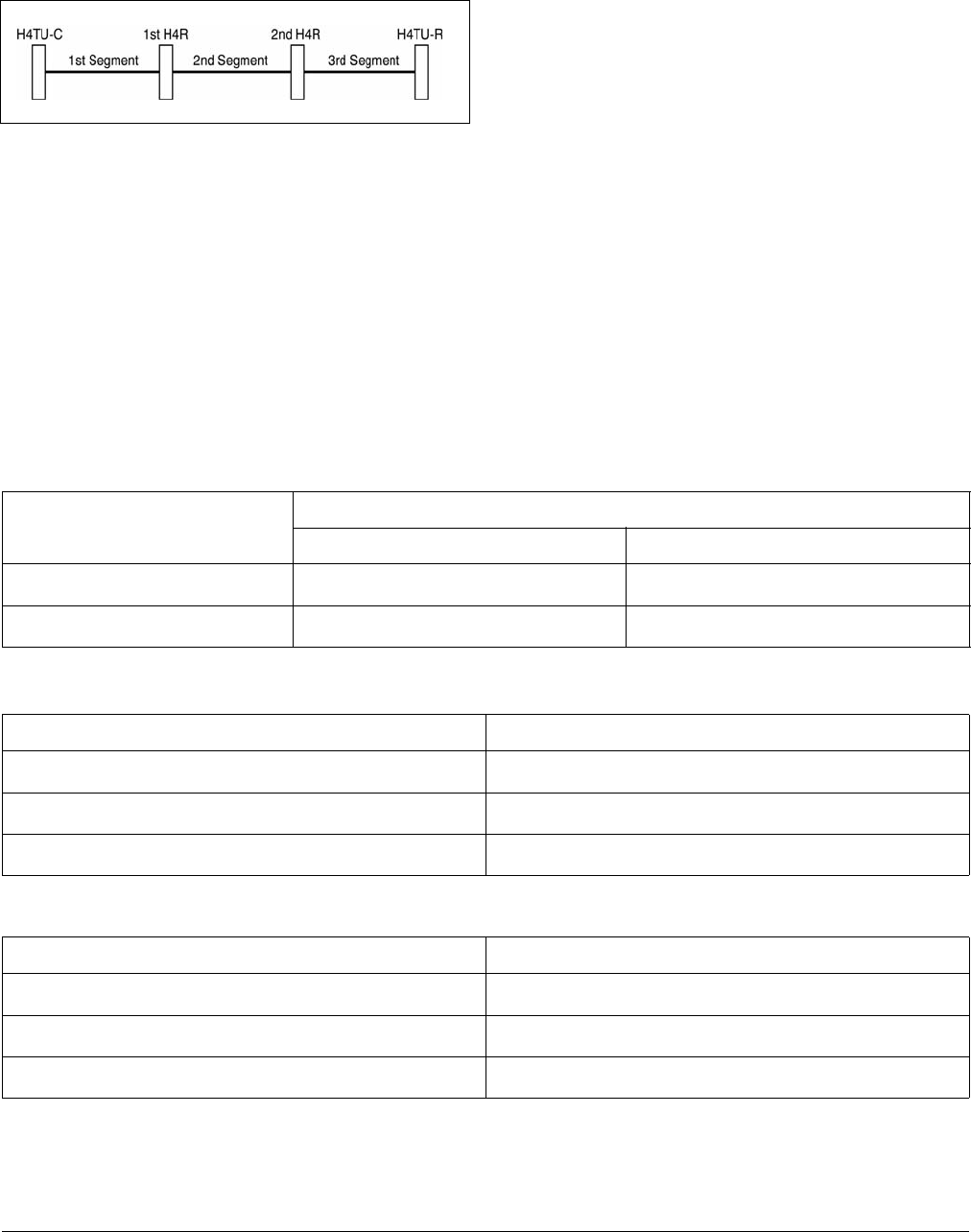
The different segments of an HDSL4 circuit are defined
in Figure 26.
Figure 26. HDSL4 Circuit Segments
The ADTRAN HDSL4 system provides DS1-based
services over loops designed to comply with the guide-
lines given below. These guidelines apply to the
following circuit configurations:
• a single segment or an HDSL4 circuit with no
H4Rs,
• a circuit having two segments (with one H4R), or
• a circuit having three segments (with two H4Rs).
The guidelines reflected herein are for worst-case
scenarios, that is, for loops that contain a maximum
amount of disturbers, noise, etc. Actual deployment
guidelines may vary based on local policy. Please refer
to those guidelines on an as-necessary basis to ensure
optimum performance.
Designing a circuit with loop attenuation greater than
the recommended maximum loss may result in compro-
mised reliability of that loop. Follow the guidelines in
in this section to ensure that the circuit meets basic
requirements:
1. All loops are nonloaded only.
2. Any single bridged tap is limited to 2 kft.
3. Total bridged tap length is limited to 2.5 kft.
4. Bridge tap within 1000 feet of units may affect
performance of the circuit.
5. Loop Attenuation Limits. See Table 6.
6. DSL-Recommended Range Limits. See Table 7
and Table 8.
Table 6. Attenuation limits
Recommended Maximum
Upstream Downstream
1st segment 30 dB 32 dB
2nd and 3rd segment 28 dB 28 dB
Table 7. Range Limits: 26 Gauge / 70°F / PIC
26 Gauge Recommended Maximum
1st segment 10,470 ft.
2nd segment 9,865 ft.
3rd segment 9,865 ft.
Table 8. Range Limits: 24 Gauge / 70°F / PIC
26 Gauge Recommended Maximum
1st segment 14,770 ft.
2nd segment 14,050 ft.
3rd segment 14,050 ft.

61223424L2-5A Issue 1, December 2003 19
8. MAINTENANCE
The T200 H4TU-R requires no routine maintenance for
normal operation. In case of equipment malfunction,
use the front panel bantam jack connectors to help
locate the source of the problem. Verification of
possible trouble indications may be accomplished using
the Troubleshooting Guide in Table 9.
ADTRAN does not recommend that repairs be
attempted in the field. Repair services may be obtained
by returning the defective unit to ADTRAN. Refer to
the Warranty and Customer Service section for further
information.
9. SPECIFICATIONS
Specifications for the T200 H4TU-R are detailed in
Table 10.
10. WARRANTY AND CUSTOMER SERVICE
ADTRAN will replace or repair this product within the
warranty period if it does not meet its published specifi-
cations or fails while in service. Warranty information
can be found at www.adtran.com/warranty.
U.S. and Canada customers can also receive a copy of
the warranty via ADTRAN’s toll-free faxback server at
877-457-5007.
• Request document 414 for the U.S. and Canada
Carrier Networks Equipment Warranty.
• Request document 901 for the U.S. and Canada
Enterprise Networks Equipment Warranty.
Refer to the following subsections for sales, support,
CAPS requests, or further information.
ADTRAN Sales
Pricing/Availability:
800-827-0807
ADTRAN Technical Support
Pre-Sales Applications/Post-Sales Technical
Assistance:
800-726-8663
Standard hours: Monday - Friday, 7 a.m. - 7 p.m. CST
Emergency hours: 7 days/week, 24 hours/day
ADTRAN Repair/CAPS
Return for Repair/Upgrade:
(256) 963-8722
Repair and Return Address
Contact Customer and Product Service (CAPS) prior to
returning equipment to ADTRAN.
ADTRAN, Inc.
CAPS Department
901 Explorer Boulevard
Huntsville, Alabama 35806-2807
Table 9. Troubleshooting Guide
Condition: All front panel indicators are off.
Solutions:
1. Make sure the H4TU-R is properly seated in the housing.
2. Verify that the enclosure is delivering sufficient voltage to the unit.
If steps 1 and 2 pass and front panel indicators remain off, replace the H4TU-R.
Condition: DSL 1/DSL 2 LED is red.
Solutions:
1. Verify that loss (attenuation) on Detailed System Status screen is < 32 dB on the first segment of the circuit and
< 28 dB on the second and third segments of the circuit.
2. Verify that the loop meets requirement stated in the HDSL4 Deployment Guidelines section of this practice.
3. Verify that noise on the HDSL4 loops is within acceptable limits.
If steps 1-3 pass and LED is red, replace the H4TU-R.

20 Issue 1, December 2003 61223424L2-5A
Table 10. HDSL4 T200 H4TU-R Specifications
Specification Description
Loop Interface
Modulation Type
Mode
Number of Pairs
Line Rate
Baud Rate
Loop Loss
Bridged Taps
Performance
H4TU-C Transmit Power (Data) Level
H4TU-C Transmit Power (Activation) Level
Input Impedance
Maximum Loop Resistance
Return Loss
16 TC PAM
Full Duplex, partially overlapped echo canceling
2
1.552 Mbps
261.333 k baud
Refer to the HDSL4 Deployment Guidelines section.
Single Taps < 2000 ft., Total Taps < 2500 ft.
Compliant with T1.418-2000 (HDSL4 Standard, issue 2)
14.1 ±0.5 dBm (0 to 400 kHz)
14.1 ±0.5 dBm (0 to 307 kHz)
135 ohms
1150 ohms (nonrepeatered circuit)
12 dB (50 kHz to 200 kHz)
Network Interface
DS1 Transmit Level
DSX-1 Line Buildout
DSX-1 Line Code
0 dB (default), –7.5 dB, –15 dB
0-133 ft. ABAM (default)
133-266 ft. ABAM
266-399 ft. ABAM
399-533 ft. ABAM
533-655 ft. ABAM
B8ZS (default), AMI
Power
Tested with the ADTRAN H4TU-C (P/N 1223401L2) and H4R (P/N 1223445L1)
H4TU-R Power Dissipation
Local Power
Fusing
3.8 watts
–48 VDC ± 24 VDC
1.00 A (not field-replaceable)
Clock
Clock Sources
Internal Clock Accuracy
DSX-1 Derived (with HDSL4 frame bit stuffing)
±25 ppm (Exceeds Stratum 4), meets T1.101 Timing
Requirements
Tests
Diagnostics Self-Test, Local Loopback (H4TU-C), Remote Loopback
(H4TU-R)
Physical
T200 Office Repeater Shelf-Mounted
Dimensions
Weight
5.5 in. High, x 0.7 in. Wide, x 6.0 in. Deep
< 1 lb.
Environment
Operating Temperature (Standard)
Storage Temperature
–40°C to + 70°C
–40°C to + 85°C
Compliance
UL 60950; GR-1089-CORE; GR-63-CORE; ANSI T1.418-2001, Issue 2; ANSI T1.102 (DS1 Interface)
Part Number
T200 H4TU-R 1223424L2

61223424L2-5A A-1
HDSL4 MAINTENANCE MODES
This appendix describes operation of the HDSL4
system with regard to detection of inband and ESF
facility data link loopback codes.
Upon deactivation of a loopback, the HDSL4 system
will synchronize automatically.
Loopback Process Description
In general, the loopback process for the HDSL4 system
elements is modeled on the corresponding DS1 system
process. Specifically, the H4TU-C loopback is similar
to an Intelligent Office Repeater loopback, and the
H4TU-R loopbacks are similar to an in-line T1 Repeater
loopback.
In-band control code sequences are transmitted over the
DS1 link by either the insert or overwrite method. The
HDSL4 elements respond to either method. The insert
method produces periodic control sequences that are not
overwritten by the DS1 framing bits.
The overwrite method produces periodic control
sequences. However, once per frame, the framing bit
overwrites one of the bits in the control sequence.
The unit can detect the loopback activation or deacti-
vation code sequence only if an error rate of 1E-03 or
greater is present.
Loopback Control Codes
A summary of control sequences is given in Table A-1
and Table A-2.
NOTE
In all control code sequences presented, the in-
band codes are shown left-most bit transmitted
first, and the esf data link codes with right-
most bit transmitted first.
Appendix A
HDSL4 Loopbacks

A-2 Issue 1, December 2003 61223424L2-5A
1. The Source column indicates from which side of the interface the control codes are sent. For example, an (N) indi-
cates a network sourced code while a (C) indicates a customer sourced code.
2. All codes are in-band unless labeled ESF-DL.
3. All codes listed above must be sent for a minimum of 5 seconds to be detected and acted upon.
Table A-1. HDSL4 Loopback Control Codes
Type Source1 Code2,3 Name
Abbreviated (N)
(N)
(N)
(N)
(C)
(C)
(C)
(C)
3in7 (1110000)
4in7 (1111000)
2in6 (110000)
3in6 (111000)
6in7 (1111110)
5in7 (1111100)
4in6 (111100)
5in6 (111110)
Loopback data from network toward network in the HTU-R.
Loopback data from network toward network in the HTU-C.
Loopback data from network toward network in first HRE.
Loopback data from network toward network in second HRE.
Loopback data from customer toward customer in HTU-C.
Loopback data from customer toward customer in HTU-R.
Loopback data from customer toward customer in first HRE.
Loopback data from customer toward customer in second HRE.
Wescom (N)
(C)
(N)
(N)
(C)
(C)
(N)
(C)
(C)
(N)
(N/C)
(N/C)
FF1E (1111 1111 0001 1110)
3F1E (0011 1111 0001 1110)
FF04 (1111 1111 0000 0100)
FF06 (1111 1111 0000 0110)
3F04 (0011 1111 0000 0100)
3F06 (0011 1111 0000 0110)
FF02 (1111 1111 0000 0010)
3F02 (0011 1111 0000 0010)
FF48 (1111 1111 0100 1000)
FF48 (1111 1111 0100 1000)
1 in 3 (100)
FF24 (1111 1111 0010 0100)
Loopback data from network toward network at HTU-C.
Loopback data from customer toward customer at HTU-C.
Loopback data from network toward network at HRE1.
Loopback data from network toward network at HRE2.
Loopback data from customer toward customer at HRE1.
Loopback data from customer toward customer at HRE2.
Loopback data from network toward network at HTU-R.
Loopback data from customer toward customer at HTU-R.
Loopback data from customer toward customer at HTU-R.(FDL)
Loopback data from network toward network at HTU-R. (FDL)
Loopdown everything.
Loopdown everything. (ESF-DL)

61223424L2-5A Issue 1, December 2003 A-3
Table A-2. Loopback Control Codes
Function Code (Hex / Binary) Response
ARM (in-band) - also
known as 2-in-5 pattern
11000 (binary) If the pattern is sent from the network, the units will arm, and
the H4TU-R will loop up if NIU Loopback is enabled.
ARM (ESF Data Link) FF48 or
1111 1111 0100 1000
sent in the Facility Data Link
If the pattern is sent from the network, the units will arm, and
the H4TU-R will loop up if NIU Loopback is enabled. When
sent from the customer, the units will arm.
Disarm (in-band) - also
known as 3-in-5 pattern
11100 (binary) When sent from the network or customer, all units are
removed from the armed state, and loopbacks will be released.
Disarm (ESF Data Link) FF24 or
1111 1111 0010 0100
sent in the Facility Data Link
When sent from the network or customer, all units are
removed from the armed state, and loopbacks will be released.
H4TU-C Loop Up 1,2 D3D3 or
1101 0011 1101 0011
If armed, the H4TU-C will loop up, 2 seconds of AIS (all
ones) will be transmitted, the looped data will be sent for 5
seconds, and then a burst of 231 logic errors will be injected.
The burst of 231 logic errors will continue every 20 seconds as
long as the D3D3 pattern is detected. When the pattern is
removed, the unit will remain in loopback. If the pattern is
reinstated, the injection of 231 logic errors will continue every
20 seconds.
Loop Down w/o Disarm 9393 or
1001 0011 1001 0011
When sent from the network, all units currently in loopback
will loop down. Armed units will not disarm. In order to
behave like a smartjack, the H4TU-R will not loop down from
a network loopback in response to the 9393 pattern if NIU
Loopback is enabled.
Loopback Query 1D5D5 or
1101 0101 1101 0101)
When the pattern is sent from the network, logic errors will be
injected toward the network to indicate a loopback is present
toward the network. The number of errors injected is
determined by the nearest unit that is in loopback. As long as
the pattern continues to be sent, errors are injected again every
20 seconds:
H4TU-C 231 errors
H4R1 10 errors
H4R2 200 errors
H4TU-R 20 errors
Loopback Time Out
Override1
D5D6 or
1101 0101 1101 0110
If the units are armed or a unit is currently in loopback when
this pattern is sent from the network, the loopback time out
will be disabled. As long as the units remain armed, the time
out will remain disabled. When the units are disarmed, the
loopback time out will revert to the previous loopback time
out setting.
If any element is in network loopback a bit error confirmation
will be sent.
H4TU-C 231 errors
H4R1 10 errors
H4R2 200 errors
H4TU-R 20 errors

A-4 Issue 1, December 2003 61223424L2-5A
1. Units must be armed with 11000b or FF48h before this code will work.
2. Loopback and error injection will only occur if the in-band code is received by the unit that is to go into loopback. In
other words, if another loopback blocks the in-band code from being transmitted to the unit that is to go into loop-
back, loopback and error injection will not occur.
Note: All codes listed above must be sent for a minimum of 5 seconds to be detected and acted upon
Span Power Disable16767 or
0110 0111 0110 0111
If the units are armed and 6767 is sent from the network, the
H4TU-C will disable span power. If the pattern is sent from
the network, the span power will be disabled as long as 6767
pattern is detected. Once the pattern is no longer received, the
H4TU-C will reactivate span power. All units will then retrain
and return to the disarmed and unlooped state.
First H4R Loop Up 1,2 C741
1100 0111 0100 0001
If one or more H4Rs are present, the H4R closest to the
H4TU-C will loop up toward the network, 2 seconds of AIS
(all ones) will be transmitted, the looped data will be sent for 5
seconds, and then a burst of 10 logic errors will be injected.
The burst of 10 logic errors will continue every 20 seconds as
long as the C741 pattern is detected. When the pattern is
removed, the unit will remain in loopback. If the pattern is
reinstated, the injection of 10 logic errors will continue every
20 seconds.
Second H4R Loop Up 1,2 C754
1100 0111 0101 0100
If two H4Rs are present, the second H4R from the H4TU-C
will loop up toward the network, 2 seconds of AIS (all ones)
will be transmitted, the looped data will be sent for 5 seconds,
and then a burst of 200 logic errors will be injected. The burst
of 200 logic errors will continue every 20 seconds as long as
the C754 pattern is detected. When the pattern is removed, the
unit will remain in loopback. If the pattern is reinstated, the
injection of 200 logic errors will continue every 20 seconds.
H4TU-R Address 20 for
Extended Demarc 1,2
C742
1100 0111 0100 0010
If armed, the H4TU-R will loop up toward the network, 2
seconds of AIS (all ones) will be transmitted, the looped data
will be sent for 5 seconds, and then a burst of 20 logic errors
will be injected. The burst of 20 logic errors will continue
every 10 seconds as long as the C742 pattern is detected.
When the pattern is removed, the unit will remain in loopback.
If the pattern is reinstated, the injection of 20 logic errors will
continue every 10 seconds.
Table A-2. Loopback Control Codes (Continued)
Function Code (Hex / Binary) Response

61223424L2-5A Issue 1, December 2003 A-5
This page is intentionally blank.

A-6 Issue 1, December 2003 61223424L2-5A
